Mastering Professional Slide Generation with Multi-Agent Intelligence
Move beyond basic AI prompts to professional slide generation using multi-agent orchestration for strategy decks and corporate presentations.
There is a common moment of realization for professionals working with presentations: the discovery that Large Language Models can help build a PowerPoint. It usually starts with a simple prompt and a wave of relief as the AI returns a 10-slide outline. But that relief often turns into frustration when you realize that ChatGPT, while capable at generating text, cannot design a slide, arrange a layout, or export a native PPTX file ready for a boardroom.
In the world of corporate strategy and academic defense, a text outline is roughly 10% of the work. The remaining 90%--logical flow, visual hierarchy, data visualization, and brand consistency--is where professionals continue to lose hours. Multi-agent AI systems are beginning to address this gap by splitting the presentation workflow into specialized tasks handled by purpose-built agents rather than a single general-purpose chatbot.
This guide covers what standard AI tools can and cannot do for slide generation, how to get the most from them through careful prompting, and where multi-agent orchestration fits into a professional workflow.
The Reality of AI Slide Tools in 2026
The AI presentation space has matured considerably over the past two years. In early 2024, most tools were wrappers around GPT-3.5 that produced cookie-cutter slides with stock imagery. By mid-2025, a second wave brought tighter LLM integration, theme customization, and basic data chart support. Now in 2026, the landscape splits into three broad categories.
Chat-based generators like ChatGPT and Claude remain the most accessible entry point. You type a prompt, receive structured text, and manually transfer it into your slide software. The output quality depends heavily on your prompting skill, and the "last mile" of design work stays with you.
Template-driven platforms such as Gamma, SlidesAI, and Beautiful.ai automate layout selection by mapping your text onto pre-built templates. They handle basic formatting, but the results tend to look generic. When your data does not fit neatly into a template's assumptions--say a five-column comparison table where the template expects three--you end up fighting the tool instead of collaborating with it.
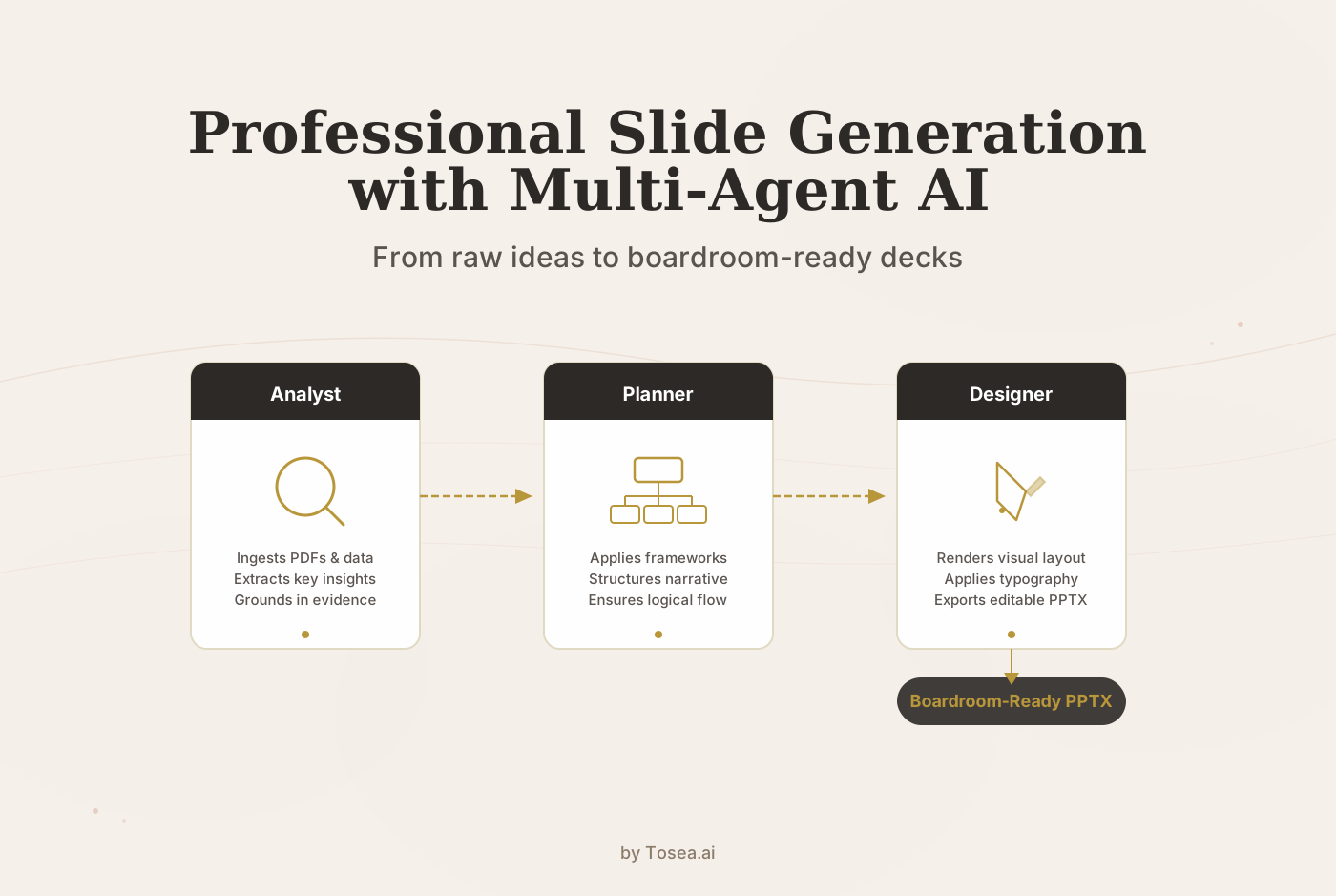
Agent-based systems represent the newest category. Instead of one model doing everything, multiple specialized agents handle analysis, narrative planning, and visual rendering in sequence. Tosea.ai falls into this category, using separate agents for document parsing, outline generation, and slide design. The distinction matters because each agent can be optimized for its specific task rather than relying on a single model to be adequate at everything.
The practical implication: if you are producing internal team updates or low-stakes summaries, a chat-based tool or template platform will often suffice. For investor decks, board presentations, client deliverables, or academic defenses--where formatting precision and logical rigor carry real consequences--the limitations of single-model approaches become tangible.
What Standard AI Can and Cannot Do
To use AI effectively for presentations, it helps to be clear-eyed about current boundaries.
What Works Well
Standard AI models handle the cognitive scaffolding of a presentation reliably. They can generate structural outlines that ensure your story has a beginning, middle, and end. They can expand bullet points, taking a single header and developing the supporting arguments underneath it. They are useful for drafting speaker notes--the invisible script that prevents you from simply reading slides aloud. And they can suggest where a specific chart type or visual framework might strengthen a point.
These capabilities are genuine and save real time. A 12-slide outline that once took 45 minutes of brainstorming can be drafted in under two minutes with a well-constructed prompt.
Where They Fall Short
The execution phase is where standard models struggle. They cannot produce editable PPTX files directly--they output Markdown or code that you must manually transfer into PowerPoint. They do not understand visual logic: the difference between a high-contrast palette for an executive briefing versus a warmer tone for an internal workshop. And they frequently produce layout suggestions that do not fit standard 16:9 slide dimensions, because they lack spatial awareness of the final medium.
This gap between content generation and presentation delivery is the core problem that multi-agent systems attempt to solve.
A Step-by-Step Manual Workflow
If you are working with a chat-based AI tool, the following process will produce better results than a single prompt. It requires more effort, but the output quality scales with the discipline you bring.
Step 1: Define the Blueprint
Do not start with content. Start with constraints. Your opening prompt should specify the target audience, the objective, the slide count, and any structural requirements.
Example prompt:
Create a 12-slide strategic outline for a C-suite presentation on adopting Generative AI in supply chain logistics. The audience is non-technical executives. Focus on three pillars: ROI projections, risk mitigation, and a 24-month implementation roadmap. Use a Problem-Solution-Benefit structure.
This prompt works because it gives the model five concrete parameters: audience, topic, length, focus areas, and logical structure. Compare it to the vague alternative--"make me a presentation about AI in logistics"--and you can see why specificity matters.
Step 2: Expand Slide by Slide
Once you have an outline, expand each slide individually rather than asking for the full deck at once. This prevents the model from becoming too brief on later slides as it runs into context length pressure.
Example prompt for a single slide:
Expand slide 4, which covers projected cost savings. Include three hypothetical but realistic data points comparing traditional manual workflows to AI-augmented workflows. Frame the comparison as a before-and-after scenario with specific percentage improvements and dollar figures for a mid-size logistics company (500-1000 employees).
The key technique here is asking for evidence rather than more text. Specificity in your expansion prompts--dollar figures, employee counts, percentage ranges--produces content that reads as grounded rather than generic.
Step 3: Generate Speaker Notes and Transitions
Speaker notes are the mark of a prepared presenter. Use AI to generate transition phrases between slides. Ask it to write notes in a conversational tone that differ from the slide text, so your verbal delivery adds context rather than repeating what the audience can already read.
Example prompt:
Write speaker notes for slides 3 through 6. Each note should be 3-4 sentences, include a transition phrase to the next slide, and use a conversational but authoritative tone. Do not repeat the slide bullet points verbatim.
Step 4: Transfer and Format Manually
This is the step that consumes the most time. You copy the AI-generated text into your slide software, apply formatting, insert charts, adjust layouts, and ensure brand consistency. For a 12-slide deck, this manual transfer typically takes 30 to 60 minutes--sometimes longer if the data requires custom visualization.
Prompt Engineering for Strategy Decks
The quality of AI-generated presentation content correlates directly with prompt specificity. Five variables consistently produce stronger outputs when included in a prompt:
Topic and context. Go beyond the subject. Include the industry, the current market situation, and any relevant constraints. "AI in healthcare" is weak; "AI-driven diagnostic triage in mid-size US hospitals facing staffing shortages" gives the model a concrete frame.
Target audience. Technical experts, financial investors, academic committees, and marketing teams all require different vocabulary, evidence density, and pacing. Name the audience explicitly.
Logic framework. Specify whether the deck should follow the Pyramid Principle, SCQA (Situation-Complication-Question-Answer), SWOT analysis, or a Problem-Solution-Benefit structure. Without this, the model defaults to a generic sequential format.
Tone and authority level. A persuasive investor pitch reads differently from a conservative regulatory briefing. State the register you need.
Visual directives. Even though the model cannot render visuals, telling it to "recommend a waterfall chart on slide 7" or "suggest a 2x2 matrix for the competitive landscape" produces text that is easier to convert into actual slides.
Comparing AI Tools for Slide Generation
Different tools suit different use cases. The following comparison reflects practical experience rather than feature-list marketing.
| Capability | ChatGPT / Claude | Template Platforms (Gamma, SlidesAI) | Tosea.ai (Multi-Agent) |
|---|---|---|---|
| Content generation | Strong. Flexible, handles complex prompts well. | Moderate. Often constrained by template structure. | Strong. Analyst agent extracts from source documents. |
| Structural logic | Depends on prompt quality. No built-in frameworks. | Basic. Pre-set slide flow options. | Built-in. Planning agent applies consulting frameworks. |
| Visual design | None. Text output only. | Template-based. Limited customization. | Custom per-deck. Design agent renders layout and typography. |
| PPTX export | No. Requires manual transfer. | Yes, but locked to template grid. | Yes. Fully editable native PPTX. |
| Source document input | Paste text into chat. File upload varies by plan. | Limited. Some accept text input. | PDF, Word, URL ingestion with OCR parsing. |
| Data visualization | Suggestions only. No rendering. | Basic auto-charts from simple data. | Vector-accurate charts generated from source data. |
| Brand consistency | Manual. You apply your own branding. | Theme selection from preset options. | Configurable palettes, typography, and layout rules. |
| Best suited for | Brainstorming, early drafts, speaker notes. | Quick internal decks, low-stakes summaries. | Client deliverables, investor decks, academic defenses. |
No tool is universally better. ChatGPT remains excellent for fast ideation. Template platforms work well for recurring reports where consistency matters more than customization. Agent-based systems handle the cases where both content rigor and visual polish carry professional consequences.
How Multi-Agent Orchestration Works
The core idea behind multi-agent slide generation is decomposition: instead of one model attempting to handle research, writing, structuring, and designing simultaneously, the work is split across specialized agents.
The Analyst Agent ingests your raw materials--PDF research papers, Word documents, spreadsheets, or URLs--and extracts the most relevant insights. This step matters because it grounds the presentation in your actual data rather than the model's training set. When you upload a 30-page market research PDF, the analyst identifies the key findings, supporting statistics, and logical relationships between sections.
The Planning Agent takes those extracted insights and organizes them into a narrative structure. It applies strategic frameworks--SCQA, Pyramid Principle, Problem-Solution-Benefit--depending on the presentation context. The output is a detailed outline where each slide has a defined role in the overall argument.
The Design Agent renders the planned content into finished slides. It handles typography selection, color palette application, chart generation, and spatial layout within standard 16:9 dimensions. The output is a fully editable PPTX file--not a screenshot, not a PDF, but a native PowerPoint document where every text box, chart, and image can be modified.
This pipeline means that the quality bottleneck shifts from "can the AI write decent text" (most models can) to "can the system produce a finished artifact that meets professional standards" (fewer systems can).
Getting the Most from Your Workflow
Regardless of which tool you use, several practices consistently improve output quality.
Start with your source material, not a blank prompt. If you have existing research, data, or notes, feed them to the AI rather than asking it to generate content from scratch. AI that works from your data produces slides grounded in reality. AI that works from nothing produces plausible-sounding generalities.
Iterate in layers, not all at once. Generate the outline first. Review it. Then expand slide by slide. Then add speaker notes. Each layer builds on reviewed output, which reduces the compounding of errors that happens when you try to generate an entire deck in a single prompt.
Specify what you do not want. Negative constraints are underused. Prompts like "do not include generic motivational quotes" or "avoid bullet points with more than 8 words" sharpen the output noticeably.
Keep a prompt library. If you regularly produce similar presentations--quarterly business reviews, project kickoffs, research summaries--maintain a document of prompts that worked well. Refine them over time. A good prompt is a reusable asset.
Review for logical gaps, not just typos. AI-generated presentations tend to have smooth prose but occasionally skip logical steps. Read the deck as a skeptical audience member: does each slide follow from the previous one? Is every claim supported? Are there assertions that sound confident but lack evidence?
Scenario: Quarterly Business Review Deck
Consider a practical example. A product manager needs to prepare a quarterly business review for leadership. She has a spreadsheet of product metrics, three customer interview transcripts, and a competitive analysis document her team prepared.
Using ChatGPT alone: She pastes key metrics into the chat, asks for a 15-slide QBR outline, and gets a reasonable structure in about two minutes. She then spends 90 minutes copying text into PowerPoint, formatting tables, creating charts in Excel, and adjusting slide layouts. Total time: roughly two hours.
Using a template platform: She selects a QBR template, inputs her metrics through a form interface, and gets a formatted deck in about five minutes. However, the template assumes four KPIs per slide while she has seven, so she spends 30 minutes restructuring. The charts are auto-generated but use the platform's default style, which does not match her company's brand guidelines. She exports and spends another 20 minutes on brand adjustments in PowerPoint. Total time: roughly one hour.
Using a multi-agent system: She uploads the spreadsheet, interview transcripts, and competitive analysis directly. The analyst agent extracts key metrics and customer quotes. The planning agent organizes the deck into an executive summary, metric deep-dives, customer insights, competitive positioning, and next-quarter priorities. The design agent renders everything with her configured brand palette and typography. She reviews the output, makes a few edits to the narrative framing on slides 4 and 9, and exports. Total time: roughly 25 minutes.
The time savings compound across a quarter. If she prepares this deck monthly plus ad-hoc presentations, the difference between two hours and 25 minutes per deck adds up to meaningful reclaimed capacity.
Building Trust in AI-Generated Presentations
In an environment where AI-generated content is increasingly common, the presentations that earn trust are those that demonstrate rigor rather than polish alone. Three principles help.
Source transparency. When a slide cites a statistic or a finding, the audience should be able to trace it back to the original data. Multi-agent systems that work from uploaded source documents have an advantage here because the content is derived from your materials rather than generated from the model's training data.
Logical consistency. Every conclusion should be supported by the preceding slides. AI models occasionally make logical leaps--stating a recommendation without adequately establishing the problem it solves. Review your deck specifically for these gaps.
Appropriate confidence. AI-generated text tends toward confident, declarative statements. For presentations involving projections, estimates, or preliminary data, manually soften the language where appropriate. "Our analysis suggests" reads more credibly than "This proves" when the underlying data has uncertainty.
FAQ
Can I convert a long research paper into slides?
Yes, though the approach varies by tool. With ChatGPT or Claude, you would need to paste sections of the paper into the chat (subject to context length limits) and ask for slide-by-slide summaries. With Tosea.ai, you can upload the entire PDF. The analyst agent parses the document using OCR, identifies the core arguments and supporting evidence, and synthesizes them into a structured presentation.
Are the generated PPTX files compatible with Google Slides?
Tosea.ai exports native PPTX files that open in Microsoft PowerPoint, Google Slides, and Apple Keynote. Formatting fidelity is highest in PowerPoint, as it is the native format. Google Slides handles most elements well, though complex chart formatting occasionally requires minor adjustments after import.
How does data privacy work?
Tosea.ai uses enterprise-grade encryption for uploaded documents and generated presentations. Your files are not used to train public models. This is worth verifying with any AI presentation tool, as some template platforms route data through third-party LLM providers with different privacy policies.
What types of source documents can I upload?
Tosea.ai accepts PDF files, Word documents, and URLs. The system includes OCR capabilities for scanned documents and can extract text, images, tables, and mathematical formulas. This is particularly useful for academic papers and technical reports that contain complex formatting.
How does this compare to hiring a presentation designer?
A skilled human designer will still produce higher-quality output for high-budget, one-off presentations like keynote speeches or major investor roadshows. Where AI tools provide the most value is in the high-volume, recurring presentations that consume professional time disproportionately: weekly updates, monthly reports, quarterly reviews, and conference talks. The practical question is usually not "AI or designer" but "which of my 20 presentations this quarter justify designer time, and which can AI handle?"
Can I customize the visual style to match my brand?
Yes. Tosea.ai supports configurable color palettes, typography settings, and layout preferences. Once configured, these settings apply consistently across all generated presentations, which is useful for teams that need brand-compliant output without manual formatting on every deck.