7 Best ChatGPT Prompts for Financial Presentations: Investor, Board & Equity Research
Seven copy-paste ChatGPT prompts for investor decks, board briefings, equity research, and executive financial reports — each with verification rules to prevent AI hallucinations.
The best prompt for a financial presentation is not a single magic instruction — it is a strategy. Financial decks fail not because the slides look bad, but because the thinking behind them is weak: the message is unclear, the data is unverified, the structure does not match what the audience needs to decide. A good prompt forces the AI to do the thinking before it generates a single slide.
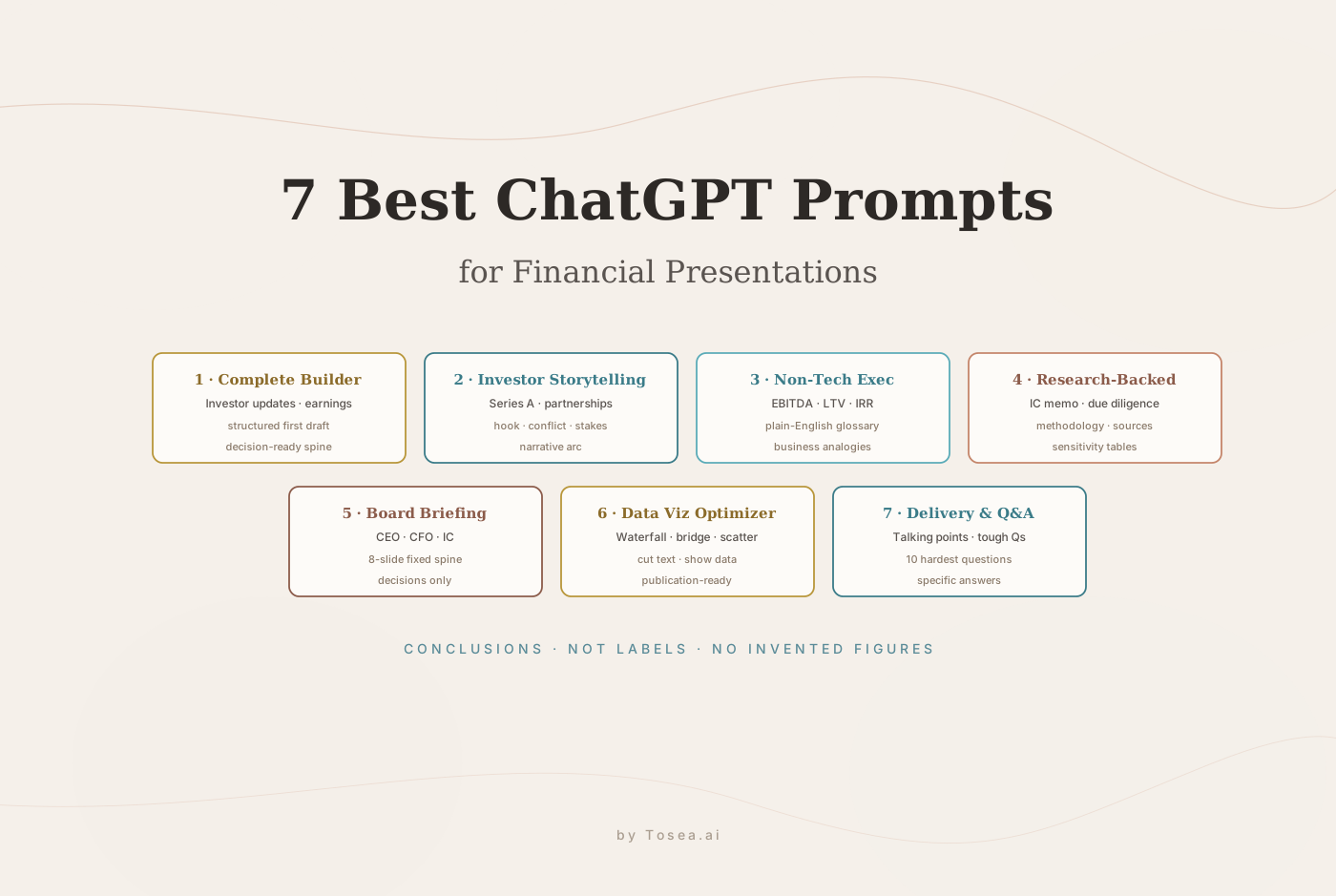
This guide gives you seven ChatGPT prompts for financial presentation creation, each optimized for a specific audience and goal — investor storytelling, board briefings, executive summaries for non-finance audiences, research-backed analysis decks, data-visualization clean-up, and Q&A preparation. Copy them, adapt them, and use them with any AI presentation generator you prefer. For a broader, non-finance prompt library, see our 60+ Best AI Prompts for PowerPoint; for academic equivalents, see Best Prompts for Academic Presentation Slides.
One note before you start: if you already have a financial document — a 10-K, an equity research report, a quarterly earnings summary — Tosea.ai generates structured, professionally formatted slides directly from that source material with every figure traced back to the source. No prompting required. The prompts below are for the case where you are starting from scratch.
Why Financial Presentations Need Specialized Prompts
A generic presentation prompt produces generic slides. Financial audiences — investors, board members, analysts, and CFOs — evaluate presentations differently than general business audiences. They notice when figures are inconsistent. They catch when market-size claims are unsourced. They know when a slide title labels a topic instead of stating a conclusion.
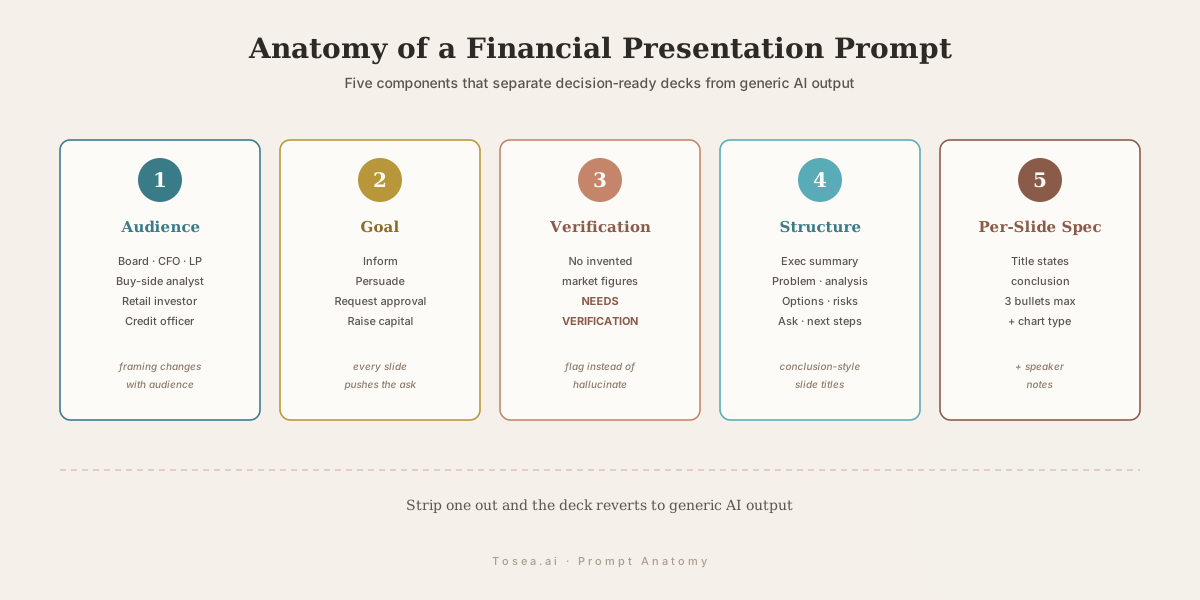
A workable prompt for financial contexts has three components that most generic prompts omit:
Audience specification with financial context. The same revenue-growth story requires different framing for a retail investor, a buy-side analyst, a board director, and a strategic partner. Every prompt below requires explicit audience definition.
Data verification instructions. Financial AI presentations carry a unique risk: hallucinated figures. Every prompt below instructs the AI to mark unverified data as NEEDS VERIFICATION rather than generating plausible-sounding numbers. For a deeper treatment of this risk, see our Zero-Hallucination AI Slides Complete Guide.
Decision orientation. Financial presentations exist to produce decisions — approve a budget, authorize an investment, accept a strategy. Every prompt below ends with a clear decision or action requirement.
According to MIT Sloan Management Review's research on data visualization, decision-makers in financial contexts process visual conclusions much faster than descriptive narrative. The prompts below reflect this by requiring conclusion-style slide titles throughout.
Prompt 1: The Complete Financial Presentation Builder
Use when you need a complete, structured first draft quickly — investor updates, earnings decks, or financial briefings.
Act as a financial presentation strategist and slide creator.
Create a complete slide-by-slide financial presentation on:
[insert financial topic — e.g., Q3 earnings results, Series B pitch, annual budget review]
Audience: [insert audience — e.g., board of directors, buy-side analysts, potential investors, CFO]
Goal: [inform / persuade / request approval / update / raise capital]
Length: [insert number of slides]
Tone: [executive / technical / persuasive / conservative]
For each slide, include:
- A conclusion-style slide title that states the key message — not just a label
- Main takeaway in one sentence
- 3 bullet points maximum
- Recommended financial visual (chart type, table format, or diagram)
- Speaker notes with transition to the next slide
- Flag any statistic or figure that requires external verification with the label: NEEDS VERIFICATION
Structure the deck with:
- Executive summary
- Current financial position or business context
- The central problem or opportunity
- Financial impact and analysis
- Supporting evidence and data
- Recommendation or ask
- Risk factors
- Next steps and required decisions
Make this deck decision-ready. Every slide should push toward the final ask.
Prompt 2: The Investor Storytelling Framework
Use when the deck needs to persuade investors or raise capital. Numbers alone do not close rounds — story does. For a deeper treatment of pitch-deck structure specifically, see our AI Presentations for Startups Pitch Decks guide.
Create a fundraising or investor presentation on:
[insert topic — e.g., Series A pitch, secondary offering, strategic partnership proposal]
Use this narrative structure:
- Hook: the single insight that changes how the audience sees this opportunity
- Conflict: what is broken, missing, or inefficient in the current market
- Stakes: the financial and strategic cost of the status quo
- Journey: the path from current state to market capture
- Insight: the proprietary advantage or insight that makes this possible
- Transformation: what the market looks like after this solution succeeds
- Call to Action: the specific ask and what it enables
For each slide, include:
- Slide title as a memorable headline, not a label
- Core financial idea or market claim
- Narrative beat — where this slide sits in the story arc
- Recommended visual metaphor or financial chart
- Speaker notes with one line to deliver with emphasis
- Flag any market-size claim or growth projection with: NEEDS VERIFICATION
Avoid generic startup language. Make this feel like a credible investment thesis, not a product demo.
Prompt 3: The Non-Technical Executive Summary
Use when presenting financial complexity to non-finance audiences — board members without financial backgrounds, general partners, or operational leadership.
Build an executive-level financial presentation on:
[insert financial topic — e.g., risk exposure, budget variance, regulatory impact, capital allocation]
The audience has limited financial background. Explain every concept clearly enough that a senior executive without an accounting background would follow every slide.
For each financial concept, provide:
- A plain-English explanation of what it means
- A real-world business analogy
- The specific business decision it informs
- A visual that clarifies rather than decorates
- Speaker notes that anticipate non-technical questions
Rules:
- No unexplained jargon. If you use EBITDA, LTV, CAC, IRR, or similar terms, define them immediately on the same slide.
- No assumptions about prior financial knowledge.
- Flag any benchmark figure with: NEEDS VERIFICATION
The goal is decision-readiness, not financial education.
Prompt 4: The Research-Backed Financial Analysis Deck
Use when the deck needs to be defensible — board presentations, investment committee materials, regulatory submissions, due-diligence packages. For an end-to-end walkthrough of the IC memo format specifically, see our Investment Committee Memo Deck Guide.
Create a research-backed financial presentation on:
[insert topic — e.g., market entry analysis, competitive landscape, credit risk assessment]
Audience: [insert audience]
Goal: [insert decision or action required]
For each slide, include:
- A conclusion-style slide title
- Key analytical takeaway
- Supporting financial evidence required — chart type, data source category, or analysis type
- Suggested data visualization — waterfall chart, sensitivity table, scatter plot, regression line, or other
- Speaker notes with citation guidance
- For any specific figure, statistic, or market data: mark as NEEDS VERIFICATION
Structure the deck with:
- Market or business context with key macro factors
- The analytical question this deck answers
- Methodology — how the analysis was conducted
- Key findings with supporting data
- Scenario analysis or sensitivity analysis
- Risks and limitations
- Conclusion and recommendation
- Source appendix
Rules:
- Never invent numbers. If a figure is missing, write: NEEDS VERIFICATION — [describe what data is needed]
- Every quantitative claim needs a source category (e.g., company filings, market data provider, management estimate)
Prompt 5: The Board and Executive Briefing Deck
Use when presenting to the CFO, CEO, board of directors, or investment committee. These audiences want decisions, not information. The structure below mirrors the spine used at McKinsey and BCG for partner-level briefings — read our McKinsey Way to Present Research Findings for the underlying logic.
Create an executive-level financial briefing on:
[insert topic]
Audience: [CEO / CFO / board / investment committee / audit committee]
Structure exactly as follows:
- Slide 1: Executive summary — the situation, the recommendation, and the decision required — in three bullets maximum
- Slide 2: Current financial position — the most relevant metrics, no more than six figures on this slide
- Slide 3: The central problem or opportunity — stated as a financial impact, not a description
- Slide 4: Analysis — supporting data for the recommendation, structured as a comparison, scenario, or trend
- Slide 5: Strategic options — two or three alternatives with financial and strategic tradeoffs
- Slide 6: Recommendation — one clear direction with the financial case
- Slide 7: Risks — the three most significant risks and the mitigation approach for each
- Slide 8: Next steps and decisions required from this meeting
For each slide:
- Title states the conclusion, not the topic
- Maximum three bullets
- Recommended visual or data format
- Speaker notes with the decision or action this slide leads to
- Flag any figure with: NEEDS VERIFICATION
No filler. No generic business language. Every word earns its place.
Prompt 6: The Financial Data Visualization Optimizer
Use after the content is drafted to improve how financial data is presented visually. Run this prompt on your existing slide content.
Act as a senior financial presentation designer.
Review and improve this slide-deck content for visual clarity and analytical impact:
[paste your slide content here]
For each slide, recommend:
- The most appropriate chart or visualization type for the financial data (waterfall, bridge, line chart, scatter plot, heat map, comparison table, or other)
- What text to cut — every slide should show, not tell
- What should be converted from bullets to a visual
- Specific layout recommendation (two-column, full-bleed chart, timeline, matrix, or other)
- A stronger conclusion-style headline that states the financial insight
- A cleaner, shorter version of the slide copy
Design rules:
- One financial insight per slide
- Lead with the conclusion, support with data
- Financial tables must show all necessary rows — do not abbreviate data that decisions depend on
- Highlight the key metric or result in the primary brand color
- All axes labeled, all data sourced
- Charts should look publication-ready, not presentation-template default
Make this deck look like it came from a top-tier investment bank or consulting firm, not a template library.
Prompt 7: The Delivery Coach and Q&A Preparation Prompt
Use when you actually have to present the financial deck and need to prepare for tough questions.
Act as a financial speechwriter and investor presentation coach.
Using this deck:
[paste your slide outline or key slide titles]
For each slide, create:
- Opening line — the first sentence of your delivery for this slide
- Main talking points — what to say, not what is on the slide
- Financial story or example to make the number real
- What to emphasize — the one figure or claim that must land
- Transition to the next slide — what connects this slide to what follows
- The hardest financial question this slide will provoke
- A strong, specific answer to that question
After the slide notes, provide:
- The 10 most challenging questions this audience will ask after the full presentation
- A direct, confident answer to each question
Rules:
- Do not make the delivery sound like reading bullets aloud
- Use natural, confident financial language
- Anticipate skepticism about projections, assumptions, and risks
This is where the presentation becomes defensible — the numbers are only part of the case.
How to Match the Right Prompt to Your Deck
| Scenario | Prompt | Audience | Output |
|---|---|---|---|
| Quick first draft of any financial deck | Prompt 1 | Mixed | Full slide-by-slide outline |
| Fundraising / pitch / partnership | Prompt 2 | VCs, strategic investors | Narrative-driven storyline |
| Explaining numbers to non-finance leaders | Prompt 3 | Operational executives | Jargon-stripped briefing |
| Due diligence, IC memo, regulatory | Prompt 4 | Investment committee | Defensible, sourced analysis |
| CEO / CFO / board briefing | Prompt 5 | Senior decision-makers | 8-slide decision spine |
| Polish existing slide content | Prompt 6 | Any | Visualization upgrade pass |
| Rehearsal & Q&A preparation | Prompt 7 | Presenter | Talking points + tough Qs |
Most real-world finance decks combine two or three of these in sequence: Prompt 1 or 5 for the spine, Prompt 6 to upgrade the visuals, Prompt 7 to rehearse delivery and pre-empt questions.
7 Tips for Using These Prompts Effectively
Define the audience before anything else. A workable prompt for a financial presentation always starts with the specific audience, not the topic. A revenue-growth slide for a venture investor and the same slide for a bank credit officer require completely different framing.
Make slide titles state conclusions. Weak: Market Trends. Strong: Revenue growth is accelerating in enterprise while consumer segment contracts. The slide title should answer the question: what should the audience believe after reading this slide?
Enforce one idea per slide. Add this instruction to any prompt: each slide communicates exactly one financial insight. AI-generated decks default to information-dense slides. One idea per slide forces clarity.
Never accept invented figures. Any financial metric in an AI-generated slide without a real source is a liability. Add to every prompt: mark any figure that requires external verification with NEEDS VERIFICATION.
Ask the AI to critique its own output. After the first draft, use this follow-up: now critique this deck as a skeptical CFO who will challenge every assumption — what is weak, unsupported, or unclear? The revised version will be substantially better.
Use Tosea.ai for document-based presentations. When the source material already exists — a 10-K, an equity research report, a board package — the best AI presentation tool is one that reads the actual document and builds slides from what it contains, with every figure linked back to the source. Prompting an AI to generate from memory introduces the hallucination risk that financial presentations cannot afford. See our PDF to PowerPoint conversion guide for the document-first workflow.
Prepare separately for Q&A. Use Prompt 7 specifically for this. The ten hardest questions an analyst, investor, or board member will ask are almost always predictable. Preparing specific answers makes the delivery stronger than any slide design decision.
Q&A
Q: Which prompt is best for a deck that has to survive due diligence?
Prompt 4 (Research-Backed Analysis Deck) with the explicit instruction to mark every unverified figure. For presentations built from actual company filings or research reports, upload the source document to Tosea.ai instead — the platform generates slides grounded in the actual document content with full source traceability, which is the appropriate standard for due-diligence materials.
Q: Can I use these prompts to convert a financial report PDF to PowerPoint?
Yes, with an important caveat. Prompting an AI to recreate a financial report produces approximations, not reproductions — figures may be paraphrased or rounded incorrectly. For accurate PDF-to-PowerPoint conversion of financial documents, use a document-first tool that reads the source file and builds slides from the actual content with full traceability.
Q: Which prompt works best for an equity research report or annual report presentation?
Prompt 4 (Research-Backed Analysis Deck) or Prompt 5 (Executive Briefing) depending on the audience. For investment committees, use Prompt 5. For detailed analyst briefings, use Prompt 4. For either, mark all figures that require independent verification. If the research report or annual report already exists as a document, Tosea.ai converts it to slides more accurately than any prompt approach.
Q: How do I prevent AI from hallucinating financial figures in my presentation?
Every prompt above includes the instruction to mark unverified figures with NEEDS VERIFICATION rather than generating plausible-sounding numbers. This is the minimum standard for AI-assisted financial presentations. For the highest-stakes materials — investor decks, board presentations, regulatory submissions — use a source-grounded tool that generates from actual documents rather than model memory.
Q: Should I run these prompts in ChatGPT, Claude, or Gemini?
All three work. ChatGPT and Claude tend to follow long structured prompts most reliably; Gemini is competitive for the data-visualization optimizer (Prompt 6) because of its chart-vocabulary. For the verification rule to bite, you need a model that respects negative constraints — test each model on a low-stakes deck first before trusting it with a real investor presentation.
Turn Your Financial Documents Into Presentation-Ready Decks
These seven prompts cover the major financial presentation scenarios — investor storytelling, executive briefings, research-backed analysis, visual design optimization, and delivery preparation. Use them as the starting point for any from-scratch deck.
When the source material already exists — an annual report, a 10-K, an equity research document, a financial model output — the more accurate and defensible approach is uploading the document directly to Tosea.ai. The platform reads the actual content, preserves tables and charts, traces every claim to its source, and generates editable .pptx slides without the hallucination risk that prompt-based generation introduces. For a broader look at the document-to-deck workflow, see our Mastering Document Transformation for Executive Presentations guide.
Sources
- The Value of Data Visualization — MIT Sloan Management Review
- How to Make a Presentation That Resonates with Your Audience — Harvard Business Review
- The Pyramid Principle (logic in writing and thinking) — McKinsey & Company