How to Build a Massive Slide Deck in Minutes: Generate 100 Slides With Consistent Style (2026)
A guide to building 60 to 100+ slide decks in one AI pass. Covers why other tools cap at ~25 slides, why multi-run stitching breaks style consistency, and how source-first architecture scales.
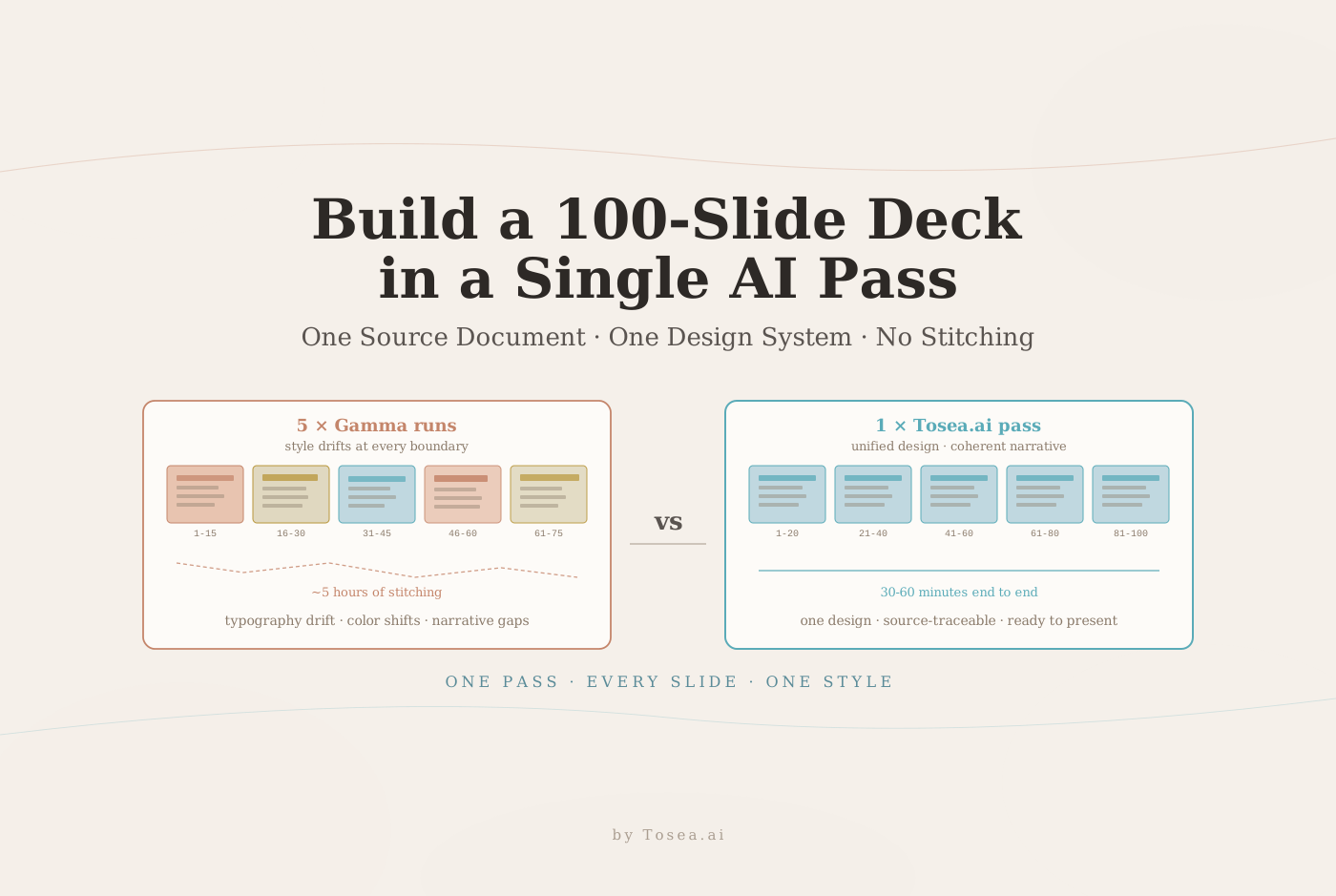
You need an 80-slide annual strategy presentation. You open Gamma, type your prompt, and get a clean 15-slide deck. You run it again for the next section — different font weights, slightly different heading sizes, a subtly different color tone. Third run: another 15 slides, another micro-variation in the design system. By the time you stitch all five batches together, you have your 80 slides — and three hours of manual cleanup ahead of you.
This is the hidden cost of every AI presentation tool on the market right now. The page cap is not a bug. It is a design philosophy. These tools were built for rapid ideation on short decks, not for the dense, high-volume content that professionals actually need to present.
Before we get into the solution: Tosea.ai is built specifically to scale presentation creation with AI — generating 60, 80, or 100+ slides from a single source document in one pass, with a unified design system applied consistently from slide one to the last. Register now, and by the end of this guide you will understand why other tools break down at scale and how Tosea.ai handles what they cannot.

The Hidden Page Cap Problem Every AI Presentation Tool Has
If you have used any of the major AI presentation generators in 2026, you have probably noticed a pattern. Gamma caps generation at around 10 to 25 slides per run. Canva's Magic Design produces 10 to 15 slides before it stops. Beautiful.ai is primarily a slide design system, not a document-to-deck engine. NotebookLM's slide generation feature, while capable for source-grounded content, limits output length and is optimized for summary-style decks rather than exhaustive professional presentations. For a side-by-side read on two of these tools, see our Canva vs Gamma comparison.
This is not a technical limitation that will be fixed in the next update. It reflects a fundamental design assumption: these tools are creative inspiration platforms. They assume you are starting with a short brief or a prompt and need a visual starting point. They are not built for the use case where you have a 60-page research document, a 90-page financial audit, or a 120-page strategic plan, and you need a complete presentation that covers the entire document without omitting critical content.
The result is that anyone who needs to create a professional deck from scratch fast — with genuine depth — ends up doing exactly what you did in the opening scenario: multiple generation runs, manual stitching, and hours of style reconciliation work.
Why Multiple Generation Runs Break Style Consistency
The style inconsistency problem is not random. It is a predictable consequence of how generative AI systems work.
Every time you generate a new set of slides, the AI is making independent probabilistic decisions about typography, spacing, color application, and visual hierarchy. Even within the same model and the same platform, these micro-decisions vary between runs. The heading on slide 16 might be marginally bolder than the heading on slide 31. The chart background on the second batch might be a shade lighter than in the first. Icon styles may drift between sections.
Research on cognitive load in presentations consistently shows that visual inconsistency increases the cognitive effort required to process information. In a professional context — an investor presentation, a board briefing, a client deliverable — inconsistent design signals a lack of rigor. It erodes confidence in the content before the audience has read a single word.
But the style problem is actually the secondary issue. The deeper problem with multi-run generation is narrative fragmentation. When you generate an 80-slide deck in five separate batches, each batch treats its assigned section as a standalone document. The transition logic, the recurring themes, the through-line arguments that connect slide 12 to slide 47 — these are lost. What you get is five short presentations stapled together, not one coherent presentation of 80 slides.
According to Zapier's analysis of the best AI presentation makers in 2026, the tools that perform best are those that maintain a consistent narrative flow and visual system from first slide to last. The challenge is that few of the current tools can do that when content exceeds their single-generation page threshold. For a broader market view, our best AI presentation makers 2026 article compares the leading options by use case.
Who Actually Needs 60+ Slide Presentations
Before addressing the solution, it is worth being specific about who this problem affects most severely — because not every presentation needs 80 slides, and the tools designed for short decks are adequate for their intended use cases.
Academic research and dissertation defenses. A PhD defense presentation commonly runs 40 to 80 slides. A systematic literature review, a comprehensive methods section, a results analysis with multiple figures, and a discussion section — all of these require genuine depth. Trimming this to 15 slides means losing the substance that committee members are evaluating. For the research-paper workflow specifically, see our 30-page research paper to professional slides walkthrough.
Enterprise strategy and annual reporting. A comprehensive annual strategy presentation covering market context, performance review, competitive landscape, financial results, and forward guidance cannot be compressed to 15 slides without losing the analysis that justifies the recommendations.
Consulting deliverables. Professional consulting reports delivered as presentations commonly run 60 to 120 slides. This is an established industry standard for a reason: clients pay for depth of analysis, and that depth requires space. See our cognitive architecture of McKinsey deck logic for the structural conventions behind long consulting decks.
Due diligence and investor materials. A complete investment memorandum converted to a presentation format — covering market sizing, competitive moats, financial modeling, risk analysis, and team credentials — routinely exceeds 60 slides.
Technical documentation as presentations. Engineering teams, product organizations, and developer relations teams frequently need to turn dense academic papers into slide decks or convert technical specifications into presentations for cross-functional audiences. These source documents are inherently long-form.
For all of these use cases, the 15-slide ceiling is not a minor inconvenience. It makes the tool unusable for the core task.

How Tosea.ai Generates 60+ Slides in a Single Pass
The architectural difference between Tosea.ai and most AI presentation tools comes down to one design decision: source-first versus prompt-first generation.
Every tool that imposes a page cap does so because it is generating from a prompt or a brief. The AI is creating content from its training data, and longer outputs mean more opportunity for the generation to drift, lose coherence, or hallucinate. Capping at 15 slides is a quality control mechanism for prompt-based generation.
Tosea.ai inverts this architecture. You do not provide a prompt. You provide a source document — your research paper, your strategy brief, your financial report, your technical specification. The AI does not generate information. It reads the existing information, understands its structure, and translates it into slides.
Spatial Semantic Perception
Tosea.ai's Spatial Semantic Perception engine analyzes the full logical hierarchy of your source document before a single slide is created. It identifies the primary arguments, the supporting evidence, the data tables and figures, the section structure, and the narrative arc of the entire document — not just the first 15 pages.
This full-document analysis is what enables consistent, coherent generation at scale. The AI knows when it is on slide 47 that slide 12 established the foundational argument it is now developing. It knows that the chart on slide 63 is supporting the claim introduced in the executive summary. The narrative logic runs through the entire deck because the entire document was analyzed before any slide was generated. For more on how this traceability works, see our hallucination-free document-to-PPT conversion engineering note.
Single-Pass Generation with a Unified Design System
Because Tosea.ai generates the complete presentation in a single pass from the fully analyzed document, the design system is applied consistently from slide one to the last slide. There is no second run that might make slightly different typographic choices. There is no batch boundary where color application subtly shifts. The heading on slide 72 follows the same hierarchy rules as the heading on slide 3, because they were created in the same generation process.
This is the fundamental difference between Tosea.ai and using Gamma five times. Tosea.ai is producing one complete thing. Multiple Gamma runs are producing five separate things that happen to cover adjacent topics.
Step-by-Step: From Document to 60+ Slide Deck
Step 1: Prepare your source document. Tosea.ai accepts PDF, Word (.docx), plain text, and Markdown files. The source document should be your complete, authoritative document — the full research paper, the complete strategy brief, the entire financial report. Do not pre-summarize or trim. The value of Tosea.ai is that it handles the full content.
Step 2: Upload to Tosea.ai. Navigate to tosea.ai and upload your document. The Spatial Semantic Perception engine begins analyzing the full document structure immediately.
Step 3: Review the generated outline. Tosea.ai presents a structural outline based on its analysis of your document. You can review the proposed narrative arc, adjust section emphasis, and confirm that the AI has correctly identified the logical hierarchy of your content before generation proceeds.
Step 4: Generate the complete presentation. With your outline confirmed, Tosea.ai generates the full slide deck in a single pass. Every figure is extracted directly from your source document. Every data point links back to its origin through Absolute Traceability. The design system is applied consistently across all slides.
Step 5: Export and refine. The output is a native .pptx file, fully editable in Microsoft PowerPoint or Google Slides. You can apply your organization's brand template, adjust individual slides, and make final refinements. Because the design is already consistent across the full deck, this refinement step takes minutes rather than hours.
The Competitive Landscape: Why Other Tools Cap at 15 Slides
Understanding why competing tools cannot solve this problem helps clarify why the architecture matters.
Gamma is capable at what it does — rapid, web-native presentation creation from short prompts. Its 25-slide practical ceiling is appropriate for its use case. It was not designed to scale presentation creation with AI at the document level. For a deeper head-to-head, see our Tosea.ai vs Gamma professional workflows breakdown.
Beautiful.ai handles smart slide design automation and brand consistency within its template system. Its strength is making individual slides look polished. It is not a document-to-deck engine. Our Tosea.ai vs Beautiful.ai comparison breaks down the design-vs-document split in detail.
Adobe Express's AI presentation maker and Canva's Magic Design are both optimized for fast creation from short prompts. They produce professional-quality decks quickly, but within the 15-slide range that their prompt-based architectures support.
Zapier's 2026 roundup of the best AI presentation makers highlights that the key differentiator in the current market is the balance between AI content generation quality and customization control. What is notably absent from every tool in that comparison is the ability to consistently generate and scale presentation creation with AI beyond 20 to 25 slides from complex source documents. For a shortlist of tools that come closest, see our top 5 Gamma alternatives 2026 review.
Tosea.ai is not competing in the same category as these tools. It is solving a different problem: how do you turn dense academic papers into slide decks, or turn a 90-page strategic plan into a 70-slide boardroom presentation, with a consistent design and accurate content — in minutes rather than days?
The Time and Quality Argument
Consider the realistic alternative to Tosea.ai for a 70-slide deck:
| Option | Time | Style Consistency | Content Accuracy |
|---|---|---|---|
| Multi-run AI generation (5× Gamma) | 5–6 hours | Degrades at every batch boundary | Prompt-based, can drift |
| Manual slide building | 12–16 hours | High if a designer owns it | High, but expensive |
| Tosea.ai (source-first, single pass) | 30–60 minutes | Uniform across full deck | Traceable to source |
For researchers, consultants, and enterprise teams who produce high-volume, document-based presentations regularly, the third option is not just more convenient — it changes what is feasible within a normal working timeline.
Frequently Asked Questions
What is the practical upper limit on slide count in Tosea.ai? Current production workflows routinely produce 80 to 120 slide decks from single documents. The limiting factor is usually source-document length rather than the generation engine itself.
Does Tosea.ai accept my existing brand template? Yes. You can apply your organization's .pptx brand template post-generation, or configure brand assets (fonts, logos, color palette) before generation so the output already matches.
How does Tosea.ai handle charts and figures in my source document? Figures are extracted directly from the source, preserving the original data. No re-rendering or chart fabrication — what appears on the slide is what existed in the document.
Can I regenerate a single section without touching the rest of the deck? Yes. You can regenerate individual sections while the rest of the deck stays intact. Because the design system is global, the regenerated section will match the existing slides.
Is there a free tier I can test on a long document? Yes. New accounts can upload and generate decks from documents on the free tier. See our ultimate AI slides tool free trial guide for a walk-through.
Start Building at Scale Today
If your work involves converting research, strategic plans, financial reports, or any complex documentation into professional presentations, the 15-slide ceiling of conventional AI tools is not a temporary limitation you can work around. It is an architectural constraint built into tools designed for a different use case.
Tosea.ai was designed for yours.