Gamma vs Tosea AI: Best AI Presentation Tool for Research Papers in 2026?
We ran Gamma and Tosea AI on the same cardiac amyloidosis meta-analysis. Scored results on figures, effect estimates, PPTX export and repair time, with both decks downloadable.

Choosing the best AI presentation tool for research papers is not about the prettiest first slide. For scholars, researchers, and graduate students, the test is whether methods, sample sizes, effect estimates, confidence intervals, figures, limitations, and citations survive the move from paper to PowerPoint. We tested Gamma and Tosea AI on the same 14-page cardiac amyloidosis meta-analysis and inspected both exported PPTX files.
Quick Answer
Gamma is faster for a visual summary. Tosea AI is stronger when a presentation must preserve tables, forest plots, methods, and source context. Gamma produced 10 clean slides; Tosea produced 12 evidence-rich slides with less estimated repair.
Why Research Paper Presentations Are a Hard Test
A research deck must communicate the question, design, evidence, uncertainty, and limitations. Common failure points include:
- A pooled risk ratio can lose its confidence interval or reference group.
- A methods section can be compressed until the study is no longer reproducible.
- A table can become a decorative chart that changes the meaning of the data.
- A forest plot can disappear even though it is the strongest visual evidence in the paper.
- An inconsistency in the source can be repeated instead of flagged.
- A polished export can still require manual checking.
These concerns align with PRISMA 2020, which emphasizes transparent reporting. For researchers, source fidelity is part of presentation quality.
What Is Tosea AI?
Tosea AI turns research papers and complex documents into editable PowerPoint slides. Its workflow separates source parsing, image extraction, outline review, rendering, and export. Researchers can use built-in or custom templates.

In this test, the outline provided a checkpoint before visual generation and the final deck retained more original evidence.
What Is the Gamma App?
Gamma creates presentations, documents, webpages, and social content. Users import a file, select a theme, and generate a styled deck. It also offers Smart Charts and one-way Google Sheets synchronization, according to its guides for document imports and charts.
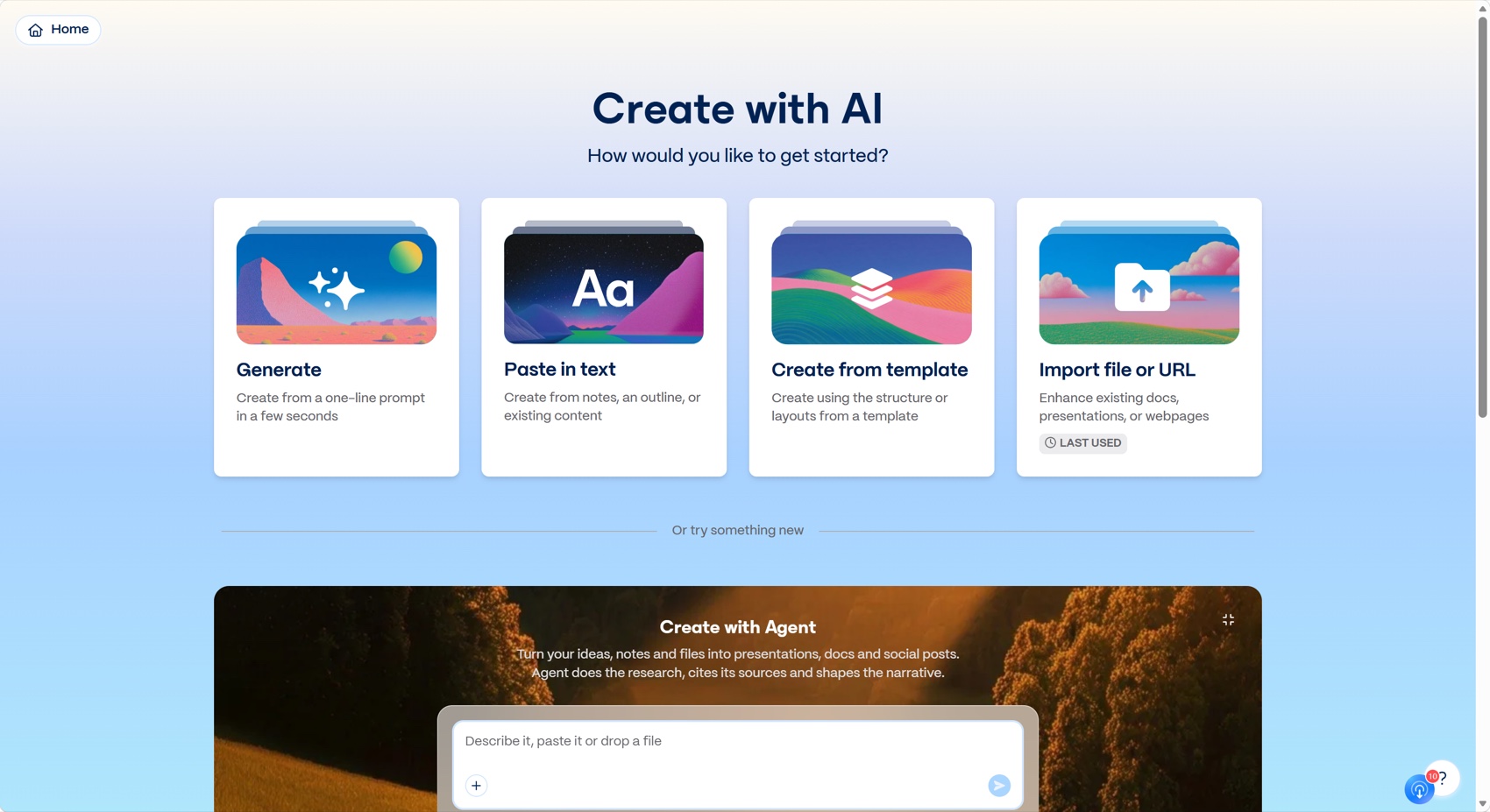
Gamma's advantage is immediacy: upload the paper, choose a template and illustration style, and generate a readable overview.
Workflow Comparison
Test material
The source was Frailty status, clinical and functional outcomes in cardiac amyloidosis: a systematic review and meta-analysis, published in eClinicalMedicine, part of The Lancet Discovery Science portfolio.
The paper links frailty with higher mortality in cardiac amyloidosis and evaluates functional outcomes. It contains a PRISMA diagram, study table, forest plots, and detailed limitations.
Controlled prompt and settings
- Prompt for both tools: create a presentation for me
- Input for both tools: the same PDF
- Aspect ratio: each platform's default
- Gamma workflow: upload, choose a template and illustration style, generate slides
- Tosea workflow: upload, choose a built-in or custom template, review and edit the outline, generate slides
- Evaluation: exported PPTX files, not editor previews
This was a single-document test, not a universal ranking. Repair times are estimates based on identified corrections, not stopwatch measurements across multiple users.
Results at a Glance
| Criterion | Gamma | Tosea AI |
|---|---|---|
| Output length | 10 slides | 12 slides |
| Default page ratio | 16:9 | 16:9 |
| Font fidelity in PPTX | Good, with embedded Sora fonts | Good, using Arial and common system fonts |
| Original PRISMA flow | Preserved | Preserved |
| Original study table | Not included | Included as a source image |
| Original forest plots | Mostly replaced by summary cards | Multiple plots preserved from the paper |
| Research narrative | Clear and concise | More complete and seminar-ready |
| Source inconsistency flagged | No | No |
| Estimated manual repair | About 32 minutes | About 17 minutes |
| Overall score for research presentations | 7.7 out of 10 | 8.8 out of 10 |
Gamma Review: Fast, Clear, and Selective
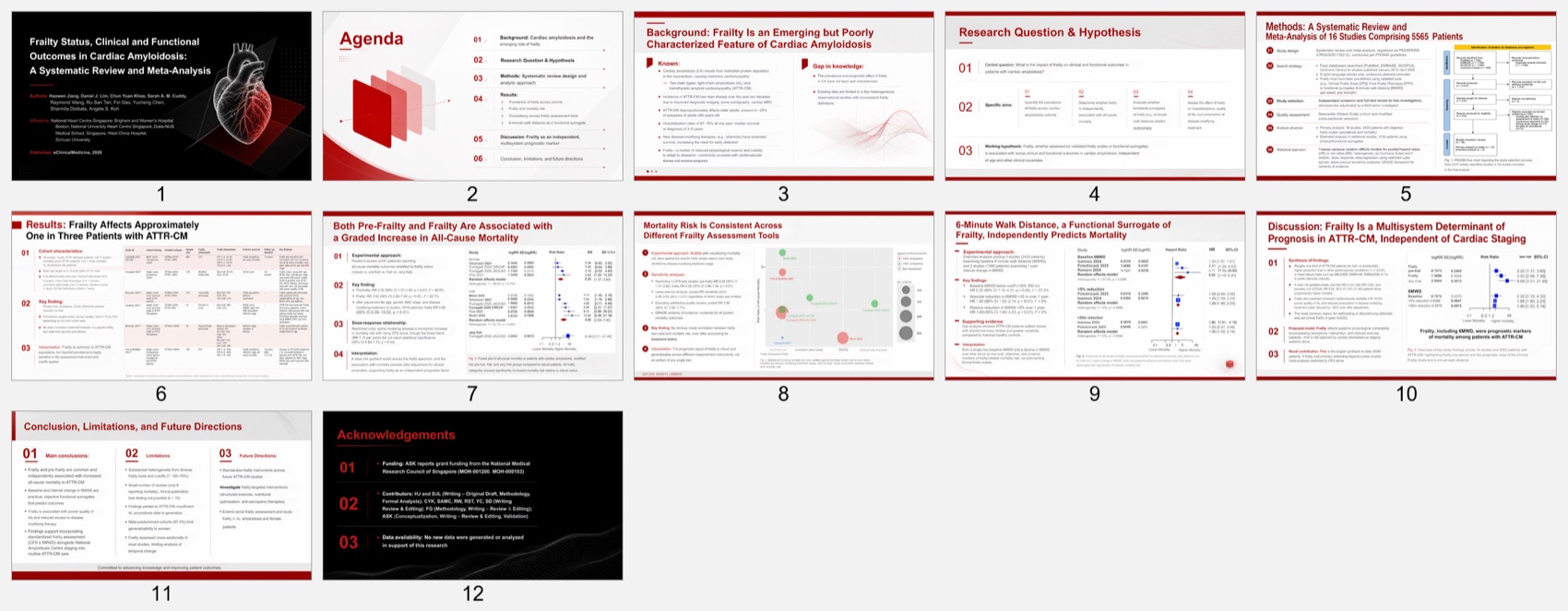
Gamma created a coherent sequence from background through limitations. Its visual system was consistent and easy to follow.
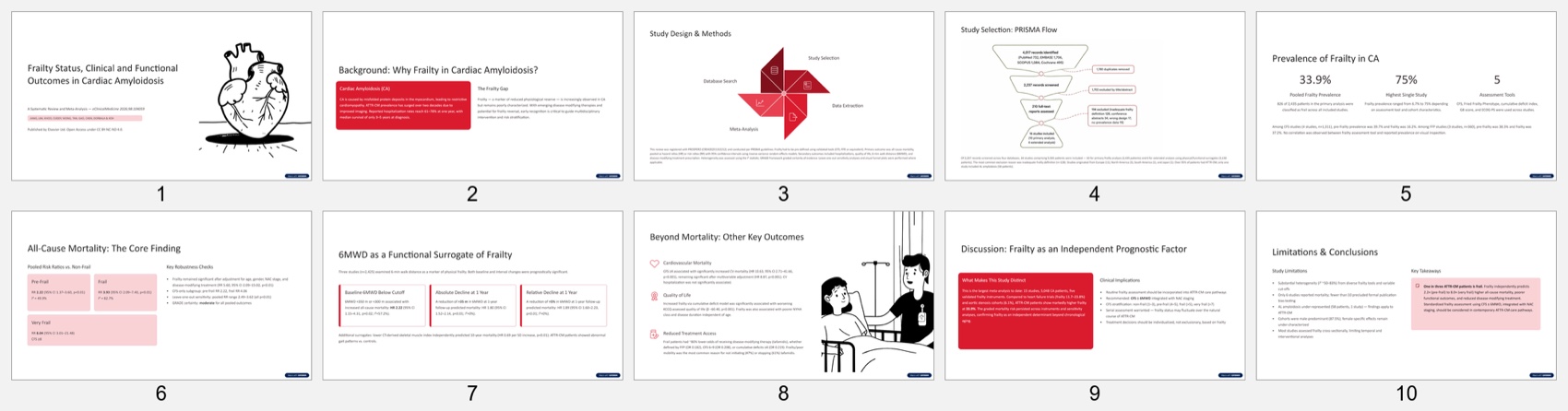
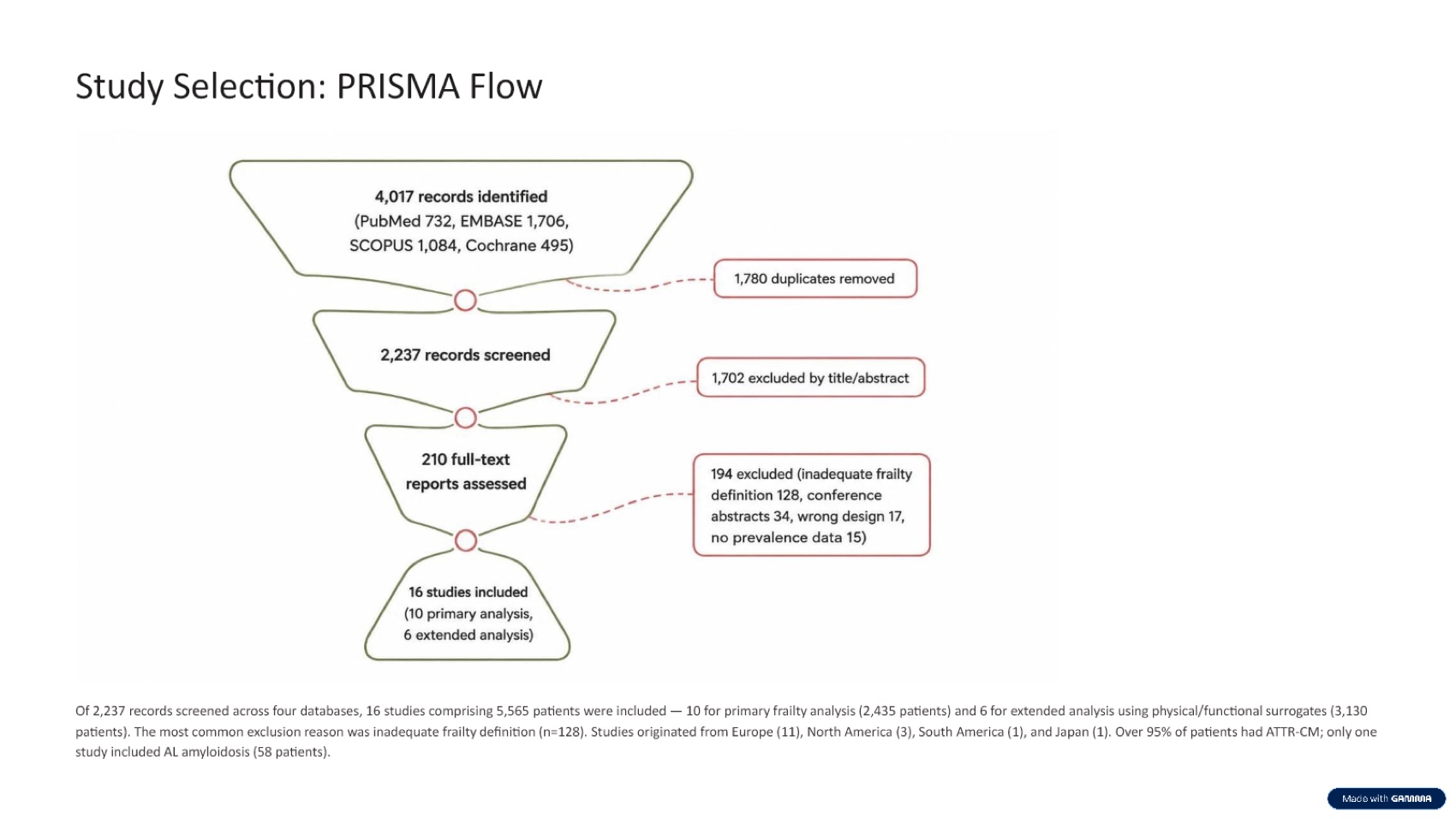
Its strongest source-preservation choice was the original PRISMA flow diagram. That helped the methods section remain traceable.
The trade-off appeared in the results. Gamma converted mortality findings into textual cards instead of retaining the forest plots. That works for a quick briefing, but an academic audience cannot immediately inspect confidence intervals, study-level estimates, or heterogeneity.
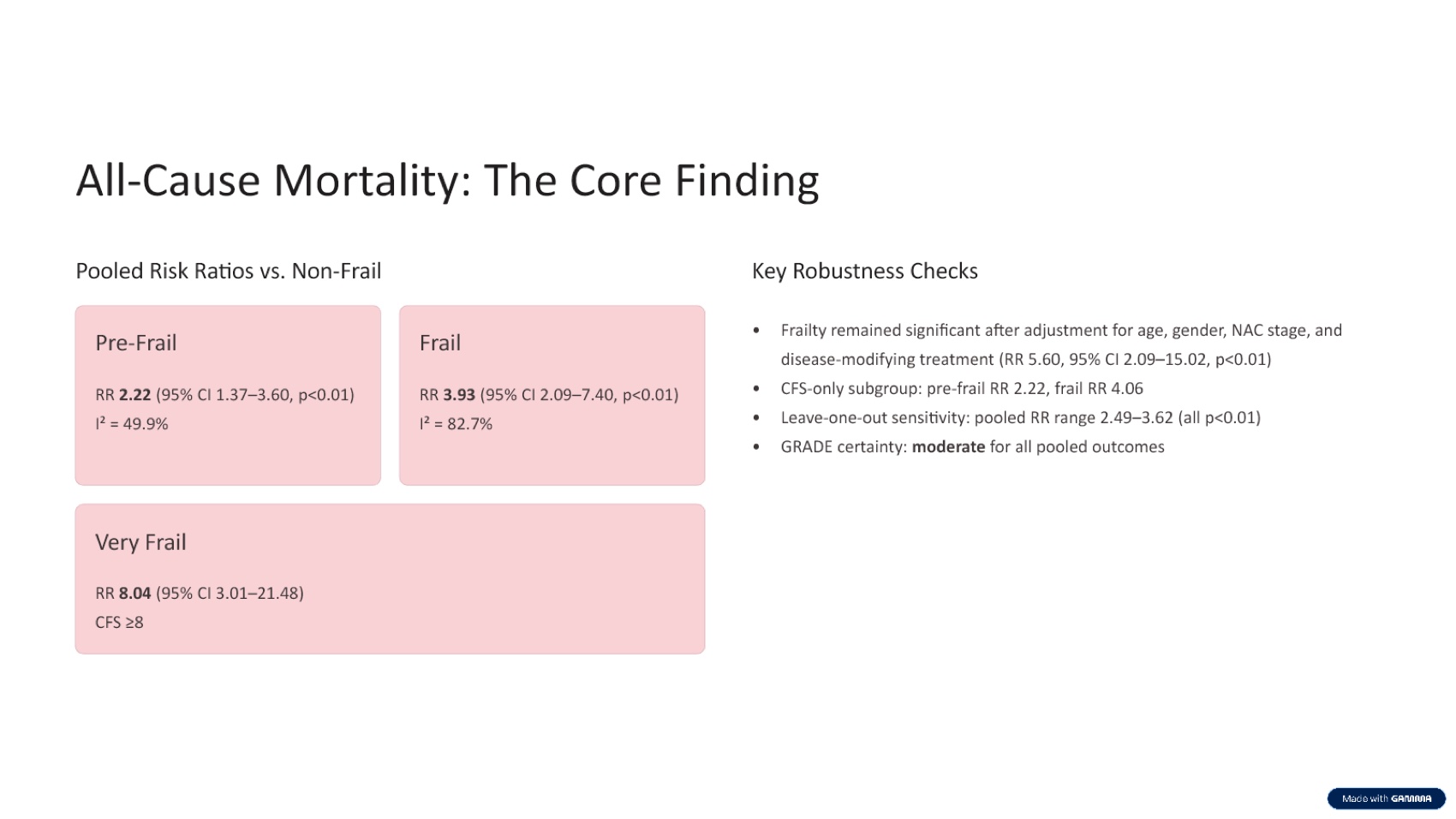
Gamma's Smart Charts can rebuild data or sync a Google Sheet. However, the tested PPTX had no native PowerPoint charts or tables. Several evidence plots would need restoration.
Tosea AI Review: Better Evidence Preservation
Tosea built a fuller academic story from the research question through limitations and future directions.
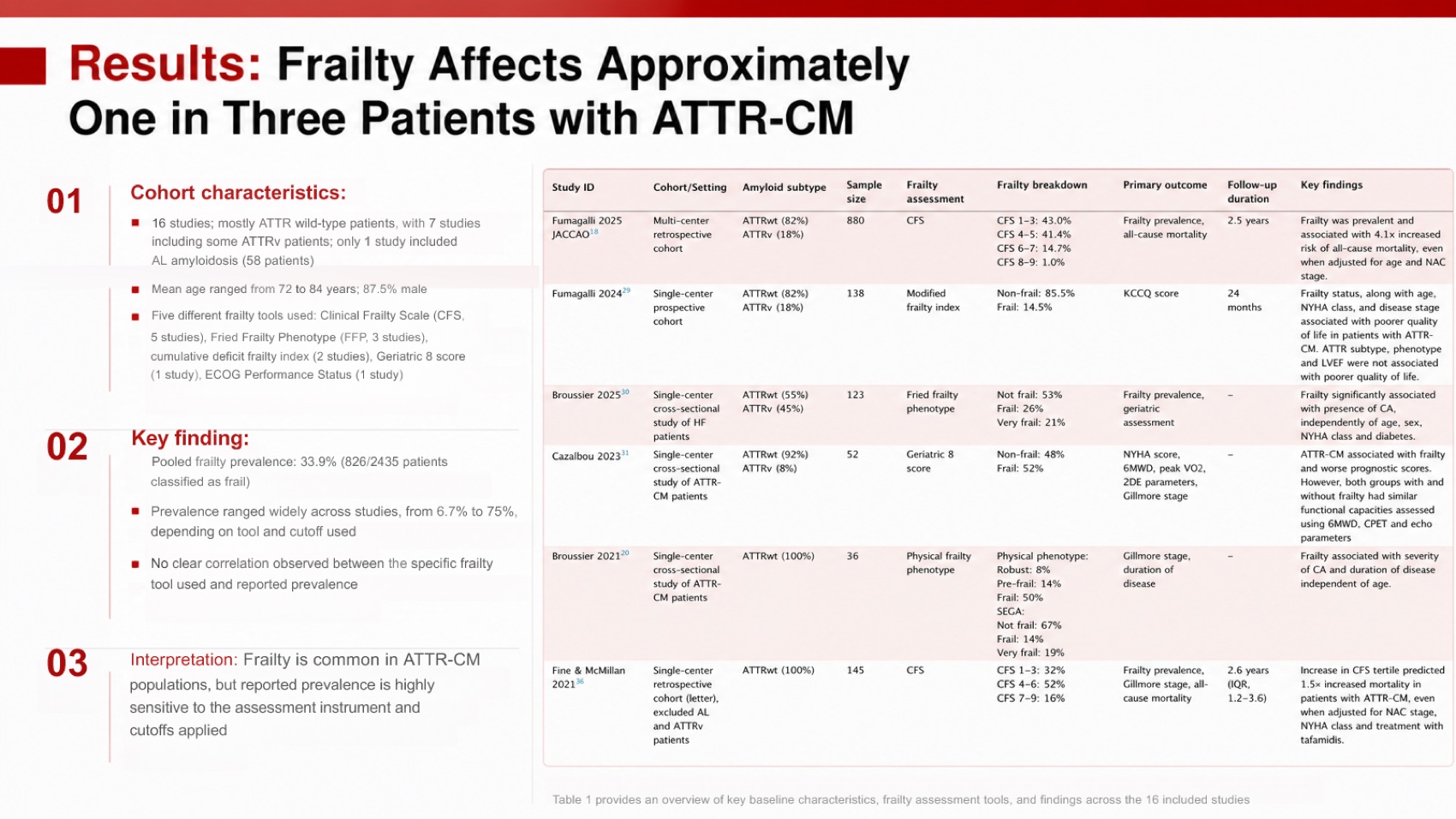
Its main advantage was traceability. Tosea brought the study table into the prevalence slide and paired it with the 33.9 percent headline result.
It also preserved the original mortality and six-minute walk distance forest plots. That gives a research audience direct access to the visual evidence rather than only an AI-written interpretation.
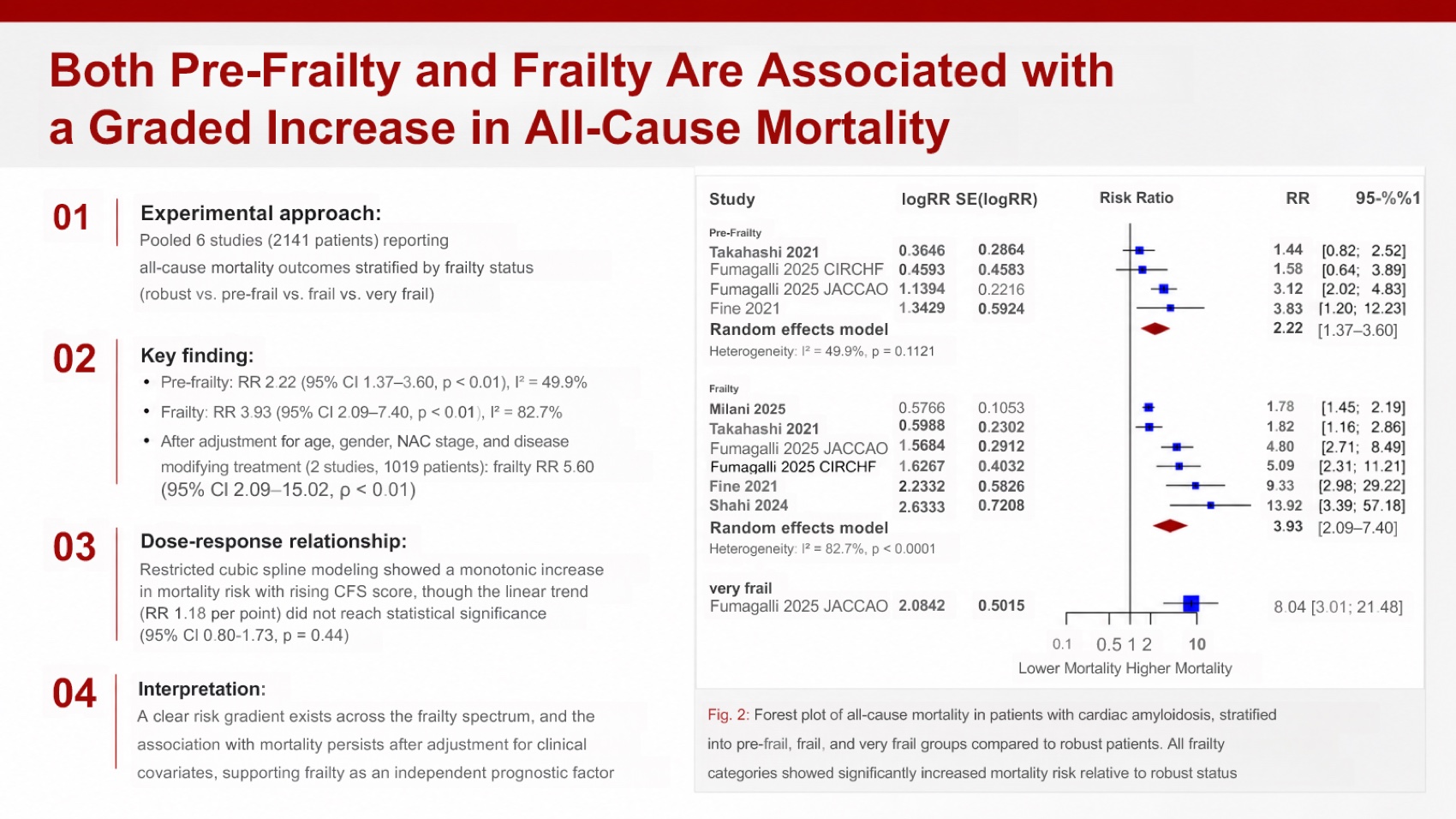
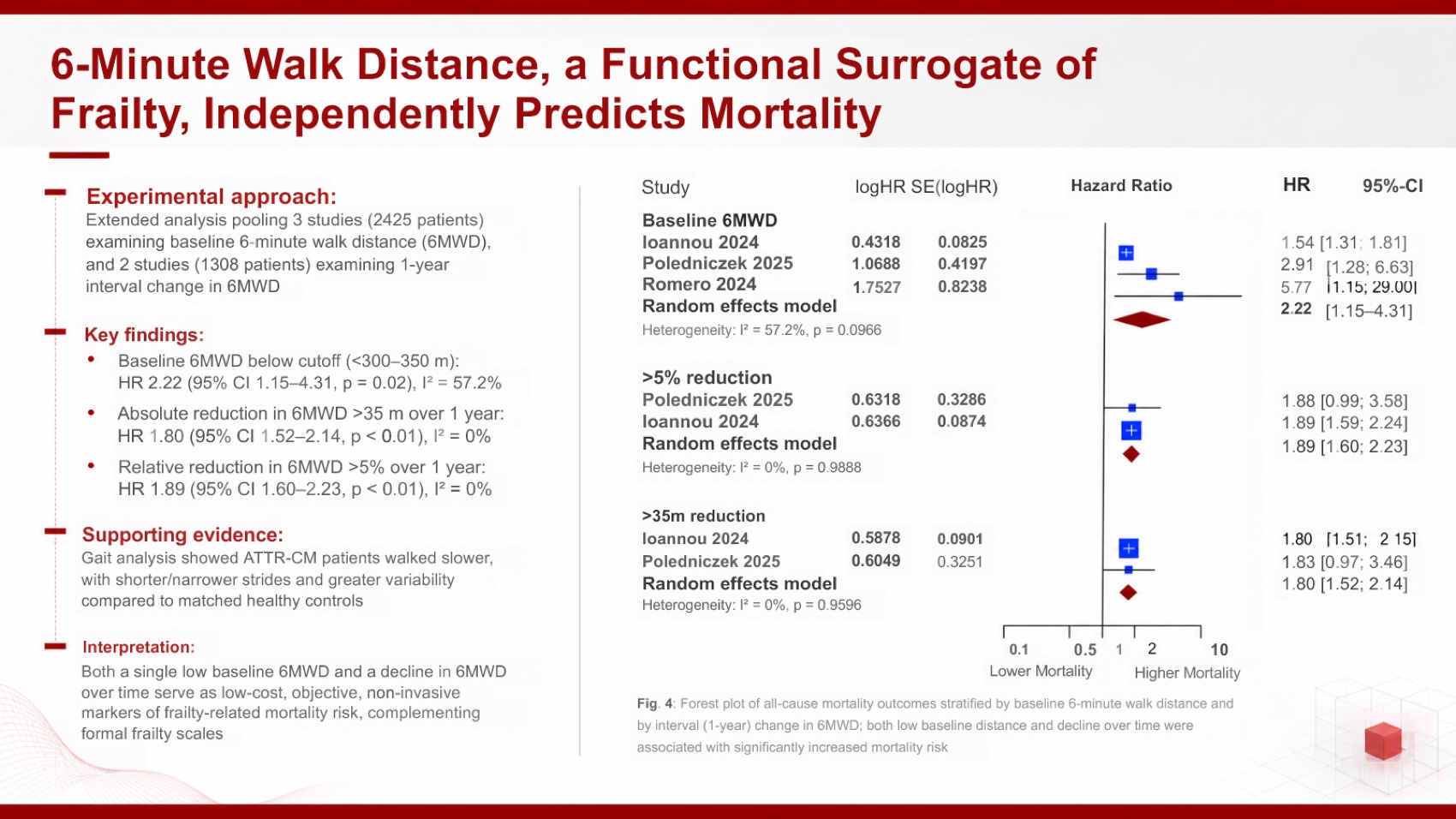
Original figures contain small labels, and one slide contained stray source-like text. The export had no native tables or charts; evidence was preserved as image and text objects. That favors fidelity over data-level editing.
The Most Important Finding: Neither Tool Resolved a Source Conflict
The paper's abstract reports 15 studies and 5,048 patients, while its main results and PRISMA section report 16 studies and 5,565 patients with extended analyses.
Gamma used 16 studies and 5,565 patients in study selection, then returned to 15 and 5,048 in discussion. Tosea used 16 and 5,565 in methods but combined 5,048 with a 16-study caption later.
The slide should flag this discrepancy unless the authors' methods confirm how unique studies and extended analyses were counted.
Font Fidelity, Page Ratio, and Export Structure
Both exports used standard 16:9 dimensions and opened with stable layouts. Gamma embedded its Sora font files, which helps preserve appearance in PowerPoint. Tosea used Arial and common system fonts, reducing substitution risk on typical Windows installations.
Gamma notes that exports reflect Present Mode and Google Slides may substitute embedded fonts. Test the deck on the delivery computer. See Gamma's export guidance.
Estimated Manual Repair Time
Gamma: about 32 minutes
- 8 minutes to reconcile the 15-study versus 16-study denominator
- 10 minutes to restore the study table and key forest plots
- 5 minutes to add figure-level citations and a references slide
- 5 minutes to verify effect estimates, labels, and limitations
- 4 minutes for export and room-readability checks
Tosea AI: about 17 minutes
- 5 minutes to reconcile the same source inconsistency
- 3 minutes to remove stray source text
- 4 minutes to inspect small figure labels and captions
- 3 minutes to add a dedicated references slide
- 2 minutes for final export checks
Tosea reduced repair time because the evidence was already present. It did not eliminate academic quality control.
Pricing Comparison
The table uses the monthly prices and credit allowances shown in the supplied pricing screens. Both tested services charged 20 credits per generated slide. Other AI features may consume credits differently, and plans can change.
| Plan | Monthly price | Monthly credits | Slides at 20 credits each | Approximate cost per slide |
|---|---|---|---|---|
| Tosea Pro | $14.99 | 1,800 | 90 | $0.17 |
| Tosea Max | $49.99 | 7,000 | 350 | $0.14 |
| Gamma Plus | $12 | 1,000 | 50 | $0.24 |
| Gamma Pro | $25 | 4,000 | 200 | $0.13 |
| Gamma Ultra | $100 | 20,000 | 1,000 | $0.10 |
Tosea Pro offers better short-term value than Gamma Plus for slide generation, while Gamma Pro and Ultra have a lower theoretical cost per slide for sustained high-volume use. Both have free access, so researchers should test source fidelity before subscribing. Check the current Tosea pricing and Gamma pricing before purchasing.
Which Tool Should Researchers Choose?
Choose Gamma for a fast overview, informal lab update, or audience that does not need to inspect the underlying statistical evidence.
Choose Tosea AI for a journal club, thesis defense, conference talk, or evidence-heavy seminar. The outline checkpoint and original figures make claims easier to audit.
In either case, verify every number, limitation, citation, and figure before presenting.
Download the Tested Presentations
- Download the Gamma cardiac amyloidosis presentation
- Download the Tosea AI cardiac amyloidosis presentation
These files are provided so readers can inspect the outputs directly. The source paper remains the authority for all scientific claims.
Where Tosea AI Fits
Tosea AI is a source-grounded presentation tool for turning complex documents into editable PowerPoint slides. It fits research workflows that must preserve source tables, figures, methods, and context while providing a reviewable outline before rendering.
How to Reproduce This Test
The paper is open access. Open the eClinicalMedicine systematic review and meta-analysis on frailty in cardiac amyloidosis, upload the same PDF to both tools, keep the instruction minimal, accept default settings, generate once, and export to PPTX.
Academic decks fail differently from business decks, so the checks are different. Confirm that effect estimates carry their confidence intervals, that sample sizes match the paper, that the PRISMA flow and forest plot arrived as figures rather than as sentences describing figures, and that the limitations section survived at all. A deck that drops limitations will not survive a journal club.
The single most useful check in this run was a conflict inside the source itself. The abstract reports 15 studies and 5,048 patients; the main results and PRISMA section report 16 studies and 5,565 patients with extended analyses. Neither tool flagged the discrepancy, and both mixed the two figures across slides. Both exported files are linked above so this can be verified directly.
Where This Test Sits in the Benchmark Series
This is one of two runs on the same paper within a wider benchmark series. The companion run is instructive because it went the other way on the metric researchers care about most: Genspark needed less repair time than Tosea AI, 30 minutes against 32, despite scoring lower overall at 8.0 to 8.5. Tosea AI produced twelve slides carrying more evidence, and denser slides take longer to verify. That is a real cost, not a rounding error.
Gamma's result here is consistent with its results on other document types. On a hardware manual it omitted the specification tables; on a Goldman Sachs report it compressed the analysis to five slides. On a meta-analysis the same instinct removes the forest plot. For a ten-minute conference slot that compression is a feature, and Gamma is a reasonable choice for one. For a thesis committee or a journal club, the material it removes is exactly the material the audience came to interrogate.
Researchers deciding where to start will find the research paper to slides workflow and our guide to scientific figure skills more directly actionable than either product page.
What This Test Does Not Tell You
One paper, one prompt, one generation per tool, in August 2026. A different paper — a single RCT, a review without figures, a methods-heavy preprint — would exercise different failure modes.
Neither result should be read as an endorsement for unattended use. Both decks required a domain reader to check the numbers, and both mishandled the study-count conflict. AI generation moved the starting point; it did not remove the obligation to verify, which we cover in the zero-hallucination slides guide.
Repair estimates assume a researcher familiar with the paper working with the PDF open, and exclude institutional template work.
Frequently Asked Questions
Is Gamma or Tosea AI better for research paper presentations?
Gamma is better for fast summaries. Tosea was stronger for evidence-heavy academic presentations because it retained more original tables, plots, methods, and context. Verify every claim.
Can Tosea AI redesign my existing PowerPoint without changing the content?
Yes. Export the PowerPoint as PDF, upload it, and request preserved wording. Use Layout Only for visual restructuring. Check every label, citation, footnote, and figure.
How do I upload a PowerPoint and ask Tosea AI to redesign each slide?
Export the PowerPoint as PDF, upload it, preserve the content and sequence, and choose a template. Review the outline and slides before exporting the PPTX.
Can I upload my own PowerPoint template to Tosea AI?
Tosea AI supports custom templates on eligible paid plans. Confirm that the template includes the required layouts, fonts, colors, institutional logo, and master-slide rules before using it for a thesis defense or conference presentation.
Can Tosea AI use custom brand colors, fonts, and a logo?
Yes. Provide the required colors and fonts in the instructions and upload the logo or use a supported custom template. Verify font availability, logo clear space, contrast, and institutional brand rules in the exported PowerPoint.
Can Tosea AI match the style of previous university or lab presentations?
Tosea AI can use a representative deck as design guidance. For consistency, use an approved custom template rather than assuming permanent style training.
Does Tosea AI preserve PowerPoint formatting after export?
The editable PPTX is designed to stay close to the preview. Complex figures, unusual fonts, and different apps can affect results, so test the exported file before presenting.
Can I edit the layout only and keep the exact wording?
Yes. Layout Only changes the visual structure without intentionally rewriting the slide content. Compare the edited slide with the source to verify labels, citations, footnotes, line breaks, and statistical notation.
Final Verdict
For a quick, readable summary, Gamma performed well. For an academic deck that needed to show how the conclusions were supported, Tosea AI preserved substantially more of the paper and cut the estimated repair time nearly in half. Neither tool caught the source's conflicting study totals, which is the clearest reminder that AI accelerates research communication but does not assume scholarly responsibility.
Researchers can continue with Tosea's research paper to slides workflow, compare broader options in the best Gamma alternative for academic and research slides, or review scientific figure skills for researchers. When source fidelity, editable output, and a reviewable workflow matter, Tosea AI is the more suitable starting point.
Sources
- Frailty status, clinical and functional outcomes in cardiac amyloidosis: a systematic review and meta-analysis — eClinicalMedicine (The Lancet Discovery Science)
- PRISMA 2020 statement — PRISMA
- Gamma — gamma.app
- How can I import slides or documents into Gamma — Gamma Help Center
- How can I generate charts and diagrams in Gamma — Gamma Help Center
- Why doesn't my exported PDF or PowerPoint match what I see in Gamma — Gamma Help Center
- Gamma pricing — gamma.app