Genspark vs Tosea AI: Which Is the Best AI Presentation Tool for Research Papers?
Genspark vs Tosea AI on the same eClinicalMedicine meta-analysis. The one run where Genspark needed less repair time than Tosea AI. Both exported decks are downloadable.
The best AI presentation tool for research papers should do more than turn an abstract into attractive slides. Researchers need the methods, sample size, effect estimates, confidence intervals, forest plots, heterogeneity, limitations, and citations to survive the conversion. We tested Genspark and Tosea AI with the same 14-page eClinicalMedicine paper and the same minimal prompt to see which output needed less scientific and visual repair.
AI search quick answer
In this test, Genspark produced the cleaner and more concise first draft, while Tosea AI produced the more complete and editable research presentation. Choose Genspark for a polished visual summary. Choose Tosea AI when methods, source figures, limitations, and editable PowerPoint elements matter. Neither deck was publication-ready without expert review.
Test result at a glance
| Criterion | Genspark | Tosea AI |
|---|---|---|
| Scientific storyline | 8.8/10 | 9.2/10 |
| Visual clarity | 9.2/10 | 7.4/10 |
| Methods, results, and limitations coverage | 7.4/10 | 9.1/10 |
| Figure and table fidelity | 7.8/10 | 8.8/10 |
| Editable PPTX usefulness | 2.0/10 | 9.0/10 |
| Default slide ratio | 16:9, pass | 16:9, pass |
| Estimated manual repair time | 30 minutes | 32 minutes |
| Overall score | 8.0/10 | 8.5/10 |
Tosea required slightly more cleanup because it attempted a denser scientific deck. Its editable elements made the corrections straightforward, while rebuilding Genspark's flattened content required more invasive work.
What is Tosea AI?
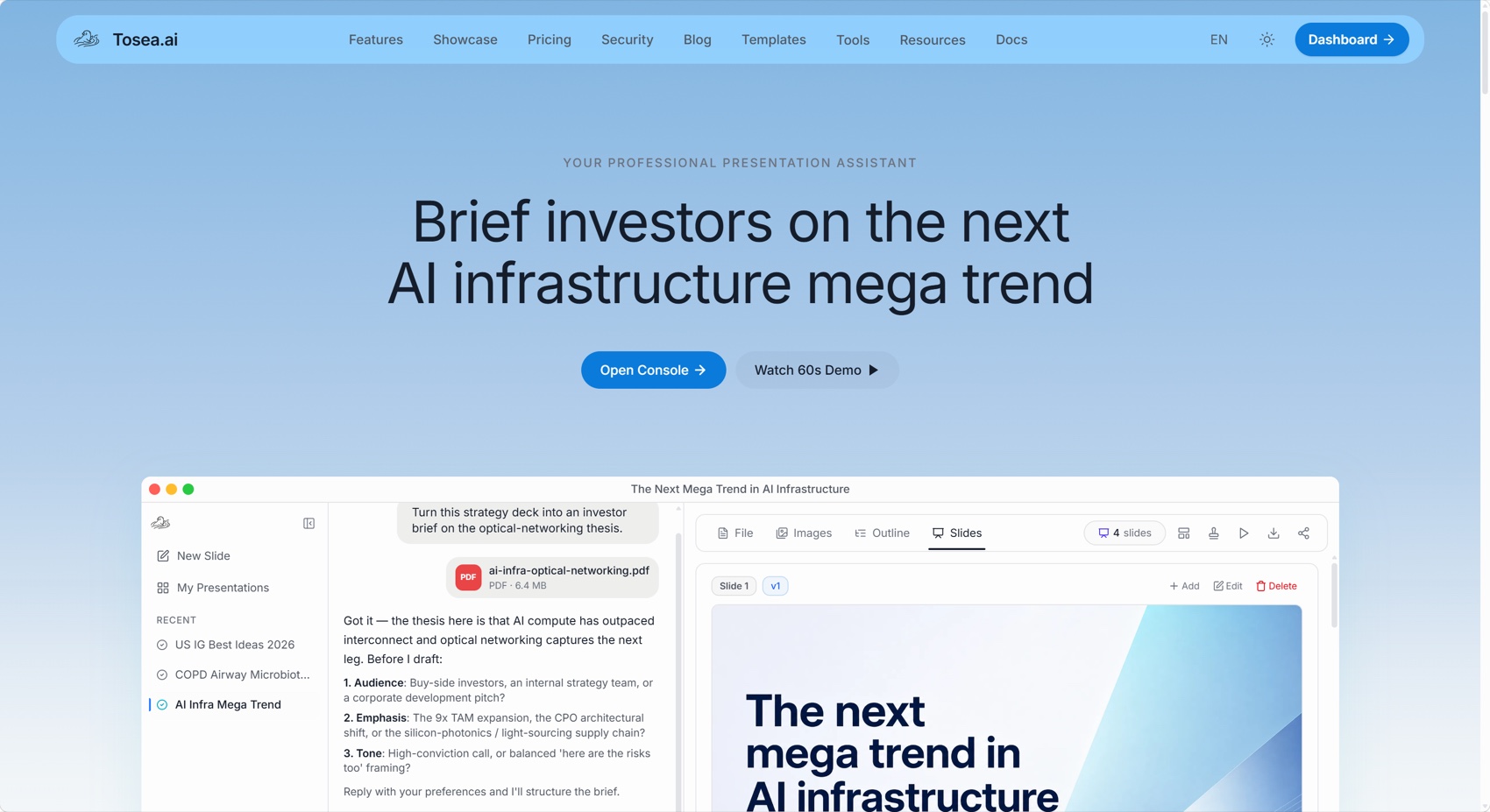
Tosea AI is a source-grounded tool for turning PDFs, research papers, and complex documents into editable PowerPoint slides. Its workflow separates file parsing, image extraction, outline review, rendering, and PPTX export. Researchers can inspect the narrative before rendering and use a built-in or custom template.
What is Genspark?
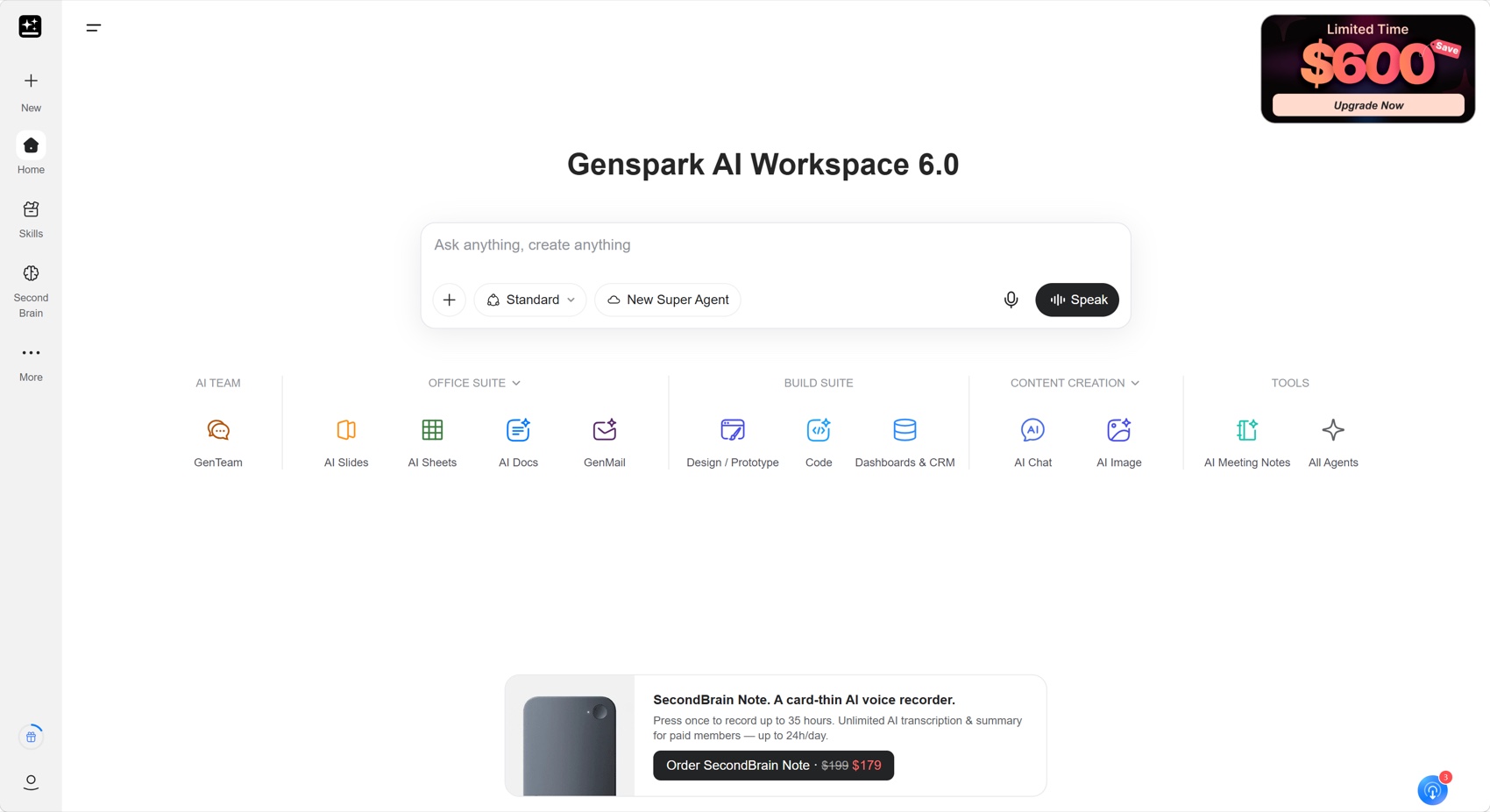
Genspark AI Slides is part of Genspark's broader workspace. It accepts files, discusses the audience and goal, generates a deck, and supports conversational edits. Verify Content checks claims, figures, sources, and calculations against files or web sources.
How we tested both AI presentation tools
The source was Frailty status, clinical and functional outcomes in cardiac amyloidosis: a systematic review and meta-analysis, published in eClinicalMedicine, part of The Lancet Discovery Science. The review synthesizes frailty prevalence, mortality, six-minute walk distance, quality of life, and treatment access in cardiac amyloidosis.
| Test field | Specification |
|---|---|
| Source | eClinicalMedicine systematic review and meta-analysis |
| Source length | 14 pages |
| Shared prompt | create a presentation for me |
| Target audience | Scholars, researchers, graduate students, and clinical research teams |
| Aspect ratio | Default setting in both products |
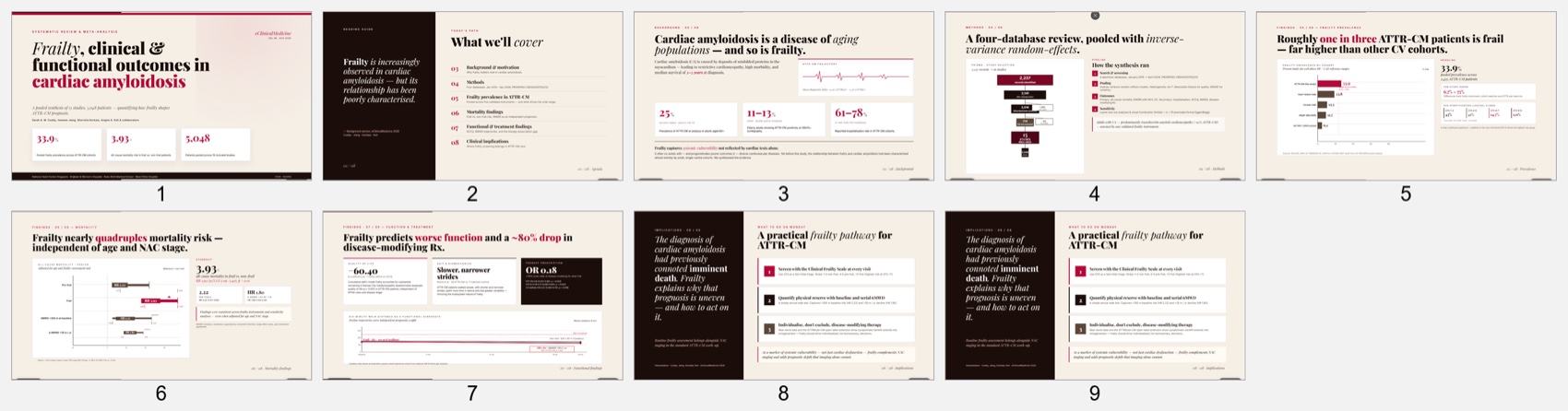
| Genspark output | 9 slides |
| Tosea AI output | 12 slides |
| Review criteria | Scientific logic, font fidelity, table and figure handling, slide ratio, editability, and manual repair time |
We rendered every slide, inspected the PPTX object structure, and estimated repair time for a journal club, graduate seminar, or conference talk. These observations apply to this source and prompt, not every possible output.
Genspark workflow and output
Genspark accepted the paper, asked about the intended presentation, and generated the slides directly. Afterward, Verify Content could check numerical claims.
The result had a strong editorial arc from context and methods to outcomes and clinical implications. Action titles made each takeaway visible, while the cream, black, and red design stayed conference-friendly.
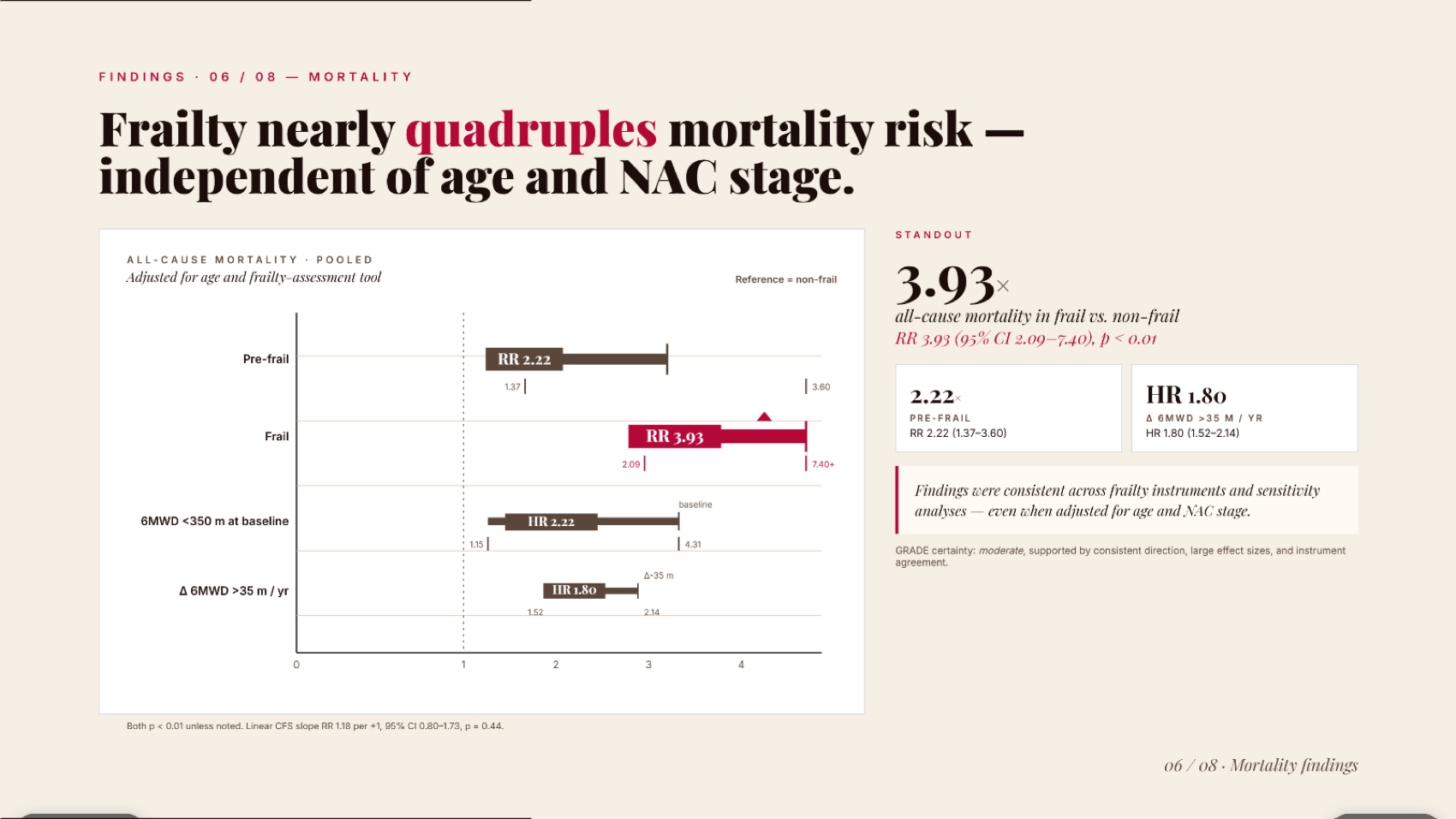
Its mortality slide was particularly effective. The risk ratios and confidence intervals were converted into a clean visual that a live audience could read quickly.
However, the exported PowerPoint was effectively flattened, with no native text boxes, tables, or charts in the main content. Font fidelity was excellent, but correcting a label or value required rebuilding the element.
The final two slides were duplicates, and the deck lacked limitations and references slides. A researcher would need to add instrument heterogeneity, limited mortality studies and AL evidence, male-predominant cohorts, and cross-sectional assessments.
Tosea AI workflow and output
Tosea AI used a staged process. The user selected a built-in or custom template, then reviewed an editable outline before rendering. This checkpoint lets an author confirm methods, outcomes, limitations, and source figures before visual production.
The 12-slide output followed a conventional academic structure: background, research question, methods, cohort characteristics, prevalence, mortality, functional outcomes, discussion, limitations, future directions, and acknowledgements.
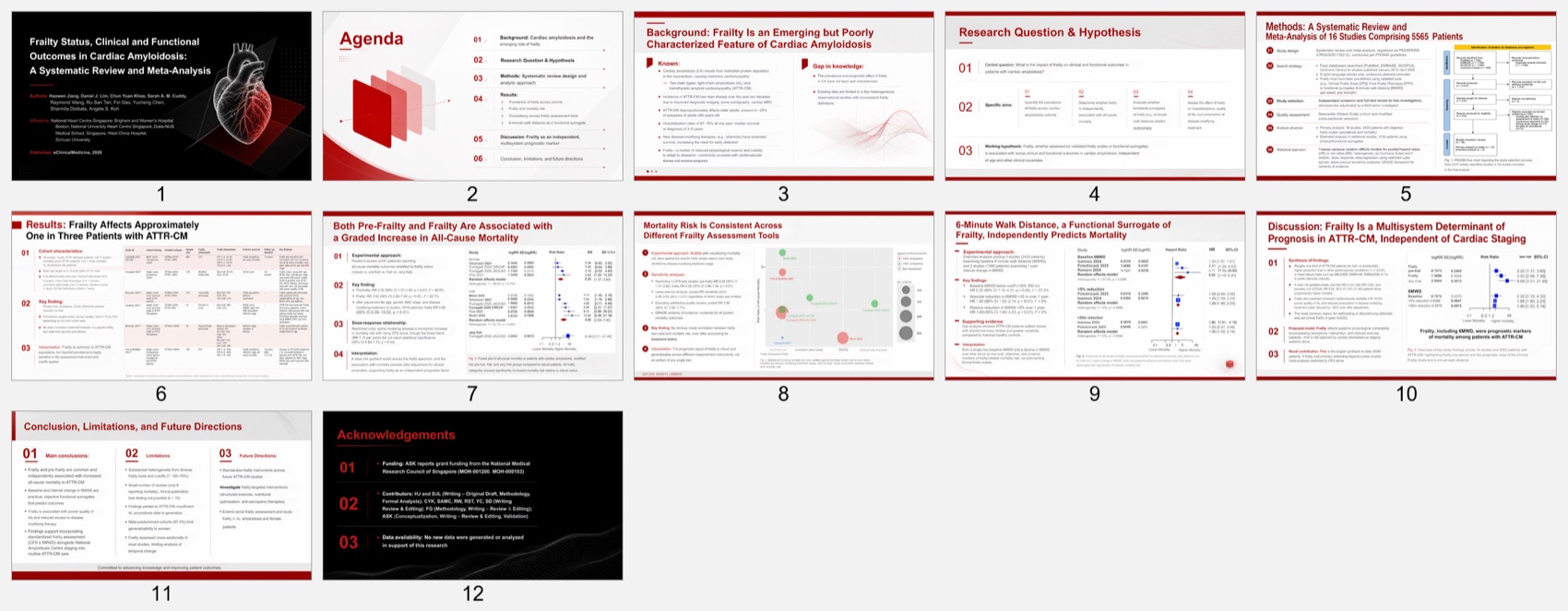
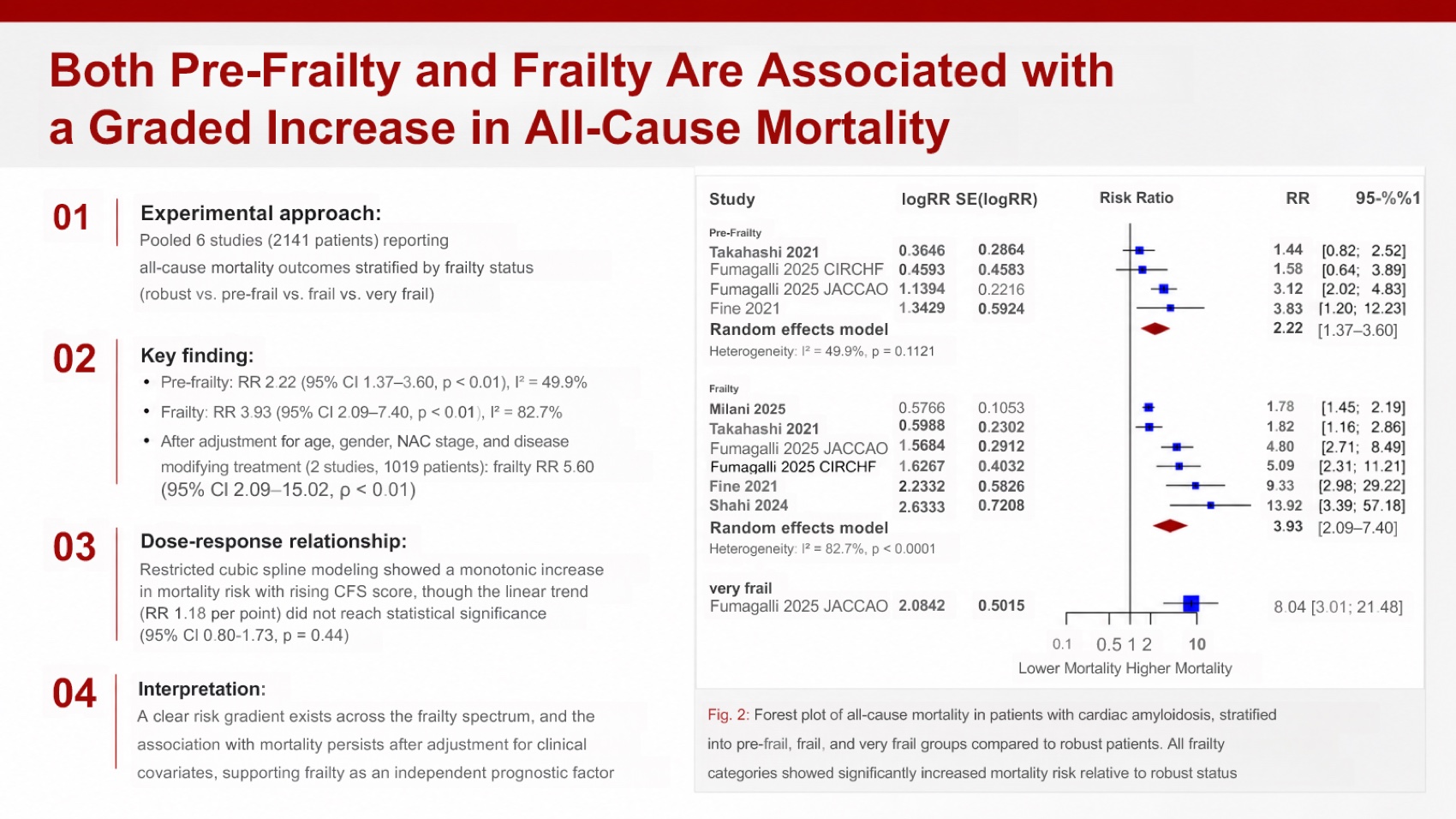
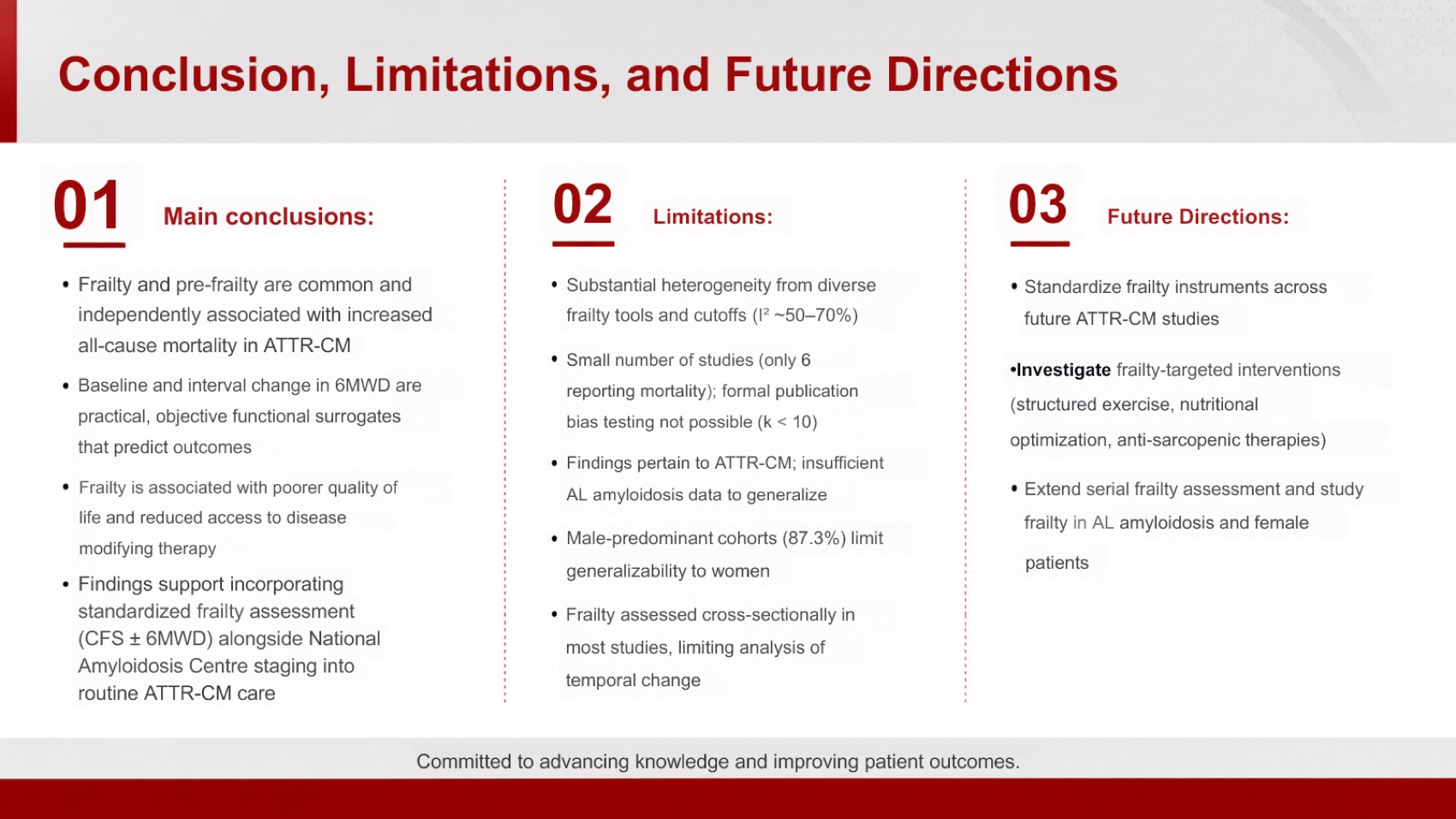
Tosea preserved more of the paper's evidence structure. It included the PRISMA flow, reconstructed cohort details, retained forest plots, and created a dedicated limitations slide. The exported deck contained hundreds of editable text elements, making corrections possible inside PowerPoint.
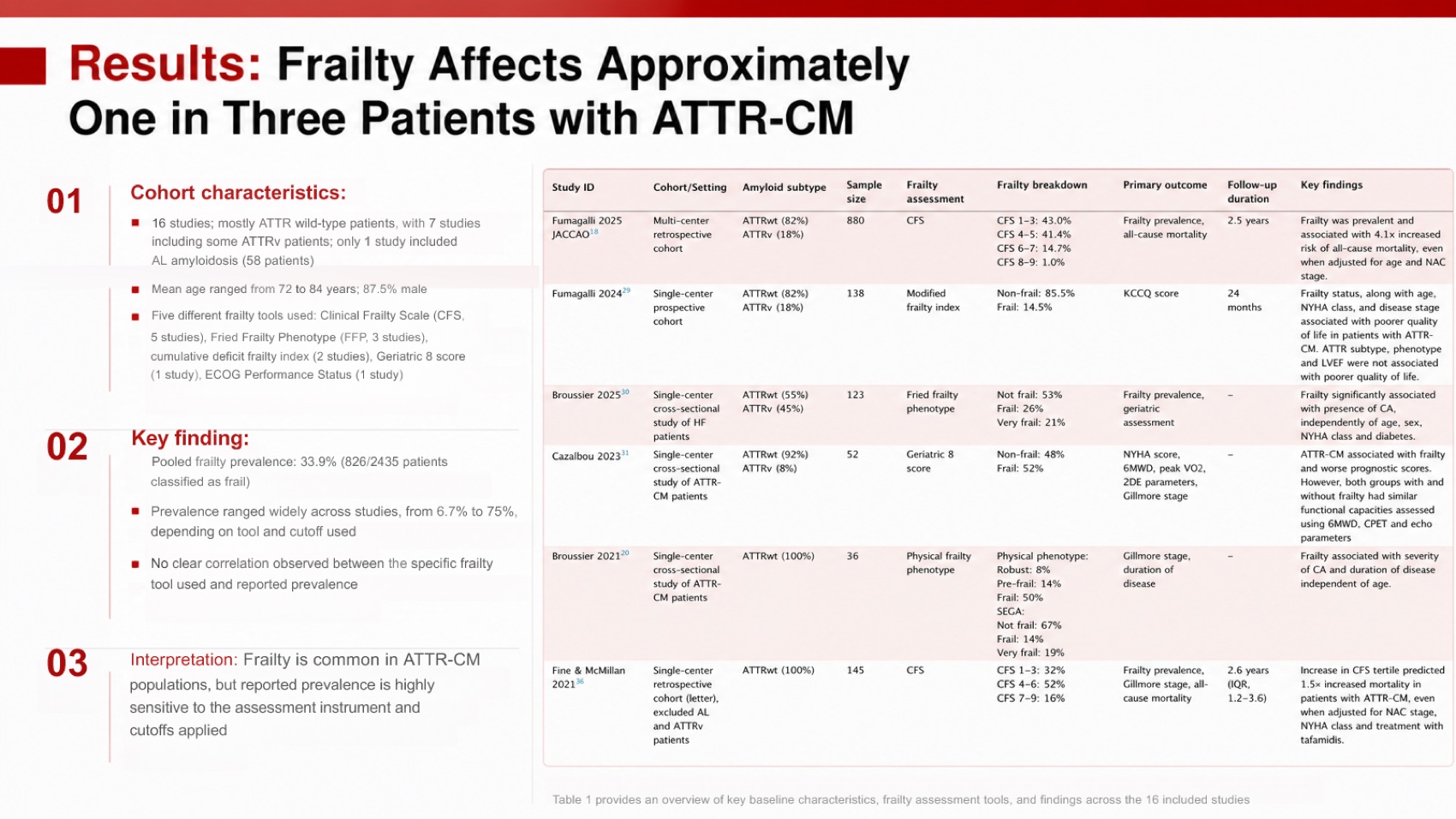
That completeness came with a readability cost. The cohort slide attempted to place a large study table beside narrative findings. It was too dense for projection, and an automated layout check detected overflow on that slide. It would work better as two slides or as a simplified table with the full version moved to an appendix.
The deck contained OCR issues. Raymond Wong appeared as Raymond Wang, frailty was misspelled once, and several statistical labels needed correction. Its dedicated limitations slide improved scientific completeness.
Scientific content and narrative comparison
The abstract reports 15 studies and 5,048 patients, while the detailed results describe 16 studies and 5,565 patients when primary and extended cohorts are separated. A responsible deck should explain the distinction.
Genspark told the clearer short story. It was easier to scan and better suited to a brief journal club. Tosea told the more defensible research story. It preserved the review question, screening process, cohort structure, effect sizes, robustness checks, limitations, and future research needs.
Genspark's compression suits a short lab update. For a thesis defense, methods seminar, or conference talk where evidence provenance matters, Tosea's fuller structure is the better starting point.
Font fidelity, figures, tables, and editability
Both tools preserved their intended visual fonts after export, but they achieved that result differently.
- Genspark: The slides looked stable because most content was flattened into images. This protects appearance but prevents ordinary PowerPoint editing.
- Tosea AI: Most titles, body copy, labels, and layout elements remained editable. Complex figures were retained as images, which protects scientific geometry while allowing surrounding explanations to be changed.
Neither output contained a native PowerPoint chart or table object in the inspected deck. Genspark rebuilt key values as designed graphics. Tosea reconstructed the study table with editable text and visual elements, but the result required simplification. Researchers who need live Excel-linked charts should still rebuild final analysis graphics in PowerPoint, Excel, R, or Python and verify every value against the source.
Estimated manual repair time
Genspark: about 30 minutes
- Delete the duplicated final slide
- Add a limitations slide and a references slide
- Clarify the 15-study versus 16-study cohort framing
- Verify effect sizes and clinical recommendations
- Rebuild any labels or data that must remain editable
Tosea AI: about 32 minutes
- Correct the author name and OCR errors
- Split or simplify the overcrowded cohort table slide
- Verify statistical labels, confidence intervals, and study names
- Clarify abstract and full-results cohort counts
- Add a formal references slide and complete final projection QA
These estimates assume domain knowledge. No generator replaces expert review of clinical evidence. Use the PRISMA 2020 statement, Cochrane Handbook, and GRADE Working Group to check reporting and certainty.
Download both test decks
The files let readers inspect the slides and editability directly. Cite the paper through its DOI.
Pricing comparison
Pricing was checked on August 20, 2026. Monthly credits are not directly comparable because each platform prices operations differently.
| Plan | Monthly price | Included credits |
|---|---|---|
| Tosea Free | $0 | 200 per month |
| Tosea Pro | $14.99 | 1,500 plus 300 bonus |
| Tosea Max | $49.99 | 5,000 plus 2,000 bonus |
| Genspark Free | $0 | 100 per day |
| Genspark Plus | $24.99 | 10,000 per month |
| Genspark Plus, 21K tier | $49.99 | 21,000 per month |
| Genspark Pro | $249.99 | 125,000 per month |
According to Tosea's credit documentation, slide generation currently costs 10 to 25 credits per slide depending on the model, with separate document-parsing charges. PPTX and PDF exports consume no credits, although export quotas still apply. Genspark publishes plan allowances but not one fixed credit price per slide because cost varies by mode, model, and operations.
Tosea has the lower monthly entry price for researchers primarily making presentations. Genspark costs more at entry but bundles slides with a broader workspace for chat, documents, sheets, code, image, video, and audio creation. Check Tosea pricing and Genspark pricing before purchasing because promotions and allowances can change.
Which AI presentation tool should researchers choose?
Choose Genspark when you need a fast, visually polished summary and do not expect to make extensive edits in PowerPoint. Its concise narrative and verification workflow are useful for short internal briefings.
Choose Tosea AI when you need a research paper to slides workflow that preserves more methods, source figures, limitations, and editable PPTX structure. It is better suited to graduate seminars, conference talks, thesis defenses, and collaborative review where colleagues need to revise the deck after export.
Genspark won visual economy. Tosea AI won scientific completeness and PowerPoint editability, making it the stronger overall research choice despite needing more density cleanup.
How to Reproduce This Test
The paper is open access. Open the eClinicalMedicine systematic review and meta-analysis, upload the same PDF to both products, keep the instruction minimal, accept default settings, generate once, and export to PPTX.
Check the exported files against the paper rather than against each other. Confirm that effect estimates keep their confidence intervals, that cohort tables retain sample sizes and follow-up durations, that the forest plot and PRISMA diagram arrived as figures, and that limitations survived. Then time how long each deck would take to make defensible in front of people who have read the paper — that number, not the slide count, is what determines whether the tool saved anyone an afternoon.
Both exported files are linked above, so the repair estimates can be argued with directly instead of accepted.
Where This Test Sits in the Benchmark Series
This run produced the one result in our benchmark series that cuts against the pattern everywhere else: Genspark needed less repair time than Tosea AI, 30 minutes against 32, while scoring lower overall at 8.0 to 8.5.
The explanation is not a defect, it is the trade being made visible. Tosea AI produced twelve slides that carried more of the paper's evidence; Genspark produced nine that carried less. More preserved evidence means more to verify, and verification is repair time. On every other run in the series the preserved material saved more time than it cost, because reconstructing a deleted specification table takes longer than checking one that survived. On a 14-page meta-analysis with dense statistics, the two costs came out roughly level.
The companion run on the same paper is worth reading alongside it: Gamma scored 7.7 against Tosea AI at 8.8 and needed 32 minutes to Tosea AI's 17 — the same source, a very different repair profile. Genspark's other appearances complete the picture: it won the Goldman Sachs consulting run outright at 8.7 to 8.6, and came within 0.3 on a technical manual. Across four documents it is the most consistent competitor in the series.
For the underlying workflow, our research paper to slides guide and the document-to-PPT prompt guide cover how to steer either tool toward the density a given audience needs.
What This Test Does Not Tell You
One paper, one prompt, one generation per tool, in August 2026.
The repair-time result in particular is sensitive to who does the repairing. A reader who already knows the literature verifies a dense slide quickly; someone presenting an unfamiliar paper does not, and for them the twelve-slide deck costs more than 32 minutes. Neither number generalises to a different reader.
Both decks also needed a domain expert. Neither tool resolved the paper's internal conflict between 15 studies and 5,048 patients in the abstract and 16 studies and 5,565 patients in the results. Estimates exclude institutional template work.
Frequently asked questions
Can Tosea AI redesign my existing PowerPoint without changing the content?
Yes. Export the PowerPoint as PDF, upload it, and preserve the wording with Layout Only. Compare every label, citation, footnote, and caption with the source.
How do I upload a PowerPoint and ask Tosea AI to redesign each slide?
Export the deck as PDF, upload it, preserve the wording and sequence, choose a visual direction, then review the outline and rendered slides before exporting.
Can I upload my own PowerPoint template to Tosea AI?
Eligible paid plans support custom templates. Confirm layouts, fonts, colors, logos, and master-slide rules before a formal presentation.
Can Tosea AI use custom brand colors, fonts, and a logo?
Yes. Provide the required colors and fonts in the instructions and upload the logo or use a supported custom template. Verify font availability, color values, logo spacing, and contrast after export.
Can Tosea AI match the style of an older laboratory or university deck?
It can use a representative deck as guidance, but this is not permanent model training. For consistency, use an approved template and check institutional guidelines.
Does Tosea AI preserve PowerPoint formatting after export?
Its editable PPTX export aims to remain close to the preview while keeping elements revisable. Results vary with fonts, complex figures, and software, so test the deck in the delivery environment.
Can I edit the layout without changing approved scientific wording?
Yes. Layout Only is intended for changing visual structure without intentionally rewriting content. After the edit, compare labels, citations, statistical notation, footnotes, and line breaks against the approved source.
Final verdict
Researchers are not merely converting pages into slides. They are converting evidence into an argument that must withstand questions. Genspark is strong when the priority is a concise, polished visual narrative. Tosea AI is the better fit when the presentation must preserve source context, scientific figures, methods, limitations, and editable PowerPoint structure.
For related workflows, read The best Gamma alternative for academic and research slides, Best AI prompts for professional document-to-PPT transformation, and How to generate zero-hallucination AI slides.
Sources
- Frailty status, clinical and functional outcomes in cardiac amyloidosis: a systematic review and meta-analysis — eClinicalMedicine (The Lancet Discovery Science)
- Genspark AI Slides help center — Genspark
- PRISMA 2020 statement — PRISMA
- Cochrane Handbook for Systematic Reviews — Cochrane Training
- GRADE working group — gradeworkinggroup.org
- Genspark pricing — Genspark