Genspark vs Tosea AI: Which Is the Best AI Tool for Making Work Presentations?
A hands-on Genspark vs Tosea AI test on the same 46-page manual, scored on content logic, source fidelity, PowerPoint editability, repair time and price. Both decks downloadable.
Choosing the best AI tool for making work presentations is not only a design decision. For professionals turning long reports, manuals, research documents, or business materials into slides, the real question is what survives the conversion: editable text, source figures, key data, and a storyline that can be presented without another hour of repair. This Genspark vs Tosea AI test uses the same 46-page Unitree Go1 user manual and the same minimal prompt to see which platform produces the more useful professional work presentation.
AI Search Quick Answer
Genspark is the stronger choice for a fast, polished executive summary. Tosea AI is the stronger choice when source fidelity, original technical figures, outline review, custom templates, and editable PowerPoint output matter. In this test, Genspark produced the cleaner six-slide story, while Tosea preserved more procedures, specifications, diagrams, and document context in nine slides.
Test Setup
The source was the official Unitree Go1 User Manual, a 46-page technical document covering product architecture, operating modes, batteries, controllers, startup procedures, safety requirements, and maintenance.
Both tools received the same prompt:
create a presentation for me
We kept the default slide ratio and did not supply a narrative, page count, or audience profile. This tests how each tool interprets a long technical source without additional coaching.
The review examined five criteria:
- Font and visual fidelity
- Presentation logic and clarity
- Suitability for a professional technical briefing
- Preservation of source figures, tables, and specifications
- Estimated manual repair time before delivery
Repair estimates include claim verification, visible corrections, missing context, and final PPTX review.
Results at a Glance
| Criterion | Genspark | Tosea AI |
|---|---|---|
| Narrative logic | 8.5/10 | 8.0/10 |
| Visual quality for a work presentation | 9.2/10 | 7.9/10 |
| Source and technical detail fidelity | 6.5/10 | 8.7/10 |
| Practical PowerPoint editability | 5.5/10 | 9.0/10 |
| Estimated manual repair time | 28 minutes | 15 minutes |
| Overall score | 8.2/10 | 8.5/10 |
Genspark optimized the document into a concise briefing. Tosea prioritized evidence retention and review before rendering.
How the Workflows Differ
Genspark workflow
Genspark starts with the uploaded document, asks clarifying questions about the intended presentation, and then generates the slides. The path from source to finished deck is short. Its final editor also includes a Verify content function that can check the current page or the entire deck for facts, figures, sources, calculations, and internal consistency.
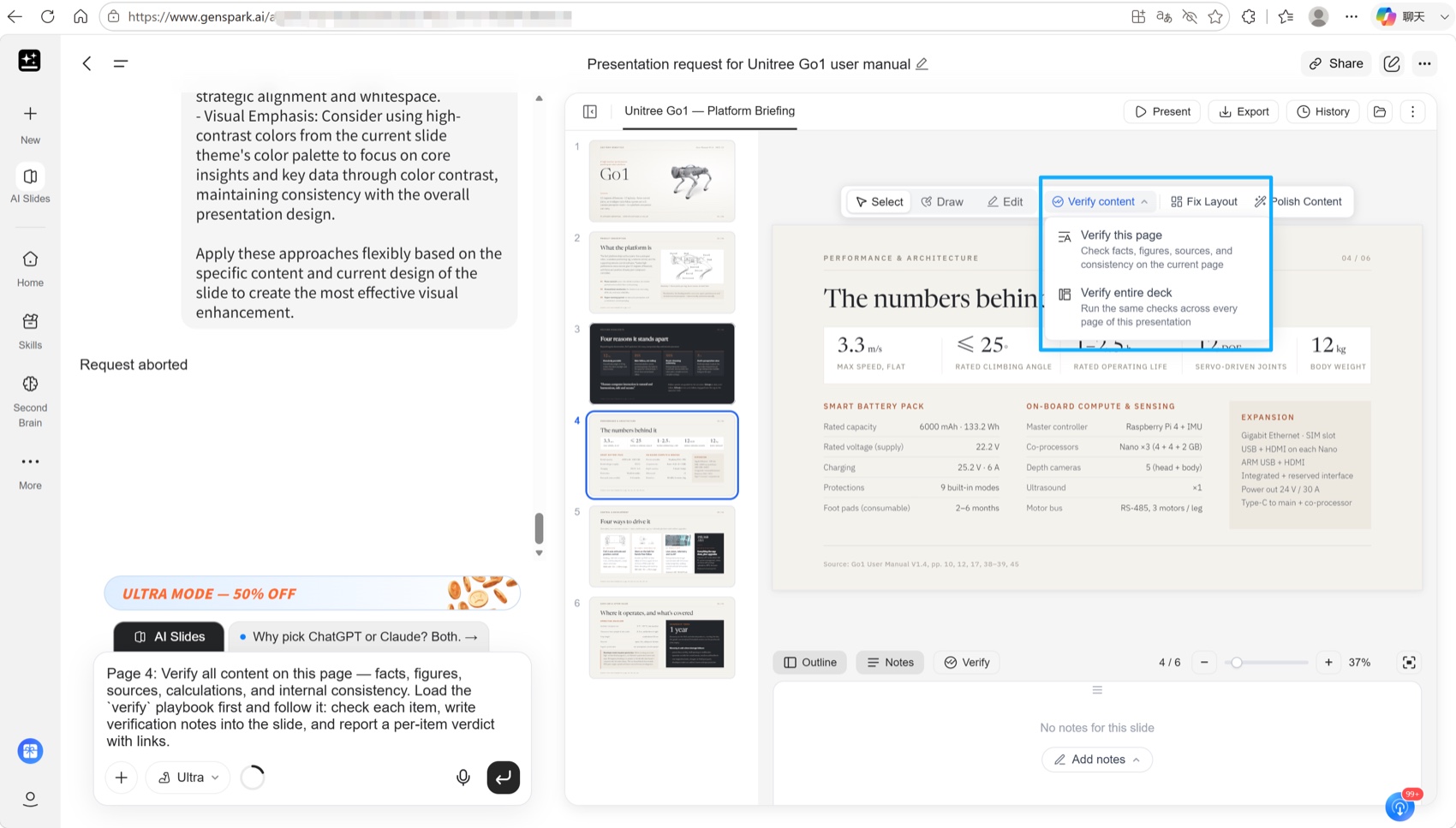
Verification is valuable but should supplement human review. The Genspark AI Slides documentation notes that complex content can become images or shapes after PowerPoint export.
Tosea AI workflow
Tosea AI separates generation into reviewable stages. The user selects a template, including an eligible custom template, then receives an outline containing slide titles, body content, selected images, and speaker notes. The outline can be revised without consuming slide-generation credits. Slides are rendered only after the content structure has been approved.
This checkpoint helps presenters catch missing safety procedures, measurements, or source figures before rendering.
Presentation Logic
Genspark produced six slides with a clear executive sequence: platform definition, differentiators, performance numbers, control methods, and operating coverage. The deck quickly answered what the Go1 is, why it matters, how it performs, and where it can be used. For a five-minute management briefing, this was the strongest narrative in the test.
The trade-off was compression. Important operating procedures, system diagrams, battery details, and safety instructions were either reduced or omitted. The deck explained the product at a high level but did not function as a detailed technical handoff.
Tosea generated nine slides and covered more of the manual. Its sequence included product introduction, system architecture, startup and shutdown, battery specifications, remote-control devices, safety, and maintenance. Product points were clearer for an engineering or operations audience because the original diagrams and supporting specifications remained visible.
Tosea was less concise. Some agenda labels felt academic and several slides were dense. Still, the deck retained enough evidence for technical discussion rather than only executive scanning.
Font Fidelity and PPTX Editability
Both decks looked visually stable when opened. The underlying files, however, behaved very differently.
The Genspark export contained each slide as a single full-page image. That preserves the visual appearance and prevents font substitution, but it also means the font is not truly editable. Correcting a label, changing a number, or applying a corporate typeface requires returning to Genspark or rebuilding part of the slide.
The Tosea export contained editable text boxes and separate visual objects. Fonts included common families such as Arial, Microsoft YaHei, Times New Roman, and SimSun. This makes post-export correction much faster, although the presentation should still be tested on the exact computer used for delivery because missing local fonts can cause substitutions.
Both passed visual fidelity. Tosea won practical PowerPoint editing.
Tables, Figures, and Technical Data
Genspark did process numerical information well enough to create a polished performance slide. It extracted major values such as speed, climbing angle, operating life, body weight, battery capacity, voltage, and sensing hardware. The result was easy to scan and included source-page references.
What it did not do was preserve the original technical tables as reusable PowerPoint tables. The exported deck contained no native table or chart objects. Data was redesigned inside flattened slide images, which is suitable for reading but restrictive for revision.
Tosea preserved more source figures, system diagrams, product illustrations, and specification content. Its sample also did not contain native PowerPoint table objects, but the original information remained visually traceable to the manual and text elements were editable. For document-grounded work, this is the safer starting point because the presenter can compare the slide against the source instead of reconstructing omitted evidence.
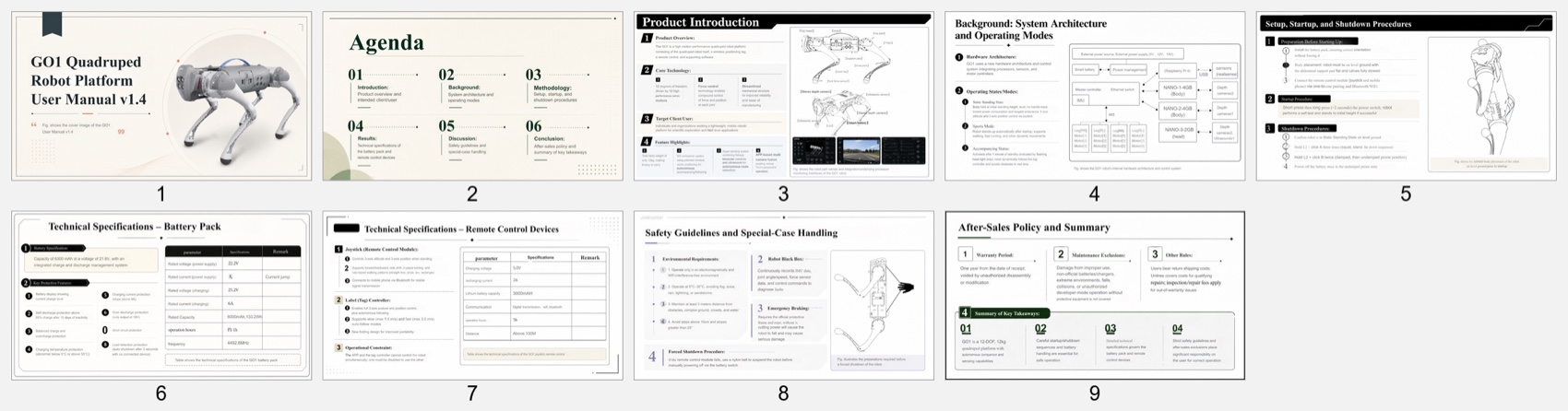
The difference is easiest to see on the battery page. Genspark reports capacity and voltage as designed statistics inside a summary layout; Tosea carries the manual's own specification block onto the slide, including the entries a presenter would otherwise have to look up mid-answer.
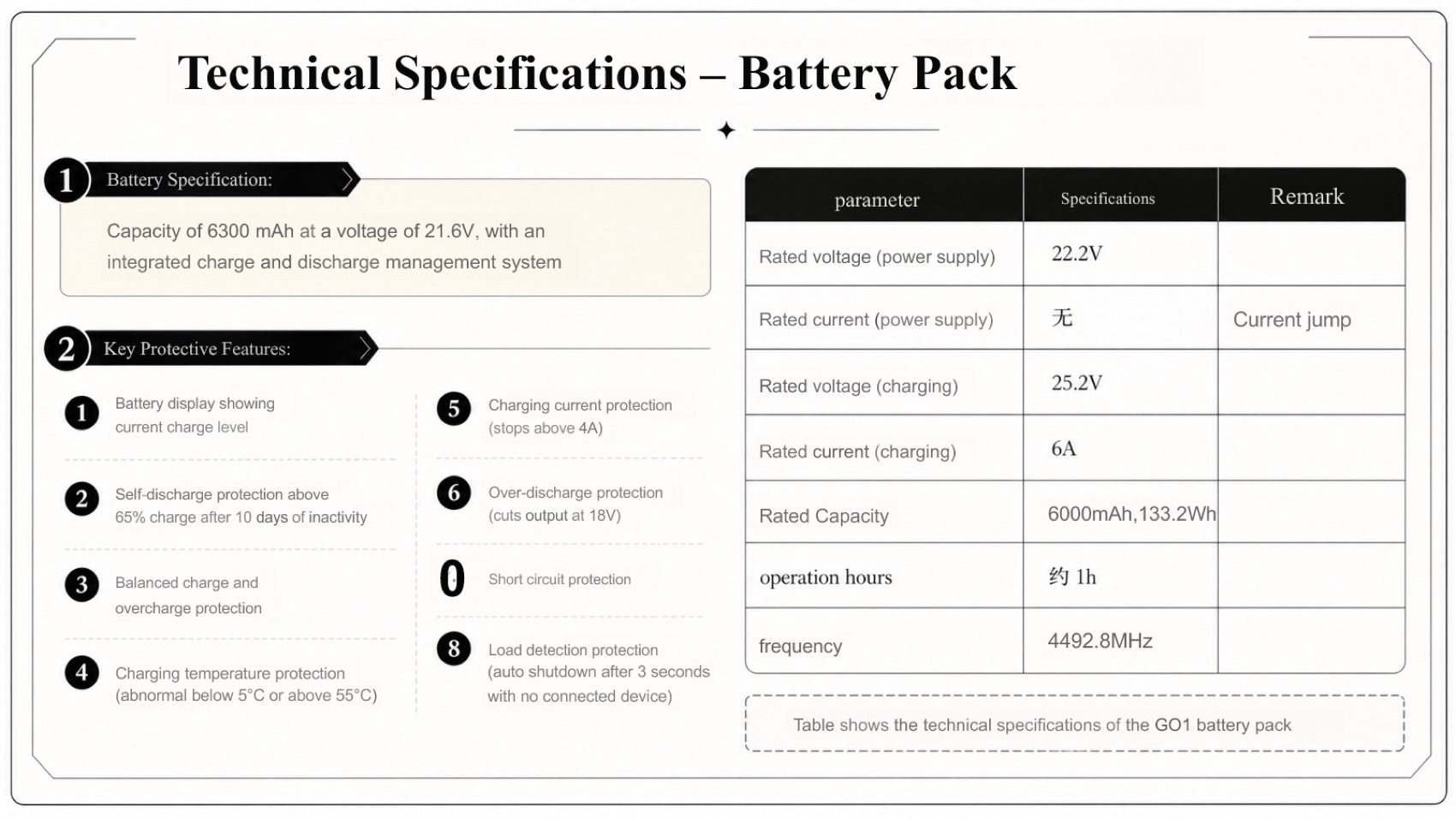
Neither approach is strictly better. A performance slide built from extracted values is cleaner to project and easier to read from the back of a room. A preserved specification block is harder to read and harder to dispute. Which one you want depends on whether the audience is being informed or being asked to make a decision on the numbers — and on our GO1 test that difference accounted for most of the 13-minute gap in repair time.
Manual Repair Time
Genspark: approximately 28 minutes
- 8 to 10 minutes to verify technical claims and source references
- 8 minutes to restore missing procedures or table context required by the audience
- 6 minutes to rebuild any labels or values that must be editable in PowerPoint
- 4 minutes for final slide-by-slide quality assurance
The deck was visually close to presentation-ready, but its flattened export created friction whenever content needed to change.
Tosea AI: approximately 15 minutes
- 7 minutes to correct OCR, numbering, and residual source-language issues
- 4 minutes to rename agenda labels and tighten dense copy
- 4 minutes for final source and export checks
Tosea needed more visual editing, but corrections were faster because the text remained editable and more source material had already been retained.
Pricing Comparison
Pricing changes, so the following comparison reflects the interfaces captured on August 18, 2026.
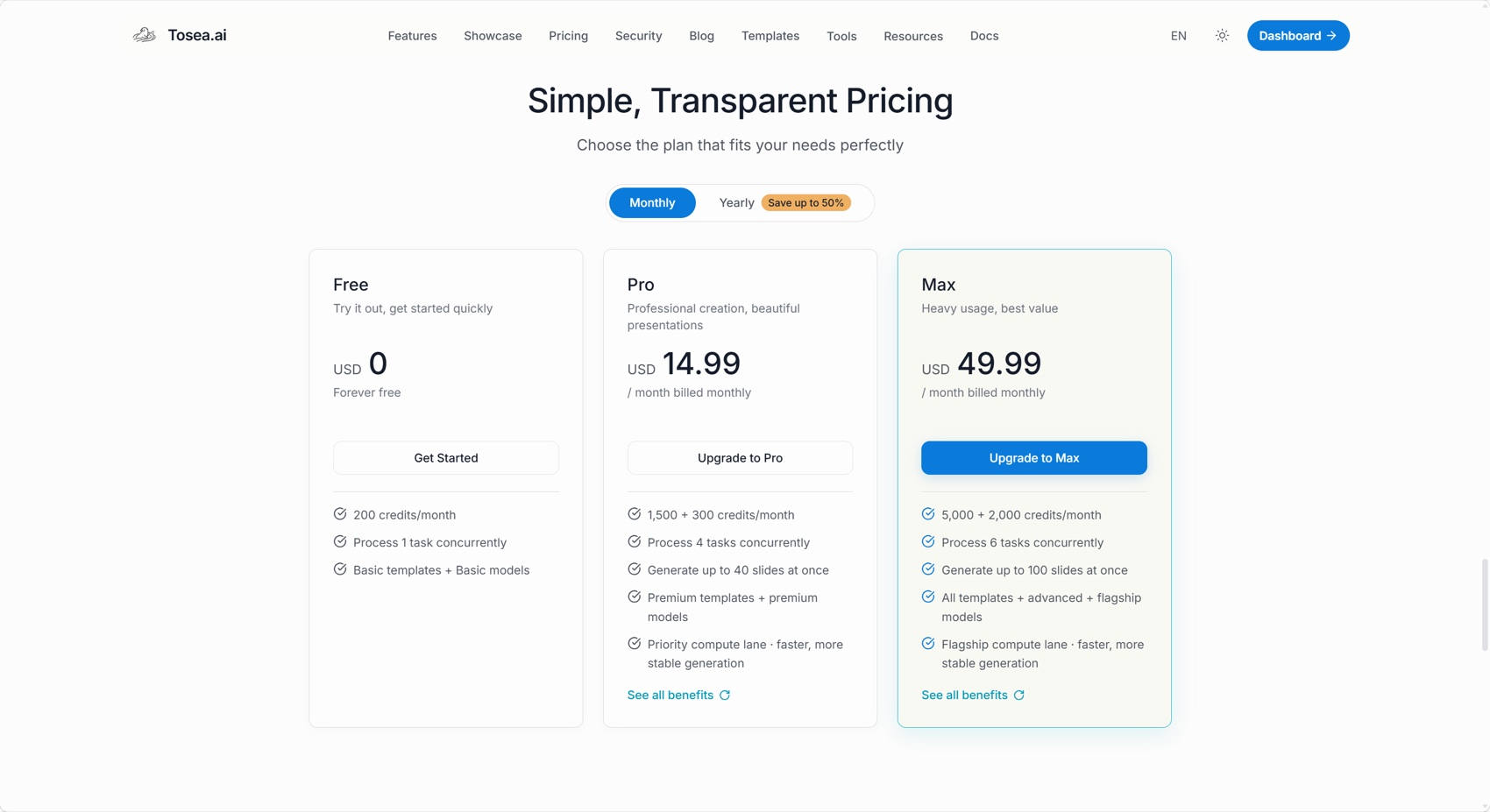
Tosea displayed a free plan with 200 monthly credits, Pro at $14.99 per month with 1,800 total monthly credits, and Max at $49.99 per month with 7,000 total monthly credits. At 20 credits per generated slide, those balances correspond to approximately 10, 90, and 350 slides before considering any other credit use.
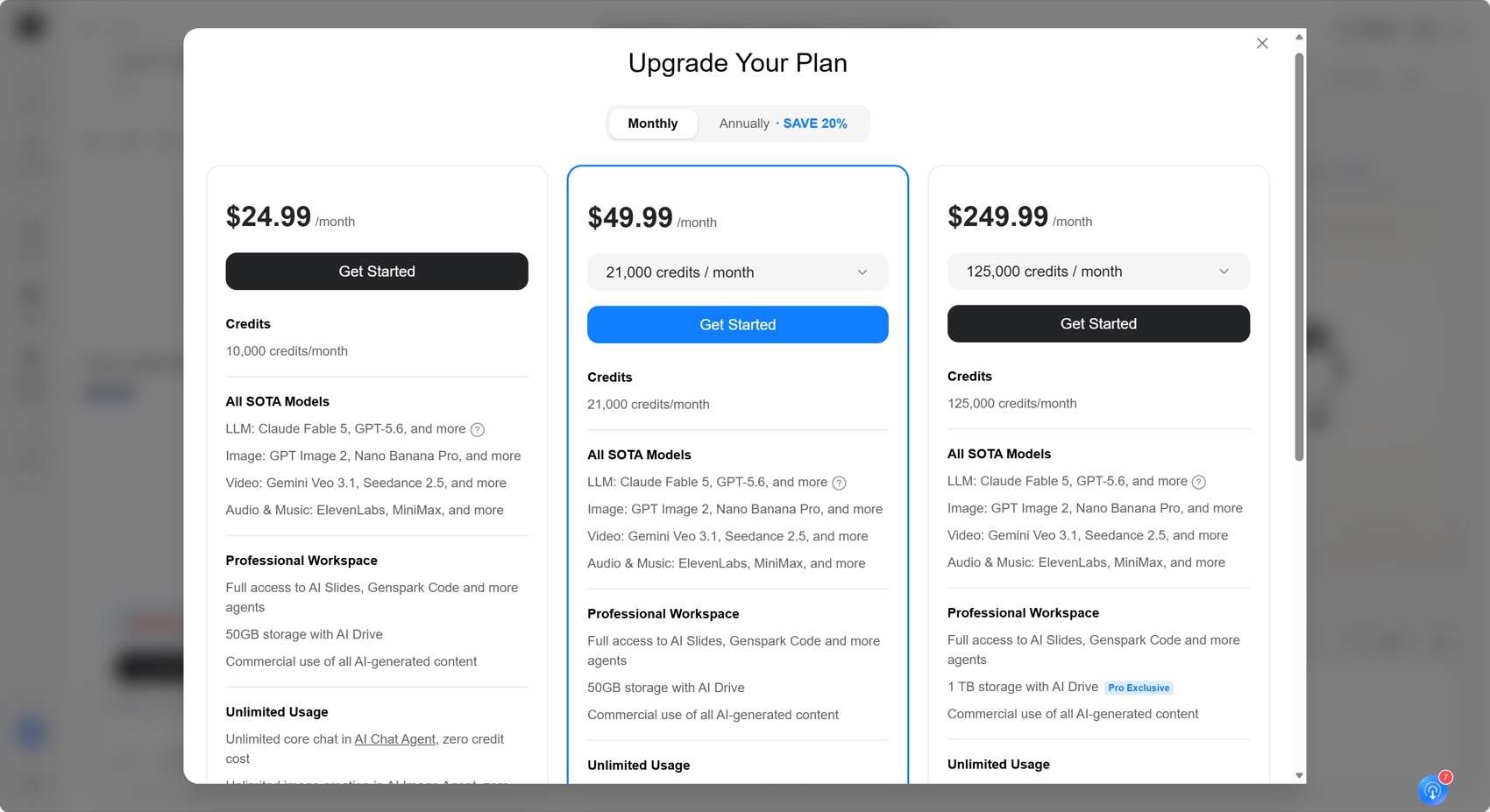
Genspark displayed monthly tiers at $24.99 with 10,000 credits, $49.99 with 21,000 credits, and $249.99 with 125,000 credits. Its credits support a broader workspace that includes slides and other AI agents, so the credit numbers are not directly comparable with Tosea credits.
Tosea has the lower entry price for a presentation-focused workflow. Genspark can provide more value to users who also need its wider set of AI models and agents. Buyers should confirm current prices and the credit cost of their intended workflow before subscribing.
Download the Test Decks
The files let readers inspect editability, structure, source coverage, and export behavior directly.
Where Tosea AI Fits
Tosea AI is a source-grounded AI presentation tool that turns PDFs, research papers, financial reports, technical manuals, and complex documents into editable PowerPoint slides. It is built for analysts, researchers, consultants, and technical teams that need preserved tables, figures, specifications, and source context with a reviewable outline before rendering.
Which Tool Should You Choose?
Choose Genspark when the goal is a fast, visually polished summary for an executive audience and extensive editing in PowerPoint is unlikely. Its concise storytelling, strong aesthetics, and built-in verification workflow make it useful for rapid briefings.
Choose Tosea AI when the source is long, technical, or evidence-heavy and the final PPTX must remain editable. It is better suited to engineering reviews, research presentations, analyst work, consulting deliverables, and any situation where original figures, procedures, or specifications must survive the document-to-slides conversion.
How to Reproduce This Test
The source is public. Download the Unitree GO1 User Manual, upload the identical PDF to both products, and send the same minimal instruction so neither tool benefits from coaching. Keep each platform's default aspect ratio, generate once, and export PPTX.
Inspect the exported files rather than the previews. For this pairing the interesting question is what each product does with material it decides not to feature. Genspark's Verify Content step surfaces what it drew from, which is genuinely useful for checking an executive summary; the check worth running is whether the specifications it verified actually reached a slide, or only the sentences about them.
Open both decks and count the manual's operating procedures, battery specifications, and control-device details that a reader could recover from the deck alone. Then note how long each would take to bring to a deliverable state. Both files from our run are linked above.
Where This Test Sits in the Benchmark Series
This is the closest result of the four GO1 runs in our benchmark series, and the closest result anywhere in the series apart from the Goldman Sachs consulting test. Genspark at 8.2 against Tosea AI at 8.5 is a narrow enough gap that team preference reasonably decides it.
The other three runs on this manual spread much wider. Gamma scored 6.8 with a compressed five-slide brief, Beautiful.ai 6.2 with the cleanest layouts and the thinnest source coverage, and Slidesgo 6.4 with a template-first deck that needed 50 minutes of repair.
Genspark's strength holds up outside hardware documentation. On a Goldman Sachs research report it scored higher than Tosea AI outright, 8.7 to 8.6, the only outright loss in the series. On a clinical meta-analysis it needed less repair time than Tosea AI, 30 minutes against 32. Read together, the three Genspark runs describe a product that is strongest when the deliverable is an argument and less strong when the deliverable has to carry the evidence with it. If your work is closer to the first, the PPT designer workflow guide covers how to keep that speed without losing the source.
What This Test Does Not Tell You
One document, one prompt, one generation per tool, run in August 2026. Genspark ships quickly and a rerun could land differently.
Because the two scores are within 0.3, small differences in weighting flip the ranking. Lower source fidelity from 25% to 15% and Genspark wins this scenario. We publish the weights precisely so that recalculation is possible rather than hidden.
Repair times are estimates from an experienced editor with the manual open, not measured sessions, and exclude rebranding. The ratio between them is more reliable than either number alone.
Frequently Asked Questions
Can Tosea AI redesign my existing PowerPoint without changing the content?
Yes. Export the PowerPoint as a PDF, upload it to Tosea AI, and request a redesign that preserves the original wording. Use Layout Only when the goal is to refresh visual structure without intentionally rewriting content. Check every label, footnote, and citation after generation.
How do I upload a PowerPoint and ask Tosea AI to redesign each slide?
Export the presentation as a PDF, upload it, and state that the content and sequence must remain unchanged. Select a template or describe the intended visual direction, review the outline, generate the deck, and inspect every slide before export.
Can I upload my own PowerPoint template to Tosea AI?
Tosea supports custom templates on eligible paid plans. Confirm that required layouts, fonts, colors, logos, and master-slide rules are represented correctly before distributing the generated deck.
Can Tosea AI use custom brand colors, fonts, and a logo?
Yes. Provide the required colors and fonts in the instructions and upload the logo or use a supported custom template. Verify font availability, color values, contrast, and logo clear space after export.
Can Tosea AI match the style of previous company presentations?
Tosea can use a representative deck as design guidance. For stronger consistency, use an approved custom template that already contains the company layouts, colors, fonts, and logo rather than assuming permanent model training.
Does Tosea AI preserve PowerPoint formatting after export?
The editable PPTX export is designed to stay close to the generated preview while retaining editable elements. Results can vary with installed fonts, complex graphics, and the software used to open the file, so test the deck in the delivery environment.
Can I edit only the layout and keep the exact wording?
Yes. Layout Only changes the visual arrangement without intentionally rewriting slide content. Compare the result with the source to confirm that labels, citations, footnotes, line breaks, and technical values remain correct.
Final Verdict
Genspark created the more elegant summary. Tosea AI created the more workable technical deliverable. That distinction matters more than a single overall score.
For a quick leadership update, Genspark is an excellent option. For a professional presentation built from a manual, research paper, financial report, or other complex source, Tosea AI is the better choice when accuracy, evidence retention, reviewable content, and editable PowerPoint output carry more weight than immediate visual polish.
For related workflows, see AI presentation tools for PPT designers, the research paper to slides workflow, and the best AI slide generators for the second half of 2026.
Sources
- GO1 official download center — Unitree Robotics
- Unitree GO1 User Manual (PDF) — Unitree Robotics
- Genspark AI Slides FAQ — Genspark