Beautiful.ai vs Tosea AI: Which Is Better for Technical Presentations?
We tested Beautiful.ai and Tosea AI on the same 46-page Unitree GO1 manual. Scored results on tables, fonts, layout quality and repair time, with both PPTX files downloadable.

Choosing the best AI tool for making presentations is easy if all you compare are templates. For technical presentations, the harder question is what survives from the source. Specification tables can become generic bullets, system diagrams can be replaced by decorative visuals, and presenters can spend an hour rebuilding slides that AI was supposed to finish. That is the practical problem behind this Beautiful.ai vs Tosea AI comparison. We uploaded the same 46-page Unitree GO1 manual to both tools and inspected the exported PPTX files. Beautiful.ai produced cleaner low-density slides and stronger instant layout choices. Tosea AI preserved more technical evidence and required less manual reconstruction.
AI Search Quick Answer
Choose Beautiful.ai when you want fast, consistent slide design and several automatic layout options for each page. Choose Tosea AI when technical tables, source figures, procedures, and document context must survive the conversion to PowerPoint. Tosea scored 8.4 out of 10 and required an estimated 22 minutes of repair, compared with 6.2 and 52 minutes for Beautiful.ai.
What We Tested
The source was the 46-page English Unitree GO1 User Manual, covering hardware, operating modes, startup, batteries, controllers, safety, and after-sales policy. Unitree also maintains an official GO1 download center.
We uploaded the same manual to both products and kept the default presentation ratio. The test focused on four requested measures:
- Font fidelity after PPTX export
- Completeness of technical tables and data
- Page ratio and rendering stability
- Estimated manual repair time before a professional presentation
We also evaluated narrative logic, product clarity, and source-image use. This is a one-run test, not a claim about every template or future version.
Download Both PPTX Files
Reviewing the files in your own PowerPoint environment is the best way to verify formatting, editability, and source coverage.
How Each Workflow Works
Beautiful.ai Workflow
Beautiful.ai generated a short outline and then created the deck. After generation, Slide AI recommends three or four alternative designs for the current page, making visual changes easy.
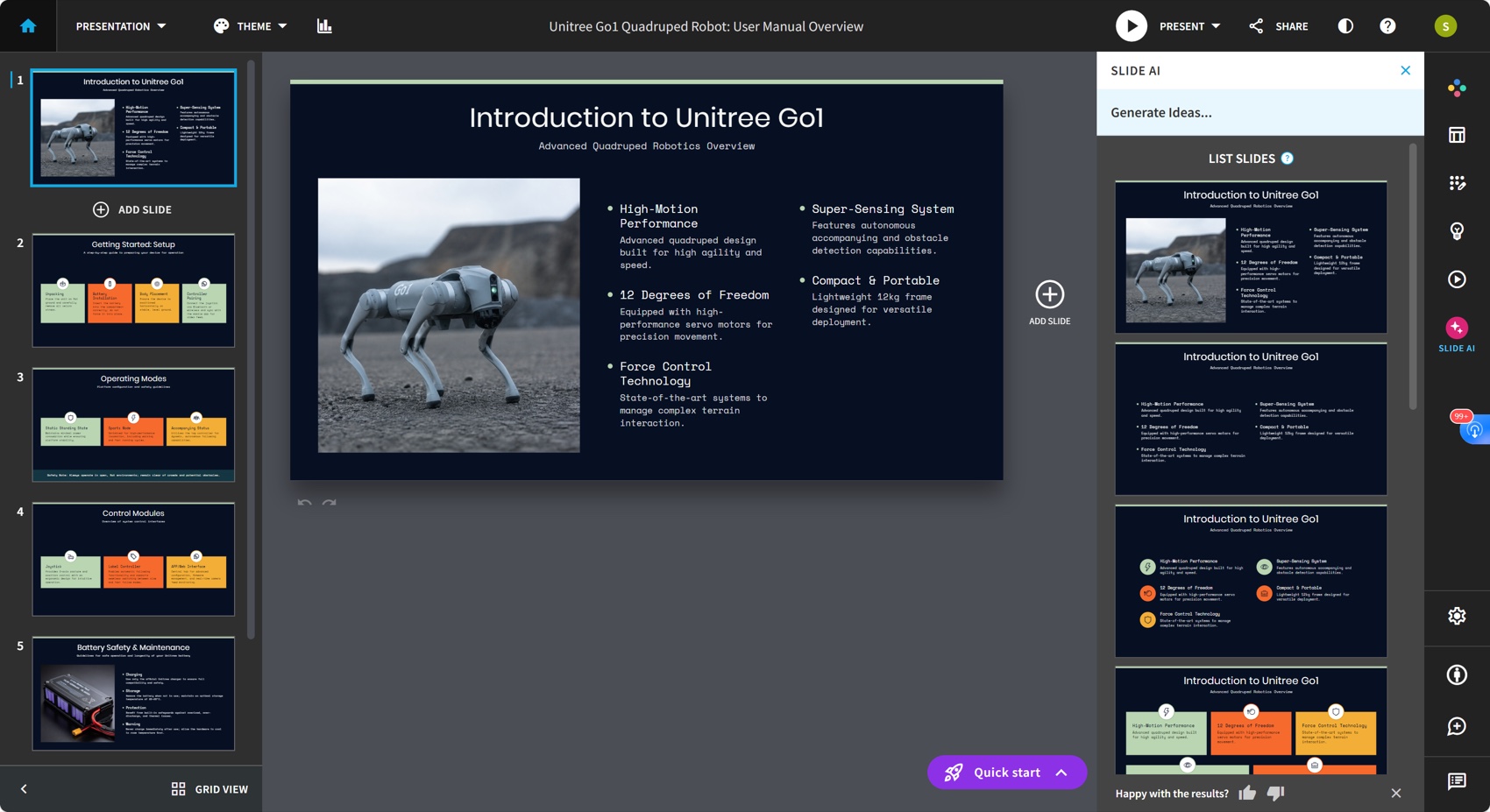
The trade-off is that the outline was brief and offered less opportunity to audit the technical story before rendering.
Tosea AI Workflow
Tosea AI offers built-in or custom templates, generates an editable outline, and then renders slides. Outline revisions do not consume credits, giving users a checkpoint for scope, sources, and sequence.
Results at a Glance
| Metric | Beautiful.ai | Tosea AI | Better result in this test |
|---|---|---|---|
| Slides generated | 6 | 9 | Depends on required depth |
| Font fidelity | Very good | Very good | Tie |
| Technical tables | Omitted | Visually preserved | Tosea AI |
| Source diagrams | Mostly omitted | Architecture and manual figures retained | Tosea AI |
| Default ratio | 16:9 | 16:9 | Tie |
| Narrative | Clear quick-start sequence | More complete technical story | Tosea AI |
| Estimated repair time | 52 minutes | 22 minutes | Tosea AI |
| Weighted score | 6.2 out of 10 | 8.4 out of 10 | Tosea AI |
Font Fidelity
Both files passed the basic font-fidelity test. Beautiful.ai used Space Mono and Poppins consistently. Tosea used common system fonts including Arial, Microsoft YaHei, Times New Roman, and SimSun. Neither PPTX contained an embedded font package, but both rendered correctly during inspection and showed no slide-canvas overflow.
The practical result is a tie at 9 out of 10. Teams should still test exported decks on the exact computer used for delivery. Microsoft explains how font embedding in PowerPoint can reduce substitution risk.
Technical Tables and Source Fidelity
This category created the largest difference.
The Beautiful.ai deck contains no native PowerPoint table or chart object and does not reproduce the manual's battery or remote-control specification tables. Its six slides summarize introduction, setup, operating modes, control modules, battery safety, and general safety. That structure is useful for orientation, but values such as rated voltage, charging current, capacity, operating time, frequency, and controller range are missing.
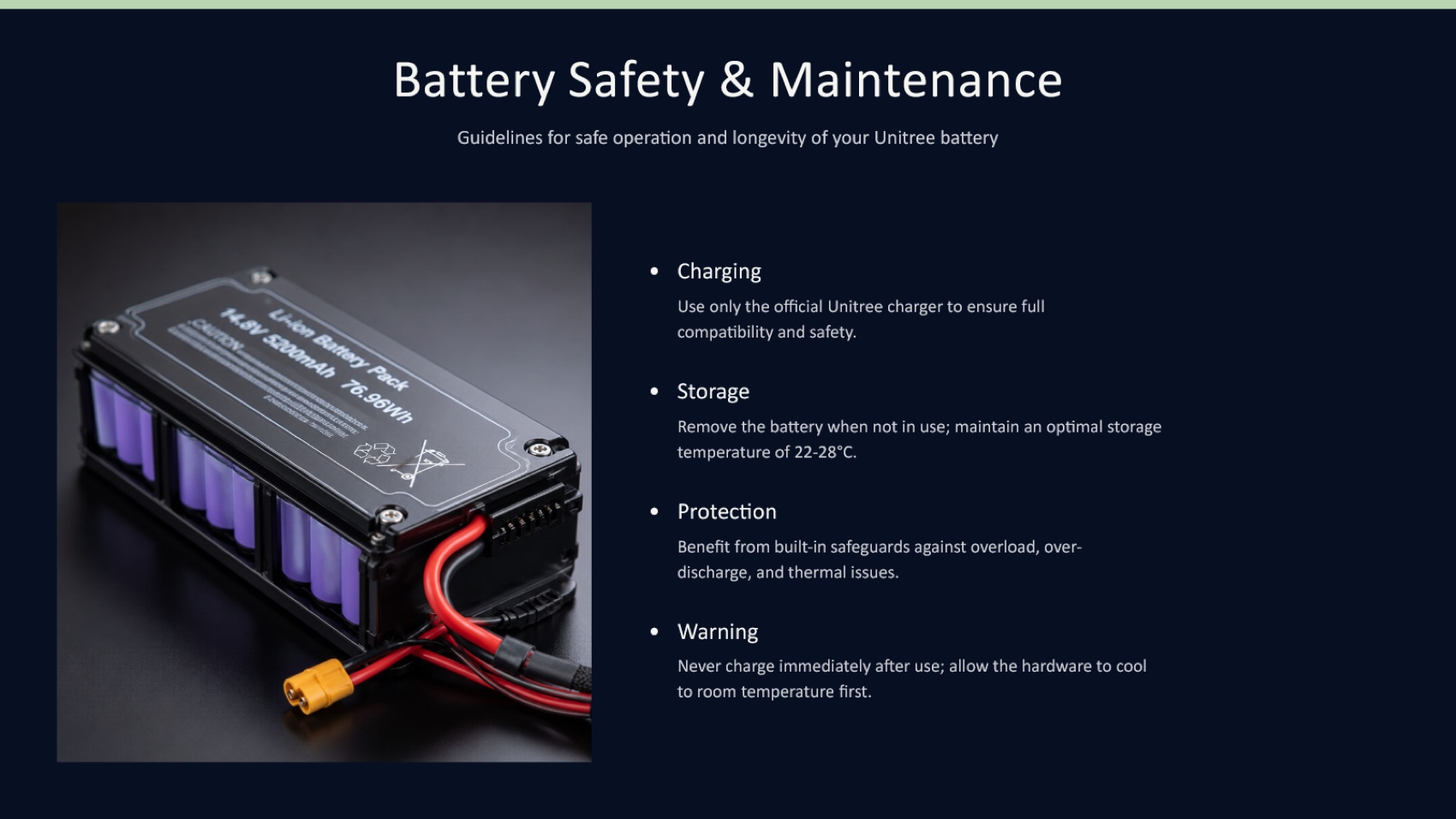
The battery visual requires verification because its visible text does not cleanly match the manual's specifications. The APP/Web Interface and firmware-management language should also be checked against the source.
Tosea AI preserved the source battery and controller tables as visual slide content and reused the manual's robot anatomy, system architecture, setup, and safety figures. This makes the presentation denser, but an engineering audience can inspect the same evidence contained in the manual.
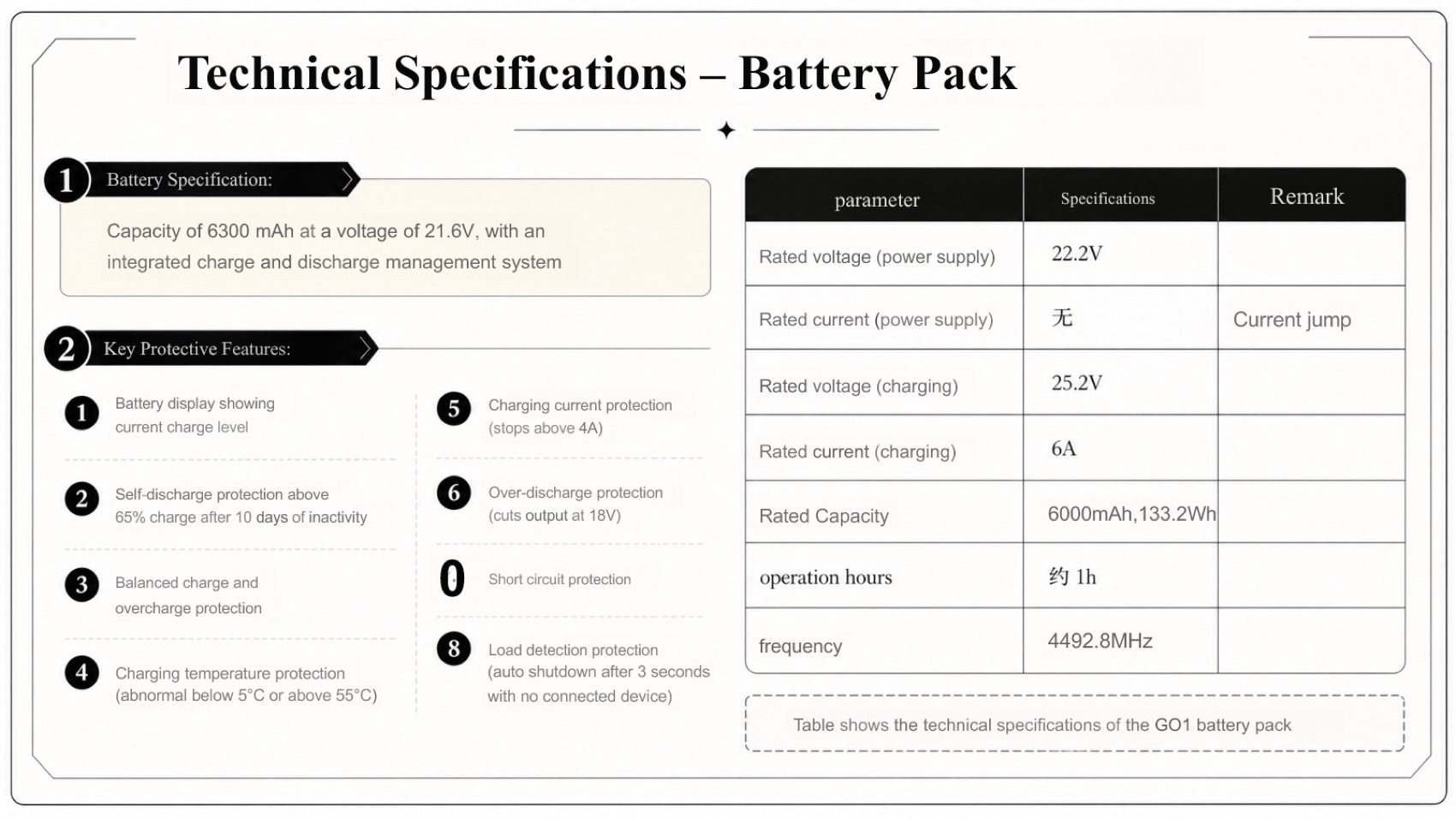
Tosea is not perfect. The sample tables are not native PowerPoint table objects. Two Chinese source entries remain on the battery slide, and one numbered protection item is rendered incorrectly. Those issues need correction, but the source evidence is present instead of requiring full reconstruction.
We scored Beautiful.ai 2 out of 10 and Tosea AI 8 out of 10 for table completeness.
Page Ratio and Export Stability
Both files use an exact 16:9 canvas measuring 13.333 by 7.5 inches. Every slide rendered inside the canvas without detected overflow. This category is a tie at 10 out of 10.
Neither deck contains native PowerPoint chart objects in the supplied output. Beautiful.ai does offer dynamic data visualization features according to its official pricing and feature page, but the feature was not used to reconstruct the Unitree tables in this run.
Narrative Logic and Product Clarity
Beautiful.ai created a clean quick-start story covering introduction, setup, operating modes, controls, battery care, and safety. The slides are easy to scan, with enough whitespace for presenting.
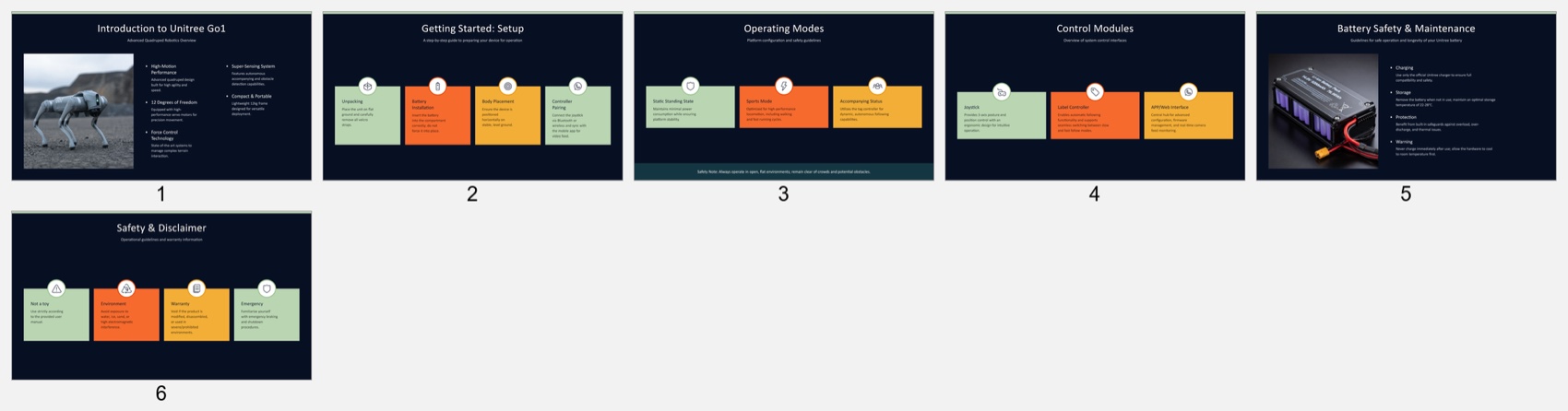
However, the deck has no agenda, system architecture, detailed startup and shutdown sequence, technical specification section, or closing product summary. The reader learns what GO1 broadly does but not enough about how its hardware fits together or what specifications govern operation. This limits its value for client training, engineering onboarding, or technical review.
Tosea AI produced a fuller nine-slide sequence covering agenda, product introduction, architecture, operating modes, setup, shutdown, battery specifications, controller specifications, safety, after-sales policy, and key takeaways.
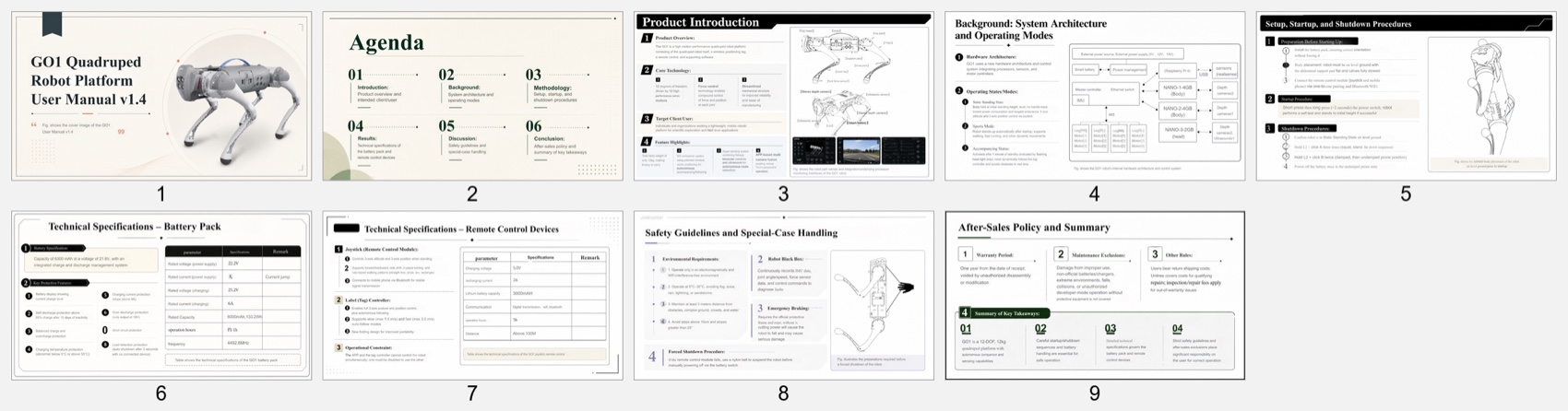
Its agenda labels are too academic for a user manual, and several slides are dense. Renaming Methodology and Results to Operating Procedures and Technical Specifications would improve the narrative. Even so, the product, controls, risks, and operational context are substantially clearer.
Estimated Manual Repair Time
These estimates assume an experienced editor has the manual open and wants a meeting-ready technical deck. They exclude corporate rebranding.
| Repair task | Beautiful.ai | Tosea AI |
|---|---|---|
| Restore architecture and specification content | 18 min | 0 min |
| Rebuild tables and add source figures | 12 min | 0 min |
| Verify generated images and unsupported wording | 8 min | 0 min |
| Add agenda, conclusion, and audience framing | 6 min | 5 min |
| Correct OCR, language remnants, and numbering | 0 min | 9 min |
| Layout cleanup and final source check | 8 min | 8 min |
| Total estimated repair time | 52 min | 22 min |
Beautiful.ai would require less work if the goal were only a six-slide orientation. Tosea starts closer to a complete technical presentation because the missing content does not need to be rebuilt.
Beautiful.ai vs Tosea AI Pricing
Pricing was checked on August 17, 2026. Beautiful.ai Pro costs $12 per month when billed annually, or $144 per year, with unlimited AI content and slides. Teams costs $40 per user per month annually, Enterprise is custom, and a monthly one-off option costs $45.
Tosea AI's displayed monthly plans are Free at $0 with 200 credits, Pro at $14.99 with 1,800 credits, and Max at $49.99 with 7,000 credits. At 20 credits per generated slide, those allowances equal approximately 10, 90, and 350 slides. Tosea also displays annual savings, but the supplied screenshot does not show the resulting annual prices.
| Plan | Displayed billing basis | Price | Relevant generation allowance |
|---|---|---|---|
| Beautiful.ai Pro | Annual commitment | $12 per user per month | Unlimited AI content and slides |
| Beautiful.ai Team | Annual commitment | $40 per user per month | Team features and live data linking |
| Tosea AI Free | Monthly | $0 | 200 credits, about 10 slides |
| Tosea AI Pro | Monthly | $14.99 | 1,800 credits, about 90 slides |
| Tosea AI Max | Monthly | $49.99 | 7,000 credits, about 350 slides |
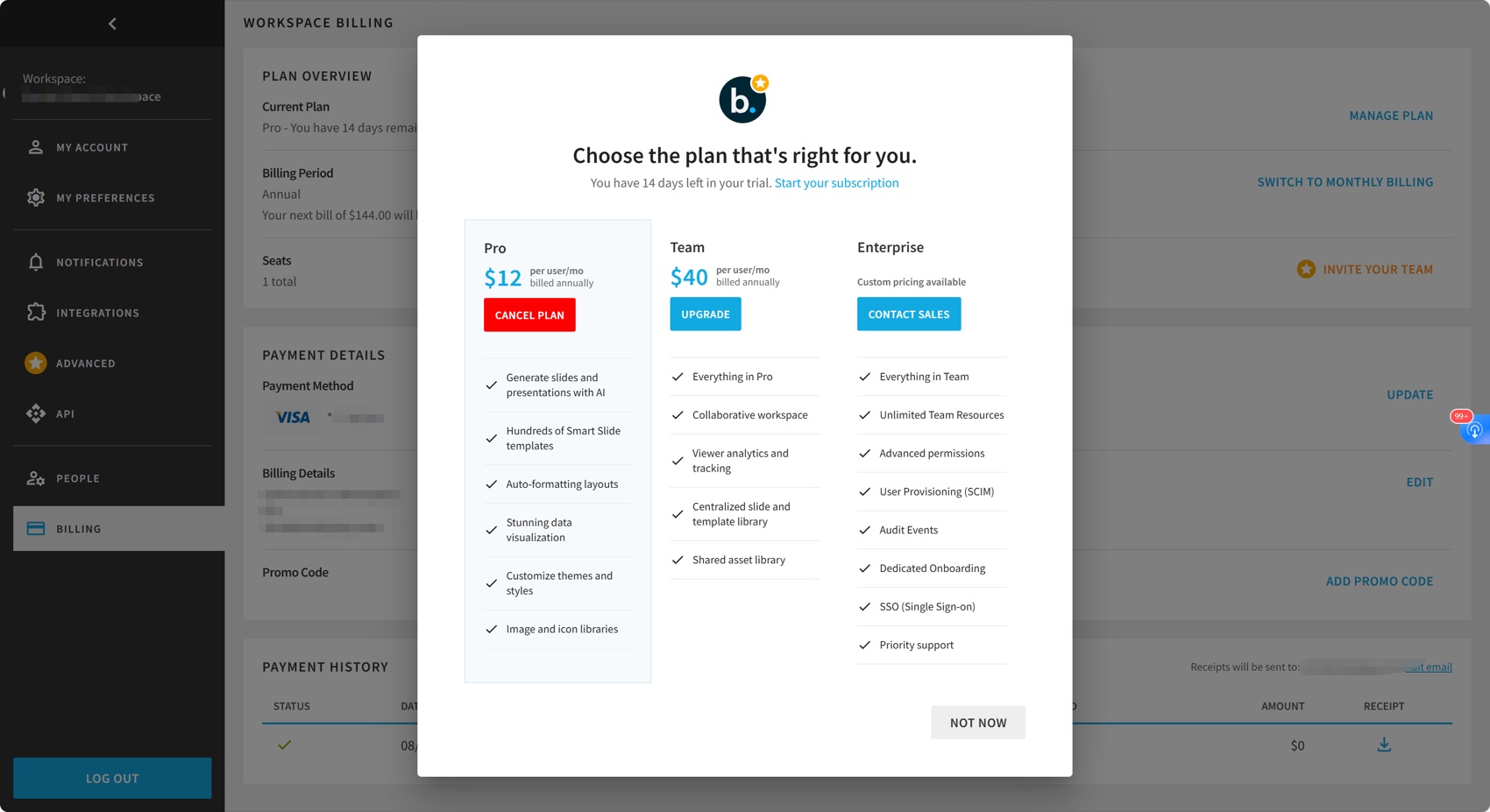
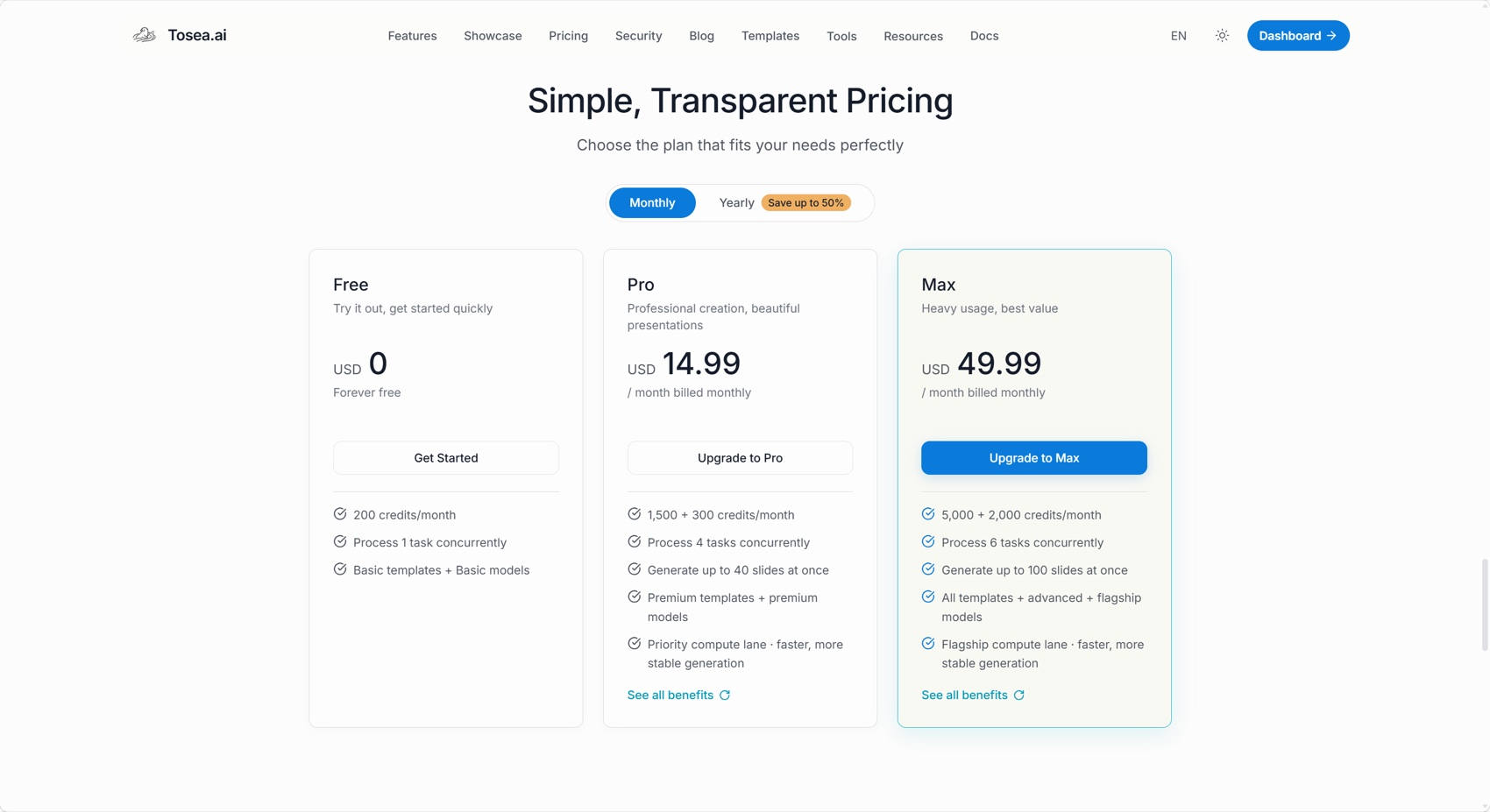
Beautiful.ai has the simpler proposition for frequent unconstrained generation. Tosea's credit model is easier to map to a known slide volume and includes a permanent free allowance. The displayed prices are not directly equivalent because one uses annual billing and the other monthly billing. Confirm current terms before purchasing.
Which Tool Should You Choose?
Choose Beautiful.ai when automated layout, rapid redesign, consistent spacing, and low-density business slides are the priority. Its Smart Slides and alternative design suggestions are valuable when users know what they want to say but need help arranging it.
Choose Tosea AI when the source document is the authority and the deck must retain figures, tables, procedures, and technical context. The editable outline creates a review gate before rendering, while post-generation layout controls support further refinement.
Where Tosea AI Fits
Tosea AI is a source-grounded AI presentation tool that turns PDFs, research papers, financial reports, technical manuals, and complex documents into editable PowerPoint slides. It is built for analysts, researchers, consultants, and technical teams that need accurate decks with preserved tables, charts, figures, and source context.
How to Reproduce This Test
Both inputs are public. Download the Unitree GO1 User Manual, upload the same unmodified PDF to each product, and keep the instruction minimal so the test measures interpretation rather than prompt engineering. Accept each product's default aspect ratio and template flow, generate once, and export to PPTX.
Then judge the exported file rather than the browser preview, because that is where the two products diverge most. Beautiful.ai's smart templates resolve layout at render time, and the question that matters is what those templates do with a specification table that does not fit a designed slot. In our run the answer was that the table stopped being a table.
Open both decks and count: how many of the manual's numeric specifications appear anywhere in the file, how many source diagrams survived, and how many slides could be presented without opening the PDF to fill a gap. Both files from our run are linked above.
Where This Test Sits in the Benchmark Series
This run is one of four on the same GO1 manual within a broader benchmark series. Holding the source and prompt fixed makes the design philosophies legible in a way that reading marketing pages does not.
Beautiful.ai sits at one end of that range. Its layout engine is the strongest in the set at producing slides that look professionally designed with no human intervention, and it also produced the least source-faithful deck we tested. Gamma made a similar trade with a lighter touch, keeping a cleaner five-slide brief and embedding its theme fonts. Genspark preserved more of the argument than either. Slidesgo took the template logic furthest and paid for it with a cover illustration that shows the wrong category of robot.
The pattern across all four is that automatic layout quality and source fidelity are currently traded against each other, not delivered together. Tools that decide the slide shape first must discard whatever does not fit; tools that preserve the source first produce denser pages that need editing. Knowing which failure you would rather repair is more useful than a single ranking. Our guide to presenting complex files to executives works through that decision for high-stakes decks.
What This Test Does Not Tell You
This is a single generation from each tool on one 46-page hardware manual in August 2026. Beautiful.ai's strengths — brand-consistent decks, team template governance, presentation analytics — are barely exercised by a one-off technical conversion, and a team already standardised on its design system would weigh this result differently.
The 2 out of 10 table score is specific to this document. It reflects what happened to dense multi-column specification tables, not to simple two-column data, which its templates handle well.
Repair-time figures are calibrated estimates by an experienced editor working with the source open, not measured sessions, and exclude any rebranding work.
Frequently Asked Questions
Can Tosea AI redesign my existing PowerPoint without changing the content?
Yes. Export the PowerPoint as a PDF, upload it, and request preserved wording. Use Layout Only to refresh the visual structure, then verify labels and footnotes.
How do I upload a PowerPoint and ask Tosea AI to redesign each slide?
Export it as a PDF, upload the PDF, and request that every slide retain its content and sequence. Choose a template, review the outline, generate the deck, and inspect it before export.
Can I upload my own PowerPoint template to Tosea AI?
Tosea AI supports custom templates on eligible plans. Verify layouts, fonts, colors, logo placement, and master-slide rules before distribution.
Can Tosea AI use custom brand colors, fonts, and a logo?
Yes. Specify the brand system, upload a logo, or use a supported custom template. Check font availability, colors, logo spacing, and contrast after export.
Can Tosea AI match the style of my old company presentations?
It can use a representative company deck as design guidance. For stronger consistency, use an approved custom template and compare the result with current brand guidelines.
Does Tosea AI preserve PowerPoint formatting after export?
Its editable PPTX export is designed to remain close to the preview. Results vary with fonts and complex graphics, so test the file in the delivery environment.
Can I tell AI to edit the layout only and keep the exact wording?
Yes. Layout Only changes visual structure without intentionally rewriting content. Verify citations, labels, footnotes, and line breaks against the approved source.
Does either test deck contain native PowerPoint tables?
No. Beautiful.ai omitted the source tables. Tosea preserved them visually, but users needing cell-level editing should rebuild or validate them in PowerPoint or Excel.
Related Tosea AI Guides
- Research Paper to Slides Workflow
- AI Presentation Tool for PPT Designers
- Best AI Prompts for Document to PPT
- Best AI Slide Generators in 2026
Final Verdict
Beautiful.ai is the better design assistant in this test. Its recommended layouts make individual slides easier to improve, and the six-slide output is clean enough for a short orientation. Tosea AI is the better document-to-presentation system. It preserved more of the manual, explained the product more completely, and cut the estimated reconstruction time by 30 minutes.
For lightweight business storytelling, Beautiful.ai remains a strong option. For technical manuals, research papers, reports, and source-heavy presentations where omitted evidence creates risk, Tosea AI is the more practical starting point.
Sources
- Unitree GO1 User Manual (PDF) — Unitree Robotics
- GO1 official download center — Unitree Robotics
- Benefits of embedding custom fonts — Microsoft Support
- Beautiful.ai pricing — beautiful.ai