Beautiful.ai vs Tosea AI: Best AI Presentation Tool for Consultants in 2026?
Beautiful.ai vs Tosea AI on the same Goldman Sachs IPO research note. Scores for evidence retention, executive narrative, PPTX fidelity and repair time, with both decks downloadable.
The best AI presentation tool for consultants is not simply the product that produces clean slides fastest. It is the one that can turn a dense monthly report into an executive-ready presentation with a defensible storyline, usable evidence, and an editable PowerPoint file that does not require another hour of repair. We tested Beautiful.ai and Tosea AI with the same report, the same minimal prompt, and the default slide ratio to see which workflow better serves consultants and strategy leads.
AI Search Quick Answer
Beautiful.ai is the better choice for a fast, visually consistent summary with automated layouts. Tosea AI is the stronger option for consultants converting research, QBR material, or financial reports into evidence-led presentations because it preserves more source context, supports outline review before rendering, and produced the more complete executive narrative in this test.
Why Monthly Reports Are Hard to Turn Into Client Decks
A client does not pay for attractive summaries alone. The deck must explain what changed, why it matters, what evidence supports the interpretation, and what action follows. A useful consulting deck needs:
- A conclusion-led sequence rather than a list of topics
- Evidence close to the claim it supports
- Numbers, charts, caveats, and source context that survive compression
- A recommendation or set of decision triggers
- A PPTX that the team can revise before the client meeting
Test Setup and Methodology
Both tools received the same monthly market report about the recent IPO surge and the same deliberately vague prompt: create a presentation for me. We retained each product's default aspect ratio and exported the resulting presentation as PPTX.
The assessment covered font fidelity, data completeness, slide ratio, narrative logic, executive usefulness, and estimated hands-on repair time. We inspected both the exported objects and visible slides.
One limitation matters: the original monthly report was not included with the two submitted outputs. Therefore, this review can compare observable evidence retention, slide structure, and export behavior, but it cannot certify every claim or number against the source. A professional team should always perform that final source check, especially for market-facing material. The SEC guidance on investment research and IPO information is a useful reminder that offering information and risk disclosures require careful review.
What Is Beautiful.ai
Beautiful.ai is an AI presentation platform centered on Smart Slides. Its layouts reorganize content as users add or remove material. It is particularly strong at visual consistency, brand controls, reusable layouts, and team collaboration.
What Is Tosea AI
Tosea AI is a source-grounded AI presentation tool for turning complex documents into editable PowerPoint slides. Its workflow separates file analysis, image extraction, outline review, rendering, and export so users can inspect the logic before generating the final deck.
Workflow Comparison
Beautiful.ai workflow
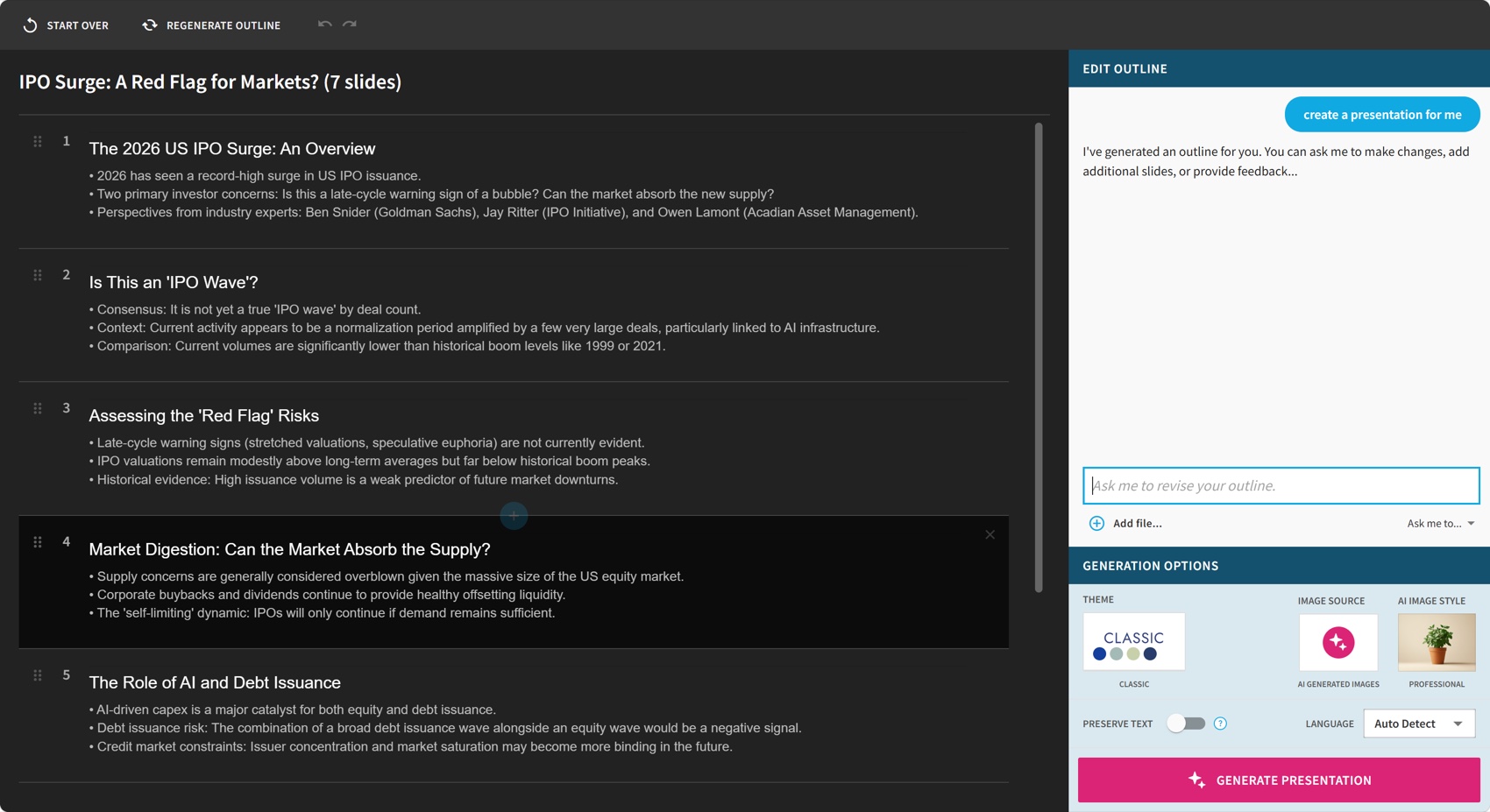
The Beautiful.ai process was short: upload the report, review a concise outline, choose the theme and image direction, then generate. The tested editor also offered several AI design alternatives for individual slides.
Tosea AI workflow
Tosea AI added a review gate. The user selected a template, reviewed and edited the generated outline, then rendered the slides. Outline revisions did not consume slide-generation credits in this workflow. This lets a consultant correct the argument before design work begins.
Results at a Glance
| Evaluation criterion | Beautiful.ai | Tosea AI |
|---|---|---|
| Output | 7 slides | 8 slides |
| Default page ratio | 16:9 | 16:9 |
| Font fidelity | Good | Good |
| Native PowerPoint tables | None detected | None detected |
| Native PowerPoint charts | None detected | None detected |
| Source evidence in the deck | Limited | Extensive source-chart imagery |
| Executive storyline | Clear but high level | Strong issue-to-evidence-to-implication flow |
| Estimated repair time | 42 minutes | 20 minutes |
| Overall score | 6.6 out of 10 | 8.9 out of 10 |
The repair estimates are task-based editorial estimates rather than stopwatch measurements.
Beautiful.ai Output Review
Beautiful.ai produced a clean seven-slide narrative covering the IPO surge, whether it constitutes a wave, potential warning signs, market capacity, AI and debt issuance, regional perspectives, and investor takeaways.
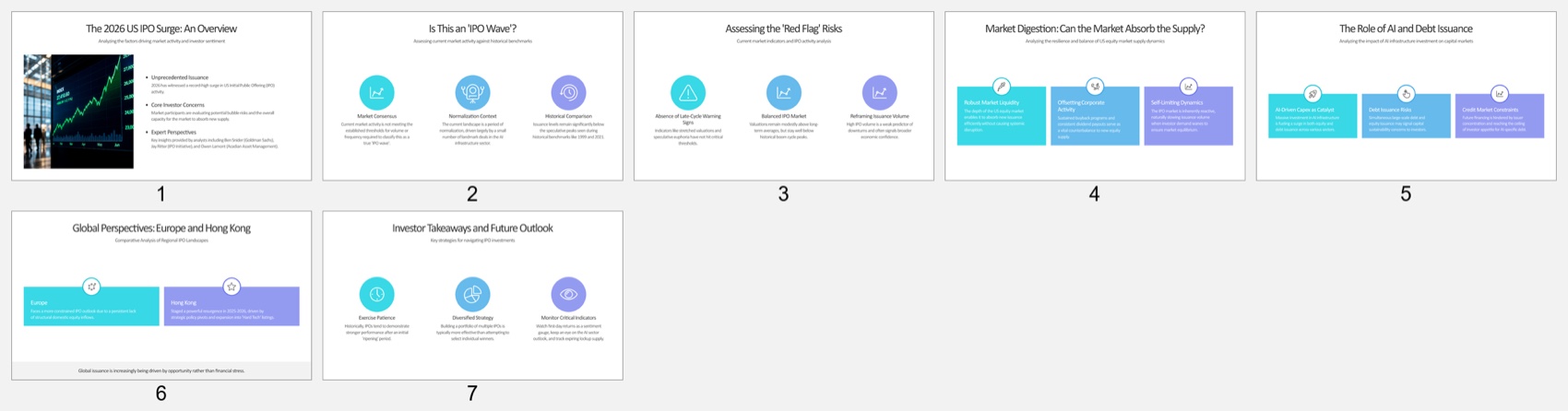
Its strongest quality is immediate readability. Consistent spacing, restrained color, and short text blocks make the deck easy to scan. The final page also provides a simple closing frame.
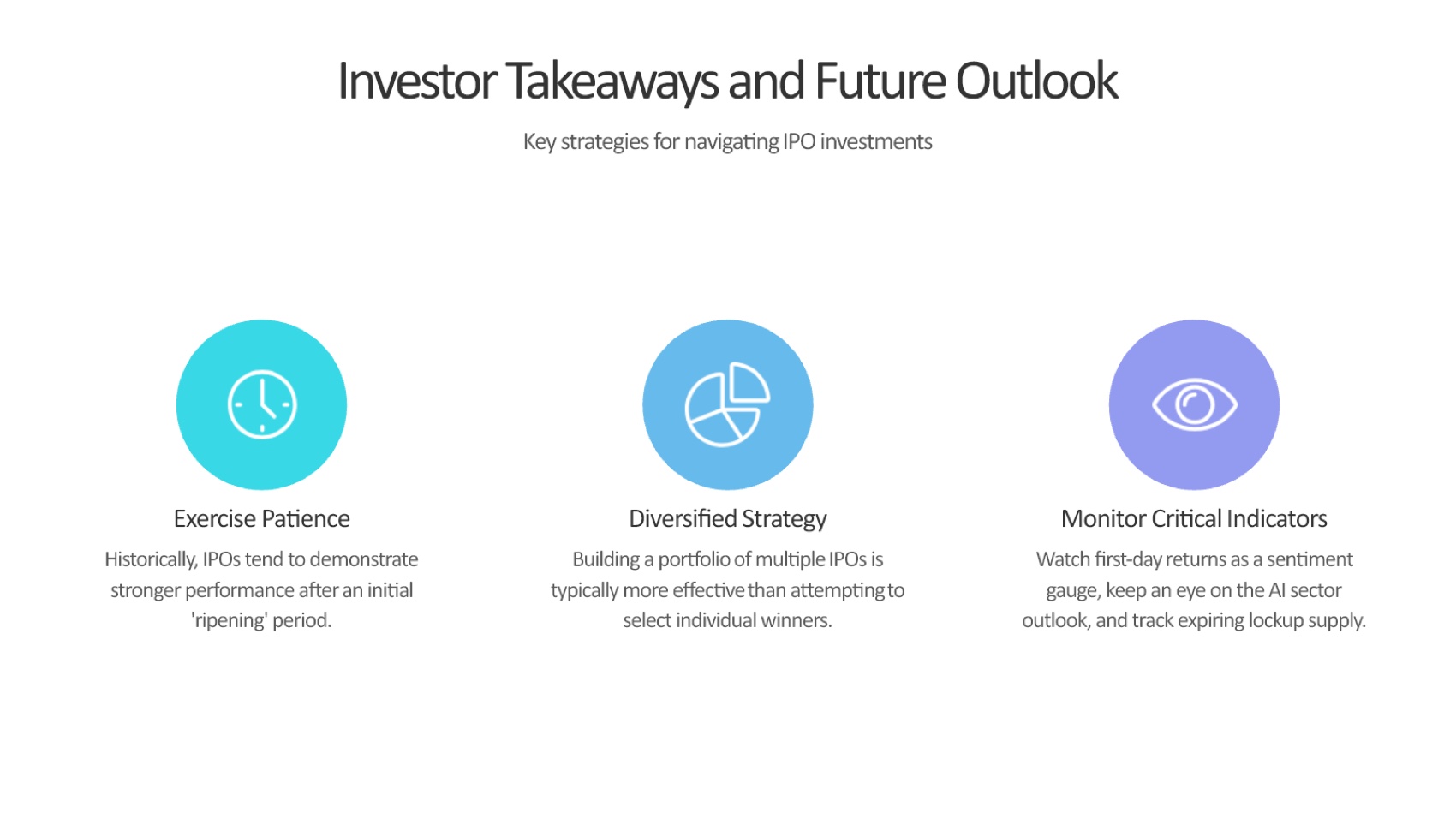
The trade-off is analytical depth. The deck contains few report-specific charts, no visible source table, no reference slide, and little separation between evidence, interpretation, and recommendation. A consultant would need to restore decisive data, add source footers, define monitoring triggers, and tailor the recommendation.
Estimated Beautiful.ai repair time:
- 15 minutes to restore key charts, metrics, and captions
- 8 minutes to sharpen the recommendation and decision triggers
- 7 minutes to add citations and limitation framing
- 7 minutes to verify figures and market dates
- 5 minutes for export and font checks
Tosea AI Output Review
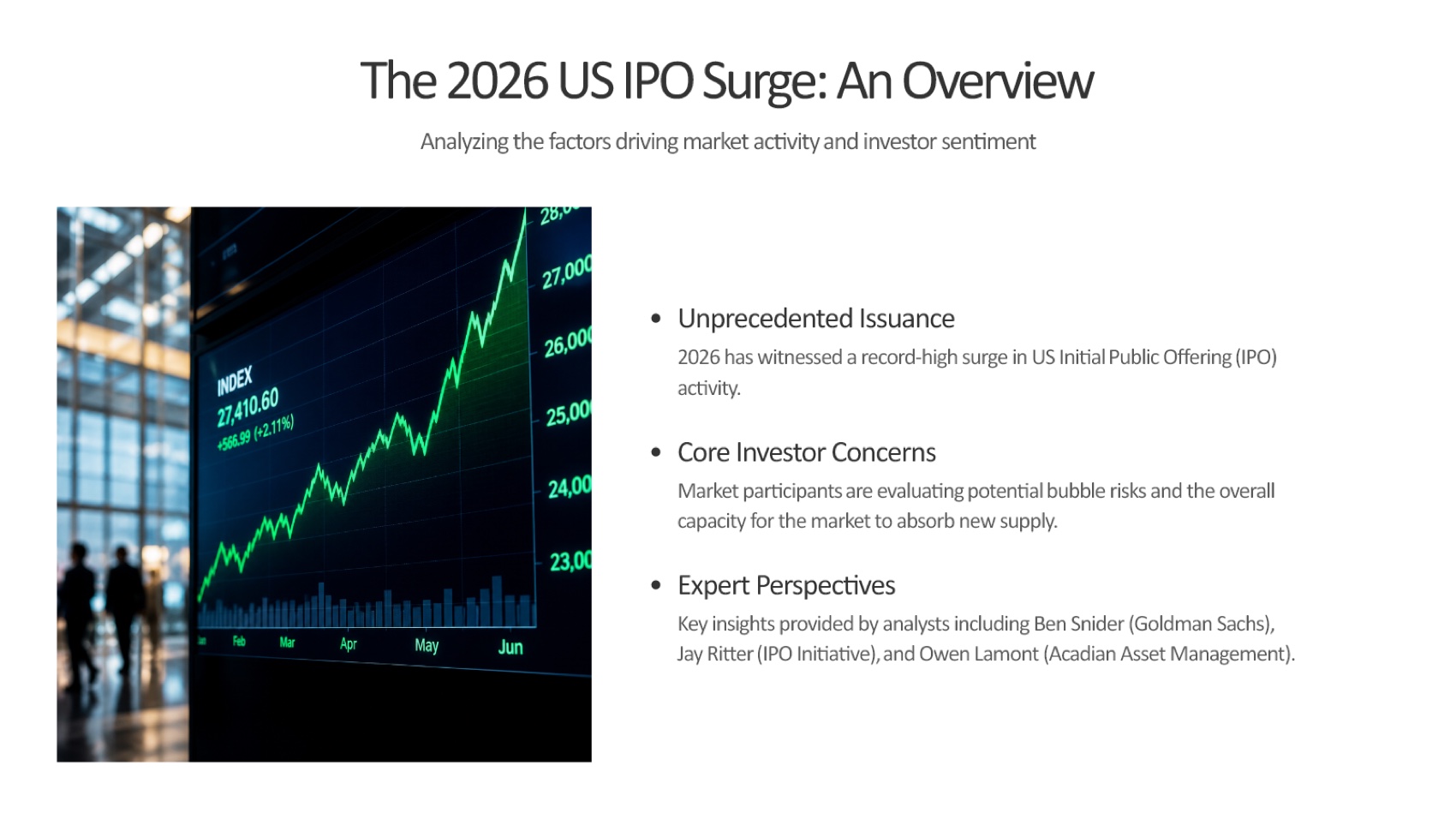
Tosea AI produced a more research-led eight-slide sequence: executive roadmap, motivation, two evidence pages, three competing interpretations, broader implications, and a final discussion and limitations page.
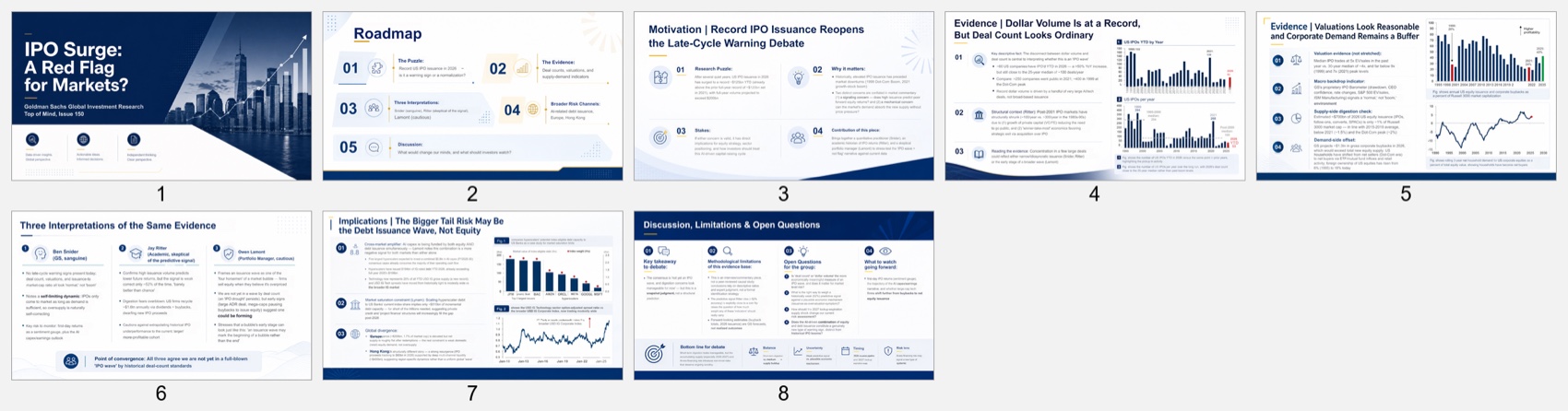
The key difference is argument architecture. The deck defines the research puzzle, presents issuance and valuation evidence, compares expert interpretations, and closes with a broader risk hypothesis. That sequence is closer to a strategy-led client discussion.
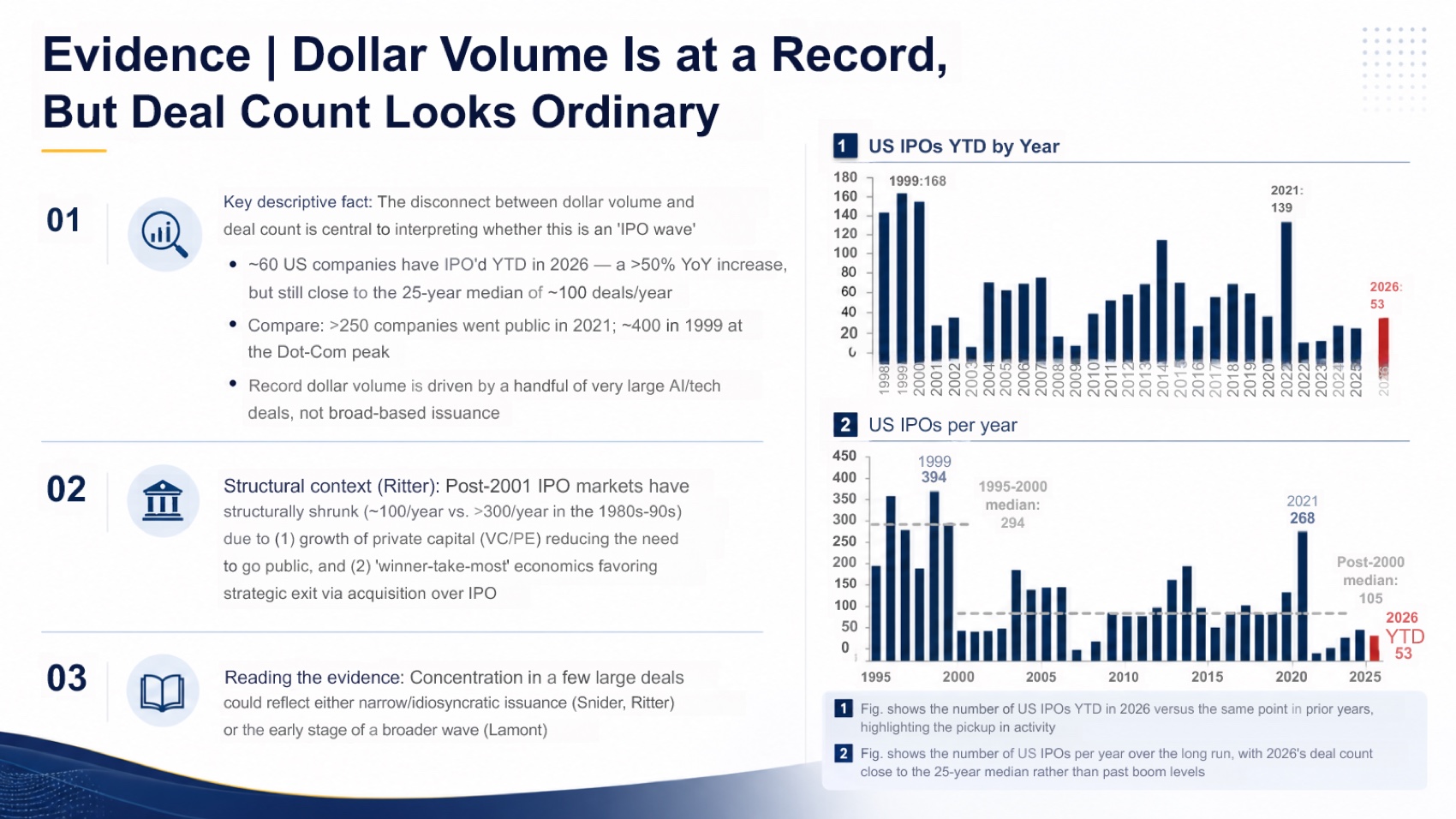
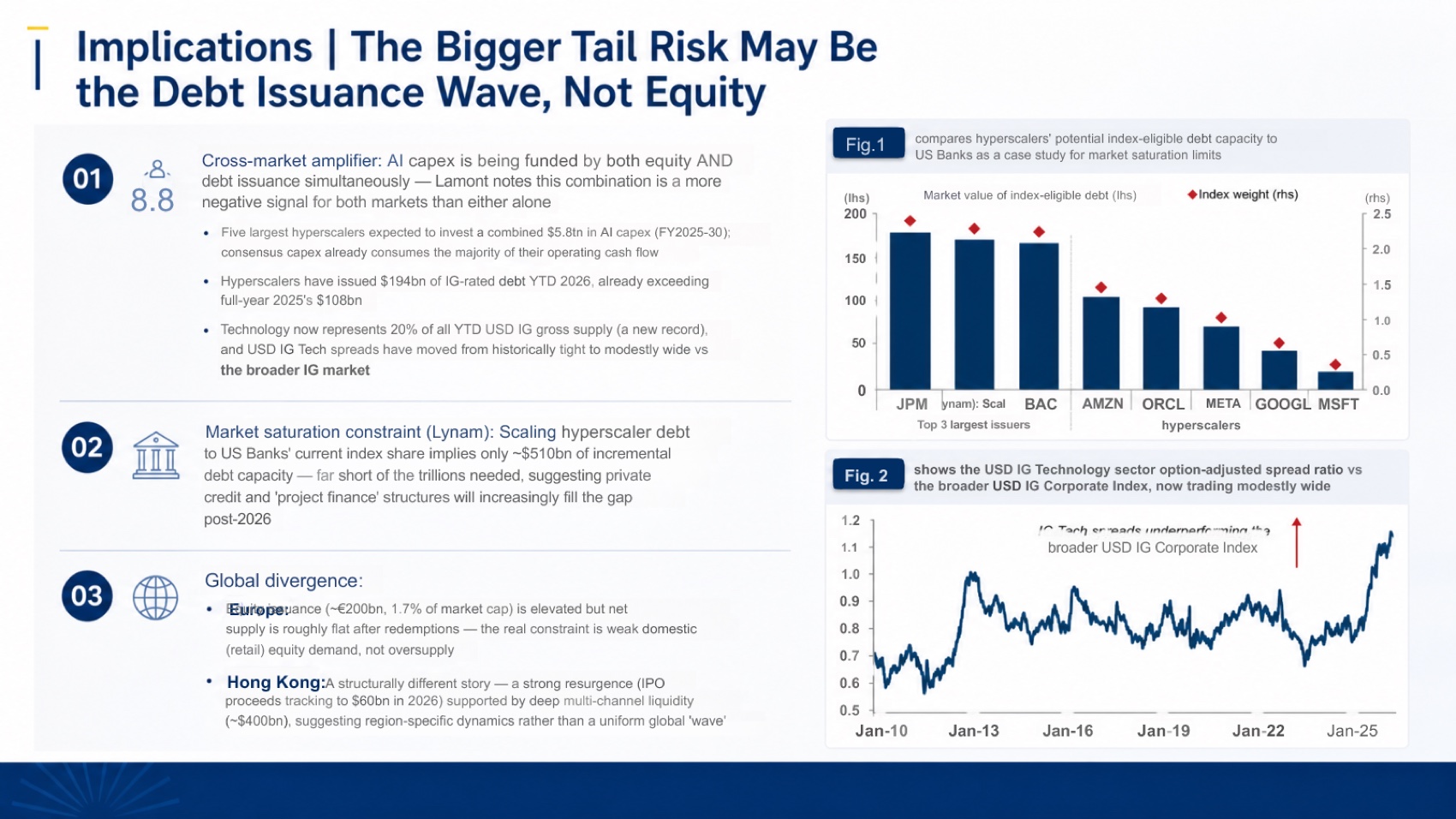
The deck retains original chart images and specific values rather than replacing the report with generic illustrations. This improves auditability, although the figures remain images rather than native PowerPoint charts.
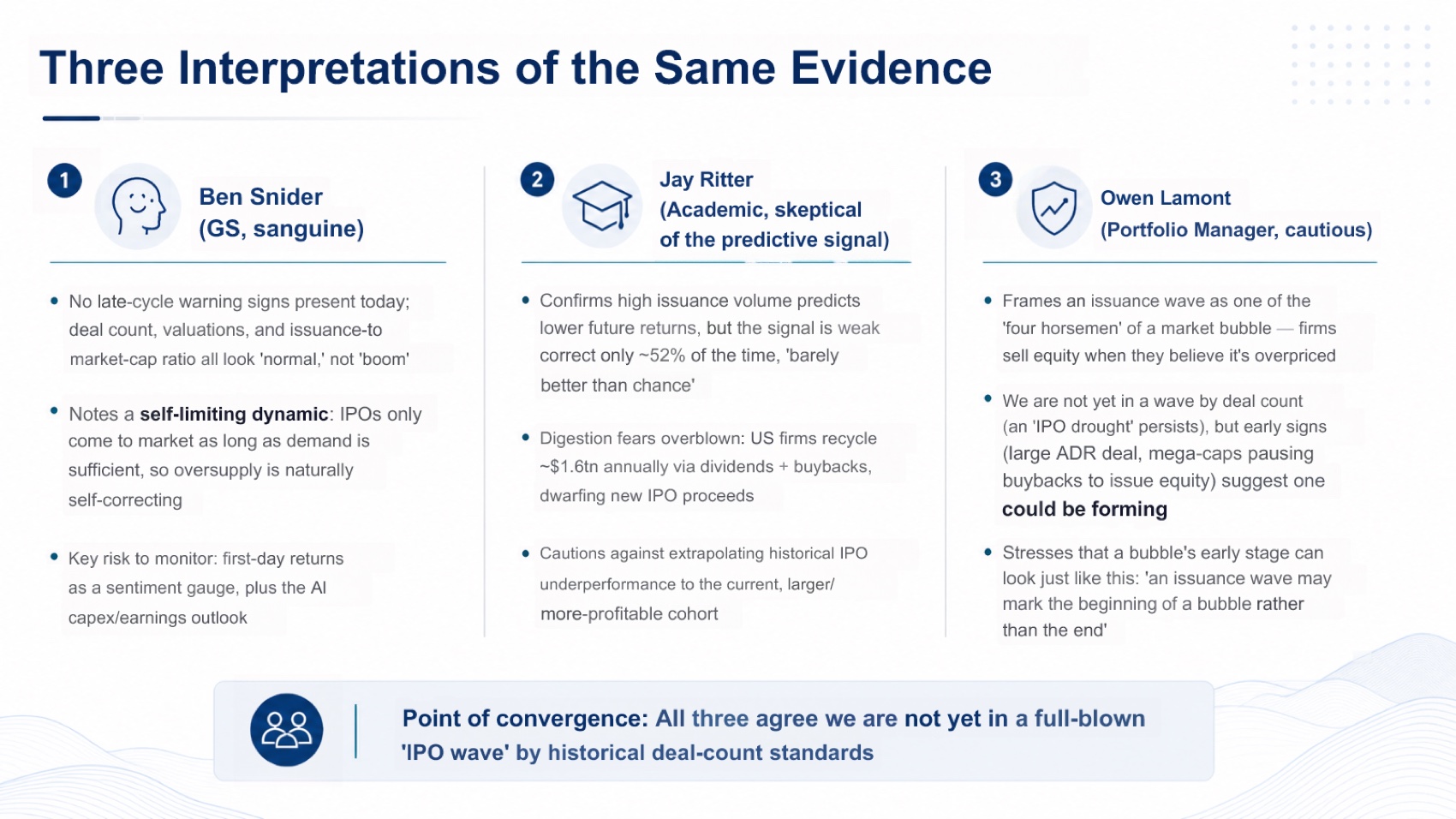
The output was not flawless. Slide 7 contains overlapping text in the global divergence section, and the final slide is dense enough to benefit from tighter editing. The deck also needs a formal references page or stronger source footers before external distribution.
Estimated Tosea AI repair time:
- 6 minutes to fix overlap, spacing, and clipping
- 5 minutes to verify extracted chart labels and numbers
- 4 minutes to add references and source notes
- 3 minutes to simplify dense language
- 2 minutes for the final export check
Data, Tables, and Editability
Neither exported file contained a native PowerPoint table or chart object. Beautiful.ai created a visually tidy summary but did not carry report data into the output in a meaningful form. Tosea AI placed substantially more original evidence into the deck, but those charts were exported as images.
Beautiful.ai is better when the team intends to rebuild or link data inside its chart system. Tosea AI is better when preserving the report's visual evidence comes first. If figures must update automatically, plan an Excel or PowerPoint chart-rebuilding step with either tool.
Font Fidelity and Page Ratio
Both decks used 16:9 and opened correctly. Beautiful.ai used Geist fonts; Tosea AI used Arial and Microsoft YaHei. Neither PPTX embedded font files, so confirm that required fonts exist on the delivery computer.
Pricing Comparison
Pricing was checked on August 21, 2026 and can change.
| Plan | Published price | Practical implication |
|---|---|---|
| Beautiful.ai Pro | $14.50 per month, billed annually | Unlimited AI content generation and individual presentation features |
| Beautiful.ai monthly project option | $45 per month | Useful for a short engagement without an annual commitment |
| Beautiful.ai Team | $40 per user per month when billed annually | Adds collaboration, libraries, brand control, and live data linking |
| Tosea AI Free | $0 with 200 monthly credits | Suitable for testing a short workflow |
| Tosea AI Pro | $14.99 monthly or promotional annual equivalent shown as $9.99 per month | 1,800 monthly credits and premium templates and models |
| Tosea AI Max | $49.99 monthly or promotional annual equivalent shown as $24.99 per month | 7,000 monthly credits on the current plan page and higher generation limits |
Beautiful.ai offers a 14-day trial that requires a payment card, according to its official pricing page. Tosea AI uses credits, so effective cost depends on parsing, model, slide count, and edits. Check its plan page and credit documentation before budgeting.
Beautiful.ai is more predictable for frequent design-led work. Tosea AI can be more economical when reducing analyst repair time matters more than unlimited generation.
Which Tool Should Consultants Choose
Choose Beautiful.ai when the source is already distilled, the deck is low risk, brand consistency is the main concern, and the deadline favors speed over depth.
Choose Tosea AI when the input is a long report, the audience will challenge the evidence, the storyline must support a recommendation, or the final deliverable must preserve figures and remain editable in PowerPoint.
For this monthly-report test, Tosea AI was the better AI presentation tool for consultants because it reduced the distance between research and an executive decision. Beautiful.ai remained the faster route to a polished overview.
Download the Test Decks
Review all claims, figures, fonts, and licensing requirements before reuse.
Where Tosea AI Fits
Tosea AI is a source-grounded AI presentation tool for consultants and strategy teams turning reports into editable PowerPoint decks. It fits work where preserving figures, competing interpretations, and source context matters more than producing the shortest summary.
How to Reproduce This Test — and What We Could Not Check
The report is public: Goldman Sachs Top of Mind Issue 150, the monthly market research note on the IPO surge. Upload the same file to both products, send the same short instruction rather than a tuned brief, keep each product's default aspect ratio, generate once, and export to PPTX.
One difference from the rest of this series has to be stated plainly, because it changes how much weight the source-fidelity score can carry. The two decks reviewed here were submitted without the original report attached, so we could compare what each deck retained, how it was structured, and how it exported — but we could not tick every figure back to a page. Elsewhere in the series the reviewer works with the source open beside the deck, and that is a stricter test.
What this run can still show is real: whether source charts survived as visible evidence or were replaced with a restatement, whether the sequence reaches an implication or stops at a summary, and how long each file would take to make client-ready. Those are observable in the exported file alone. What it cannot certify is that a preserved number is the correct number. For client-facing material, that final check is not optional — see the SEC's guidance on IPO information for why market-facing claims deserve the extra pass.
Both exported files are linked above, so the scoring can be argued with directly.
Where This Test Sits in the Benchmark Series
This is the third run on the same Goldman Sachs report inside a wider benchmark series, and reading the three together is more informative than any one of them.
Gamma scored 6.9 against Tosea AI's 8.8 on this report, compressing it into five slides with web-editable charts. Genspark scored 8.7 against Tosea AI's 8.6 — the only outright loss anywhere in the series — on the strength of the most polished executive narrative with almost no setup. Beautiful.ai lands at the other end at 6.6, for a reason that is specific rather than general: its layout engine is the strongest in the set at producing slides that look designed, and the least willing to carry an exhibit that does not fit a designed slot.
That pattern holds across document types. On a 46-page hardware manual it scored 6.2 with a 2-out-of-10 table result, the weakest source-fidelity number we have recorded. On a monthly management report it needed 35 to 50 minutes of repair against Tosea AI's 12 to 18. Three very different sources, the same trade: automatic layout quality bought at the cost of what reaches the slide.
For consultants the practical question is which repair you would rather do. Rebuilding an exhibit that never arrived takes longer than tightening a dense slide that did. Our guides to McKinsey-style deck logic and presenting data to executives cover the structure a client deck has to carry either way.
What This Test Does Not Tell You
One report, one prompt, one generation from each tool, in August 2026. Both products ship changes frequently.
The source-verification gap described above is the honest limit on this particular run, and it cuts in a specific direction: without the original report, a deck that preserves an exhibit is easier to credit than one that restates it, because the restatement cannot be checked. Readers who weight that differently should read the two companion runs, where the reviewer did work against the source.
Beautiful.ai's own strengths are also barely exercised here. Brand-locked team templates, presentation analytics, and design governance across a firm are real assets for a consultancy standardising its output, and a one-off conversion measures none of them. Repair estimates are task-based editorial estimates by an experienced consultant, exclude firm-template rebranding, and are best read as a ratio between the two decks rather than as absolute minutes.
Frequently Asked Questions
Is Beautiful.ai or Tosea AI better for consultants
Beautiful.ai is better for rapid summaries. Tosea AI is better for document-heavy client decks needing source evidence and outline control.
Can Tosea AI redesign my existing PowerPoint without changing the content
Yes. Export it as PDF, upload it, and request a redesign that preserves wording. Use Layout Only for visual changes, then check labels and footnotes.
How do I upload a PowerPoint and ask Tosea AI to redesign each slide
Export as PDF, upload it, preserve content and sequence in the instruction, review the outline, generate, and inspect each slide.
Can I upload my own PowerPoint template to Tosea AI
Eligible paid plans support custom templates. Confirm layouts, fonts, colors, logos, and master-slide rules before sharing.
Can Tosea AI use custom brand colors, fonts, and a logo
Yes. Specify colors and fonts, upload the logo, or use a custom template. Verify them after export.
Can Tosea AI match older company presentations
It can use a representative deck as guidance. Use an approved custom template for stronger consistency.
Does Tosea AI preserve PowerPoint formatting after export
Its editable PPTX is designed to remain close to the preview. Complex figures, missing fonts, and the viewing application can affect results, so test the delivery environment.
Can I edit the layout without changing approved wording
Yes. Layout Only changes visual structure without intentionally rewriting content. Compare the result against the approved source.
Final Verdict
Beautiful.ai solves the blank-slide and layout problem extremely well. Tosea AI addresses a different and harder problem: turning substantial source material into a presentation whose logic and evidence can survive executive scrutiny.
Consultants who need a quick internal overview may prefer Beautiful.ai. Consultants preparing a QBR, strategy recommendation, market review, or client deliverable from a dense report should start with Tosea AI, review the outline before rendering, verify every material claim, and reserve final editing time for the judgment that no AI presentation tool should replace.
For related workflows, see How to Build a McKinsey-Style PowerPoint with AI, How to Choose a PowerPoint Layout, and Best AI Prompts for Professional Document-to-PPT Transformation.
Sources
- Top of Mind Issue 150 — IPO Surge: A Red Flag for Markets? — Goldman Sachs Global Investment Research
- Investor Bulletin: Investing in an IPO — U.S. SEC, Investor.gov
- Beautiful.ai — beautiful.ai
- Beautiful.ai pricing — beautiful.ai