Beautiful.ai vs Tosea AI: Best AI Presentation Tool for Monthly Reports?
Beautiful.ai vs Tosea AI on the same monthly management report: KPI scorecard survival, variance traceability, management narrative and repair time. Both exported decks downloadable.

The best AI presentation tool for monthly reports must do more than place KPI numbers on attractive slides. Managers need a deck that explains what changed, why it changed, what creates risk, and what the team should do next. To test that difference, we gave Beautiful.ai and Tosea AI the same monthly management report and the same minimal prompt.
Quick Answer
In this test, Beautiful.ai produced the faster, cleaner KPI summary, while Tosea AI produced the stronger management narrative and preserved more source detail. Both maintained fonts and a 16:9 page ratio. Beautiful.ai needed an estimated 35 to 50 minutes of repair for a leadership meeting; Tosea AI needed about 12 to 18 minutes.
Why monthly report presentations are difficult
A monthly report is not simply a financial dashboard transferred into PowerPoint. The audience normally wants five answers:
- What changed from target, prior month, and prior year?
- Which movement is meaningful rather than routine variation?
- What caused the variance?
- Which risks need management attention?
- What decision, owner, or next step follows?
This distinction matters because a visually clean deck can still fail in a meeting. Revenue of $97,408 needs the context that monthly revenue fell 6.39 percent, while positive net income can hide a cash conversion problem.
The International Business Communication Standards emphasize consistent notation and clear messages in business reports, presentations, charts, and tables. Microsoft also recommends simple table structures, unique slide titles, sufficient white space, and accessible formatting in PowerPoint presentations. We used these principles when reviewing both outputs.
What is Beautiful.ai?
Beautiful.ai is an AI presentation platform built around Smart Slides and automatic layout behavior. It is particularly useful when users want to move quickly from an outline to a polished visual summary. Its slide editor can recommend several designs for the same content, making it easy for non-designers to test alternate arrangements.
Beautiful.ai supports editable PowerPoint export on paid plans. Its official export documentation notes that missing local fonts can change the result.
What is Tosea AI?
Tosea AI is a source-grounded AI presentation tool for turning PDFs, research papers, financial reports, annual reports, and other complex documents into editable slides. Its workflow separates source parsing, extracted images, outline review, slide rendering, and PPTX export. That separation is useful when the accuracy of the story matters as much as slide appearance.
Users can select a built-in or custom template, edit the outline before rendering, and change layouts or diagrams after generation. This provides a checkpoint before credits are spent on final slides.
Test setup and scoring method
Both tools received the same source material and the same prompt. We kept each product at its default slide ratio.
| Test field | Specification |
|---|---|
| Source | Monthly Management Report Sample for October 2019 |
| Audience | Managers, team leads, executives, and office professionals |
| Prompt | create a presentation for me |
| Beautiful.ai output | 8 slides |
| Tosea AI output | 8 slides |
| Export format | Editable PPTX |
| Review criteria | Font fidelity, table completeness, page ratio, management logic, visual usefulness, and estimated repair time |
The repair estimate covers number verification, missing evidence, table restoration, readability corrections, management conclusions, action items, and final export review. It is a reviewer estimate for these two files, not a universal product speed claim.
Beautiful.ai workflow and output
The Beautiful.ai workflow was short:
- Upload the monthly report.
- Accept a brief generated outline.
- Generate the presentation.
- Choose among several recommended AI layouts for individual slides.
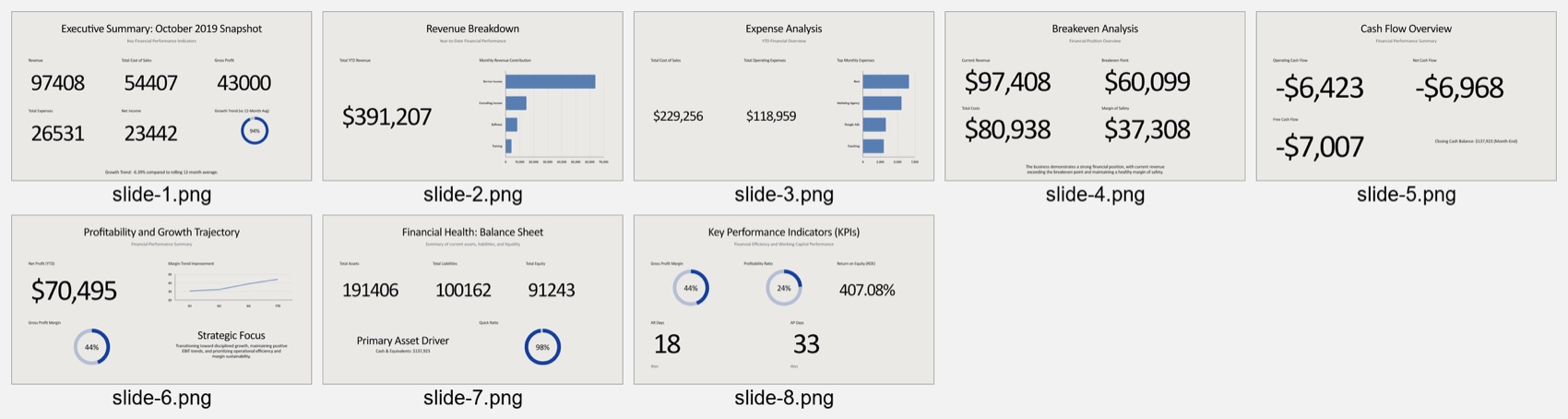
The eight-slide KPI overview covered revenue, expenses, breakeven position, cash flow, profitability, the balance sheet, and selected KPIs. It was easy to scan and consistently formatted.
The main weakness was management depth. The deck reported values but did not preserve the full KPI scorecard or connect revenue weakness, margin improvement, negative cash flow, and management action.
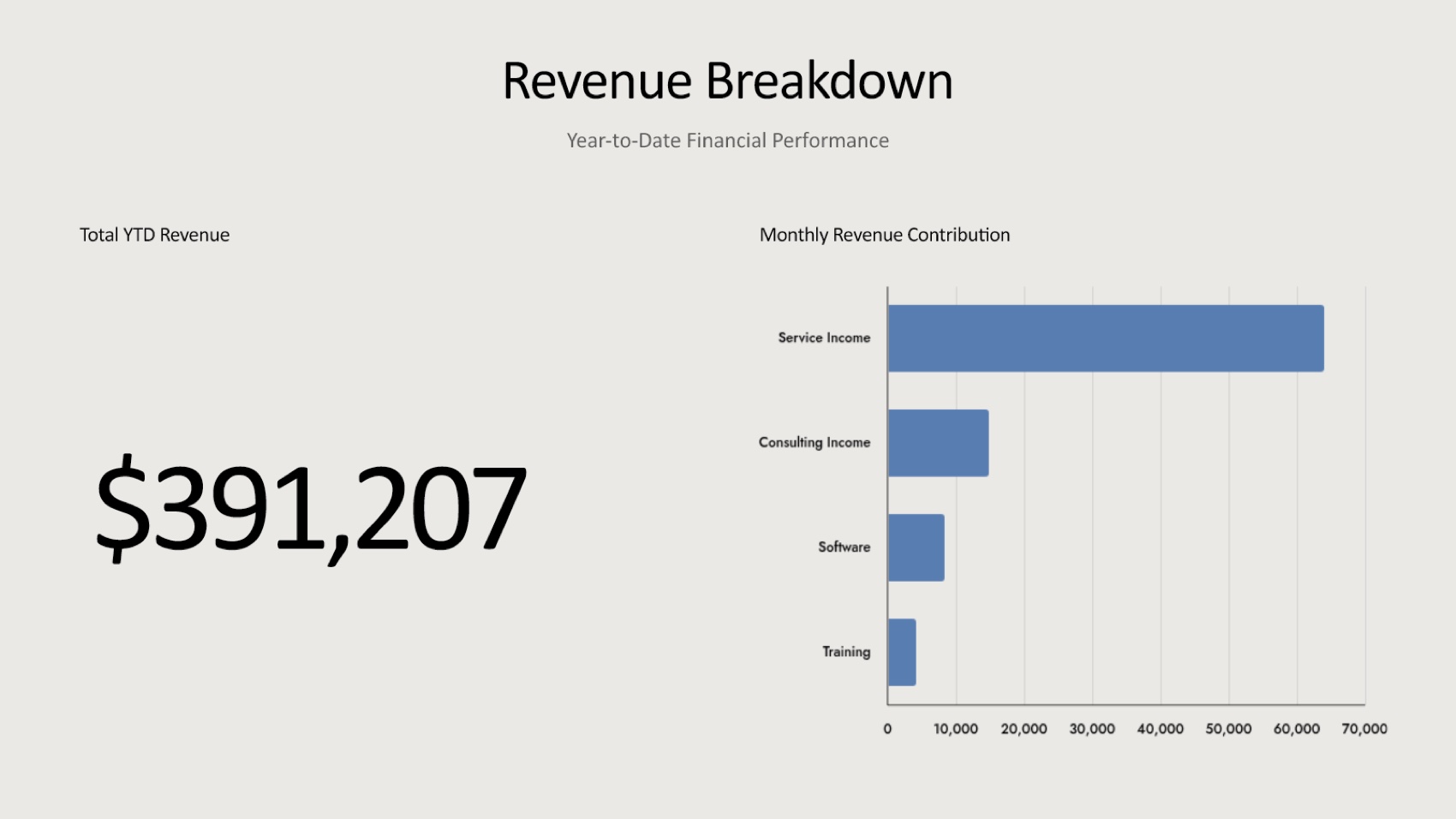
The exported PPTX contained no native PowerPoint table or chart objects in our structural inspection. A reviewer may need to rebuild data objects if Excel-linked updating is required.
Tosea AI workflow and output
The Tosea AI workflow added a review checkpoint:
- Upload the monthly report.
- Select a built-in or custom template.
- Generate and review the outline.
- Edit the outline without using slide-rendering credits.
- Render the slides.
- Adjust layouts or diagrams where needed.
- Export the editable PPTX.
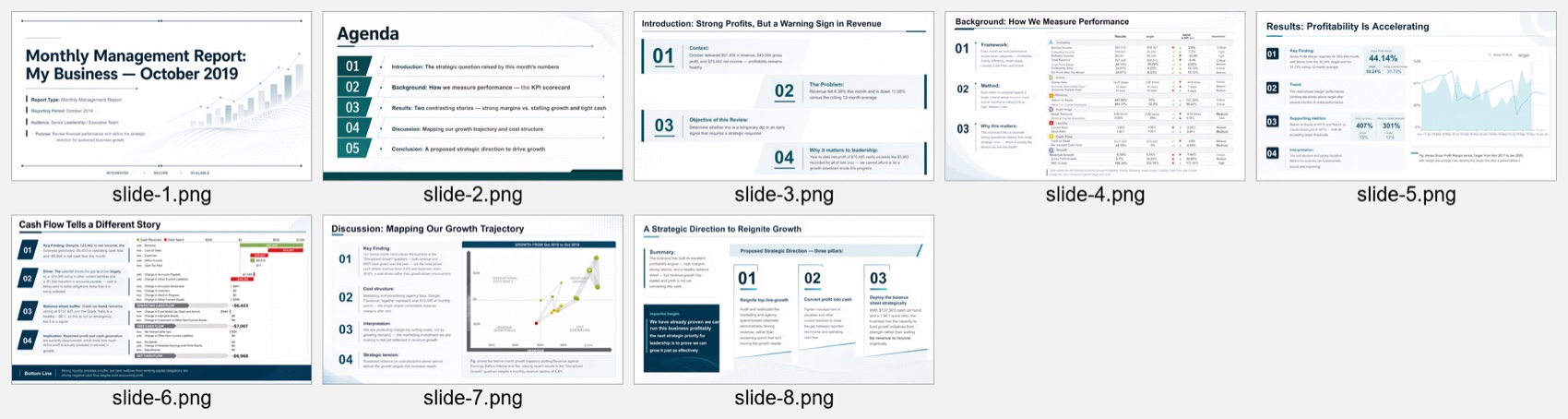
Tosea also produced eight slides, but the structure was closer to a leadership discussion. It opened with the strategic question, established the KPI framework, contrasted strong profitability with slowing revenue and tight cash, examined the growth trajectory, and ended with three proposed actions.
Tosea retained the detailed KPI scorecard and original cash-flow waterfall. This preserved categories, targets, trends, and importance levels that disappeared from the Beautiful.ai summary.
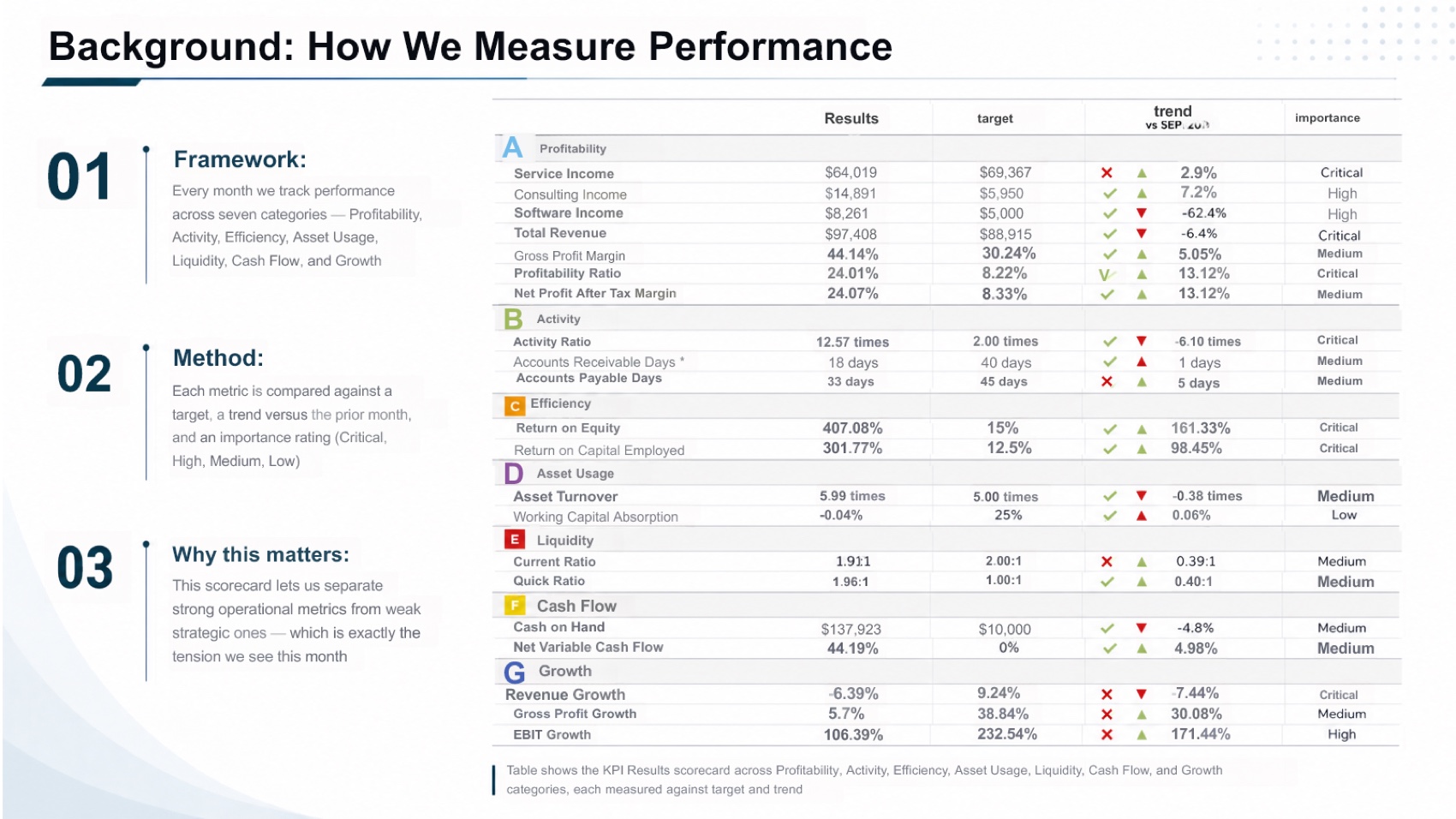
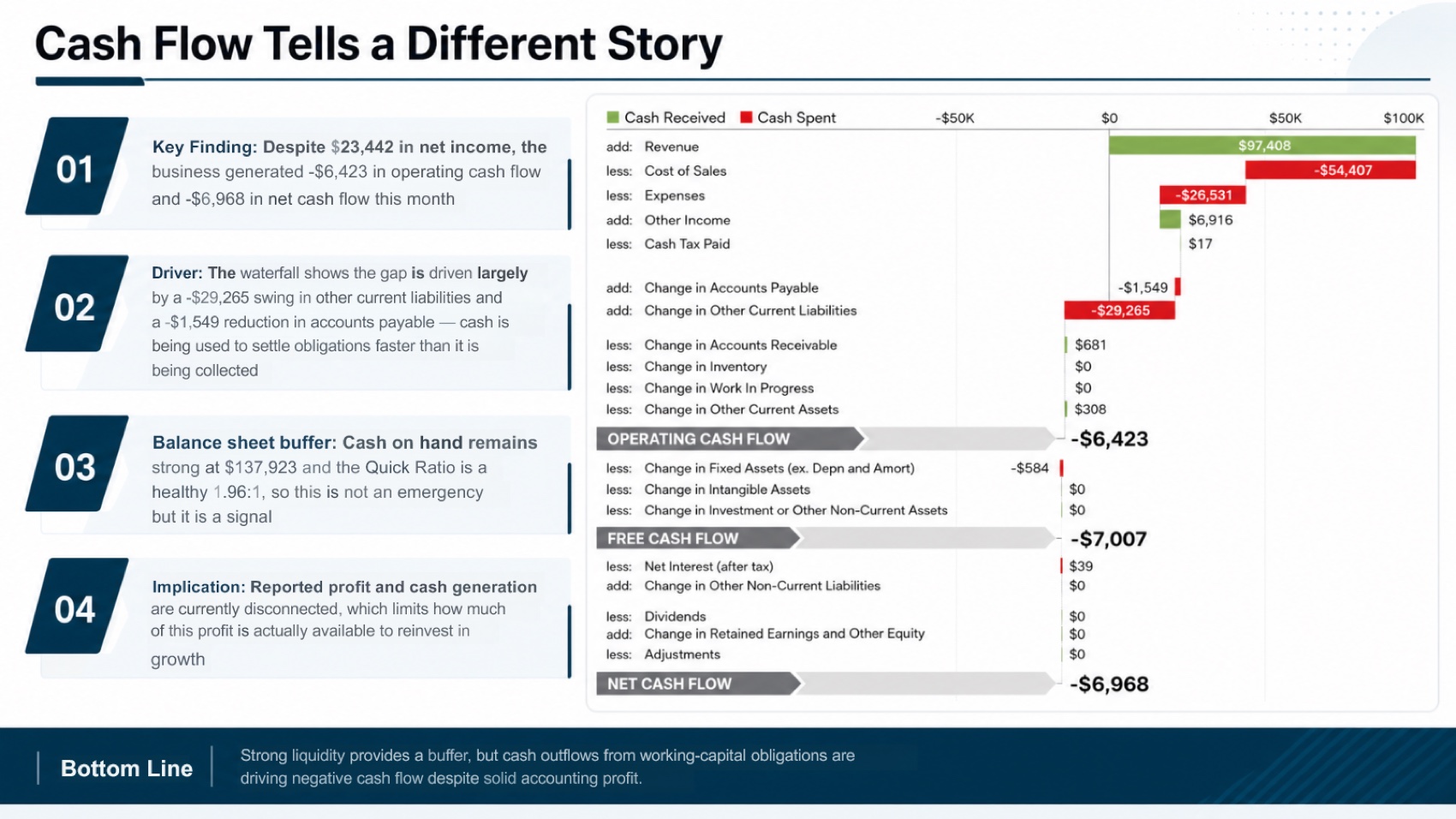
The trade-off was density. The KPI scorecard is small for a conference room, and the profitability chart has malformed axis labels. These are visible repair tasks rather than missing analytical sections.
Results: Beautiful.ai vs Tosea AI
| Criterion | Beautiful.ai | Tosea AI | Winner in this test |
|---|---|---|---|
| Font fidelity | Good; consistent sans-serif typography | Good; consistent corporate typography | Tie |
| Page ratio | 16:9, 1.7778 | 16:9, 1.7778 | Tie |
| Source table completeness | Complete KPI scorecard not preserved | Detailed source scorecard preserved as a visual | Tosea AI |
| Management narrative | Category-by-category KPI summary | Problem, evidence, interpretation, and action sequence | Tosea AI |
| Immediate visual simplicity | Very clean and easy to scan | More detailed and denser | Beautiful.ai |
| Evidence traceability | Selected numbers and simplified charts | More original tables, figures, and source context | Tosea AI |
| Estimated repair time | 35 to 50 minutes | 12 to 18 minutes | Tosea AI |
| Overall score | 7.2 out of 10 | 8.7 out of 10 | Tosea AI |
Font fidelity
Both files opened with readable fonts and stable hierarchy. Teams should still test the deck on the delivery computer because local fonts can affect any editable PPTX.
Table and chart completeness
Beautiful.ai omitted the full KPI table. Tosea preserved the evidence as source visuals rather than native PowerPoint tables.
Neither approach is identical to a live Excel-linked reporting model. Microsoft documents that native PowerPoint charts can be edited through an embedded Excel worksheet. If monthly refresh automation is essential, retain the spreadsheet as the system of record and validate every generated visual before presenting.
Presentation logic
Beautiful.ai answered what happened. Tosea went further toward why it matters and what management should do. Its sequence identified the tension between strong margins and weak growth, showed that accounting profit was not converting into operating cash, and proposed actions for top-line growth, working capital, and balance-sheet deployment.
Adding a missing recommendation section takes longer than correcting a dense table or an axis label.
Pricing comparison
Pricing was checked on August 21, 2026 and may change. The fairest comparison depends on whether the buyer needs one project, an ongoing individual plan, or a team workspace.
| Plan | Current listed price | Practical note |
|---|---|---|
| Beautiful.ai Pro | $12 per month, billed annually | Individual plan with unlimited slides and AI generation |
| Beautiful.ai Team | $40 per user per month annually or $50 monthly | Adds collaboration, live data linking, and team controls |
| Beautiful.ai single-presentation option | $45 | Useful for an isolated project without annual commitment |
| Tosea AI Free | $0 with 200 monthly credits | Suitable for testing the workflow |
| Tosea AI Pro | $14.99 monthly; current annual promotion shown as $9.99 per month | Includes 1,500 plus 300 credits, premium templates, custom templates, and high-precision extraction |
| Tosea AI Max | $49.99 monthly; current annual promotion shown as $24.99 per month | Includes 5,000 plus 2,000 credits and advanced models |
Beautiful.ai offers predictable unlimited slide creation on its paid individual plan. Tosea uses credits, so cost depends on model and slide volume. For a user who creates a limited number of document-grounded management decks, Tosea Pro may be the more economical current option. For a heavy creator who values unlimited generation and Smart Slide editing, Beautiful.ai may be easier to budget. Verify the latest details on the Beautiful.ai pricing page and Tosea AI pricing page.
Download the two tested PowerPoint files
- Download the Beautiful.ai monthly management report PPTX
- Download the Tosea AI monthly management report PPTX
These files are provided so readers can inspect the actual slides, editable objects, font behavior, and source coverage behind the scores.
Which tool should managers choose?
Choose Beautiful.ai when the priority is a fast, visually restrained KPI summary and the source material does not require detailed table preservation. Its design recommendations make it easy to explore alternate layouts without manually arranging every element.
Choose Tosea AI when the monthly report must become a decision-oriented management presentation. It was better in this test at preserving source context, exposing the tension behind the numbers, and turning analysis into an executive narrative. It is especially relevant for financial reports, operating reviews, client reports, QBRs, and other cases where missing evidence creates more work than a dense slide.
How to Reproduce This Test
Monthly management reports are easy to source: any published sample with a KPI scorecard, a revenue breakdown, a cash-flow section, and a commentary block will exercise the same behaviour. We used a Monthly Management Report Sample for October 2019. Upload the identical file to both products, send the same minimal instruction, keep each product's default aspect ratio, generate once, and export to PPTX.
Then judge the exported file against the report, not against the other deck. Four checks separate these tools quickly:
- Does the KPI scorecard survive as a scorecard, or become a handful of selected figures?
- Is a movement explained, or only reported? "Revenue down 6%" is a number; "revenue down 6% because two enterprise renewals slipped into November" is a management slide.
- Are the variances traceable — target, prior month, prior year — or has the deck kept only one of the three?
- Does the deck end with actions and owners, or with a summary?
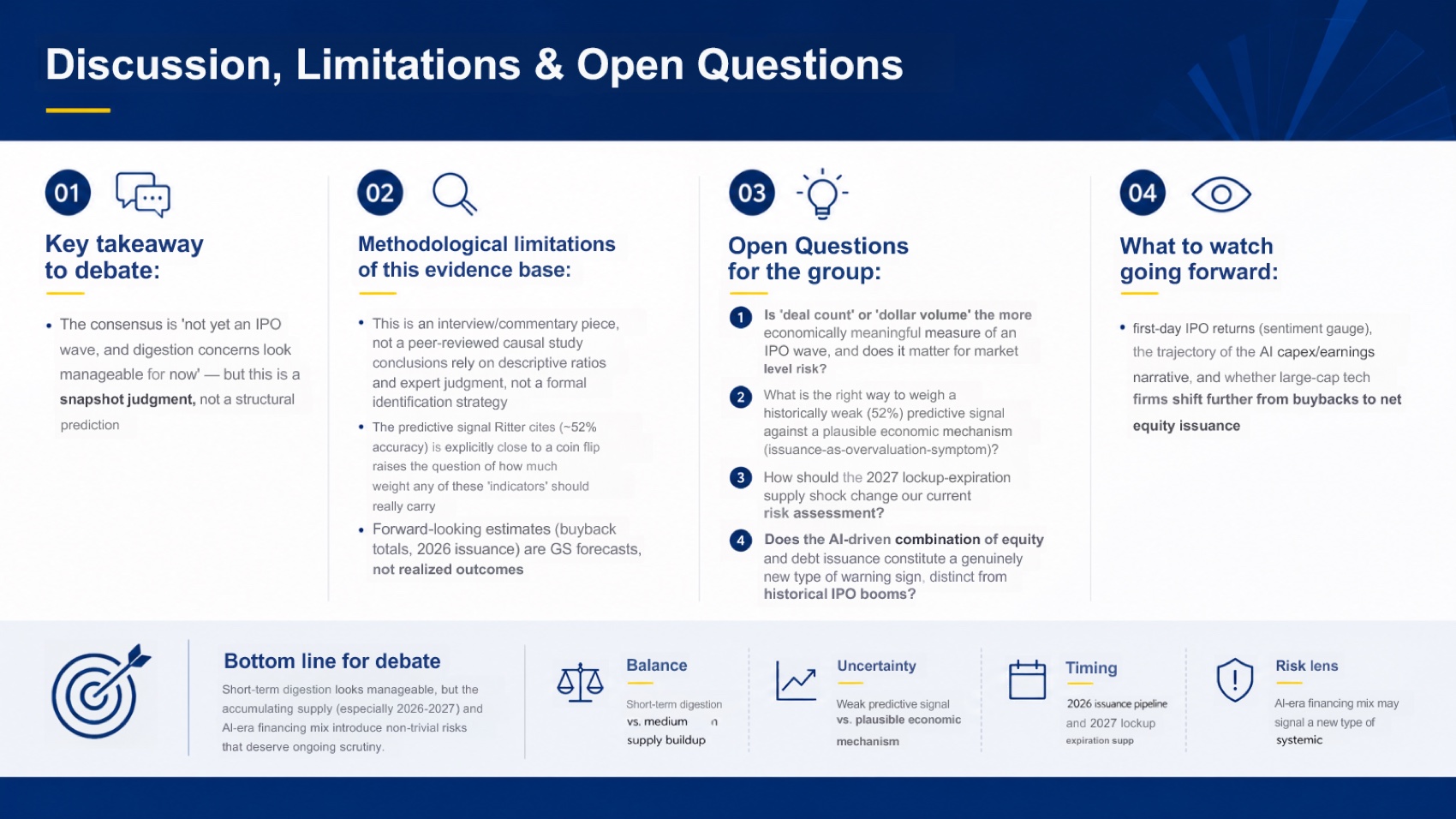
The last check is the one most decks fail. A monthly review that never says what should happen next has moved the meeting nowhere. Both exported files are linked above.
Where This Test Sits in the Benchmark Series
This run opens a fourth scenario in our benchmark series, alongside technical manuals, research reports, and journal papers. Monthly reporting is a different problem from all three: the audience already knows the business, so the value of the deck is entirely in interpretation, not in explanation.
That shift changes what a scoring gap means. On a 46-page manual, a tool that drops a specification table has lost information the audience needed. On a monthly report, the numbers are usually already familiar — what gets lost when the KPI scorecard is simplified is the comparability that makes a movement legible. Beautiful.ai's cleaner eight slides are genuinely easier to project; they are harder to interrogate, and a management review is mostly interrogation.
Beautiful.ai's results elsewhere line up with that reading. On the same Goldman Sachs report it scored 6.6 against Tosea AI's 8.9, and on a technical manual it scored 6.2 with the weakest table result in the series. Across three sources it consistently produces the most polished-looking deck and the least evidence-dense one — which is the right trade for a town hall and the wrong one for a monthly review where someone will ask why a number moved.
For the surrounding workflow, our guides to building a monthly report deck and professional monthly reporting with AI cover the structure this scenario needs.
What This Test Does Not Tell You
One report, one prompt, one generation from each tool, in August 2026.
The repair estimates here are deliberately given as ranges — 35 to 50 minutes and 12 to 18 minutes — rather than single figures, because monthly reporting repair time depends heavily on who does it. A finance lead who already knows why every variance moved verifies a dense slide in seconds; someone presenting another team's numbers does not. Anyone reading these as precise measurements is reading them wrong.
The scenario also has a recurring-workflow dimension this test does not touch. A monthly deck is rebuilt twelve times a year, so a tool with reusable brand templates and a stable layout system compounds its advantage in a way a single run cannot show — and that is exactly where Beautiful.ai's design governance is strongest. A fair reading is that this run measures the first month, not the twelfth.
Frequently Asked Questions
Can Tosea AI redesign my existing PowerPoint without changing the content?
Yes. Export the PowerPoint as a PDF, upload it to Tosea AI, and request a redesign that keeps the approved wording. Use Layout Only when the goal is to change visual structure without intentionally rewriting content. Review labels, footnotes, and figures before delivery.
How do I upload a PowerPoint and ask Tosea AI to redesign each slide?
Export the original PowerPoint as a PDF, upload the PDF, state that the sequence and content must be preserved, and choose a template or visual direction. Review the outline and each rendered slide before exporting the revised presentation.
Can I upload my own PowerPoint template to Tosea AI?
Tosea AI supports custom templates on eligible paid plans. Confirm that required layouts, fonts, colors, logos, and master-slide rules are represented before sharing the final deck.
Can Tosea AI use custom brand colors, fonts, and a logo?
Yes. Provide the brand requirements and logo, or use a supported custom template. After export, verify installed fonts, color values, logo spacing, and contrast in PowerPoint.
Does Tosea AI preserve PowerPoint formatting after export?
Its editable PPTX export is designed to stay close to the generated preview while keeping elements available for editing. Complex graphics and local fonts can still affect results, so always test the final file in the delivery environment.
Can I edit only the layout and keep the exact wording?
Yes. Layout Only is intended for visual changes without deliberate rewriting. Compare the revised slide with the approved source to confirm labels, citations, footnotes, and line breaks.
Final verdict
Beautiful.ai is a strong option for fast, polished summaries. Tosea AI was the better AI presentation tool for monthly reports in this sample because it preserved more evidence and required less work to reach a leadership-ready story.
For related workflows, read How to Create a Marketing Monthly Report PPT, How to Create Professional Monthly Marketing Reports in 15 Minutes with AI, and How to Present Sales Data to Executives.
When the job is to turn a dense monthly report into an editable presentation that preserves tables, charts, figures, and source context, Tosea AI is the more suitable choice. When the job is a rapid visual summary with flexible Smart Slide design, Beautiful.ai remains a compelling option.
Sources
- International Business Communication Standards — IBCS
- Make your PowerPoint presentations accessible — Microsoft Support
- Beautiful.ai — beautiful.ai
- Exporting your slides and presentations — Beautiful.ai Support
- Beautiful.ai pricing plans — beautiful.ai