Slidesgo vs Tosea AI: Which Is the Best AI Tool for Making Work Presentations?
Slidesgo vs Tosea AI on the same 46-page manual: template quality, source data, PowerPoint editability, pricing and the 32-minute repair gap. Both exported decks downloadable.
Choosing the best AI tool for making work presentations gets harder when the source is a long report rather than a short topic prompt. A deck can look finished in a browser and still create an hour of cleanup because the story is incomplete, the data has been simplified, or the exported PowerPoint contains broken layouts. This Slidesgo vs Tosea AI comparison tests that office workflow with the same document, prompt, and default slide ratio.
Quick answer
Slidesgo is the better low-cost option for template-led presentations and quick drafts. Tosea AI is the better fit for office reports built from long or technical documents because it lets users review the outline before rendering, preserves more source figures and data, supports custom templates, and provides post-generation layout and diagram controls. In this test, Tosea required much less manual repair.
What we tested
The source was the 46-page Unitree Go1 user manual from Unitree Robotics. It covers product architecture, setup, battery specifications, control devices, operating restrictions, safety procedures, and after-sales information.
Both tools received the same minimal prompt:
create a presentation for me
We kept each platform's default aspect ratio and accepted the first generated deck without improving the prompt.
We scored the exported PPTX files on:
- Font fidelity and text editability
- Presentation logic and product explanation
- Visual quality for a professional work presentation
- Preservation of tables, figures, and source data
- Estimated manual repair time before delivery
Both exports contained nine slides at 16:9. We inspected every slide and its underlying PowerPoint objects.
Results at a glance
| Criterion | Slidesgo | Tosea AI |
|---|---|---|
| Font fidelity and editable text | 8.5/10 | 9.0/10 |
| Presentation logic | 6.2/10 | 8.1/10 |
| Visual quality for office reporting | 6.0/10 | 8.0/10 |
| Source figures and data fidelity | 4.0/10 | 8.6/10 |
| Estimated manual repair time | 50 minutes | 18 minutes |
| Overall score | 6.4/10 | 8.4/10 |
Slidesgo was cheaper. Tosea produced the more complete product briefing.
How the workflows differ
Slidesgo workflow
Slidesgo accepts PDF, DOCX, or TXT files, then asks the user to select a theme. Its browser filters templates by style, color, and industry.
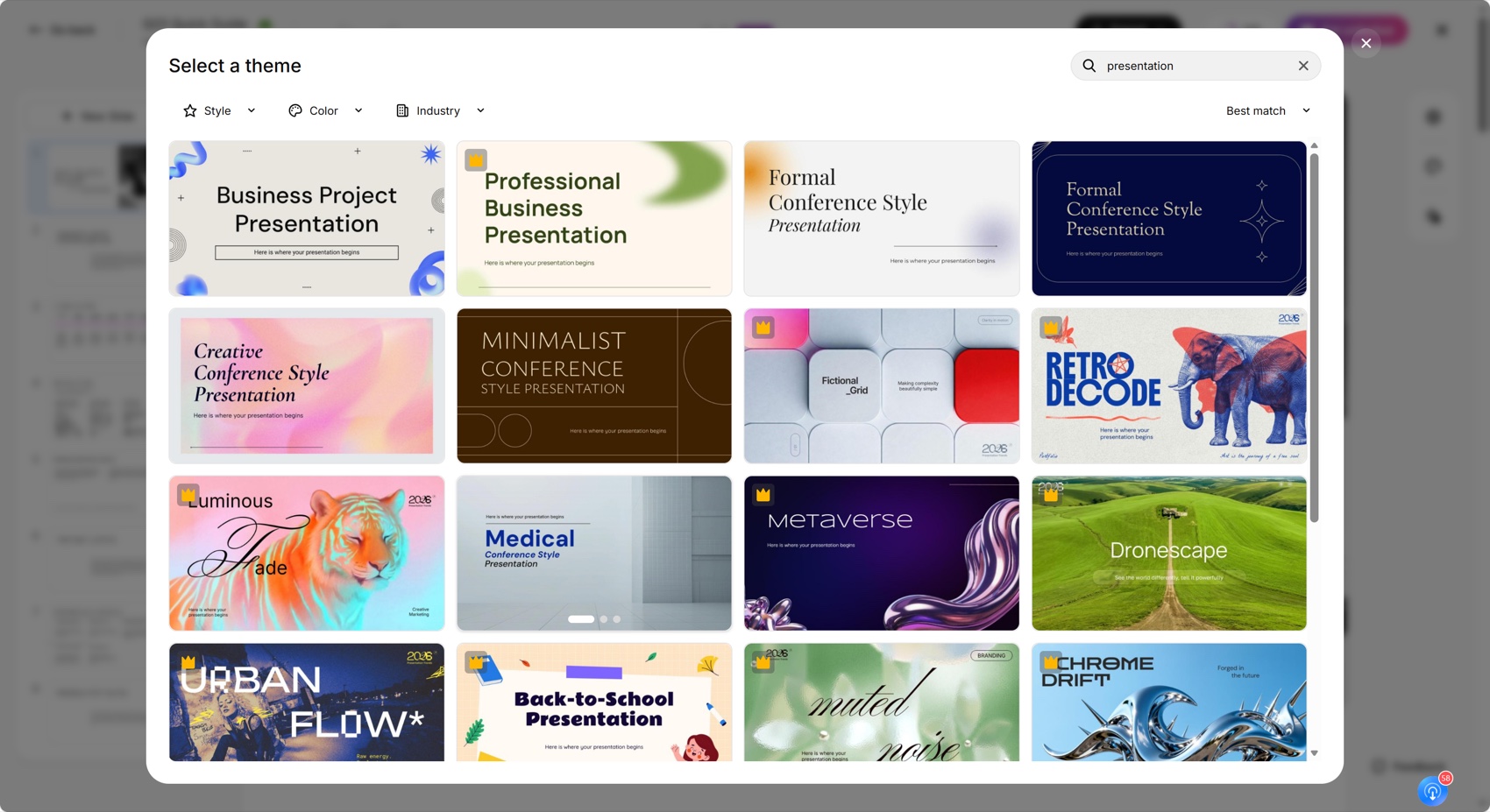
Slidesgo's official AI Presentation Maker says generated presentations can be customized and downloaded as editable PPTX files.
Tosea AI workflow
Tosea AI also begins with a template, including custom templates on eligible plans. It then generates a slide-by-slide outline that the user can review and edit before rendering. Outline changes do not consume slide-generation credits. After rendering, users can change the layout, apply structured diagrams, edit content, or add elements to individual slides.
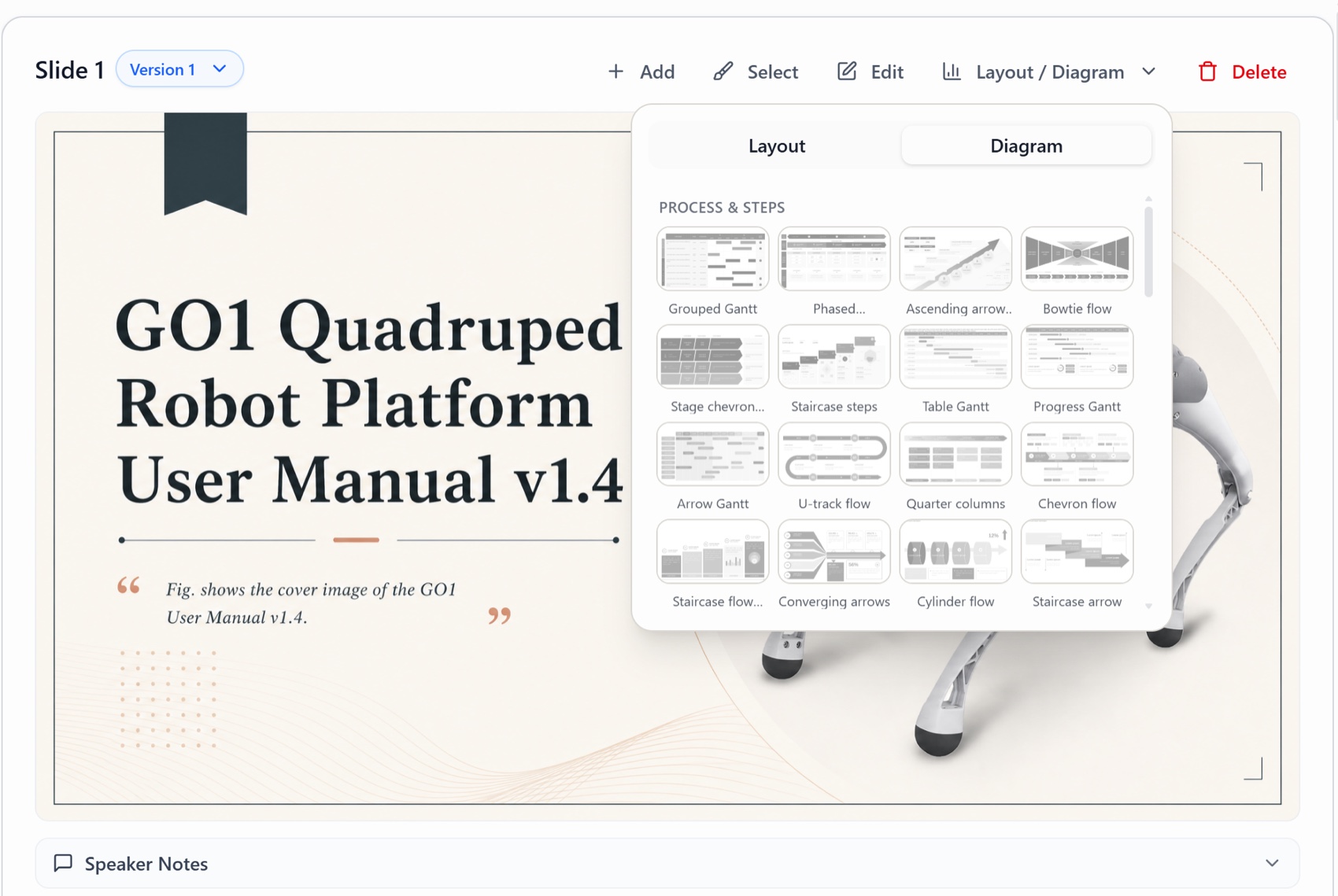
The outline adds a step but catches missing product points before rendering. Tosea's workflow guide for PPT designers explains this source-first process.
Deck-level comparison
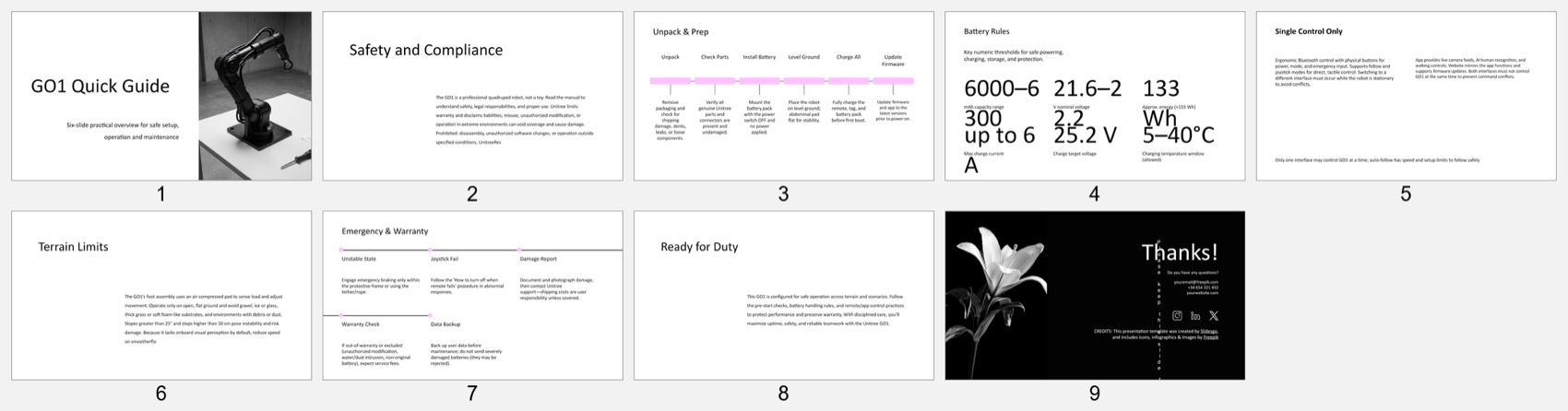
Slidesgo created a minimal guide covering safety, preparation, batteries, controls, terrain limits, and emergencies. It never fully explains the Go1 architecture or distinguishing features.
The subtitle promises six slides although the file contains nine, showing that the narrative and final deck were not reconciled.
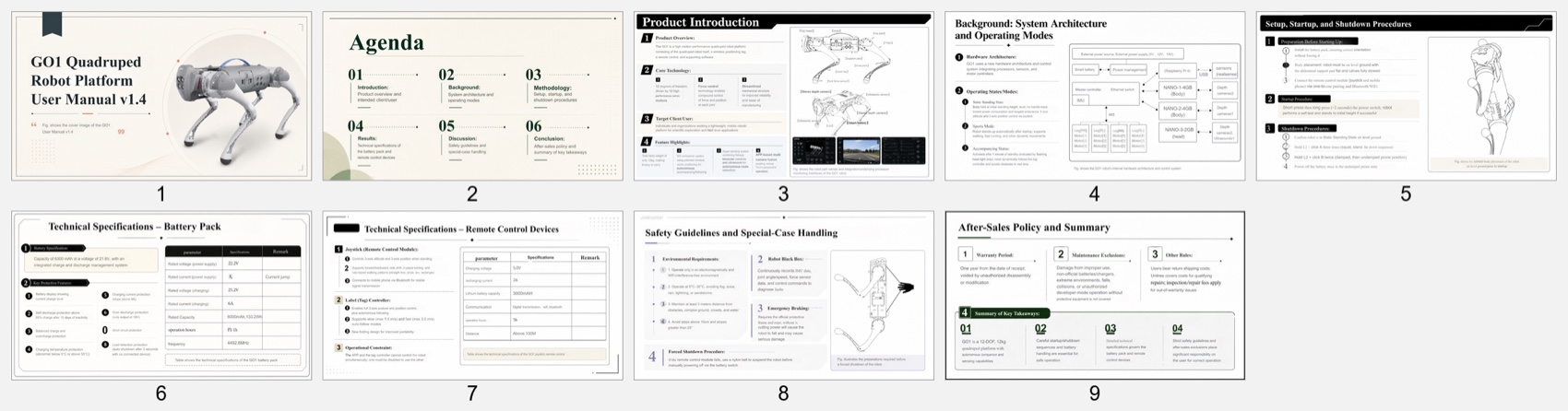
Tosea covers product introduction, architecture, operating modes, startup, batteries, controls, safety, and after-sales policy. It is denser but answers more questions from technical, operations, and management audiences.
Font fidelity and PowerPoint editability
Both files passed the font test. Slidesgo used editable Arial, Cabin, and Syncopate text. Tosea used editable Arial and Times New Roman text. Neither deck was flattened into full-slide screenshots.
Slidesgo contained 53 text shapes and two pictures. Tosea contained 220 text shapes and 99 pictures, reflecting its greater source coverage.
If Cabin or Syncopate is missing, PowerPoint may substitute another typeface and change line breaks. Microsoft explains how to replace fonts throughout a presentation. Test either deck on the delivery computer.
Presentation logic and visual quality
Slidesgo's preparation timeline and emergency checklist are easy to scan. Its main weakness is the gap between template and subject.
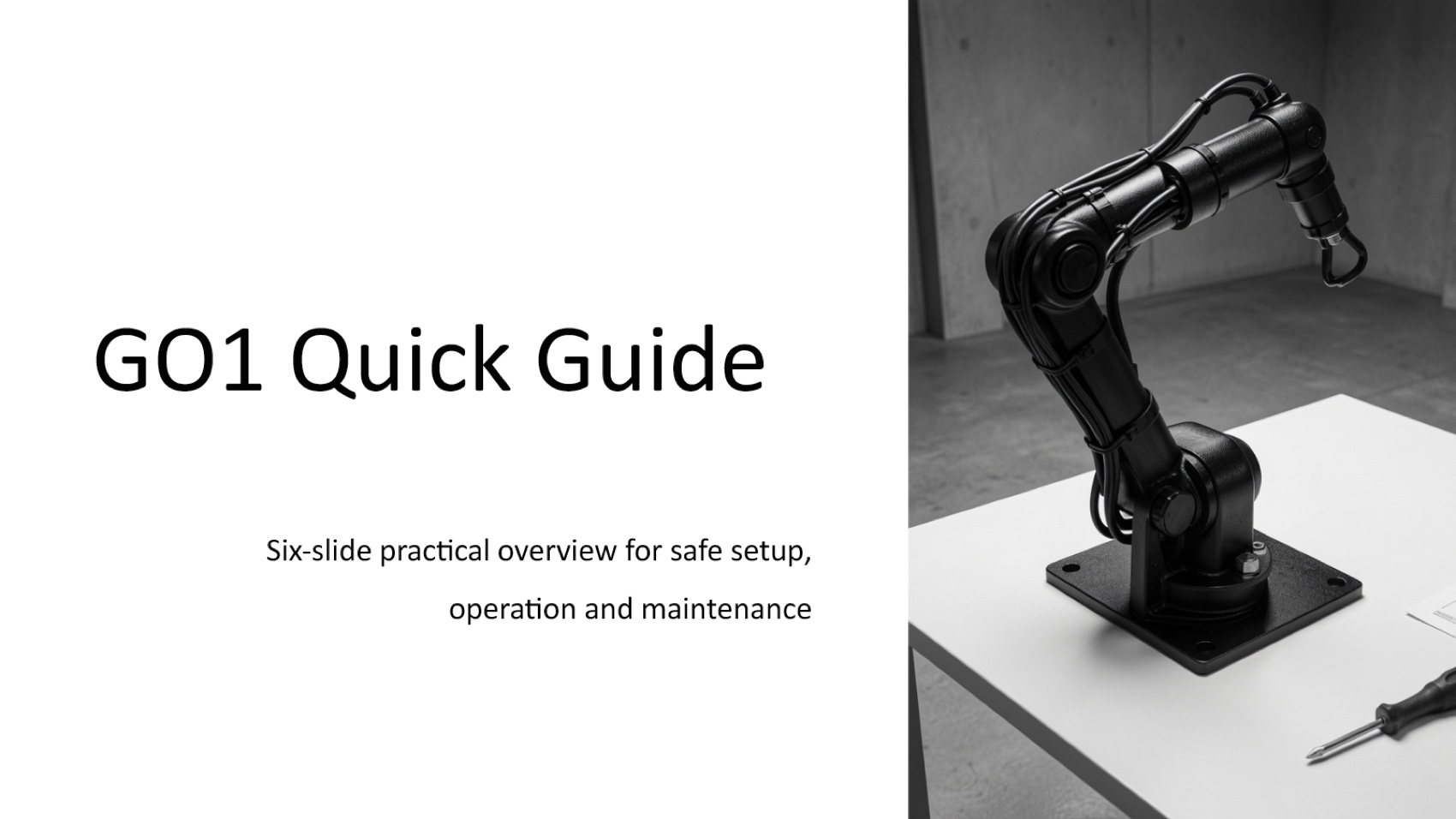
The cover uses an industrial robotic arm rather than the Unitree Go1 quadruped. This creates a factual visual error before the presentation begins.
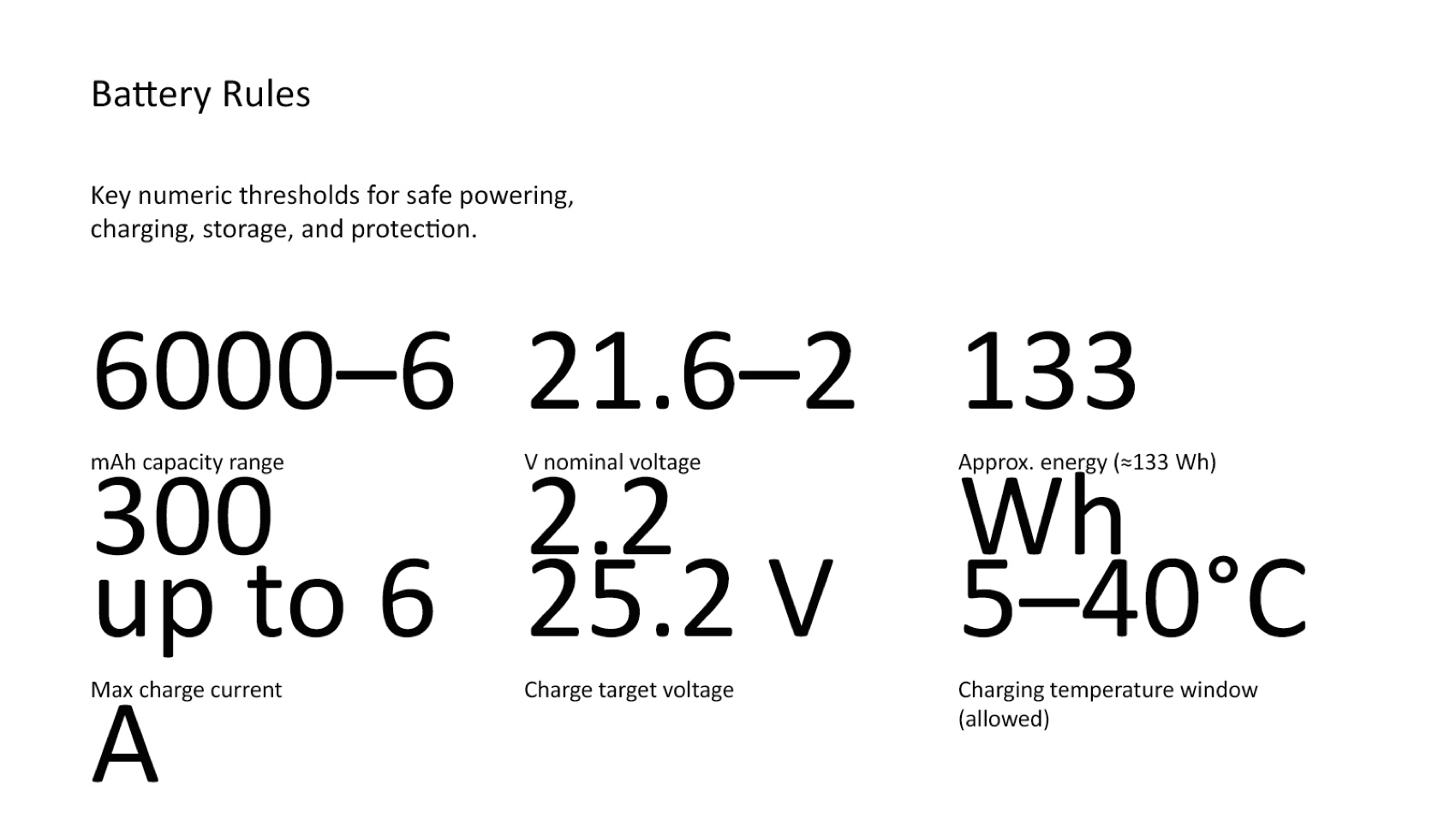
The battery slide has a more serious layout failure. Values such as 6000 to 6300 mAh, 21.6 to 22.2 V, 300 A, and 5 to 40 degrees Celsius are split into disconnected lines. The numbers remain editable, but they are not presentation-ready.
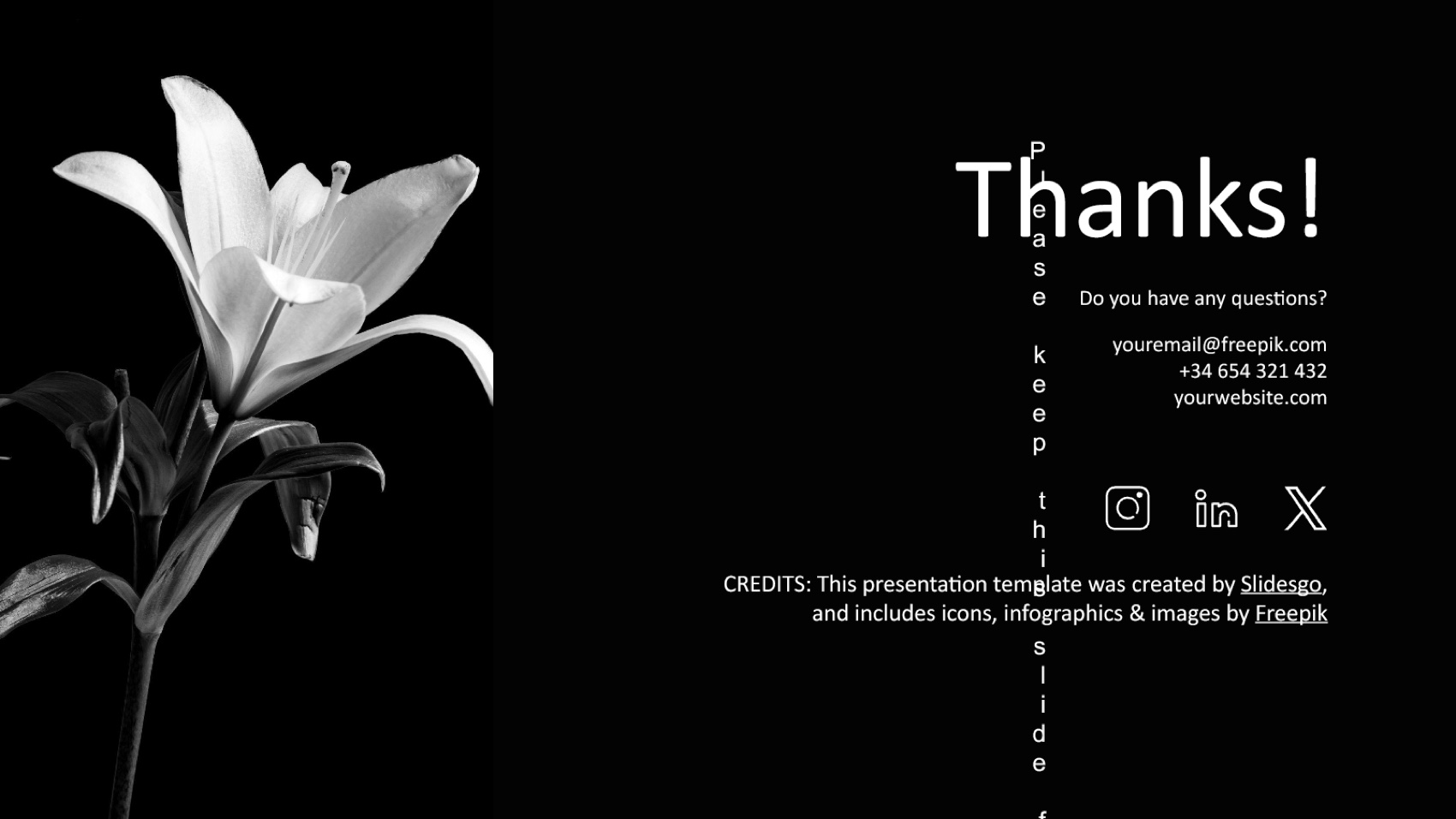
The final page retains generic contacts and attribution. Free users must keep the credits slide under the official Slidesgo pricing terms, but the contact fields need replacement.
Tosea's design is busier, yet the visual choices relate to the actual product. It uses the source diagrams, labeled robot anatomy, control interfaces, battery specifications, and safety illustrations.
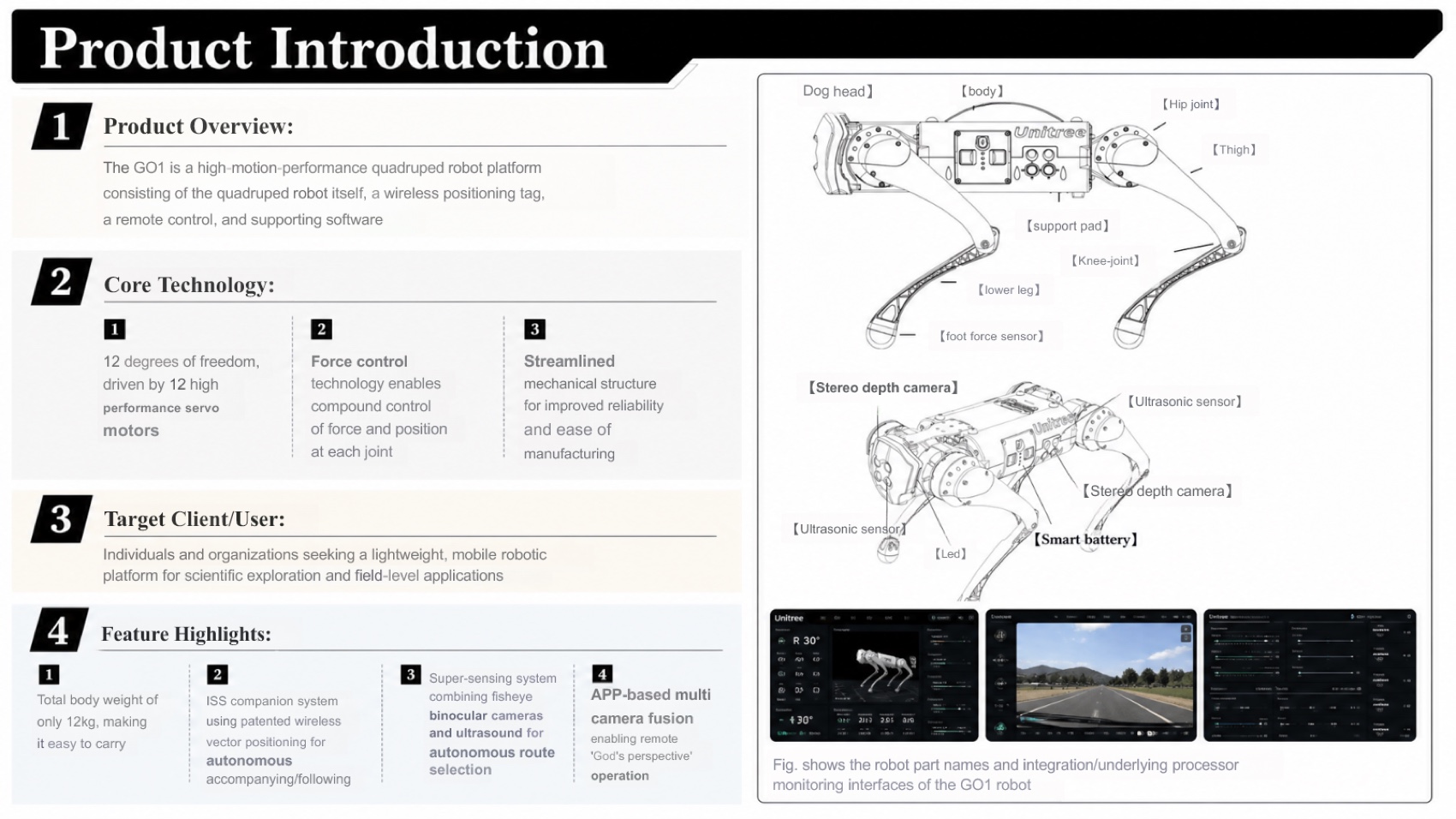
Several Tosea slides need fewer words and larger type. Microsoft recommends familiar fonts, unique titles, readable contrast, and intentional reading order in its PowerPoint accessibility guidance.
Tables and source data
The Slidesgo PPTX contains no native PowerPoint tables or charts. It summarizes battery values as separate text boxes, and the layout breaks several figures. It also omits the original architecture diagram and specification tables.
Tosea also lacks native table objects in this sample, but it preserves source tables visually and keeps surrounding text editable. This reduces lost rows, units, and remarks.
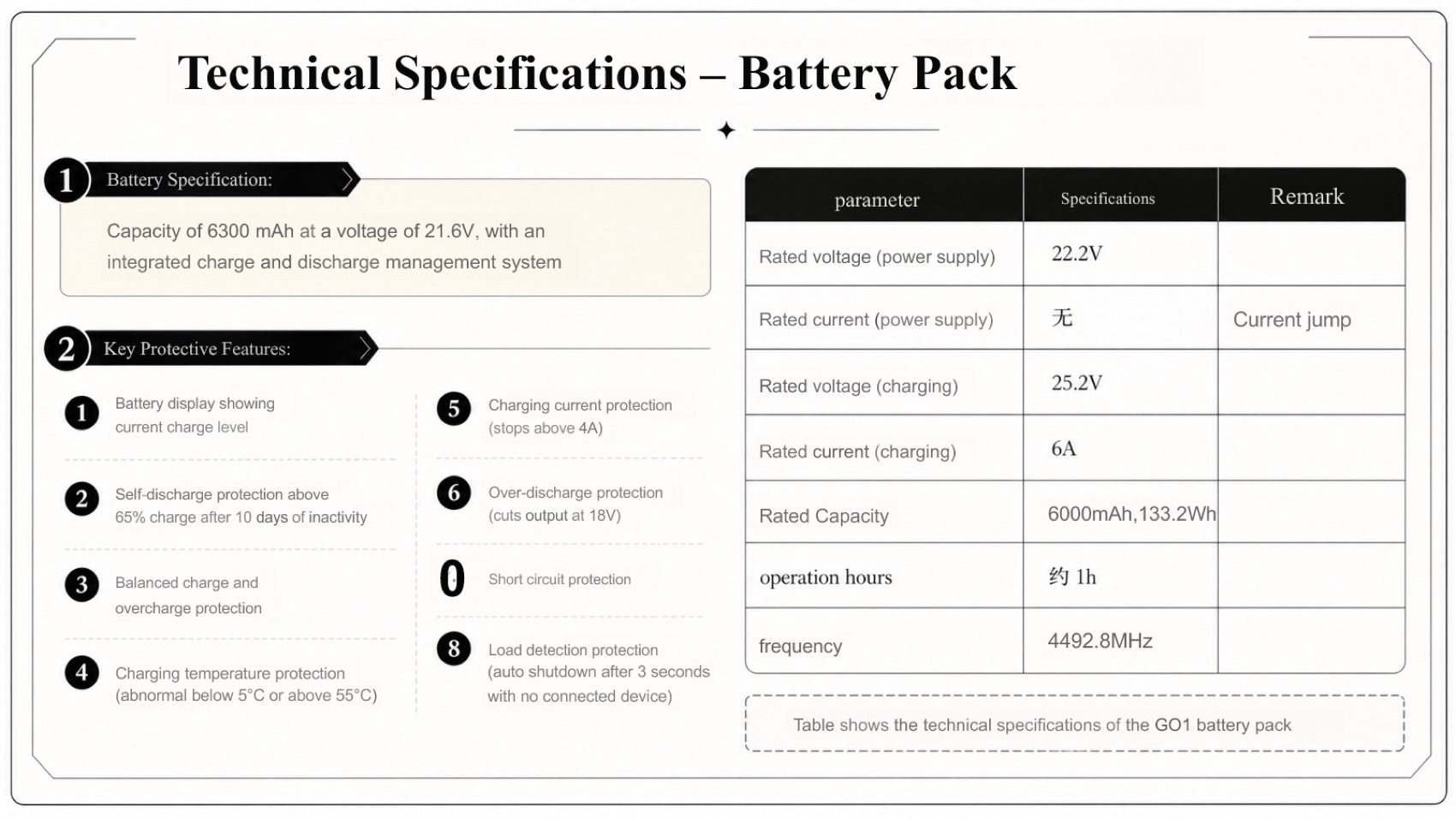
Tosea's battery page contains two Chinese entries and one incorrect item number. The source evidence remains visible, so the presenter can repair it without rebuilding the slide. Tosea's PDF to PowerPoint guide explains the difference between a new narrative and page reconstruction.
Manual repair time
Slidesgo: approximately 50 minutes
- 7 minutes to replace the unrelated cover image and correct the slide-count subtitle
- 10 minutes to repair the broken battery values and units
- 15 minutes to restore missing product architecture, original diagrams, and specification context
- 8 minutes to strengthen the product story and clarify why the Go1 matters
- 5 minutes to replace contact placeholders and handle attribution
- 5 minutes for source checking and final PowerPoint review
Tosea AI: approximately 18 minutes
- 8 minutes to correct OCR residue, numbering, and untranslated source text
- 5 minutes to simplify dense slides and rename academic-sounding agenda labels
- 5 minutes to verify specifications, source figures, and export formatting
These estimates measure time to reach a credible internal or client-facing work presentation, not time to create a highly customized brand deck.
Pricing comparison
Pricing was captured on August 18, 2026 and may change.
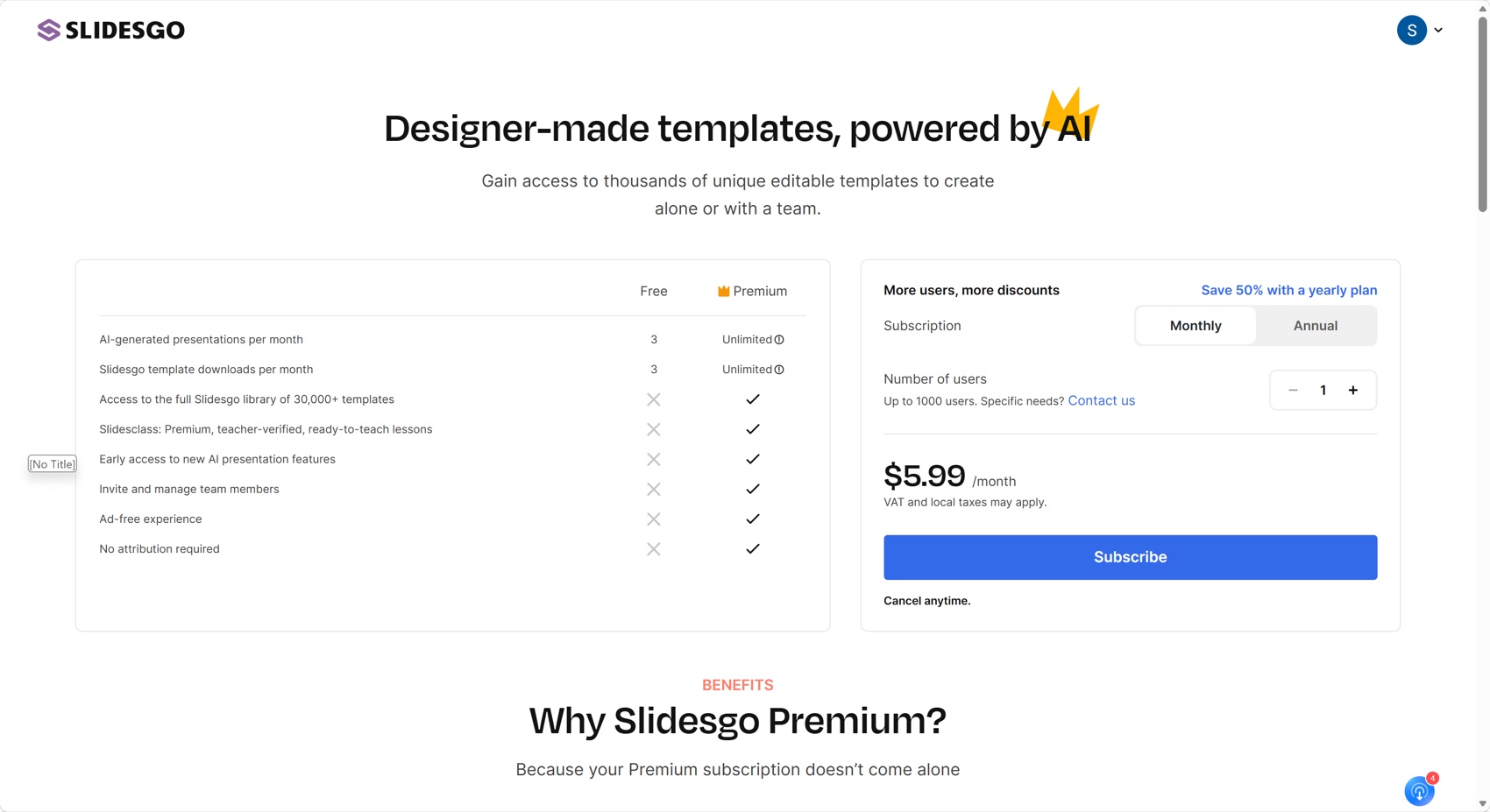
Slidesgo offers three free AI presentations and three template downloads per month. Premium costs $5.99 monthly or $35.99 annually, equivalent to $3 per month, before applicable taxes. The official page describes Premium generation as unlimited but notes a security limit of 150 AI presentations per month. Premium also removes the attribution requirement and provides the full template library.
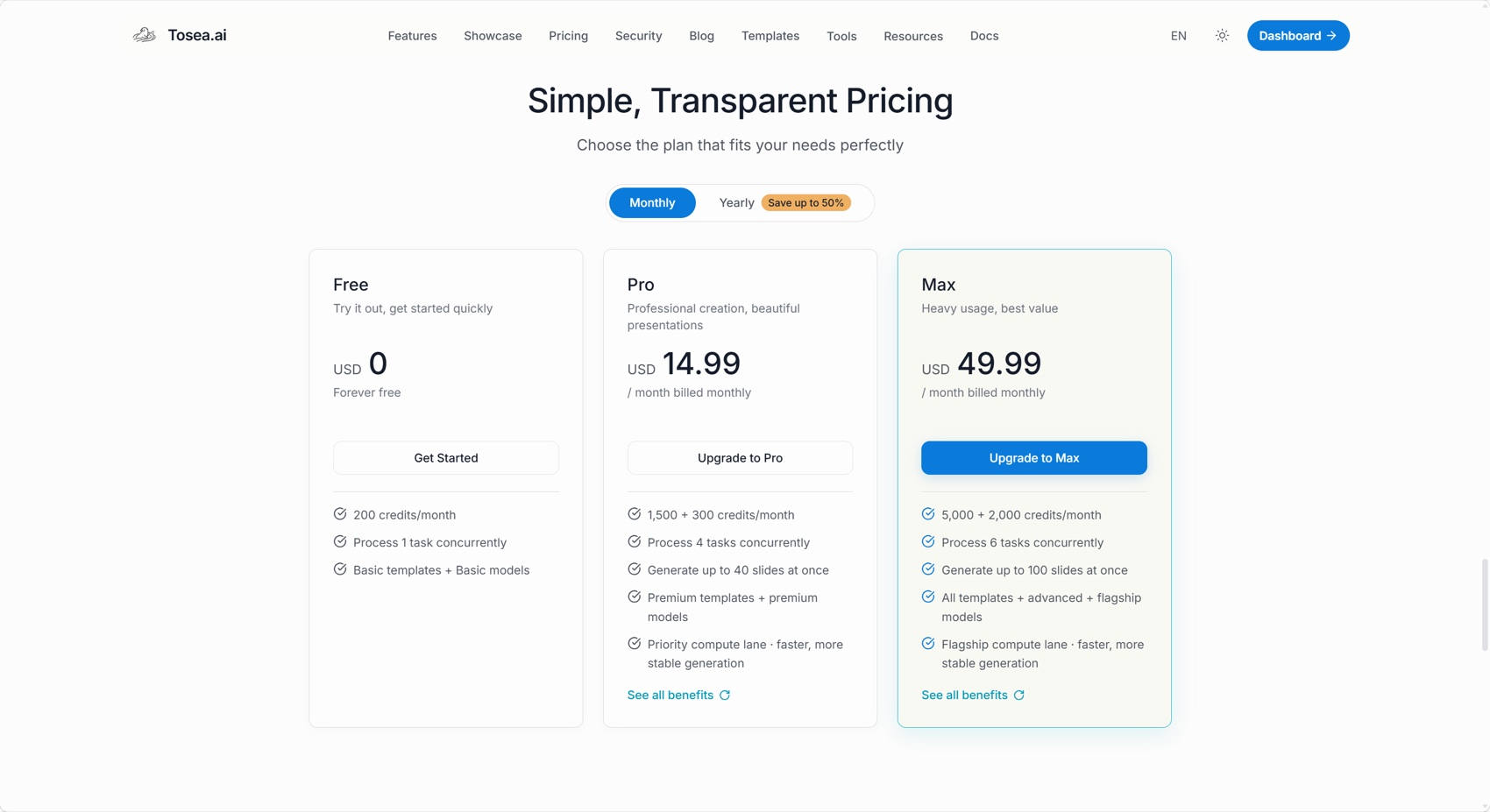
Tosea offers 200 free credits per month. Pro costs $14.99 monthly with 1,800 total credits, while Max costs $49.99 with 7,000 total credits. At 20 credits per generated slide, those balances correspond to about 10, 90, and 350 slides. Editing the outline does not consume generation credits.
Slidesgo is clearly cheaper for frequent template-based decks. Tosea costs more because its workflow focuses on parsing long documents, extracting source visuals, reviewing outlines, and producing editable, evidence-heavy presentations. Price should be judged against cleanup time, not only generation volume.
Download the test decks
Where Tosea AI fits
Tosea AI is a source-grounded AI presentation tool that turns PDFs, research papers, financial reports, annual reports, technical manuals, and complex business documents into editable PowerPoint slides. It is built for analysts, researchers, consultants, and teams that need preserved tables, charts, figures, and source context with a reviewable outline before rendering.
Which tool should you choose?
Choose Slidesgo when you need an inexpensive presentation maker, want access to a large template library, and can work from a short brief or simple source. It is useful for quick classroom, marketing, and general-purpose slides when extensive evidence preservation is not required.
Choose Tosea AI when your office presentation starts with a long report, manual, paper, or data-heavy PDF. The outline checkpoint, source-image extraction, custom-template support, layout controls, and editable PPTX output make it a better starting point when accuracy and revision time matter.
The cost comparison is worth doing properly, because subscription price and cost per delivered deck are not the same number. Slidesgo is the cheaper subscription by a wide margin. It also required 50 minutes of repair against 18 in this test, and that 32-minute difference is paid by whoever has to present the deck. At any realistic loaded hourly rate for an analyst or engineer, the repair gap on a single deck exceeds the monthly price difference between the two products. That calculation flips whenever the source is short or the presentation is built from a topic rather than a document, which is precisely where Slidesgo's template library is strongest — so the honest framing is not that one tool is better value, but that they are priced for different inputs.
How to Reproduce This Test
Everything needed is public. Download the Unitree GO1 User Manual, upload the same PDF to both tools, keep the instruction minimal, accept the default aspect ratio, generate once, and export to PPTX.
Two checks separate these products quickly. First, look at the cover: a template-driven generator picks illustration by keyword, and "robot" is a broad keyword. Ours returned an industrial robot arm for a quadruped manual, which is the kind of error that survives review because the slide looks finished. Second, open the battery slide in PowerPoint and check whether numeric ranges hold together. Values such as 6000 to 6300 mAh, 21.6 to 22.2 V, and 5 to 40 degrees Celsius stayed editable in our run but broke across disconnected lines.
Free Slidesgo decks also retain a credits slide under the official pricing terms, and the closing page keeps placeholder contact fields that need replacing before delivery. Both exported files are linked above.
Where This Test Sits in the Benchmark Series
Slidesgo is the price anchor of this benchmark series, and it is the run that most clearly separates cost per deck from cost per delivered deck. It is the cheapest tool tested, and it also needed the most repair of any run on this manual at 50 minutes.
The other three GO1 runs fill in the range. Gamma at 6.8 produced a compressed but coherent five-slide brief. Beautiful.ai at 6.2 produced the most polished layouts and lost the most source data. Genspark at 8.2 came closest to Tosea AI's 8.5.
What distinguishes Slidesgo from the others is where its intelligence sits. Gamma, Beautiful.ai, and Genspark each interpret the document and then choose a presentation form. Slidesgo starts from a template library that is genuinely excellent for its intended job — a topic, a deadline, and no source document — and fits the document into it. For a team presentation built from a topic rather than a report, that is the right architecture and the lowest price in this comparison. For a 46-page manual it inverts the problem, which is why the repair time lands where it does. Our PDF to PowerPoint guide covers the source-first path in more detail.
What This Test Does Not Tell You
This is one generation from each tool on one technical manual in August 2026, judged on the exported PPTX.
The test also plays to Slidesgo's weakest scenario. Its template library, editable Google Slides and PowerPoint formats, and free tier are strong assets for classroom decks, team updates, and topic-led presentations, none of which are measured here. A fair reading is that this run tells you what happens when Slidesgo is asked to do document conversion, not what Slidesgo is for.
Repair estimates assume an experienced editor with the manual open and exclude rebranding, so treat them as a ratio rather than a stopwatch reading.
Frequently asked questions
Can Tosea AI redesign my existing PowerPoint without changing the content?
Yes. Export it as a PDF, upload it, and request a redesign that preserves the wording. Use Layout Only for visual changes, then check every label and citation.
How do I upload a PowerPoint and ask Tosea AI to redesign each slide?
Export the deck as PDF, upload it, preserve the sequence and content, select a template, review the outline, then inspect every generated slide.
Can I upload my own PowerPoint template to Tosea AI?
Tosea supports custom templates on eligible plans. Verify layouts, fonts, colors, logos, and master-slide rules before sharing.
Can Tosea AI use custom brand colors, fonts, and a logo?
Yes. Add brand requirements and upload the logo or use a custom template. Verify fonts, colors, spacing, and contrast after export.
Can Tosea AI match previous company presentations?
Tosea can use a representative deck as design guidance. Use an approved custom template for stronger consistency.
Does Tosea AI preserve PowerPoint formatting after export?
Its editable PPTX export is designed to remain close to the generated preview. Results can vary with fonts, OCR, complex graphics, and the PowerPoint application used, so test the file in the delivery environment.
Can I edit only the layout and keep the exact wording?
Yes. Layout Only changes the arrangement without intentionally rewriting the content. Compare the result with the source to confirm that labels, citations, values, and line breaks remain correct.
Final verdict
Slidesgo wins on price and template variety. Tosea AI wins this work-presentation test on source coverage, product explanation, data preservation, revision controls, and repair time.
For a simple visual draft, Slidesgo is a practical choice. For an office report that must survive review and remain useful after export, Tosea AI provides the stronger document-to-PowerPoint workflow.
For related guidance, read Best AI Prompts for Professional Document-to-PPT Transformation, AI Presentation Tool for PPT Designers, and 10 Tips for Executive-Grade AI Presentations.
Sources
- GO1 official download center — Unitree Robotics
- Unitree GO1 User Manual (PDF) — Unitree Robotics
- Slidesgo AI Presentation Maker — Slidesgo
- Change the fonts in a presentation — Microsoft Support
- Slidesgo pricing and license terms — Slidesgo
- Make your PowerPoint presentations accessible — Microsoft Support