


PDCA cycle prompts for PowerPoint
Four Bain-style prompts that turn a Plan-Do-Check-Act improvement effort into one executive slide each. They cover manufacturing defects, a delayed project, repeat customer contacts and invoice-processing cost, and each ends with a decision on what to standardize, extend, revise or stop.
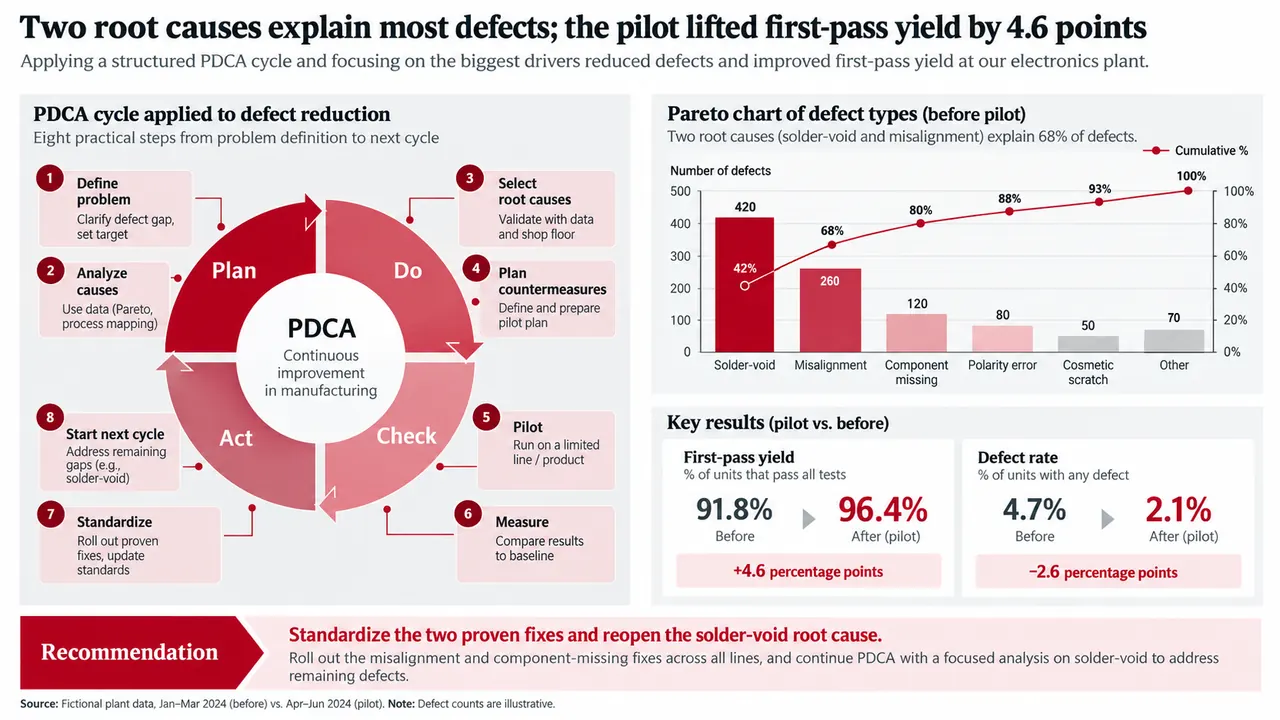
PDCA cycle prompt
Pick a slide, fill in any highlighted fields, then copy or run it.
Create one 16:9 executive PDCA slide for manufacturing quality. Audience: plant leadership. Problem: [problem]. Use only these verified inputs: [baseline, defect categories, periods, root-cause evidence, pilot results, targets, sources]. Show the eight PDCA steps, a Pareto chart, and before-versus-after quality metrics. Distinguish proven fixes from unresolved causes. Write a conclusion-led title and a specific Act decision. Use a restrained red, charcoal, gray, and white consulting layout. Label illustrative or estimated values. Do not invent data.
Build one 16:9 PDCA slide for a delayed project or transformation. Use these verified sources: [milestone data, rework, approval times, interviews, process evidence]. Show the baseline on the left, a cause tree in the center, and a four-week Plan-Do-Check-Act pilot on the right. Highlight no more than two primary causes. Define three measurable gates for scaling and include a stop condition. Write an action title that names the cause, not only the delay. Do not fabricate metrics.Create one 16:9 customer-service PDCA slide. Problem: [metric and definition]. Segment the baseline by contact driver, channel, or customer group. Use only verified data from [sources]. Build a 5W2H pilot plan with action, owner, channel, timing, and success measure. Compare pilot and control trends. In Act, classify each countermeasure as Standardize, Keep in test, Revise, or Stop. Add limitations and source notes. Do not invent causal claims.
Create one 16:9 finance-process PDCA slide. Map the current process and mark the two largest verified bottlenecks. Pilot these countermeasures: [actions]. Show cost, cycle time, error rate, and control-quality measures before and after. Use a waterfall or variance chart for quantified effects. End with a decision table that labels each action Standardize, Extend, Revise, or Reject, with rationale and owner. Preserve units, periods, and sources. Do not invent savings.Why these prompts work
Act is a decision, not a step
Every prompt ends on a decision: a specific Act call, scale gates with a stop condition, or a table labeling each action Standardize, Extend, Revise or Reject.
Proven and unproven are split
The defect prompt separates proven fixes from unresolved causes, and the service prompt compares pilot with control trends. No fix gets credit without a comparison.
The title names the cause
The project prompt asks for an action title that names the cause, not only the delay, and allows no more than two primary causes. Readers learn why, not just what slipped.
Scaling has gates
The project prompt sets three measurable gates and a stop condition before scaling. The finance prompt adds control-quality measures so cost cuts do not weaken controls.
Adapt it to your own deck
Replace the bracketed inputs
Swap [problem] and [baseline, defect categories, periods] for your own data, or attach the pilot tracker and add "Mark any metric that has no baseline period."
Pick the closest use case
Use the defect prompt for any yield or quality metric, the service prompt for any repeat-volume metric, and the finance prompt for transactional processes such as order-to-cash.
Change colors and audience
The defect prompt names red, charcoal, gray and white. Replace that line with your brand colors, and for a frontline audience ask for plain labels instead of consulting shorthand.
PDCA cycle FAQ
What is the PDCA cycle?
Plan-Do-Check-Act is a four-stage method for continuous improvement. You plan a change from a defined problem, test it at small scale, check results against a baseline, then act by standardizing what worked and starting the next cycle.
Is this an official Bain template?
No. Bain-style describes the restrained consulting layout these prompts ask for: an action title, evidence charts and a clear decision. Tosea is not affiliated with Bain & Company.
Can I use these prompts in ChatGPT, Claude or Gemini?
Yes. You will get analysis text and a slide outline to build yourself. In Tosea you attach your pilot data with the prompt and get slides you can edit and export to PowerPoint.
Bain-style describes a common consulting framework. Tosea is not affiliated with Bain & Company. Figures on the example slides are illustrative.
Prefer not to write a prompt?
Upload the document. Tosea drafts the deck, you edit and export.
Start for free