


Weighted decision matrix prompt for PowerPoint
A PwC-style prompt for one option-selection slide. It scores three options against your criteria, weights and 1-to-5 rules, shows each weighted contribution, checks that weights total 100 percent and tests the two most uncertain weights before naming a leader.
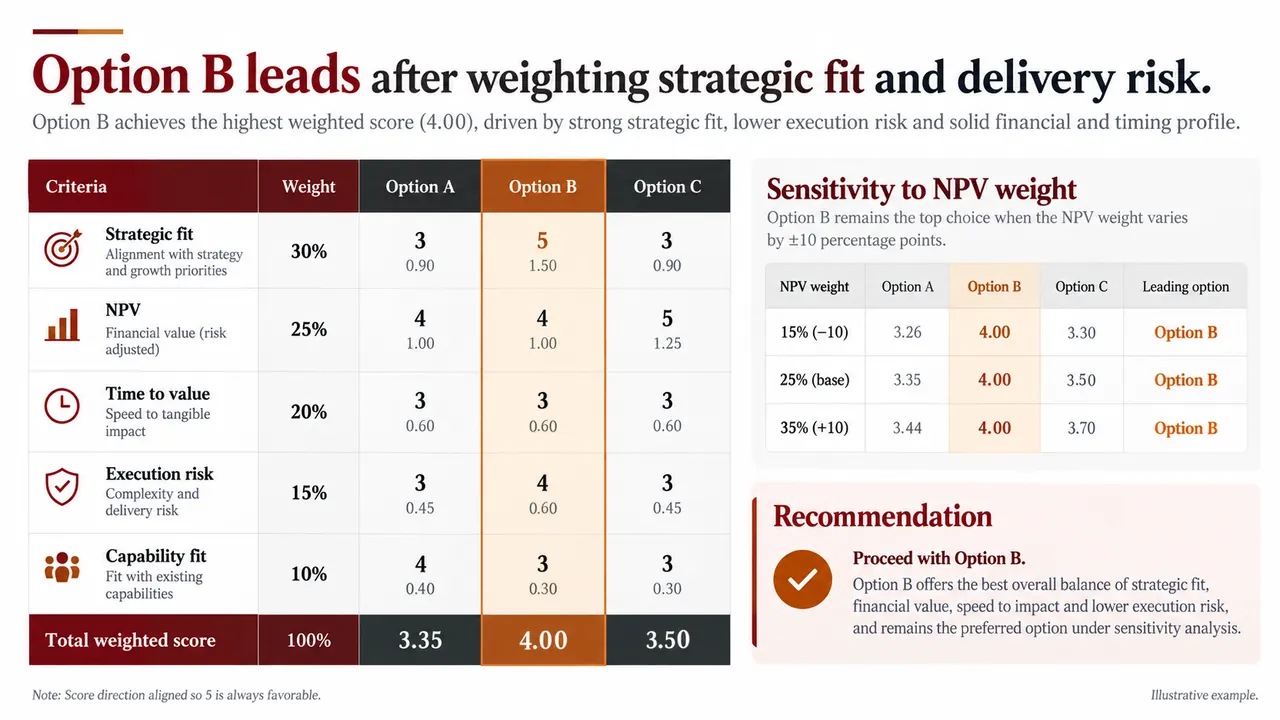
Weighted decision matrix prompt
Fill in any highlighted fields, then copy or run it.
Build a weighted decision matrix for three options using supplied criteria, weights, evidence, and 1-to-5 rules. Show each weighted contribution and verify that weights total 100 percent. Test the two most uncertain weights. Highlight the leader, threshold risks, and why management should accept or reject the ranking.
Why this prompt works
Weights must add up
The model has to verify that weights total 100 percent. A matrix whose weights sum to 95 or 110 is a common error that undermines the whole ranking.
Contributions are visible
Each weighted contribution is shown, not just the total, so the audience can see which criterion carries the leading option.
The ranking faces a sensitivity check
Testing the two most uncertain weights shows whether the winner holds if the committee values NPV or risk differently.
Accept or reject is explicit
The slide must say why management should accept or reject the ranking and flag threshold risks, so a high score cannot hide a deal-breaker.
Adapt it to your own deck
Bring your criteria and evidence
Fill in your criteria, weights and scoring rules, or attach the evaluation workbook. Add "Show the evidence for any score of 1 or 5 in a footnote."
Score more options
The prompt fixes three options. For four or five, add "Rank all options but show full detail only for the top three."
Use it for vendor selection
Rename the options to suppliers and add a must-have gate: "Exclude any vendor that fails the security requirement before scoring."
Weighted decision matrix FAQ
What is a weighted decision matrix?
A table that scores each option against several criteria, multiplies each score by the criterion's weight and adds the results. It makes the trade-offs behind a choice explicit and shows how the ranking changes if the weights change.
Is this an official PwC template?
No. Weighted scoring is a general decision tool, and "PwC-style" refers to the burgundy and orange layout. Tosea is not affiliated with PwC.
Can I use ChatGPT, Claude or Gemini for the scoring?
Yes, a chat assistant can compute the weighted totals and sensitivity table as text. Tosea turns the prompt and your attached scoring sheet into a designed, editable slide that exports to PowerPoint.
PwC-style describes a common consulting framework. Tosea is not affiliated with PwC. Figures on the example slides are illustrative.
Prefer not to write a prompt?
Upload the document. Tosea drafts the deck, you edit and export.
Start for free