


SPACE matrix prompts for PowerPoint
Four Bain-style prompts for strategy teams that build one SPACE matrix slide per strategic posture. Each calculates the vector from financial strength, competitive advantage, environmental stability and industry strength scores, then gives posture-specific actions with gates or triggers.
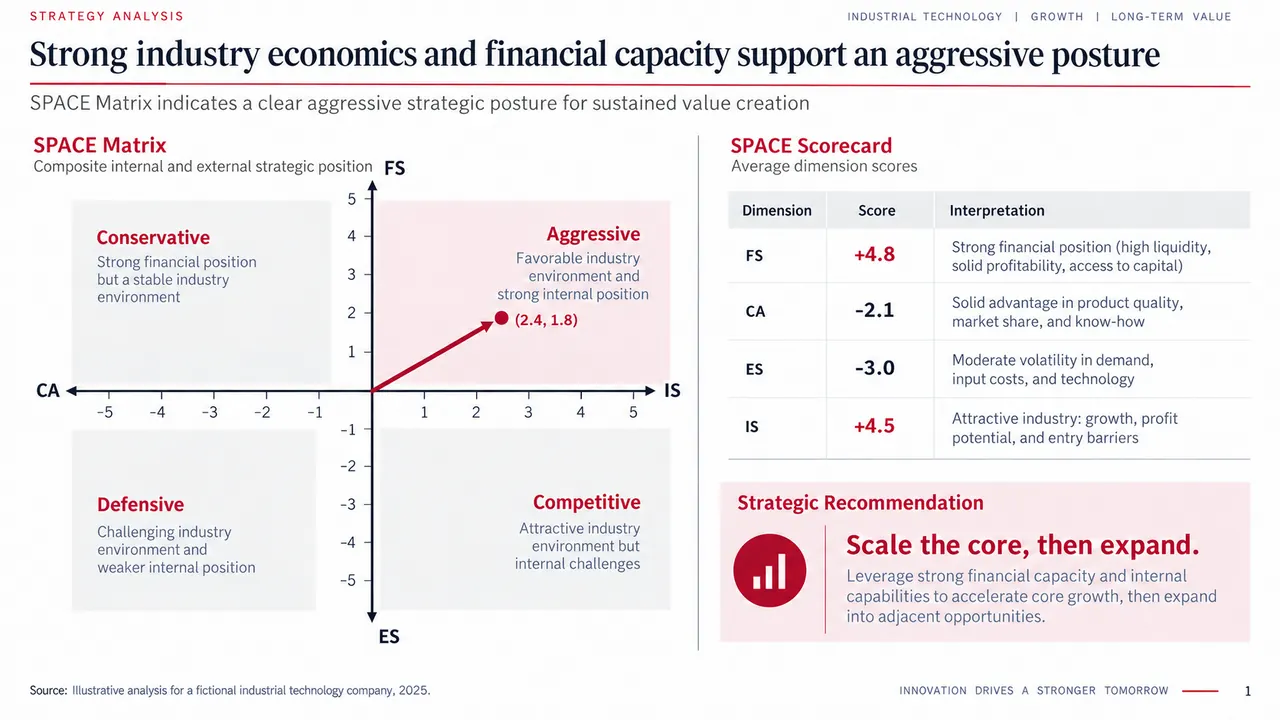
SPACE matrix prompt
Pick a slide, fill in any highlighted fields, then copy or run it.
Create one 16:9 executive strategy slide using a SPACE Matrix. Audience: executive committee. Company: [company]. Decision: [decision]. Use only the verified data below: [FS, CA, ES, IS variables, scores, dates, and sources]. Calculate the four dimension averages, X coordinate, and Y coordinate. Plot a vector from the origin. Place the matrix on the left and a scorecard plus recommendation on the right. Write a conclusion-led title. Recommend no more than three sequenced growth moves. Add assumptions, decision gates, and source notes. Use a restrained red, charcoal, gray, and white consulting layout. Do not invent data.
Build one 16:9 SPACE Matrix slide for a conservative strategic posture. Use these verified inputs: [paste data and sources]. Show the vector and explain the two variables that most influenced the result. Divide the right side into Protect margin, Extend selectively, and Preserve optionality. For each action, state the owner, investment limit, evidence gate, and review date. Use a conclusion-led title and restrained consulting typography. Label all forecast values and assumptions. Do not fabricate evidence.Create one 16:9 competitive-posture SPACE Matrix slide for [company]. Verified inputs: [data and sources]. Plot the calculated vector. Identify one customer segment or use case where the company can build advantage. Add three priority actions with quantified stage gates. Include a stop condition for each action. Write a title that states why focused investment is preferable to broad expansion. Use red only for the chosen path and key numbers. Keep the source note visible. Do not invent metrics.
Create one 16:9 defensive SPACE Matrix slide. Company: [company]. Use only these verified inputs: [scores, cash, debt, working capital, portfolio performance, market evidence, sources]. Plot the vector and state why the business falls in the defensive quadrant. Build a 90-day plan covering liquidity, portfolio, cost base, and exit triggers. Add a cash bridge and identify which figures are actuals, forecasts, or assumptions. Use a restrained executive layout. Do not invent values or soften downside risks.
Why these prompts work
Coordinates are calculated
The aggressive prompt asks for the four dimension averages, then the X and Y coordinates, before plotting the vector from the origin. The posture follows from the math.
Each posture gets its own actions
Conservative splits into Protect margin, Extend selectively and Preserve optionality. Defensive builds a 90-day plan across liquidity, portfolio, cost base and exit triggers.
Stop conditions are required
The competitive prompt asks for quantified stage gates and a stop condition for every action. The conservative one adds an investment limit and review date per action.
Downside stays visible
The defensive prompt asks the model to label actuals, forecasts and assumptions and not to soften downside risks, which keeps a cash-first plan honest.
Adapt it to your own deck
Score your own variables
Paste your FS, CA, ES and IS variables with scores and sources where the prompt says [paste data and sources]. Add "Show the variable list on an appendix slide."
Run the posture you land in
Calculate your coordinates first, then use the prompt that matches the quadrant. If the vector sits near an axis, run both neighboring postures and compare.
Match the colors to your brand
The prompts use red, charcoal, gray and white, with red only for the chosen path. Replace those words with your template colors and keep the one-accent rule.
SPACE matrix FAQ
What is a SPACE matrix?
The Strategic Position and Action Evaluation matrix scores four dimensions: financial strength, competitive advantage, environmental stability and industry strength. The resulting vector points to one of four postures: aggressive, conservative, competitive or defensive.
How are SPACE matrix coordinates calculated?
Average the scores within each dimension. The X coordinate is competitive advantage plus industry strength, and the Y coordinate is financial strength plus environmental stability. Competitive advantage and environmental stability are scored on negative scales.
Is this an official Bain template?
No. Bain-style describes the restrained red, charcoal and white consulting layout these prompts request. Tosea is not affiliated with Bain & Company.
Can I use these prompts in ChatGPT, Claude or Gemini?
Yes. A chat assistant can calculate the vector and write the recommendation as text. In Tosea you attach your scoring data with the prompt and get slides you can edit and export to PowerPoint.
Bain-style describes a common consulting framework. Tosea is not affiliated with Bain & Company. Figures on the example slides are illustrative.
Prefer not to write a prompt?
Upload the document. Tosea drafts the deck, you edit and export.
Start for free