


GE-McKinsey Matrix prompts for PowerPoint
Five McKinsey-style consulting prompts that build a portfolio review deck: a nine-box overview, the weighted scoring model behind it, and one recommendation slide for each zone of the matrix.
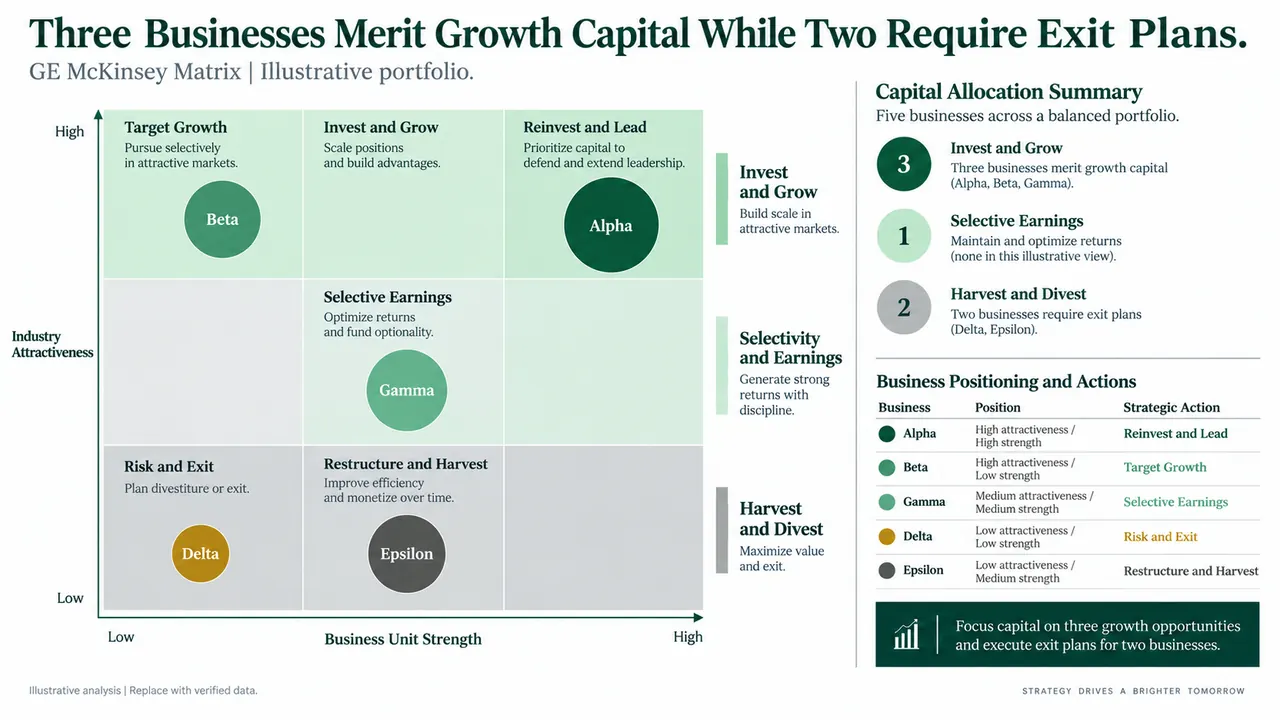
GE-McKinsey matrix prompt
Pick a slide, fill in any highlighted fields, then copy or run it.
Create a 16:9 executive strategy slide titled Portfolio choices favor Digital Services and Specialty Solutions. Build a GE McKinsey nine-box matrix with industry attractiveness on the vertical axis and business unit strength on the horizontal axis. Plot five labeled bubbles sized by annual revenue. Use dark green for invest and grow, pale green for selective investment, and light gray for harvest or divest. Add a right-side panel with three portfolio recommendations, capital implications, and one key risk. Use a clean white background, precise alignment, restrained icons, small source notes, and editable chart elements. Do not add company logos.
Design a 16:9 methodology slide titled Weighted evidence places Business A in the invest zone. Show two compact scoring tables: industry attractiveness and business unit strength. Include criterion, weight, score from 1 to 5, weighted result, source, and confidence. Weights must total 100 percent for each axis. Add the weighted score formula, a small sensitivity chart for the top three assumptions, and a conclusion box. Use a dark green, mint, charcoal, and white consulting palette with editable tables and no decorative photography.
Create a green consulting-style recommendation slide for a business in the invest and grow zone. Use an action title stating that targeted investment can extend market leadership. Include a highlighted nine-box matrix, a three-year investment roadmap, three value drivers, required capabilities, milestone KPIs, and a risk-control panel. Show sample figures clearly as illustrative. Prioritize one message per visual, generous white space, editable shapes, and a concise source footer.
Build a 16:9 portfolio slide for a business in the selectivity and earnings zone. The action title should state that focused investment protects earnings while limiting exposure. Show the business position on a nine-box matrix, then divide initiatives into fund, test, maintain, and stop. Add return thresholds, cash impact, owner, timing, and decision gates. Use a white background, dark green headings, mint highlights, charcoal text, and an evidence-based consulting layout with fully editable elements.
Create an executive options slide for a business in the harvest or divest zone. Include a highlighted nine-box position and compare four paths: harvest, restructure, sell, and exit. For each path show cash released, execution time, one-time cost, major risk, and trigger condition. Add a recommended path, a 100-day plan, and decision dependencies. Use subdued green and gray, simple tables, clear hierarchy, editable objects, and an explicit note that all numbers are illustrative.
Why these prompts work
The title is a claim
Four of the five prompts set an action title that states the recommendation, so the slide reads as an answer instead of a topic.
Axes and encodings are fixed
Attractiveness runs up, unit strength runs across, bubble size is revenue and color is the zone. The model has nothing to guess.
Weights total 100 percent
The scoring prompt requires weights that total 100 percent on each axis, with criterion, score, source and confidence, plus a sensitivity chart for the top three assumptions.
Each zone gets its own action
Invest and grow gets a roadmap and milestone KPIs. Selectivity sorts initiatives into fund, test, maintain and stop. Harvest compares four exit paths with triggers.
Adapt it to your own deck
Use your own data
Attach the portfolio spreadsheet and add "Use only figures from the attached file. Mark missing values as gaps."
Rewrite the fixed titles
The first two prompts hard-code titles and business names. Replace them with your own conclusion, or write "Write the action title from the scoring results."
Match your template
The prompts name dark green, mint, charcoal and white. Swap in your template's palette, or pick a template in Tosea, and keep the rule that zone color carries meaning.
GE-McKinsey matrix FAQ
What is a GE-McKinsey matrix slide?
A nine-box grid that places each business unit by industry attractiveness and business unit strength. Teams use it to decide where to invest, where to hold for earnings and where to harvest or exit.
How is it different from the growth-share matrix?
The growth-share matrix uses two single measures, market growth and relative market share, in four boxes. The GE-McKinsey matrix uses weighted scores built from several criteria on each axis and has nine boxes.
Is this an official McKinsey template?
No. The name describes a widely taught portfolio framework, and McKinsey-style describes the consulting slide convention. Tosea is not affiliated with McKinsey & Company or GE.
Can I use these prompts in ChatGPT, Claude or Gemini?
Yes. A chat assistant returns the scoring and recommendations as text and an outline. In Tosea you attach your portfolio data with the prompt and get slides you can edit and export to PowerPoint.
McKinsey-style describes a common consulting framework. Tosea is not affiliated with McKinsey & Company. Figures on the example slides are illustrative.
Prefer not to write a prompt?
Upload the document. Tosea drafts the deck, you edit and export.
Start for free