Best AI Skills for Research: 6 Skills to Run the Full Academic Workflow (2026)
A practical review of 6 GitHub-based AI research skills and MCP tools — from paper-search-mcp to Oh My Paper — for running a complete academic literature workflow in 2026.

This is a practical, non-hype review of GitHub-based research skills and MCP tools that can help students, researchers, and technical teams run a more complete academic research workflow. The goal is not to outsource judgment to AI. The goal is to use AI skills as research assistants for the parts of literature work that are slow, repetitive, and easy to lose track of. Each skill below is assessed by what its README and project page actually claim it does, what stage of research it fits, and where it can mislead you if used carelessly. For a related deep dive on one of these suites, see our complete guide to academic-research-skills.
Quick Overview
If you are new to AI-assisted research, use different skills for different stages:
- Use
paper-search-mcpwhen you need to find papers across arXiv, PubMed, bioRxiv, Semantic Scholar, Crossref, OpenAlex, and other sources. - Use
literature-searchordeep-researchfromagent-research-skillswhen you need a structured literature survey workflow. - Use
literature-reviewwhen you already have a research topic and need to group papers by theme, method, evidence, and research gap. - Use
Oh My Paperwhen you want a heavier research pipeline that connects paper discovery, analysis, experiment planning, writing, and presentation work. - Use
Academic Research Agent Skillwhen you want a human-guided research process with explicit approval gates, source inspection, novelty review, and claim verification. - Use
pubmed-search-mcpwhen your work is biomedical, clinical, or life-science focused.
The best workflow is not one tool for everything. It is a staged process: find papers, filter them, inspect sources, compare methods, synthesize themes, verify claims, then write or present your own judgment.

Why Normal AI Paper Summaries Are Not Enough
A common beginner workflow looks like this:
Upload a PDF. Ask the AI to summarize it. Read the summary. Feel like you understood the paper.
That can be helpful, but it is also risky. A summary may skip the research question, flatten the method, miss the baselines, ignore limitations, or make the contribution sound more complete than it is. The bigger danger is that a summary can create false confidence.
For real research reading, you usually need to answer three questions:
- What problem does this paper actually solve?
- What method or evidence supports the claim?
- What did the experiment really prove, and what did it not prove?
AI skills are useful when they help you unpack those questions. They are less useful when they simply make the paper feel easier than it is.
1. paper-search-mcp: Best for Finding and Downloading Papers
GitHub: openags/paper-search-mcp
paper-search-mcp is a Model Context Protocol server and CLI-oriented research tool for searching and downloading academic papers from multiple sources. Its README describes support for sources such as arXiv, PubMed, bioRxiv, medRxiv, Semantic Scholar, Crossref, OpenAlex, PubMed Central, CORE, Europe PMC, dblp, OpenAIRE, DOAJ, BASE, Zenodo, HAL, SSRN, and Unpaywall.
This is the right skill when you are at the beginning of a topic.
Use it when:
- You only know a keyword or research direction.
- You need to build a first paper pool.
- You want papers from multiple databases instead of one search engine.
- You need to download PDFs or extract text.
- You want standardized search results for an AI agent workflow.
A practical use case:
You are starting a project on retrieval-augmented generation for scientific literature. Instead of asking an LLM to name papers from memory, you use paper-search-mcp to search across open academic sources, download candidate papers, and create a reading list.
Useful prompt:
Find recent papers on retrieval-augmented generation for scientific literature review. Search arXiv, Semantic Scholar, Crossref, and OpenAlex. Return 20 papers grouped by theme, with title, year, source, DOI or URL, abstract summary, and why each paper may be relevant.
Why it matters:
Academic search should be source-grounded. Tools such as arXiv, PubMed, bioRxiv, Semantic Scholar, Crossref, and OpenAlex exist because scholarly discovery depends on traceable metadata, not vague memory. If you need the newest work specifically, pair this with a recency-focused workflow — we walk through one in our guide to the /last30days research skill.
2. literature-search and deep-research: Best for Building a Survey Pipeline
GitHub: lingzhi227/agent-research-skills
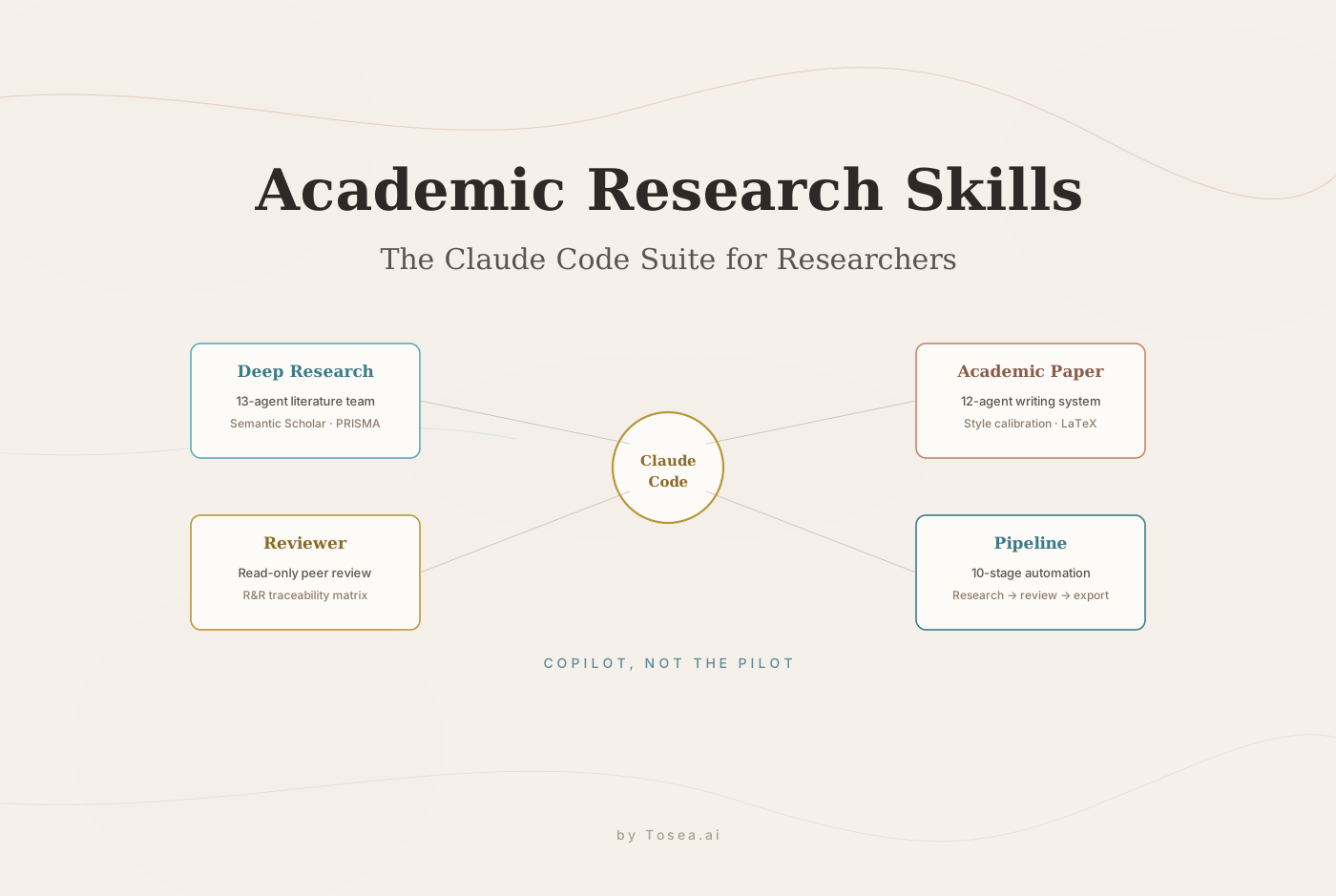
The agent-research-skills repository contains a large set of Claude Code research skills for the academic paper lifecycle. Its README lists deep-research as a systematic literature survey workflow and literature-search as a multi-source academic search skill using sources such as Semantic Scholar, arXiv, OpenAlex, and Crossref. We reviewed the full suite — including its writing and peer-review skills — in our academic-research-skills complete guide.
This repository is useful because it separates research into stages instead of treating paper reading as one chat prompt.
Relevant skills include:
literature-searchfor multi-source search and rankingdeep-researchfor frontier search, survey, deep dive, code, synthesis, and report generationliterature-reviewfor grounded review worknovelty-assessmentfor repeated literature checkscitation-managementfor BibTeX harvesting, validation, and deduplicationrelated-work-writingfor organizing related work thematicallysurvey-generationfor survey-style writing with citation validation
Installation from the README:
npx skills add lingzhi227/agent-research-skills -g -a claude-code
Use it when:
- You already have a topic, but not a structured map.
- You need to compare methods across papers.
- You want a repeatable survey workflow.
- You are writing Related Work or a thesis chapter.
- You need to move from search results to a source-backed report.
A practical workflow:
- Use
literature-searchto collect candidate papers. - Use
deep-researchto organize the field into themes. - Use
literature-reviewto compare methods and gaps. - Use
citation-managementto validate references. - Use
related-work-writingonly after source inspection is complete.
This is closer to how literature review should work. You do not ask AI to produce a conclusion first. You ask it to structure the evidence so you can judge the conclusion.
3. literature-review: Best for Organizing a Topic, Not One Paper
GitHub: xyxsns-zdj/literature-review
A literature review skill is not primarily for summarizing one paper. It is for understanding a research area.
The agent-research-skills repository also includes a literature-review skill described as a multi-perspective dialogue simulation with expert personas for grounded literature review. Another public option is xyxsns-zdj/literature-review, a Claude Code skill designed for step-by-step literature review work.
Use a literature review skill when:
- You want to know how a field has developed over several years.
- You need to group papers by theme or method.
- You want to identify open problems.
- You need a Related Work section.
- You are comparing assumptions, datasets, metrics, or baselines.
Good output should include:
- Research clusters
- Method families
- Key datasets
- Evaluation metrics
- Chronological development
- Competing viewpoints
- Strong and weak evidence
- Unresolved gaps
- Papers that must be read in full
Critical warning:
Do not trust citations, years, or method classifications without checking the original papers. A literature review skill can organize your reading, but it should not be the final authority.
For formal systematic reviews, researchers often use frameworks such as PRISMA to make search, screening, and inclusion decisions transparent. AI skills can support this process, but they do not replace review protocol design.
4. Oh My Paper: Best for a Full Research Pipeline
GitHub: LigphiDonk/Oh-my--paper
Oh My Paper is a Claude Code plugin that positions itself as a full research lab workflow in the terminal. Its README lists skills across literature, survey and ideation, experiment, writing, planning and review, presentation, and domain-specific research.
The literature-related skills include:
paper-finderpaper-analyzerpaper-image-extractorresearch-literature-tracebiorxiv-databasedataset-discovery
This is heavier than a single paper search tool. It is designed for users who want to connect literature discovery with later research work such as experiments, writing, and presentations.
Use it when:
- You are building a serious research project.
- You want a project-level pipeline, not isolated prompts.
- You need to track papers, experiments, writing, and handoffs.
- You want paper image extraction and literature tracing.
- You are comfortable working inside Claude Code or Codex-like environments.
The README also lists Codex installation instructions and notes that Codex users can ask naturally after installing the plugin, although slash-command behavior may differ depending on environment.
Best for:
- PhD students
- AI researchers
- Lab teams
- Technical writers
- Research engineers
- People who want a durable project pipeline
Not ideal for:
- One-off paper summaries
- Non-technical users
- People who only need a quick reading list
- Users who do not want to manage a terminal-based workflow
5. Academic Research Agent Skill: Best for Human-Guided Research Judgment
GitHub: ngtiendong/Academic-Research-Agent-Skill
The Academic Research Agent Skill is designed for graduate students and technical researchers. Its project page emphasizes human approval gates, evidence before claims, and durable research artifacts. It supports workflows such as literature review, novelty checks, mathematical formalization, experiment planning, reviewer simulation, and claim verification.
This is one of the most useful philosophies for AI-assisted research: the student remains responsible for judgment.
The skill creates artifacts such as:
- Scope documents
- Literature grounding notes
- Paper notes
- Figure and table evidence
- Math formalization
- Novelty gate reports
- Code execution plans
- Claim verification records
Use it when:
- You are scoping a thesis or research project.
- You need to decide whether an idea is novel enough.
- You want AI help without giving up control.
- You need artifacts your advisor, lab, or future self can inspect.
- You care about claim verification.
A practical prompt:
Read the skill instructions and my topic file. Help me scope this research idea. Do not skip human decision gates. Before making claims, identify which sources need to be inspected.
This is especially strong for E-E-A-T-style research writing because it makes the evidence trail visible.
6. pubmed-search-mcp: Best for Biomedical and Clinical Literature
GitHub: u9401066/pubmed-search-mcp
If your topic is biomedical, clinical, or life-science focused, general paper search may not be enough. pubmed-search-mcp is a professional MCP server for biomedical literature research. Its README describes multi-source search across PubMed, Europe PMC, CORE, OpenAlex, preprint servers, full-text access, citation networks, PICO-style workflows, timeline analysis, and more.
Use it when:
- You are working with clinical or biomedical questions.
- You need PubMed-centered search.
- You need PICO-style framing.
- You need to distinguish peer-reviewed sources from preprints.
- You need biomedical timeline or citation context.
A practical prompt:
Search for recent studies on remimazolam versus propofol for ICU sedation. Use a PICO framing. Separate peer-reviewed papers from preprints. Return the strongest papers, main outcomes, limitations, and whether full text is available.
For health research, this distinction matters. Medical literature search should be careful about study type, population, intervention, outcome, and peer-review status.
Recommended Workflow: How to Use Research Skills Without Fooling Yourself
Here is a practical workflow that works for most academic topics. The point is sequence: each stage produces an artifact the next stage can check, so you never jump from a raw search straight to a confident conclusion.
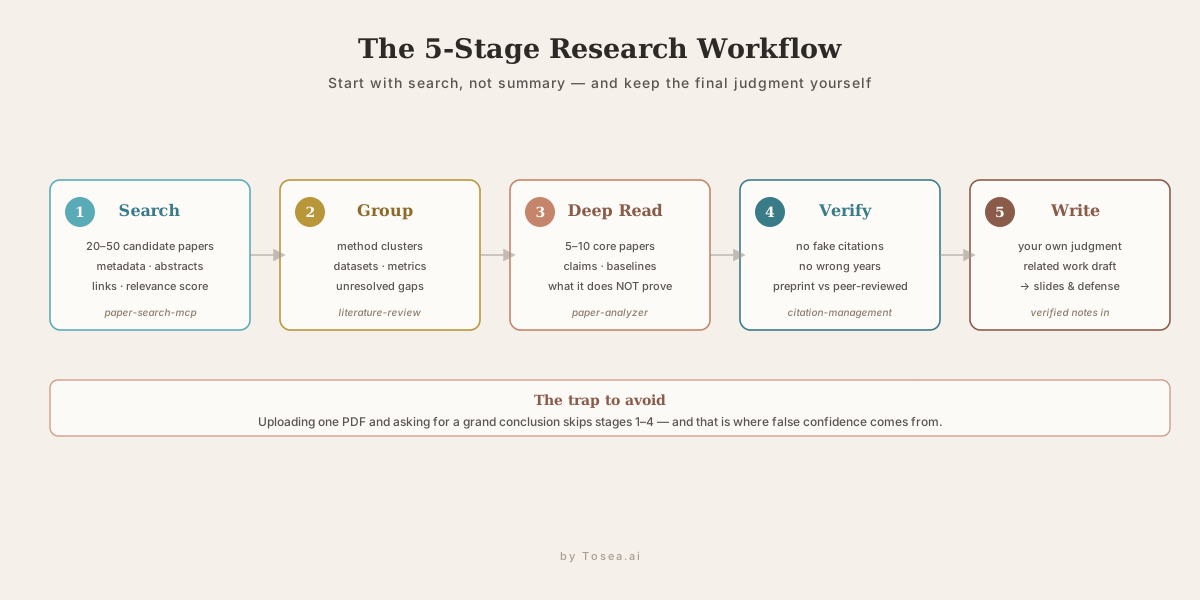
Step 1: Start with Search, Not Summary
Use paper-search-mcp, literature-search, or pubmed-search-mcp to build a paper pool. Do not start by uploading one paper and asking for a grand conclusion.
Goal:
- 20 to 50 candidate papers
- metadata
- abstracts
- links
- source database
- initial relevance score
Step 2: Group Papers by Theme
Use literature-review or deep-research to group papers by theme, method, dataset, and research question.
Goal:
- method clusters
- major schools of thought
- common datasets
- evaluation metrics
- repeated limitations
- unresolved gaps
Step 3: Deep Read the Core Papers
Select 5 to 10 papers for full reading. Use paper-analyzer, Academic Research Agent Skill, or a custom prompt to break down each paper.
For each paper, extract:
- problem statement
- hypothesis or claim
- method
- experimental design
- baselines
- datasets
- metrics
- results
- limitations
- what the paper does not prove
Step 4: Verify Citations and Claims
Use citation tools from agent-research-skills or manually check references through Crossref, Semantic Scholar, PubMed, or publisher pages.
Goal:
- no fake citations
- no wrong years
- no unsupported claims
- no invented author relationships
- no confusion between preprints and peer-reviewed papers
Step 5: Write Your Own Judgment
Only after search, grouping, deep reading, and verification should you ask AI to help write.
Good prompt:
Based on the verified paper notes and evidence matrix, draft a related work section. Organize by method family, compare assumptions and limitations, and mark any claim that needs source verification.
Comparison Table: Which Research Skill Should You Use?
| Tool or Skill | Best For | Use When | Main Caution |
|---|---|---|---|
paper-search-mcp | Finding and downloading papers | You are starting from a keyword or broad topic | Search coverage varies by source |
literature-search | Multi-source academic search | You need ranked papers across scholarly databases | Still requires manual screening |
deep-research | Structured survey pipeline | You need a full topic map and synthesis | Do not accept synthesis without source checks |
literature-review | Thematic organization | You already have papers and need structure | Citation and method claims must be verified |
Oh My Paper | Full research pipeline | You want discovery, analysis, experiments, writing, and presentation together | Heavier setup and workflow |
Academic Research Agent Skill | Human-guided research process | You need approval gates and traceable artifacts | Requires discipline from the user |
pubmed-search-mcp | Biomedical literature | You need PubMed, PICO, clinical search, or preprint separation | Medical conclusions require expert review |
Frequently Asked Questions
What is the best AI skill for finding research papers?
For general academic discovery, paper-search-mcp is a strong starting point because it searches multiple sources and supports paper downloading and text extraction. For biomedical topics, pubmed-search-mcp is more specialized.
What is the best skill for literature review?
For structured literature review, literature-review and deep-research from agent-research-skills are useful because they help group papers, compare methods, and synthesize evidence. For a more guided graduate-student workflow, use the Academic Research Agent Skill.
Can AI skills replace reading papers?
No. AI skills can help you search, organize, summarize, compare, and verify papers faster. They cannot replace your judgment about the research question, method quality, experimental validity, or final interpretation.
What is the safest way to use AI for paper reading?
Use AI to produce inspectable artifacts: paper lists, source matrices, method comparisons, citation checks, and claim verification notes. Always return to the original paper before making a final claim.
Which skill should I use first?
If you do not know which papers to read, start with a search skill such as paper-search-mcp or literature-search. If you already know the field but need structure, use a literature review skill. If you are running a full research project, consider Oh My Paper or the Academic Research Agent Skill.
Are GitHub research skills reliable?
They can be useful, but reliability depends on maintenance, source coverage, installation quality, and how carefully you verify outputs. Always check the repository, README, issues, dependencies, and source links before relying on a tool.
From Verified Literature to Research Slides
The same source-first principle that governs literature work applies the moment you have to present it. A lab meeting, a conference talk, a thesis committee, or a grant review all turn your verified notes into a slide deck — and that hand-off is where a careful workflow most often breaks. Researchers who spent weeks building an evidence matrix paste raw paragraphs into slides the night before, lose the structure, and reintroduce exactly the unverified claims they worked to remove.
This is the gap AI slide generation should close, not widen. Once your paper pool is searched, grouped, deep-read, and citation-checked with the skills above, the deliverable is a structured document — an outline, a method comparison, an evidence table, figures with verified captions. A document-to-PPT workflow can take that finished artifact and convert a research paper into professional slides while preserving the section logic you built, instead of asking a model to invent talking points from a one-line prompt. A generic slide maker that starts from a topic string will hallucinate structure; a PDF-to-PowerPoint workflow anchored to your verified source keeps the slide structure tied to evidence.
Tosea.ai sits at this layer as the document-to-deck orchestration step, turning dense research output into a presentation-ready slide deck focused on evidence, structure, and review. For researchers weighing options, our best Gamma alternative for academic and research slides covers what to look for, our PDF to PowerPoint guide shows how tables and formulas survive the trip into a deck, and our AI slides free-trial guide for academics walks through a first run end to end.
Final Takeaway
The best AI skills for research are not magic paper readers. They are workflow tools. Use search skills when you do not know what to read. Use literature review skills when you need to organize a field. Use full research pipeline skills when you are managing a serious academic project. Use biomedical MCP tools when your domain requires PubMed, PICO, and clinical search discipline.
The most important habit is simple: let AI help you find, structure, compare, and trace the literature, but keep the final judgment yourself — all the way through to the slides you present.
Sources
- openags/paper-search-mcp — MCP server for multi-source academic paper search and download
- lingzhi227/agent-research-skills — Claude Code research skill suite (literature-search, deep-research, citation-management, and more)
- xyxsns-zdj/literature-review — Claude Code skill for step-by-step literature review
- LigphiDonk/Oh-my--paper — Claude Code plugin for a full terminal research pipeline
- ngtiendong/Academic-Research-Agent-Skill — human-guided research agent with approval gates and claim verification
- u9401066/pubmed-search-mcp — MCP server for biomedical and clinical literature search
- PRISMA statement — reporting framework for systematic reviews and meta-analyses
- OpenAlex and Semantic Scholar — open scholarly metadata sources referenced by several of the skills above