How to Use Academic Research Skills: Complete Guide to the Claude Code Suite (2026)
A practical guide to academic-research-skills — the open-source Claude Code suite covering literature research, writing, peer review, and the full paper pipeline for PhD students and researchers.
Writing an academic paper is not one task. It is five distinct tasks that each demand a different cognitive mode: deep literature research, structured writing, critical peer review, systematic revision, and final formatting. Researchers who switch between tools, lose context between sessions, and spend hours on the mechanical work — citation hunting, format checking, logical consistency verification — find that most of their day is consumed by work that does not require their expertise.
Before we get into the tool: once your research paper is complete, the next challenge is presenting those findings at a conference, thesis defense, or departmental seminar. Tosea.ai converts finished research papers directly into structured academic presentation decks, with every claim traced back to the source document. For the specific case of defending a dissertation, our Thesis Defense Presentation Guide walks through the structure that committee chairs actually expect.
What Is academic-research-skills?
academic-research-skills is an open-source suite of Claude Code skills for academic research, built by Cheng-I Wu and released under the MIT license. It covers the complete academic writing pipeline: research, write, review, revise, and finalize — all within Claude Code, with no external orchestration layer.
The project reached v3.7.0 in May 2026 and installs in 30 seconds through the Claude Code plugin marketplace, with native support for the Claude Code CLI, VS Code, JetBrains, and the Codex CLI through a sibling distribution.
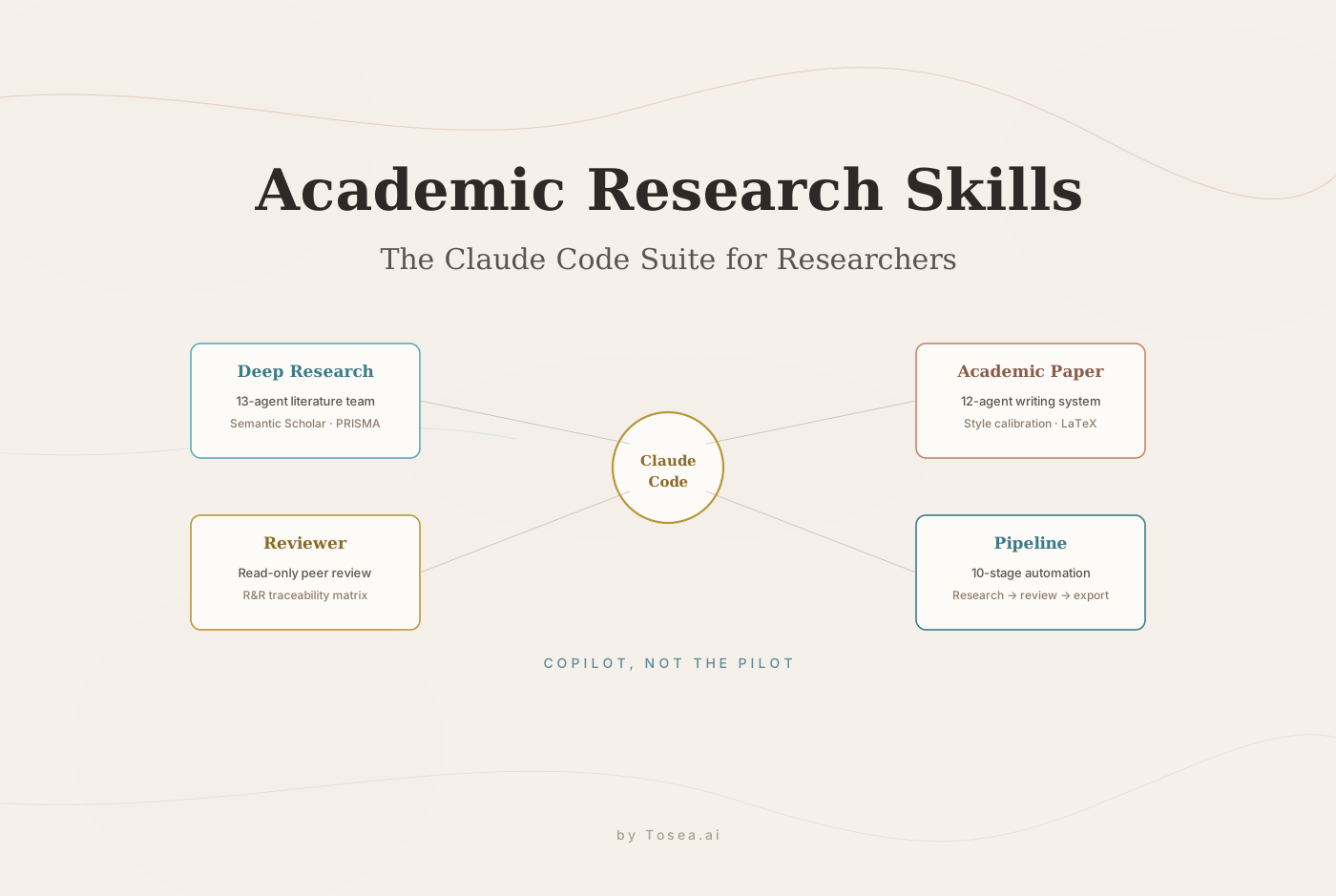
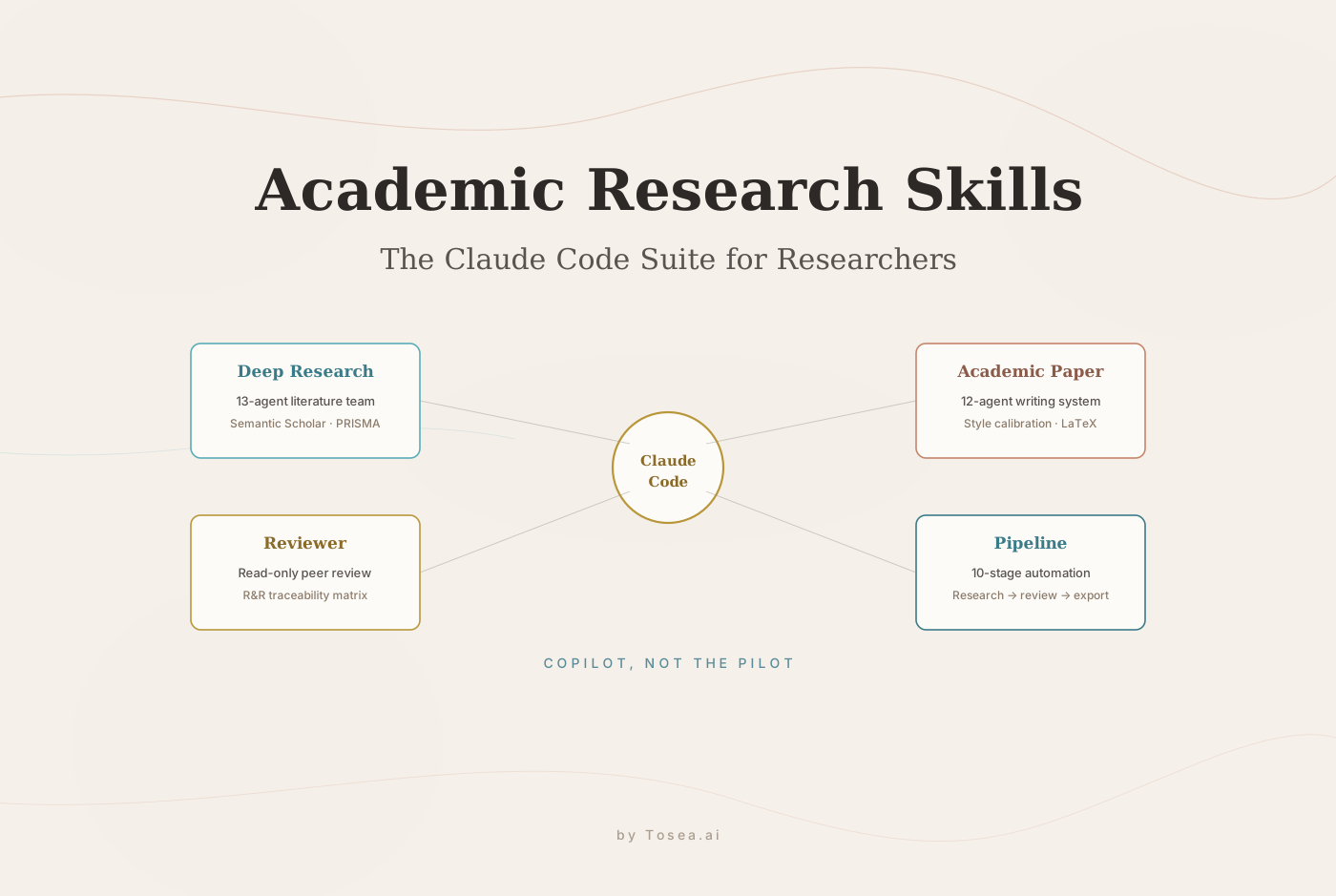
The core philosophy is stated directly in the project documentation: AI is your copilot, not the pilot. The suite handles the mechanical work — hunting down references, formatting citations, verifying data, checking logical consistency — so the researcher can focus on the parts that actually require their training: defining the research question, choosing the method, interpreting what the data means, and writing the sentence after I argue that.
Unlike AI humanizers or essay generators, academic-research-skills does not help authors hide AI involvement. It helps them write better work that survives peer review. This distinction matters for academic integrity and is reflected in every design decision in the suite.
The complete pipeline costs approximately $4 to $6 in API costs for a 15,000-word paper with 2 to 4 hours of collaborative work — a meaningful fraction of the time that the same process requires without AI assistance, but not zero. The author still owns every claim.
The Four Core Skills
1. Deep Research — 13-Agent Research Team
The Deep Research skill deploys 13 specialized agents for the literature review and research phase. Notable capabilities:
Socratic guided mode. Rather than immediately generating a literature review, the system asks clarifying questions to help the researcher develop a focused research question and methodology direction. After 5 to 15 rounds of dialogue, the output is a defensible research question — not just a topic area.
PRISMA systematic review support. The standard protocol for systematic literature reviews in medical, health, and social science research, implemented as a structured agent workflow.
Semantic Scholar API verification. Literature claims are cross-referenced against actual academic paper databases rather than generated from model memory.
Intent detection and dialogue health monitoring. The system detects when a conversation is drifting from productive research and redirects it back.
Optional cross-model devil's advocate. A secondary model challenges claims made by the primary research agent, stress-testing conclusions before they enter the paper.
2. Academic Paper — 12-Agent Writing System
The Academic Paper skill handles structured writing with 12 specialized agents. Notable features:
Style Calibration learns the author's voice from past work, so AI-assisted text does not sound like a different author wrote each section. This is particularly important for thesis work and journal submissions where stylistic consistency across the document matters to the reviewer.
Writing Quality Check evaluates draft sections against academic writing standards before they move forward in the pipeline.
LaTeX hardening. Mathematical notation, equations, and structured content are verified for LaTeX compatibility, which reduces submission-day formatting failures.
VLM (Vision Language Model) figure verification. Figures included in the paper are checked for accuracy and relevance using visual understanding, not by reading captions.
Anti-leakage protocol prevents the writing agent from incorporating information from sources outside the specified citation set, protecting against hallucinated references and unintended plagiarism.
Citation conversion handles the conversion between citation formats (APA, MLA, Chicago, Vancouver, IEEE) without manual reformatting.
Revision coaching provides structured guidance on how to improve specific sections rather than generating replacements.
3. Academic Paper Reviewer — Structured Peer Review
The reviewer skill implements a read-only constraint: the reviewing agent cannot modify the manuscript it is evaluating. This architectural decision mirrors the boundary that separates authors from reviewers in real peer review — and it prevents the system from making edits when it should be making recommendations.
The R&R (Revise and Resubmit) Traceability Matrix adds Author's Claim and Verified columns to review output. After revision, the system can independently verify whether each revision claim was actually addressed, creating an audit trail that supports the revision response letter.
Three cognitive framework reference files teach the agents how to think about review quality:
argumentation_reasoning_framework.mdapplies the Toulmin model, Bradford Hill causal reasoning, inference to the best explanation, and epistemic status classification to evaluate argument quality.review_quality_thinking.mdprovides three review lenses (internal validity, external validity, contribution), documents common reviewer traps, and includes calibration questions.research_gap_reasoning.mddefines what constitutes a genuine research gap versus a rhetorical gap, preventing a common AI failure mode in academic work.
The reviewer skill also implements the IS Basket of 8 journals and, through community contribution, the full AIS Senior Scholars' Basket of 11 journals for information systems research — discipline-specific review standards rather than generic academic review criteria.
4. Academic Pipeline — Full 10-Stage Automation
The Academic Pipeline skill chains the other three skills into a complete 10-stage automated workflow. One instruction — I want to produce a complete research paper about [topic] — triggers the full pipeline: research, outline, draft, internal review, revision, LaTeX formatting, figure verification, citation formatting, final quality check, and export.

Budget approximately $4 to $6 in API costs and 2 to 4 hours of collaborative work for a complete 15,000-word paper. The pipeline can be resumed from any stage if a step fails or the author wants to revise an earlier decision before continuing.
Installation: Two Methods
Method 1: Claude Code Plugin (Recommended — 30 Seconds)
/plugin marketplace add Imbad0202/academic-research-skills
/plugin install academic-research-skills
This works in Claude Code CLI, VS Code with the Claude Code extension, and JetBrains IDEs with the Claude Code plugin. Version 3.7.0 or later is required. For a broader walkthrough of the Claude Code surface itself, see our Claude Code Complete Guide.
After installation, start with:
/ars-plan
This enters Socratic mode and walks through clarifying the research question and paper structure through guided dialogue — the recommended entry point for new papers.
Method 2: Git Clone and Symlink (Traditional)
# Install Claude Code
curl -fsSL https://claude.ai/install.sh | bash

# Clone the repository
git clone https://github.com/Imbad0202/academic-research-skills.git ~/academic-research-skills

# Navigate to your project directory
cd /path/to/your/project
mkdir -p .claude/skills

# Install each skill via symlink
ln -s ~/academic-research-skills/deep-research .claude/skills/deep-research
ln -s ~/academic-research-skills/academic-paper .claude/skills/academic-paper
ln -s ~/academic-research-skills/academic-paper-reviewer .claude/skills/academic-paper-reviewer
ln -s ~/academic-research-skills/academic-pipeline .claude/skills/academic-pipeline
Each skill must be located at .claude/skills/<skill-name>/SKILL.md for Claude Code to discover it automatically. The setup documentation covers copy-based alternatives and global installation options.
Codex Users
A sibling distribution — academic-research-skills-codex — packages the same workflow content in Codex-native format as a single $academic-research-suite skill with ars-* aliases for users who prefer the Codex CLI environment.
29 Anti-Patterns and 22 Iron Rules: Why This Matters
The suite documents 29 explicit anti-patterns across all four skills — 7 to 8 per skill — in a tabular format that explains both what the failure looks like and why it happens. Examples:
- Generating literature reviews from model memory rather than verified database queries (why it fails: introduces plausible-sounding but unverifiable citations).
- Summarizing source papers instead of analyzing their arguments (why it fails: produces shallow engagement that peer reviewers identify immediately).
- Modifying the manuscript during review rather than producing recommendations (why it fails: conflates author and reviewer roles, undermining the review's independence).
The 22 IRON RULE markers identify the rules that cannot be violated even in long conversations where context drift is a risk. These are the commitments the system maintains regardless of how the user frames a subsequent request.
According to research on AI hallucination in academic contexts from Stanford HAI, large language models hallucinate academic citations at high rates when generating from memory. The Semantic Scholar API integration and the anti-leakage protocol directly address this failure mode.
Generic LLM Prompting vs Academic Research Skills
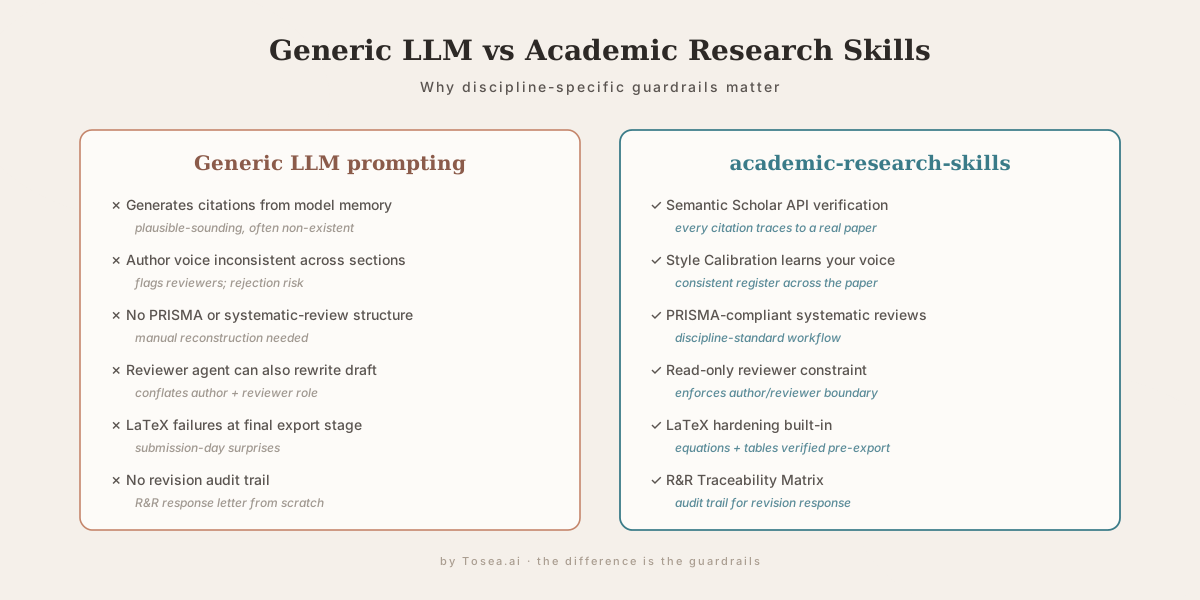
A common question from researchers who have already been using ChatGPT or Claude for paper work: what does the suite actually change? The differences cluster into six categories.
| Failure mode in generic LLM use | What academic-research-skills changes |
|---|---|
| Citations generated from model memory | Semantic Scholar API verification on every claim |
| Inconsistent author voice across sections | Style Calibration trained on past work |
| No systematic-review structure | PRISMA workflow built in |
| Reviewer agent can rewrite the draft | Read-only reviewer constraint |
| LaTeX surprises at export | LaTeX hardening before final stage |
| No audit trail for revisions | R&R Traceability Matrix |
The pattern is the same in each row: the failure mode is not that the LLM is incapable, but that the workflow has no guardrail. The suite adds the guardrails.
A Recommended First Hour
For researchers installing the suite for the first time, the most reliable first-hour sequence:
- Install via plugin marketplace (~30 seconds). Confirm
/ars-planis recognized. - Run
/ars-planon a topic you actually know. Pick something where you can sanity-check the Socratic questions and the literature suggestions. This calibrates your trust in the system before you point it at unfamiliar territory. - Run Deep Research on a narrow sub-question. Watch the Semantic Scholar verification step — if it flags a paper as unverified, that is the system catching what a generic LLM would have invented.
- Try the reviewer skill on an existing draft you have already had peer-reviewed. Compare the AI reviewer's findings to what the human reviewer flagged. This is the single best calibration exercise.
- Only after steps 1–4, attempt the full pipeline. The pipeline is the showpiece, but understanding the individual skills first prevents the suite from looking like a black box.
This sequence mirrors how academic researchers typically adopt new tools — try a narrow case, calibrate against ground truth, then scale up.
Who Benefits Most From academic-research-skills
PhD students writing their first journal submission who need structured guidance through the full pipeline without learning each component separately.
Researchers conducting systematic literature reviews who need PRISMA compliance and citation verification at scale.
Faculty advisors supervising multiple graduate students who want a consistent, auditable AI assistance framework across their research group.
Non-native English academic writers who need Style Calibration and Writing Quality Check to maintain consistent academic register throughout a long paper. For an adjacent workflow on cutting presentation-prep time, see Academic Researchers Cutting Presentation Time with AI.
Researchers in information systems who need IS Basket of 8 or Senior Scholars' Basket of 11 compliance in their reviewer feedback.
This tool is not appropriate as an essay generator for coursework or as a tool to obscure AI involvement. The project documentation is explicit on both points.
How It Compares to Other Claude Code Skills
Researchers exploring the Claude Code ecosystem often ask how academic-research-skills compares to other skill suites. Two relevant comparisons:
- Last30Days AI Research Skill Guide — broader news / market research, not academic paper writing. Use Last30Days for staying current; use academic-research-skills for producing a publishable paper.
- Matt Pocock Skills for Claude Code — TypeScript and engineering productivity. Different audience entirely. Both demonstrate the maturation of the Claude Code skill ecosystem.
The skills surface in Claude Code is rapidly becoming the place where domain-specific workflows live. For researchers, academic-research-skills is the most complete academic-specific bundle currently available.
From Finished Paper to Academic Presentation: Where Tosea.ai Fits
academic-research-skills handles the research and writing pipeline. A completed paper, however, is not the end of the academic workflow. Conference presentations, thesis defenses, departmental seminars, and grant review presentations all require the same research to be reformatted into slides — and that reformatting is not a simple conversion.
A research paper should not become a compressed version of itself on slides. The conference presentation structure should be: research problem, existing gap, proposed method, framework overview, key results, limitations, takeaway. Not: abstract, introduction summary, methods summary, results summary, conclusion summary. We cover the underlying logic in The McKinsey Way to Present Research Findings.
Tosea.ai handles this translation from paper to presentation. Upload the completed research paper — whether it is a PDF, Word document, or LaTeX output — and the Spatial Semantic Perception engine reads the logical structure of the paper: which claims are primary findings, which sections carry the evidentiary weight, where the data tables and figures are, and what the paper's central contribution is.
The output is a structured academic presentation that follows the narrative logic of the research, with every slide element traceable back to the specific section of the source paper through Absolute Traceability. Every figure is placed in correct context. Every statistical claim is drawn from the source, not approximated. This document-to-PPT workflow is the same one we describe in detail in our Research Paper to Slides Workflow and Zero-Hallucination AI Slides Guide.
The final file is a native .pptx, fully editable in Microsoft PowerPoint or Google Slides, ready to present at a conference without additional formatting work. For researchers evaluating the slide-generation tools available, our Ultimate AI Slides Tool Free Trial Guide for Academics covers what to test first.
academic-research-skills handles the writing. Tosea.ai handles the presentation of what was written. The two together replace the most tedious mechanical work in the research-to-presentation pipeline, and leave the author with more time for the parts that actually require a researcher's training.
FAQ
Q: Will academic-research-skills write my paper for me?
No — and this is by design. The tool handles verification, citation formatting, logical consistency checking, and structural guidance. The research question, methodology choice, data interpretation, and core arguments remain the author's. The documentation explicitly states: AI is your copilot, not the pilot.
Q: How much does running the full pipeline actually cost?
The project's performance documentation estimates approximately $4 to $6 in Claude API costs for a complete 15,000-word paper through the full 10-stage pipeline. Individual skill runs are substantially cheaper. The cost varies with paper length and the number of revision cycles.
Q: Does this work without Claude Code — for example, in Cursor or Codex?
The Codex CLI distribution (academic-research-skills-codex) packages the same workflow for Codex users. Cursor support depends on how Cursor handles Claude Code skills in your configuration. The setup documentation covers installation options for each environment.
Q: Can a research group share Style Calibration profiles across members?
Style Calibration profiles are per-author by design — sharing them across a group would defeat the purpose. What groups can share is the configuration of the four skills themselves, the anti-pattern definitions, and any local extensions. Several research groups have begun maintaining a shared .claude/skills/ directory committed to their group repo for exactly this reason.
Q: After I finish the paper, how do I turn it into presentation slides for a conference?
Upload the completed paper to Tosea.ai. The platform reads the paper's structure, identifies the primary research narrative, and generates an academic presentation formatted for conference delivery — not a compressed version of the text, but a properly restructured presentation with the evidence mapped to appropriate slide types.
Get Started With academic-research-skills
The full repository is available at github.com/Imbad0202/academic-research-skills under the MIT license. The QUICKSTART guide covers the complete installation and first-use flow. The performance documentation covers per-mode token budgets and recommended Claude Code settings.
When your research is written and needs to become a professional academic presentation, Tosea.ai is the document-to-deck layer that picks up where academic-research-skills leaves off.
Sources
- academic-research-skills (GitHub) — Cheng-I Wu, v3.7.0 (May 2026), MIT license
- QUICKSTART guide — official installation and first-use walkthrough
- Performance documentation — token-budget and mode-selection guidance
- Setup documentation — plugin marketplace, symlink, and global installation options
- Semantic Scholar API — the literature-verification backend the suite cross-references
- AI Hallucinations Research — Stanford HAI, on the failure mode the anti-leakage protocol addresses
- Claude Code — Anthropic, the host environment for the skill suite