How to Use Matt Pocock's Skills for Claude Code: A Complete Guide
A practical guide to Matt Pocock's mattpocock/skills repository — the .claude directory that makes Claude Code follow team conventions for PRDs, TDD, refactors, and git safety.
Every engineer who has used Claude Code for more than a week has run into the same friction. The tool is genuinely capable. But it does not know how your team works. It does not know that you write tests before implementation, which git operations should require human approval, your codebase's architectural patterns, or your team's conventions for breaking down work. Every session starts from scratch.
Before we get into the solution: when Claude Code and a well-structured skills library help you produce PRDs, architecture decision records, technical specifications, and issue breakdowns, those documents eventually need to become presentations — for product teams, leadership, or clients. Tosea.ai converts those technical documents into structured slide decks in under a minute, with every claim mapped back to its source. By the end of this guide you will understand both how to make Claude Code work like a senior team member and how to communicate what it produces.
Who Is Matt Pocock and Why Does His .claude Directory Matter?
Matt Pocock is the TypeScript educator behind Total TypeScript — one of the more comprehensive TypeScript learning platforms — and a former engineer at Vercel and Stately. He is a widely followed voice in the TypeScript community, with content grounded in real engineering practice rather than theoretical idealism.
When Pocock makes his personal tooling public, it is worth paying attention to — not because of name recognition, but because his tools reflect months of actual use in real development workflows. The mattpocock/skills repository is his personal .claude directory, made public. It has accumulated over 20,400 GitHub stars since release, which is a meaningful signal for a collection of structured workflow files rather than a framework or library with broad applicability.
As AgentConn's analysis of the repository describes: most Claude Code skill packs focus on capability extension — browser control, data access, API calls. Pocock's collection focuses on workflow enforcement, making Claude Code a participant in your team's development process rather than a one-shot command executor.
That distinction is what makes the collection valuable.
What Are Claude Code Skills and How Does the .claude Directory Work?
Claude Code supports a .claude directory at the root of any project. Inside that directory, you can define skills — structured Markdown files that teach the agent how to approach specific types of tasks in your project context.
Skills are not prompts. A prompt tells the AI what to do in a single interaction. A skill defines a workflow — a structured sequence of steps, decisions, and outputs that the agent follows consistently whenever the skill is invoked. VibeSparking AI's breakdown of the repository describes them as runbooks for your AI assistant: systematic, repeatable processes rather than improvised responses.
The structural consequence of this is significant. When you invoke a skill, Claude Code does not generate what it predicts you probably want. It follows a defined process — conducting a specified investigation, asking specified questions, producing specified outputs — in the same way every time. This is what allows skills to enforce team conventions at the agent level, rather than relying on the engineer to remember to include the right instructions in every session.
Installing a skill requires adding its SKILL.md file to your .claude/skills/ directory. Claude Code discovers and loads skills automatically from that location, making them available throughout the project.
The mattpocock/skills Collection: What Is Included
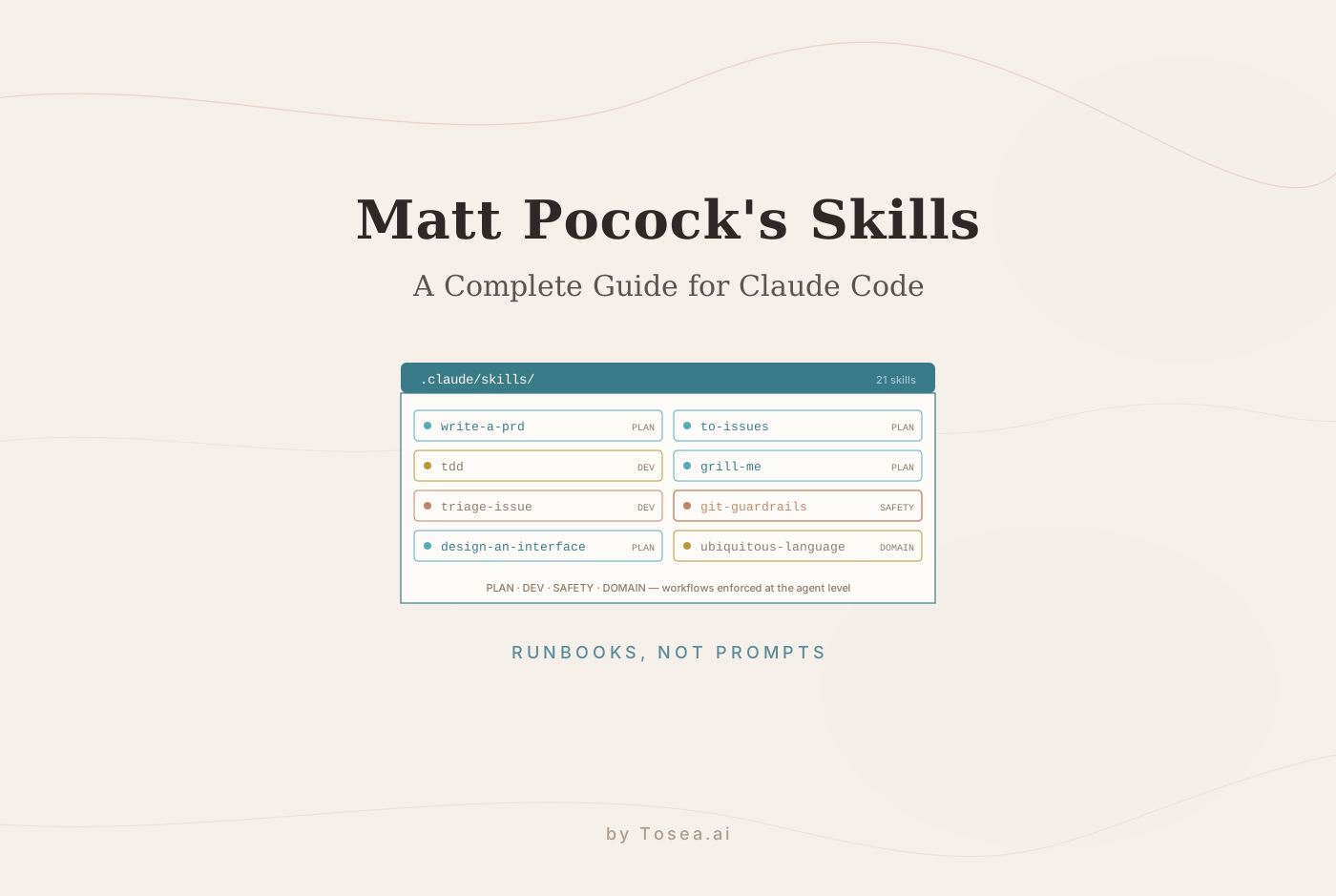
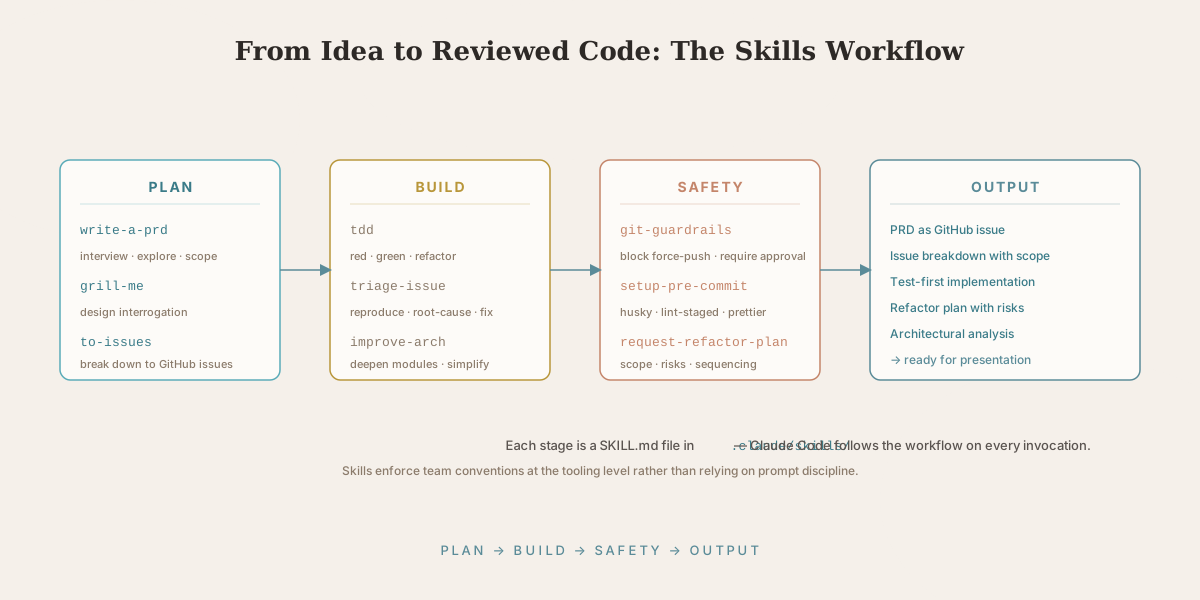
The repository includes 21 skills organized across four functional categories. Each skill is a self-contained unit that can be installed individually or as a collection.
Planning and Design Skills
These skills handle the upstream thinking that most development workflows rush through — the work that prevents expensive downstream rework.
write-a-prd headlines the planning category. Rather than filling a document template, this skill conducts an interactive interview with the developer, explores the existing codebase to understand the context, designs module boundaries, and produces a complete PRD filed as a GitHub issue. EveryDev's documentation of the skill describes it as transforming what is typically a document-filling exercise into a discovery and design session. For background on what a strong PRD looks like, see our complete guide to writing a good PRD.
to-issues takes a completed PRD and breaks it down into structured GitHub issues with appropriate scope, acceptance criteria, and dependencies identified. The output is a set of issues that engineering can pick up immediately rather than requiring further clarification.
grill-me is a design review skill. Before implementation begins, it challenges the developer's design decisions through a structured interrogation — surfacing assumptions, identifying edge cases, and probing the reasoning behind interface choices. The goal is to find the problems before they are encoded in code.
design-an-interface supports API and interface design before any implementation. It explores the usage patterns, the ergonomics, and the constraints of the proposed interface through a structured design session.
request-refactor-plan produces a structured investigation and plan before any refactoring work begins — identifying the scope of change, the risks, and the sequencing of steps.
Development Skills
These skills govern how Claude Code writes and modifies code in your project.
tdd is the most technically opinionated skill in the collection and, for TypeScript teams with existing test discipline, arguably the most valuable. It enforces the Red-Green-Refactor cycle at the agent level. Claude Code writes a failing test first, confirms the test fails for the right reason, writes the minimum implementation to make it pass, and then refactors. The agent cannot skip the failing test phase, which is the constraint that makes test-driven development actually work in practice.
As AgentConn's analysis notes, this maps directly to how disciplined TypeScript teams already work — the skill does not introduce a new workflow, it enforces the existing one at the tooling level.
triage-issue transforms vague GitHub issue descriptions into actionable bug reports. The skill conducts a structured investigation — reproducing the issue, identifying the root cause, locating the relevant code, and documenting the findings — before any fix is attempted. The output is a structured analysis that either enables the developer to write the fix themselves or gives Claude Code the context to implement it accurately.
improve-codebase-architecture provides a structured approach to architectural improvement work, identifying deep modules, shallow interfaces, and patterns that could be simplified without changing external behavior.
Tooling and Safety Skills
setup-pre-commit configures Husky hooks, lint-staged, and Prettier across a project — standardizing the code quality enforcement layer that prevents style issues from reaching code review.
git-guardrails-claude-code is a safety skill that addresses one of the real risks in agentic coding: Claude Code can execute git operations that break CI, rewrite history on shared branches, or delete work if not constrained. This skill adds the same guardrails that senior engineers apply to junior contributors — blocking dangerous operations and requiring human approval for high-risk commands.
Knowledge Management Skills
obsidian-vault enables Claude Code to work with Obsidian notes using wikilinks — searching, creating, and linking files through the command line without requiring the GUI.
ubiquitous-language helps teams build and maintain a shared vocabulary aligned with their domain model — an application of Domain-Driven Design's ubiquitous language concept at the tooling level.
Installation: Three Ways to Add Skills to Your Project
Option 1: Individual Installation via npx (Recommended for Most Users)
npx skills@latest add mattpocock/skills/write-a-prd
npx skills@latest add mattpocock/skills/tdd
npx skills@latest add mattpocock/skills/git-guardrails-claude-code
This installs each skill's SKILL.md file into your .claude/skills/ directory. Claude Code discovers it automatically on the next session. Install only the skills relevant to your current project rather than the full collection.
Option 2: Claude Code Plugin Marketplace
If your organization uses the Claude Code plugin marketplace, skills can be installed through the plugin interface. This approach is particularly useful for teams that want to standardize skills across multiple projects and engineers without requiring each person to run install commands.
/plugin marketplace add mattpocock/skills
Option 3: Bulk Installation via Community Fork
A community fork reorganizes the repository for bulk installation:
git clone https://github.com/dstroe2000/mattpocock_skills.git
cp -r mattpocock_skills/skills/* ~/.claude/skills/
This installs all skills globally to your user-level .claude directory, making them available across all projects. Note that this fork is an unofficial packaging convenience — the skill content is identical to Pocock's original repository.
How to Invoke Skills in Claude Code
Once installed, skills are invoked naturally in conversation with Claude Code. There is no special syntax — you describe what you want to do, and Claude Code matches your intent to the relevant skill based on the use-case descriptions in each SKILL.md file.
For the planning skills, typical invocations might be: "I need to design the authentication module for this project", which would trigger write-a-prd or design-an-interface depending on the stage of planning. For development skills, starting a new feature naturally triggers tdd if the skill is installed and the team has a test-driven convention in place.
Each skill's directory in the repository includes a README that documents the specific triggers and expected outputs, making it straightforward to understand when each skill is appropriate.
Why This Approach to AI Engineering Is Different
The conventional way to use AI coding tools is reactive: you have a task, you describe it, the AI produces something, you review and iterate. This works for individual, well-defined tasks. It breaks down when you need the AI to consistently follow team conventions across a project lifecycle.
Pocock's skills collection represents a different model: the AI as an opinionated team member who has internalized the workflow standards of a specific engineering culture. When tdd is active, Claude Code does not write implementation before tests — full stop. When git-guardrails-claude-code is active, certain git operations require human approval — full stop. The constraints are encoded in the tooling, not dependent on the developer remembering to include them in the prompt.
EveryDev's overview frames this as particularly valuable for TypeScript teams with existing TDD and Architecture Decision Record practices who want Claude Code to work within those constraints rather than around them.
Limitations and What These Skills Are Not
A balanced view of any tool requires acknowledging its limits. The mattpocock/skills collection is opinionated about TypeScript and Node-style workflows — many skills assume conventions like Husky pre-commit hooks, GitHub-flavored issue tracking, and a TDD-friendly test runner. Teams using different stacks (a Django + GitLab shop, for example) will get partial value and may need to fork specific skills.
The skills also do not replace human judgment on architectural questions — they structure the conversation, but the developer still owns the design decisions. And because skills are local Markdown files, they are only as up-to-date as the engineer who installed them; teams should periodically pull the upstream repository to pick up improvements.
What These Skills Mean for AI Slide Generation
The skills in this collection produce structured technical artifacts: PRDs, architectural plans, issue breakdowns, bug investigation reports, and ubiquitous language documentation. These documents are the substance of engineering work — the thinking that precedes and guides implementation. But technical documents are not the only format this work needs to appear in. PRDs go to product leadership for prioritization. Architectural decisions go to engineering leadership for review. Technical roadmaps go to investors in pitch decks. Progress against milestones goes to executive dashboards.
This is the seam where document-to-PPT tooling matters. Once write-a-prd has produced a structured PRD, or improve-codebase-architecture has output an architectural analysis, the next step is usually a presentation. Tosea.ai reads the logical structure of those documents — headings, tables, decision lists, action items — and generates a slide deck that preserves the argument of the source. The same discipline Pocock's skills enforce at the code level (every output linked to a validated requirement) Tosea applies at the slide level: every slide element traces back to a section of the source document, so when a sponsor asks where a budget figure or design decision came from, the answer is one click away.
For engineers adopting this end-to-end approach, the relevant reading is our research-paper-to-slides workflow, which covers the same document-to-deck pipeline applied to long-form technical documents, and our guide on mastering document transformation for executive presentations, which goes deeper on how a PDF-to-PowerPoint conversion preserves a multi-section argument. For engineering leaders who routinely present roadmaps and progress reports, zero-hallucination AI slide generation covers the source-traceability principle that lets an AI presentation tool defend every claim under boardroom scrutiny.
Get Started With mattpocock/skills
The full repository is available at github.com/mattpocock/skills under the MIT license. The Total TypeScript platform provides additional context on the TypeScript practices these skills are designed to enforce, and the Claude Code documentation covers the .claude directory structure and skill discovery in detail.
When the work these skills produce needs to become a presentation, Tosea.ai handles that step — turning the PRD, the refactor plan, or the architectural memo into a slide deck without rebuilding it from scratch.
Sources
- mattpocock/skills repository — Matt Pocock, GitHub
- How AgentConn analyzes the mattpocock/skills collection — AgentConn
- Matt Pocock's Skills and the Claude Code skill economy — VibeSparking AI
- mattpocock-skills tool documentation — EveryDev
- Claude Code official documentation — Anthropic