How to Use Headroom: Compress AI Agent Context, Logs, and RAG Chunks
Learn how to use Headroom, the open-source context compression layer for AI agents. Cut tool outputs, logs, and RAG chunks by 60-95% before they reach Claude Code, Codex, or Cursor.
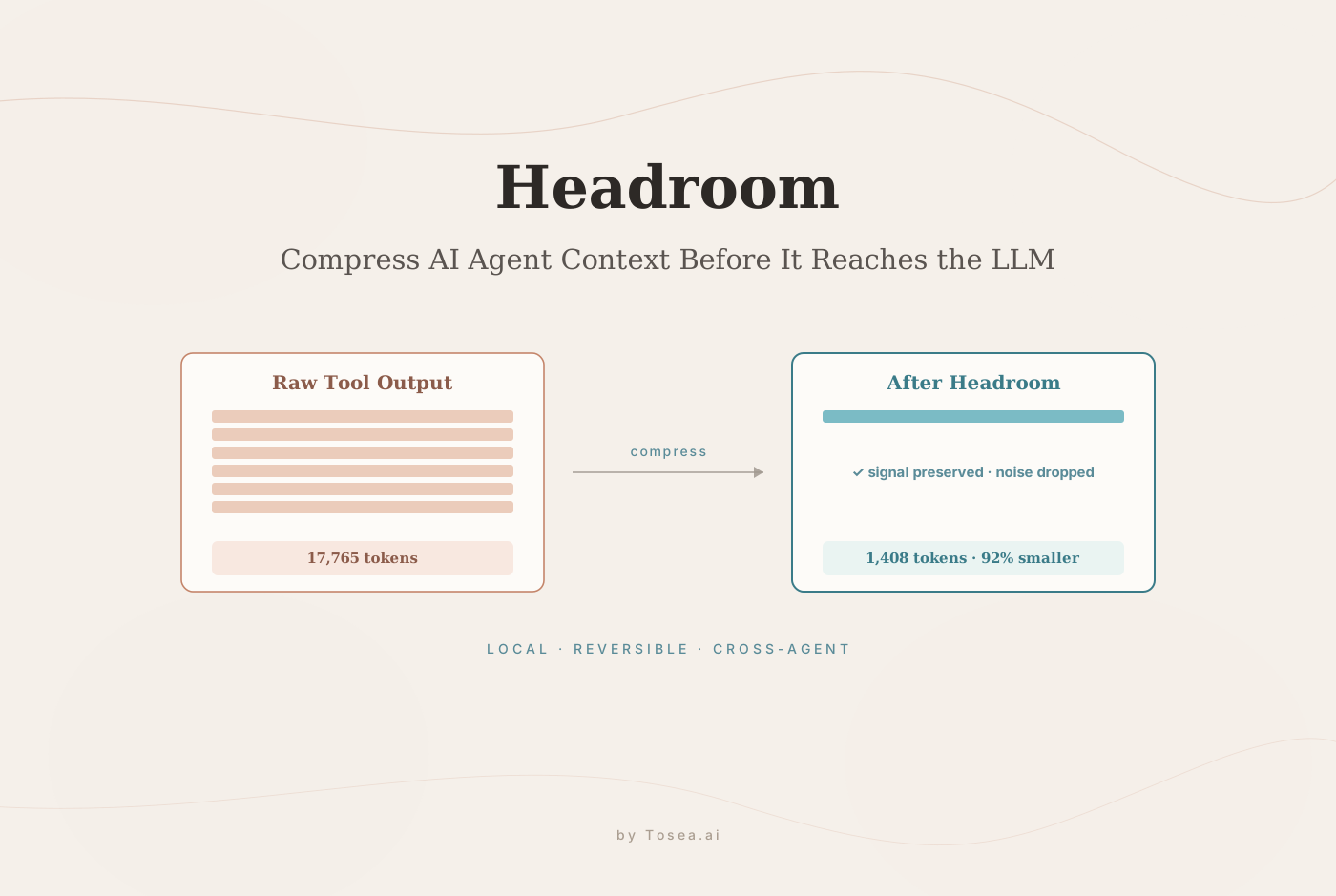
If you want to understand how to use Headroom, start with the problem it solves: AI agents often read too much raw context. Logs, terminal output, code search results, files, RAG chunks, and conversation history can quickly consume the context window before the model has enough room to reason. Headroom is an open-source GitHub project that compresses this information before it reaches the LLM, helping developers use AI coding agents like Claude Code, Codex, Cursor, Aider, Copilot CLI, LangChain, and MCP clients more efficiently.
Quick Overview
Headroom is an open-source context compression layer for AI agents. It reduces the amount of text sent to large language models by compressing tool outputs, logs, files, RAG chunks, code search results, and conversation history. The project is maintained by Tejas Chopra and released under the Apache 2.0 license, so you can audit and self-host the entire pipeline.
You can use Headroom in several ways:
- As a Python or TypeScript library
- As a local proxy for OpenAI-compatible clients
- As a wrapper for AI coding agents
- As an MCP server
- As a shared memory layer across multiple agents
Headroom is most useful for developers who run long AI coding sessions, debug large logs, explore codebases, triage GitHub issues, or use RAG pipelines with large retrieved chunks.
GitHub repository: chopratejas/headroom
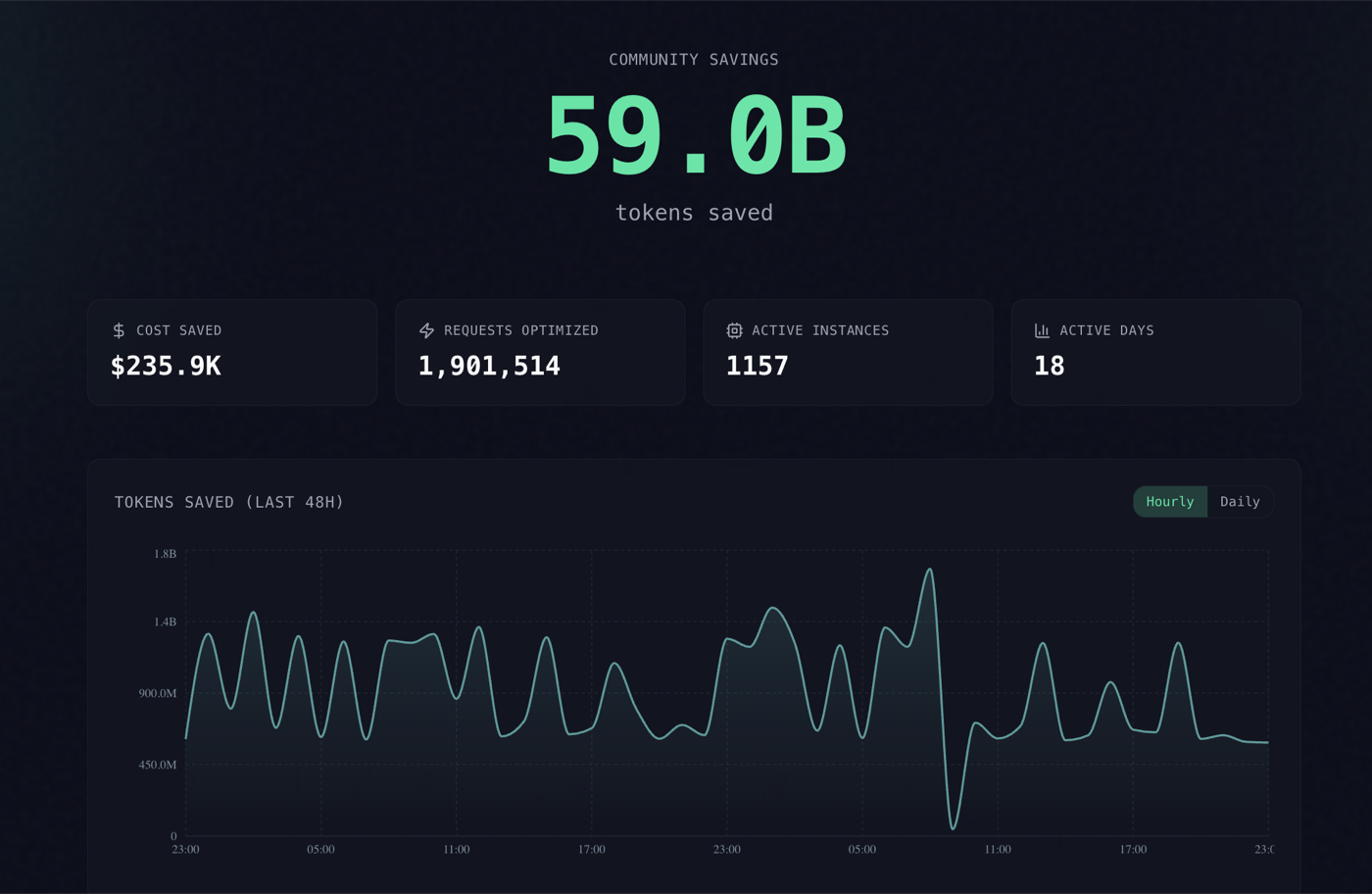
What Is Headroom?
Headroom is a context compression tool for AI agents and LLM applications. Instead of sending every raw tool result directly to a model, Headroom sits between your agent and the LLM. It compresses noisy or repetitive context while preserving the information the model is likely to need.
That matters because modern AI agents do not only read user prompts. They read command output, stack traces, files, search results, API responses, documentation snippets, RAG chunks, and prior conversation turns. In a real coding session, those inputs can become much larger than the actual problem.
Headroom is designed to make that context smaller before it reaches the model.
According to the project README, Headroom can work as a library, proxy, MCP server, and agent wrapper. The repository also describes it as local-first and reversible, meaning original content can be retained locally and retrieved later if needed.
Why Developers Use Headroom
Developers care about Headroom because context is now one of the main bottlenecks in AI-assisted work.
When an AI coding agent runs tests, searches a repository, reads files, or inspects logs, it can generate thousands of tokens in seconds. Much of that output is useful, but not all of it needs to be sent to the model in full.
Common problems include:
- Test logs filled with repeated warnings
- Code search results with many near-duplicate matches
- Stack traces buried inside long terminal output
- RAG chunks that contain useful paragraphs mixed with irrelevant text
- Large files that need selective compression
- Long agent conversations that become expensive and hard to manage
- Multi-agent workflows where each agent re-reads the same context
Headroom helps by compressing the material before it enters the LLM request. The goal is not to hide information. The goal is to preserve the signal and reduce the noise.
How Headroom Works
A simple way to think about Headroom is this: your agent produces context, Headroom compresses that context, and the LLM receives a smaller, cleaner version.
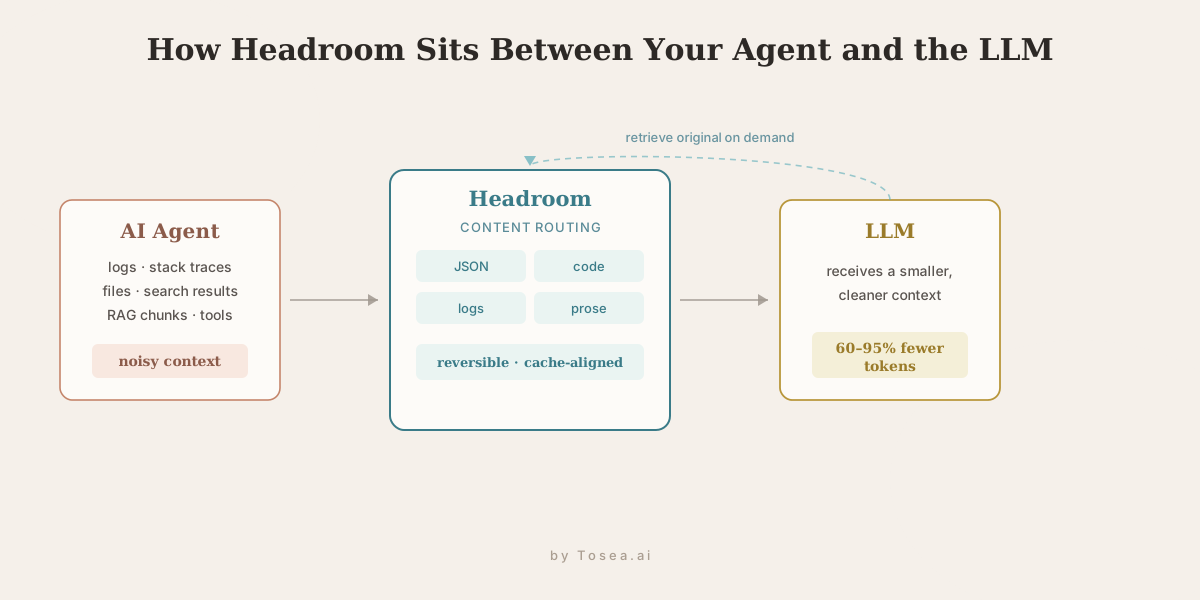
In practice, Headroom routes different content types through different compression strategies. Structured data, code, prose, logs, and RAG chunks do not benefit from the same treatment. A JSON response should not be compressed the same way as a Python file or a natural-language document.
The Headroom project describes several internal components, including:
- Content routing to detect what kind of context is being processed
- JSON and structured data compression
- Code-aware compression
- Text compression
- Cache alignment for better provider-side caching
- Reversible compression with retrieval support
- Cross-agent memory for shared context
The most important idea for users is simple: Headroom tries to reduce token load without removing the information an AI agent needs to complete the task.
How to Use Headroom: Quick Start
The fastest way to use Headroom is to install it and choose the mode that matches your workflow.
For Python:
pip install "headroom-ai[all]"
For Node or TypeScript:
npm install headroom-ai
To wrap an AI coding agent:
headroom wrap claude
headroom wrap codex
To run Headroom as a proxy:
headroom proxy --port 8787
To inspect token savings:
headroom stats
A good rule of thumb:
- Use the wrapper if you are using an AI coding agent.
- Use the proxy if you want minimal code changes.
- Use the library if you are building your own AI application.
- Use MCP if your client supports MCP-native tools.
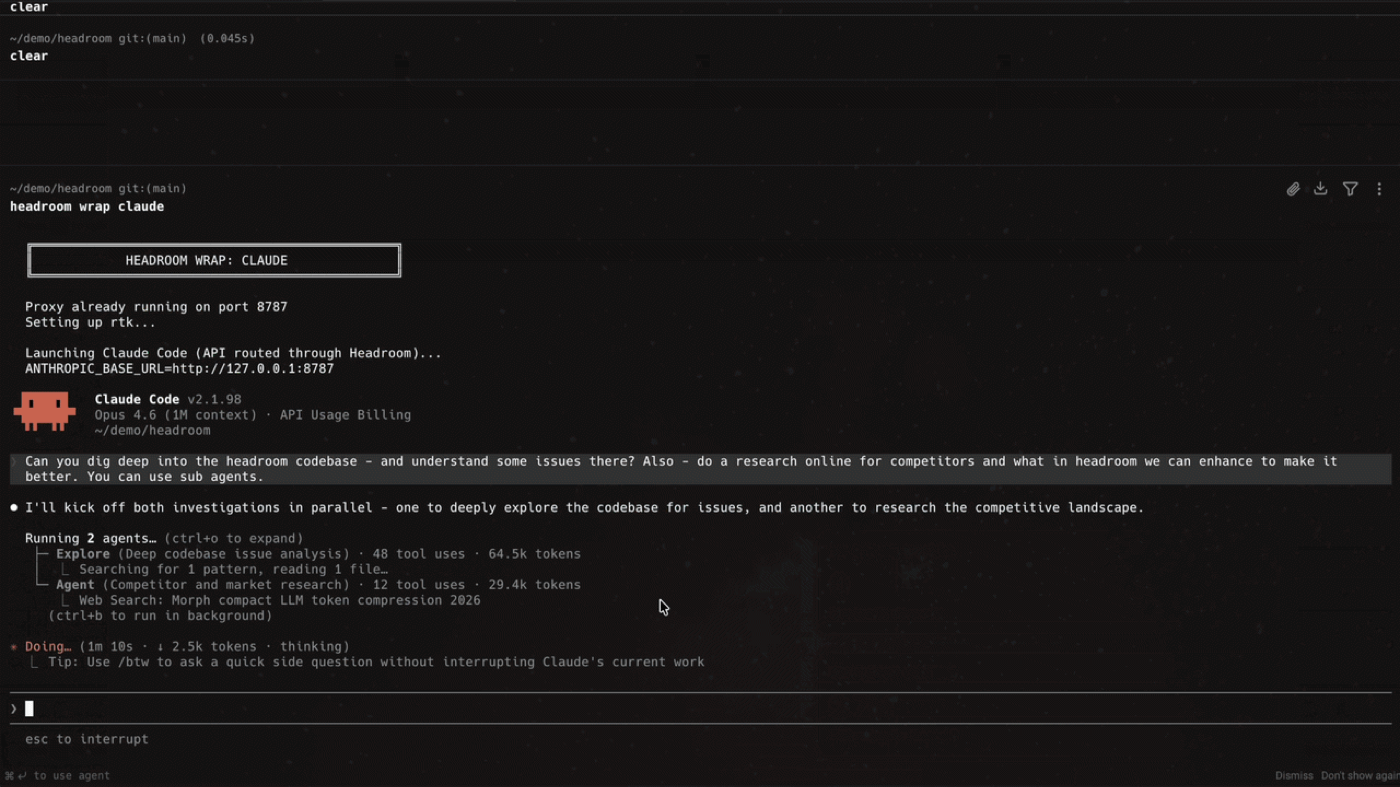
There is also a headroom learn command that mines failed sessions and writes corrections, so the compression layer can improve as it sees more of your real workloads.
Main Ways to Use Headroom
1. Use Headroom as a Library
If you are building your own AI application, using Headroom as a library gives you the most control.
This is useful for:
- Python apps
- TypeScript apps
- Custom AI agents
- LangChain workflows
- RAG pipelines
- Internal developer tools
The library approach lets you decide exactly when compression happens, what gets compressed, and how the compressed context is passed into your model call.
Use this mode when you are designing the AI workflow yourself.
2. Use Headroom as a Proxy
The proxy mode is useful when you want context compression without restructuring your app.
A proxy sits between your application and the model provider. Your app sends requests through the proxy, Headroom compresses the context, and then the request continues to the LLM provider.
This is a good fit for:
- OpenAI-compatible clients
- Existing apps where you want fewer code changes
- Multi-language projects
- Fast experiments to measure savings
If you want to test whether Headroom helps your workflow, proxy mode is often the easiest place to start.
3. Use Headroom with AI Coding Agents
Headroom is especially relevant for AI coding agents because coding agents generate noisy context all day.
For example, a coding agent may:
- Run a failing test suite
- Read multiple source files
- Search a repository
- Inspect dependency errors
- Read build logs
- Compare diffs
- Open documentation
- Retry failed commands
Each of those steps can add thousands of tokens. Headroom can compress the intermediate context so the model receives the important parts without carrying every repeated warning or irrelevant line.
The repository lists compatibility with agents such as Claude Code, Codex, Cursor, Aider, Copilot CLI, and OpenClaw. For developers who use these tools daily, Headroom can act like a context efficiency layer. If you already use a pre-indexed retrieval helper, it pairs naturally with tools like CodeGraph, which cuts the number of file reads before Headroom compresses what remains.
4. Use Headroom as an MCP Server
Headroom also supports MCP workflows. MCP, or Model Context Protocol, gives AI clients a standard way to call external tools.
As an MCP server, Headroom can expose compression, retrieval, and stats tools to compatible clients. That makes it useful for agentic workflows where the model may need to compress context, retrieve originals, or inspect savings during a task.
This is especially helpful when you want the AI agent to manage its context more actively instead of relying only on static prompt design.
You can learn more about MCP from the official Model Context Protocol documentation.
5. Use Headroom for Cross-Agent Memory
Many developers now use more than one AI assistant. A common workflow might include Claude Code for one task, Codex for another, Cursor for interactive editing, and a separate RAG app for documentation.
Without shared memory, each agent may rediscover the same context. Headroom's cross-agent memory approach is designed to reduce that duplication.
This can be useful when:
- Multiple agents work on the same repository
- You switch between Claude Code and Codex
- You want one agent to benefit from another agent's discoveries
- You repeatedly inspect the same logs or files
- You want compressed context reuse across sessions
Real-World Token Savings
How much does Headroom actually save? The project publishes benchmark numbers from real workloads, and the headline claim is 60-95% fewer tokens with the same answers. The reductions vary by task because some content compresses far better than others:
| Workload | Tokens before | Tokens after | Reduction |
|---|---|---|---|
| Code search | 17,765 | 1,408 | 92% |
| SRE incident debugging | 65,694 | 5,118 | 92% |
| GitHub issue triage | 54,174 | 14,761 | 73% |
| Codebase exploration | 78,502 | 41,254 | 47% |
The pattern is intuitive. Repetitive, low-entropy content such as search results and incident logs compresses dramatically, while codebase exploration — where most lines carry unique signal — compresses less. These figures come from the maintainer's own benchmarks, so treat them as a directional guide and measure headroom stats on your own workloads before relying on a specific percentage.
Best Use Cases for Headroom
AI Coding Agent Context Compression
This is the clearest use case. If your coding agent regularly reads long files, command outputs, or test logs, Headroom can help compress that context before it reaches the model.
Claude Code Token Optimization
Claude Code users often work through long debugging sessions. Headroom can help reduce the amount of raw terminal and file context passed through each step.
Codex Context Compression
Codex users exploring a codebase or implementing a feature may generate large tool outputs. Headroom can help keep useful context available while reducing token pressure.
Cursor Codebase Exploration
Cursor users often jump between files, search results, and generated edits. Headroom can help compress context from code exploration and repeated file reads.
RAG Chunk Compression
RAG systems can retrieve more text than the model needs. Headroom can compress retrieved chunks so the model receives the core information without unnecessary bulk.
For background on retrieval-augmented generation, see IBM's overview of RAG.
SRE Incident Debugging
Incident logs can be huge. Headroom can help compress logs while preserving error signatures, timestamps, stack traces, and relevant failure patterns.
GitHub Issue Triage
Issue triage often includes long descriptions, comments, stack traces, environment details, and reproduction steps. Headroom can compress this material before an agent drafts a response or investigates the bug.
When You Should Not Use Headroom
Headroom is useful, but it is not necessary for every workflow.
You may not need it if:
- You only use AI tools occasionally
- Your prompts are short
- Your provider's native compaction is enough
- You do not run local processes
- You cannot add a proxy or wrapper to your environment
- Your workflow requires the full original text to be sent every time
You should also test quality. Compression should reduce noise, but any compression layer can change what the model sees. For high-risk workflows, verify that the model still has enough information to answer correctly.
Headroom vs Native LLM Compaction
Native LLM compaction is useful, but it is usually provider-specific. It may summarize conversation history, but it may not handle tool outputs, logs, RAG chunks, files, and multi-agent memory in the same way.
Headroom is different because it is designed as an agent-side context layer.
| Approach | Best For | Local | Reversible | Works Across Agents |
|---|---|---|---|---|
| Native provider compaction | Conversation history | No | Usually no | No |
| Manual summarization | Small prompts | Sometimes | No | Limited |
| RAG reranking | Retrieval quality | Sometimes | No | Depends |
| Headroom | Agent context, logs, files, RAG chunks, tools | Yes | Yes | Yes |
The key difference is scope. Headroom is not only about shortening chat history. It is about compressing the operational context that agents produce while working.
Practical Example: Debugging a Failing Test with Headroom
Imagine you are using Codex or Claude Code to debug a failing test.
The agent runs the test suite. The output is 12,000 tokens long. Most of it contains repeated warnings, dependency messages, and passing test names. Buried near the middle is the actual failure.
Without compression, the entire output may enter the model context. That costs tokens and makes the model work harder to find the important part.
With Headroom, the workflow looks different:
- The agent runs the test.
- The raw log goes through Headroom.
- Headroom compresses repeated and low-value sections.
- The LLM receives a smaller version with the key failure preserved.
- If the model needs the full original, it can retrieve it.
- You run
headroom statsto see how much context was saved.
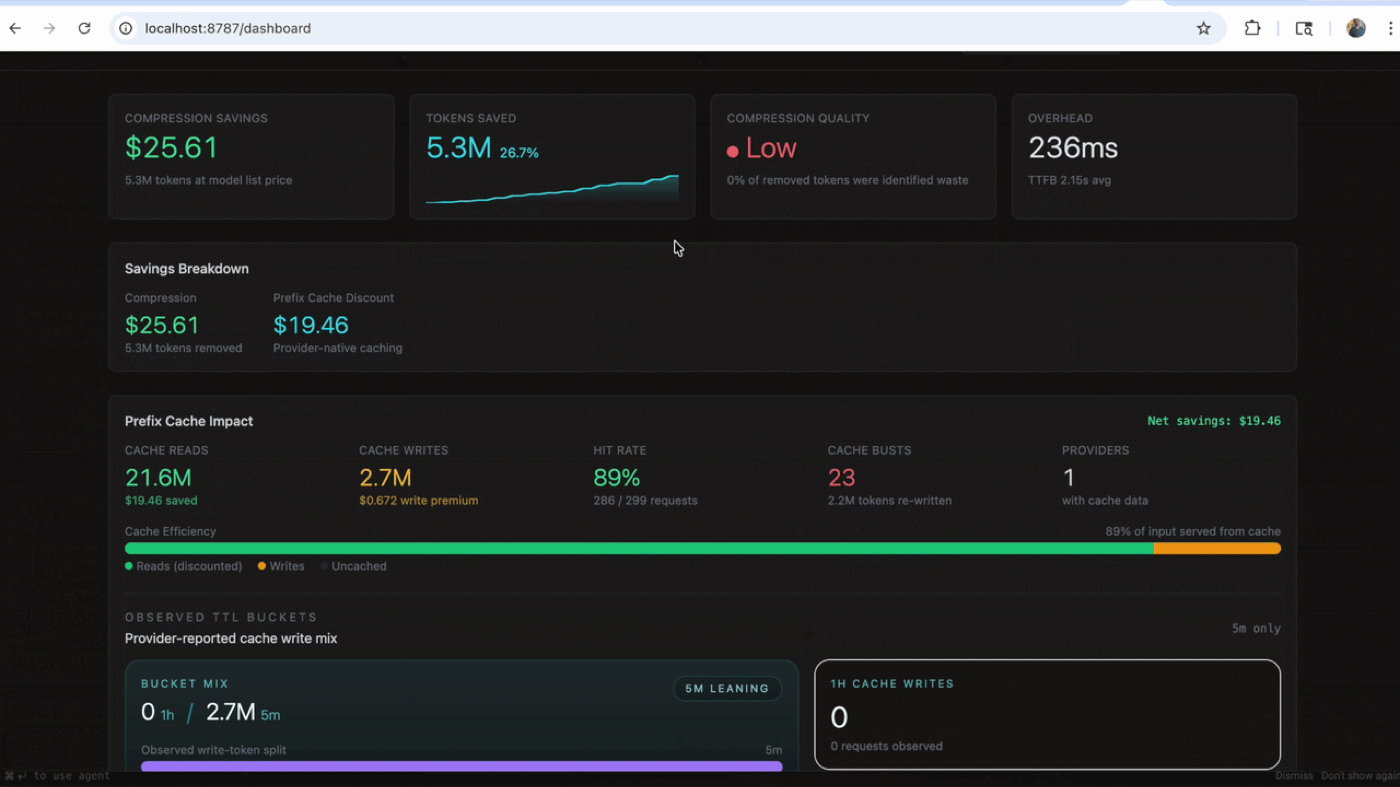
This is the kind of workflow where Headroom makes immediate sense. It does not replace the coding agent. It helps the agent spend less context on noise.
Security and Privacy Notes
Headroom is described as local-first, which is important for developers working with private code, internal logs, or sensitive context. Local-first means compression can happen on your machine before content is sent to an LLM provider.
That said, you should still understand your full data path.
Before using any AI workflow with private code or sensitive documents, check:
- Which model provider receives the final request
- Whether raw content is stored locally
- Where retrieval data is saved
- Whether logs contain sensitive information
- Whether your company allows local proxy tools
- Whether your AI provider uses submitted data for training
For broader AI risk management principles, the NIST AI Risk Management Framework is a useful reference.
From Compressed Agent Context to Presentation-Ready Slides
Headroom solves a problem that shows up directly in document-to-deck workflows. When you ask an AI agent to turn a stack of source material — research papers, financial filings, internal reports — into a presentation, the agent first has to read all of it. A handful of long PDFs can blow past the context window before the model ever starts thinking about slide structure. Compressing that upstream context is exactly the headroom an AI slide generation pipeline needs to reason over many documents at once.
The same content-aware routing that helps a coding agent applies to a slide pipeline. Logs and near-duplicate search results compress aggressively; the substantive paragraphs that become slide bullets are preserved. That distinction matters for a document-to-PPT workflow, where the goal is a faithful deck, not a lossy summary. If the compression layer drops the wrong sentence, the slide inherits the error — which is why reversible, retrievable compression is the right design for high-stakes decks.
This is the layer Tosea.ai operates in. Headroom is infrastructure that keeps an agent's working context lean; Tosea is the document-to-deck orchestration layer that turns finished source material into structured slides. The two are complementary: tighter agent context upstream, faithful PDF-to-PowerPoint conversion downstream. For teams running this at scale — dozens of reports compressed into a single board-ready presentation workflow — see our guide on building a massive slide deck with AI. The principle behind both tools is the same: better, leaner inputs produce better presentation output.
Q&A
What is Headroom on GitHub?
Headroom is an open-source GitHub project for AI agent context compression. It compresses logs, tool outputs, files, RAG chunks, code search results, and conversation history before they reach an LLM.
How to use Headroom with Claude Code?
Install Headroom, then use the agent wrapper:
headroom wrap claude
This lets Headroom compress Claude Code context such as command outputs, logs, code search results, and long files.
How to use Headroom with Codex?
Install Headroom, then run:
headroom wrap codex
This is useful for long Codex tasks, codebase exploration, debugging sessions, and repeated tool output compression.
Does Headroom work with Cursor?
Yes, the Headroom repository lists Cursor as a supported agent workflow. Depending on your setup, Headroom may print configuration instructions that you apply inside Cursor.
Can Headroom reduce LLM token cost?
Yes, that is one of its main goals. The actual savings depend on your workload. Long logs, repeated tool outputs, and large RAG chunks usually offer more compression opportunity than short prompts.
Is Headroom a RAG tool?
Headroom is not a traditional RAG framework. It does not replace retrieval, embeddings, or vector databases. Instead, it can compress RAG chunks after retrieval and before they enter the LLM context.
Is Headroom reversible?
Headroom supports reversible compression through its retrieval approach. The compressed context can refer back to locally stored originals when the model or workflow needs more detail.
Is Headroom safe for private code?
Headroom is local-first, which is helpful for private code. However, users should still review their provider settings, local storage behavior, team security requirements, and data policies before using any AI tool with sensitive code.
Should beginners use Headroom?
Beginners do not need Headroom for short prompts or light AI usage. It becomes more useful when you regularly use AI coding agents, inspect long logs, explore large codebases, or manage expensive LLM context.
What is the easiest way to start with Headroom?
The easiest way is to install it, wrap your preferred coding agent, run a normal task, and then check savings:
pip install "headroom-ai[all]"
headroom wrap codex
headroom stats
Final Takeaway
Learning how to use Headroom is really about learning how to manage AI agent context. As AI coding agents become more capable, they also read more: logs, files, RAG chunks, search results, tool outputs, and conversation history. Headroom helps compress that context before it reaches the LLM, making workflows with Claude Code, Codex, Cursor, MCP servers, and RAG pipelines more efficient.
For developers, Headroom is worth exploring if you care about AI agent context compression, LLM token compression, RAG chunk compression, and long-running coding tasks. For professional teams working with dense documents and presentation workflows, the same source-first principle matters: better inputs create better outputs. To turn complex documents into accurate, presentation-ready slides, explore Tosea AI at https://tosea.ai.
Sources
- chopratejas/headroom — Official GitHub repository, README, and benchmark figures (Apache 2.0)
- Model Context Protocol documentation — Official MCP specification
- What is retrieval-augmented generation (RAG)? — IBM
- AI Risk Management Framework — NIST