How to Use CodeGraph for Claude Code and Cursor: Complete Guide (2026)
How to use CodeGraph — the local MCP knowledge-graph that cuts Claude Code, Cursor, and Codex API cost ~35% and tool calls ~70% via tree-sitter + SQLite + FTS5 indexing of your codebase.
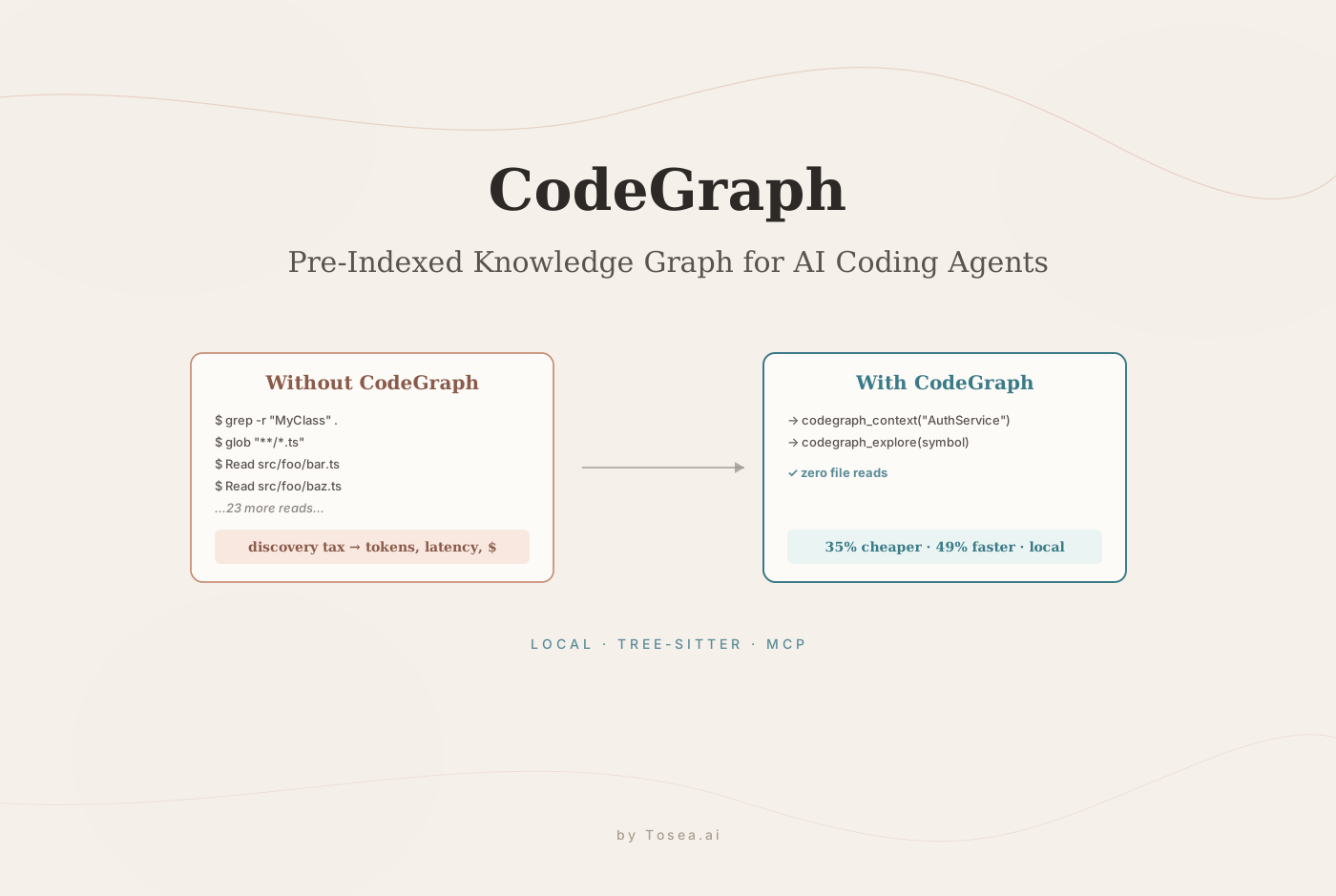
Every time Claude Code, Cursor, or Codex CLI explores an unfamiliar codebase, it spawns explore agents that scan files using grep, glob, and Read — burning tokens on every tool call before the actual work begins. On a large repository, a single architecture question can trigger dozens of file reads and sub-agent spawns before the model finds the relevant code. You pay for all of that discovery work in API costs, latency, and context-window consumption.
CodeGraph attacks that overhead at the root. When your engineering team produces architecture analyses, code documentation, or technical reports as a result of these sessions, those outputs frequently need to be presented to product managers, engineering leadership, or investors — a step where Tosea.ai converts technical documents into consulting-grade presentations with full source traceability. The rest of this guide focuses on the tool itself: what it does, how it does it, and where it's worth the setup cost.
What Is CodeGraph?
CodeGraph is an open-source, local-first code intelligence library, CLI, and MCP server built by developer Colby McHenry. Released under the MIT license and distributed as @colbymchenry/codegraph on npm, it gives AI coding agents a pre-indexed knowledge graph of your codebase — symbol relationships, call graphs, import structures, and code architecture — so agents can answer questions by querying the index rather than by scanning files.
CodeGraph runs 100% locally. All indexing and intelligence processing occur on the developer's machine, addressing both API-cost and data-privacy concerns. The project supports Claude Code, OpenAI Codex CLI, Cursor, and OpenCode — covering the major AI coding agent frameworks in 2026.
The Problem CodeGraph Solves: The Discovery Tax
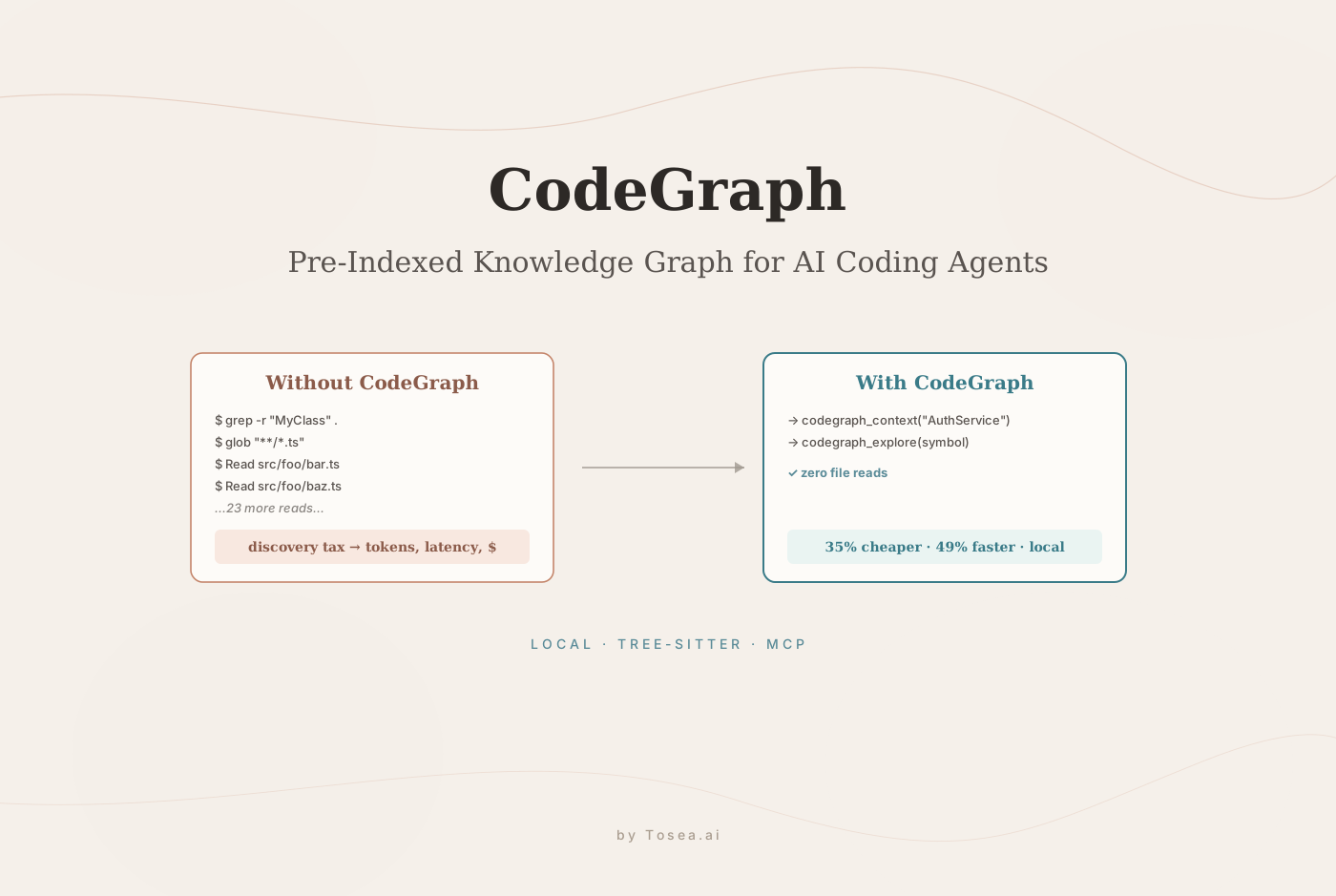
Without CodeGraph, when an AI coding agent is asked a question about codebase architecture, it pays what the project documentation calls a discovery tax.
The agent spawns explore sub-agents. Those sub-agents call grep to search for symbol definitions, glob to find files by pattern, and Read to open and process file contents. Each of those calls is a separate tool invocation that costs tokens and adds latency. On a large codebase, the agent can spend a meaningful share of its session token budget on discovery before it reads a single line of relevant code.
CodeGraph eliminates this discovery phase. When the index is available, the agent calls codegraph_context to map the relevant area of the codebase, then codegraph_explore to examine specific symbols and relationships — and stops, often with zero file reads.
For a concrete sense of the difference: a question like "trace how an authenticated request flows from the API gateway to the database layer" in a 4,000-file backend typically fans out to 40+ grep/glob/Read calls without CodeGraph. With the index in place, the same question resolves to 2 to 4 MCP calls.
Benchmark Results: What the Numbers Actually Show
CodeGraph's performance claims are backed by structured benchmarks across 7 real-world open-source codebases spanning 7 programming languages. The methodology is transparent and reproducible: each test arm runs Claude Code headlessly (claude -p with Claude Opus 4.7 and Claude Code v2.1.145), answering one architecture question per repository, 4 runs per arm, median result reported.
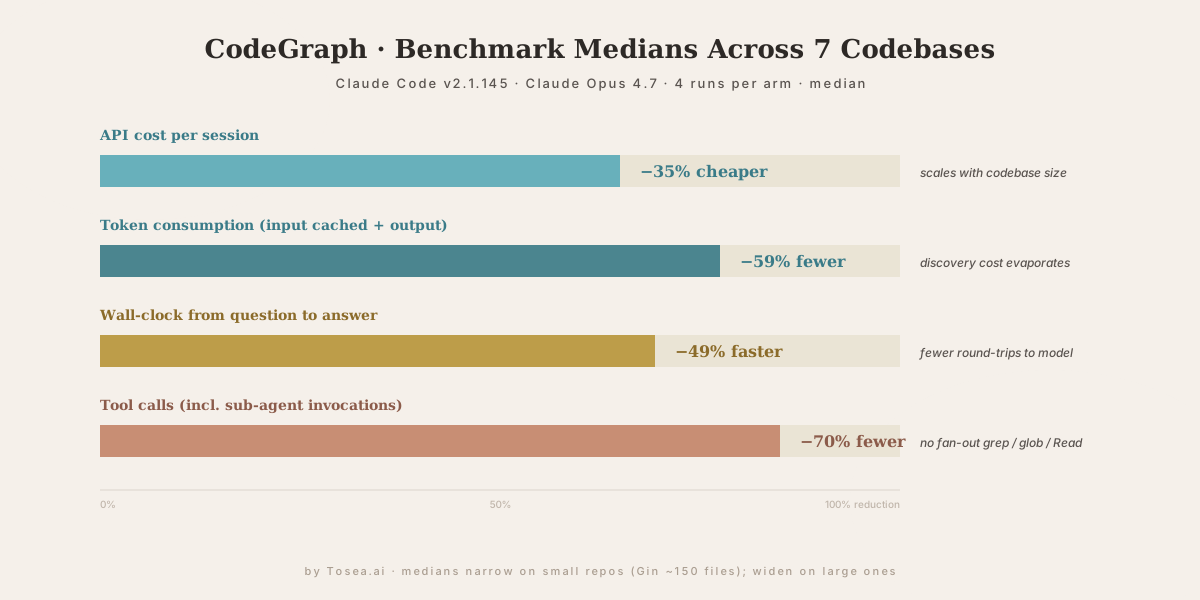
Averaged medians across the 7 codebases:
- 35% cheaper in API cost per session
- 59% fewer tokens consumed (input including cached, plus output)
- 49% faster wall-clock time from question to answer
- 70% fewer tool calls across the session, including all sub-agent invocations
The project documentation is explicit that the gains scale with codebase size. On large repositories, the agent answers from the index in a handful of calls with zero file reads, while the no-CodeGraph agent fans out across grep / find / Read and the sub-agents it spawns. On small repositories like Gin (~150 files), native search is already cheap, so the margin narrows.
This scaling behavior is the key insight for deciding when CodeGraph is worth the setup investment: if the codebase has hundreds or thousands of files, the payoff is substantial and immediate.
How CodeGraph Works: The Three Layers
CodeGraph's architecture has three layers that work together.
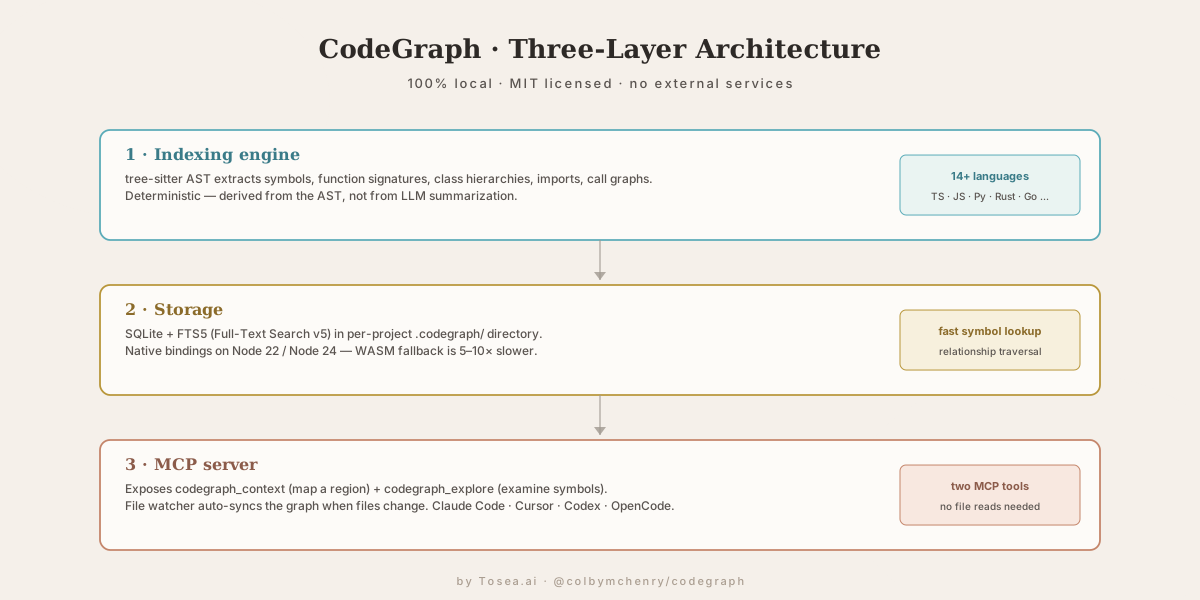
1 · Indexing engine. CodeGraph parses the codebase using tree-sitter — the same AST parser that powers many modern editors — to extract symbol definitions, function signatures, class hierarchies, import relationships, and call graphs. The extraction is deterministic: it is derived from the AST of the code, not from LLM summarization, which means the index is accurate and reproducible.
2 · Storage. All extracted data is stored in SQLite with FTS5 (Full-Text Search version 5) enabled, in a per-project .codegraph/ directory. SQLite enables fast symbol lookup and relationship traversal without any external service dependency. Everything is local. The current release ships native SQLite bindings for Node 22 and Node 24 — when the native binding fails to load and the package falls back to WASM, performance drops by 5 to 10×.
3 · MCP server. CodeGraph exposes its knowledge graph to AI agents through the Model Context Protocol. The MCP server provides two primary tools: codegraph_context for mapping a region of the codebase, and codegraph_explore for examining specific symbols and their relationships. The MCP server also runs a file watcher that auto-syncs the graph when files change.
Installation and Setup
CodeGraph installs as a global npm package and integrates into your AI coding agent through the MCP configuration.
Step 1: Install the Package
npm install -g @colbymchenry/codegraph
Node 22 or Node 24 is required. Both ship with native SQLite bindings, so a fresh install does not need a compiler. If you are upgrading from a pre-0.9 release on Node 24, reinstall the package to pull the new bindings.
After installation, run codegraph status to confirm the backend is native, not WASM. If it reports Backend: wasm, the SQLite native binding did not load correctly and performance will be 5 to 10× slower than the benchmarks.
Step 2: Register the MCP Server With Your Agent
codegraph install
This command registers the CodeGraph MCP server with Claude Code, Cursor, Codex CLI, and OpenCode. The install command writes the MCP server configuration into each agent's settings file. If you are upgrading from a pre-0.8 install, the same step also removes the now-defunct sync-if-dirty hooks that older versions wrote into Claude Code's settings.json.
For manual MCP configuration (when the auto-installer does not cover your setup), the server can be added directly:
{
  "mcpServers": {
    "codegraph": {
      "command": "codegraph",
      "args": ["serve"]
    }
  }
}
Step 3: Build the Index
Navigate to the project directory and run:
codegraph init
For interactive mode, which guides you through configuration options:
codegraph init -i
The init command parses the codebase with tree-sitter and builds the SQLite knowledge graph in .codegraph/. Indexing time scales with codebase size — most projects complete in seconds to a few minutes.
Once the index is built, Claude Code typically prompts: Would you like me to run codegraph init -i to build a code knowledge graph? That prompt is the confirmation that the MCP server is visible and working.
How to Verify CodeGraph Is Actually Being Used
A common failure mode is that CodeGraph appears to be installed but the agent never calls it. Three checks resolve this in under a minute:
- Run
codegraph statusin the project directory. The output should showBackend: nativeand report the number of indexed symbols. If symbols read0, the index was not built — re-runcodegraph init. - Watch the agent's tool-call log during a session. When CodeGraph is active, you should see
codegraph_contextorcodegraph_explorecalls early in the trace. If you see onlygrep/glob/Read, the MCP server is not being consulted — verify the entry in your agent's settings file. - Compare a fresh-question session before and after. Ask the same architecture question with CodeGraph disabled and enabled. The token count and wall-clock time should both drop noticeably on a large codebase.
If the gap is small, your codebase is probably one where native search is already cheap. That's a real outcome, not a misconfiguration — the value is genuinely codebase-dependent.
Supported Languages
CodeGraph's tree-sitter parser supports more than 14 programming languages, including TypeScript, JavaScript, Python, Rust, Go, Java, C, C++, Ruby, PHP, Swift, Kotlin, Scala, and others in the tree-sitter grammar ecosystem.
The language coverage means CodeGraph is useful across most professional codebases — whether you are working on a TypeScript web application, a Python data-science project, a Rust systems codebase, or a Java enterprise application.
When CodeGraph Delivers the Highest Value
The benefit-to-setup ratio depends on codebase characteristics. CodeGraph delivers the most value when:
- The repository has hundreds to thousands of files. The discovery tax is proportional to codebase size — large codebases produce the largest absolute savings.
- You run multiple AI coding sessions per day. The cost reduction compounds across every session, making the investment worthwhile quickly for frequent Claude Code or Cursor users.
- The team shares the codebase across multiple developers. A shared CodeGraph index in the repository means every team member benefits immediately rather than individually building context from scratch.
- Architectural questions span multiple files or modules. Questions that require understanding import chains, inheritance hierarchies, or call graphs benefit most from the pre-indexed relationship data.
For small repositories or one-off questions, the overhead of building and maintaining the index may not be worth it. The project's own benchmark data shows the margin narrows on small repos like Gin (~150 files).
When to Skip CodeGraph (Honest Trade-offs)
CodeGraph is not always the right tool. Skip it when:
- The codebase changes faster than the index can sync. Highly active monorepos where dozens of files change in a single session may spend nearly as much time on
codegraph syncas the discovery they were trying to avoid. - The question is about runtime behavior rather than static structure. CodeGraph indexes the AST. Runtime call traces, performance hot paths, and dynamic dispatch decisions are not in the graph.
- The agent already has a strong project memory /
CLAUDE.mdsetup. A well-maintained project-context file covers a lot of what CodeGraph replaces. CodeGraph compounds with project context — it does not replace it.
If you already use Claude Code skills heavily for non-architecture work, see Matt Pocock Skills for Claude Code and Best OpenClaw Skills for Productivity for adjacent productivity wins that don't require an index.
From Codebase Intelligence to Professional Communication
CodeGraph makes AI coding agents dramatically more efficient at understanding and reasoning about a codebase. The outputs of that intelligence — architecture analyses, technical documentation, code-review summaries, security audit findings — are assets that often need to reach audiences beyond the engineering team.
Product roadmap conversations with leadership require that technical findings be communicated in accessible terms. Investor due diligence requires that technical architecture be explained in a format financial reviewers can evaluate. Client deliverables require engineering work to be presented with the polish professional relationships demand. We covered the underlying logic in Mastering Document Transformation for Executive Presentations and Hallucination-Free Document to PPT Conversion. For the upstream PRD step that often feeds these analyses, our How to Write a Good PRD Guide covers the document the AI agent is actually working from.
Tosea.ai handles the translation from technical document to professional presentation. Upload the architecture analysis, engineering report, or technical summary that your AI coding session produced. Tosea.ai's Spatial Semantic Perception engine reads the logical structure of the content — identifying architectural decisions, system components, performance findings, and implications — and generates a consulting-grade slide deck that communicates the technical substance at the level the audience needs. Every claim in the generated presentation traces back to the source document through Absolute Traceability. The output is a native .pptx file, fully editable in Microsoft PowerPoint or Google Slides.
CodeGraph makes the AI coding agent more efficient. The document-to-PPT layer makes the outputs of that agent more communicable.
FAQ
Q: Does CodeGraph work with all versions of Claude Code and Cursor?
CodeGraph uses the Model Context Protocol, which is supported by Claude Code, Cursor, Codex CLI, and OpenCode. It works with Claude Code v2.x and current Cursor versions. The codegraph install command handles MCP registration automatically. For older Claude Code releases, check the releases page for version-compatibility notes.
Q: Is the ~35% cost reduction guaranteed on every codebase?
No — the benchmark results are medians across 7 specific test repositories. The gains scale with codebase size. On large codebases with complex dependency structures, savings can exceed the benchmark averages. On small repositories under a few hundred files, the margin narrows. Running codegraph status after setup confirms the native SQLite backend is active, which is required for full performance.
Q: Does CodeGraph send my code to any external service?
No. The entire pipeline — AST parsing with tree-sitter, storage in SQLite, and the MCP server — runs on the local machine. The .codegraph/ directory containing the index lives in the project directory. No data is sent to external services. This is what the project means by 100% local.
Q: What happens when I update files after building the index?
CodeGraph's MCP server runs a file watcher that auto-syncs the graph when files change in an active session. For changes made outside an active session, run codegraph sync manually to update the index before the next agent session.
Q: Should the .codegraph/ directory be checked into git?
The current recommendation is to commit the .codegraph/ directory when working on a team. This lets a new developer get the benefit of the index immediately on first checkout, without having to wait for codegraph init to complete. The directory is deterministic and small enough that it does not bloat the repository in meaningful ways.
Q: Does CodeGraph work for AI agents I build myself, or only for the listed clients?
Any agent that speaks MCP can register CodeGraph. The two MCP tools — codegraph_context and codegraph_explore — are standard tool-call surfaces. The four officially listed clients (Claude Code, Cursor, Codex CLI, OpenCode) are the ones that ship with codegraph install recipes; for a custom agent, you add the MCP server entry manually.
Get Started With CodeGraph
The repository is available at github.com/colbymchenry/codegraph under the MIT license. Install with npm install -g @colbymchenry/codegraph, register with codegraph install, and build your first index with codegraph init. The README covers the complete setup and the full benchmark methodology.
When the engineering work that CodeGraph accelerates produces technical documents that need to become professional presentations, Tosea.ai is the document-to-deck layer for that step.
Sources
- CodeGraph (GitHub) — Colby McHenry, MIT license, the canonical repository for the project
- CodeGraph README — installation, MCP tool reference, full benchmark methodology
- CodeGraph: Enhancing Claude Code with Pre-Indexed Semantic Knowledge Graphs — AIToolly technical analysis, May 18, 2026
- tree-sitter — the AST parser CodeGraph uses for deterministic symbol extraction
- SQLite FTS5 — the full-text-search engine that backs the
.codegraph/index - Model Context Protocol — the open standard CodeGraph speaks to AI agents
- Claude Code — Anthropic, one of the four agents supported out of the box