How to Write a Good PRD: A Complete Guide for Product Managers in 2026
A practical 2026 guide to writing a Product Requirements Document — Cagan's four-section framework, common mistakes to avoid, and how to turn your PRD into a presentation in minutes.
You have done the discovery work. You know the user problem. You have alignment with design. Now comes the document that will determine whether what gets built is what you intended — the Product Requirements Document.
Before we dive in: once your PRD is complete, you will almost certainly need to present it — to engineering leadership, to executives, to investors in a pitch deck, or to a cross-functional alignment session. Tosea.ai transforms a PRD directly into a structured presentation in under a minute, with every claim traceable back to the source document. By the end of this guide you will understand both how to write a PRD that works and how to present it without rebuilding it from scratch.
What Is a PRD and Why Does It Matter?
A Product Requirements Document is the central reference point for what your product team will build. According to Marty Cagan of the Silicon Valley Product Group, whose foundational guide How to Write a Good PRD has shaped product management practice for two decades, the purpose of the PRD is to clearly and unambiguously articulate the product's purpose, features, functionality, and behavior.
Ben Horowitz and David Weiden, both notable venture capitalists, described the PRD as the most important document a product manager maintains — the product Bible for marketing, design, and engineering. UXPin's PRD guide elaborates: the PRD is the heart of your product and serves as a living document for any designer, developer, or stakeholder to understand the status and purpose of the product.
The business case for getting PRDs right is empirical. Planio's analysis of project failure research cites the finding that 70% of projects fail due to a lack of requirement gathering. A well-structured PRD is the primary defense against that failure mode.
The Golden Rule: Explain What, Not How
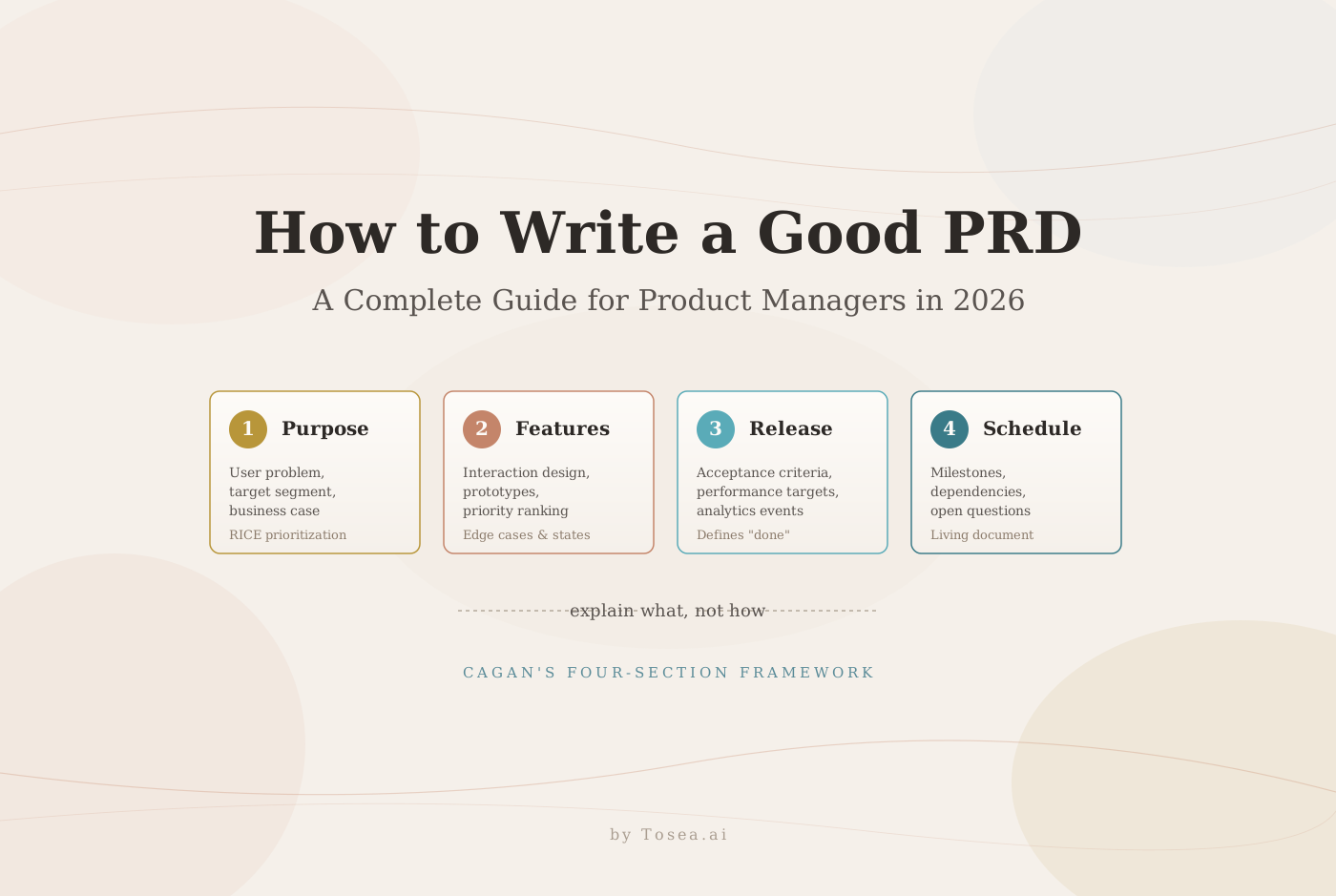
Cagan's most important principle is also the most frequently violated: the PRD explains what the product should do, not how engineering should build it.
This distinction matters because it determines who is making which decisions. The PRD defines the user problem to be solved, the behavior the product must exhibit, and the experience the user must have. The engineering team — with their knowledge of architecture, technical constraints, and implementation tradeoffs — decides how to achieve that behavior.
A PRD that specifies implementation details is not a requirements document; it is a technical specification that constrains engineering creativity and often leads to solutions that are technically compliant but experientially broken. As Planio describes Cagan's guidance: a PRD forces you to think through your product from the user's perspective rather than obsessing over technical implementation.
The modern PRD also looks significantly different from the 50-page waterfall documents that Cagan's original guide was written to improve upon. A contemporary analysis of PRD evolution notes that the modern PRD is far shorter but somehow more insightful — it includes specific user data, reads accessibly, and excites the team to build rather than burdening them with documentation.
The Four Core Sections of a Good PRD
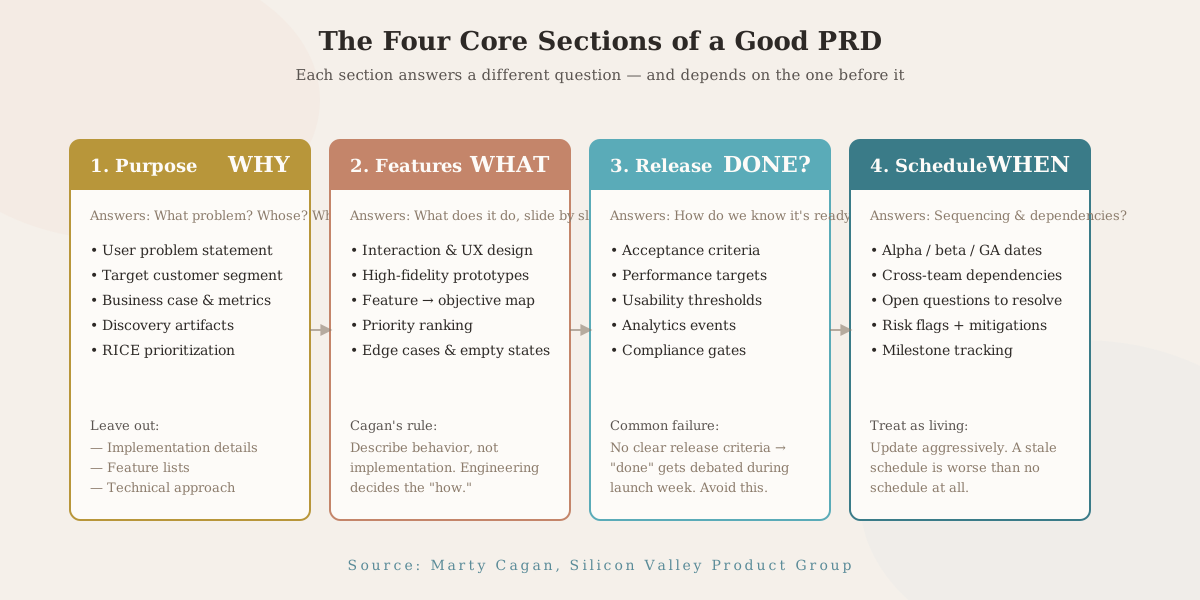
Cagan's framework organizes every PRD around four essential components. Every additional section you add should serve one of these four purposes — or it probably should not be in the PRD at all.
Section 1: Product Purpose
This section answers three questions: What user problem does this product solve? Who experiences this problem? Why is solving it valuable to the business?
Start with the user need, not the feature. Amazon's Working Backwards methodology — famously captured in the press release and FAQ format — offers a useful mental model: if you cannot write a clear, compelling description of the user problem in one paragraph, you do not understand it well enough to define requirements for solving it.
Practical elements to include in the purpose section: a clear statement of the user problem in the user's own language, the target user or customer segment, the business case including expected impact on revenue, retention, or other key metrics, and links to discovery artifacts — user interviews, survey data, behavioral analytics — that validate the problem.
What to leave out: implementation details, technical approaches, and feature lists. Those come later.
One useful prioritization tool for this section is Intercom's RICE framework — Reach, Impact, Confidence, and Effort. According to a comprehensive modern PRD guide, adding RICE scores next to functional requirements or open questions makes tradeoffs visible and keeps scope disciplined throughout the document's lifecycle.
Section 2: Feature Descriptions
This is the core of the PRD. For each feature, describe the user experience and interaction design at a level that gives engineering full context on what must be true, while leaving them the flexibility to determine how to make it true.
Cagan's specific guidance here has proven durable: describe features at the level of interaction design and use cases. Link to high-fidelity prototypes rather than writing extensive prose. UXPin's PRD framework reinforces this directly: Cagan argues that the majority of the product spec should be the high-fidelity prototype. A clickable prototype resolves questions that paragraphs of written description cannot.
For each feature, map it explicitly to a product objective. This practice — sometimes called requirements traceability — ensures that every feature has a clear reason to exist, and that if a feature needs to be cut during development, the team can assess which objective is no longer addressed rather than making arbitrary scope decisions.
Rank features by priority. When schedules shift — and they always do — a prioritized feature list gives engineering and product management a shared framework for deciding what ships and what gets deferred.
The features section should also address edge cases and empty states. What happens when a user encounters an error? What does the interface look like with no data? These questions are far cheaper to answer in writing than in code.
Section 3: Release Criteria
How will you know the product is ready to ship? Release criteria define the measurable conditions that must be true before the product goes to users.
This section is typically the most technical in the PRD, but it should still describe goals rather than implementation. Performance requirements — page load times, error rates, concurrency limits — belong here as targets, not as architectural specifications. Acceptance criteria for each feature belong here as testable conditions: given a user who does X, the system must respond with Y.
Release criteria also cover: usability testing thresholds (what task completion rate must be achieved in user testing before release?), analytics implementation requirements (what events must be instrumented before launch?), and regulatory or compliance requirements that gate release.
A PRD without clear release criteria creates ambiguity about what done means. That ambiguity typically resolves itself at the worst possible time — during the final week before a scheduled launch, when engineering and product management discover they had different mental models of what the release required.
Section 4: Timeline and Schedule
The schedule section is a rough planning artifact, not a commitment. Its purpose is to establish shared expectations about sequencing and milestones and to surface dependencies that might affect other teams.
Include: major milestone dates (alpha, beta, general availability), dependencies on other teams or external systems, open questions that must be resolved before specific milestones can be achieved, and risk flags with mitigation approaches.
The schedule section should be the most aggressively updated part of the PRD as the project progresses. UserVoice's customer-feedback-fueled PRD framework identifies treating the PRD as a static document as one of the most common PM failure modes. A schedule that reflects reality rather than the original plan is significantly more useful to the team than an optimistic original schedule that has been quietly abandoned.
The Five Most Common PRD Mistakes
Writing solutions instead of problems. Feature descriptions that specify how engineering should build something rather than what the user should experience are the most expensive form of PRD error, because they get encoded in architectural decisions that are difficult to reverse.
Overbuilding the document. Length is not quality. A 60-page PRD that attempts to specify every edge case in prose is harder to read, harder to maintain, and harder to act on than a 10-page PRD with linked prototypes that convey the same information in a fraction of the words.
Skipping discovery. Cagan's caution is direct: beware the anti-pattern of using documents instead of discovery. A PRD should capture validated decisions, not replace validation. Requirements written before user research is complete are guesses dressed up as specifications.
No prioritization. A feature list without priority signals is a list that engineering will implement in dependency order, convenience order, or their own priority order — none of which is necessarily aligned with the business's priorities.
Letting it go stale. The PRD is a living document. A PRD that accurately described the product at kickoff and has not been touched in eight weeks is actively harmful, because team members reading it cannot know which parts are current and which are obsolete.
From PRD to Presentation: The Step That Most Teams Handle Poorly
A completed PRD is a foundational artifact. It aligns engineering, design, data, and go-to-market. But most product managers also need to present the PRD's core content to audiences who will not read the document itself — executives approving investment, investors evaluating a pitch deck, cross-functional partners who need a 15-minute briefing.
This translation from document to presentation is where significant time is lost. The product manager who wrote the PRD knows the content. But the work of extracting the narrative arc, building the slide structure, formatting the feature descriptions for a visual format, and producing a deck that holds together from first slide to last typically takes hours that could be spent on product work — a tax on PMs we have written about in our founder-trap to systems-architect guide.
The best AI presentation maker tools in 2026 address this translation problem directly. Rather than generating slides from prompts — which produces content the AI predicts should be in a product presentation rather than content actually in your PRD — document-first AI presentation generators read your source document and build from it. Our zero-hallucination AI slides guide explores why this distinction matters in practice.
This matters for PRDs specifically because the value in your requirements document is in the specifics: the exact user problem you validated, the precise release criteria you established, the specific feature priority you made. A free AI presentation generator that produces generic product slides from a brief cannot reproduce any of that. An AI that reads your actual PRD can.
Tosea.ai: The AI PowerPoint Creator Built for Professional Documents
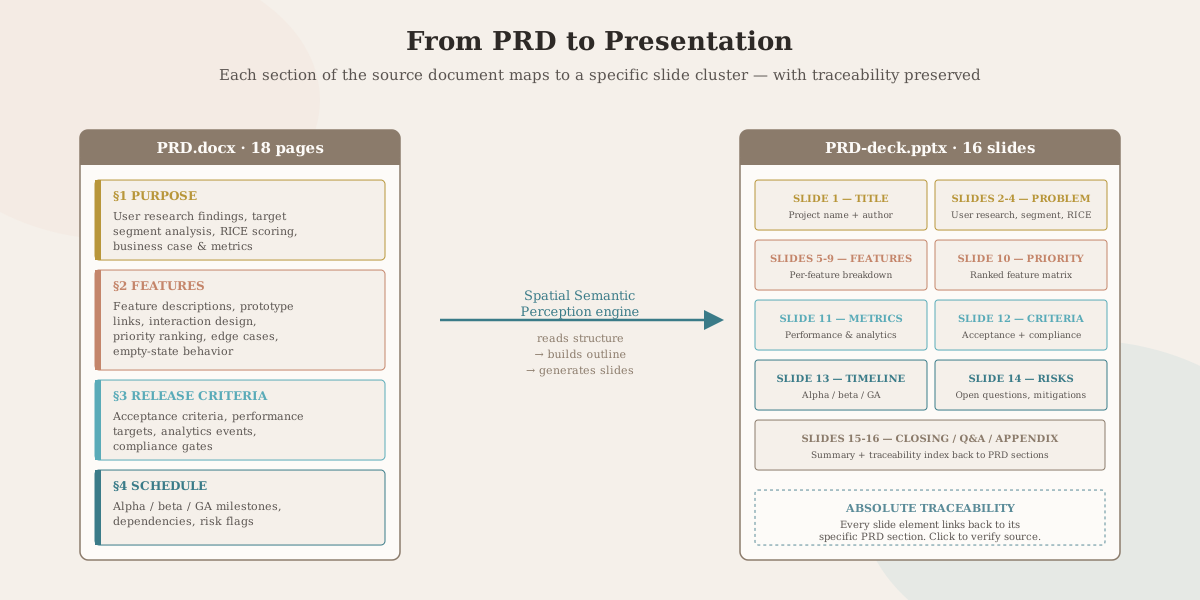
Tosea.ai is an AI slides generator designed for exactly this use case. Upload your PRD — whether it is a Word document, a PDF export from Confluence, or a Markdown file — and the platform's Spatial Semantic Perception engine reads the full logical structure of your document. The same workflow we documented for PDF-to-PowerPoint conversion applies directly: tables, formulas, and structural hierarchy are preserved, not paraphrased.
It identifies which sections establish context, which define features, which set release criteria, and how those sections relate to each other as a strategic argument. The result is an AI presentation that follows the logic of your PRD rather than generic product-presentation conventions — useful for executive briefings of the sort discussed in our executive summary master slide guide and our mastering document transformation guide.
Absolute Traceability links every slide element back to the specific section of your PRD where it originated. When an executive asks in a review where a specific acceptance criterion came from, you can locate it in the source document immediately — the same standard of accountability that Cagan's guide applies to the PRD itself.
The output is a native .pptx file, fully editable in Microsoft PowerPoint or Google Slides. Clean layers, consistent design across all slides, no locked elements. Whether you need a structured executive summary, a pitch deck for investors, or a cross-functional alignment deck for the launch team, the AI PowerPoint creator handles the structural translation while you retain full control over the final presentation. For PRDs that span dozens of pages and produce 50+ slides, our massive slide deck guide covers how to keep style consistent at scale.
Writing the PRD is the hard intellectual work. Tosea.ai handles the presentation layer — making the AI presentation tool genuinely useful to product managers who have better things to do than rebuild their PRD as a slide deck.
Closing Thought
A good PRD is specific, validated, prioritized, and maintained as a living document. It defines what the product must do, not how engineering should build it. It gives every team member — from engineering to customer support — a shared understanding of what is being built and why.
Once the PRD is written, the presentation layer should not consume more time than the requirements work itself. Pair the discipline of Cagan's framework with a document-to-deck pipeline like Tosea.ai, and the next time a PRD review goes on the calendar, the deck is one upload away rather than three hours of slide assembly.
Sources
- How to Write a Good PRD — Marty Cagan, Silicon Valley Product Group
- How to Write a Good Product Requirements Document — UXPin
- The One-Page PRD: Product Requirements, Simplified — Planio
- Product Requirements Documents (PRDs) — Aakash Gupta
- How to Write a Good Product Requirements Document — Ulad Shauchenka
- The Customer-Feedback-Fueled PRD — UserVoice
- Working Backwards — Colin Bryar and Bill Carr