How to Use AI Job Search to Get an Offer with MadsLorentzen/ai-job-search
How to use MadsLorentzen/ai-job-search, an open-source Claude Code framework, to run an honest AI job search: profile, ranking, tailored CVs, ATS checks — and where Tosea AI fits after the offer.
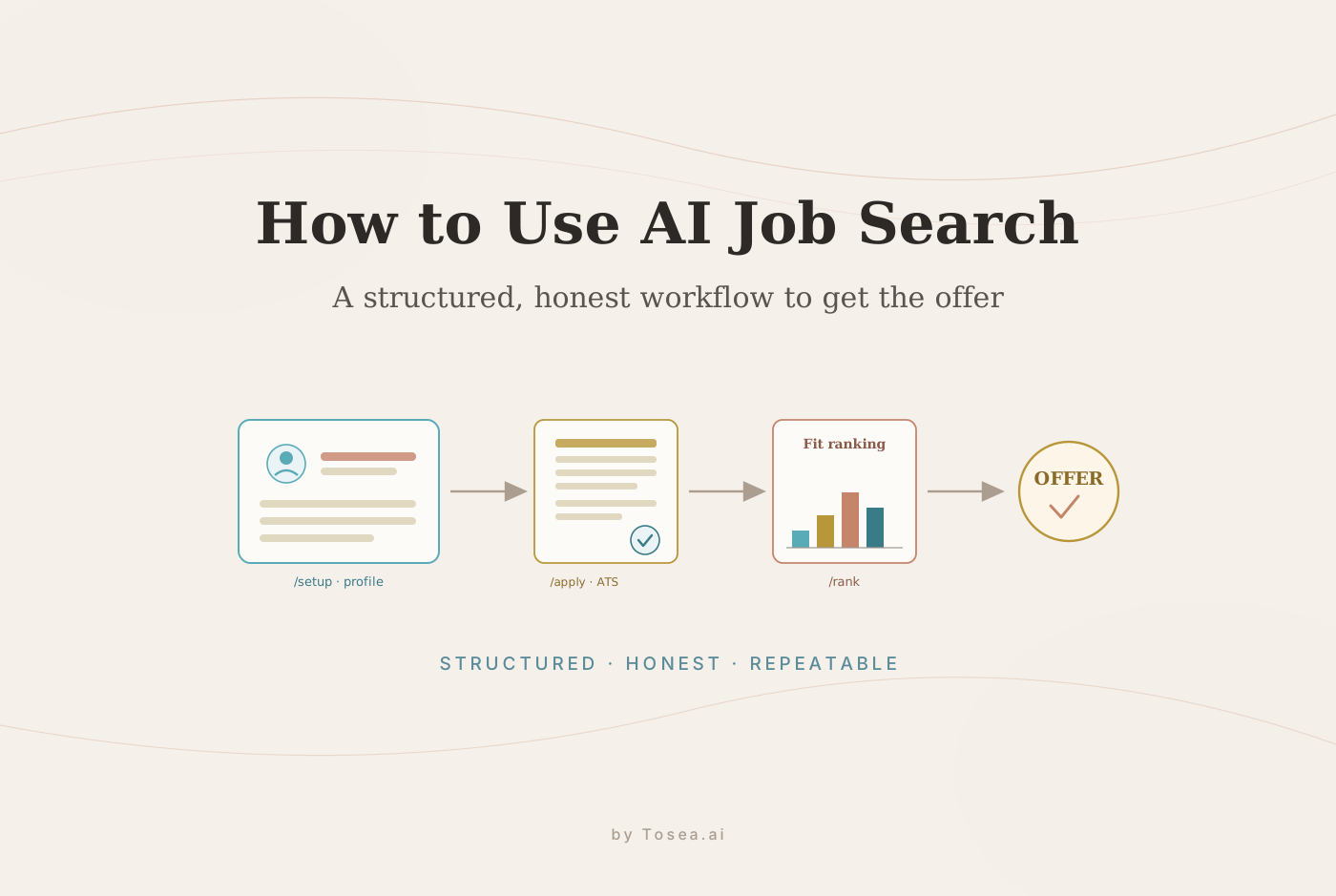
If you want to use AI job search to get an offer, the biggest mistake is treating AI like a one-shot resume writer. A better approach is to build a structured job application system that understands your real experience, evaluates each role, tailors your CV, drafts a focused cover letter, prepares you for interviews, and records outcomes so every application improves the next one. That is exactly what the open-source MadsLorentzen/ai-job-search project is designed to help with.
Quick Summary
MadsLorentzen/ai-job-search is an open-source AI job application framework built on Claude Code. It helps candidates create a profile, search jobs, rank opportunities, evaluate fit, tailor CVs, write cover letters, prepare for interviews, and track outcomes. It is most useful for job seekers who want an honest, repeatable AI job search workflow instead of generic AI-generated applications.
What Is MadsLorentzen/ai-job-search?
MadsLorentzen/ai-job-search is an AI-powered job application framework built on Claude Code. The project turns Claude Code into a structured job search assistant that can read your career documents, understand your profile, search job portals, evaluate fit, draft tailored CVs and cover letters, and prepare you for interviews. If Claude Code itself is new to you, our Claude Code complete guide covers the basics, and the wider ecosystem of packaged commands is worth a look in our roundup of Claude Code skills for productivity.
The repository describes itself as a framework, not a simple resume prompt. That distinction matters. A resume prompt gives you one draft. A framework gives you a repeatable process.
The core workflow is:
- Set up your candidate profile
- Search or import job postings
- Evaluate role fit
- Rank opportunities
- Generate tailored CV and cover letter drafts
- Review and revise the materials
- Compile and inspect PDFs
- Check ATS parseability
- Track outcomes
- Use results to improve future applications
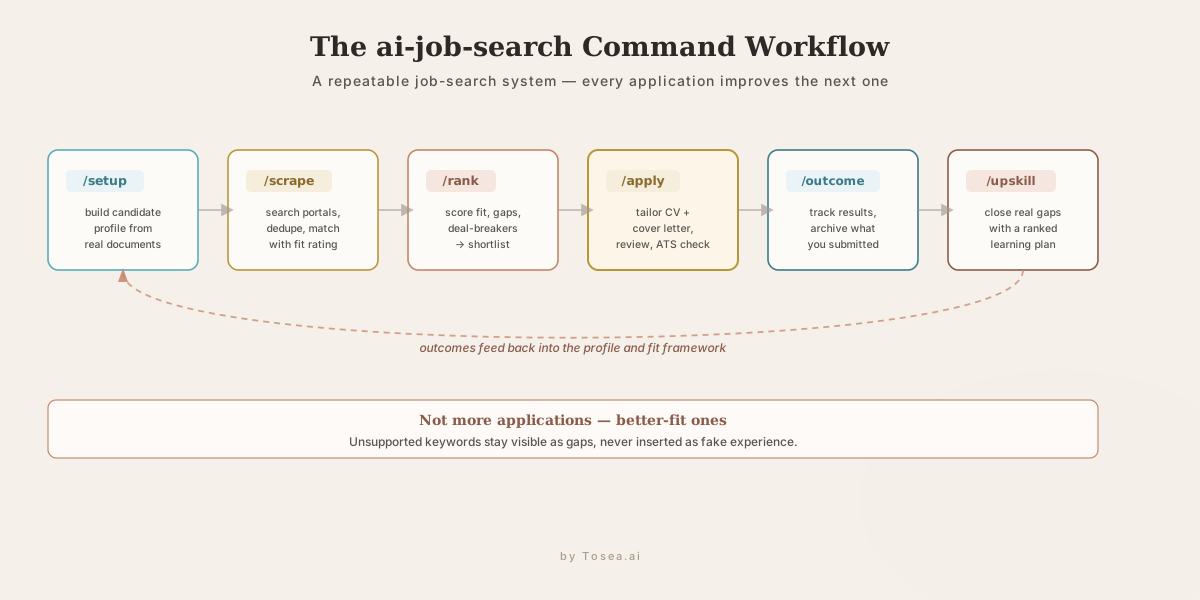
The project is especially interesting because it does not encourage fake skills or keyword stuffing. According to the repository, unsupported keywords are treated as gaps, not inserted as false experience. That matters for credibility, ethics, and interview readiness.
Who Should Use This AI Job Search Workflow?
This AI job search framework is useful for several types of candidates.
Students and new graduates can use it to turn scattered coursework, internships, projects, and extracurricular experience into a clearer candidate profile.
Mid-career professionals can use it to reposition experience for adjacent roles, new industries, or more senior positions.
Career switchers can use it to discover transferable skills, identify missing competencies, and create a learning plan through the /upskill command.
Technical candidates can benefit from the LaTeX CV workflow, ATS text-layer checks, and structured role-fit scoring.
High-volume job seekers can use /rank, /scrape, and /outcome to reduce manual screening time while still keeping applications specific.
This is not a tool for spraying hundreds of low-quality applications. It is better understood as a job search operating system for people who want each application to be more targeted.
What You Need Before You Start
The repository lists several prerequisites and tools.
You need Claude Code, which is the agentic coding environment used by the framework.
You need Python 3.10+ for Python-based tools.
You need Bun for the job portal search tools in the .agents/skills folder.
You need a LaTeX distribution such as TeX Live or MiKTeX because the framework compiles CVs and cover letters into PDFs.
The repository also mentions optional Poppler tooling. Its pdftotext utility can help inspect the PDF text layer, which matters because applicant tracking systems read embedded text rather than visual layout.
For better output, prepare these documents before setup:
- Current CV or resume
- LinkedIn profile export
- Diplomas or transcripts
- Reference letters
- Past cover letters
- Portfolio links
- GitHub links
- Personal website
- Past applications and outcomes
- List of target roles and locations
- Salary research if available
The richer your inputs, the sharper the outputs. A thin profile usually produces generic applications. A detailed profile gives the system material to reframe your real experience for each role.
Step 1: Fork and Clone the Repository
Start by forking and cloning the GitHub repository.
gh repo fork MadsLorentzen/ai-job-search --clone
cd ai-job-search
You can also clone it manually from the GitHub repository.
This gives you a local workspace where your profile, applications, templates, and tracking files can live. Because the tool works with personal career data, you should treat the fork as private unless you remove personal information.
Step 2: Install the Job Search Tools
The project includes job portal CLI tools under .agents/skills. The original implementation includes Danish job portals such as Jobindex, Jobnet, Jobdanmark, and Akademikernes Jobbank, plus a LinkedIn public listing search skill.
From the README, installation looks like this:
cd .agents/skills/jobbank-search/cli && bun install && cd ../../../..
cd .agents/skills/jobdanmark-search/cli && bun install && cd ../../../..
cd .agents/skills/jobindex-search/cli && bun install && cd ../../../..
cd .agents/skills/jobnet-search/cli && bun install && cd ../../../..
cd .agents/skills/linkedin-search/cli && bun install && cd ../../../..
The Danish portals are market-specific. If you are outside Denmark, the most important idea is the pattern. The project includes /add-portal, which is designed to help create a local job board integration for your market. The repository notes that auth-walled portals are declined and restrictive terms get personal-use warnings, which is the right approach for responsible use.
Step 3: Run Setup and Build Your Candidate Profile
After installing the tools, open Claude Code in the project folder and run:
/setup
The setup flow supports three paths:
- Read your
documents/folder if you already placed CVs, LinkedIn exports, diplomas, reference letters, and past applications there - Import a single CV pasted into chat
- Walk through an interview to build your profile interactively
The goal is to create a detailed candidate profile that the system can use for job matching, CV tailoring, cover letter writing, and interview preparation.
This is the most important step. If you only provide job titles and generic skills, the system cannot tailor applications well. Instead, describe what you actually did.
Weak profile input:
- Python
- Project management
- Marketing analytics
Strong profile input:
- Built a Python churn prediction pipeline using scikit-learn and customer transaction data
- Led a 6-person cross-functional project to launch a new onboarding funnel
- Created weekly marketing dashboards that reduced campaign reporting time by 40 percent
Specific context gives the AI enough factual material to write stronger applications without inventing experience.
Step 4: Search for Jobs with /scrape
Once your profile is ready, run:
/scrape
The /scrape command searches configured job portals for positions matching your profile. It deduplicates results and presents matches with fit ratings.
This step helps reduce one of the biggest problems in job hunting: spending hours reading postings that are not actually a good fit.
The framework can support both explicit targeting and latent opportunity discovery. Explicit targeting means you already know the roles you want. Latent opportunity discovery means the system analyzes your history and suggests career paths you may not have considered.
That can be valuable for people with mixed backgrounds. For example, someone with finance, Python, and operations experience might discover analytics, revenue operations, product operations, or strategy roles that match better than their current job title suggests.
Step 5: Rank Opportunities Before Applying
If a scrape returns many jobs, use:
/rank
The /rank command batch-scores postings against the fit framework. It considers strengths, gaps, deal-breakers, deadlines, and role alignment.
This is one of the most practical parts of the system. Many job seekers waste energy applying to roles with low fit because the title looks attractive. Ranking gives you a more disciplined shortlist.
A good AI job search workflow should answer:
- Is this role actually aligned with my experience?
- Which requirements do I strongly meet?
- Which requirements are real gaps?
- Is the gap trainable before interview?
- Is the location or work mode acceptable?
- Does this role support my next career move?
- Is the application worth a tailored effort?
The point is not to let AI make your career decisions. The point is to use AI to surface tradeoffs faster.
Step 6: Apply with a Tailored CV and Cover Letter
To apply to a role, run:
/apply https://example.com/job-posting
If the URL cannot be fetched, paste the full job description:
/apply paste the full job description here
The /apply workflow does several things:
- Parses the job posting
- Evaluates fit against your profile
- Drafts a tailored CV and cover letter in LaTeX
- Uses a reviewer agent to critique the drafts
- Revises based on feedback
- Compiles and inspects the PDFs
- Checks ATS parseability
- Presents the final output with verification
The reviewer-agent structure is important. A single AI pass often leaves generic wording, missed keywords, weak positioning, or unclear evidence. A separate reviewer agent can research the company and critique the drafts with fresh context.
Step 7: Understand the ATS and PDF Verification Loop
Many candidates focus only on whether a resume looks good visually. But applicant tracking systems often parse the PDF text layer. A resume can look fine on screen and still extract poorly.
The ai-job-search workflow uses optional pdftotext from Poppler to inspect the compiled CV as a parser would see it. It checks whether contact details are literal text, whether the reading order is sane, and whether keyword coverage is supported by the candidate profile.
This is one of the strongest parts of the project. It connects design, ATS readability, and honesty.
The system also verifies layout. It compiles the CV with lualatex and the cover letter with xelatex, then inspects the output. It aims to prevent broken PDFs, orphaned job titles, cover letters spilling onto page two, inconsistent fonts, and formatting issues.
That kind of quality control is hard to get from a generic AI resume generator.
Step 8: Track Outcomes with /outcome
After applying, record what happened:
/outcome
This command tracks interviews, offers, rejections, silence, and application results. It archives the submitted CV, cover letter, and posting text.
The value is feedback. If certain roles produce interviews and others do not, your profile and fit framework should adapt. Over time, you can learn which keywords, industries, role types, and positioning angles are actually working.
This turns job search into a learning system instead of a pile of disconnected applications.
Step 9: Use /upskill to Close Gaps
If you are not getting interviews or if target roles consistently show skill gaps, run:
/upskill
The /upskill command analyzes the gap between your profile and tracked job postings. It can generate a prioritized learning plan with study resources and time estimates.
This is useful because not every gap deserves equal attention. Some gaps are deal-breakers. Some are nice-to-have. Some can be addressed by reframing existing experience. Some require real learning.
A good AI job search workflow should be honest enough to say when you are not ready for a role. That honesty helps you focus.
How to Use AI Job Search Without Hurting Your Credibility
AI can help you get more interviews, but it can also damage your credibility if you use it carelessly.
Use these rules:
- Never add a skill you cannot discuss in an interview
- Never invent projects, metrics, employers, degrees, or certifications
- Keep claims traceable to your real experience
- Use AI to clarify and reframe, not fabricate
- Manually review every CV and cover letter
- Customize the final tone so it sounds like you
- Keep a record of what you submitted
- Prepare interview examples for every major claim
The best applications are not the ones with the most keywords. They are the ones where the candidate, role, evidence, and story line up.
ai-job-search vs Generic AI Resume Tools
| Feature | ai-job-search | Generic AI resume tool |
|---|---|---|
| Candidate profile | Structured and reusable | Often one-off |
| Job evaluation | Built into workflow | Usually limited |
| CV tailoring | Based on stored profile and role fit | Often prompt-based |
| Cover letter | Drafted and reviewed | Often generic |
| PDF compilation | LaTeX workflow | Depends on tool |
| ATS text check | Optional pdftotext verification | Often absent |
| Outcome tracking | Built in | Usually absent |
| Skill gap analysis | Supported by /upskill | Usually absent |
| Honesty guardrails | Unsupported gaps stay visible | Varies |
The biggest advantage is repeatability. You are not starting from scratch for every role. You are improving a career system.
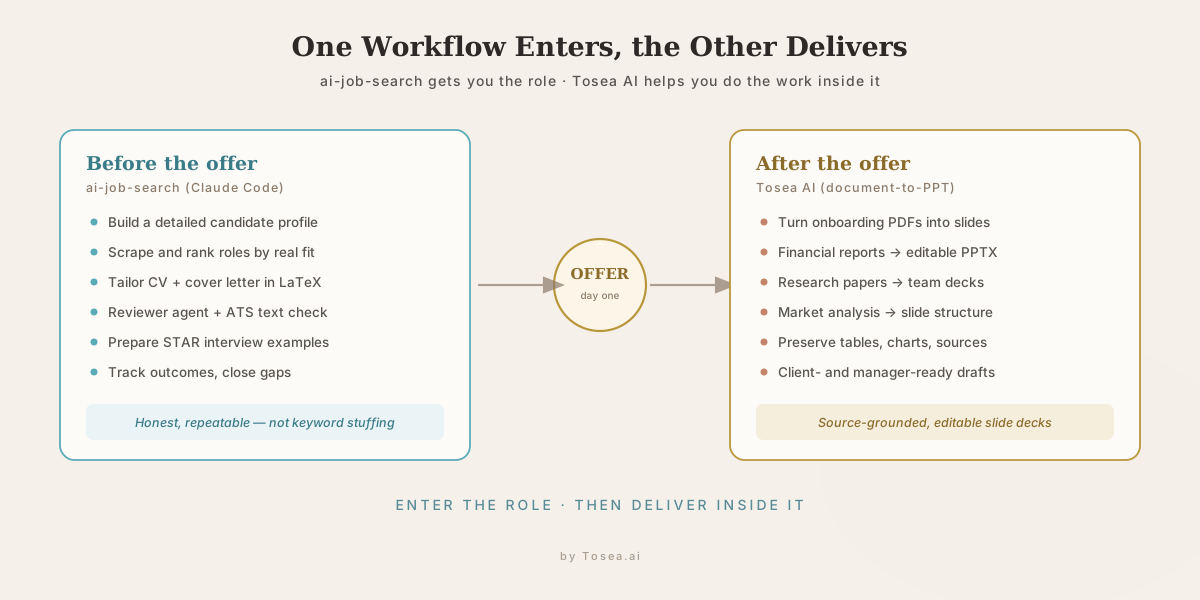
After You Get the Offer: Where Tosea AI Fits
Getting the offer is not the end of the workflow. Once you start the job, you will need to produce work: project updates, client decks, research summaries, onboarding reports, market analysis, product reviews, investment memos, team presentations, and strategy documents.
That is where Tosea AI fits naturally.
Tosea AI is a source-grounded AI presentation tool that turns PDFs, research papers, financial reports, annual reports, 10-K filings, and complex documents into editable PowerPoint slides. It is built for analysts, researchers, consultants, product teams, and knowledge workers who need accurate slide decks with preserved tables, charts, figures, and source context.
For a new hire, this matters because many early tasks involve understanding dense documents and turning them into clear deliverables. You may need to summarize a market report, convert a research paper into a team presentation, transform a financial PDF into a client-ready deck, or prepare an internal update from multiple sources. The same document-to-PPT skill sits at the center of turning raw source material into executive-ready presentations and data-driven decks for leadership.
If ai-job-search helps you get the role, Tosea AI can help you perform inside the role.
Practical Example: From Job Search to First 30 Days
Imagine you are applying for an analyst role.
Before the offer, ai-job-search helps you:
- Build a detailed profile
- Find relevant analyst roles
- Rank postings by fit
- Tailor your CV
- Write a role-specific cover letter
- Prepare STAR interview examples
- Track outcomes and improve
After the offer, Tosea AI helps you:
- Turn onboarding PDFs into slides
- Convert financial reports into editable PowerPoint decks
- Summarize market research into presentation structure
- Preserve tables, charts, figures, and source context
- Create client or manager-facing presentation drafts faster
That makes the two tools complementary. One helps you enter the opportunity. The other helps you deliver once you are inside.
Q&A
What is MadsLorentzen/ai-job-search?
MadsLorentzen/ai-job-search is an open-source AI job application framework built on Claude Code. It helps candidates set up a profile, search jobs, rank opportunities, evaluate fit, tailor CVs, write cover letters, prepare for interviews, and track outcomes.
Can ai-job-search guarantee an offer?
No. No tool can guarantee an offer. ai-job-search can improve the quality, consistency, and targeting of your applications, but hiring outcomes still depend on your experience, market conditions, role fit, interview performance, timing, and employer decisions.
Is ai-job-search only for Denmark?
The original job portal skills include Danish job boards, but the core workflow is language- and country-agnostic. The repository includes /add-portal for creating job board integrations for other markets, and it includes a LinkedIn public job listing skill as a broader starting point.
Do I need to know how to code?
You need some comfort with command-line tools because the project uses Claude Code, Python, Bun, and LaTeX. Non-technical users may need help setting it up, but the workflow itself is designed around commands such as /setup, /scrape, /rank, and /apply.
Will it fabricate my experience?
The repository emphasizes that claims in the CV and cover letter are verified against your actual profile. Unsupported keywords are treated as gaps rather than inserted as fake experience. You should still manually review every output before sending it.
How does Tosea AI relate to job search?
Tosea AI is not a job application tool. It becomes useful after you get the role. If your new job involves reports, research papers, financial documents, market analysis, or client presentations, Tosea AI can turn source documents into editable PowerPoint slides.
Final Takeaway
AI job search works best when it is structured, honest, and repeatable. MadsLorentzen/ai-job-search is useful because it turns job hunting into a system: profile building, job discovery, fit ranking, tailored applications, PDF verification, ATS checks, interview preparation, outcome tracking, and upskilling.
Use it to apply with more focus, not more noise. The goal is not to send more generic applications. The goal is to find better-fit roles, explain your real experience more clearly, and prepare for interviews with evidence you can defend.
Then, after you get the offer, keep the AI workflow going. Use Tosea AI when your new role requires turning PDFs, research papers, financial reports, annual reports, 10-K filings, market research, and complex documents into editable PowerPoint slides. ai-job-search can help you get the job. Tosea AI can help you do the work once you are there.
Sources
- MadsLorentzen/ai-job-search — open-source AI job application framework (GitHub repository and README)
- Claude Code — Anthropic, the agentic coding environment the framework runs on
- Bun — runtime used by the job portal search skills
- Poppler (pdftotext) — PDF text-layer inspection used for ATS checks
- TeX Live — LaTeX distribution used to compile the CV and cover letter PDFs