How to Make a Job Portfolio Presentation with AI: Interview-Ready Slides from Your Real Work
Build a job portfolio presentation with AI: collect verified evidence, map it to the job description, use an 8-slide structure, protect confidential work, and rehearse for the interview.
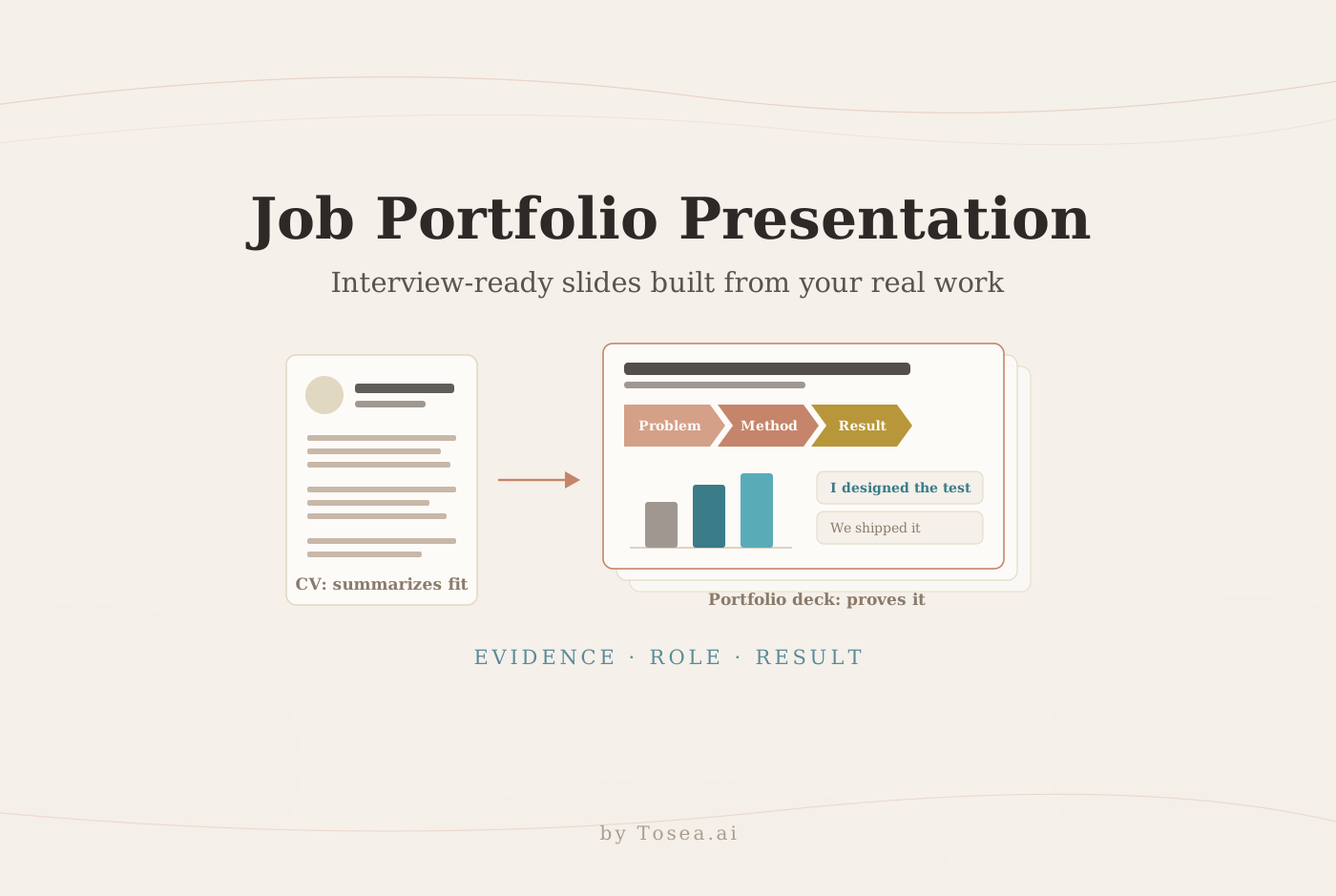
A CV summarizes fit. A job portfolio presentation proves it. When a hiring panel asks you to "walk us through a project you're proud of," or a final round includes a 15-minute presentation slot, the candidates who stand out are the ones who arrive with a short, structured deck of real work: what the problem was, what they personally did, what changed as a result, and how that experience transfers to the new team.
This guide shows how to build that deck from evidence you can defend. It covers when a portfolio presentation is expected, how to collect and clear your work samples, how to map them to the job description, an eight-slide structure with example titles, how to write case-study slides that separate your contribution from the team's, and how to rehearse for the format. It also shows how the open-source MadsLorentzen/ai-job-search framework can organize the evidence behind your applications, and how Tosea AI turns approved projects, reports, and work samples into an editable PowerPoint you can adapt for each interview.
Quick answer: Pick two case studies that match the role's top requirements. For each, show the problem, your responsibility, your method, a sourced result, and the lesson. Wrap them in an eight-slide deck: value proposition, skills map, two case studies, a work sample, transfer to the target team, and a close. Use only material you are allowed to share, and rehearse a 10-minute and a 3-minute version.
When you need a job portfolio presentation
The U.S. Department of Labor–sponsored CareerOneStop portfolio guide defines a portfolio as "a collection of work samples that shows your skills and qualifications," which you can post online, show during an interview, or share at other points in a job search. A portfolio presentation is the interview version: a deck you present live, built around a few selected samples instead of everything you have ever made.
| Situation | Typical length | What evaluators are looking for |
|---|---|---|
| "Present a past project" interview round | 10–15 minutes, 6–10 slides | Ownership, reasoning, measurable result, self-awareness |
| Final-round or panel presentation | 15–30 minutes plus Q&A | Structure under time pressure, handling challenge questions |
| Design, UX, or research portfolio review | 20–45 minutes | Process, trade-offs, evidence behind decisions |
| Internal transfer or promotion case | 10–20 minutes | Impact in the current role, readiness for the next |
| Networking or informational follow-up | 3–5 slides, sent as PDF | A quick, credible picture of what you do |
A take-home case presentation is a different exercise — you are answering the employer's prompt with their data. The portfolio presentation answers a simpler question: what have you actually done, and why does it matter here?
The format is common in consulting, product management, data and analytics, design and research, engineering, sales, and strategy roles — and in any role where the job itself involves presenting to stakeholders, because the interview is a natural place to test that skill.
Step 1: Build an evidence inventory before you open PowerPoint
Most weak portfolio decks start with slides and look for content to fill them. Strong ones start with an inventory. CareerOneStop's advice for each work sample is a useful template: include "a description of the project, who the client or employer was, how you contributed, and any results of the project." Turn that into a table and fill one row per candidate project:
| Field | What to record | Example |
|---|---|---|
| Project | One-line description | Reduced onboarding drop-off for a B2B SaaS product |
| Context | Organization type, team size, timeframe | Series B company, 4-person squad, Q2–Q3 |
| Your role | What you owned vs contributed to | Owned the analysis and experiment design; engineering built the change |
| Actions | Two or three specific things you did | Funnel analysis, five user interviews, A/B test plan |
| Result | Metric, baseline, and source | Activation 31% → 38% over 8 weeks (product analytics dashboard) |
| Artifact | What you can show | Redacted funnel chart, test summary, before/after screens |
| Permission | Can you share it? In what form? | Approved by former manager with client name removed |
Two rules make the inventory trustworthy. First, separate your contribution from the team outcome — "the team shipped" and "I designed the test" are different claims, and interviewers probe the difference. Second, record the source of every number so you can answer "how did you measure that?" without improvising.
Clear the confidentiality question first
Include only material you are allowed to share. Remove client names, confidential metrics, personal data, internal screenshots, and proprietary methods unless you have explicit permission. Common safe alternatives:
- Replace exact figures with ranges or relative changes ("cut cycle time by about a third")
- Replace client names with descriptors ("a top-10 European retailer")
- Rebuild charts from your own notes instead of screenshotting internal tools
- Use a public or personal side project when the best professional work is under NDA
Never upload or reuse a former employer's slides or templates without permission. Interviewers notice — and a confidentiality lapse in a portfolio deck answers the trust question for them.
Step 2: Map the evidence to the job description
A portfolio deck is not a highlights reel; it is an argument for one specific role. List the five or six most important requirements from the posting, then match each to the strongest evidence in your inventory. Requirements with direct evidence become the backbone of the deck. Requirements with only partial evidence become talking points. Requirements with no evidence should not be faked — prepare an honest bridge answer instead.
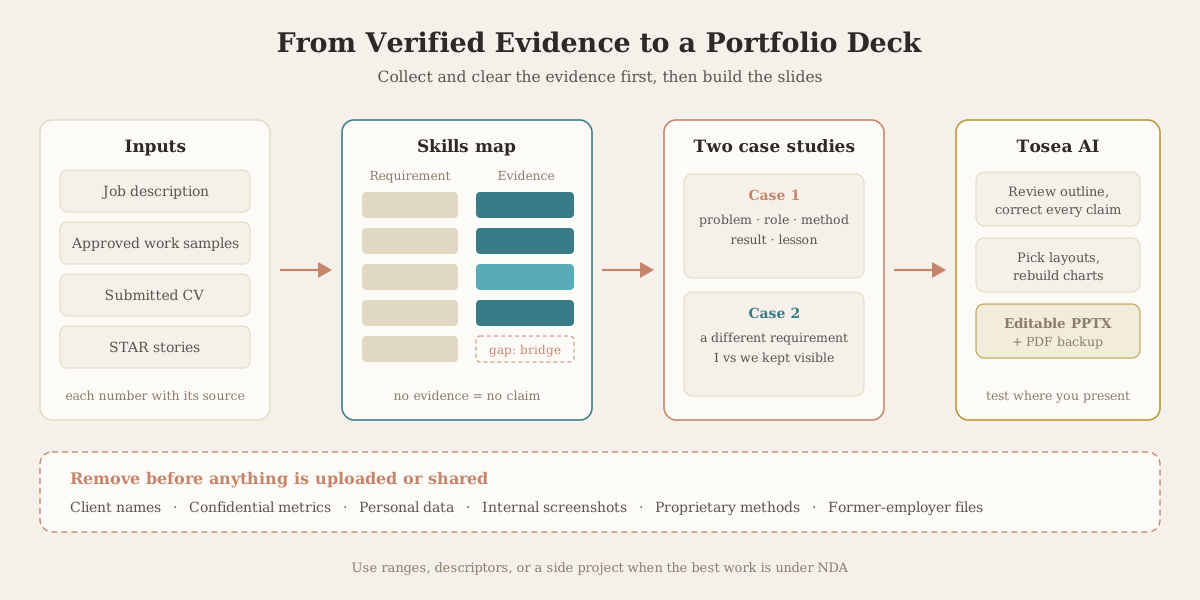
Pick two case studies, not five. Two well-told cases fit a 10–15 minute slot with room for questions; five shallow ones leave the panel with nothing memorable. Choose cases that cover different requirements — for example, one that shows analytical depth and one that shows stakeholder influence.
Use ai-job-search to organize the evidence behind each application
If you are running several applications at once, keeping the evidence, tailored CVs, and interview notes consistent is its own job. MadsLorentzen/ai-job-search is an open-source, MIT-licensed job application framework built on Claude Code that runs on your own machine. As of October 20, 2026, the repository had more than 59,000 GitHub stars. Its author, Mads Lorentzen, writes in the README that the framework was built to run Lorentzen's own search after a position was cut in late 2025: sixty-nine tailored applications, twenty first interviews, and one signed contract later, Lorentzen started as an AI engineer in June 2026.
The parts that matter for a portfolio presentation:
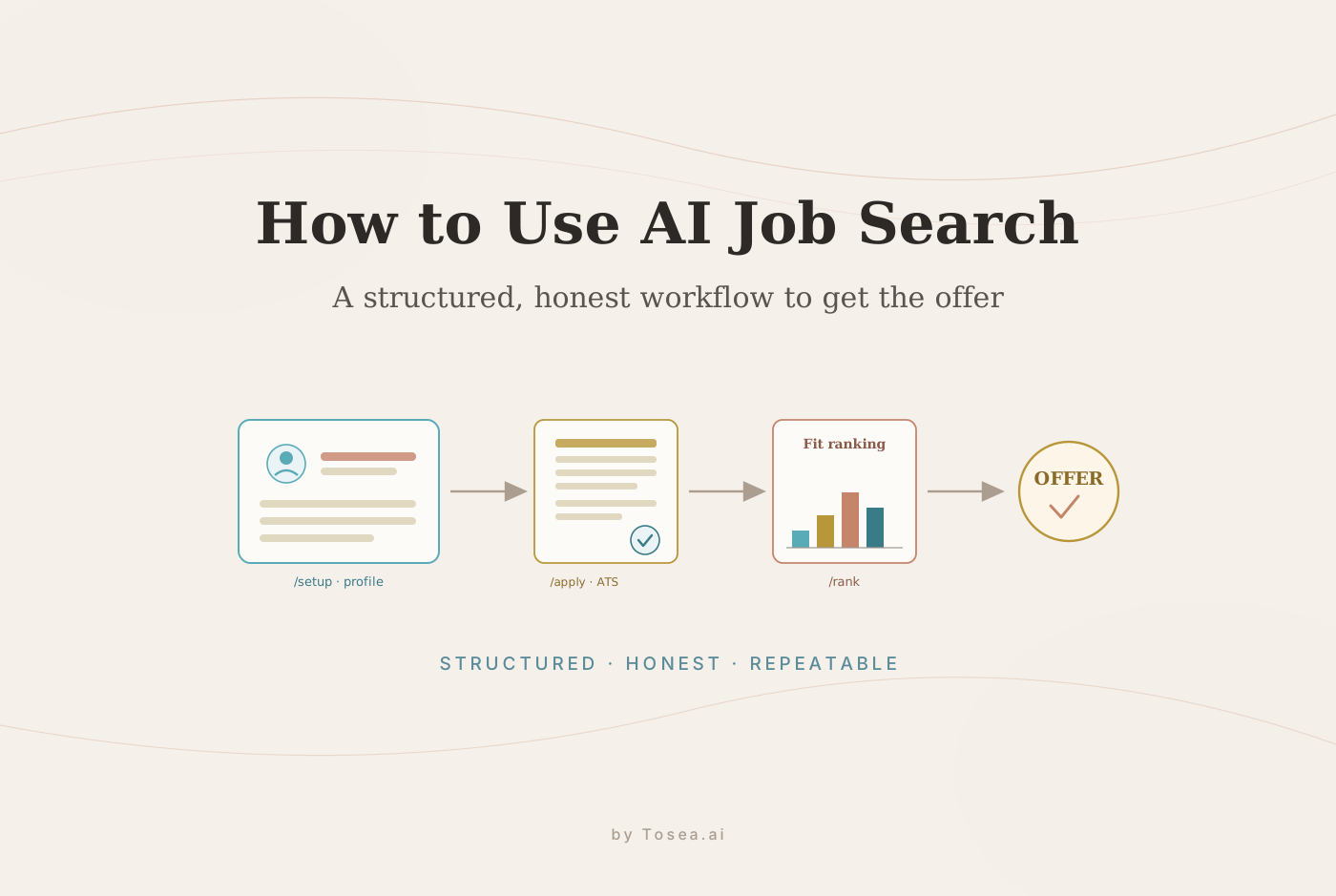
/setupbuilds your candidate profile from adocuments/folder (CV, LinkedIn export, diplomas, reference letters, past applications), a pasted CV, or an interview — the same raw material as your evidence inventory./rankand/applyscore roles against a fit framework and surface honest per-job strengths and gaps; the README states that keywords your profile does not support are acknowledged as gaps, "never stuffed in." That gap list is exactly what Step 2 needs./interviewbuilds a stage-specific prep pack from the archived posting and the CV and cover letter the interviewer actually read, maps likely questions to your STAR examples, and offers a mock interview. Gaps get "honest bridge answers, never invented experience."/outcomearchives what you submitted per application, so the deck you present matches the CV the panel has in front of them.
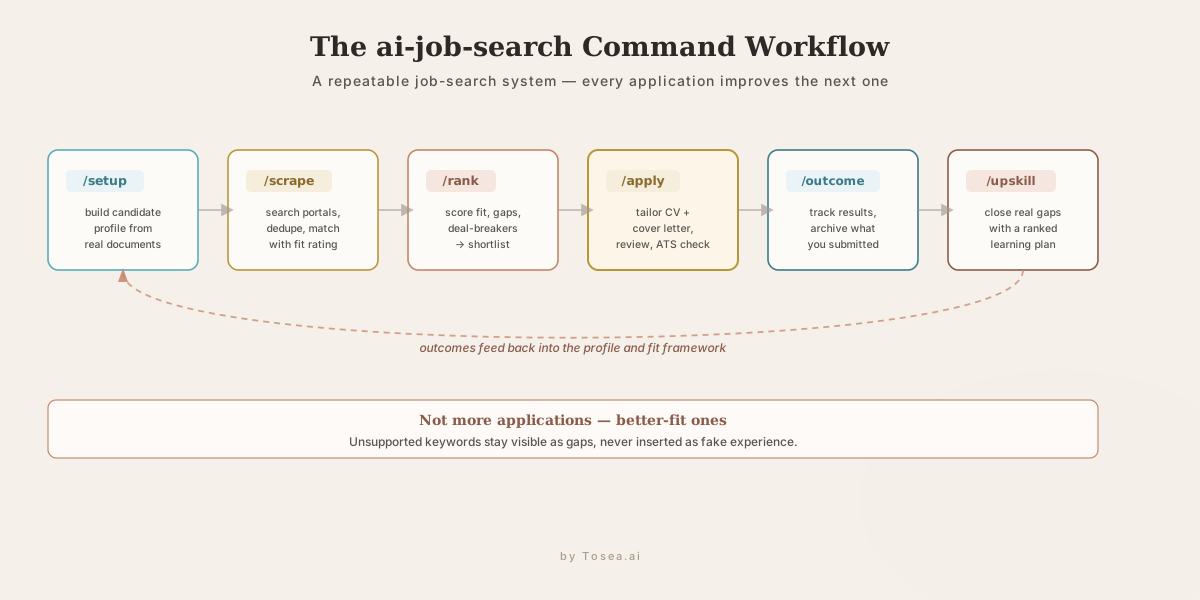
Two cautions before you install it. It needs a command-line setup — Claude Code (which has no free tier: a paid Claude plan or API credits), Python 3.10+, Bun, and a LaTeX distribution. And because /setup writes personal data into tracked files, the README warns that a GitHub fork of the public repository is always public; for your own job search it recommends a private repository with the original project as upstream. Our step-by-step ai-job-search setup guide walks through installation, every core command, and the ATS check in detail.
Step 3: Use an eight-slide structure
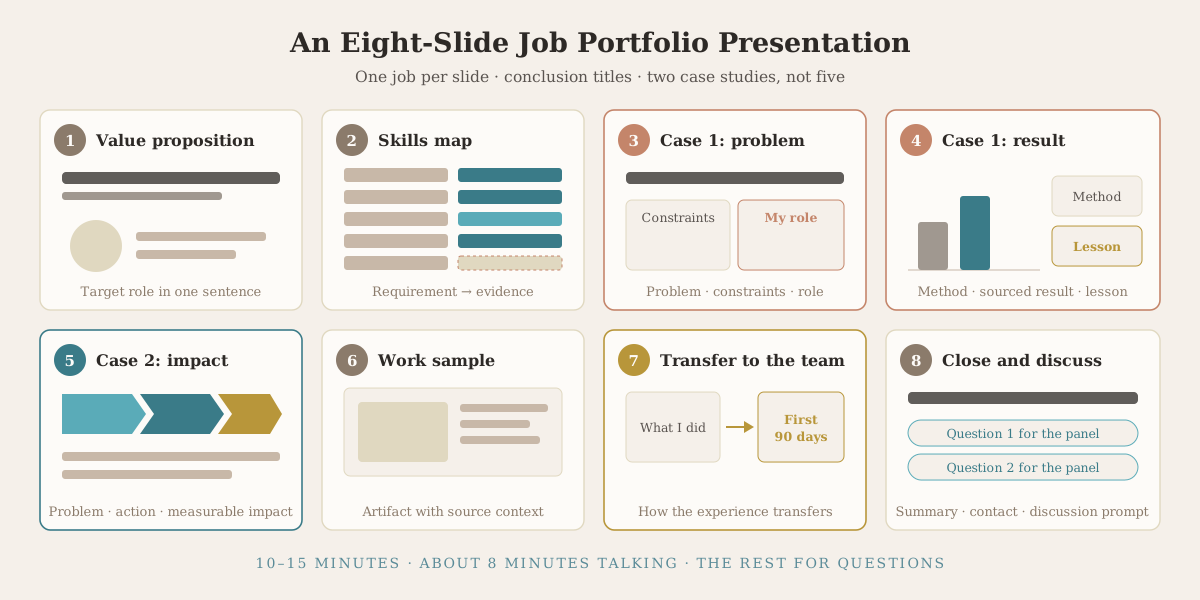
For a 10–15 minute slot, eight slides is a reliable default. Each slide has one job, and its title should state a conclusion rather than a topic.
| # | Slide | Example action title |
|---|---|---|
| 1 | Target role and value proposition | "I turn messy product data into experiments that move activation" |
| 2 | Skills map tied to the role requirements | "Four of your five core requirements are backed by shipped work" |
| 3 | Case study one: problem, constraints, your responsibility | "Activation was stalling at 31% and nobody owned the funnel" |
| 4 | Case study one: method, result, lesson | "A two-step test raised activation to 38% in eight weeks" |
| 5 | Case study two: problem, action, measurable impact | "Aligning sales and support cut escalations by about a third" |
| 6 | Work sample or technical artifact with source context | "The analysis template now used by three product teams" |
| 7 | How your experience transfers to the target team | "What I would look at in your first 90 days" |
| 8 | Closing summary, contact details, discussion prompt | "Two questions I would like to explore with you" |
Slide 7 is the one candidates most often skip, and it is the one that turns a retrospective into a conversation about the job. Keep it specific and humble: name what you would want to learn first, not what you would change on day one.
Step 4: Write case-study slides that survive follow-up questions
Every case-study slide should let the interviewer trace a straight line from problem to result. A practical sequence is problem → constraints → your responsibility → method → result → lesson, which overlaps with the STAR structure most interviewers already use.
Weak and strong versions of the same slide title:
- Weak: "Onboarding project" — a topic, not a claim.
- Better: "Improved onboarding" — a claim with no evidence.
- Strong: "A two-step onboarding test raised activation from 31% to 38% in eight weeks" — a claim, a magnitude, and a timeframe the interviewer can probe.
On the slide body, use "I" for what you did and "we" for what the team did, and keep both visible. Put the metric's source in a footnote. If a result is an estimate, say so. Add one sentence on what you would do differently — it shows self-awareness and pre-empts the "what went wrong?" question.
Step 5: Build the deck with Tosea AI
With the inventory and the skills map done, the deck itself should take minutes, not an evening. In Tosea AI, upload the approved project reports, charts, PDFs, and work samples, together with the job description. Request a concise deck for a named role and audience, then review the outline before anything is rendered: correct every claim, check that each title is a conclusion, and remove anything that is not cleared for sharing.
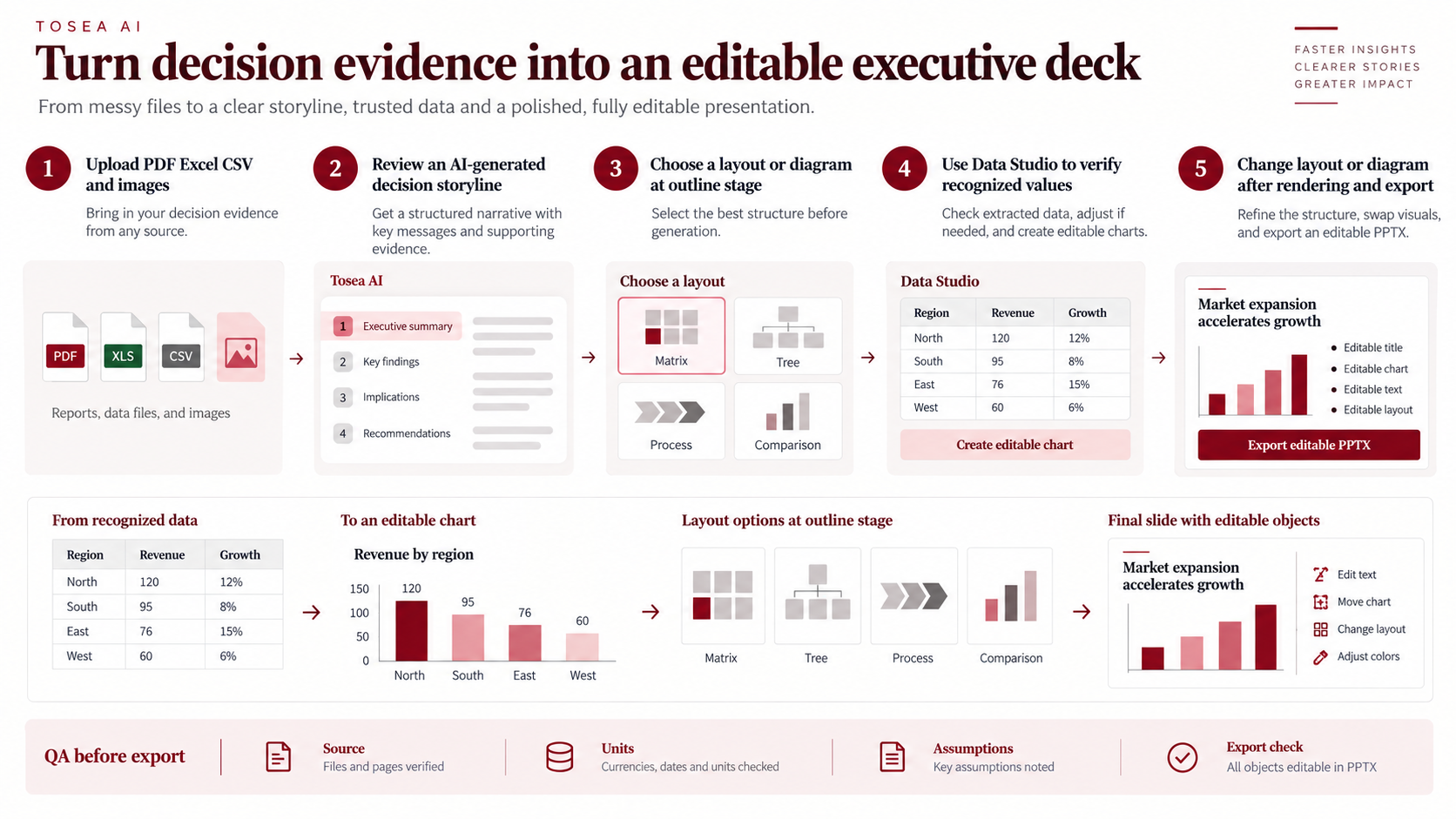
Choose layouts or diagrams at the outline stage — a timeline for the case-study arc, a comparison for before/after, a matrix for the skills map — and revise them again after rendering. If a result chart only survives as a screenshot, Data Studio can recognize the values and rebuild it as an editable chart, which also lets you redact or round sensitive figures cleanly. Eligible paid plans support custom templates, colors, fonts, and logos. Export an editable PPTX and test it in the interview environment.
Reusable Tosea AI prompt:
Create an eight-slide job portfolio presentation for the target role in my uploaded job description. Use only evidence from my approved files. Start with my professional value proposition, then map my skills to the role's top five requirements and present two case studies using problem, constraints, my responsibility, method, result, and lesson. Separate my contribution from team outcomes and cite the source of every metric in a footnote. Preserve relevant charts and work samples, flag missing evidence, remove client names and confidential details, and use concise action titles. Do not invent metrics, clients, tools, or experience. Produce an editable PowerPoint suitable for a 10-minute interview discussion.
For more on turning dense documents into structured slides, see our guides to converting a PDF into PowerPoint slides and the research-paper-to-slides workflow, which use the same document-to-deck approach.
Recover existing portfolio slides with Reslide
Sometimes the only surviving version of your best work is a PDF, a screenshot, or a flattened slide image from an old laptop. Reslide by Tosea AI turns slide images and PDFs into editable PowerPoint. Instead of placing the original page as one background picture, it reconstructs supported text as text boxes, graphics as editable shapes, and pictures as separate layers, so you can update numbers, redact names, and restyle the page.
Use the cleanest source available, convert a small representative sample first, and inspect every page. OCR, uncommon fonts, dense charts, and overlapping objects can still need correction. An editable result is a starting point for updating your own portfolio slides — not permission to reuse confidential material. Our Reslide guide covers the conversion workflow and its limits in more detail.
Step 6: Rehearse for the format, not just the content
A portfolio presentation is evaluated as a presentation. Rehearse it the way it will be delivered:
- Time it. For a 10-minute slot, aim for about eight minutes of talking and leave the rest for questions. Prepare a 3-minute version of the same story for when the interviewer says "just give us the highlights."
- Prepare the follow-ups. For each case study, write down the three hardest questions — "What would you do differently?", "What was your specific contribution?", "How do you know the result was caused by your change?" — and answer them aloud. The
/interviewprep pack in ai-job-search is one way to generate them from the actual posting. - Add backup slides. One or two appendix slides with methodology details or extra data let you answer depth questions without cluttering the main story.
- Test the setup. Open the PPTX on the platform you will present from, keep a PDF backup, and check fonts, screen sharing, and contrast. Our academic conference presentation guide has a useful timing and rehearsal plan for tight slots that transfers well to interviews.
- Decide what you send. If the employer asks for the deck in advance, send a PDF with the same content you will present. If they don't, offer it afterwards as a leave-behind.
Discipline-specific notes
| Field | What to emphasize | What to avoid |
|---|---|---|
| Consulting and strategy | Problem structuring, hypothesis, synthesis, recommendation | Client names and engagement fees |
| Product management | Discovery, prioritization trade-offs, experiment results | Roadmaps that are still confidential |
| Data and analytics | Method, data quality decisions, business impact | Raw data, internal dashboards as screenshots |
| Design and UX research | Process, research evidence, iterations, rationale | Only showing final polished screens |
| Engineering | Architecture decisions, constraints, reliability or performance results | Proprietary code |
| Sales and customer success | Pipeline or retention outcomes, deal strategy, cross-team work | Customer-identifying details |
| Research and academia | Research question, method, contribution, publication or impact | Unpublished results you don't have rights to share |
Early-career candidates can build the same structure from internships, coursework, capstones, and side projects; our guide to the consulting and finance internship conversion presentation shows the internship version of this deck in detail.
Safety and credibility checks before you share anything
A portfolio workflow mixes sensitive personal data with documents you will send to people you have not met. Two checks protect you.
Protect your data. If you use an AI agent workflow such as ai-job-search, remember that it combines an AI agent, untrusted job-posting text, and your personal files. The project's security policy is candid that its instruction-level defenses are "not a sandbox": review what was fetched and written before you send anything, read community extensions before enabling them, and never commit personal data to a public repository. Prefer official APIs or manual pasting when a job board's access rules are unclear.
Verify the employer. Before you share identity documents, bank details, or money, confirm the opportunity is real. The FTC's guide to spotting job scams lists the common warning signs — recruiters writing from personal email accounts, pressure to pay for equipment or "training," and requests for personal information up front — and recommends contacting the company through a phone number or website you know is legitimate, not one the recruiter gave you. No legitimate workflow or tool can guarantee an offer.
Frequently Asked Questions
How many slides should a job portfolio presentation have?
For a 10–15 minute slot, six to ten slides is typical; eight is a reliable default. Fewer, deeper case studies beat many shallow ones. Put methodology details in backup slides.
Should I send my portfolio presentation before the interview?
Only if asked. If you send it, send a PDF of exactly what you will present. Otherwise, offer it afterwards as a leave-behind so the panel can share it internally.
Can I include work from a previous employer?
Only with permission and after removing confidential details — client names, internal metrics, proprietary methods, and internal screenshots. When in doubt, rebuild the chart from your own notes, use ranges, or present a side project instead.
Is MadsLorentzen ai-job-search free?
The repository is open source under the MIT License, but its primary workflow runs on Claude Code, which has no free tier — you need a paid Claude plan or API credits. You also need local software (Python, Bun, LaTeX) and time to review everything it produces.
Can AI job search guarantee interviews or an offer?
No. It can improve consistency, role targeting, document quality, and preparation, but hiring outcomes depend on experience, fit, competition, timing, referrals, market conditions, and employer decisions.
Can Tosea AI redesign my existing PowerPoint without changing the content?
Yes. Export the PowerPoint as a PDF, upload the PDF to Tosea AI, and request a redesign that keeps the original wording. Use Layout Only when the goal is to refresh visual structure without intentionally rewriting the content. Review the result to confirm that every label, footnote, and slide element remains complete.
How do I upload a PowerPoint and ask Tosea AI to redesign each slide?
First export the PowerPoint as a PDF. Upload that PDF to Tosea AI and explain that you want each slide redesigned while preserving its content and sequence. Choose a template or describe the visual direction, generate the deck, and inspect every slide before exporting the revised presentation.
Can I upload my own PowerPoint template to Tosea AI?
Tosea AI supports custom templates on eligible paid plans. Configure the template through the available product workflow, then use it for the portfolio presentation. Check that required layouts, fonts, colors, logo placement, and master-slide rules are represented correctly before sharing the final deck.
Can Tosea AI use custom brand colors, fonts, and a logo?
Yes. Specify the required colors and fonts in the presentation instructions and upload the logo or use a custom template where supported. Custom logo and custom template features are available on eligible plans. After export, verify font availability, color values, logo spacing, and contrast in PowerPoint.
Can Tosea AI match the style of my old company presentations?
Tosea AI can use a representative company deck as design guidance, but style matching should not imply permanent model training. For stronger consistency, use an approved custom template containing the company layouts, colors, fonts, and logo. Never upload or reuse former-employer materials without permission.
Does Tosea AI preserve PowerPoint formatting after export?
Tosea AI editable PPTX export is designed to remain close to the generated preview while keeping elements available for further editing. Results can vary with fonts, complex graphics, and the application used to open the file. Test the deck in the exact PowerPoint environment used for delivery before presenting.
Can I tell AI to edit the layout only and keep the exact wording?
Yes. Tosea AI provides a Layout Only editing mode for changing visual layout without intentionally rewriting slide content. This is useful after portfolio wording has been approved. Compare the edited slide with the source to confirm that labels, citations, footnotes, and line breaks remain correct.
Show the proof behind your CV
The best job portfolio presentation is short, specific, and defensible: two case studies tied to the role's real requirements, a clear line from problem to result, your contribution kept separate from the team's, and nothing you are not allowed to share. Build the evidence first, then the slides.
Use the MadsLorentzen ai-job-search repository to keep applications and interview prep consistent, build the deck from approved evidence in Tosea AI, and recover old portfolio screenshots and PDFs with Reslide. For related guidance, read our AI presentation tool workflow for PPT designers and the McKinsey way to present research findings.
Sources
- MadsLorentzen/ai-job-search — GitHub repository and README, accessed October 20, 2026
- ai-job-search setup guide — SETUP.md, including the private-repository recipe
- ai-job-search security policy — SECURITY.md, threat model and permission rules
- MIT License and author attribution — LICENSE
- Portfolios — CareerOneStop, sponsored by the U.S. Department of Labor
- How to spot the latest job scams — U.S. Federal Trade Commission