How to Use a Deep Research AI Skill for Business and Competitor Analysis
A verified walkthrough of the open-source deep-research CLI: what the code actually does, three reusable briefs, the agent-ID gotcha, and how to turn a cited report into a deck.
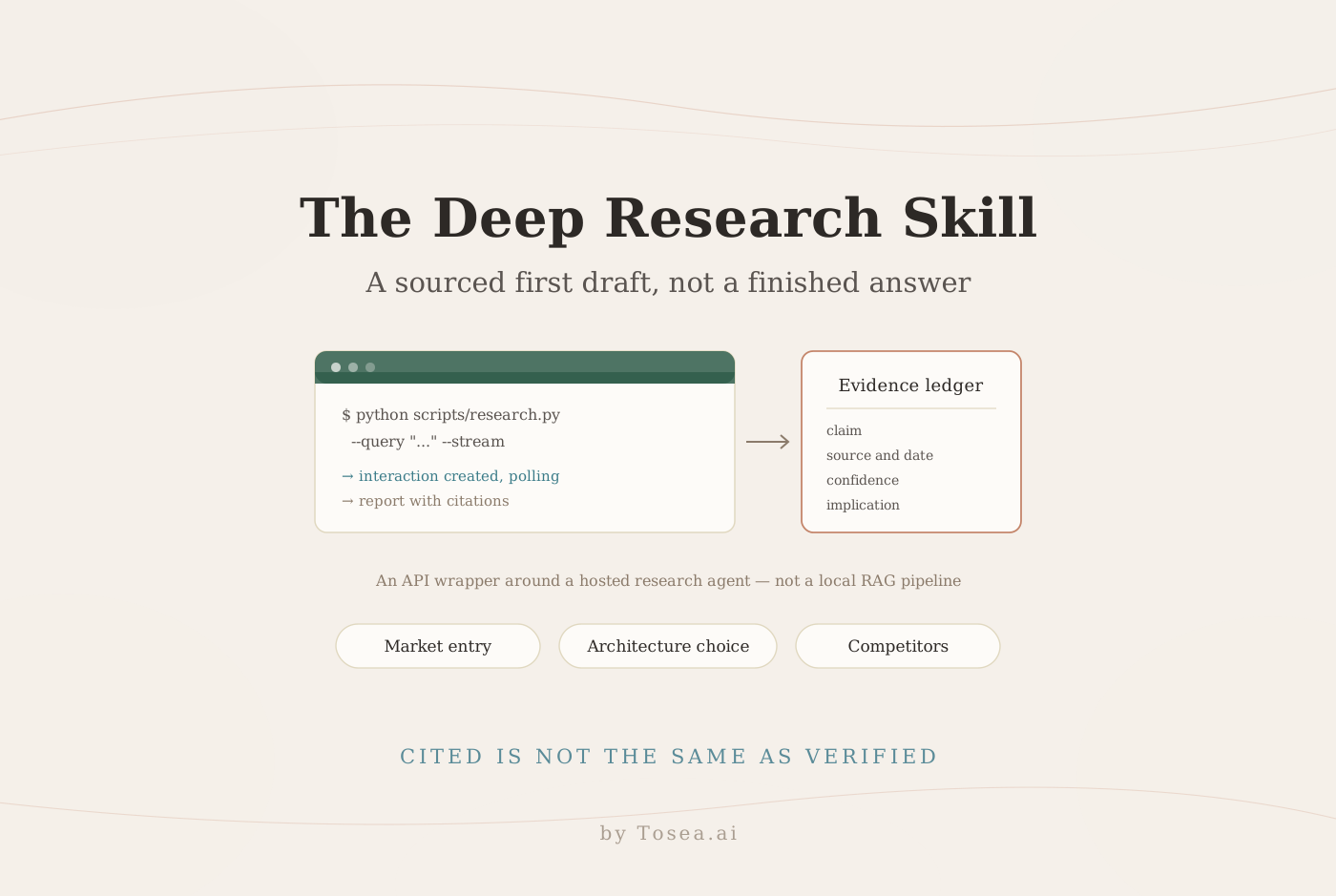
A Deep Research AI skill can turn a vague market question into a sourced first draft of a business insight, technical comparison, or competitor analysis. The deep-research skill by sanjay3290 is a Python command-line wrapper around Google's Gemini Deep Research agent. This guide covers setup, useful briefs, what the code actually does, and the review step that decides whether any of it is usable.
In brief: Install the dependencies, provide a Gemini API key, run a focused research query, inspect the cited report, and verify material claims before using them in a memo or presentation. The project orchestrates an API call. It does not implement a local RAG pipeline or vector database.
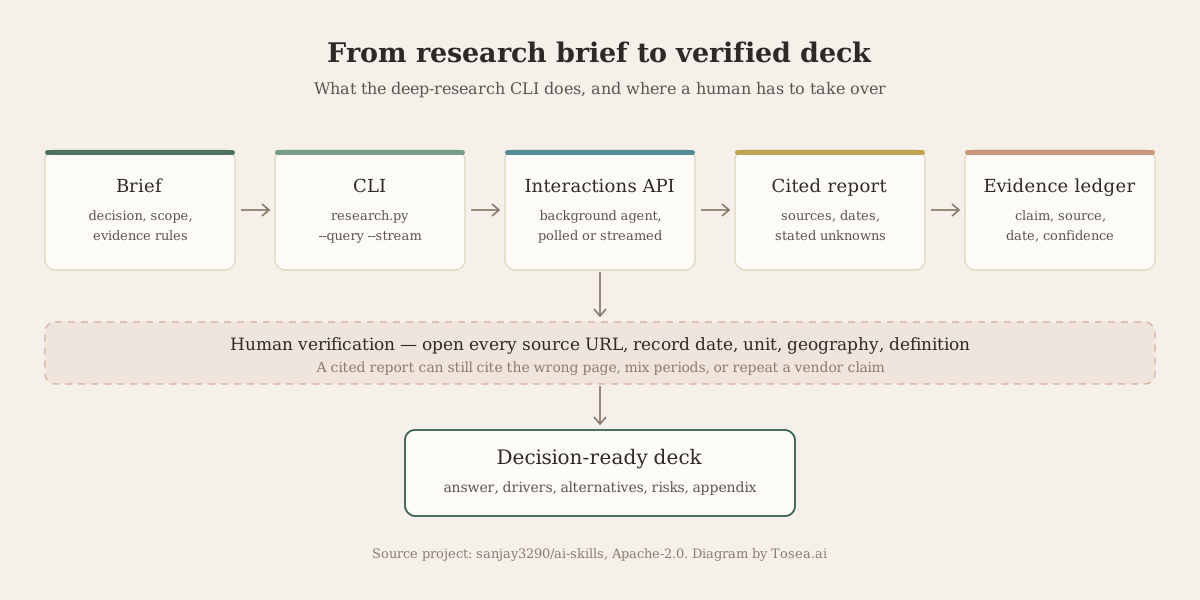
Original workflow diagram by Tosea AI, based on the repository architecture. Source project and author: sanjay3290/ai-skills, Apache-2.0 licensed.
In This Guide
- What the GitHub project does
- Install and run it safely
- Three briefs professionals can reuse
- What beginners can learn from the code
- When this is the wrong tool
- Review the output before it becomes a decision
- Turning verified research into an editable deck
- Frequently asked questions
What the GitHub Project Does
The author, sanjay3290, publishes a collection of cross-platform agent skills; the deep-research folder is the one covered here. The README documents queries, output structure, streaming, status checks, follow-ups, and JSON output. The requirements file lists just two dependencies — httpx and python-dotenv — which is the first clue about what the project is and is not.
The Python source is a single file of roughly 690 lines. It sends a background request to the Gemini Interactions API at generativelanguage.googleapis.com/v1beta/interactions, receives an interaction ID, polls or streams progress, and stores task metadata locally. Google documents this pattern in its Deep Research guide, which also notes that the agent is available only through the Interactions API and must run with background execution — it cannot be called through generate_content.
The agent identifier is the most likely thing to break
This is worth checking before your first run. The repository hard-codes its agent constant as deep-research-pro-preview-12-2025, while Google's current documentation names deep-research-preview-04-2026 and deep-research-max-preview-04-2026. Preview identifiers are retired on Google's schedule, not the repository's.
If a request fails with an error that looks like a model or agent problem rather than an authentication problem, open the source, find the AGENT constant near the top of the client class, and replace it with the identifier in the current documentation. Check pricing at the same time, because the preview tiers are not billed identically.
Install and Run It Safely
The following steps mirror the repository, with a virtual environment added to keep dependencies isolated:
git clone https://github.com/sanjay3290/ai-skills.git
cd ai-skills/skills/deep-research
python -m venv .venv
python -m pip install -r requirements.txt
Activate the environment for your operating system. Get an API key from Google AI Studio and add GEMINI_API_KEY to a local .env file. Never commit it or paste the key into a prompt. See the repository .env.example.
Run a simple, non-sensitive test query first. Use python3 instead of python if that is how your system exposes Python:
python scripts/research.py --query batteries --stream
For real work, pass the full brief as one shell argument, following your shell's syntax for multiword text.
| Flag | What it does |
|---|---|
--query | The research brief |
--stream | Streams progress as the agent works |
--wait / --no-wait | Block until the task finishes, or return immediately with an ID |
--status | Check a task by interaction ID |
--continue | Ask a follow-up against a previous interaction |
--list / --limit | Show recent tasks from local history |
--json / --raw / --format | Control output shape for piping into other tools |
Do not store confidential client questions in local shell history without approval. If a command fails, check the key, the HTTP error, the agent identifier, and account access — and do not repeatedly launch paid jobs while troubleshooting, because each launch is billable work.
Common failures and what they usually mean
Most first-run problems fall into four groups, and the HTTP status is enough to tell them apart.
| Symptom | Most likely cause | What to do |
|---|---|---|
| 401 or 403 on the first call | Key missing, unexported, or not loaded from .env | Confirm GEMINI_API_KEY is set in the environment the script actually runs in |
| 404 or an "unknown agent" style error | The hard-coded preview agent has been retired | Replace the AGENT constant with the identifier in the current documentation |
| The task starts but never completes | Background task still running, or polling stopped | Re-check with --status and the interaction ID rather than starting a new run |
| 429 or quota errors | Rate or spend limit on the key | Wait, then reduce scope — a broad landscape brief is several tool calls, not one |
The pattern that costs real money is relaunching a broad brief repeatedly while debugging something that is actually an environment problem. Validate the setup with a one-word public query first; it is the cheapest request you will make all day.
Three Briefs Professionals Can Reuse
The research agent is most useful when the prompt defines a decision rather than merely naming a topic. Copy one of the briefs below into the query argument, replace the bracketed fields, and ask for a structured report. These are research instructions, not factual inputs.
Business insight: market entry
Decision: Should [company type] enter [market] within [time horizon]?
Scope: [geography], [customer segment], and [date range].
Compare demand, regulation, distribution, unit economics, and three plausible entry paths.
Use primary sources where possible. Record publication dates and distinguish reported facts from estimates.
Return an executive summary, evidence table with URLs, unknowns, scenarios, and a recommendation with conditions that would change it.
Do not invent market shares or fill data gaps with plausible numbers.
Test the resulting demand estimate against regulator data, filings, and customer research. The report is an evidence map, not a market-sizing model.
Technical research: architecture choice
Decision: Select between [technology A], [technology B], and [technology C] for [workload].
Environment: [traffic], [latency target], [team capability], [security requirements], and [budget].
Compare architecture, reliability, deployment complexity, licensing, ecosystem maturity, and migration risk.
Prioritize official documentation and reproducible benchmarks. State benchmark hardware, software versions, and test conditions.
Return a comparison matrix, failure modes, unresolved questions, and a small proof-of-concept plan.
Version and workload matter more than generic winner rankings. A benchmark run on another architecture may not predict your outcome.
Competitor analysis: strategic response
Decision: How should [our company] respond to [competitor set] in [segment]?
Scope: [geography] and [last 12 months].
Compare verified product capabilities, published pricing, positioning, distribution, partnerships, and recent launches.
Separate competitor claims from independently verified evidence.
Return a source-linked comparison table, changes over time, threats, opportunities, and three response options with trade-offs.
Mark unavailable data explicitly. Do not infer private revenue or customer counts from marketing pages.
A blank evidence cell is more useful than a confident guess.
What Beginners Can Learn from the Code
The script is a compact example of asynchronous API orchestration, and it is short enough to read in one sitting. A beginner can trace five things: argument parsing, prompt construction, request creation, progress polling or streaming, and report formatting.
Two details are worth studying. The previous_interaction_id parameter lets a user ask a follow-up without starting a wholly separate conversation, which is how multi-turn research is expressed in a stateless CLI. And the local HistoryManager class keeps a rolling record of recent task IDs and statuses — capped at the most recent 50 — so the tool can list or resume work after the terminal is closed. Neither is exotic, and both are the kind of plumbing that separates a usable CLI from a script.
When This Is the Wrong Tool
The most common misconception about this project is that it is a retrieval-augmented generation system. It is not, and the distinction matters when choosing a tool.
| This deep-research CLI | A RAG system | |
|---|---|---|
| Where the knowledge lives | The public web, via a hosted agent | Your own documents |
| What runs locally | An HTTP client and a history file | Ingestion, chunking, embeddings, a vector index |
| Access control | Your API key and the vendor's terms | Your document permissions |
| Best for | Market, competitor, and technology scans | Questions about internal, approved material |
| Reproducibility | Varies — the web changes between runs | High, for a fixed corpus |
The reviewed repository has no local embedding call, vector index, or retrieval pipeline. It delegates research to Google's hosted agent. Google's embeddings documentation is a good next stop if you want to study vectorization after understanding this API wrapper.
Choose this skill for web research with source review. Use a separate RAG system for controlled retrieval over approved internal documents. Google's current agent can accept documents through the official API, but that does not make this CLI a complete private-document workflow.
Review the Output Before It Becomes a Decision
A cited report can still cite the wrong page, mix periods, or treat a vendor claim as independent evidence. For every material number, open the original URL and record the exact date, unit, geography, and definition. For a competitor claim, ask whether the cited page is a product announcement, an independent test, a regulatory filing, or analysis. For technical benchmarks, look for reproducible methods.
Set an evidence threshold before researching rather than after reading. A workable default: two independent sources for a high-impact market claim, a primary source for any legal or pricing claim, and a visible "unknown" where neither exists.
Then keep a short evidence ledger. It is much easier to audit than a long narrative report, and it is what the deck will eventually be built from:
| Claim | Source and date | Type | Confidence | Implication |
|---|---|---|---|---|
| Segment grew 18% in 2025 | Regulator annual report, March 2026 | Primary | High | Supports entry case |
| Competitor list price is X | Vendor pricing page, retrieved today | Vendor | Medium | Check for discounting |
| Churn is below 5% | Vendor blog post, 2024 | Vendor claim | Low | Do not present as fact |
Protect sensitive material as well. Google warns that web pages and supplied files can contain prompt injection, and OWASP explains the risk for AI systems that process untrusted content. The repository advises against placing secrets in queries. Do not submit confidential documents without checking your organization's data policy, API retention settings, and vendor terms.
Watch cost and latency. Repository estimates are illustrative; Google bills according to token and tool usage. Start with one narrow brief.
Turn Verified Research into an Editable Deck
A research agent ends at a document, but almost nobody makes a decision from a document. The output has to become slides, and that handoff is where most of the analytical work quietly leaks away — long paragraphs get pasted into text boxes, citations drift away from the figures they support, and the "unknowns" section disappears entirely because it does not look good on a slide.
Structure the presentation around the decision instead: answer, supporting drivers, alternatives, risks, and next steps. A useful slide title states the finding rather than the topic. Put citations near the figures they support, and move methodology and secondary evidence to an appendix. The evidence ledger above maps almost one-to-one onto slide structure — each high-confidence claim becomes a supporting page, each low-confidence one becomes a stated risk.
Tosea AI is built for that document-to-PPT step. Upload the Markdown or PDF report, choose a visual direction, and inspect the outline before rendering, which is where the slide structure is still cheap to change. Assign a comparison table, timeline, process diagram, or evidence chart to each section where it clarifies the argument. After rendering, change a layout or diagram if the first visual is not the clearest choice. Use Layout Only when approved wording should remain intact, then verify every claim, citation, and footnote after export.
Two related guides cover the rest of the research-to-presentation workflow: our guide to presenting research findings covers how to structure the argument itself, and the DeerFlow open-source research agent guide and last30days recent-signal research guide cover two other agents that feed the same slide pipeline.
If a cited chart or an approved slide exists only as a screenshot or a PDF page, Reslide by Tosea AI converts images and PDFs into PowerPoint files with editable text boxes, vector shapes, and separate picture layers. Check the reconstructed text and layout, then update the presentation without being trapped inside a flat image. Reslide is a conversion tool, not a source-verification tool, so retain the original evidence alongside the editable PPTX.
Frequently Asked Questions
Does this GitHub skill contain a vector database or RAG implementation?
No. Its Python code sends research tasks to the Gemini Interactions API and manages status and local history. It is useful for studying asynchronous agent calls. To learn RAG, study embedding generation, document chunking, indexing, retrieval, and source-level access control separately.
Which agent identifier should I use?
The repository ships with deep-research-pro-preview-12-2025. Google's current documentation lists deep-research-preview-04-2026 and a higher-capability deep-research-max-preview-04-2026. Preview identifiers change, so read the official page before your first run rather than trusting any README, including this article.
How much does one research task cost?
There is no fixed per-task price. The repository provides estimates, while Google's current pricing depends on model tokens and tool use. Check the official pricing page before production use, set a budget, and test with a narrow public question before running a broad competitive landscape study.
Can Tosea AI redesign my existing PowerPoint without changing the content?
Yes. Export the PowerPoint as a PDF, upload it to Tosea AI, and request a redesign that keeps the original wording. Use Layout Only to refresh structure without intentionally rewriting content. Review labels, formulas, footnotes, and slide elements against the source.
How do I upload a PowerPoint and ask Tosea AI to redesign each slide?
Export the file as a PDF. Upload it to Tosea AI and ask for each slide to be redesigned while preserving content and sequence. Choose a template or describe the visual direction, generate the deck, and inspect each slide before exporting the revision.
Can I upload my own PowerPoint template to Tosea AI?
Tosea AI supports custom templates on eligible paid plans. Configure the template through the available product workflow, then check that required layouts, fonts, colors, logo placement, and master-slide rules appear correctly before sharing the research presentation.
Can Tosea AI use custom brand colors, fonts, and a logo?
Yes. Specify the brand colors and fonts, then upload a logo or use a custom template where supported. These features are available on eligible plans. After export, verify font availability, color values, logo clear space, and contrast in PowerPoint.
Can Tosea AI match the style of my old company presentations?
Tosea AI can use a representative deck as design guidance, but that does not mean permanent model training. For stronger consistency, use an approved custom template containing the company's layouts, colors, fonts, and logo. Compare the result with current brand guidelines.
Does Tosea AI preserve PowerPoint formatting after export?
Its editable PPTX export is designed to stay close to the preview while keeping elements available for editing. Fonts, complex graphics, and the application used to open the file can affect the result. Test the export in the exact PowerPoint environment used for delivery.
Can I tell AI to edit the layout only and keep the exact wording?
Yes. Layout Only changes visual structure without intentionally rewriting slide content. It is useful after wording has been approved. Compare the revised slide with the source to confirm labels, citations, footnotes, line breaks, and formulas remain correct.
Make Research Reusable
The GitHub skill helps collect and organize a first pass of evidence. It is a small, readable program that does one thing well: it hands a structured brief to a hosted research agent and gets a cited report back. Your team still owns source verification and judgment, and nothing in the tool changes that.
What it does change is where the effort goes. Less time assembling the first draft means more time on the part that determines whether the recommendation holds — checking the sources, marking the unknowns, and building the argument that the audience will actually act on.
Sources
- deep-research skill — sanjay3290/ai-skills, Apache-2.0
- Deep Research guide — Google Gemini API documentation
- Gemini API pricing — Google
- Embeddings documentation — Google
- LLM Prompt Injection Prevention Cheat Sheet — OWASP