How to Use Nano Banana 2 Lite: Complete Guide to Google's Fast Image Model
Nano Banana 2 Lite (Gemini 3.1 Flash-Lite Image) generates 1K images in 4 seconds at ~3.4 cents each. Benchmarks, pricing vs Nano Banana 2 and Pro, capabilities, and usage.
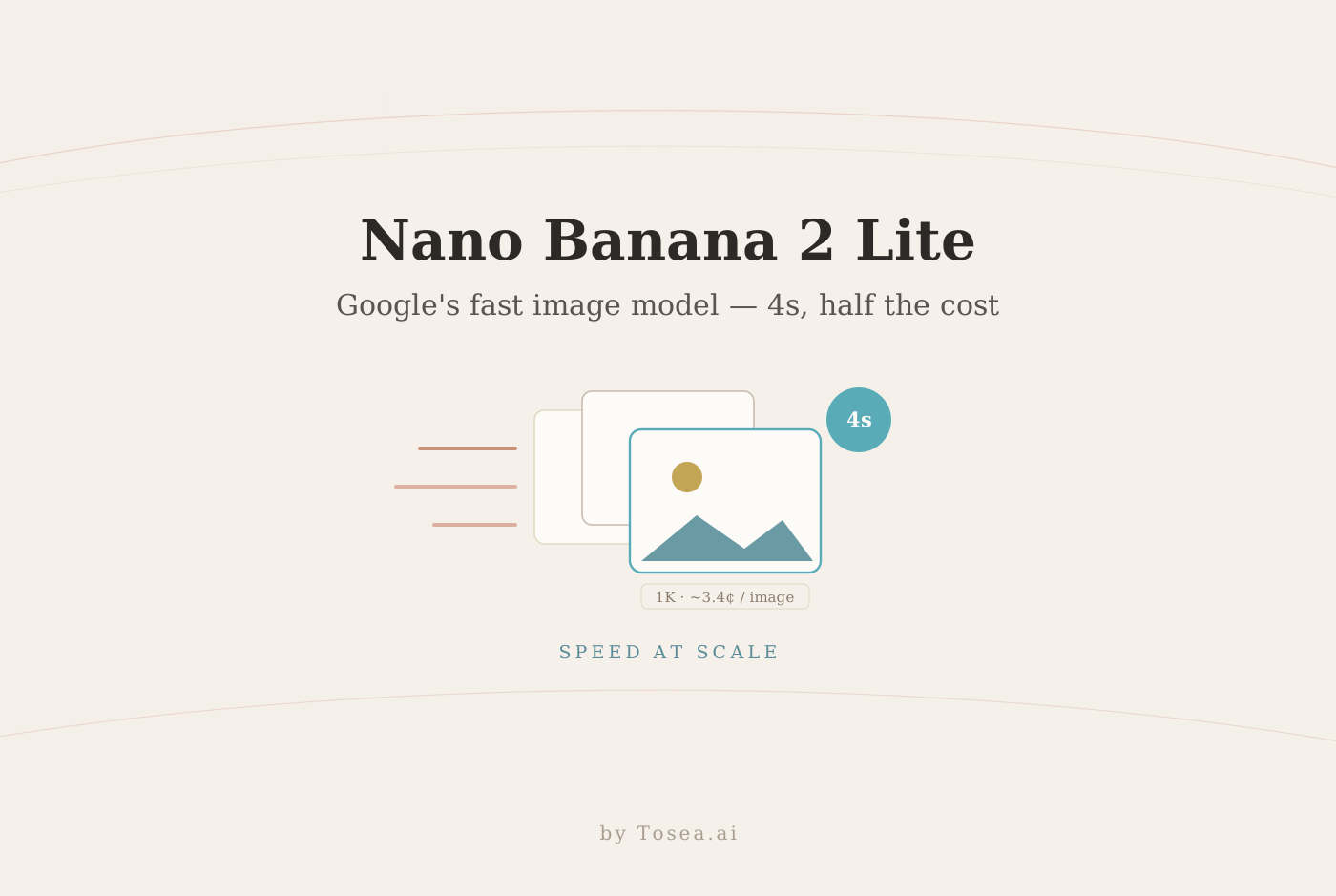
On June 30, 2026, Google shipped Nano Banana 2 Lite — the fastest, cheapest tier of its Nano Banana image line — alongside a new image-to-video model called Gemini Omni Flash. Its official API name is Gemini 3.1 Flash-Lite Image (gemini-3.1-flash-lite-image), and the whole point is speed: a 1K-resolution image in about four seconds, at roughly half the cost of the full Nano Banana 2.
This guide covers what Nano Banana 2 Lite actually is, where it sits in the three-tier lineup, its benchmark scores against base Nano Banana 2 and rivals, the real per-image pricing (which several outlets got wrong), what it can and can't do, and how to use it. If you followed our Nano Banana 2 vs Pro comparison for AI PPT generation, this is the third member of that family — the one built for volume.
What Is Nano Banana 2 Lite?
Nano Banana 2 Lite is a lightweight variant of Google's Gemini image-generation family. "Nano Banana" is Google's nickname for its Gemini image models; the current generation runs on Gemini 3.1 Flash, and Lite is the trimmed-down Flash-Lite version tuned for near-real-time, high-volume workflows where ultra-low latency matters more than maximum fidelity.
One naming trap worth clearing up immediately: the text-only model gemini-3.1-flash-lite is a different model and does not generate images. The image model is the separate -image variant, gemini-3.1-flash-lite-image. When people say "Nano Banana 2 Lite," that image variant is what they mean.
Lite replaces the older first-generation Nano Banana (built on Gemini 2.5 Flash Image), which Google now labels a legacy model. So the lineup you should think about is a clean three-tier stack, not a sprawling menu.
The Three Nano Banana Tiers
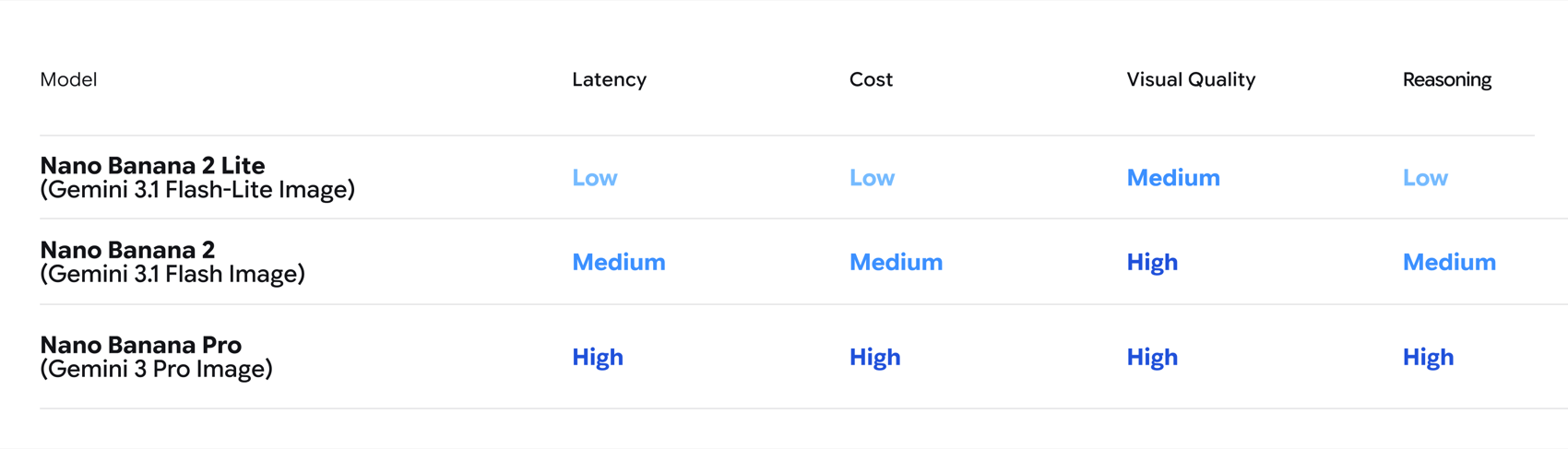
Google's official positioning table lays out the tradeoffs directly:
| Tier | Underlying model | Latency | Cost | Visual quality | Reasoning |
|---|---|---|---|---|---|
| Nano Banana 2 Lite | Gemini 3.1 Flash-Lite Image | Low | Low | Medium | Low |
| Nano Banana 2 | Gemini 3.1 Flash Image | Medium | Medium | High | Medium |
| Nano Banana Pro | Gemini 3 Pro Image | High | High | High | High |
Note the version detail: Lite and base Nano Banana 2 both run on Gemini 3.1 Flash, while Nano Banana Pro runs on Gemini 3 Pro Image — a different, more capable model line built for complex, reasoning-heavy generation. Lite is explicitly the "Medium visual quality, Low reasoning" tier. You give up fidelity and complex-instruction handling in exchange for the lowest latency and cost in the family.
Benchmarks: Quality, Speed, and Price
Google published a four-panel benchmark chart comparing Lite against base Nano Banana 2, the legacy model, and three competitors — Flux 2 Klein 9B, Grok Imagine Image, and Seedream v5 Lite. Elo scores are sourced to LMArena; latency figures to Artificial Analysis.
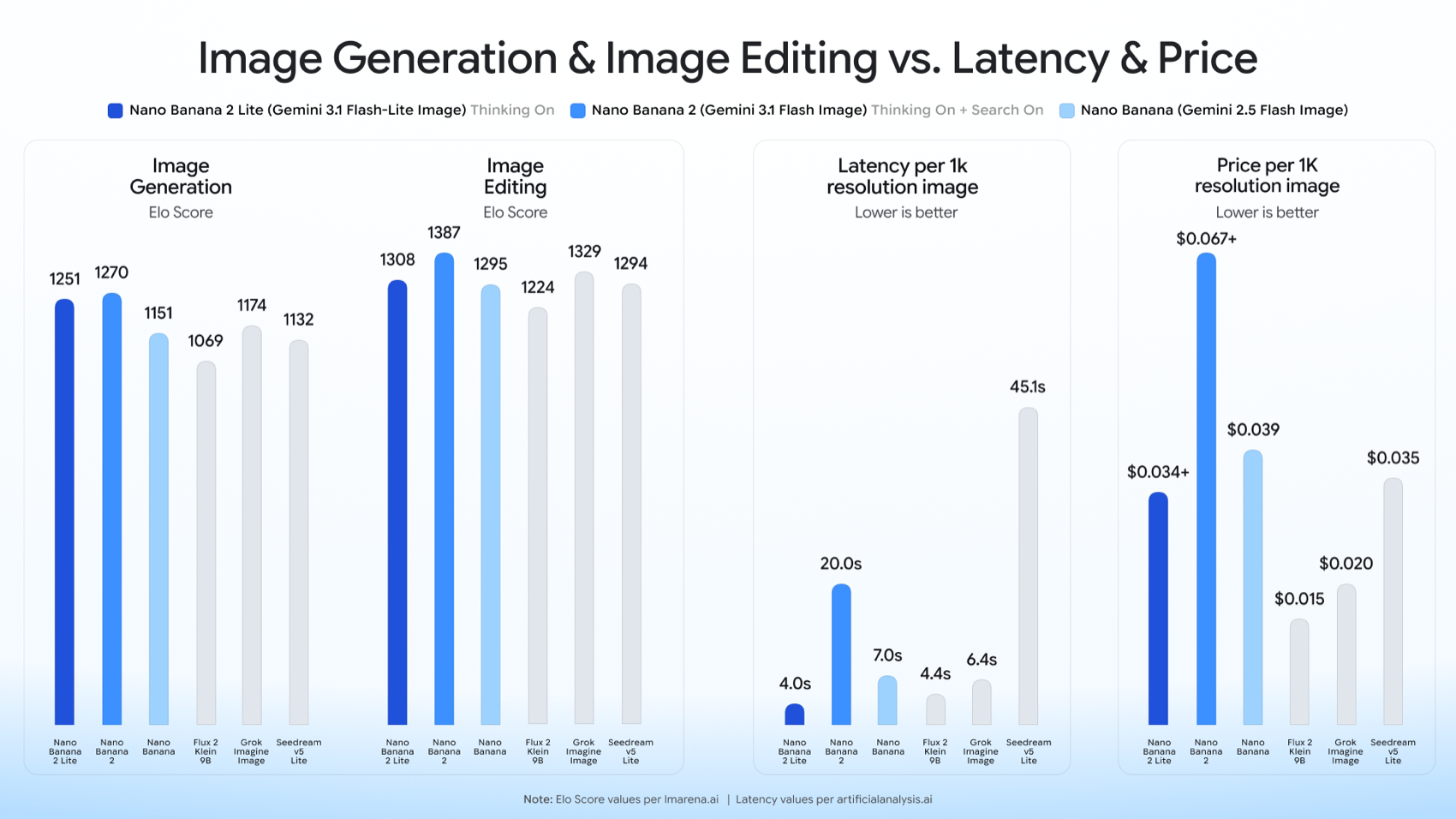
Transcribed from the official chart:
| Model | Generation Elo | Editing Elo | Latency (1K) | Price (1K) |
|---|---|---|---|---|
| Nano Banana 2 Lite | 1251 | 1308 | 4.0s | $0.034+ |
| Nano Banana 2 | 1270 | 1387 | 20.0s | $0.067+ |
| Nano Banana (legacy) | 1151 | 1295 | 7.0s | $0.039 |
| Flux 2 Klein 9B | 1069 | 1224 | 4.4s | $0.015 |
| Grok Imagine Image | 1174 | 1329 | 6.4s | $0.020 |
| Seedream v5 Lite | 1132 | 1294 | 45.1s | $0.035 |
The story is a favorable trade. On image generation, Lite (1251 Elo) gives up only about 19 points to base Nano Banana 2 (1270) — roughly a 1.5% quality gap — while running five times faster (4.0s vs 20.0s) and at half the price. On image editing the gap is wider (1308 vs 1387), so heavy edit workloads still favor the full model. Against the outside competition, Lite outscores Flux 2 Klein 9B and Seedream v5 Lite on both quality axes and dramatically beats Seedream on speed (4.0s vs 45.1s). It trails Grok Imagine Image slightly on editing Elo (1308 vs 1329) but leads it on generation (1251 vs 1174).
Two honest caveats. First, Google chose its own comparison set — Grok Imagine's image model, Flux 2 Klein, and Seedream — and conspicuously did not include GPT Image / OpenAI, so there is no official Lite-versus-GPT-Image number to cite. Second, Google reports LMArena Elo values but no published leaderboard rank, so any "Lite is #1" claim is unverified.
Capabilities and Limits
Lite's capability envelope is deliberately narrower than the full model's.
- Resolution: 1K (1024px, ~1MP) and 512px only. There is no 2K or 4K output — those are exclusive to base Nano Banana 2 and Nano Banana Pro. If you need print-scale or large-canvas output, Lite is the wrong tier.
- Aspect ratios: a full spread — 1:1, 3:2, 2:3, 3:4, 4:3, 4:5, 5:4, 9:16, 16:9, and 21:9 — so it covers social, web, and widescreen formats including the 16:9 slide ratio.
- Core features: text-to-image, image editing, prompt adherence, character consistency, and legible in-image text rendering, all inherited from the family. Multi-image composition is supported, though Lite's exact character- and object-count limits are not clearly documented.
- Text-rendering languages: Google did not enumerate a language list specifically for Lite. In-image text quality data exists for the Pro and base models, not broken out for Lite, so treat non-Latin or long-string text rendering as an area to test rather than assume.
The honest framing: Lite is a "good enough for volume" model. It handles the common cases — clean single-subject generation, straightforward edits, standard aspect ratios — at speed, and steps back from the hard cases (high fidelity, complex multi-constraint scenes, dense factual infographics) that its "Low reasoning" rating flags.
Pricing and the Cost Math
Pricing is where Lite earns its place, and it is worth stating carefully because secondary coverage got it wrong.
From Google's own Gemini API pricing page, Nano Banana 2 Lite bills at $0.25 per million input tokens and $30 per million output tokens. A 1K-resolution image is 1,120 output tokens, which works out to $0.0336 — about 3.4 cents — per single image, not per thousand images as some outlets reported. In batch mode the output rate halves to $15 per million tokens, dropping a 1K image to roughly 1.7 cents. There is no free tier.
For comparison within the family:
- Base Nano Banana 2 bills output at $60 per million tokens: a 1K image is ~$0.067, a 2K image ~$0.10, a 4K image ~$0.15.
- Nano Banana Pro bills output at $120 per million tokens: a 4K image runs ~$0.24 at standard rates.
So Lite's 1K image is about half the price of base Nano Banana 2's 1K image, and roughly a quarter of Pro's higher-resolution output. Interestingly, Lite and base Nano Banana 2 use the same 1,120 tokens for a 1K image — the entire saving comes from the cheaper per-token output rate ($30 vs $60 per million), not from a smaller image. That makes the cost math simple: for 1K work, Lite is a straight 2x discount over the workhorse tier.
How It Compares to Competitors
Against the competitors Google chose to show, Lite is quality-competitive but not the cheapest. Flux 2 Klein 9B ($0.015) and Grok Imagine Image ($0.020) both undercut it on price, while Seedream v5 Lite is close on price ($0.035) but eleven times slower (45.1s vs 4.0s). Where Lite wins is the balance of the three axes at once — strong Elo, four-second latency, and mid-tier pricing — rather than topping any single column. If your only metric is cost-per-image, a cheaper model exists; if you need decent quality and real-time latency and Google's ecosystem integration, Lite is the sweet spot.
The absence of a GPT Image comparison is the notable gap. Google benchmarked against the open and challenger models, not the other frontier proprietary image model, so a direct Lite-versus-GPT-Image quality claim isn't available from official data. For most practical decisions that doesn't matter — the choice is usually Lite versus another Nano Banana tier — but it's worth knowing the comparison set is curated.
Availability and How to Use It
Nano Banana 2 Lite is available across Google's developer and product surfaces:
- Google AI Studio — the fastest way to try it interactively and prototype prompts before writing code.
- Gemini API — call
gemini-3.1-flash-lite-imagedirectly; pick your aspect ratio from the supported list and request 1K or 512px output. - Gemini Enterprise Agent Platform — Google's enterprise route for production, higher-quota deployments.
On the consumer side, Google says the model powers image generation in AI Mode in Search, the Gemini app, NotebookLM, Google Photos, Stitch, Google Flow, and Google Ads — which is why a fast, cheap tier matters to Google at all: these are billion-request surfaces where 4-second latency and 3.4-cent images are the difference between a shippable feature and an unaffordable one. Rollout regions were not specified at launch.
A practical workflow tip: use Lite for the high-velocity phase — bulk ideation, thumbnail generation, prototyping, and in-product generation — then escalate specific assets to base Nano Banana 2 or Pro only when you need 2K/4K output or maximum fidelity. Pairing Lite with Gemini Omni Flash (the image-to-video model launched the same day, at $0.10 per second) makes it a natural cheap front-end for a generate-then-animate pipeline.
How to Prompt Nano Banana 2 Lite for Best Results
Lite's "Low reasoning" rating means it rewards clear, concrete prompts over clever, multi-constraint ones. A few practical habits:
- Lead with the subject and style, then the details. "A minimalist product hero shot of a ceramic coffee mug, soft studio lighting, warm neutral background" beats a paragraph of layered conditions.
- Specify the aspect ratio explicitly. Request 16:9 for slide covers, 9:16 for mobile, 1:1 for social — Lite supports all of them, and stating it up front avoids awkward crops.
- Keep in-image text short. Lite renders legible text, but its quality on long strings and non-Latin scripts is undocumented — treat headlines and single labels as safe, dense paragraphs as risky.
- Iterate cheaply, then finalize. At ~3.4 cents and four seconds per image, generate a dozen variations of a concept on Lite, then re-render only the winner on base Nano Banana 2 or Pro if you need 2K/4K or higher fidelity.
- Use editing for controlled changes. For "same scene, swap the background" tasks, Lite's editing (1308 Elo) is capable, though the full model's 1387 is stronger for demanding edits.
The general craft of image prompting for presentation visuals — composition, palette, and negative space — carries over directly; our guide to high-aesthetic AI presentation prompts goes deeper on that.
Nano Banana 2 Lite and Gemini Omni Flash
Google launched Lite alongside Gemini Omni Flash, an image-to-video model in public preview priced at $0.10 per second of output. The pairing is deliberate: Lite is the cheap, fast front-end that generates a still, and Omni Flash animates it. For teams building a generate-then-animate pipeline — short social clips, animated section intros, product loops — Lite's four-second, low-cost stills make the image half of that pipeline nearly free by comparison, so the video model becomes the only meaningful cost. It's a clean example of Google building the ultra-cheap tier specifically so the expensive downstream step is the bottleneck, not the input.
When to Use Lite vs Base Nano Banana 2 vs Pro
The decision comes down to three questions:
- Do you need output above 1K resolution? If yes, skip Lite — it caps at 1K. Base Nano Banana 2 gives you up to 4K; Pro gives you the highest fidelity at 4K.
- Is the task edit-heavy or reasoning-heavy? Lite's editing Elo (1308) trails base Nano Banana 2 (1387) by a real margin, and its "Low reasoning" rating means complex, multi-constraint infographics or factual diagrams belong on Pro. For straightforward generation, Lite is nearly as good as base at half the cost.
- Is latency or volume the constraint? If you're generating at scale or need sub-five-second turnaround, Lite is the only tier that delivers it. Base Nano Banana 2's 20-second latency makes it unsuitable for interactive, high-volume loops.
For the common case — decent-quality 1K generation at speed and low cost — Lite is the right default, and you reserve the pricier tiers for the specific assets that justify them. This is the same escalation logic we applied in the Nano Banana 2 vs Pro breakdown.
Who Is Nano Banana 2 Lite For?
Lite is built for volume and velocity, so it fits teams whose bottleneck is throughput rather than per-image perfection. That includes product engineers embedding image generation into consumer-scale features — social creative, ad variations, in-app avatars, thumbnails — where four-second latency and 3.4-cent images are what make the feature shippable at all. It suits designers and marketers in the rapid-ideation phase, who want to explore dozens of directions before committing to one, and prototypers wiring image generation into a demo without burning through budget. It's also the natural front-end for pipelines that feed a downstream step — image-to-video, compositing, or a slide deck — where the still is an input rather than the final deliverable.
It's the wrong tool when a single hero asset has to be flawless: print-scale output, maximum fidelity, dense reasoning-heavy infographics, or demanding edits all point to base Nano Banana 2 or Nano Banana Pro instead. The healthy pattern is a two-tier workflow — draft on Lite, then finalize on the larger model only for the specific assets that earn the extra cost and latency. For most teams, the overwhelming majority of generated images never need that upgrade, which is exactly why a fast, cheap tier changes the economics of shipping custom visuals at all.
What Nano Banana 2 Lite Means for AI Slide Generation
For presentation work, an image model earns its keep on two jobs: slide-ready cover art and in-image text for infographic labels and titles. Nano Banana 2 Lite is well-suited to the first and workable for the second — its 16:9 aspect ratio support and legible text rendering cover the two things slide visuals need most, and its four-second latency means a deck's worth of section covers can be generated in the time base Nano Banana 2 takes to render one. For a designer iterating on a title slide, that speed is the difference between exploring ten directions and settling for the first.
But there's a critical distinction that matters for anyone building an AI presentation tool: an image model generates assets, not decks. Lite produces one great picture per call. It does not read a source document, plan a narrative across forty slides, decide which chart belongs on which slide, or emit editable slide structure. That is a document-to-deck reasoning problem, not an image problem — the per-asset layer versus the per-deck layer. The recent shift toward AI agents redefining slide creation is precisely about that orchestration layer sitting above the image model.
That is where Tosea.ai fits as the document-to-deck orchestration layer. Tosea takes a PDF, report, or brief and produces a structured, editable presentation — handling the outline, the slide structure, and the fact-grounding — while a fast image model like Nano Banana 2 Lite can supply the cover art and section imagery inside that flow. The cheap, low-latency generation makes it economical to give every deck custom visuals instead of stock placeholders. If you want the craft side of image prompts for slides, our guide to high-aesthetic AI presentation prompts and our zero-hallucination AI slides walkthrough show how the asset layer and the deck layer combine into one presentation workflow.
Frequently Asked Questions
What is Nano Banana 2 Lite's official name?
Its API name is Gemini 3.1 Flash-Lite Image (gemini-3.1-flash-lite-image). "Nano Banana 2 Lite" is Google's marketing name for that image model. Note that the text-only gemini-3.1-flash-lite is a different model that does not generate images.
How much does Nano Banana 2 Lite cost? About 3.4 cents per 1K image (1,120 output tokens at $30 per million), or roughly 1.7 cents in batch mode — half the price of base Nano Banana 2 at the same resolution. There is no free tier. Ignore the "per 1,000 images" figure some outlets published; it's per single image.
How fast is Nano Banana 2 Lite? Around four seconds per 1K image, versus 20 seconds for base Nano Banana 2 — roughly five times faster.
What resolutions does it support? 1K (1024px) and 512px only. There is no 2K or 4K output; those require base Nano Banana 2 or Nano Banana Pro.
How does Nano Banana 2 Lite compare to GPT Image? Google did not include GPT Image in its comparison set, so there's no official head-to-head number. On Google's own board, Lite outscores Flux 2 Klein 9B and Seedream v5 Lite and trails only its own larger siblings.
Where can I use Nano Banana 2 Lite? Via Google AI Studio, the Gemini API, and the Gemini Enterprise Agent Platform for developers, and inside consumer products including AI Mode in Search, the Gemini app, NotebookLM, Google Photos, and Google Ads.
The Bottom Line
Nano Banana 2 Lite is a well-judged addition to Google's image lineup: it keeps ~98% of base Nano Banana 2's generation quality while running five times faster and costing half as much, at the price of a 1K resolution cap, "Medium" fidelity, and weaker editing and reasoning. For high-volume, latency-sensitive, cost-sensitive image work — including the cover art and section imagery that feed a slide deck — it's the right default, with base Nano Banana 2 and Pro reserved for the assets that genuinely need 2K/4K output or maximum quality. Just remember the corrected math: it's about 3.4 cents per 1K image, not per thousand.
Sources
- Start building with Nano Banana 2 Lite and Gemini Omni Flash — Google, June 30, 2026
- Gemini Developer API pricing — Google AI for Developers
- Gemini 3.1 Flash Image — Nano Banana 2 — Google DeepMind
- Google introduces a faster, cheaper image generator with Nano Banana 2 Lite — TechCrunch
- Google unveils Nano Banana 2 Lite for low-cost, 4-second enterprise image generation — VentureBeat
- Nano Banana 2, aka Gemini 3.1 Flash Image, makes edits easier and faster — DeepLearning.AI The Batch