How to Use image-blaster: Turn One Image Into a Complete 3D Asset Pack With Sound
Complete guide to image-blaster, the open-source Claude skill that turns one image into a 3D scene, object model, viewpoints, clean plates, and sound via World Labs, FAL, Hunyuan 3D, and ElevenLabs.
You have one image. A product photograph. An architectural render. A character concept sketch. A game asset reference. What you actually need is a complete set of production-ready materials — a 3D model, multiple rendered viewpoints, cleaned reference images, ambient sound design, and object-specific audio. The traditional path runs through a 3D modeling studio, a sound designer, a retouching artist, and several weeks and a few thousand dollars of production time.
image-blaster collapses that workflow into a single Claude session. This guide walks through what it is, the four-model stack underneath it, how the pipeline runs end to end, the parameters worth tuning, the failure modes you will hit, and how the assets it produces become a presentation your stakeholders can actually read.
What Is image-blaster?
image-blaster is an open-source Claude skill — a structured SKILL.md-based capability module — built by developer neilsonnn. It is described as an image-to-world skillset for Claude, which captures its core function: you provide one input image, and the skill orchestrates a pipeline of specialized AI models to generate a world of assets derived from that single source.
The skill runs inside Claude Code or any compatible AI coding agent, and it works by coordinating multiple generative AI services through their APIs. Rather than requiring you to learn how each API works, navigate several platforms, or chain outputs by hand, image-blaster wraps the multi-model pipeline into a guided, conversational workflow with a human confirmation step before each stage.
As the Claude Skills ecosystem documented in the ComposioHQ/awesome-claude-skills repository explains, Claude Skills are reusable instruction packages that teach an AI agent how to handle a specific class of tasks. Here that class is multi-model creative asset generation — a job that normally lives across four separate vendor dashboards.
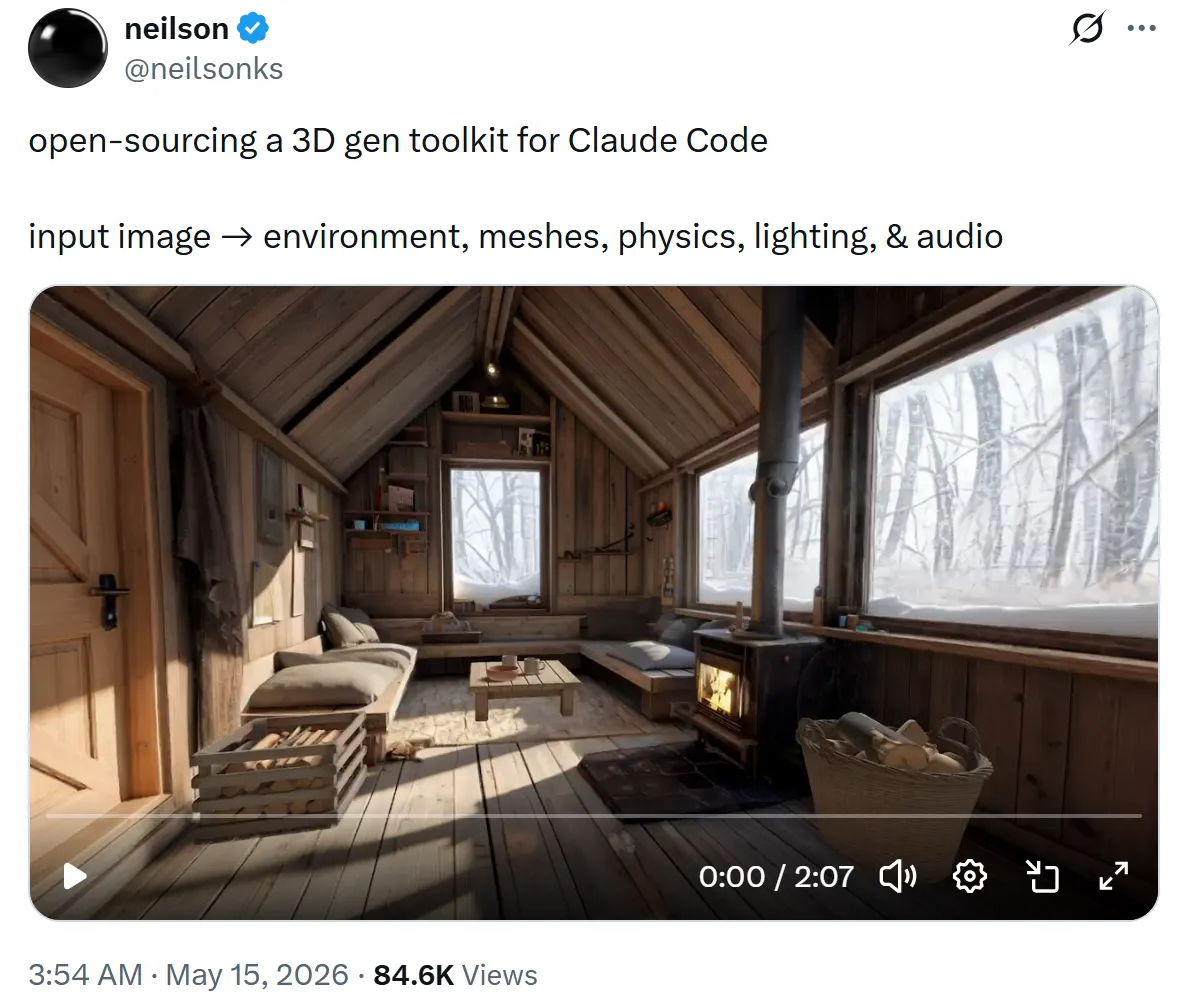
from @neilsonks
The Technology Stack: Four Specialized AI Models
image-blaster does not lean on a single generalist model to handle everything. It routes each task to the system best suited for that output type. Understanding the stack tells you what to expect from each result and where to intervene.
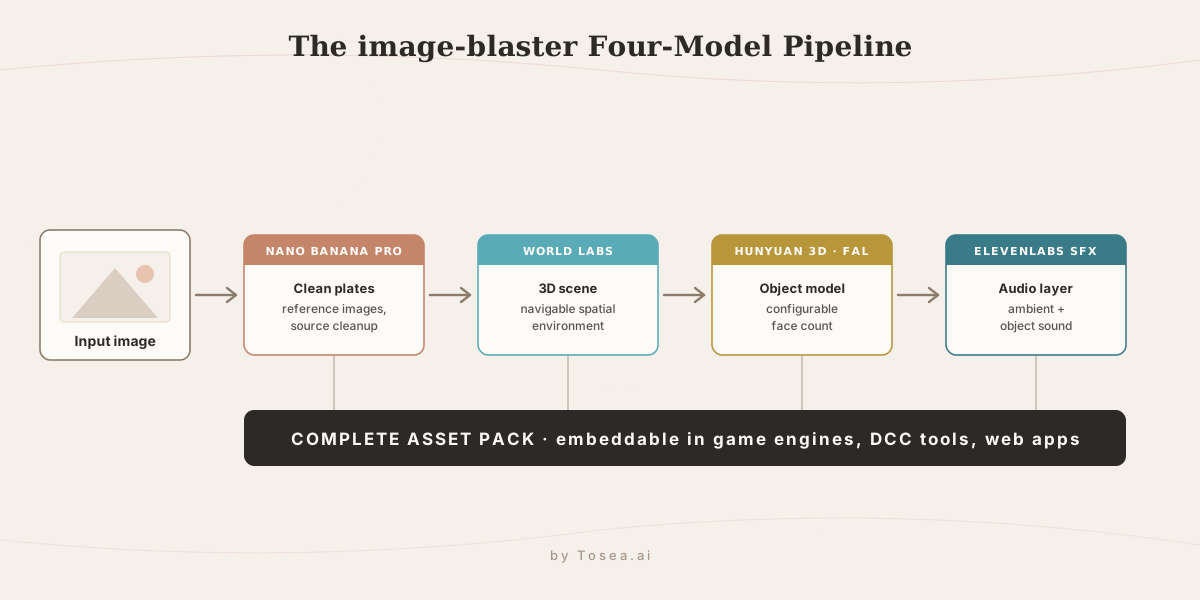
World Labs: 3D Scene Generation
World Labs is a spatial AI company focused on generating and understanding 3D scenes. image-blaster uses it to build the 3D spatial environment derived from your input image — a navigable, explorable scene that captures the spatial relationships, depth, and geometry of the original, in a format you can embed in game engines, visualization tools, or interactive web applications.
FAL: Inference Infrastructure for Image and Audio Models
FAL is an AI inference platform that provides fast, scalable access to a range of generative models. image-blaster uses FAL as the infrastructure layer for several operations, including Hunyuan 3D model generation and other image processing. FAL's API-first design is what lets image-blaster coordinate the pipeline without standing up separate infrastructure for each model.
Nano Banana Pro: Clean Plates and Reference Images
Nano Banana Pro (referenced in the codebase as nano-banana) is the default image editing provider. It handles source image cleanup, generates clean plates suitable for compositing, and produces object reference images that stay visually consistent across a production pipeline. This is the model that turns your raw input into usable reference material. For a deeper look at how this model handles in-image text and layout, see our Nano Banana 2 vs Pro breakdown.
An alternative image editing provider — gpt-image-2 — is available on request. That gives you a choice of editing approach depending on the characteristics of your input image; the trade-offs between the two are covered in our gpt-image-2 complete guide.
Hunyuan 3D: Object Model Generation via FAL
Hunyuan 3D is Tencent's 3D generation model, accessed through FAL. image-blaster uses it to create detailed 3D object models from the input image. The generated models support a configurable face count, giving you control over geometric complexity — from lightweight meshes for real-time applications to high-density models for cinematic rendering.
ElevenLabs SFX: Ambient and Object-Specific Sound
ElevenLabs provides the sound effects layer. image-blaster uses its sound effects model to generate two categories of audio: ambient sounds that establish the environmental character of the scene, and object-specific sounds tied to the particular subjects in the input image. The result is a coherent audio environment derived from the visual content, without separate sound design work.
The Stack at a Glance
| Model | Provider | Output | When to tune |
|---|---|---|---|
| Nano Banana Pro | FAL (default) / gpt-image-2 (optional) | Clean plates, reference images, source cleanup | Switch to gpt-image-2 when the input has heavy text, logos, or a hard subject/background separation |
| World Labs | World Labs API | Navigable 3D scene | Mostly automatic; quality tracks input depth cues and composition |
| Hunyuan 3D | FAL | Standalone 3D object mesh | Set face count for the target engine (real-time vs cinematic) |
| ElevenLabs SFX | ElevenLabs API | Ambient + object-specific audio | Re-prompt when audio does not match the scene's material or scale |
What image-blaster Generates by Default
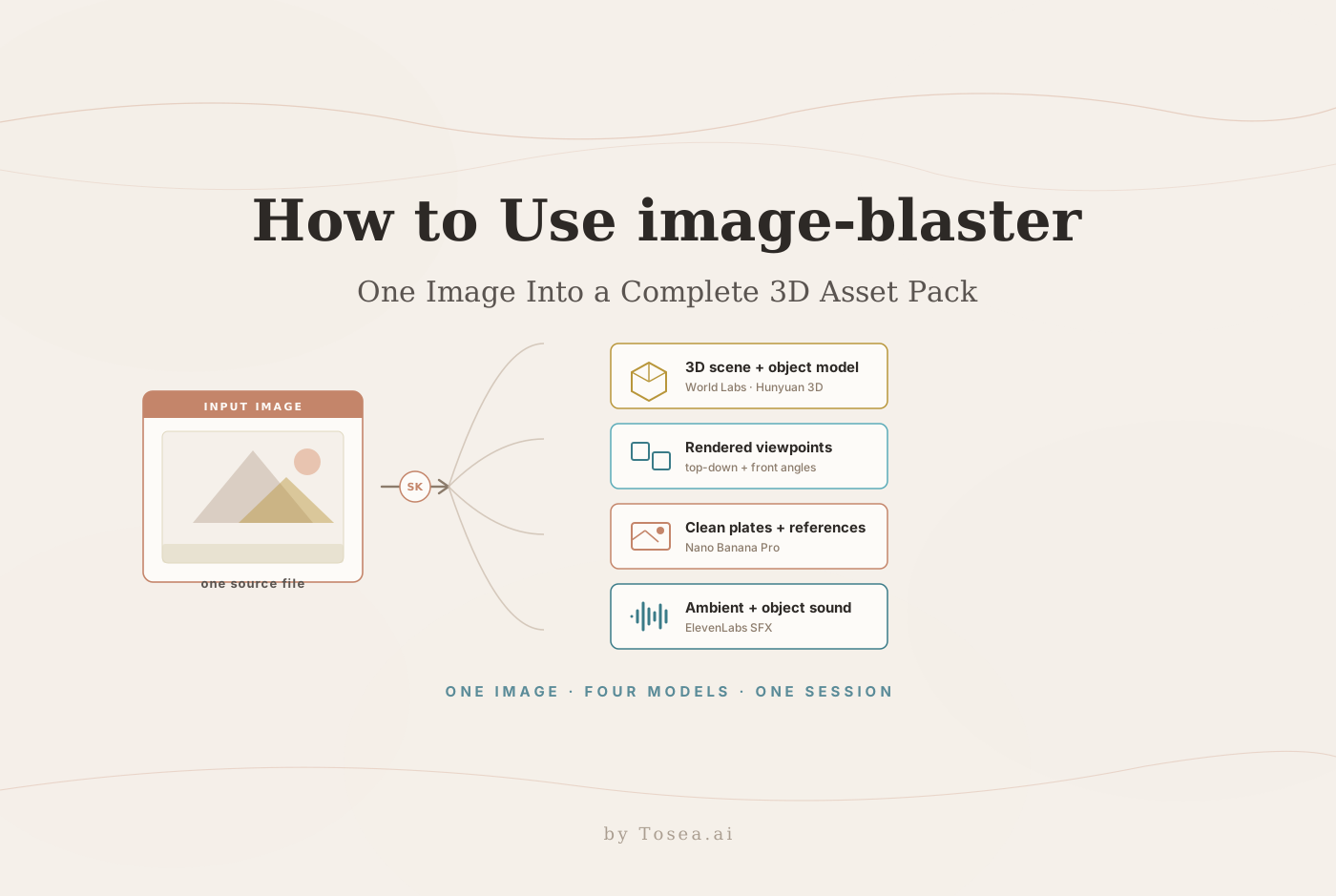
Run image-blaster on an input image and the default pipeline produces:
- A 3D scene via World Labs, representing the spatial environment in an explorable 3D format.
- A 3D object model via Hunyuan 3D through FAL — a standalone geometric model of the primary subject, configurable from 40,000 to 1,500,000 faces depending on your rendering target.
- Multiple rendered viewpoints — top-down and front-facing renders of the generated 3D content, giving you standard production reference angles without manual camera positioning.
- Clean plates and reference images — source-cleaned versions of the input and standardized reference images for consistent use across a production team.
- Ambient audio — environmental sound design matching the scene, generated by ElevenLabs SFX.
- Object-specific audio — targeted sound effects for individual objects identified in the image, also through ElevenLabs.
The full output set is designed to drop into game engines, DCC (Digital Content Creation) software, or web applications without extra processing.
How the Pipeline Works End-to-End
The four models do not run in isolation — they form a sequence where each stage feeds the next. Understanding that sequence is what makes the confirmation prompts meaningful instead of noise you click through.
It starts with your input image. Nano Banana Pro runs first, cleaning the source and producing the clean plates and reference images. This matters because everything downstream inherits the quality of this step: a cleanly separated subject gives World Labs and Hunyuan 3D a clearer signal to work from than a cluttered original.
Next, World Labs reads the cleaned image and constructs the 3D scene — interpreting depth, layout, and spatial relationships into a navigable environment. In parallel with the scene logic, Hunyuan 3D via FAL generates the standalone object model for the primary subject, at the face count you specify. The scene gives you the world; the object model gives you the hero asset you can manipulate independently.
With 3D content available, the pipeline renders the standard viewpoints — top-down and front — so you have production reference angles without setting up cameras manually. Finally, ElevenLabs SFX generates the audio layer: one pass for ambient environmental sound that matches the scene, a second for object-specific effects tied to the subjects.
The output is a single coherent pack where the model, the renders, the plates, and the sound were all derived from the same source frame — which is the reason they hang together visually and tonally instead of looking assembled from stock parts.
Installation and Setup
Getting image-blaster running requires three components: the skill itself, a Claude Code environment, and API keys for World Labs, FAL, and ElevenLabs.
Step 1: Clone the repository
git clone https://github.com/neilsonnn/image-blaster
cd image-blaster
Step 2: Install into your Claude skills directory
cp -r image-blaster ~/.claude/skills/
Or if you use OpenClaw, Hermes Agent, or another compatible agent framework:
cp -r image-blaster ~/.agents/skills/
If you are coming from the agent-framework side, our Hermes Agent guide covers how self-improving agents load and run skills like this one.
Step 3: Configure API keys
You need keys from three providers. World Labs supplies the 3D scene generation — create an account at worldlabs.ai for your key. FAL provides the inference infrastructure for Hunyuan 3D — create an account at fal.ai. ElevenLabs handles the sound effects, so its key is required for audio outputs. Provide these to Claude during your first session; the skill stores them for subsequent runs.
Step 4: Add your input image
Place the image you want to process into the input/ directory inside the image-blaster folder.
Running Your First Blast: Step-by-Step
The interaction model is conversational with explicit confirmation at each step, which keeps you in control of the pipeline without managing each API call yourself.
Open a terminal and start Claude:
claude
Greet Claude and introduce the image-blaster skill — it will recognize the skill from your skills directory. Provide your API keys for World Labs, FAL, and ElevenLabs when prompted. Then describe what you want:
I have an image in the input directory. Please blast it and confirm each step with me before proceeding.
Claude walks through each stage — image cleanup, scene generation, 3D modeling, viewpoint rendering, and sound generation — pausing for confirmation before executing. That lets you skip a stage you do not need, adjust parameters before proceeding, or review intermediate outputs before the next step begins.
Advanced Parameters: Controlling 3D Model Complexity
For the Hunyuan 3D step, image-blaster exposes a face count parameter that controls the geometric resolution of the output model:
- A face count of 40,000 to 100,000 suits real-time applications — game engines, interactive web experiences, and AR/VR content where performance is a constraint.
- A face count of 500,000 to 1,500,000 suits cinematic rendering, high-quality visualization, and production assets where visual fidelity matters more than real-time performance.
To set a face count, tell Claude the target before the 3D model step:
For the 3D model, please use a face count of 200,000.
You can also specify provider preferences for image editing. If you want gpt-image-2 instead of the default nano-banana for a particular edit, tell Claude to use gpt-image-2 for that step when you reach it.
Common Failure Modes and Fixes
Most problems with image-blaster trace back to one of four causes. Knowing them in advance saves a wasted run and the credits that go with it.
Bad input image. The single biggest quality lever is the source. A low-resolution image, a busy background with no clear subject, or extreme motion blur gives World Labs and Hunyuan 3D ambiguous depth cues, and the 3D output looks melted or flat. Fix: start with a sharp image where the primary subject is clearly separated from the background. If the original is messy, run the Nano Banana Pro clean-plate step first and feed the cleaned plate back as the source for the 3D stages.
API key or credit errors. A stage fails immediately with an authentication or quota message when a key is missing, mistyped, or out of credits — most often the ElevenLabs key, since it is easy to skip during setup thinking audio is optional. Fix: confirm all three keys (World Labs, FAL, ElevenLabs) are configured and that each account still has credits before starting a run. Resolve the failing stage's provider rather than restarting the whole pipeline.
Face count too high for real-time. A model generated at 1,000,000+ faces will import but tank your frame rate in a game engine or web viewer, and decimating it afterward loses detail unevenly. Fix: pick the face count for the target platform up front — stay in the 40,000–100,000 range for anything real-time, and reserve the high end for offline cinematic renders.
Audio that does not match the scene. ElevenLabs SFX occasionally generates ambient or object sound that is tonally off — wrong material, wrong scale, or an environment that does not fit. Fix: this stage is cheap to re-run, so re-prompt with a more specific description of the scene's material and scale (for example, "metallic interior, large hall, low reverb") rather than accepting the first pass.
Cost and Credits
image-blaster itself is free and open source — the cost is in the model APIs it orchestrates. World Labs, FAL, and ElevenLabs each offer trial credits, which is enough to run the full pipeline on a test image before committing to a paid plan. Practical notes: the 3D scene and object model stages are the most credit-intensive, and a high face count on Hunyuan 3D consumes more than a low one, so prototype at a low face count and only re-run the 3D model at production resolution once the rest of the pack looks right. Because each stage has its own confirmation step, you can also skip stages you do not need on a given run and spend credits only where they matter.
Who Benefits From image-blaster
Game developers and studios. The output pipeline — 3D scene, object model, multiple viewpoints, reference images, ambient audio — maps directly onto most game asset pipelines. Work that previously needed a team of specialists across multiple tools can be bootstrapped from a single concept image, accelerating the early stages of asset development.
Product and industrial designers. A photograph of a prototype renders into a 3D model that imports into CAD or visualization tools. Reference images and clean plates support consistent product presentation across a design review.
Architectural visualization teams. Render images of concepts or site photographs become explorable 3D environments for client presentations and design iteration.
Marketing and creative teams. Photographic assets transform into 3D content for interactive web experiences, product configurators, and immersive campaigns without engaging a separate 3D production vendor.
From image-blaster Assets to Investor-Ready Slides
image-blaster produces a rich set of technical and creative outputs — meshes, scenes, plates, audio. None of those are how decisions get made. A game publisher greenlights a project from a pitch deck, not a .glb file. An architecture client approves a direction from a presentation, not a raw scene export. A marketing leader signs off a budget from slides, not a folder of reference plates. The asset workflow ends in a 3D pipeline; the approval workflow runs through a slide deck.
That handoff is where most creative teams lose time. Translating a production run into a clear narrative — what was produced, why, what the technical specifications mean for the audience, and what comes next — is a different skill than generating the assets, and doing it slide by slide by hand is slow. This is the gap a document-to-PPT layer fills. Tosea.ai is the document-to-deck orchestration layer for exactly this: upload your project brief, asset inventory, or production notes alongside the image-blaster outputs, and its Spatial Semantic Perception engine reads the logical structure of the content — objectives, assets produced, technical specs, production implications — and turns it into a consulting-grade slide deck.
The same pattern shows up across creative-to-communication workflows. Studios pitching publishers use the structure we cover in AI presentations for startups and pitch decks; consultancies and visualization teams presenting to clients use the document-to-PPT approach in mastering document transformation for executive presentations; and teams working with generative video and 3D pipelines will recognize the production-to-deck handoff described in our look at the director era for professional slides. Whether the audience is a publisher, an architecture client, or a marketing team, the AI slide generation step produces a native .pptx editable in Microsoft PowerPoint or Google Slides, with consistent design and every claim traceable to your source material. image-blaster handles the creative asset generation; an AI presentation tool handles the presentation of what was created.
Get Started With image-blaster
The repository is at github.com/neilsonnn/image-blaster. You will need API keys from World Labs, FAL, and ElevenLabs for the full pipeline, each of which offers trial credits to test the workflow first. Start with a clean, high-resolution input image, pick a face count that matches where the model is going, and use the per-step confirmations to spend credits only on the stages you actually need.
When the assets are done and the work needs to be communicated rather than rendered, Tosea.ai turns the project documentation behind it into a presentation in minutes — so the creative pipeline and the people who fund it stay in sync.
Sources
- image-blaster — GitHub repository — neilsonnn, project source and SKILL.md
- open-sourcing a 3D gen toolkit for Claude Code — @neilsonks on X, May 15, 2026
- ComposioHQ/awesome-claude-skills — Composio, Claude Skills ecosystem reference
- World Labs — World Labs, spatial AI / 3D scene generation
- FAL — FAL, AI inference infrastructure
- Hunyuan 3D-2 — Tencent on Hugging Face, 3D generation model
- ElevenLabs — ElevenLabs, sound effects generation