How to Use OpenHuman: Complete Guide to the Open-Source Personal AI Agent (2026)
Complete guide to OpenHuman, the open-source personal AI agent by TinyHumans.ai: Neocortex memory, the Subconscious self-learning loop, Screen Intelligence, and how it compares to OpenClaw and Hermes.
Every AI agent you have ever tried started cold. You spent the first week explaining your stack, your writing style, your team structure, your project conventions. Then you explained it again in the next session, because the agent forgot. Then again the week after. The promise of a genuinely useful personal AI kept receding behind a training period that never quite ended.
When OpenHuman helps you research and synthesize your personal knowledge base, that output often needs to reach others in a professional format. Tosea.ai converts documents and reports into consulting-grade presentations in under a minute. The agent below handles the personal-knowledge layer; the section near the end covers how that knowledge becomes a slide deck someone else can act on.
What Is OpenHuman?
OpenHuman is an open-source personal AI agent built by TinyHumans.ai and released under the GNU GPL3 license. The project describes it as a private, local-first personal AI assistant.
It was presented at the 2026 GTC AI Demo Day in San Francisco. The project is currently in early alpha, with active development tracked through GitHub and community discussion on Discord.
OpenHuman draws on Andrej Karpathy's LLM Knowledgebase concept — the idea that a language model paired with a well-organized, compressed personal knowledge base becomes more useful than a model operating without that context. The distinguishing choice in OpenHuman is how it builds and maintains that knowledge base: automatically, continuously, and locally.
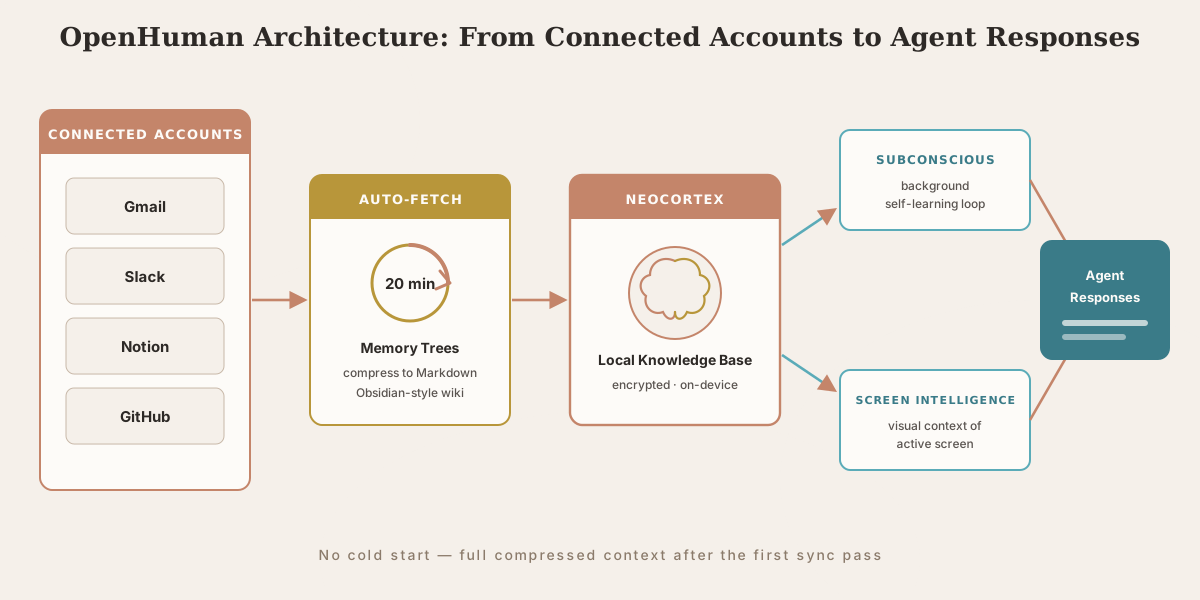
As the DEV Community writeup by the creator explains, most agents start cold. OpenHuman's approach is to connect your accounts, let auto-fetch pull data locally on a 20-minute loop, and have Memory Trees compress everything into Markdown files stored in a Karpathy-style Obsidian wiki. After one sync pass, the agent has compressed context of your inbox, calendar, repositories, documents, and messages.
Who Should Use OpenHuman (and Who Shouldn't)
OpenHuman is not a tool that fits every workflow. Being honest about fit saves you an install and a disappointment.
Good fit:
- Knowledge workers with scattered context. If your working memory lives across Gmail threads, Notion pages, Slack channels, and a dozen repos, the auto-fetch model is built for exactly this fragmentation. The payoff scales with how scattered your context is.
- People who switch agents often. If you have tried three agents this quarter and re-explained your stack each time, the cold-start elimination is the headline feature.
- Privacy-conscious individuals and small teams. Local-first storage, local encryption, and a GPL3 codebase you can audit suit people who will not put their inbox into a cloud inference pipeline.
- Developers comfortable with alpha software. People who can read a stack trace, file a useful GitHub issue, and tolerate breaking changes between releases will get the most out of it.
Poor fit:
- Teams needing production stability today. Early alpha means features move and break. If a broken sync on a Tuesday derails your week, wait for a more mature release.
- Heavily regulated environments without a self-host plan. The local-first model helps, but auto-fetch reaching into Gmail and Slack is a data-scope decision your security team should sign off on before, not after, install.
- Users who want zero setup. Connecting accounts, granting scopes, and waiting for the first sync is light work but not zero. A plain chatbot is lower friction if memory is not the point for you.
- Anyone expecting a finished product. OpenHuman is a strong architectural bet in active development, not a polished commercial app.
The Three Technical Pillars
Neocortex: The Local-First Knowledge Base
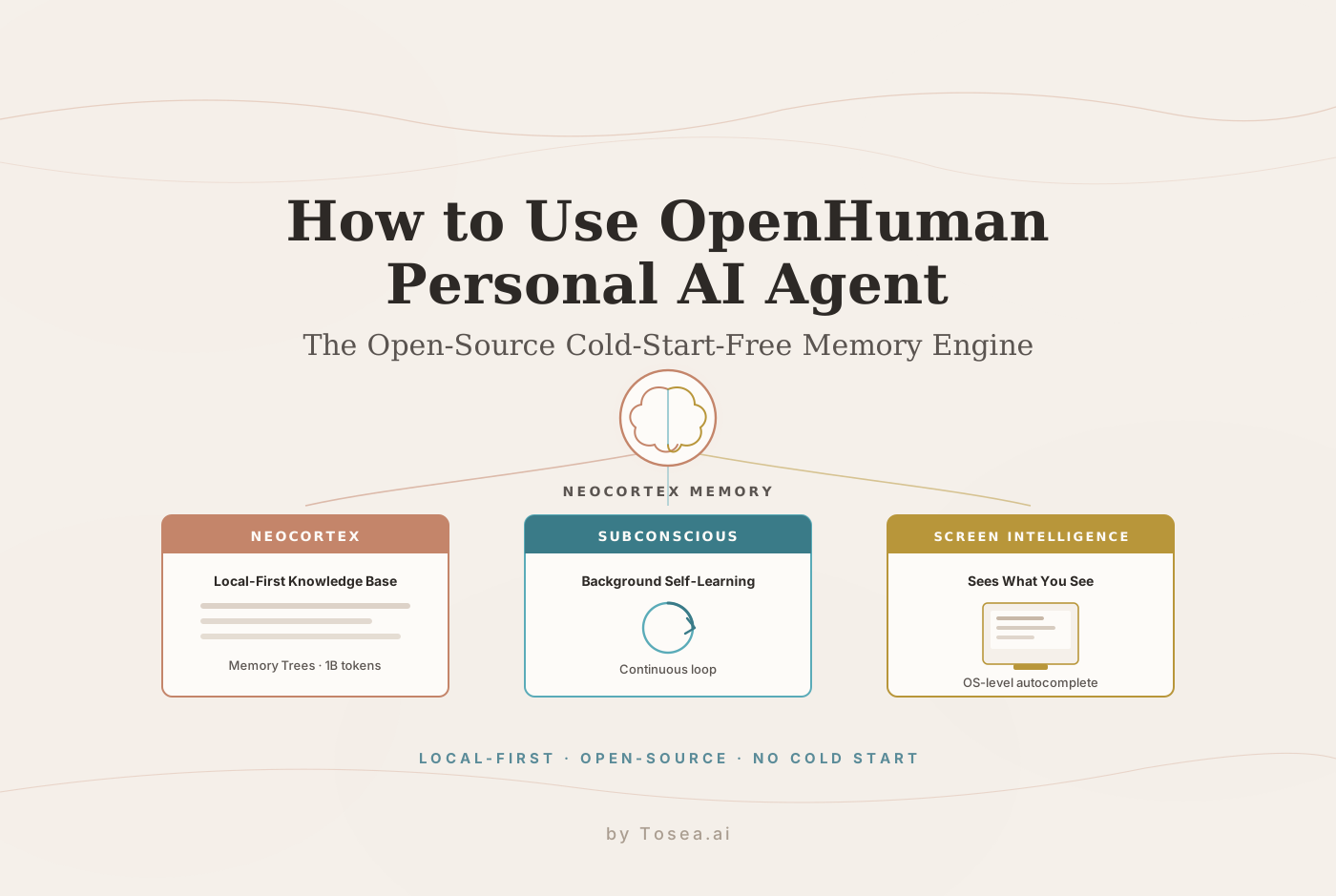
Neocortex is OpenHuman's memory engine — a local-first knowledge base that learns from your data and activity, compounding context across tools and sessions. Rather than storing raw data, it applies Memory Trees: a compression and summarization process that converts your emails, documents, chat messages, and calendar events into structured Markdown files in an Obsidian-style wiki on your device.
According to TinyHumans.ai's product page, OpenHuman is designed to retain up to 1 billion tokens of memory — so you can provide your professional history and it will reference that context across future sessions. This is not a rolling window or a one-paragraph summary; it is compressed but complete access to your context.
The auto-fetch system pulls fresh data from all connected accounts every 20 minutes — Gmail, Slack, Notion, GitHub repositories, calendar events — so the agent's knowledge of your current work is rarely more than 20 minutes stale.
The Subconscious: Background Self-Learning
The Subconscious is one of OpenHuman's more distinctive features: a background self-learning loop that runs continuously, processing your accumulated data, identifying patterns in your workflows, and building workflow-aware context even when you are not actively using the agent.
As SourceForge's project description explains, OpenHuman focuses on a private, desktop-first experience with a persistent assistant that remembers context over time. The Subconscious makes that persistence active rather than passive — the agent is not only waiting for a query; it is processing what it already knows and preparing relevant responses ahead of the question. In practice the system does not just store and retrieve; it synthesizes, prioritizes, and surfaces connections you did not explicitly ask for.
Screen Intelligence: The Agent Sees What You See
Screen Intelligence gives OpenHuman awareness of your current screen state, feeding visual context into its local understanding of what you are working on. Rather than requiring you to describe what you are doing, the agent observes your active application, reads on-screen content, and incorporates that context into its responses.
This pairs with the inline autocomplete capability: memory-aware keyboard autocomplete that works in any desktop application. Unlike browser-extension autocomplete that only functions in web forms, OpenHuman's autocomplete is OS-level — it assists your writing in email clients, document editors, code environments, or any other desktop application.
Features That Make Daily Use Different
One Subscription, Many Model Providers
A single OpenHuman subscription provides access to multiple model providers, so you can use the agent without juggling credentials and billing across Claude, GPT, Llama, and Gemma separately. The platform routes models automatically based on task requirements.
The Desktop Mascot
OpenHuman ships with a desktop mascot — a visible agent presence that speaks and maintains a persistent presence on your desktop. More practically, the mascot can join Google Meet calls as a participant, so meeting context — what was discussed, what was decided, what actions were assigned — flows into Neocortex without manual note-taking.
Voice: STT and TTS Native
Speech-to-text input and text-to-speech output are built into the desktop application natively, not through a browser extension or third-party integration. Speak to OpenHuman and hear it reply — useful when your hands are occupied or when you want to query the agent without leaving your current task.
Skills and Integrations
OpenHuman supports one-click skills for Gmail, Slack, Notion, and other productivity tools, with local encryption and webhooks for instant feedback. The openhuman-skills repository is the skills registry powering the codebase, functioning similarly to the skill systems in OpenClaw and Hermes Agent — structured Markdown-based capability modules that extend what the agent can do. If you are coming from the OpenClaw ecosystem, our roundup of the best OpenClaw skills to boost productivity maps closely to how this registry is organized.
Teams and Organizations
OpenHuman supports shared workspaces — multiple users working with a shared agent context. This is early in development but points toward team-level AI assistants that maintain shared organizational knowledge rather than individual silos.
How to Install OpenHuman
Option 1: Desktop Application Download (Easiest)
Download the DMG for macOS or the EXE installer for Windows from the official TinyHumans.ai download page. Install, launch, and follow the onboarding flow. No terminal required.
Option 2: Command-Line Installation
macOS and Linux:
curl -fsSL https://raw.githubusercontent.com/tinyhumansai/openhuman/main/scripts/install.sh | bash
Windows:
irm https://raw.githubusercontent.com/tinyhumansai/openhuman/main/scripts/install.ps1 | iex
Option 3: Build From Source
The install documentation covers building from source for developers who want to inspect or modify the codebase. The project uses Tauri for the desktop application layer — Tauri's cross-platform framework produces smaller, faster, and more secure desktop applications compared to Electron alternatives.
First Run: Connecting Your Accounts
After installation, the onboarding flow prompts you to connect your accounts. Each connected account — Gmail, Slack, Notion, GitHub, calendar — grants OpenHuman permission to pull that data into Neocortex via the 20-minute auto-fetch loop. The first synchronization pass is where the cold-start elimination happens.
Your First Week With OpenHuman: A Concrete Walkthrough
Here is what the first week actually looks like for a knowledge worker connecting three accounts.
Day 1 — Connect Gmail, GitHub, and Notion. During onboarding you authorize three integrations: Gmail requests read access to your inbox; GitHub requests repository and issue scopes; Notion requests the workspaces you select. Be deliberate here — grant access to the accounts where your working context lives, and skip the ones holding data you do not want compressed into a local wiki. Read the scope prompts; do not click through them.
Day 1, evening — The first sync runs. Auto-fetch begins its first pass on the 20-minute loop. The initial pass is the heavy one: it pulls recent email threads, your active repositories and open issues, and the Notion pages you authorized, then Memory Trees compress it into structured Markdown in the local wiki. Depending on volume this can take several cycles to fully populate, so let it run before you judge the results.
Day 2 — The first useful query. Instead of opening three tabs, you ask OpenHuman directly: "What did the engineering thread about the auth migration conclude, and which GitHub issue tracks the remaining work?" The agent answers from Neocortex — pulling the decision out of the email thread and linking it to the open issue — without you re-explaining who is on the team or which repo matters. This is the first moment the cold-start elimination feels concrete rather than theoretical.
Day 3-4 — The Subconscious surfaces connections. As the background loop processes accumulated data, you start getting answers that link sources you never explicitly connected. Ask about a Notion project brief and the agent references the related thread and the commit that implemented it, because the Subconscious built those associations while you were doing other work.
Day 5-7 — It becomes the default lookup. By the end of the week the pattern inverts. Rather than searching Gmail, then GitHub, then Notion, you ask OpenHuman first because it answers across all three with current context — and the 20-minute freshness means the answers reflect this morning's email, not last Tuesday's snapshot. That inversion, from "search each tool" to "ask the agent," is the entire value proposition, and it lands within a week rather than after a months-long training period.
How OpenHuman Compares to Similar Agents
The AI agent landscape in 2026 includes several memory-capable alternatives. The meaningful differences are architectural.
OpenClaw waits for plugins to ferry context in — its knowledge of your work depends on which skills you have installed and context accumulates gradually through use. We covered that model in our guide to OpenClaw and the agentic shift of 2026, worth reading because OpenHuman is built on top of OpenClaw's underlying architecture and inherits its tool integrations and skill infrastructure. Hermes Agent instead learns by watching you work — a continuous observation model that is genuine but carries a real training period of weeks.
OpenHuman skips the accumulation phase. Memory Trees compression applied to your connected accounts means the agent has compressed but complete context from the first sync, regardless of how long you have used the tool. For users who switch agents frequently, or who want immediate productivity rather than a learning investment, this has practical advantages — though it trades the deep, behavior-specific adaptation an observation model like Hermes builds over time.
| OpenHuman | OpenClaw | Hermes Agent | |
|---|---|---|---|
| Memory model | Auto-fetch + Memory Trees into local Neocortex KB | Plugin-fed context, accumulated per skill | Observation-based, learns from watching you work |
| Cold-start | Eliminated after first sync pass | Gradual, depends on installed skills | Cold; warms over weeks of use |
| Learning period | ~1 sync cycle to useful context | Days to weeks of active use | Weeks of observation |
| Privacy | Local-first, local encryption, GPL3 | Local-first, plugin-dependent | Local-first, self-hostable |
| Best for | Scattered context across many accounts; agent-switchers | Workflow built around a curated skill set | Users who stay on one agent long-term |
If you are evaluating this whole category — local-first, knowledge-base-driven agents — our top 10 AnythingLLM alternatives comparison places OpenHuman alongside the broader field of privacy-first knowledge agents.
Privacy and Security Architecture
All workflow data stays on device. The local LLM that handles low-level tasks like summarization and tool invocation runs on your hardware, keeping sensitive data out of cloud inference pipelines, and stored data is encrypted locally.
The GNU GPL3 license means the complete source code is available for inspection and self-hosting. For users with strict data residency requirements, or who want to verify the privacy guarantees through code review rather than trust, this is the appropriate path. One-click cloud deployment is available through the v0.53.22 release for teams that want managed infrastructure, with the same local encryption model applied to cloud-hosted instances.
Early-Alpha Caveats
Set expectations honestly before you commit a real workflow to this tool.
- Rough edges are expected. Early alpha means features change between releases and some integrations are more complete than others. Treat this as a tool you are evaluating, not a system of record, and keep a fallback for anything mission-critical until the project matures.
- GPL3 and self-hosting carry obligations. GPL3 is a strong copyleft license. If you self-host and modify the code for distribution, you inherit GPL3's source-disclosure obligations. For personal use this is a non-issue; for teams folding it into a wider distributed product, loop in whoever owns license compliance.
- Auto-fetch data scope is broad by design. The feature that eliminates cold-start works by continuously reading your connected accounts — inbox, repositories, messages, calendar — and compressing them locally. That is the point, but it is a meaningful data-handling decision: grant only the accounts you are comfortable having compressed into Neocortex, review the scopes at connect time, and revisit them as integrations expand.
- Self-host if the guarantees matter. The privacy story is only as strong as your willingness to verify it. For high-sensitivity contexts, read the code, self-host, and pin the version rather than trust the description.
From OpenHuman's Memory to Stakeholder-Ready Slides
OpenHuman is strong at the knowledge-accumulation and synthesis layer: compressing your professional history into a queryable memory, maintaining awareness of your current work context, and producing research summaries, document analyses, and synthesized briefs from your accumulated data. None of that, however, is in a form you can put in front of a client, an investor, or your leadership team. A queryable wiki and a Markdown brief are working artifacts; a board does not read your Obsidian vault.
This is the structural gap between a personal-knowledge agent and professional communication, and it is worth being precise about. OpenHuman answers what do I know? It does not answer how do I present what I know to people who were not in the loop? The first is a retrieval and synthesis problem the agent solves well. The second is a document-to-PPT problem — taking a dense, argument-heavy source and rebuilding it as a slide deck that preserves the logic while respecting an audience's attention.
This is where Tosea.ai acts as the document-to-deck orchestration layer. You take the synthesized brief or research summary OpenHuman produced — the consolidated picture of a project, a competitive landscape, or a quarter's worth of decisions — and Tosea.ai's Spatial Semantic Perception engine reads the logical structure of that content. It identifies key findings, conclusions, and supporting evidence, then runs AI slide generation that produces a consulting-grade presentation preserving the argument of the source. Absolute Traceability links every slide element back to the source document, so every claim in the deck can be verified against the underlying research — the same evidence discipline that makes a research-paper-to-slides workflow trustworthy applies here to your personal knowledge base.
The output is a native .pptx file, editable in Microsoft PowerPoint or Google Slides, with consistent design across every slide. The division of labor is clean: OpenHuman owns the personal-knowledge layer, the AI presentation tool owns the communication layer, and together they cover the path from scattered context to a stakeholder-ready slide deck. For a worked end-to-end view of that presentation workflow, see our guide to mastering document transformation for executive presentations.
Get Started With OpenHuman
The repository is available at github.com/tinyhumansai/openhuman under the GNU GPL3 license. The desktop application is available at tinyhumans.ai/openhuman. Community discussion happens on the project's Discord server, linked from the GitHub repository. The project is in early alpha — expect rough edges and evolving features, and free usage is available to early users.
When your personal AI research produces documents that need to become professional presentations, Tosea.ai turns that synthesized work into a boardroom-ready deck in minutes.
Sources
- OpenHuman · GitHub — Source
- OpenHuman · TinyHumans.ai product page — Source
- DEV Community · "I am building the first AI agent with big data capabilities" — Source
- OpenHuman · SourceForge mirror — Source
- Andrej Karpathy · GitHub — Source
- openhuman-skills · GitHub registry — Source