How to Use UI-TARS Desktop: Complete Guide to ByteDance's AI Agent (2026)
Complete guide to UI-TARS Desktop, ByteDance's vision-native open-source AI agent: how it works, four deployment paths, five use cases, security trade-offs, and how it pairs with AI presentations.
Most workflow automation tools work by reading code — inspecting the DOM, calling APIs, parsing structured data. This works well when the software you want to automate was built to be automated. But most software was not. The button you need to click does not have a convenient API. The form you need to fill is behind a login wall. The data you need lives in a proprietary desktop application with no public interface.
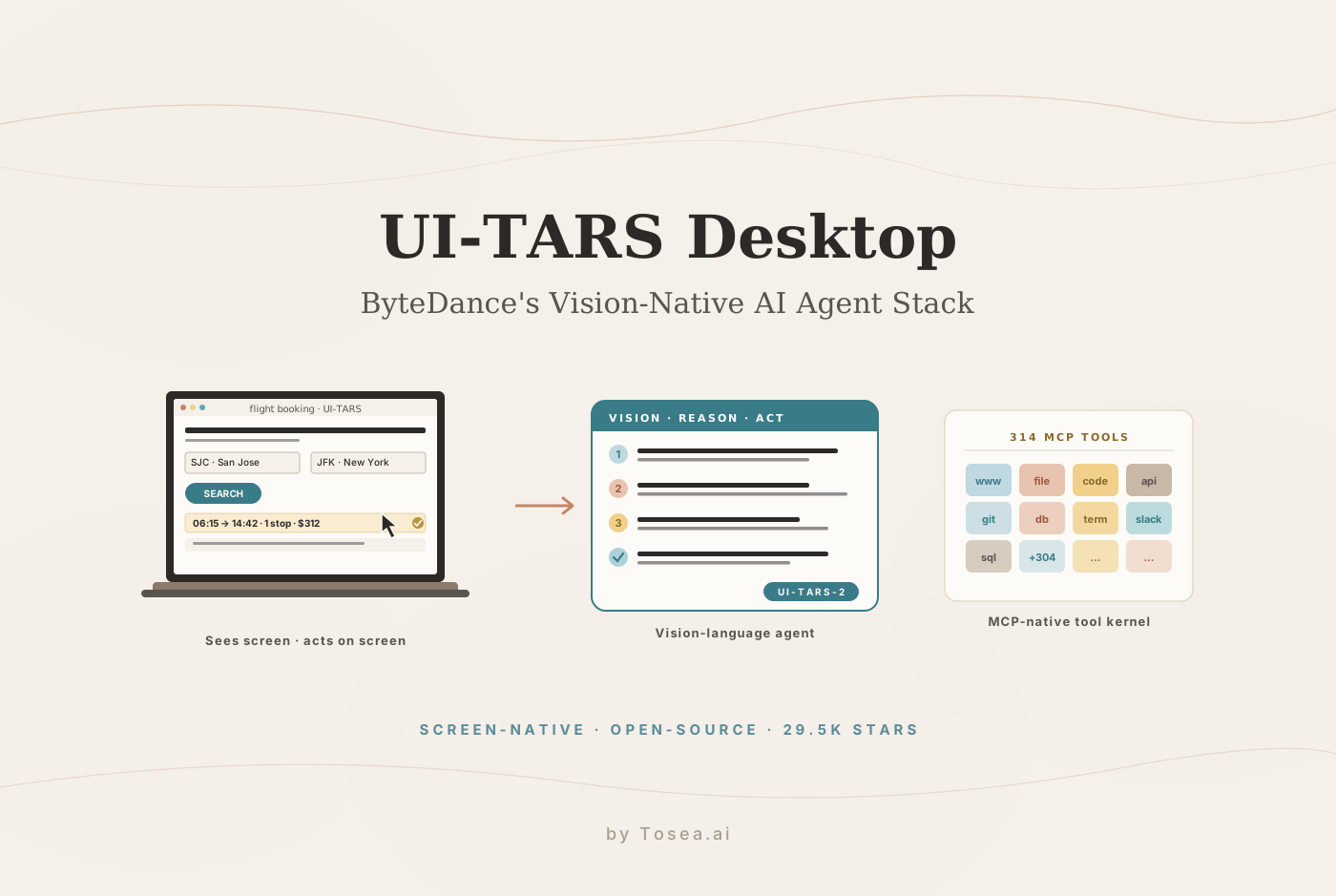
UI-TARS Desktop solves this differently. It sees your screen — literally takes screenshots, understands what is displayed, and executes mouse and keyboard actions to accomplish tasks you describe in plain language. No DOM inspection. No API keys for the software being automated. Just a vision-language model that perceives your screen the way a human would, and acts accordingly.
Before we get into how it works: when UI-TARS Desktop helps you automate research, collect data, or generate reports, those outputs often need to be communicated to stakeholders in a professional format. Tosea.ai converts documents and reports into consulting-grade presentations in under a minute. Register at tosea.ai now, then come back to learn how to set up the agent that handles the automation layer.
What Is UI-TARS Desktop?
UI-TARS Desktop is an open-source multimodal AI agent stack built by ByteDance and released under the Apache-2.0 license. It has accumulated approximately 29,500 GitHub stars with over 2,900 forks, and is described by the project as the open-source multimodal AI agent stack connecting cutting-edge AI models and agent infrastructure.
The project ships two primary products. UI-TARS Desktop is an Electron desktop application that uses vision-language models to control your entire computer. Agent TARS is a general multimodal AI agent stack available through a CLI and web UI, designed for developers who want to integrate the agent into terminal workflows and product pipelines.
As DEV Community's analysis of the project describes: what sets UI-TARS apart from other AI agents is its GUI-native approach. Rather than relying solely on APIs or DOM manipulation, UI-TARS actually sees your screen through vision-language models and interacts with it using human-like perception, reasoning, and action.
The project is named after the AI robot TARS from the film Interstellar — an apt choice for a system designed to operate autonomously while remaining under human direction. ByteDance has a track record of shipping serious agent infrastructure as open source; we covered a related project in our DeerFlow open-source research agent guide, and UI-TARS sits in the same family — but with a focus on the GUI execution layer rather than the planning layer.
The Technical Foundation: Why Vision-Native Matters
The fundamental architectural decision in UI-TARS is to treat the screen as the interface rather than treating the application's underlying code as the interface.
Conventional automation approaches — Selenium, Playwright, RPA tools — interact with software by reading its DOM structure, calling its APIs, or hooking into its accessibility layer. These approaches work reliably when the software is well-structured and automation-friendly. They fail in three common situations: proprietary desktop applications with no web interface, legacy software with inconsistent DOM structure, and web applications that change their front-end frequently without changing their underlying function.
UI-TARS bypasses all three failure modes. It captures a screenshot of the current screen state, passes that screenshot through a vision-language model that understands what is displayed — buttons, text fields, menus, data — and then generates mouse and keyboard actions to accomplish the requested task. The model does not need the application to have an API. It just needs to be visible on screen.
The underlying model architecture has evolved through several versions. UI-TARS-2, released in September 2025, is described as an All In One agent model with enhanced capabilities across GUI, game environments, code tasks, and tool use. According to the project's Hugging Face model page, the model integrates advanced reasoning enabled by reinforcement learning, allowing it to reason through its thoughts before taking action — significantly enhancing performance and adaptability in inference-time scaling.
ChatForest's technical review notes that with UI-TARS-2, the model reached approximately 60% of human-level performance in game environments, which is a meaningful benchmark because game environments require real-time visual understanding and fast decision-making in dynamic, uncontrolled contexts — the same characteristics that make real-world GUI automation difficult.
The architectural distinction matters in practice. A DOM-based scraper that worked perfectly in October typically breaks in November because the target site changed two class names. A vision-native agent does not care about class names — it cares about the rendered pixels. As long as the button still looks like a button, the agent still finds it.
The Two Core Products
UI-TARS Desktop: Full Computer Control
UI-TARS Desktop is an Electron application that provides a chat-style interface for giving the agent natural language instructions. The agent captures your screen, understands the current state, and executes the actions needed to complete your request.
The v0.2.0 release introduced two particularly significant features: Remote Computer Operator and Remote Browser Operator, both available completely free with no configuration required. Remote Computer Operator allows the agent to control computers other than the one it is running on — useful for teams that want to run the agent on a dedicated machine while controlling other systems remotely. Remote Browser Operator extends browser automation to remote sessions.
The v0.1.0 release brought a redesigned agent UI, new browser operation features, and support for the UI-TARS-1.5 model for improved performance and precise control.
Agent TARS: CLI and Web UI for Developers
Agent TARS is the more developer-oriented product, shipping primarily as a CLI with an accompanying web UI. It is built on MCP (Model Context Protocol) as its kernel and supports mounting additional MCP servers to connect to real-world tools. The CLI can be launched immediately without installation:
npx agent-tars
Agent TARS aims to provide a workflow that is closer to human-like task completion through cutting-edge multimodal LLMs and seamless integration with various real-world MCP tools. The tool ecosystem is substantial: 314 MCP tools are accessible through the agent, covering file operations, web browsing, code execution, API calls, and a wide range of external service integrations.
Installation: Getting Started With UI-TARS Desktop
Option 1: Desktop Application (Easiest)
Download the pre-built installer from the GitHub Releases page for your platform — Windows, macOS, or Linux packages are provided. Install and launch. The application guides you through initial model configuration.
For model selection, three size options are available: 2B, 7B, and 72B. The 7B model is generally recommended for most users — it balances capability with hardware requirements that most modern laptops and desktops can meet. The 72B model delivers significantly higher performance but requires dedicated GPU hardware with substantial VRAM.
Option 2: Agent TARS CLI
# Launch directly with npx
npx agent-tars

# Or install globally
npm install -g agent-tars
agent-tars
The CLI launches a web interface on your local machine where you can interact with the agent through a browser.
Option 3: Docker Deployment
docker pull bytedance/ui-tars-desktop
docker run -p 3000:3000 bytedance/ui-tars-desktop
Docker deployment is appropriate for teams that want to run the agent on a server and access it remotely, or for organizations with specific infrastructure requirements.
Option 4: Cloud Deployment via ModelScope
For users in regions where direct model hosting is preferred, ModelScope provides cloud deployment options for UI-TARS models. The project's documentation includes a dedicated Chinese-language deployment guide for ModelScope setup.
Model Configuration
After installation, configure your preferred model provider. UI-TARS Desktop supports multiple backends:
- Claude (Anthropic) via API key
- GPT-4V and GPT-4o (OpenAI) via API key
- Qwen-VL models via Alibaba Cloud
- Local deployment through Ollama or vLLM for full offline operation
Local deployment through Ollama removes any dependency on external API providers:
# Install and run the UI-TARS model locally
ollama pull ui-tars-7b
For latency-sensitive workflows, the local-Ollama path is meaningfully faster on the click-to-action loop than any cloud-API setup — typically 200–400 ms per step instead of 800–1500 ms. The trade-off is that local 7B is meaningfully less accurate on long-horizon tasks than cloud Claude or GPT-4o. Most teams start cloud, then move latency-critical workflows to local once the prompts are stable.
Five Practical Use Cases
Flight and travel booking. The project's documentation demonstrates booking the earliest flight from San Jose to New York as a sample task. The agent opens the browser, navigates to a travel site, interprets the search interface visually, enters the required parameters, reads the search results, selects the appropriate option, and proceeds through the booking flow — handling every step that a human user would handle, without requiring any programmatic access to the airline's systems.
Cross-application research workflows. Research tasks that span multiple sources — checking a GitHub repository for recent issues, reading a relevant paper, summarizing findings from a web page, compiling results into a document — can be described in a single natural language instruction. The agent handles navigation between applications and the compilation of results without requiring the researcher to context-switch manually between tools.
Form filling at scale. For teams that regularly submit forms to government portals, vendor systems, or enterprise applications, UI-TARS can handle the repetitive visual navigation that makes these tasks tedious. The agent reads the current form state, understands what fields are required, and fills them correctly based on the information provided.
GitHub and development workflow assistance. Tell the agent to check the latest issues on a GitHub repository, summarize the open bugs by priority, and draft a response to the top issue. The agent navigates to the repository, reads the issues page visually, synthesizes the information, and can compose and submit a response — all from a single instruction.
Data collection and report generation. Gathering data from multiple web sources, extracting the relevant information, and compiling it into a structured document is a common research task that is time-consuming when done manually. UI-TARS can handle the navigation and extraction layer, producing a structured output document that captures the collected data. This is the use case that connects most naturally to slide generation — once UI-TARS has assembled the source document, the document-to-deck conversion step is where the value lands in front of decision makers.
Where UI-TARS Stops and Other Agents Begin
It is worth being honest about what UI-TARS is not. Compared to text-first agents:
- UI-TARS is slower per step than a Playwright-based scraper for sites where Playwright works. The vision pass adds 0.5–2 seconds per action. For high-volume scraping, Playwright is still the right tool.
- UI-TARS is less reliable on long-horizon planning than agents purpose-built for planning, like Hermes or DeerFlow. For multi-day research projects, pair UI-TARS execution with a separate planning agent.
- UI-TARS is excellent on per-app interactivity — clicking through a desktop app, navigating a stubborn web portal, filling a PDF form in Adobe Reader — where the alternatives flat-out do not work.
The right mental model: UI-TARS is the universal end-effector. It does the last mile that other agents cannot reach.
Security and Privacy Considerations
Giving any software full control over your screen and computer is a significant trust decision. Several considerations are worth understanding before deploying UI-TARS in production environments.
ChatForest's review notes that ByteDance provenance raises legitimate concerns for users in enterprise or government contexts where data residency and foreign software usage are regulated. For these users, the local deployment options — running the model through Ollama on your own hardware with no external API calls — provide a path to full data isolation.
For general use, the agent requires explicit permission for each action category at setup, and operates in a supervised mode by default where you can review and approve actions before they execute. Fully autonomous operation is opt-in. As the DEV Community analysis advises: an AI that can control your computer is a powerful tool — use it wisely, audit it carefully, and never run untrusted code on sensitive systems.
The Apache-2.0 license means the full source code is available for inspection, modification, and self-hosting — which is the appropriate response to provenance concerns for technically capable teams. A common production pattern at security-sensitive organizations is to fork the repository, audit the IPC boundaries between the Electron shell and the model layer, pin all dependencies, and self-host the model on internal infrastructure.
Two operational rules worth adopting:
- Never run UI-TARS as administrator. A screen agent that can also escalate privileges is a much wider blast radius than necessary. The supervised mode + standard-user account combination covers virtually every legitimate workflow.
- Treat the action log as audit-grade. UI-TARS captures every click and keystroke. Forward those logs to your standard SIEM so a misbehaving agent leaves a reviewable trail.
UI-TARS in the AI Presentation Stack
UI-TARS Desktop excels at the operational layer of knowledge work — gathering data, filling forms, navigating interfaces, collecting research. But the outputs of that work — research summaries, collected datasets, compiled reports — are only valuable if they reach decision-makers in a format they can act on. That is where AI slide generation enters the workflow.
The pattern is straightforward: UI-TARS executes the collection and aggregation steps (logging in to a portal, scraping a quarterly filing, exporting a CSV from a desktop accounting app, screenshotting a chart from a tool with no export option), saving the raw output as a PDF, Markdown, or .docx document. From there, Tosea.ai consumes the document and produces a consulting-grade presentation through the same Spatial Semantic Perception pipeline we describe in our zero-hallucination AI slides guide. Every chart, table, and quote on the resulting slides links back to the source document UI-TARS produced — so the chain of evidence is intact from screen capture to boardroom.
The strength of this pairing is the division of labor. UI-TARS is the universal end-effector that overcomes the no API problem. Tosea is the document-to-deck orchestration layer that overcomes the no structure problem, converting a long document into a slide structure that respects the original argument. Together they reach use cases that neither could handle alone: scraping competitive intel from a desktop terminal app, then turning the export into a board-ready strategy deck; collecting field data from a clunky regulator portal, then producing a compliance summary deck for the audit committee; assembling product analytics screenshots from three different dashboards, then converting them into a quarterly business review.
For analysts whose deliverable is a slide deck, this is the practical answer to what do I do with the output of my agent? — push it through Tosea and ship the deck. For an end-to-end view of that workflow with worked examples, see our mastering document transformation guide and the broader HTML vs image AI slide generation comparison. The keywords matter here: AI slide generation, PDF-to-PowerPoint, AI presentation tool, document-to-PPT, slide deck — that is the layer Tosea owns, and it is the layer that turns UI-TARS output into something a stakeholder will sign off on.
Get Started With UI-TARS Desktop
The full repository is available at github.com/bytedance/UI-TARS-desktop under the Apache-2.0 license. Model weights for UI-TARS-1.5 and UI-TARS-2 are available on Hugging Face for local deployment.
When your automated workflows produce documents that need to become professional presentations, Tosea.ai is ready to handle that step.