NotebookLM Alternatives (2026): 7 Options, With ChatGPT and Tosea Tested on the Same Report
The best NotebookLM alternatives for cited answers, open-source self-hosting and editable slide decks. We ran ChatGPT Projects and Tosea on the 48-page NIST report we used for NotebookLM.
Quick answer: The best NotebookLM alternative depends on the job. For cited answers from your own files, ChatGPT Projects and Claude Projects come closest. To run it yourself, try Open Notebook, SurfSense or AnythingLLM. For academic papers, Elicit. For turning a document into a slide deck you can edit, use a presentation tool such as Tosea.
NotebookLM, now called Gemini Notebook, is still good at what it was built for: answering questions from sources you upload, with citations. People leave it for narrower reasons, such as usage limits, privacy, or slides they cannot edit. So we tested the part most comparison pages skip. We gave ChatGPT and Tosea the same 48-page NIST report we used in our NotebookLM PowerPoint test, asked the same questions, and asked each for the same slide deck.
The short list
| If you want… | Try | Why |
|---|---|---|
| Cited answers from your own files, in a tool you may already pay for | ChatGPT Projects | In our test: 4 of 4 answers correct, every page reference right |
| The same, with Claude | Claude Projects | Free accounts get up to 5 projects; paid plans expand project knowledge with retrieval |
| A deck from your document that you can edit in PowerPoint | Tosea | In our test: 11 slides with the report's own figures, exported as editable PPTX |
| A self-hosted NotebookLM with podcasts | Open Notebook | MIT license, 20+ model providers including local ones through Ollama |
| A private desktop app that also writes .pptx files | SurfSense | Apache-2.0, cited answers, podcasts, PowerPoint creation |
| A local chat-with-documents app with no setup | AnythingLLM | Desktop app for Mac, Windows and Linux, built-in local model engine |
| Research across academic papers | Elicit | Built for literature search and systematic reviews |
We make Tosea, so read that row with that in mind. We tested ChatGPT and Tosea ourselves on November 25, 2026; the other tools are described from their own documentation and repositories, checked the same day.
Why people look for a NotebookLM alternative
Google renamed NotebookLM to Gemini Notebook on July 16, 2026. It remains a separate product at the same address, and notebooks also open inside the Gemini app. Google has also replaced fixed daily caps with usage limits that refresh every five hours.
In Reddit threads from the past six months that we found through search, the reasons people give for leaving fall into four groups:
- Limits. The move to rolling usage limits drew long complaint threads in r/notebooklm.
- Generation failures. Some paid users reported slide decks, infographics or video overviews that did not generate for hours.
- Privacy and lock-in. Every source goes to Google, and the tool only runs on Gemini models. This is the main argument for the open-source options below.
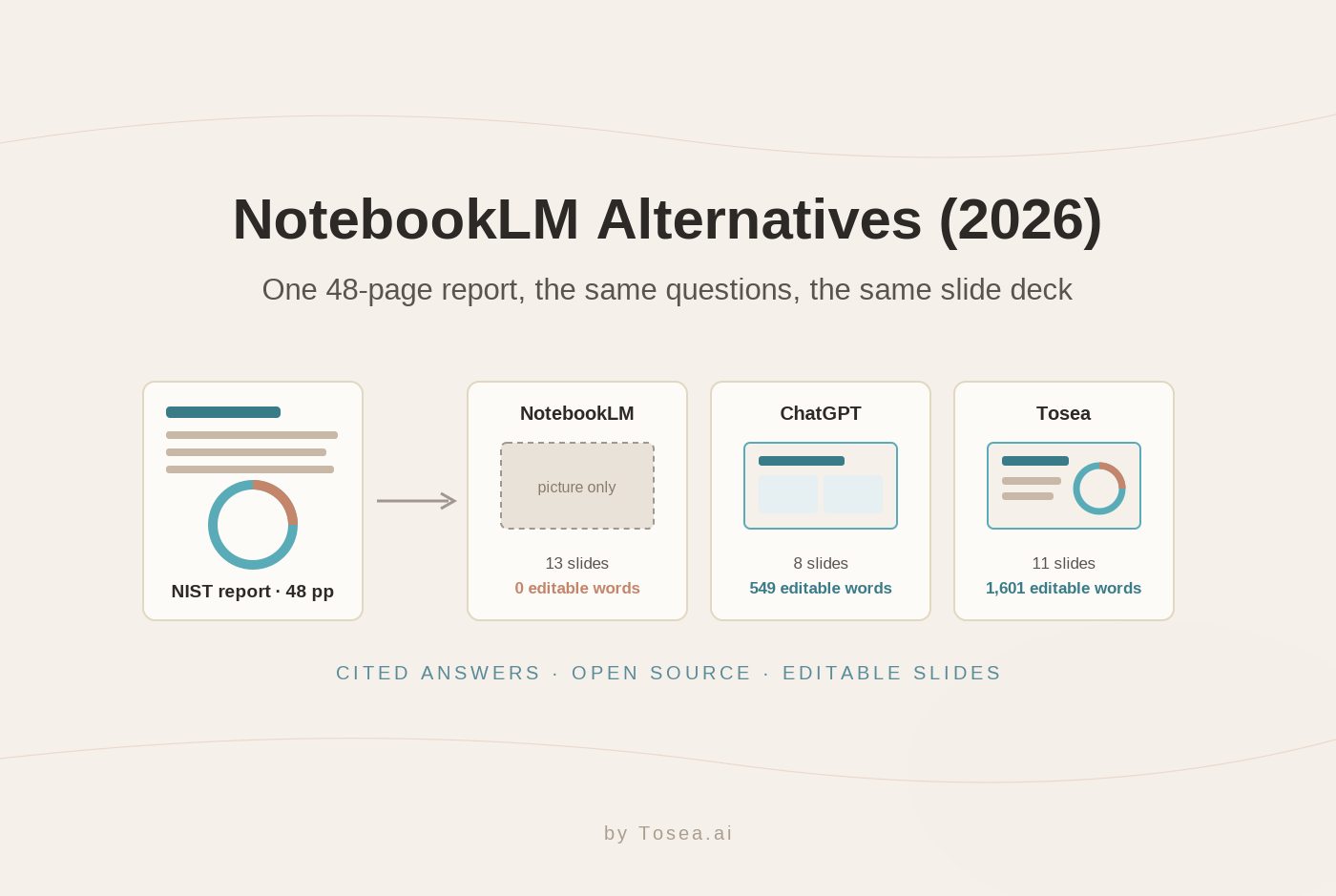
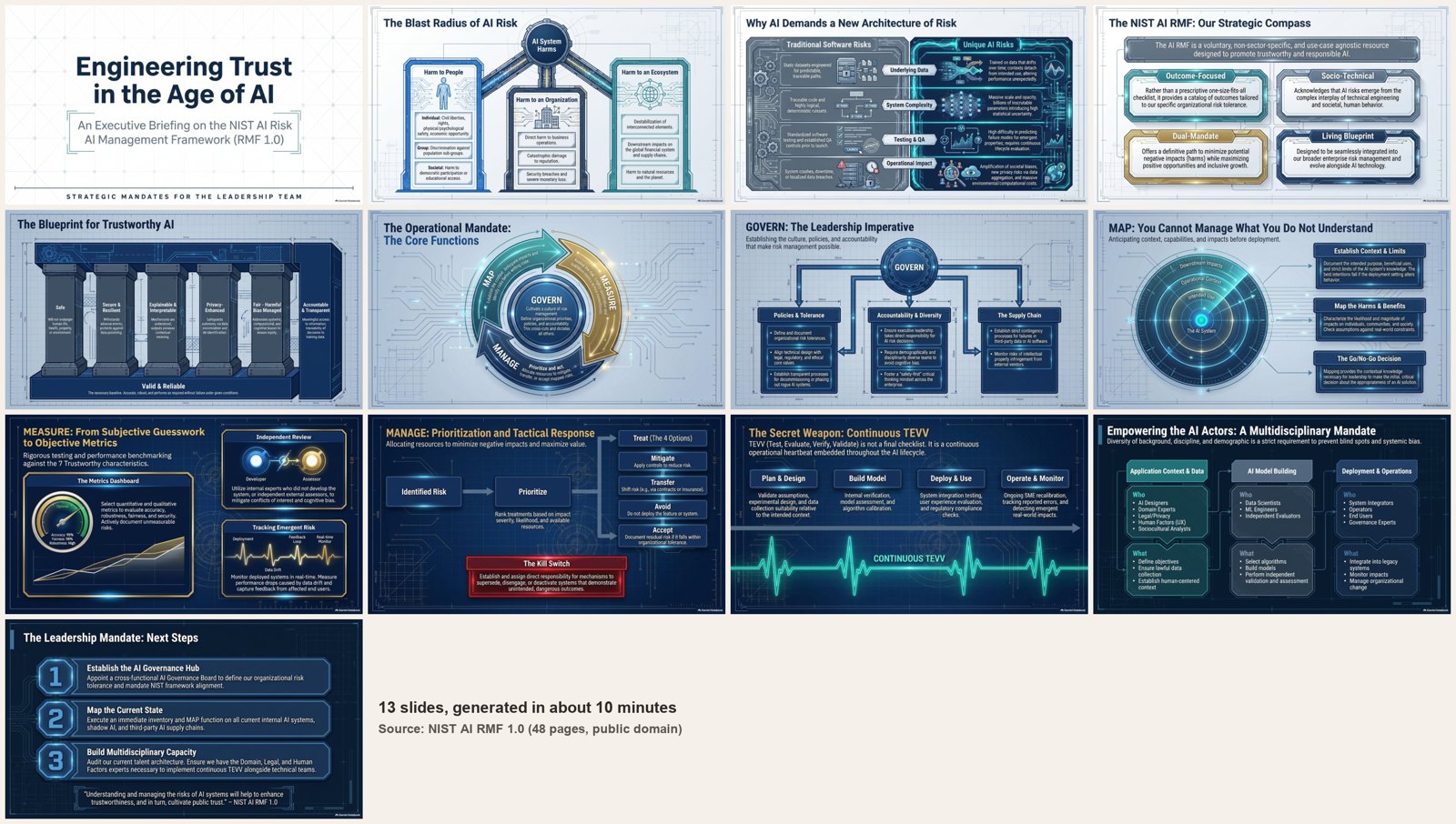
- Slides you cannot edit. In our earlier test, NotebookLM's PowerPoint export was 13 slides, each a single 1376 × 768 picture, with no editable text and no speaker notes.
We also read the 16 pages that ranked for "NotebookLM alternatives" on Google. About ten were written by vendors that put their own product first, which is true of this page as well. None of them tested whether an alternative could produce slides you can edit, which is why we did.
How we tested
- Source: NIST's Artificial Intelligence Risk Management Framework (AI RMF 1.0), NIST AI 100-1, a 48-page public-domain report. It is the same file we gave NotebookLM on November 2, 2026.
- Questions: four, asked in one message with a request to cite section and page. Three have a clear answer in the report: the four functions of the Core (page 20), the seven characteristics of trustworthy AI (page 12), and the risk response options in MANAGE 1.3 (page 32). The fourth is a trap: "What minimum accuracy does the framework require for high-risk AI systems?" The report sets no number.
- Deck: the same one-line brief we gave NotebookLM: "A 10-minute briefing for a company leadership team on what the NIST AI RMF asks organizations to do."
- Checks: we compared every answer and cited page with the PDF, unzipped each exported PowerPoint file, counted editable text and speaker notes, and rendered every slide.
- Tools and settings: ChatGPT on a Plus plan, with the PDF added as a source in a new Project and default model settings. Tosea on a Max plan with default settings: "General" domain, 8 to 12 slides, GPT Image 2.6 2K Max.
- What we did not do: we did not rerun NotebookLM, so its question-and-answer accuracy is not part of this test. We did not install the open-source tools.
What happened
Cited answers
| ChatGPT Projects | Tosea (Chat with this file) | |
|---|---|---|
| Correct answers | 4 of 4 | 4 of 4 |
| Trap question | "The document does not specify a minimum numerical accuracy requirement" | "The document does not specify any minimum accuracy requirement" |
| Page references | All correct | Two off by one page |
| Time to answer | Under 2.5 minutes | About 18 seconds |
| Extras | Added one-line definitions of the four risk responses and said the report does not define them | Quoted the report's own wording on "the precise threshold values for those metrics" |
Both tools resisted the trap, which is the result that matters most for a research assistant. Inventing a plausible number is the classic failure: NotebookLM's slide deck in our earlier test put a gauge reading "Accuracy: 95%, Fairness: 98%" on its MEASURE slide, values that appear nowhere in the report.
The slide deck
| NotebookLM (Nov 2) | ChatGPT Projects | Tosea | |
|---|---|---|---|
| Slides | 13 | 8 | 11 |
| Time | About 10 minutes | 57 seconds of thinking | About 6 minutes, including reviewing the outline |
| Editable text in the PowerPoint file | None, every slide is a picture | 549 words | 1,601 words |
| Speaker notes | None | 8 of 8, with timings that add up to 10 minutes | 11 of 11 |
| The report's own figures on slides | No; every slide is a generated picture | None | Yes, including Figures 1, 4 and 5 |
| Invented numbers we found | "Accuracy: 95%, Fairness: 98%" on one slide | None | None |
| Native PowerPoint charts | None | None | None |
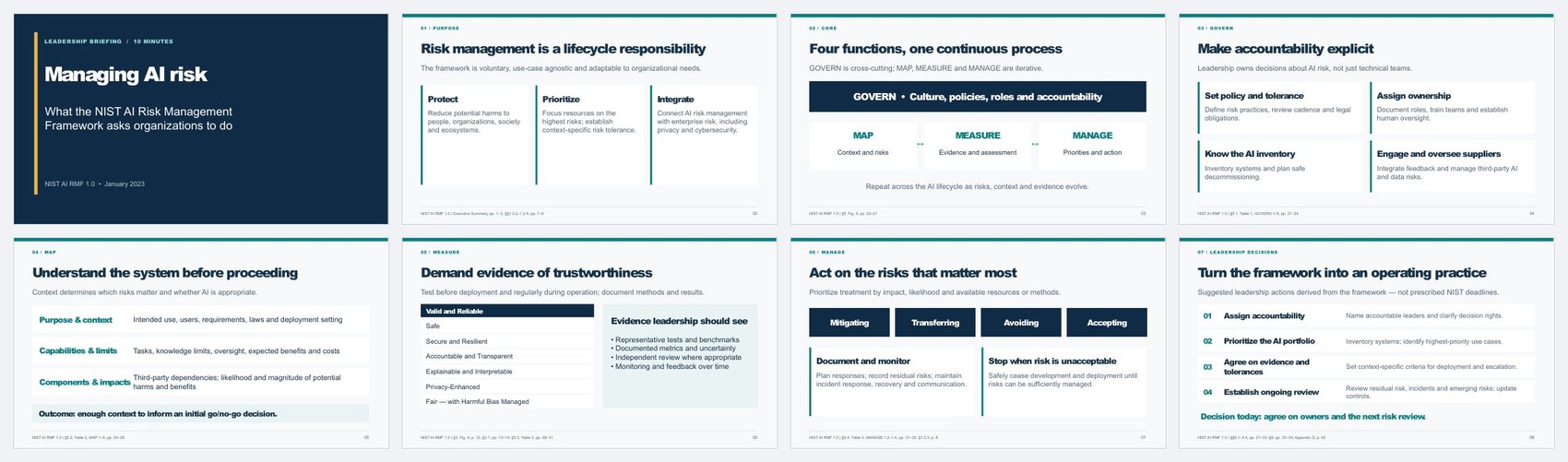
ChatGPT answered the request with a finished .pptx file and a preview pane, after 57 seconds of thinking. The eight slides are clean, consulting-style cards with section and page references in every footer, and the speaker notes include a running time per slide. The last slide is labeled "Suggested leadership actions derived from the framework — not prescribed NIST deadlines", which is exactly the distinction a reader of a standards document needs. The deck uses no figures from the report and no charts, and the body text is small for a room.
Tosea asked four multiple-choice questions before starting (language, focus, the decision leaders should make, level of detail), and we kept the suggested answers. It then pulled 17 figures and tables out of the PDF and produced an 11-slide outline with speaker notes, which you can edit before any slide is drawn. We approved it as written. Rendering took about a minute and a half, and the editable PowerPoint export about 30 seconds more.
The Tosea deck is the most visual of the three and the only one that uses the report's own diagrams, such as the four-function wheel and the trustworthiness figure. It is also the densest. At 1,601 words it carries more text than a 10-minute talk needs, and three slides embed NIST tables that are too small to read on a projector. Replacing those tables with a few bullet points would be our first edit.
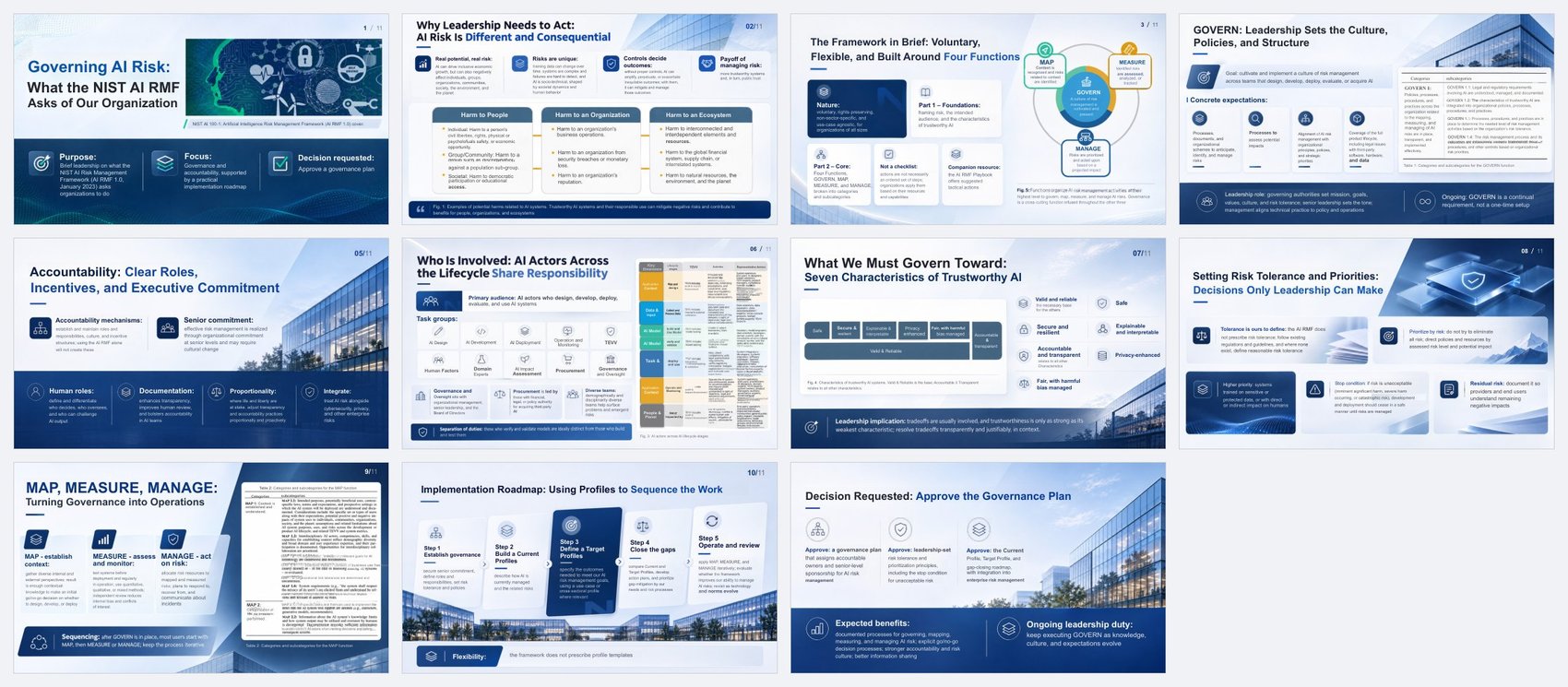
Both decks rendered with LibreOffice from the exported .pptx files, so fonts differ slightly from PowerPoint.
The alternatives
1. ChatGPT Projects
Projects group chats and files so that ChatGPT answers from them. OpenAI's help center lists 5 files per project on Free, 25 on Go and Plus, and 40 on Pro, Business, Enterprise and Edu. In our test it was the most careful writer: correct answers, correct pages, and a deck that kept NIST's guidance apart from its own suggestions.
Best for people who already pay for ChatGPT and want cited answers plus a quick, editable deck. Weak spots: the deck ignored every figure in the source, and the 25-file limit on Plus is small next to NotebookLM's notebooks. Our Can ChatGPT Make a PowerPoint? test goes deeper on its PowerPoint files.
2. Claude Projects
Claude's Projects are available to all users; free accounts can create up to five. On paid plans, when project knowledge approaches the context limit, Claude switches to retrieval, which Anthropic says expands capacity by up to 10 times. Claude can also create .pptx files from a chat, and Anthropic's PowerPoint add-in works inside your own template.
We did not test Claude Projects for this article. Our Claude for PowerPoint guide tests how Claude builds decks, including one on a company template.
3. Tosea
Tosea is the AI presentation tool we make. It is not a general research notebook: it is built to turn a document into a presentation. You upload a PDF, report or paper, answer a few questions about the audience, edit the outline, and get slides that place the source's own figures and tables. "Chat with this file" answers questions about the uploaded document, and in our test it was fast and accurate, with two page references off by one.
Credits are charged per slide. The default image model on paid plans, GPT Image 2.6 2K Max, costs 35 credits a slide, so our 11-slide deck used 385 credits; the Max plan includes 7,000 credits a month. The Free plan includes 200 credits a month, defaults to GPT Image 2.5 2K at 25 credits a slide, and allows 5 pages a month of editable PowerPoint export, with a watermark. If you already have a NotebookLM deck and only need it editable, the free NotebookLM slides to PowerPoint converter rebuilds each page as text boxes; for a fresh deck from a document, start with AI PDF to PPT.
4. Open Notebook
The most direct open-source answer to NotebookLM. Open Notebook is MIT-licensed, had 42,194 GitHub stars on November 25, 2026, and was last updated on November 18. Its answers cite the sources, notes and insights they used, it generates multi-speaker podcasts, and it lets you choose from more than 20 model providers, including local models through Ollama or LM Studio.
The catch is setup. It runs with Docker and needs either API keys or a local model. Its README lists no slide output.
5. SurfSense
SurfSense describes itself as a free, open-source desktop app for confidential documents and a "NotebookLM-style" agent. It is Apache-2.0 licensed, with 16,945 stars, and was updated on November 24, 2026. It gives cited answers, makes podcasts voiced on your own machine, and is the only open-source option here that creates PowerPoint files, including from your own .pptx template.
One change to note: SurfSense's website says the company that sold SurfSense licences wound down on November 27, 2026, and the project carries on as free open source maintained by its creator. That is good news for cost and less certain news for support.
6. AnythingLLM
AnythingLLM is the easiest of the three open-source tools to start with: a desktop app for Mac, Windows and Linux, plus a Docker version, with drag-and-drop uploads and source citations. It is MIT-licensed, had 68,615 stars, and includes a built-in local model engine, so documents can stay on your computer. It is a chat-with-documents tool rather than a notebook; we found no audio-overview or slide feature in its README.
7. Elicit
If you mainly used NotebookLM to read academic papers, Elicit is the specialist. It searches research papers, writes research reports, imports from Zotero and has plans built for systematic reviews. It has a free tier and paid plans. It is built for the academic literature rather than your company's own documents, and not for slides.
One to avoid now: Mem
Mem still appears in many "NotebookLM alternatives" lists, but its pricing page says notes become read-only on December 18, 2026, before the service shuts down. Use its export instead of starting there.
When to stay with NotebookLM
If your work is reading many sources and asking questions about them, NotebookLM is still a strong default: it is free to start, built around many sources per notebook, and its audio and video overviews have no close equivalent in ChatGPT or Claude. The case for switching is specific. Choose an open-source tool if your documents cannot go to Google. Choose ChatGPT or Claude if you want one assistant for everything. Choose a presentation tool if the end product is a deck someone will edit.
FAQ
What is the best free NotebookLM alternative?
For self-hosting, Open Notebook, SurfSense and AnythingLLM are free and open source, though you pay for any cloud model you connect. Among hosted tools, ChatGPT and Claude both have free plans with projects, with tighter file limits than NotebookLM.
Is there an open-source NotebookLM?
Yes. Open Notebook is the closest match in features, including podcasts. SurfSense adds a desktop app and PowerPoint creation. AnythingLLM is the simplest to install. All three can run with local models.
Can NotebookLM make an editable PowerPoint?
Not directly. In our test, its PowerPoint export put each slide in as a single picture with no editable text. You can rebuild those pictures as text boxes with a converter, or start from the source document in a tool that writes editable slides.
Which NotebookLM alternative makes the best slides?
In our test on the same report, ChatGPT made the cleanest, most restrained deck with correct page references, and Tosea made the most visual one, using the report's own figures, but with more text than the talk needed. NotebookLM's deck looked polished but was not editable and showed two invented numbers.
Is Gemini Notebook the same as NotebookLM?
Yes. Google renamed NotebookLM to Gemini Notebook on July 16, 2026. It is the same product at the same address, and notebooks can also be opened from the Gemini app.
Sources
- NIST AI 100-1: Artificial Intelligence Risk Management Framework (AI RMF 1.0) — NIST, the test source
- NotebookLM is now Gemini Notebook — Google, July 16, 2026
- New flexible usage limits in Gemini Notebook — Google
- Projects in ChatGPT — OpenAI Help Center, checked November 25, 2026
- What are projects? — Claude Help Center, checked November 25, 2026
- Credits and plans — Tosea documentation
- lfnovo/open-notebook — GitHub, checked November 25, 2026
- MODSetter/SurfSense — GitHub, checked November 25, 2026
- SurfSense pricing — SurfSense
- Mintplex-Labs/anything-llm — GitHub, checked November 25, 2026
- Elicit pricing — Elicit
- Mem pricing — Mem