Can Turnitin Detect AI in PowerPoint? We Checked 17 AI-Made Decks (2026)
Turnitin's AI writing report does not accept .pptx files and skips bullet points. We unzipped 17 decks from eight AI tools to see what the file itself reveals, and what a Save As in PowerPoint erases.
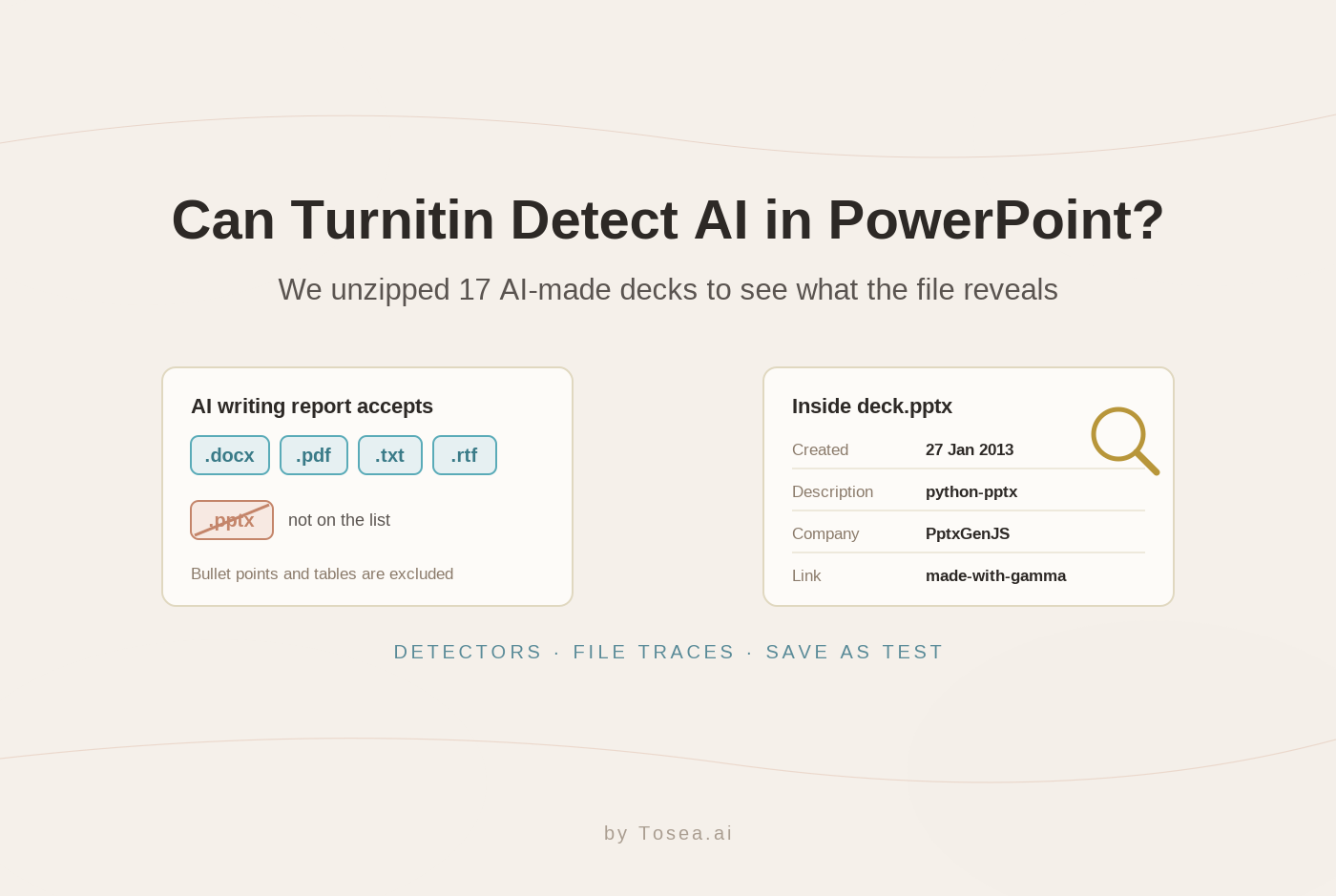
Quick answer: Not directly. Turnitin's AI writing report accepts only .docx, .pdf, .txt and .rtf files, and it skips bullet points and tables, which is most of what a slide holds. A PowerPoint can still get a similarity report. What often gives an AI-made deck away is the file itself: several AI tools leave their name or their software library in it.
That second part is what we tested. We unzipped 17 PowerPoint files made by eight AI tools and looked at what each one records about where it came from. Then we opened four of them in PowerPoint, saved them again, and checked which traces survived. This guide covers what detectors can and cannot do with slides, what we found inside the files, and why none of it proves who wrote a deck.
Can Turnitin detect AI in a PowerPoint?
Turnitin runs two different checks, and they treat PowerPoint differently. Everything below comes from Turnitin's own guides, read on November 25, 2026.
| Turnitin check | Accepts .pptx? | What it needs |
|---|---|---|
| AI writing report | No. Accepted file types are .docx, .pdf, .txt and .rtf | At least 300 words of prose "in a long-form writing format", at most 30,000 words, under 100 MB, in one of seven supported languages |
| Similarity report (matching against other sources) | Yes | Extractable text. Text inside pictures, and some themes and effects, can stop the report from generating |
Three details matter for slides:
- Bullet points are excluded. Turnitin says its AI model does not detect "short-form/unconventional writing such as bullet points, tables, or annotated bibliographies". Lists, headers, references and data tables are left out of the percentage.
- Low scores are hidden. When the AI share is between 1% and 19%, the report shows an asterisk and no percentage. Turnitin also says the percentage "should not be used as the sole basis for action or a definitive grading measure".
- A PDF goes through the same rules. A deck saved as PDF can be submitted to the AI report, but only sentences that read as long-form prose are evaluated. A typical deck of short bullet points falls under the 300-word floor, or most of its text is set aside.
We found no Turnitin page that says how speaker notes are treated.
Which AI detectors accept PowerPoint files?
Most do not take a .pptx at all. We checked each tool's upload rules and its own statements about short text on November 25, 2026.
| Detector | Accepts .pptx? | Accepted instead | What it says about short text |
|---|---|---|---|
| Turnitin AI writing report | No | .docx, .pdf, .txt, .rtf | Needs 300+ words of long-form prose; excludes bullets and tables |
| Copyleaks | Yes, also .ppt, .ppsx, .odp | Many formats | Needs at least 350 characters; Copyleaks says it scans slides and speaker notes |
| GPTZero | No | Pasted text, .docx, .pdf, images | Works best on longer English prose; accuracy rises with more text |
| Originality.ai | No | .doc, .docx, .pdf, .txt, .rtf, .xlsx, .csv | 100-word minimum; shorter text may affect accuracy |
| ZeroGPT | No | .doc, .docx, .txt, .pdf, .rtf | No note on short text |
| Grammarly AI detector | No | .doc, .docx, .odt, .rtf, .txt, .html, .pdf | Says no AI detector is 100% accurate; shorter passages are harder to measure |
The pattern is consistent: the vendors themselves say their models are built for paragraphs of prose. A slide is the opposite. If you search for a "PowerPoint AI checker", most tools you find either extract the slide text and run a text detector on it, or score something else. Our own AI PowerPoint readability checker, for example, scores how easy a deck is to read, not whether AI wrote it.
What we tested
Text detectors look at writing style. We wanted to know what the file itself records, so we took apart decks we already had from earlier tests:
- 13 decks from our AI presentation benchmarks: three each from Tosea, Gamma, Genspark and Beautiful.ai, and one from Slidesgo, all generated in August 2026 from the same source documents.
- 3 decks from our assistant tests: Claude (Claude Code with Anthropic's pptx skill), ChatGPT and Gemini, each made in November 2026 from the same one-page memo. They are written up in Claude for PowerPoint, Can ChatGPT Make a PowerPoint? and Can Gemini Create Google Slides?.
- 1 Google Slides export: the Gemini deck sent to Google Slides and downloaded again as .pptx.
A .pptx is a ZIP archive of XML files, as we explain in What Is a PPTX File. We unzipped each one and read its document properties (the fields PowerPoint shows under File, then Properties), its theme name, the names of its shapes, its links, and whether any slide was a single picture. We also searched every XML part for tool names.
Tosea makes one of the tools in this test, and our own files turned out to carry traces too. We report them the same way as everyone else's.
What the files revealed
Six of the eight tools left something that names them or the software library behind them, and a second ChatGPT deck we made later made it seven.
| Tool | Trace in the file | Where it sits |
|---|---|---|
| Beautiful.ai | Company, Author and Last Modified By all read "Beautiful.ai" | Document properties |
| Gamma | A hidden link to gamma.app with "made-with-gamma" in its tracking tag | Inside a slide layout |
| Slidesgo | Author "Slidesgo AI", a custom property named "SlidesgoGeneratedBy", and a theme called "Minimalist Design by Slidesgo" | Document properties and theme |
| Claude (pptx skill) | Company reads "PptxGenJS", the JavaScript library the skill uses | Document properties |
| Gemini (PowerPoint export) | Created January 27, 2013; Last Modified By "Steve Canny"; description "generated using python-pptx" | Document properties |
| Tosea | The same python-pptx properties as Gemini | Document properties |
| ChatGPT | Depends on the file. Our November 13 deck named no tool: Company and Author came from the memo's own wording. A deck from ChatGPT's newer slide output on November 25 listed Author "OpenAI" and Company "PptxGenJS" | Document properties |
| Genspark | No tool name, but every slide in all three decks was a single picture with no editable text. The Author field held the name of the account holder | Slides and properties |
Two of these deserve an explanation.
The 2013 date and "Steve Canny". python-pptx is a widely used open-source Python library for writing PowerPoint files. When a program builds a deck from its default starting file and does not overwrite the properties, the result inherits that file's creation date, January 27, 2013, and its author, Steve Canny, who created the library. So a deck "created in 2013" that mentions a product launched last month was almost certainly assembled by a script. It does not say which product ran the script, or whether a person wrote the words.
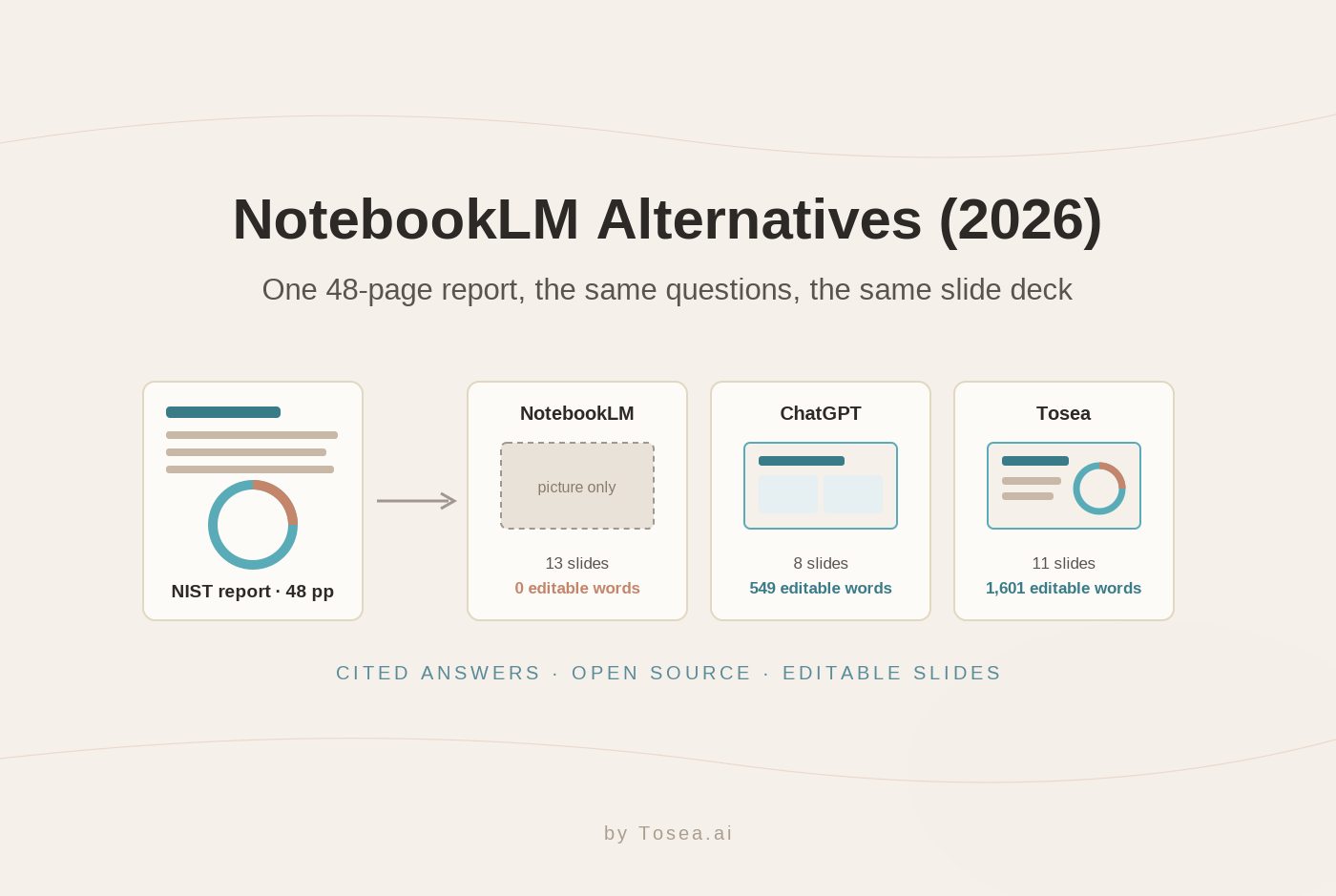
Pictures instead of text. Genspark's export put each slide in as one image. NotebookLM's PowerPoint export did the same in our earlier test: 13 slides, each a single picture. In PowerPoint you can spot this in seconds, because clicking a title selects the whole slide rather than putting a cursor in the text. Some people hand in decks like this; some image-only decks are simply scans or exports of a PDF.
Google Slides deserves a mention as a control. Its export had no document properties at all, and every shape was named "Google Shape" followed by a number. Slidesgo's file had the same shape names, because Slidesgo builds on Google Slides. That trace marks Google Slides, not AI.
What survives a Save As in PowerPoint
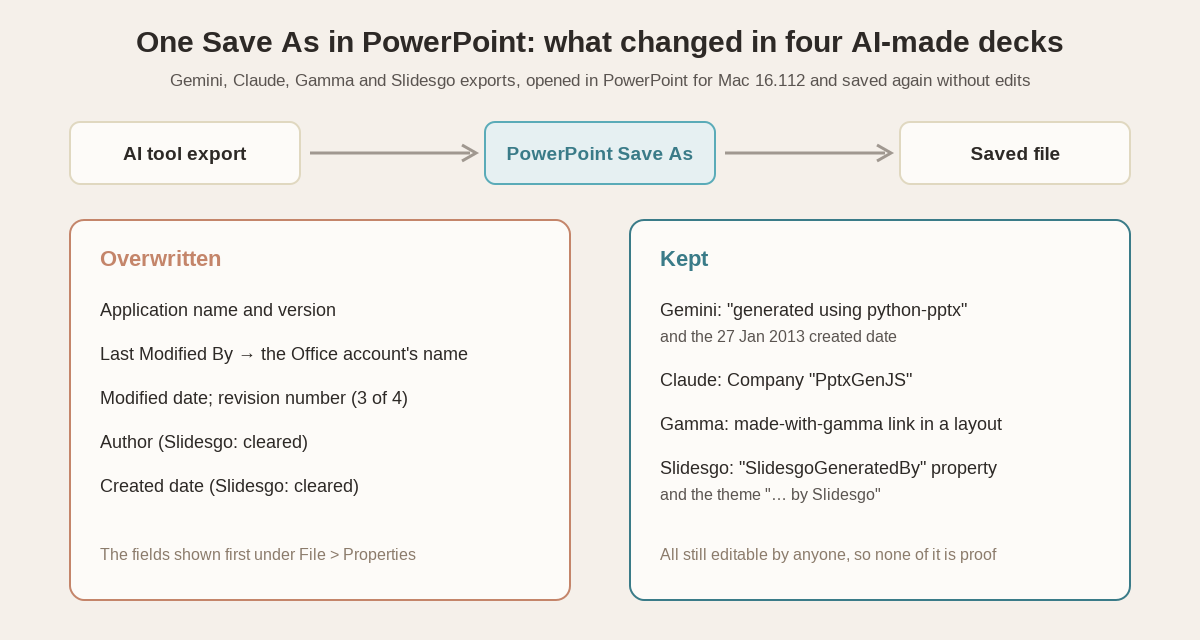
A student rarely hands in the file exactly as an AI tool exported it. They open it, change things and save. So we opened the Gemini, Claude, Gamma and Slidesgo decks in PowerPoint for Mac (version 16.112) and saved each one under a new name, without editing anything.
| Field or trace | After one Save As |
|---|---|
| Application name and version | Replaced with PowerPoint's own |
| Last Modified By | Replaced with the name of the Office account on our computer |
| Modified date | Updated |
| Revision number | Updated in three of the four files |
| Author | Kept for Claude; cleared for Slidesgo |
| Created date | Kept for Gemini (still 2013); cleared for Slidesgo |
| "generated using python-pptx" description | Kept |
| Company "PptxGenJS" | Kept |
| Gamma's made-with-gamma link | Kept |
| Slidesgo's custom property and theme name | Kept |
We saw the same thing in the wild. One of our Tosea benchmark decks had been opened and saved in PowerPoint by a teammate before we uploaded it. Its Last Modified By showed their name, yet its creation date still read 2013 and its description still named python-pptx.
So a quick Save As overwrites the fields people usually look at first, the "last saved by" line, and leaves the deeper ones. None of these fields are protected, though. Anyone can edit them, and plenty of finished decks are rebuilt by hand in a fresh file, which is one more reason they cannot carry an accusation on their own.
Why none of this proves a student used AI
Every trace above points at software, not at a person or a writing process.
- The same library serves people too. python-pptx and PptxGenJS power report automation, school portals and template tools. A deck built from a spreadsheet by a company's reporting script carries the same 2013 date as one Gemini exported.
- A tool's name says nothing about the words. A student can design slides in Gamma or Beautiful.ai and write every sentence. Many schools allow exactly that.
- Absence proves nothing either. One of our two ChatGPT files named no tool, and a deck rebuilt in a blank PowerPoint file names only PowerPoint.
- Text detectors are weakest on slides. The vendors' own guidance says short text is less reliable, and Turnitin excludes bullet points entirely. The University of Waterloo stopped using Turnitin's AI detection in September 2025, citing unreliability and bias against students writing in a second language.
- Our sample is small. We checked 17 files from eight tools, made between August and November 2026. Tools change their export code, and other tools behave differently.
The University of Kansas Center for Teaching Excellence makes the same point about bullet points and short texts, and the UK education body Jisc says decisions "should never be based solely on AI detection".
How to check a deck fairly
If you teach or review presentations, the most reliable evidence is about the process, not the file.
- Read the course policy first. If AI design tools are allowed, a Gamma link in the file is not a problem.
- Ask for version history. Google Slides and PowerPoint files stored in OneDrive or SharePoint keep a revision history that shows how a deck grew. Some teachers ask for edit access for exactly this reason.
- Check the content, not the style. Look up two or three citations and numbers. Invented sources and figures that match nothing in the readings are concrete, checkable problems. Generic layouts and polished wording are not evidence.
- Ask the presenter to walk through one slide. The University of Rochester notes that oral presentations and discussion "can expose a disconnect" between submitted work and what a student understands.
- Treat file details as a reason to ask, not a verdict. A 2013 creation date is a fair question to raise; it is not an answer.
If you are a student: keep your outline, notes and drafts, work in a file with version history, and if your course allows AI tools, say which ones you used and for what. That record answers questions far better than any detector score.
Where Tosea fits
We make an AI presentation tool, so this question applies to us too. Decks exported from Tosea currently carry the python-pptx properties shown above. If your course or company requires you to disclose AI assistance, disclose it; the file may say so anyway.
What we focus on instead is source fidelity. Tosea builds slides from the document you upload, keeps the outline editable before any slide is made, and places your source's own figures and tables on the slides, so it is easy to check every claim against the original. If you want to see what an AI presentation workflow looks like when the source stays visible, start with AI PDF to PPT or read How to Make a PowerPoint With NotebookLM for a comparison.
FAQ
Can Turnitin detect AI in PowerPoint?
Not from a .pptx file. Turnitin's AI writing report accepts .docx, .pdf, .txt and .rtf only, and it needs at least 300 words of long-form prose. It excludes bullet points and tables. A PowerPoint file can still get a similarity report, which matches text against other sources.
Does Turnitin check speaker notes?
Turnitin does not say. We found no Turnitin guide that describes how speaker notes in a PowerPoint are handled, for either the similarity report or AI detection.
Can teachers tell if you used AI for a PowerPoint?
Sometimes, but not from a detector score. In our test, six of eight AI tools left their name or their software library in the file, and some exported slides as pictures. Teachers who suspect AI usually ask about the process instead: version history, sources, and a short walk-through of the slides.
Is there a PowerPoint AI detector that works?
Copyleaks accepts .pptx files and says it scans slides and speaker notes. But every vendor we checked says its model is less reliable on short text, and slides are mostly short text. Treat any score as a prompt for a conversation, not as proof.
Does saving a PowerPoint as a PDF change what Turnitin sees?
It changes the file type, not the rules. A PDF can go to the AI writing report, but only long-form prose sentences are evaluated and the 300-word minimum still applies, so a deck of bullet points usually produces no meaningful score.
How can I check a PowerPoint's metadata?
In PowerPoint, open File, then Properties or Info, to see the author, company, created date and last saved by. Keep in mind that these fields show which software last wrote the file, and anyone can change them.
Sources
- File requirements for an AI Writing Report — Turnitin Guides, read November 25, 2026
- Why has a Similarity Report not generated for my PowerPoint file? — Turnitin Help Center
- AI writing detection model — Turnitin Guides
- Turnitin's AI writing detection capabilities FAQs — Turnitin Guides
- Supported AI text detection file types — Copyleaks documentation
- Check your PowerPoint presentation for plagiarism — Copyleaks, June 18, 2025
- How GPTZero works — GPTZero
- What are the limitations of GPTZero's AI classifier? — GPTZero support
- AI checker — Originality.ai
- ZeroGPT — ZeroGPT
- AI detector — Grammarly
- Discontinuing use of AI detection functionality in Turnitin — University of Waterloo, September 2025
- Careful use of AI detectors — University of Kansas Center for Teaching Excellence
- AI misuse: guidance for instructors — University of Rochester
- AI detection and assessment 2025 — Jisc, June 24, 2025
- python-pptx — Steve Canny, GitHub