What Is a PPTX File? Format, How to Open It, and PPT vs PPTX (2026)
A PPTX file is a PowerPoint presentation saved as a ZIP of XML, images and themes. We unzipped five real AI-generated decks to show what is inside, how to open one, and PPT vs PPTX.
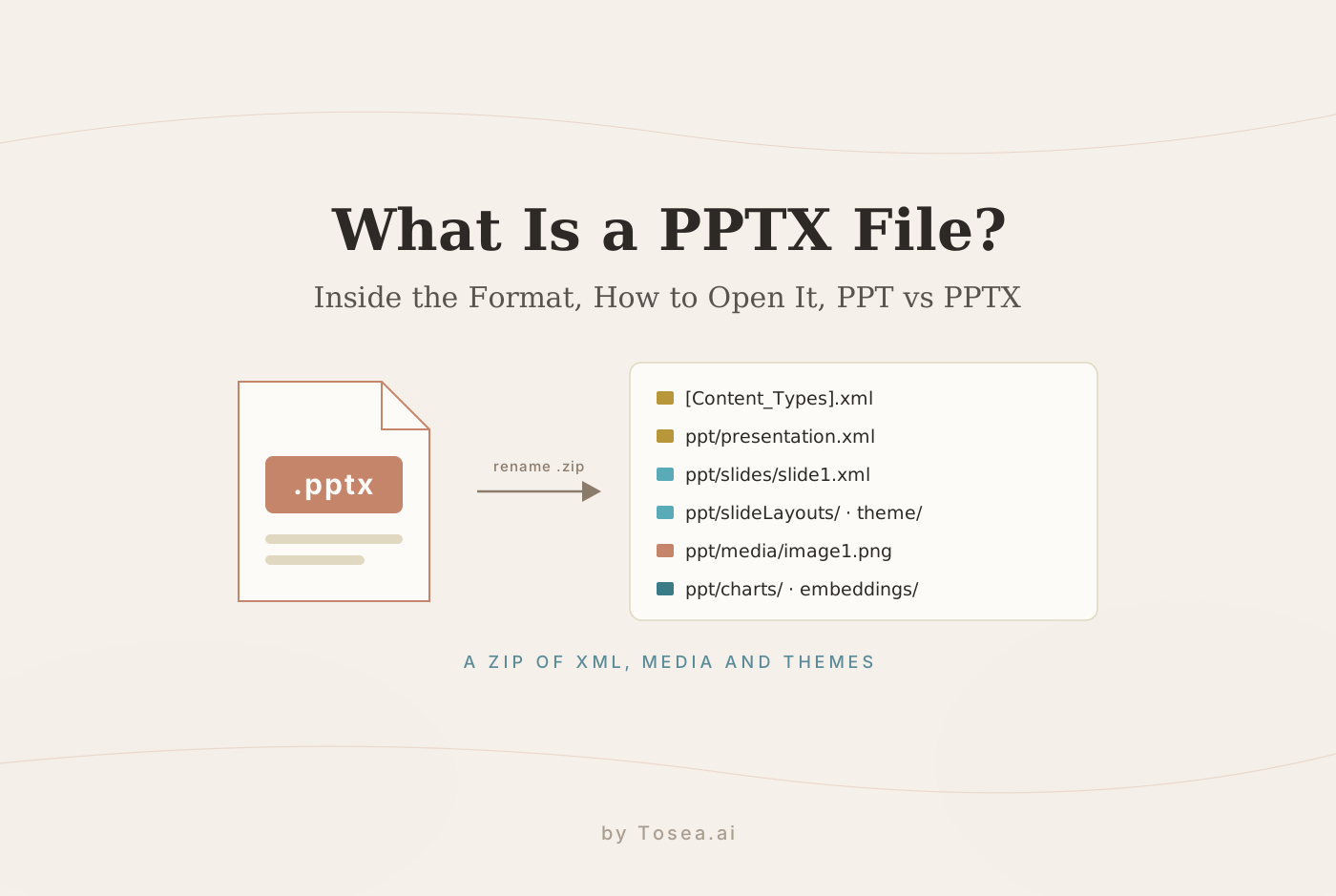
Quick answer: A PPTX file is a Microsoft PowerPoint presentation in the Office Open XML format, which has been PowerPoint's default since 2007. It is really a ZIP archive: each slide is an XML file, and images, fonts, themes and chart data are separate files inside it. You can open one in PowerPoint, Google Slides, Keynote, LibreOffice or a free web viewer.
That definition is where most explanations stop. This guide goes further: we unzipped a PPTX we built for this site and five real AI-generated decks to show what is actually inside, why some PPTX files are editable and others are just pictures, why they get so large, and what to do when one will not open.
What Does PPTX Stand For?
PPTX stands for PowerPoint Open XML Presentation. The "X" marks the XML-based format Microsoft introduced with Office 2007, alongside DOCX for Word and XLSX for Excel. The format is standardized as Office Open XML (ECMA-376, later ISO/IEC 29500), so any app can read and write it without Microsoft software.
Related PowerPoint extensions you may see:
| Extension | What it is |
|---|---|
.pptx | Standard presentation (default since PowerPoint 2007) |
.ppt | Older binary presentation format (PowerPoint 97–2003) |
.pptm | Macro-enabled presentation, which can contain VBA code |
.ppsx | Slide show: opens straight into presenting mode |
.potx | Template, used to start new presentations |
PPT vs PPTX: What Is the Difference?
PPT is the old binary format from PowerPoint 97–2003. PPTX replaced it in 2007. The practical differences:
- Structure: PPT is a single binary file. PPTX is a ZIP package of XML parts and media, which other software can read and generate easily.
- Size: PPTX is compressed, so the same deck is usually smaller.
- Recovery: a damaged PPTX can often be partly recovered because each part is separate; a damaged PPT usually cannot.
- Macros: a PPTX cannot contain VBA macros. A macro-enabled deck has to be saved as
.pptm, which makes macro files easy to spot. - Compatibility: every current presentation app opens PPTX. Save as PPT only if someone is still on PowerPoint 2003 or earlier.
If you have an old .ppt, open it in PowerPoint and use File → Save As → PowerPoint Presentation (.pptx) to convert it.
What Is Inside a PPTX File? We Unzipped One
Because a PPTX is a ZIP archive, you can look inside it:
- Windows: copy the file, rename the copy from
.pptxto.zip, and open it. - Mac: in Terminal, run
unzip -l deck.pptxto list the contents, or duplicate the file, rename it to.zipand double-click.
We did this with the example footnote slide we built for another guide: one slide with a title, three bullets, a native bar chart and three footnotes. The 35.5 KB file contained 41 separate parts:
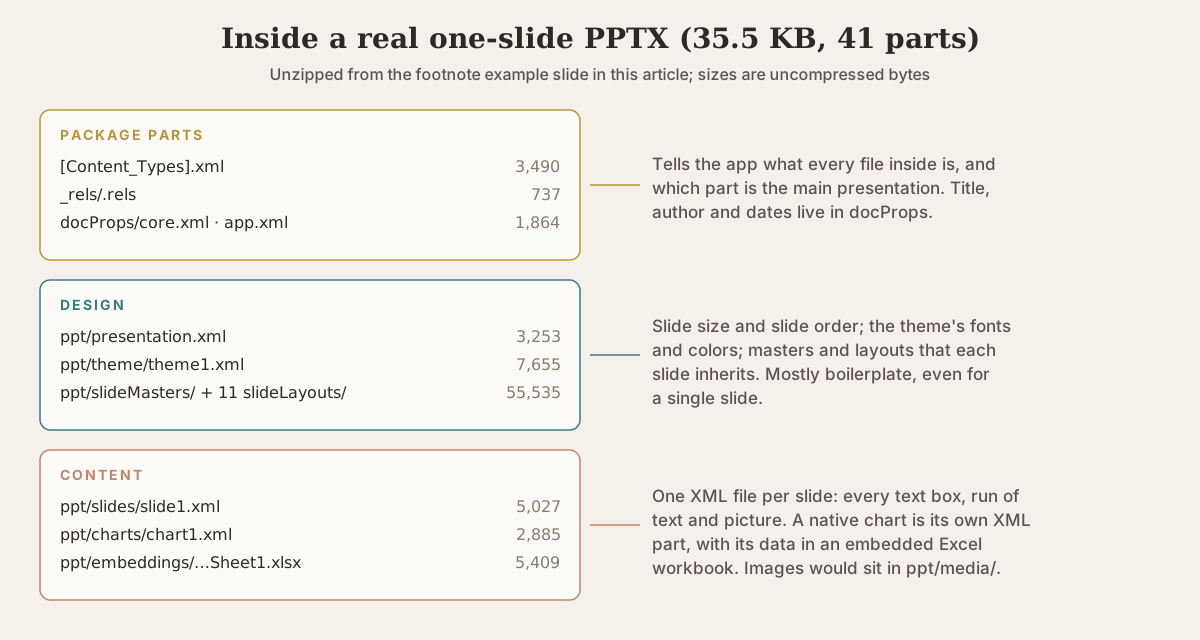
A few things stand out:
- Most of the bytes are boilerplate. The slide master and 11 layouts took 55.5 KB uncompressed, ten times the size of the slide itself. Every new deck carries them.
- The slide is plain XML. Here is the headline from
ppt/slides/slide1.xml, trimmed:
<a:r>
  <a:rPr sz="2800" b="1"><a:latin typeface="Arial"/></a:rPr>
  <a:t>Enterprise churn fell to 6.1% in Q3; net retention hit 118%</a:t>
</a:r>
<a:r>
  <a:rPr sz="2800" b="1" baseline="30000"/>
  <a:t>1</a:t>
</a:r>
sz="2800" is 28 pt. The <a:t> element holds the actual words. baseline="30000" is what PowerPoint writes when you make a footnote number superscript: the character is raised by 30%.
- A native chart carries its own spreadsheet. The bar chart is
ppt/charts/chart1.xml, and its data sits in an embedded Excel workbook (ppt/embeddings/Microsoft_Excel_Sheet1.xlsx). That is why you can right-click a real PowerPoint chart and choose Edit Data.
Is Every PPTX Editable? Five Real AI-Generated Decks Compared
The format allows editable text, but nothing forces an app to use it. Some tools export a PPTX in which every slide is just a picture. To see how common that is, we unzipped five decks from our benchmark series. Each was generated by a different AI tool from the same 46-page Unitree GO1 user manual.
| Exporting tool | File size | Slides | Slide size (inches) | Editable text runs | Images | Embedded fonts | Share of bytes in images |
|---|---|---|---|---|---|---|---|
| Tosea | 12.81 MB | 9 | 13.33 × 7.5 | 916 (1,114 words) | 99 | 0 | 96% |
| Beautiful.ai | 4.06 MB | 6 | 13.33 × 7.5 | 117 (359 words) | 22 | 0 | 96% |
| Genspark | 3.34 MB | 6 | 13.33 × 7.5 | 0 | 6 | 0 | 96% |
| Gamma | 1.49 MB | 5 | 10 × 5.625 | 84 (700 words) | 11 | 6 files | 53% |
| Slidesgo | 0.80 MB | 9 | 10 × 5.625 | 56 (495 words) | 2 | 0 | 83% |
"Editable text runs" counts the <a:t> text elements across all slides, each one a piece of text you can click into and change. Files downloaded from the benchmark pages and analyzed on November 2, 2026.
What the numbers show:
One of the five exports was not editable at all. The Genspark file had zero text on any slide: each of its six slides was a single full-slide image. It looks right in PowerPoint, but you cannot fix a typo or change a number. We checked the Genspark exports from our other two benchmark runs too, and all three behaved the same way. The PowerPoint file NotebookLM exported in a separate test was the same: 13 slides, each a single 1376 × 768 image, with no text at all. If you are handed such a file, the free image to editable PPT converter rebuilds the pages as text boxes, and the NotebookLM slides to PowerPoint tool does the same for NotebookLM exports.
Images are almost all of the file size. In four of the five decks, images were 83–96% of the bytes; the XML that describes slides and text is tiny. Our own export was the largest by far. Tosea keeps the source document's figures and visual elements as 99 separate images, which is good for editing but makes a 12.8 MB file. If you need to email a deck like that, the free PowerPoint compressor shrinks the images inside without touching the text.
"16:9" comes in two sizes. Three tools used PowerPoint's default widescreen size, 13.33 × 7.5 inches. Gamma and Slidesgo used 10 × 5.625 inches, the default size in Google Slides. Both are 16:9, so they look identical on screen, but if you paste slides from one into the other, PowerPoint rescales the content and font sizes change. For 4:3 decks, the 4:3 to 16:9 converter handles the switch.
Only one deck carried its fonts. Gamma embedded six font files (794 KB), so its typography survives on a computer without those fonts installed. The others relied on fonts already installed on the computer, so check them on the laptop you will present from.
One deck stored its files without compression. Beautiful.ai's ZIP used "store" mode, so the 4.06 MB download was essentially the same size as its contents unpacked. Everyone else compressed.
How to check if a PPTX is editable in 10 seconds
- Open it and click on a title. If you get a text cursor, the text is editable. If the whole slide gets selection handles, it is a picture.
- Or open Home → Arrange → Selection Pane in PowerPoint: an image deck shows one "Picture" per slide instead of named text boxes.
- Or unzip it and search a slide XML file for
<a:t>. No matches means there is no editable text on that slide.
How to Open a PPTX File
You do not need PowerPoint to open one:
| Where | How to open a PPTX |
|---|---|
| PowerPoint (Windows/Mac) | Double-click the file. Full editing. |
| PowerPoint for the web | Upload to OneDrive and open in the browser; free with a Microsoft account. |
| Google Slides | Upload to Google Drive, then Open with → Google Slides. It converts on import; complex animations and some fonts may change. |
| Keynote (Mac, iPhone, iPad) | File → Open the PPTX. Keynote converts it and lists anything it could not import. |
| LibreOffice Impress | Free and open source on Windows, Mac and Linux. Opened four of our five test decks directly. |
| Android or iPhone | The PowerPoint or Microsoft 365 mobile app, Google Slides, or Keynote on iPhone. |
| Canva | Upload the PPTX to import it as an editable Canva design. |
If you only need to view or share a deck, converting it to PDF avoids font and layout surprises. The free PowerPoint to PDF converter does this in the browser.
What to Do When a PPTX File Will Not Open
"Source file could not be loaded" in LibreOffice, or a repair prompt in PowerPoint. One of our five test files (the Gamma export) would not open in LibreOffice 26.2 at all. The slides inside were fine; the problem was how the ZIP container was written. We unzipped it and zipped the same files again with a standard ZIP tool, and it opened immediately. If a PPTX fails in one app, try another app first, then try re-zipping it.
"PowerPoint found a problem with content." Click Repair. Because PPTX keeps each slide in a separate part, PowerPoint can usually recover everything except the damaged slide or image.
The file opens but looks wrong. Usually missing fonts: install the font, or ask the sender to embed fonts (File → Options → Save → Embed fonts in the file) or send a PDF alongside.
It is huge and slow. Images and embedded video are the cause. Compress the pictures, or extract what you need with the free image extractor.
Can a PPTX File Contain a Virus?
A standard .pptx cannot run VBA macros. Macro code requires .pptm, and PowerPoint will not save macros into a PPTX. That makes PPTX one of the safer formats to receive, but not risk-free: a deck can still contain embedded objects, links to external files or websites, and exploits that target bugs in the viewer.
Practical rules: keep Office updated, leave Protected View on for files from the internet or email, do not click Enable Content on a file you were not expecting, and be suspicious of a "PowerPoint" that arrives as .pptm, .ppsm or inside an extra ZIP.
What You Can Pull Out of a PPTX
Because the parts are separate files, you can extract them without opening PowerPoint:
- Images: everything in
ppt/media/, or use the free image extractor. - Speaker notes: they live in
ppt/notesSlides/, and the free notes extractor exports them as text. - Chart data: each native chart's spreadsheet is in
ppt/embeddings/. - Text: every
<a:t>element inppt/slides/. This is what search tools and AI models read when you upload a deck.
How to Create a PPTX File
Save from any presentation app: in PowerPoint it is the default; in Google Slides use File → Download → Microsoft PowerPoint (.pptx); in Keynote use File → Export To → PowerPoint. Developers can generate PPTX directly with libraries such as python-pptx, which we used to build the example slide in this article.
If the deck you need already exists as a document, AI tools can draft it for you. Tosea turns a PDF, paper or report into slides and exports a PPTX with editable text, like the 916-run file in the table above. Whichever tool you use, run the 10-second editability check before you rely on the file.
Frequently Asked Questions
What is a PPTX file used for?
PPTX is the standard file for slide presentations: lectures, business pitches, reports, conference talks. It stores slides with their text, images, charts, transitions and speaker notes in one file that PowerPoint, Google Slides, Keynote and LibreOffice can all open.
Is PPTX the same as PowerPoint?
PowerPoint is the program; PPTX is its default file format. Other apps can create and edit PPTX files too, and PowerPoint can also save older formats such as PPT and other formats such as PDF.
How do I open a PPTX file without PowerPoint?
Upload it to Google Drive and open it with Google Slides, use PowerPoint for the web with a free Microsoft account, open it in Keynote on a Mac or iPhone, or install the free LibreOffice Impress. To just read it, convert it to PDF.
Why is my PPTX file so large?
Almost always because of images and video. In the five AI-generated decks we analyzed, images accounted for 53–96% of each file's bytes. Compressing pictures or removing unused media typically shrinks a PPTX far more than deleting slides does.
Can I convert PPTX to PDF or PPT?
Yes. In PowerPoint use File → Save As and choose PDF or PowerPoint 97–2003 (.ppt). Without PowerPoint, Google Slides and LibreOffice can export both, and the free PowerPoint to PDF converter works in a browser.
Sources
- Ecma International, ECMA-376: Office Open XML File Formats
- Microsoft Support, File formats that are supported in PowerPoint
- Microsoft Learn, Structure of a PresentationML document
- Tosea, AI presentation benchmark series (source of the five exported decks)