Claude for PowerPoint (2026): 4 Ways to Make Slides With Claude, Tested
Can Claude make a PowerPoint? Yes, four ways: Claude Slides, a .pptx file in chat, the PowerPoint add-in and Claude Code. We built a deck and unzipped it to see what stays editable.
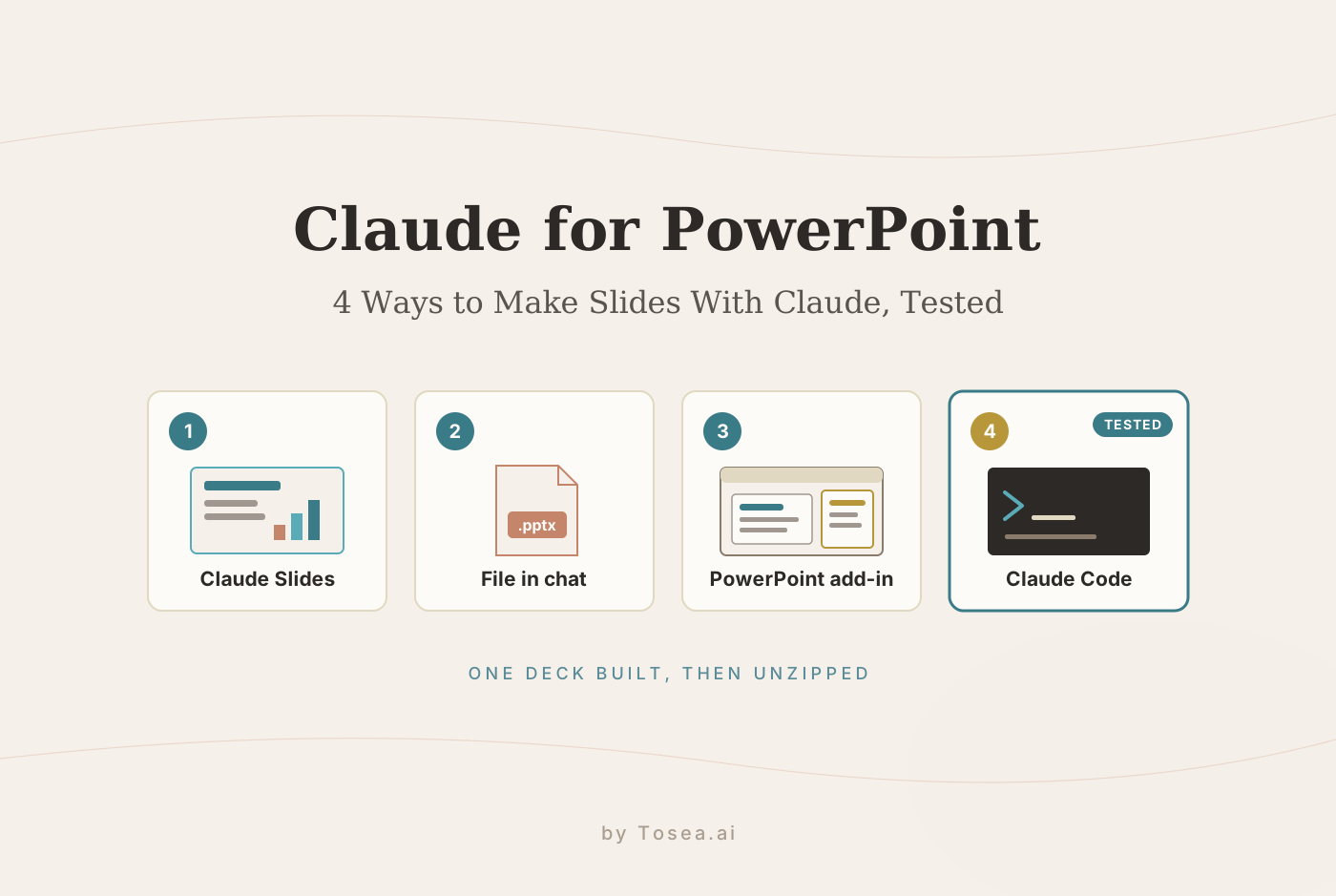
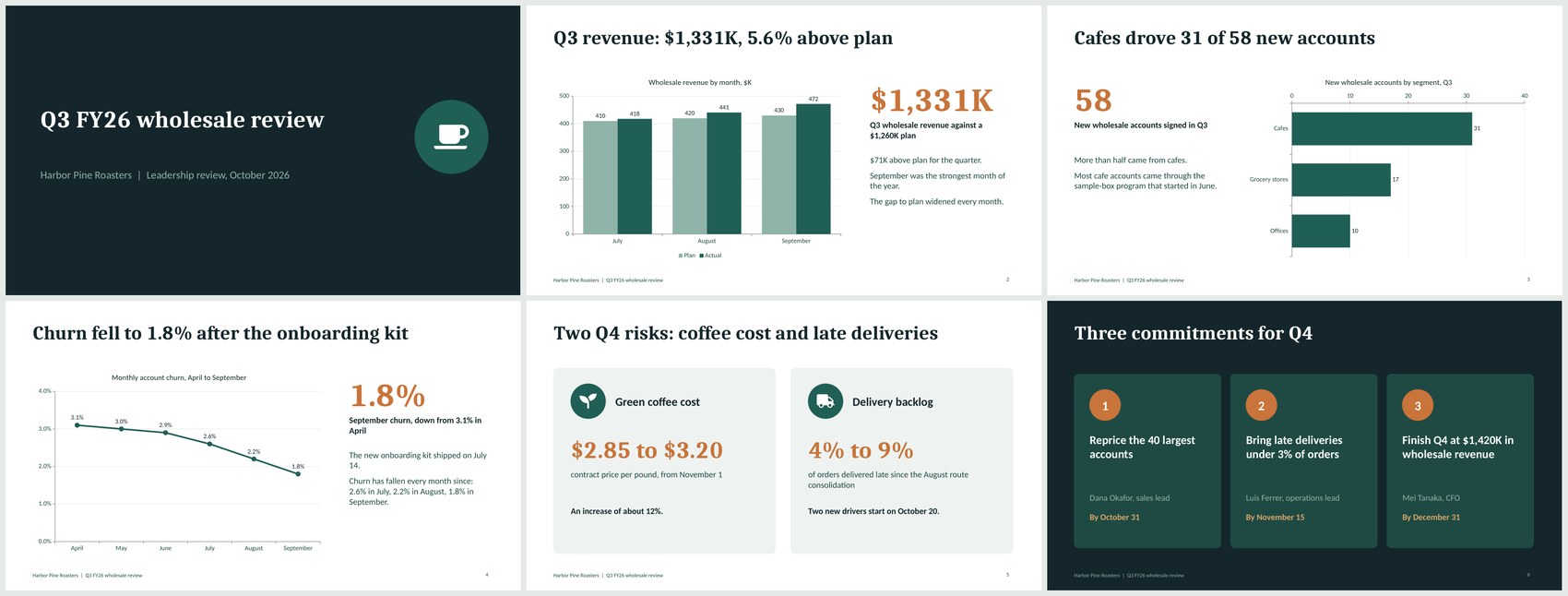
Quick answer: Yes, Claude can make a PowerPoint, and there are four ways to do it: Claude Slides in any chat, a .pptx file built in chat, the Claude for PowerPoint add-in, and Claude Code with Anthropic's pptx skill. In our test, Claude Code turned a one-page memo into a six-slide deck with native charts and speaker notes in about three minutes.
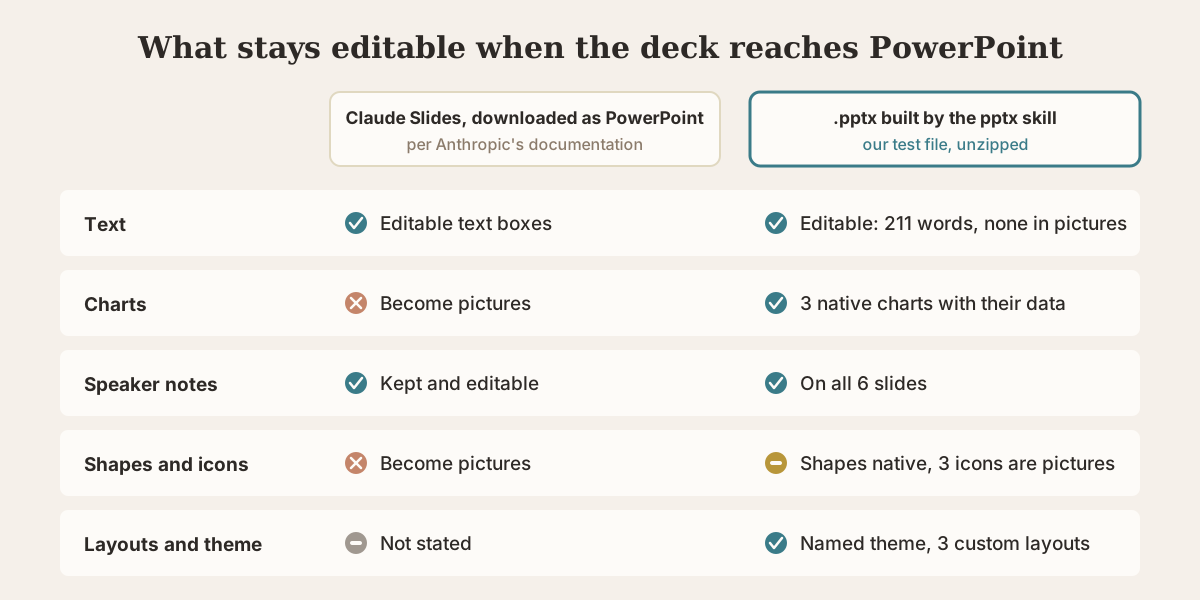
The route you pick decides what happens when the file reaches PowerPoint. Anthropic's documentation says a Claude Slides deck downloaded as PowerPoint keeps its text editable but turns charts into pictures. The file we built through the pptx skill kept all three charts as native PowerPoint charts with their data. This guide covers each route, what it costs, and what we found when we unzipped the result.
Can Claude make a PowerPoint?
Yes. As of November 2026, Claude offers four routes, and they differ more than their names suggest.
| Route | Where it runs | Plans | What you get | Tested here? |
|---|---|---|---|---|
| Claude Slides | Any Claude chat: web, desktop, mobile, Claude Code | All plans, including Free | A deck you edit and present inside Claude, with downloads as PDF, web page, PNG or PowerPoint | No, described from Anthropic's documentation |
| A .pptx file in chat | Claude on web, desktop and mobile | All plans, with code execution and file creation turned on | A PowerPoint file that Claude writes with code in a sandbox | The same skill, run in Claude Code |
| Claude for PowerPoint add-in | Inside PowerPoint on the web, Windows and Mac | Pro, Max, Team and Enterprise | Claude working in your open deck, using its slide master and layouts | No, described from Anthropic's documentation |
| Claude Code with the pptx skill | Your terminal | Pro and above | A .pptx written by a script on your own machine | Yes |
Claude's pricing page lists Free at $0, Pro at $17 a month billed annually or $20 billed monthly, Max at $100 and Ultra at $200. We checked it on November 13, 2026.
How we tested
We wanted a test where every number could be checked, so we wrote the source ourselves: a one-page Q3 wholesale review memo for a fictional coffee roaster. It contains a three-month table of planned and actual revenue, new accounts by segment, six months of churn, two risks, and three commitments with owners and dates. It is the kind of input a quarterly business review deck starts from.
The prompt was one sentence, followed by the memo:
Turn the memo below into a 6-slide PowerPoint deck (.pptx) for Thursday's leadership review. Use one chart per data slide, keep the text short, and add speaker notes to every slide.
- Where it ran: Claude Code on a Mac on November 13, 2026, using the Claude Fable 5.2 model and Anthropic's pptx skill.
- What we checked: A .pptx is a ZIP archive of XML files, as we explain in What Is a PPTX File. We unzipped the deck and counted what was inside, ran the skill's validator against the Office Open XML schema, rendered every slide, and compared each figure on the slides and in the notes with the memo.
- What we did not test: Claude Slides and the PowerPoint add-in. Those sections are based on Anthropic's documentation and say so. We also did not open the file in desktop PowerPoint. The slide images in this article were rendered with LibreOffice, so line breaks can differ slightly in PowerPoint.
- Scope: One run, one prompt, one short source. Results change with the model, the prompt and the material.
Tosea makes an AI presentation tool, and we have no affiliation with Anthropic.
Test result: six slides, three native charts, notes on every slide
Claude followed the brief. The deck has a cover, one slide each for revenue, new accounts and churn, a risks slide and a commitments slide. Each data slide carries one chart and a headline that states the finding, such as "Q3 revenue: $1,331K, 5.6% above plan".
Here is what the unzipped file contains.
| What we looked for | What was in the file |
|---|---|
| Slides | 6, as requested, at 13.33 by 7.5 inches (16:9) |
| Charts | 3 native PowerPoint charts (clustered column, bar, line), each with an embedded workbook |
| Text | 211 words in 36 titles and text boxes, all live text, with commentary at 16 pt |
| Pictures | 3, all small icons of about 3 KB each |
| Speaker notes | On 6 of 6 slides, 36 to 60 words each |
| Structure | 1 named theme, 3 custom layouts, 3 sections |
| Fonts | Cambria for headings, Calibri for body text |
| File size | 62 KB |
The charts are real PowerPoint charts. An embedded workbook is what lets you right-click a chart in PowerPoint and choose Edit Data. All three charts carried the memo's values exactly: 410 and 418 for July, 420 and 441 for August, 430 and 472 for September, and so on through the account and churn figures.
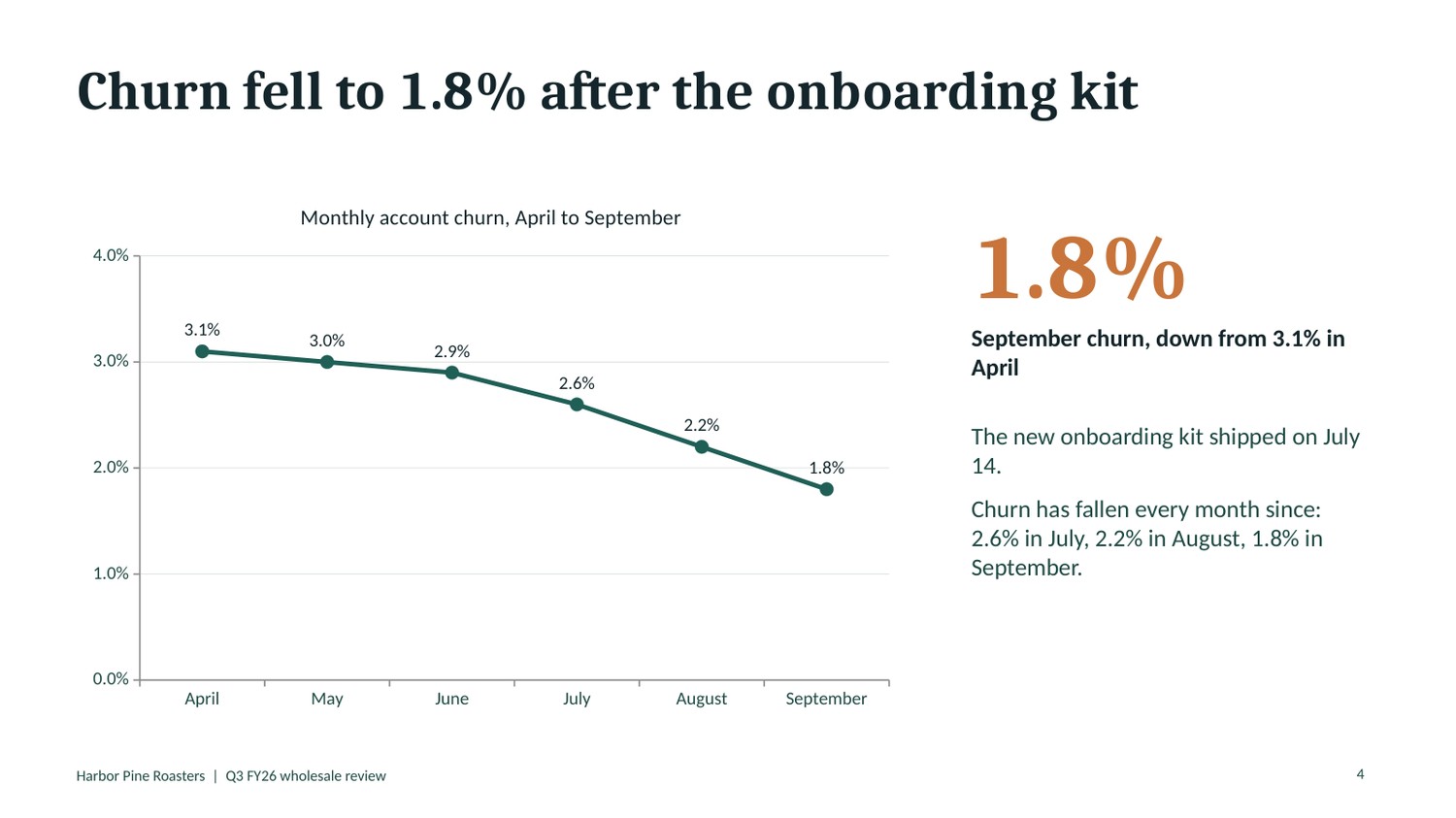
All of the text is editable. No words are baked into pictures. Each slide title is stored as a title placeholder, which is what PowerPoint's outline view and screen readers rely on, and it takes its position and formatting from the layout.
The speaker notes read as a script. They also did arithmetic the memo left implicit. The memo says the gap to plan widened every month. The notes spell out $8K in July, $21K in August and $42K in September, and all three are correct.
The deck has structure. Colors come from a named theme, and the three layouts carry the title position, footer and slide number. Change the theme in PowerPoint and the deck follows.
The first draft was not the final draft
Two things had to be fixed before the file was done.
- One unsupported claim. The first draft of the risks slide described green coffee as "our largest input cost". The memo never says that. The skill requires a content check against the source after building, and the phrase was removed in that pass.
- One layout slip. On the first render, the cover title was centered while the subtitle under it was left-aligned. That was corrected in the same pass.
Both fixes happened inside the same run, which took about three minutes including installing the pptxgenjs library. The takeaway matches the advice in Anthropic's own tutorial: check assumptions and figures against your source before you present. If nobody had looked, a sentence that was never in the memo would have gone to a leadership meeting.
Way 1: Claude Slides in any chat
Claude Slides is the default answer to "can Claude make slides" in 2026. According to Anthropic's tutorial, you can ask for a deck in any conversation on the web, desktop app, mobile app or Claude Code, and it opens beside the chat. It is available on every plan, and on Team and Enterprise an owner can switch it on or off.
What the tutorial describes:
- Asking. Say who the deck is for, then attach the memo, notes or spreadsheet. You can also attach a past deck as the pattern to follow.
- Editing. Change slides by hand as you would in PowerPoint or Keynote, leave a comment on one element for Claude, or ask in the chat for changes across several slides.
- Presenting. Present full screen from Claude, with a second window for speaker notes, a clock and the next slide.
- Downloading. PDF, a web page that keeps transitions, the current slide as an image, or PowerPoint with either your current fonts or basic fonts. If Google Drive is connected, you can send an editable copy to Google Slides.
The detail that matters for PowerPoint users is in the download section. Anthropic states that in the PowerPoint file you can keep editing text boxes, tables, pictures, slide backgrounds and speaker notes, while charts, icons and shapes become pictures and slide transitions are left out. If a colleague needs to change a number in a chart later, that is a real limit.
The tutorial also gives the workaround: if you want a PowerPoint file and got a deck in Claude, ask for "a .pptx" by name.
Way 2: Ask Claude for a .pptx file
This is the route for people who need a file. Claude's Help Center says code execution and file creation is available to all users, including the Free plan, on web, desktop and mobile. Claude writes and runs code in an isolated sandbox and hands you the result to download.
Two things to know:
- It needs the capability turned on. On individual plans, the switch is under Settings, then Capabilities, labelled code execution and file creation. On Team and Enterprise, an owner controls it.
- It uses a built-in skill. Anthropic lists PowerPoint presentation generation among the built-in skills available to all users, and says Claude uses it automatically when you ask for a presentation.
We did not run this route in the chat app. We ran Anthropic's pptx skill in Claude Code, and the results above are what that skill produced. Expect the same kind of file from the chat app, with differences that come from the model you pick and the sandbox it runs in.
Way 3: The Claude for PowerPoint add-in
This is the product most people mean by "Claude for PowerPoint". It is an add-in that puts Claude in a sidebar inside PowerPoint, and Anthropic's documentation lists it for Pro, Max, Team and Enterprise plans. It is not on the Free plan.
Supported versions, per Anthropic:
- PowerPoint on the web
- PowerPoint on Windows with a Microsoft 365 subscription, build 16.0.13127.20296 or later
- PowerPoint on Mac, version 16.46 or later
It does not run on PowerPoint 2016 or 2019 perpetual licenses, on iPad or on Android.
Install: open the Claude for Microsoft 365 listing in Microsoft's marketplace, choose Get it now, then open PowerPoint, activate the add-in and sign in with your Claude account.
What it is for: the add-in reads the slide master, layouts, fonts and colors of the deck you have open and works inside them. Anthropic describes building slides from a corporate template, editing a single slide without regenerating the deck, restructuring a storyline across slides, and turning bullets into native charts and diagrams. Usage counts against the same limits as your Claude account.
Cautions from Anthropic's own page:
- It is not recommended for final client deliverables without human review, or for highly sensitive data without proper controls.
- Use it only with trusted files. Decks from outside sources can contain hidden instructions that try to manipulate the add-in.
- After the September and October 2026 Microsoft 365 updates on Windows, some users are missing chat history and uploaded skills in the add-in. Anthropic says it is working with Microsoft on it.
On Microsoft's marketplace, the add-in showed a rating of 2.6 out of 5 from 70 ratings when we checked on November 13, 2026. In Reddit threads we found through search, people who like it tend to be working from a company template with a proper slide master, which is the case the add-in was built for. One popular r/powerpoint thread describes asking Claude for a slide-by-slide storyboard first and building the deck only after that is right.
Way 4: Claude Code with the pptx skill
Claude Code is Anthropic's coding agent, and it is the route we tested. It needs a Pro plan or above. With the pptx skill, Claude writes a short script, builds the file on your machine, validates it, renders the slides and fixes what it finds.
It suits people who make the same kind of deck repeatedly, because the script can be rerun with new numbers, and anyone who wants the build to happen locally. It is the least friendly route for someone who has never opened a terminal.
If you go this way, our list of the best Claude Code skills for PowerPoint compares the pptx skill with alternatives, and the HTML slide skills library covers skills that produce web-based decks.
Which way should you use?
| Your situation | Use | Why |
|---|---|---|
| You want a deck quickly and will present or share it from Claude | Claude Slides | Fastest path, free plan included, presenter view built in |
| You need a .pptx that colleagues will keep editing, including chart data | Ask for a .pptx file | In our test the skill produced native charts; Slides downloads turn charts into pictures |
| You have a corporate template or an existing deck to improve | The PowerPoint add-in | It works inside your slide master and edits slides in place |
| You rebuild similar decks often, or want a local, scriptable build | Claude Code with the pptx skill | The script is reusable and the file never leaves your machine during the build |
Where Claude still needs you
- Checking claims. Our first draft added a statement the memo did not contain. Numbers were right in this test, but the wording around them still needs a read.
- Images. Anthropic's tutorial notes that Claude may not be able to find or create photos, so product shots and logos are yours to attach.
- Chart editing after a Slides download. Charts arrive as pictures. Ask for a .pptx file if someone will update the data.
- Design sameness. Google autocomplete suggests "claude slides all look the same". Without a reference, Claude uses its own look. Attach a past deck, pick a design system, or start the add-in from your template.
- Iteration. Every change in chat is another prompt. For heavy rework, people on Reddit report exporting and finishing by hand.
- Long sources. A one-page memo is an easy input. We did not test a 50-page report with figures and tables in this run.
When a dedicated AI presentation tool makes more sense
Claude is a general assistant that can also build decks. A presentation generator starts from the deck. The difference shows up most with long source documents and with visual design.
Tosea.ai is the tool we make, so weigh this section with that in mind. You upload a PDF or describe a topic, and it composes a full deck, placing the source's own figures, tables and formulas on the slides and drawing on a gallery of presentation templates. If your starting point is a research paper or a long report, try the AI PDF to PPT workflow. If you already have a PDF of finished slides and only need them editable in PowerPoint, the free PDF to PPT converter rebuilds each page as an editable slide.
A few related guides: HTML slides versus image slides explains the two ways AI tools draw a slide, How to Make a PowerPoint With NotebookLM shows what happens when an export arrives as one picture per slide, and our AI presentation makers comparison scores six tools on design.
FAQ
Is Claude for PowerPoint free?
Partly. Claude Slides and file creation are listed on the Free plan, with usage limits. The PowerPoint add-in needs Pro or above, which is $17 a month billed annually or $20 billed monthly as of November 13, 2026. Claude Code also needs Pro or above.
Does Claude for PowerPoint work on Mac?
Yes. Anthropic lists PowerPoint on Mac, version 16.46 or later, as supported, along with PowerPoint on the web and Microsoft 365 on Windows. The add-in does not run on iPad or Android.
Can Claude edit an existing PowerPoint?
Yes. The add-in is the direct route, because it edits the deck you have open and keeps its template. Anthropic's pptx skill also documents an edit path for existing files, which works by unpacking the .pptx and changing the slide XML. We did not test editing in this run.
Can Claude read a PowerPoint file?
Yes. In our run, the skill's reader pulled each slide's title, text, chart data and speaker notes back out of the finished file, which is how we checked the numbers. If you only need the notes out of a deck, our free speaker notes extractor does that in the browser.
Is Claude or ChatGPT better for making a PowerPoint?
We ran the same memo and prompt through the ChatGPT chat app on a Plus plan on the same day. Both tools returned a six-slide .pptx with native charts, speaker notes on every slide and no wrong figures. The details differed. ChatGPT reported 6 minutes 52 seconds of thinking, against about three minutes for the whole Claude Code run. It drew five charts to Claude's three and put 432 words on the slides to Claude's 211, with its commentary sentences set at 8.5 pt against 16 pt in Claude's deck. Claude's file used a named theme, layouts and title placeholders, while ChatGPT's used one default layout and plain text boxes. The two ran on different surfaces, so read this as two data points, not a ranking. The ChatGPT file is taken apart in Can ChatGPT Make a PowerPoint?.
Why do Claude slides all look the same?
Because Claude falls back on its own default look when it has nothing else to go on. Anthropic's tutorial suggests attaching a past deck or selecting a design system. In the add-in, apply your template before asking for content. In the file route, name the palette and fonts in the prompt.
Sources
- Making slides and presentations with Claude — Claude Academy, Anthropic
- Use Claude for PowerPoint — Claude documentation, Anthropic
- Create and edit files with Claude — Claude Help Center
- Use skills in Claude — Claude Help Center
- Plans and pricing — Anthropic, checked November 13, 2026
- Claude by Anthropic for PowerPoint — Microsoft Marketplace listing, checked November 13, 2026
- PPTX skill — Anthropic, GitHub
- Have you ever used Claude for PPT to create decks? — r/powerpoint, read as a search excerpt