30+ Best HTML Slide Skills for Claude Code, Codex & Cursor: Complete 2026 Library
A curated 2026 library of 30+ HTML slide skills for Claude Code, Codex, Cursor, OpenClaw, and Hermes, organized into a three-tier system so you can pick the right one for any presentation.
HTML presentations have moved from a developer curiosity to a default format. In engineering and AI communities, the shift away from PowerPoint and Google Slides toward browser-native HTML slide decks accelerated through 2026, for practical reasons: they run in any browser without installing software, support native smooth animations, export as a single portable file, and can be generated from a simple text input using AI coding agents.
The problem is volume. There are now dozens of HTML slide generation skills compatible with Claude Code, Codex, Cursor, OpenClaw, and Hermes — each with a different visual style, feature depth, and output speed. Finding the right one for a specific deck requires knowing what you are looking for before you start, and most people do not. This library is a curated answer: a three-tier system you can navigate in seconds, plus the methodology behind how the skills were sorted.
If you would rather skip skill selection and go straight to a finished HTML deck, Tosea.ai generates HTML slide decks directly from your uploaded documents with no skill installation. This guide is still worth reading either way — it explains the tradeoffs any document-to-deck workflow has to make, whether you run it through an agent or upload a file.
Get Started With Awesome HTML Slide Skills
The full library lives at github.com/ToseaAI/awesome-html-slide-skills. Each skill entry in the README documents its use case, visual style, key characteristics, and the installation command for compatible agent frameworks. The repository is organized by the same three tiers described below, so the README and this article map to each other directly.
What Is an HTML Slide Skill?
An HTML slide skill is a structured capability module — a SKILL.md file — that teaches an AI coding agent how to transform text input into a complete HTML presentation. Once installed, you describe what you want in plain language, provide a Markdown outline, or paste a document excerpt, and the agent returns a self-contained HTML file that plays as a full presentation in any browser.
Skills work with all major AI coding agent frameworks:
- Claude Code (Anthropic's terminal coding agent)
- OpenClaw (open-source agent framework)
- Hermes Agent (self-improving agent by Nous Research)
- Cursor (AI-native IDE)
- Codex CLI (OpenAI's terminal agent)
The main advantage over ad-hoc prompting is consistency: a skill encodes not just the visual requirements but the structural logic — section organization, slide hierarchy, animation behavior, typography — so output stays reproducible across different inputs. For the broader context, our analysis of how AI agents are redefining slide creation covers the shift from template-filling to structure-driven generation in more depth.
The Problem This Library Solves
The HTML slide skill ecosystem grew quickly, with new skills arriving regularly from individual developers, design studios, and AI tool builders. Each claims to produce good-looking presentations, and most do — in different ways, for different audiences, at different quality-speed tradeoffs. Without curation, choosing one means reading multiple README files, testing outputs across content types, and judging the visuals by eye, which for most people takes longer than just building the deck manually. The ToseaAI/awesome-html-slide-skills repository sorts the most capable and distinctive skills into a three-tier classification so you can choose without running tests yourself.
How We Evaluated These Skills
The tier classification is not arbitrary. Every skill considered for the library was run through the same four-criteria evaluation, using a fixed set of test inputs (a structured Markdown outline, a raw bullet-point dump, and a 1,200-word document excerpt) so results were comparable rather than cherry-picked.
- Visual quality. How the rendered deck looks on a large screen and on a phone — layout sophistication, typographic hierarchy, color discipline, spacing, and whether the design holds up slide-to-slide instead of collapsing after the title slide.
- Output reliability. Run the same input five times: does it produce a coherent, complete deck every time, or occasionally drop sections, mangle a layout, or emit broken HTML? This separates skills you can trust under deadline from skills you have to babysit.
- Input-format tolerance. Does the skill only work from a clean hierarchical outline, or can it also turn rough notes and fragments into a sensible slide sequence? High tolerance means less prep before you ever invoke it.
- Generation speed. Wall-clock time from invocation to a finished file on the same model and hardware. Speed matters most when you need a deck in ten minutes and least when you have a week.
No single skill wins on all four. Maximizing visual quality usually trades away speed and demands structured input; building for velocity gives up visual depth. The three-tier system maps where each skill sits on those tradeoffs, so you pick the corner that matches your situation instead of chasing a skill that is best at everything (none is).
The Three-Tier Classification System
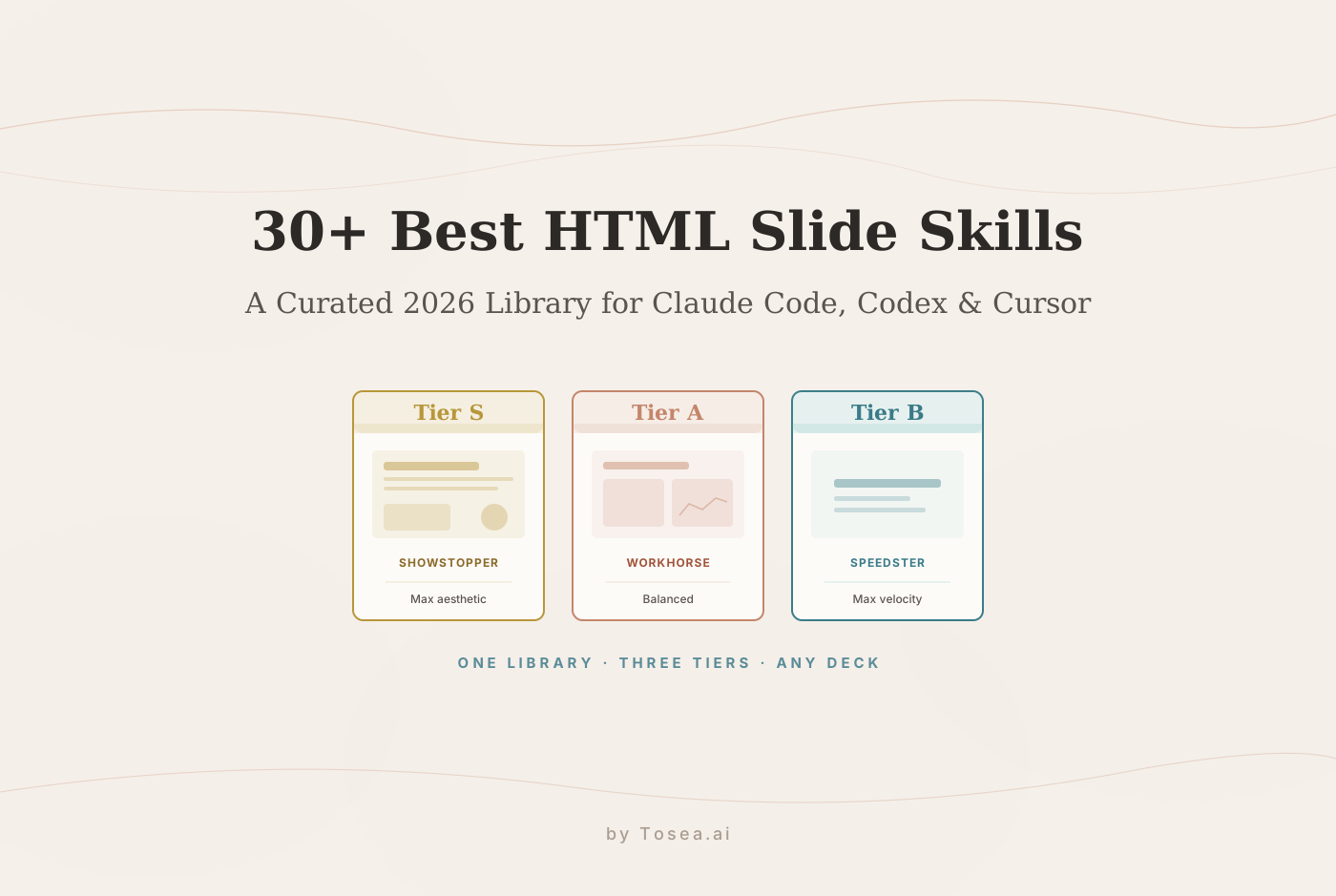
The library organizes skills into three tiers based on the tradeoff between visual sophistication, feature depth, and generation speed. Understanding the tier logic lets you navigate to the right skill in seconds instead of reading through individual documentation.
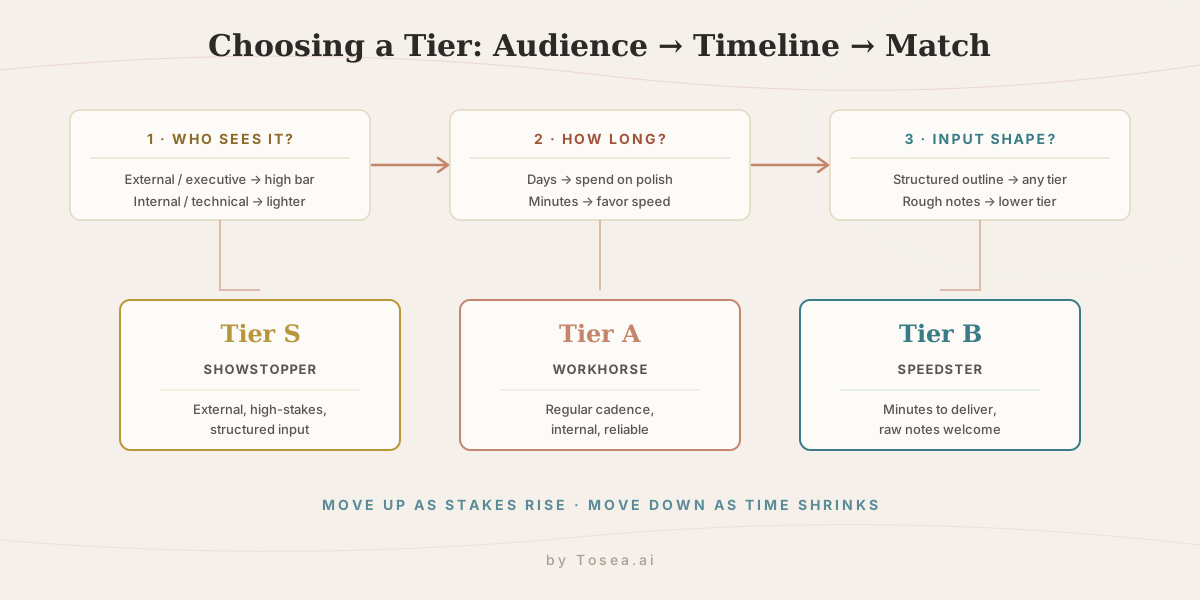
The decision flow is simple: start from who will see the deck, factor in how long you have, then check how structured your source material is. Audience sets the floor for visual quality, timeline sets the ceiling for how much generation time you can spend, and input structure decides whether the more opinionated high-tier skills will even work well for you.
Tier S — The Showstopper: Maximum Aesthetic, Full Feature Depth
Best for: high-stakes presentations, public speaking engagements, product launch decks, investor pitches, and any context where visual impact is the primary success criterion.
Tier S skills produce the most visually impressive HTML presentations in the agent skill ecosystem. They implement sophisticated layout systems — multi-column grids, full-bleed imagery, parallax-style transitions, and typographic hierarchies that match a professional design studio. These are the skills you reach for when the presentation itself needs to make an argument about your organization's polish.
The tradeoff is generation time and complexity: Tier S skills produce longer, more structured internal prompts, so the agent takes more passes. If you need something in under five minutes, Tier A or B is better; for a company-wide strategy deck or an external launch, the extra time is justified. They are also the most opinionated about structure — they expect well-organized input with a clear section hierarchy and do their best work when the source material is already structured rather than raw notes.
Tier S in practice: a Series B pitch deck
A founder preparing a Series B raise has a 14-slide narrative drafted in a doc: problem, market size, traction with three quarters of revenue data, product architecture, go-to-market, team, the ask. The audience is partners who see hundreds of decks a quarter, and the deck will be shown on a large screen and then forwarded as a file. This is the textbook Tier S case: the input is structured, the stakes justify a longer pass, and the cost of looking unpolished in that room is measured in valuation. The founder feeds the outline to a Tier S skill, gets a full-bleed, animated deck with consistent typographic rhythm, and spends the saved time rehearsing rather than nudging text boxes. For founders, our notes on AI presentations for startup pitch decks go deeper on what investors actually look at.
Tier A — The Workhorse: Balanced Performance and Efficiency
Best for: team weekly updates, internal technical presentations, project proposals, engineering retrospectives, and any regular reporting cadence where you need consistently good output without significant production time.
Tier A skills are the most versatile in the library. They produce professional, visually coherent HTML presentations that look meaningfully better than auto-generated slide tools while generating fast enough to fit a regular workflow without becoming a bottleneck. The design systems lean toward clean, functional layouts — clear hierarchy, readable typography, sensible color and contrast, smooth but not overly complex transitions — the kind of deck a professional shows to a manager, client, or cross-functional team without apologizing for the design.
The defining strength of Tier A is reliability: these skills handle everything from structured outlines to relatively unstructured notes and still produce coherent output without forcing the presenter to reorganize the source material first.
Tier A in practice: a recurring engineering review
An engineering lead presents a fortnightly review to a cross-functional group: shipped work, in-flight projects, risk items, next-sprint priorities. The content changes every two weeks, the audience is internal, and nobody is judging the gradient on the title slide — but a wall of unstyled bullets reads as careless. Tier A is the right default here because it is repeatable: the same rough notes go in every cycle and a clean, consistent deck comes out in a couple of minutes. Over a quarter that is the difference between a workflow and a chore. Teams running this pattern at larger scale should also see our guide on building a massive slide deck in minutes.
Tier B — The Speedster: Minimalist Design, Maximum Velocity
Best for: internal brainstorming sessions, developer conference lightning talks, academic note presentations, quick concept walkthroughs, and any situation where getting ideas on screen immediately matters more than visual sophistication.
Tier B skills are built for speed. They implement minimal design systems — clean white or dark backgrounds, a single accent color, generous whitespace, simple typography — that look intentionally minimal rather than accidentally sparse, borrowing from developer culture where clarity and information density beat decoration. They also generate from the roughest input: a bulleted list, raw notes, a few fragments all turn into a coherent slide sequence faster than any other category, with no organization required from the presenter. That makes them the most forgiving with text-heavy content — academic material, technical specifications, and conceptual frameworks that would look cluttered in a complex template.
Tier B in practice: a conference lightning talk
A developer has a five-minute lightning talk tomorrow and a page of half-formed notes about a debugging technique. There is no time and no need for a designed deck — the audience wants the idea, fast, on a projector. Tier B takes the raw notes, returns a clean dark-background sequence with one idea per slide, and the developer spends the evening practicing delivery instead of fighting layout. This is also the right tier for presenting research notes to yourself or a small group; our free AI PPT generators guide covers other lightweight options in the same speed bracket.
The Three Tiers at a Glance
| Tier | Best for | Visual depth | Speed | Input tolerance | Example use |
|---|---|---|---|---|---|
| S — Showstopper | External, high-stakes decks | Highest (design-studio grade) | Slowest | Low (needs structured input) | Series B investor pitch |
| A — Workhorse | Regular internal & client decks | High (clean, professional) | Medium | High (notes or outlines) | Fortnightly engineering review |
| B — Speedster | Fast, exploratory, technical | Minimalist by design | Fastest | Highest (raw fragments) | Conference lightning talk |
Read the table as a single decision: move down the tiers as your timeline shrinks and your audience gets more internal; move up as the stakes rise and your input gets more structured. Most teams end up living in Tier A for day-to-day work and reaching for Tier S only a handful of times a year.
How to Install and Use Skills From the Library
With Claude Code
# Add the curated marketplace
/plugin marketplace add ToseaAI/awesome-html-slide-skills

# Or install individual skills directly
clawhub install tosea-slide-showstopper     # Tier S
clawhub install tosea-slide-workhorse       # Tier A
clawhub install tosea-slide-speedster       # Tier B
Once installed, invoke the skill by describing your presentation in natural language (for example: "Generate an HTML presentation about our Q2 product roadmap, focus on three major features, include a timeline slide, use the Showstopper template"). For a broader walkthrough of working inside the agent itself, see our Claude Code complete guide.
With OpenClaw or Hermes Agent
Skills from the library follow the standard SKILL.md format and install into your .claude/skills/ or .agents/skills/ directory. Clone the repository and copy the relevant skill directories:
git clone https://github.com/ToseaAI/awesome-html-slide-skills.git
cp -r awesome-html-slide-skills/tier-s/showstopper ~/.claude/skills/
OpenClaw users who want to combine slide skills with other productivity skills should check our roundup of the best OpenClaw skills for productivity, and the Hermes Agent guide explains how a self-improving agent refines skill output over repeated runs.
With Cursor
Install skills through Cursor's built-in skill management or copy the SKILL.md file to your project's .cursor/skills/ directory. Invoke the skill by describing your presentation in the Cursor chat interface.
With any compatible agent and skill installed, the input can be as simple as a single sentence ("a presentation on our 2026 sustainability strategy covering emissions targets, supply chain changes, and community programs, using the Workhorse template") or as structured as a full Markdown outline. The skill handles the translation from your input format to a complete, self-contained HTML file that plays in any browser.
How to Choose the Right Skill for Your Use Case
The three-tier system is the primary filter. Use this process to narrow further:
- Start with the audience. External, executive-level, or unfamiliar with your work → start in Tier S. Internal or technical → Tier A or B.
- Consider your timeline. More than 30 minutes and appearance matters → Tier S or A. Slides needed in the next 10 minutes → Tier B.
- Evaluate your source material. A well-structured document with clear sections → any tier works. Rough notes or fragmented ideas → Tier B handles them most reliably.
- Think about the viewing context. Browser on a large screen → Tier S visual complexity pays off. Shared as a link and viewed on mobile → Tier A or B's cleaner, more readable layouts.
Who Should Use the Skill Approach vs Direct Upload
The skill approach and a direct document-upload tool solve the same end goal — a finished HTML deck — but suit different people.
The skill approach fits developers and technical teams who already live in Claude Code, Cursor, or an OpenClaw setup, who want the deck-generation step scripted into a larger pipeline, and who value being able to fork a SKILL.md and tune the design system to a house style. If you generate decks programmatically as part of CI, a build step, or a reporting bot, skills are the natural fit.
The direct upload approach fits people whose source of truth is a finished document — a PDF report, a Word strategy doc, a research paper — rather than a prompt. If your real input is "this 30-page document," routing it through an agent and a skill adds steps a document-to-deck tool removes. The tradeoff between these paths, and between HTML and image-based output, is covered in detail in our guide on HTML vs image AI slide generation. Many teams use both: skills for quick, prompt-driven decks inside the editor, and a document pipeline when the input is a real source file that has to be faithfully represented.
Tosea.ai: The Document-to-Deck Orchestration Layer
For users whose starting point is a document rather than a prompt, Tosea.ai provides a direct document-to-presentation workflow that sits one layer above the skill ecosystem. Instead of selecting a skill, configuring an agent environment, and writing an invocation, you upload your PDF, Word document, research report, or structured notes. Its Spatial Semantic Perception engine reads the logical hierarchy of your content — main argument, supporting sections, key data points, conclusion — and runs the full AI slide generation pass in one step. The output is comparable to a Tier A or Tier S skill in visual quality, with the added property that every claim in the deck is traceable back to the source document through Absolute Traceability, which matters when the deck has to survive scrutiny.
In other words, Tosea.ai is the document-to-PPT orchestration layer of the same workflow this library describes: the tier tradeoffs still apply, but the skill-selection and agent-configuration steps are removed and the presentation workflow starts from your file. Export the finished deck as an HTML file, open it in any browser, and present — the full animation and transition system works immediately. Teams that already pair Tosea with an agent can read our OpenClaw + Tosea slides skill guide for the combined setup.
For the agent-based path, start with the tier that matches your most common use case and test it with a presentation you would actually give. For the document-upload path, Tosea.ai handles the full workflow from source file to finished slide deck.
Sources
- ToseaAI/awesome-html-slide-skills — curated HTML slide skill library (GitHub)
- Claude Code — Anthropic terminal coding agent (GitHub)
- OpenClaw — open-source agent framework (GitHub)
- Hermes Agent — self-improving agent by Nous Research (GitHub)
- Codex CLI — OpenAI terminal agent (GitHub)
- Cursor — AI-native IDE (Official site)