How to Build a Quarterly Business Review (QBR) Deck: Complete Guide (2026)
Complete guide to the Quarterly Business Review deck for B2B SaaS customer success and account teams: standard 12-18 slide structure, value realization, adoption, risks, expansion, and renewal asks.
The Quarterly Business Review is the single most consequential customer-facing meeting in B2B SaaS. It is where renewal is decided in practice — long before the contract date — and where expansion either gets a credible foothold or quietly disappears. The deck that drives a QBR is therefore not a status update. It is a renewal argument with metrics, evidence, and a clear ask.
Most QBR decks fail not because customer success teams cannot present, but because the deck itself is structured wrong: it leads with features instead of outcomes, hides the metrics that matter behind cluttered dashboards, and ends without a single ask the customer's executives can act on. By the time the meeting is over, no decision has been made — and the renewal slides another quarter toward the cliff.
This guide walks through the standard 12-to-18-slide QBR deck structure, the four slides that actually decide renewal, the metrics customer execs read first, the workflow for turning your CRM and product analytics into a deck in under an hour, and the rehearsal plan that prevents the most common QBR failures. It is built for customer success managers, account managers, and partner managers at SaaS companies between Series B and IPO scale, though the structure transfers cleanly to enterprise software and managed services.
If you are early in QBR design and want a head start, Tosea.ai generates the recommended structure below from your CRM export and product analytics in under a minute, using consulting-grade templates that match how customer executives actually read decks. Register at tosea.ai and follow along.
What a QBR Actually Is (and What It Is Not)
A QBR is a quarterly meeting between a vendor's customer success or account team and the customer's economic buyer, plus relevant stakeholders. It runs 45 to 90 minutes. The agenda is value realization — proof that the customer is getting what they bought — combined with a forward-looking roadmap and a renewal-or-expansion conversation.
A QBR is not:
- A weekly check-in. Those are operational. The QBR is strategic.
- A product roadmap presentation. The roadmap is part of the QBR, but the QBR is fundamentally about the customer's outcomes, not your team's release plan.
- A renewal pitch. Pitching renewal in the QBR is too late; the QBR is where the renewal case is built, slide by slide, on evidence.
- A demo. If your QBR is a demo, your customer is too early in adoption for a QBR.
Gainsight's QBR playbook frames it correctly: the QBR is the moment customer success makes the business case for continued investment, in language the customer's CFO and COO can defend. Every slide should reinforce that case or be cut.
The Audience: Who Actually Reads Your QBR
Before designing any slide, name the audience by role. A typical enterprise QBR is attended by:
- The economic buyer. Usually a VP or C-level on the customer side who owns the budget. Reads two slides: value realization and the renewal ask.
- The day-to-day power user. Usually a director or manager. Reads adoption, the roadmap, and the support metrics.
- The exec sponsor. Senior on the customer side, often new to the deck. Reads only the cover slide and the asks.
- Your AE and CSM. Co-present. Will be quizzed live by all of the above.
The standard mistake is designing for the power user. The power user already knows you are useful — they pulled you in to begin with. The economic buyer is the one whose calendar is on the line, and the exec sponsor is the one whose attention is the scarcest. Both will read the deck in five minutes, not 45. Every slide must work at the speed-read tier.
The Standard 12-to-18 Slide QBR Structure
The QBR deck has converged across the industry to a recognizable structure. Length flexes with relationship size — a $50k ACV customer gets 12 slides; a $2M ACV customer gets 18. The order matters more than the count.
Section 1 — Frame the quarter (2 slides)
- Cover. Customer logo, quarter, attendees on both sides, your team's photos. This is the only slide the exec sponsor will read before the meeting; treat it like a hook.
- Recap of last QBR commitments. What did we promise last quarter, and did we deliver? This is the credibility slide. If you skip it, every later claim is suspect.
Section 2 — Prove value (3-5 slides, the renewal-deciding section)
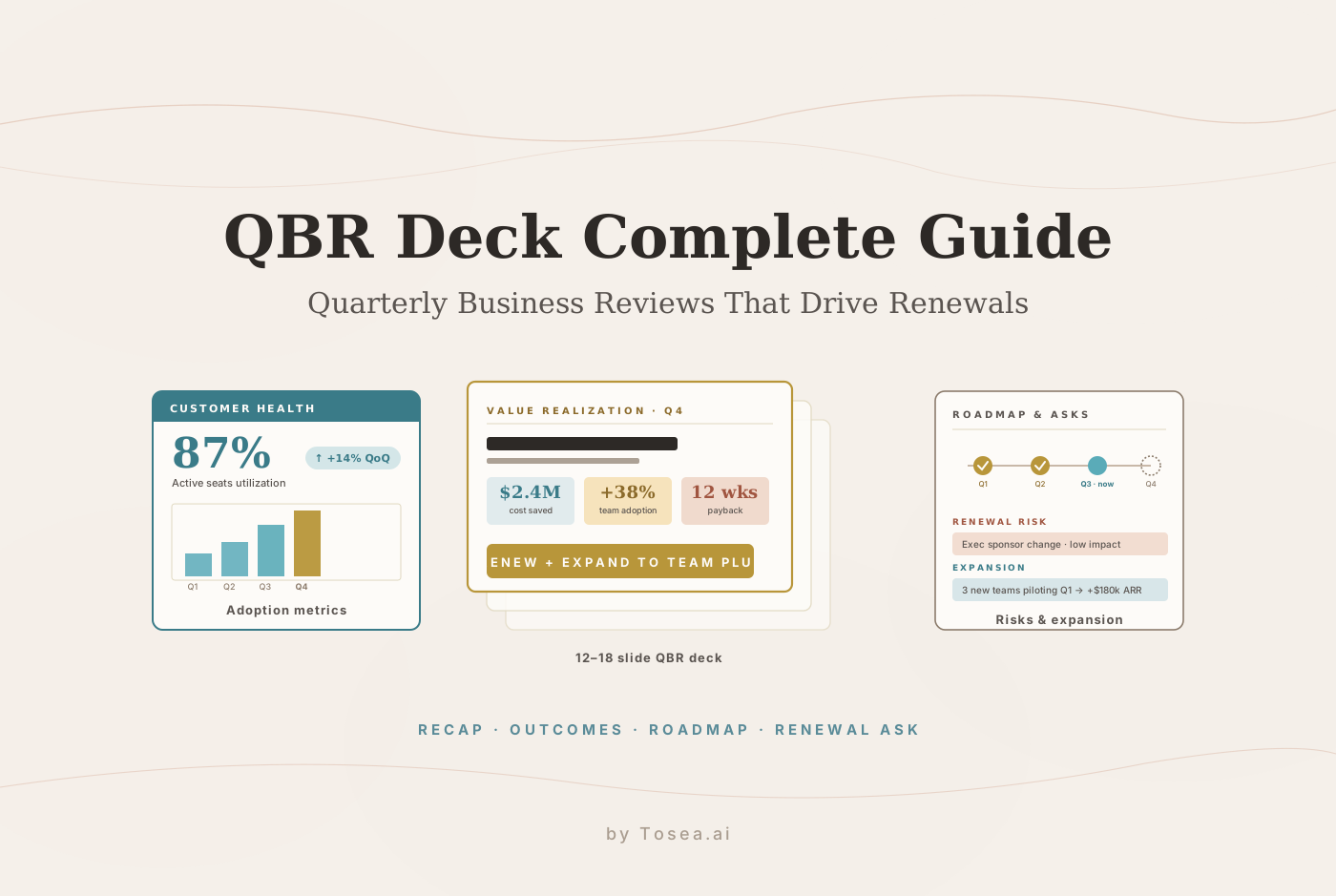
- Value realization headline. One slide, three or four metrics, framed in the customer's language. "$2.4M in cost saved" is the customer's language. "Reduced average ticket time by 27%" is yours. Use both, lead with theirs.
- Adoption metrics. Active seats, license utilization, key-feature penetration, weekly active users. A quarter-over-quarter trend chart beats a single number every time.
- Outcomes attached to adoption. This is the slide most teams skip and the slide every economic buyer wants. Pair adoption directly to a business outcome: seats utilization rose from 62% to 87%, which correlated with cases-per-rep falling from 42 to 31 per week. The correlation does not need to be causation; it needs to be defensible.
- Top success stories. One or two named team wins, with the human story. "The procurement team used the API integration to consolidate 14 spreadsheets — three weeks of manual work — into a daily automated report." Quoted from the user, not paraphrased.
- Optional: ROI calculation. If your contract was justified on an ROI model, return to that model with updated numbers. CFOs love this slide.
Section 3 — Acknowledge what didn't work (1-2 slides)
- What didn't go well. Always include this slide. Hiding negative metrics is the fastest way to lose trust. A line like "support response times in March slipped to 14 hours from our 8-hour target due to staffing constraints; we have hired three new engineers and the September average is back at 6 hours" earns more credibility than five slides of green checkmarks.
- Optional: lessons learned. Briefer than #8. A one-line callout on what we changed internally.
Section 4 — Roadmap and forward look (3-4 slides)
- Customer roadmap recap. What initiatives is the customer driving this year? Re-state them in their language. This signals you are tracking their roadmap, not just yours.
- Product roadmap, filtered. Show only the upcoming features the customer cares about, on a clear timeline (next 30 / 60 / 90 days). The full roadmap goes in the appendix.
- Your team's commitments for next quarter. Specific, dated, owned. By Nov 15, we will deliver the SSO integration with Okta and run a training session with the procurement team.
Section 5 — The expansion and risk conversation (2-3 slides)
- Land and expand. Where the next dollar of expansion is. New teams piloting your product. New product modules they are evaluating. New geographies. The frame is here is what we see; here is what your peers are doing.
- Renewal risk and health. Honest. Customer health score, exec sponsor changes since last quarter, recent escalations, contract end date. Renewal is 14 weeks out. Current health: Green with one watch item.
- Optional: competitive landscape. Only if a competitor is actively in the account. Brief, factual, no FUD.
Section 6 — The ask (1-2 slides)
- Decisions required from the customer. This is the single most important slide. Two or three named asks: approve the SSO integration sprint; introduce us to the team piloting in EMEA; commit to the August executive sponsorship review. If your QBR ends without naming asks, the meeting did not happen.
- Appendix and detailed metrics. Detailed dashboards, full feature roadmap, integration architecture, support SLA detail. Lives at the back; you may never present it.
The Four Slides That Actually Decide Renewal
Of those 12-18 slides, four are doing almost all the renewal work. If you have 30 minutes to prepare instead of three hours, make these four perfect first.
1. The Value Realization Slide
The slide that decides the renewal in the economic buyer's head. Three to four metrics, each tied to a dollar figure or a percentage the customer's CFO can quote upward. The format that works best is a metric grid: each cell shows the number, the unit, and a one-line context. No paragraphs. The CFO read time is 30 seconds.
The mistake is presenting volume metrics ("we processed 14M API calls this quarter") instead of outcome metrics ("the API consolidation eliminated $440k of annual headcount cost in operations"). Customers do not buy volume; they buy outcomes.
2. The Adoption Slide
Adoption is the leading indicator for renewal. Customers who do not adopt do not renew. The slide should show seats × usage × key feature penetration as a single chart with quarter-over-quarter trend, plus a one-line callout naming the change ("license utilization rose from 62% to 87% after the procurement team onboarded"). Adoption with no explanation is wallpaper; adoption with a causal story is a renewal argument.
3. The Roadmap Slide
The roadmap slide is where the customer either commits forward time and budget to your platform, or starts hedging toward an alternative. The mistake is showing the full product roadmap. The right cut is the filtered roadmap — the three to five upcoming features your customer cares about, in their priority order. If the procurement team is your power user, show procurement features first.
A small but powerful tactic: include one item from the customer's own roadmap on the slide, with a note showing how your product helps. This earns more goodwill than ten slides of features.
4. The Asks Slide
Without this slide, the QBR is a status meeting. With it, the QBR is a decision meeting. Two to three asks, each named, dated, and ownable. Approve the SSO sprint by end of next week. Introduce us to the EMEA pilot lead by Oct 30. Commit Mary's calendar to the August exec review. Specificity is the entire game.
What Customer Executives Read First (The 5-Minute Test)
Before you ship the deck, run it through the five-minute test. Imagine the customer's economic buyer opening the PDF at 9:55 a.m. on the day of the QBR, with a 10:00 a.m. meeting starting. They have five minutes.
In those five minutes they will:
- Read the cover slide (10 seconds).
- Skim the value realization headline (45 seconds).
- Look at the adoption chart shape, not the numbers (15 seconds).
- Flip to the asks slide and read each one (60 seconds).
- Glance at the renewal-risk slide for the health color (15 seconds).
That accounts for less than three minutes. The rest is dead air. So those four slides — cover, value realization, asks, renewal risk — have to fully carry the meeting on their own. If any of them is unclear at five-minute read speed, the meeting starts with the customer confused or skeptical.
This is the same speed-reading discipline that the executive summary master slide guide recommends for general-purpose exec decks. The QBR is just a multi-slide version of that one-slide problem.
The Six Most Common QBR Mistakes (and How to Fix Each)
- Leading with features. Every QBR opens with three slides about your product. Fix: lead with the customer's outcome, then prove it with adoption, then circle back to features only when relevant.
- Hiding negative metrics. No QBR is all-green. Customer execs distrust all-green decks. Fix: one slide on what did not go well, what you changed, and where the metric is now.
- No asks slide. The meeting ends, the CSM exits the room, and no decision was made. Fix: every QBR ends with two or three named asks. Without them, the meeting was a status update.
- Comparing to the wrong cohort. Showing "average customer" benchmarks when this customer is 3x the median seat count makes them feel small. Fix: benchmark against customers of similar size and industry.
- Talking instead of presenting. A 70-minute monologue with one slide per topic. Fix: aim for under 90 seconds per slide on average; if a section needs longer, split it.
- No internal alignment before the meeting. The AE thinks expansion is the goal, the CSM thinks retention is the goal, and they contradict each other in front of the customer. Fix: the day before, the AE and CSM agree on the asks slide and rehearse who answers which question.
Discipline-Specific Notes
The structure above is the B2B SaaS baseline. Three common adaptations:
- Infrastructure / DevTools. The adoption section emphasizes API call volumes, error rates, and integration coverage. Add a technical roadmap slide that shows infrastructure changes coming and how the customer's stack maps to them.
- Vertical SaaS (healthcare, legal, fintech). Add a compliance and regulatory updates slide between adoption and roadmap. This is often the single most-read slide by the customer's general counsel.
- Marketing tech / AdTech. Adoption metrics are usually pixel placements, campaign volumes, and attribution model coverage. Pair adoption with a spend efficiency slide showing dollars saved or revenue lifted, since marketing leaders read the deck in terms of ROAS.
The renewal-and-expansion conversation pattern stays the same regardless of vertical.
The Workflow: From CRM Export to QBR Deck in Under an Hour
The traditional CSM workflow for a QBR deck is roughly five hours per customer per quarter: pull data from the CRM, export usage data from product analytics, request adoption breakdowns from data science, copy numbers into PowerPoint, design a fresh template per customer, run it past the AE, run it past the manager. For a CSM with 30 accounts, that is the entire quarter consumed in QBR prep.
The faster pattern uses three inputs and a document-to-deck tool:
- CRM snapshot (Salesforce, HubSpot, or equivalent) exported as a PDF or .docx that includes: contract terms, ARR, contacts, recent activity log, support ticket history, NPS scores.
- Product analytics export (Amplitude, Mixpanel, Pendo, or your own data) — a one-page summary of seats, license utilization, key feature usage, and adoption trend over four quarters.
- A roadmap snippet — the three to five features relevant to this customer, with dates, from your product team's planning doc.
Combine the three into a single Markdown or PDF document. Upload it to Tosea.ai. Pick a consulting-grade template (we recommend the Executive Platinum or Strategy Navy for QBRs). Tosea reads the structure, maps each section to the 12-18-slide QBR template above, and produces a draft deck in under a minute. Every chart and quote retains a traceability link back to the source document, which means when your AE asks "where does this number come from," the answer is one click away.
From there, the CSM spends 20 minutes editing: tightening the asks slide, adding the human story to a success-story slide, swapping in the customer's logo and a fresh cover slide. Total time from data export to ready deck: under an hour. This is the same pattern we walk through in our document transformation for executive presentations and hallucination-free document-to-PPT guides, applied to the QBR genre specifically.
For teams running 80+ QBRs per quarter, the move from five hours to under an hour per deck is the difference between QBR season being survivable and QBR season being where renewals quietly slip.
Pre-QBR Rehearsal Plan
Even a great deck flops if the CSM and AE walk in unrehearsed. A 30-minute internal rehearsal the day before, run on this checklist, is what separates the meetings that close from the meetings that drift.
One week before:
- AE and CSM align on the two or three asks. Write them on the asks slide.
- Confirm attendees on the customer side and pre-flight any new attendee (e.g., a new exec sponsor) with their team to learn their priorities.
- Send the deck draft to your manager for a sanity check on the renewal-risk slide.
Two days before:
- Send the deck to the customer's main point of contact with a note: Here is the deck for Thursday. We will spend the most time on slides 4 (outcomes), 11 (roadmap), and 16 (asks). Anything you want us to add? This is the single highest-ROI message in the cycle — it converts blind meetings into prepared meetings.
Day before:
- 30-minute internal rehearsal. AE presents the cover, value realization, and asks slides. CSM presents adoption, roadmap, and risk. The other partner asks the hardest customer questions you can imagine. Specifically rehearse: "Why should we renew at this price?" and "What if we went with [competitor]?"
Day of:
- Open the meeting by recapping last quarter's commitments. Close the meeting by reading each ask out loud and asking, Can we get a decision on these by [date]? Get a verbal yes or a clear next step on the spot.
For deeper rehearsal patterns and how senior consultants prepare research deliveries, see our McKinsey way of presenting research findings guide.
The QBR Deck Final Checklist
Before you send the deck, verify each item:
- Cover slide names every attendee on both sides.
- Value realization slide shows 3-4 metrics, each tied to a dollar or percentage outcome.
- Adoption slide includes quarter-over-quarter trend, not just current state.
- One success story is named and quoted.
- One slide explicitly covers what did not go well, with the corrective action.
- Product roadmap is filtered to this customer's priorities.
- Your team's commitments for next quarter are dated and owned.
- Asks slide names 2-3 decisions, each with a date and an owner.
- Renewal-risk slide includes health score, contract end date, and any exec sponsor changes.
- Total slide count is between 12 and 18 (appendix excluded).
- Every chart is sourced; every quote is attributed.
If any box is unchecked, fix before sending. The QBR is a renewal argument, and renewal arguments are won on detail.
QBRs in the Broader Customer Success Stack
A QBR does not stand alone. It sits inside a customer success operating cadence that typically includes: weekly stand-ups with the power user, monthly health reviews with the manager, the quarterly QBR with the exec, and the annual renewal conversation. Each cadence feeds the next. The QBR is the moment the month and quarter signals get consolidated into a story the exec can defend.
Two related decks in the same stack:
- The weekly pulse report for executive presentations covers the lighter weekly cadence — what's running, what's stuck, what needs attention. A weekly pulse that surfaces issues consistently is what makes the QBR's "what did not go well" slide credible rather than awkward.
- The project status report templates guide covers the per-initiative reporting that powers the outcomes attached to adoption slide. When the QBR claims a $440k cost reduction, the project status reports are the evidence chain that backs it up.
If you are presenting customer data to your own executives — your VP of CS or your board — see how to present sales data to executives for the upstream version of the same problem.
Get Started With Tosea.ai for QBRs
Customer success teams running 30+ accounts per CSM cannot afford five hours per QBR. The data is there in your CRM and product analytics. The structure is what this guide just walked through. The bottleneck is turning the data into a 12-to-18-slide deck that an exec will sign off on in five minutes.
Tosea.ai handles that translation. Upload your CRM snapshot, product analytics export, and roadmap snippet. Tosea reads the structure, maps it to the QBR template, and produces a draft deck in under a minute — with every chart and quote traceable to the source document. Edit the asks slide, swap in the customer's logo, and ship.
Register at tosea.ai today and build your first QBR deck in under an hour.
Sources
- Gainsight · Quarterly Business Review template and best practices
- ChurnZero · The complete guide to running successful customer QBRs
- ClientSuccess · QBR templates and process
- HubSpot · Customer success best practices
- Drift · The customer-led growth playbook
- Forrester · The B2B revenue waterfall and customer success metrics