Project Status Report Templates: Complete Download Guide and Writing Tutorial 2026
Free project status report templates from Smartsheet, ProjectManager, and StakeholderMap — plus a five-step writing tutorial covering audience, RAG, milestones, risks, and brevity.
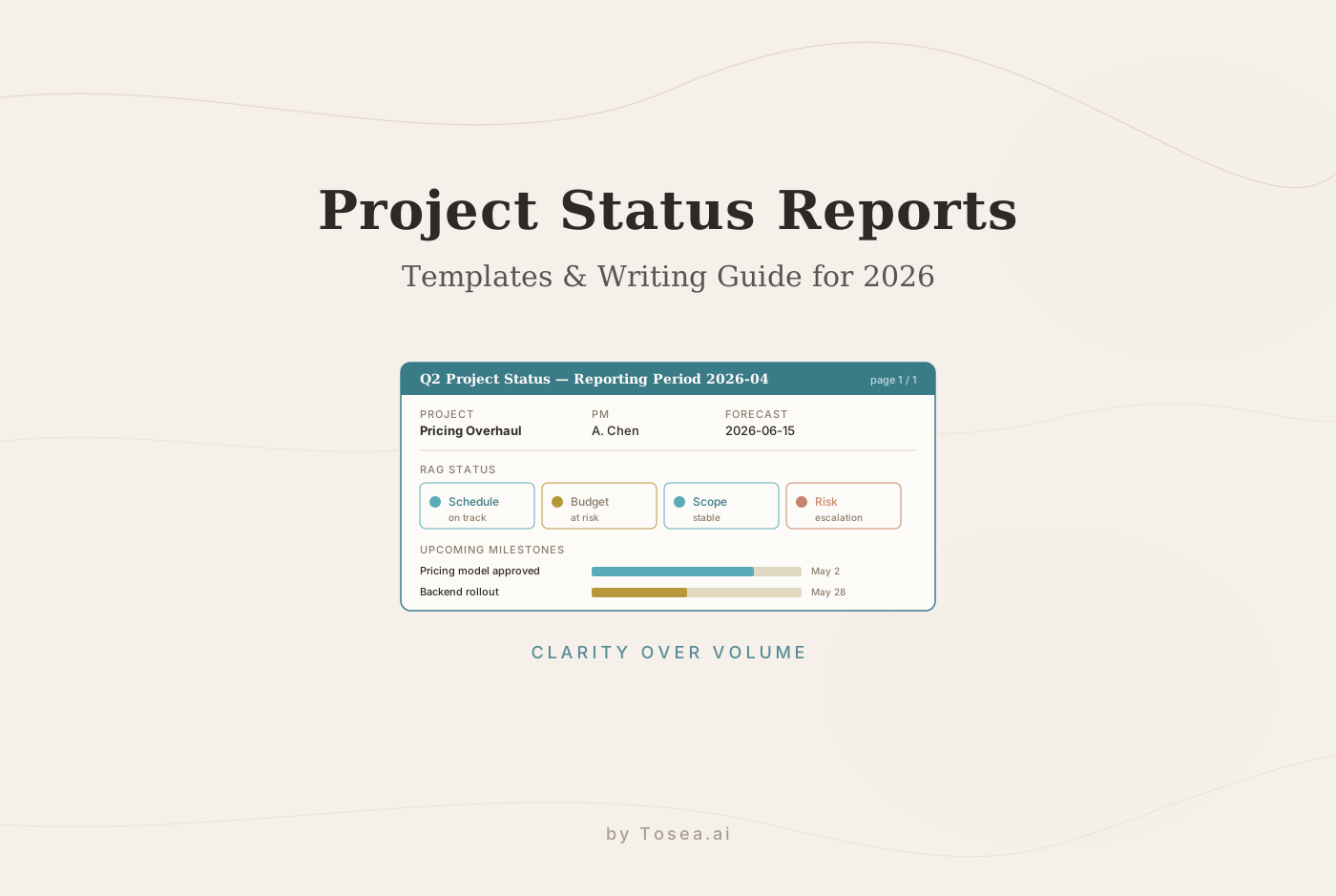
Project managers spend an average of three to five hours per week writing status reports. Then comes the second task: turning those reports into presentations for executive reviews, client updates, and steering committee meetings. That translation from document to slides eats another afternoon.
Before you start: Tosea.ai converts a completed project report into a professional presentation in under a minute — every section mapped to slides, every figure traceable to the source document. For a deeper look at the same document-to-slide pipeline applied to weekly cadences, see our weekly pulse reports guide.
Now, let us get you the templates and the writing skills to produce reports worth presenting.
What Is a Project Status Report?
A project status report is a project management document that captures the current state of a project — its progress against plan, budget health, active risks, upcoming milestones, and any decisions or actions required from stakeholders. ProjectManager defines it as a project reporting tool to relay necessary information to project stakeholders such as clients, sponsors, and team members.
Status reports serve three distinct audiences simultaneously:
- Executives and sponsors need a high-level summary: are we on track, on budget, and do they need to make any decisions?
- Team members need task-level clarity: what is done, what is blocked, and what is next?
- Clients need confidence that their project is being managed professionally and that problems are being surfaced proactively rather than discovered at delivery.
A well-structured project report satisfies all three audiences within a single document — which is why template design matters. The right project status report template structures the information so each audience can find what they need without reading sections intended for others.
Free Project Status Report Templates — Download Now
The following templates are available for immediate download at no cost. All are editable in the format specified.
1. Weekly Project Status Report Template (Excel + Word)
Best for: Recurring team and stakeholder updates across most project types.
Download: Smartsheet Weekly Project Status Report Template — available in Excel and Microsoft Word.
This weekly project status report template includes a summary field for overall project status, milestone tracking, budget and scope status, and a structured notes column for each project component. It is designed for consistent, repeatable weekly reporting and includes fields for project name, manager, reporting period, and projected completion date.
What makes it useful: The structured milestone status section lets team members update progress against specific deliverables rather than writing a narrative from scratch each week, which significantly reduces the time required to produce each report.
2. Executive Project Status Report Template (Word)
Best for: Board meetings, steering committee presentations, and executive sponsor updates.
Download: ProjectManager Executive Project Status Report Template — free Word download.
The executive project status report template condenses complex project activity into a concise, easy-to-scan layout. It highlights overall project health, key milestones, budget summary, and critical risks without requiring executives to parse operational detail. The one-page format is intentional — executives reviewing multiple projects need information quickly. For a deeper exploration of how to structure executive-facing reports for impact, see our analysis of the four masterstrokes of executive reporting.
What makes it useful: The format forces the project manager to prioritize. If something does not fit in the executive summary section, it probably belongs in the appendix or in a more detailed team report.
3. Project Status Report Dashboard Template (Excel + PowerPoint)
Best for: Organizations that need visual project health monitoring and KPI tracking.
Download: Smartsheet Project Status Report Dashboard Template — available in Excel and PowerPoint.
This dashboard template uses color-coded status indicators across all project components — budget, scope, timeline, resources, and risks. It is designed for organizations that require strategic and transparent project status reporting and want visual indicators that can be understood at a glance rather than read in detail. For ongoing performance dashboards beyond a single project, our market performance monitoring guide covers the same visual-first principle for portfolio-level reporting.
What makes it useful: The RAG (Red, Amber, Green) color coding system makes it immediately obvious which project components are on track, at risk, or in critical condition, without requiring stakeholders to read detailed explanations.
4. Monthly Project Status Report Template (Excel + Word)
Best for: Organizational reviews, client monthly updates, and internal governance reporting.
Download: Smartsheet Monthly Project Status Report Template — Excel and Word versions available.
This project management report template tracks budget, scope, risks, and project components over a monthly cycle. It includes fields for project name, code, manager, and projected completion date alongside a summary of monthly progress and priorities for the next period. Marketing teams running their own monthly cadence will find adjacent value in our professional monthly marketing reports guide, which applies a similar template-first discipline.
What makes it useful: The monthly format supports trend analysis — project managers can compare current month status against previous months to identify whether trajectory is improving or deteriorating.
5. Construction Project Daily Report Template
Best for: Construction project managers, site supervisors, and field engineers.
Download: Smartsheet Construction Daily Report Templates — multiple formats available.
A construction project daily report template captures the specific information relevant to construction sites: labor hours by trade, materials received and used, equipment on site, weather conditions, safety incidents, and work completed by location or phase. Construction projects require daily documentation because site conditions change constantly and documentation supports both project management and contractual obligations.
What makes it useful: Daily construction reports create a contemporaneous record of site conditions and progress that is essential for managing subcontractor relationships, claims, and schedule disputes.
6. Software Project Status Report Template
Best for: Software development teams, IT project managers, and Agile teams.
Download: Learn Management's Software Project Status Report Templates — 36+ templates in Word, Excel, and PowerPoint.
Software project status reports need to communicate sprint progress, bug counts and severity, release readiness, and technical debt alongside standard schedule and budget metrics. This collection includes templates tailored to software development workflows, including fields for sprint velocity, open issues by priority, and deployment status.
What makes it useful: Software-specific fields mean the template does not need to be adapted from a generic project management format — it is built for the metrics that software teams actually track.
7. Project Status Report Template Word (One-Page Format)
Best for: Internal meetings, quick client updates, and steering committee touchpoints.
Download: StakeholderMap Free Project Status Report Template — free Word download, no registration required.
The one-page project status report template Word format is the most accessible starting point for teams new to formal status reporting. It includes all essential fields — project summary, progress highlights, upcoming milestones, risks, and action items — in a format that takes 20 to 30 minutes to complete each reporting cycle.
What makes it useful: The single-page constraint forces brevity and prioritization, which is exactly what most stakeholders want.
How to Write a Good Project Report: A 5-Step Tutorial
Downloading a template is step one. The quality of your project report depends on how you use it.
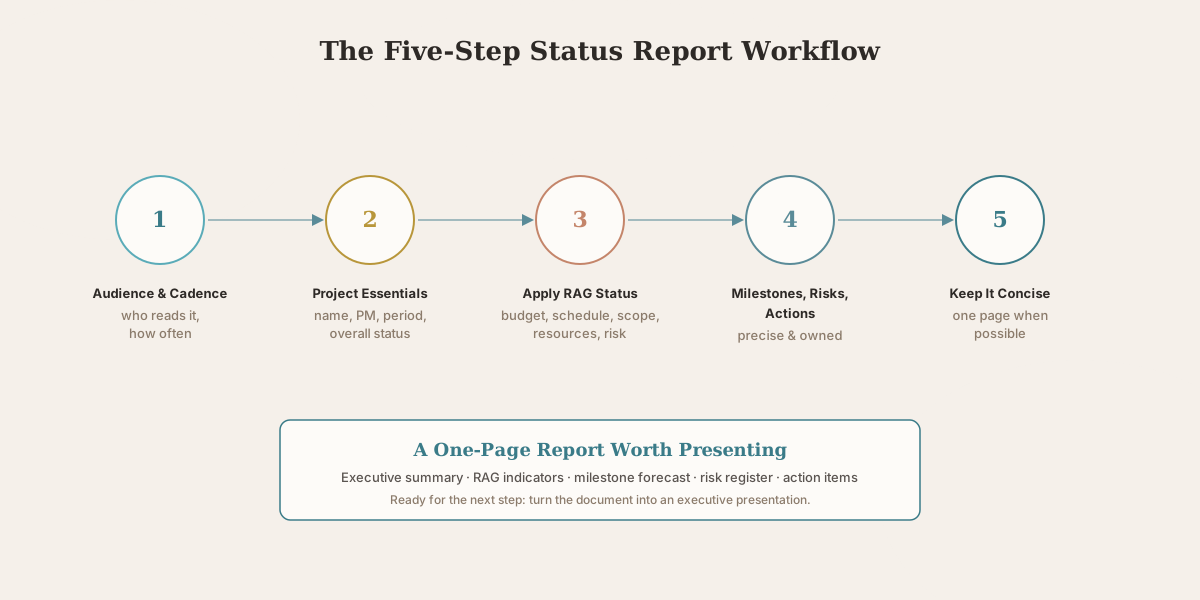
Step 1: Know Your Audience and Set Your Cadence
Before writing a word, decide who will read this report and how often it will be produced. A weekly project status report for a software development team reads differently from a monthly executive project status report for a steering committee. The audience determines how much detail is appropriate, which metrics are most relevant, and what level of explanation is needed.
According to PMI's project reporting best practices, the reporting cadence should match the pace of change in the project. Fast-moving software sprints warrant weekly reports. Large infrastructure projects may report monthly to executives and weekly to the project team.
Step 2: Fill In the Project Essentials First
Every project report should open with the same orientation data: project name, project manager, reporting period, overall status (RAG), and a two to three sentence executive summary. This section should be readable in 30 seconds and should give any stakeholder who reads nothing else a clear picture of whether the project is healthy.
The executive summary is where most project managers underinvest. Write it last, after completing the rest of the report, so you can accurately summarize what the full report contains.
Step 3: Apply RAG Status to Every Component
Red, Amber, Green status coding is one of the most useful tools in project status reporting because it communicates condition instantly without requiring the reader to evaluate data themselves. ProjectManager's guide to status reporting describes RAG as a simple system to outline the general health of different project aspects at a glance.
Apply RAG status to each major project component: budget, schedule, scope, resources, and risk. Green means on track. Amber means at risk but manageable with action. Red means in critical condition and requiring escalation or decision.
Be honest with your RAG coding. An Amber that should be Red erodes stakeholder trust when the problem escalates. A Red that is clearly communicated early gives the project team the opportunity to recover.
Step 4: Document Milestones, Risks, and Actions Precisely
The three sections of a project management report that require the most precision are milestones, risks, and action items.
- For milestones: record the planned date, the current forecast date, and the RAG status for each. If a milestone is moving, say when it moved and why.
- For risks: describe each risk specifically, assign a probability and impact score, identify the current mitigation approach, and name an owner. A risk description without a mitigation plan is an observation, not risk management.
- For action items: each item needs a description, an owner, a due date, and a status. Action items without owners do not get completed.
Step 5: Keep It Concise — One Page When Possible
Research on executive communication from McKinsey consistently finds that senior stakeholders prefer shorter, more frequent communication over longer, comprehensive reports. A project status report that fits on one page and is delivered consistently is more valuable than a 10-page report that is delivered late or inconsistently. For a deeper look at how to convey numeric updates without overwhelming an audience, see our framework for presenting sales data to executives.
Cut everything that does not inform a decision or require an action. Details about how specific tasks were completed belong in team documentation, not in a status report. The project report is a communication tool, not an archive.
The Five Most Common Project Report Mistakes
Too much detail, too little insight. Listing every task completed is not status reporting — it is a task log. Focus on what stakeholders need to know to make decisions.
No RAG status indicators. Text descriptions of project health require readers to form their own interpretation. Color-coded RAG status removes ambiguity instantly.
Stale information. A project status report template that is not updated for the current reporting period creates false confidence. Never distribute a report without verifying that all figures reflect the current date.
Risks without mitigation. Naming a risk without describing the response plan makes the report a worry list rather than a management tool.
Action items without owners. Every action item must have a named individual responsible for completion. Teams, functions, or shared ownership are not owners.
From Project Report to Executive Presentation: Where AI Slide Generation Fits
Once your project report is complete, the next challenge is familiar to every project manager: the executive presentation.
Executives rarely want to read a status report document in a meeting. They want a presentation — a structured, visual walk-through of the key points, formatted for a screen, navigable in real time, with enough white space to sustain attention across a 30-minute review. Converting a well-structured project management status report into a professional presentation typically requires 90 minutes to three hours of manual slide-building.
This is the document-to-PPT translation problem that Tosea.ai was built to solve. Upload your completed project report — Word, Excel, or PDF — and Tosea reads the full logical structure of your report. It identifies the executive summary, the milestone table, the risk register, the action items, and how they relate to each other as a management narrative. For the underlying methodology, our PDF-to-PowerPoint conversion guide walks through how a structured document maps to a slide deck without losing its argument.
The output is a structured AI slide generation that follows the logic of your project report — not a generic project slide template with placeholder text, but a presentation built from your actual project data. Every slide element traces back to the specific section of your source report, so when a sponsor asks where a specific budget figure came from, the answer is one click away. For projects where defensibility matters most — board reviews, audit trails, regulatory submissions — our zero-hallucination AI slides guide covers the source-traceability principle in more depth, and our analysis of mastering document transformation for executive presentations goes deeper on multi-section argument preservation.
The final file is a native .pptx, editable in Microsoft PowerPoint or Google Slides, with consistent design across all slides, clean layers, and no formatting work required.
Download the template that fits your project type. Write the report with the five-step process. Upload it to Tosea.ai and walk into your next executive review with a presentation already prepared.
Sources
- Project Status Report Templates and How to Write One — ProjectManager
- Free Project Status Report Templates (Excel, Word, PPT) — Smartsheet
- Stakeholder Communication: Project Status Reports — Project Management Institute
- Free Project Status Report Template (Word) — StakeholderMap
- 36 Free Project Status Report Templates in Word, Excel, and PPT — Learn Management
- Communications: Get It Right — McKinsey & Company