How to Use Pretext: Complete Guide to JavaScript Multiline Text Measurement
A complete guide to Pretext, the open-source JavaScript library for multiline text measurement. Learn how it eliminates forced reflow, powers virtual scrolling, and handles multilingual layouts.
You have built a chat application. The message list loads fine at first. Ten messages, twenty messages — smooth. But add a few hundred messages with varying text lengths, enable virtual scrolling, and suddenly the experience falls apart. Scrolling stutters. The interface hesitates before rendering. Users notice.
The culprit is almost never the rendering itself. It is the measurement step that happens before the rendering — the part where your code asks the browser how tall each message is going to be.
This guide walks through Pretext, a small library that turns that measurement step from a liability into a predictable primitive. If you are building applications that process and display text-heavy content, the quality of your text rendering pipeline directly affects the quality of your product. At Tosea.ai, we apply the same precision thinking to document presentation — see our piece on how we avoid hallucination in document-to-PPT conversion for a related take on engineering for determinism.

What Is Pretext?
Pretext is a pure JavaScript and TypeScript library for multiline text measurement and layout, built by Cheng Lou — a former member of the React core team. Since its public release, it has accumulated over 30,200 GitHub stars, which is a meaningful signal for a library that solves a single, specific problem rather than a broad framework need.
The library's stated purpose is precise: measure the height of multiline text without triggering layout reflow. It supports rendering output to DOM, Canvas, and SVG, with server-side rendering planned for a future release.
That single-sentence description understates how significant the problem is and how elegant the solution turns out to be.
The Browser Reflow Problem: Why Measuring Text Is Expensive
To understand what Pretext solves, you need to understand what happens when you ask the browser to measure an element's size.
Every visual change in a web page goes through a sequence of browser operations: JavaScript execution, style calculation, layout computation, paint, and composite. The layout step — also called reflow — is where the browser calculates the position and dimensions of every element on the page. It is an expensive operation that blocks the main thread. Nothing else happens while it runs.
When you call getBoundingClientRect() or read offsetHeight on a DOM element, you are asking the browser to give you the current, accurate dimensions of that element. If the layout has been invalidated by any preceding DOM or style change, the browser cannot return a cached value — it must perform a full reflow synchronously before it can answer your question. This is called a forced synchronous layout.
As webperf.tips explains in its analysis of layout thrashing, when JavaScript code repeatedly forces layout work — reading geometry after writing styles, over and over in a loop — the result is what the industry calls layout thrashing: a cascade of forced reflows that can consume entire animation frames.
Paul Irish's widely cited reference documents the full list of JavaScript properties and methods that trigger forced reflow. The list is longer than most developers expect. getBoundingClientRect, offsetHeight, offsetWidth, scrollTop, clientHeight — every one of these causes the browser to pause JavaScript execution and recalculate layout before returning.
According to CoreWebVitals.io's analysis, a single forced reflow of 30 milliseconds already consumes 15% of the 200ms INP budget that Google considers acceptable. Layout thrashing in an event handler can push interaction time past 500ms. The browser has approximately 16.6 milliseconds per frame to complete all work — JavaScript, style, layout, paint, and composite — for a 60fps experience. A measurement loop that forces reflow on each iteration can consume multiple frames worth of time before the first pixel changes.
For a virtual scrolling list that needs to know the height of 500 messages before it can determine which ones to render, calling getBoundingClientRect on each one is not just slow in aggregate — it is architecturally wrong. You are paying the reflow cost hundreds of times for information that could, in principle, be computed without touching the DOM at all.
Pretext's Approach: Heavy Work Once, Light Work Forever
Pretext's design insight is a clean separation between the expensive work and the cheap work, executed in that order.
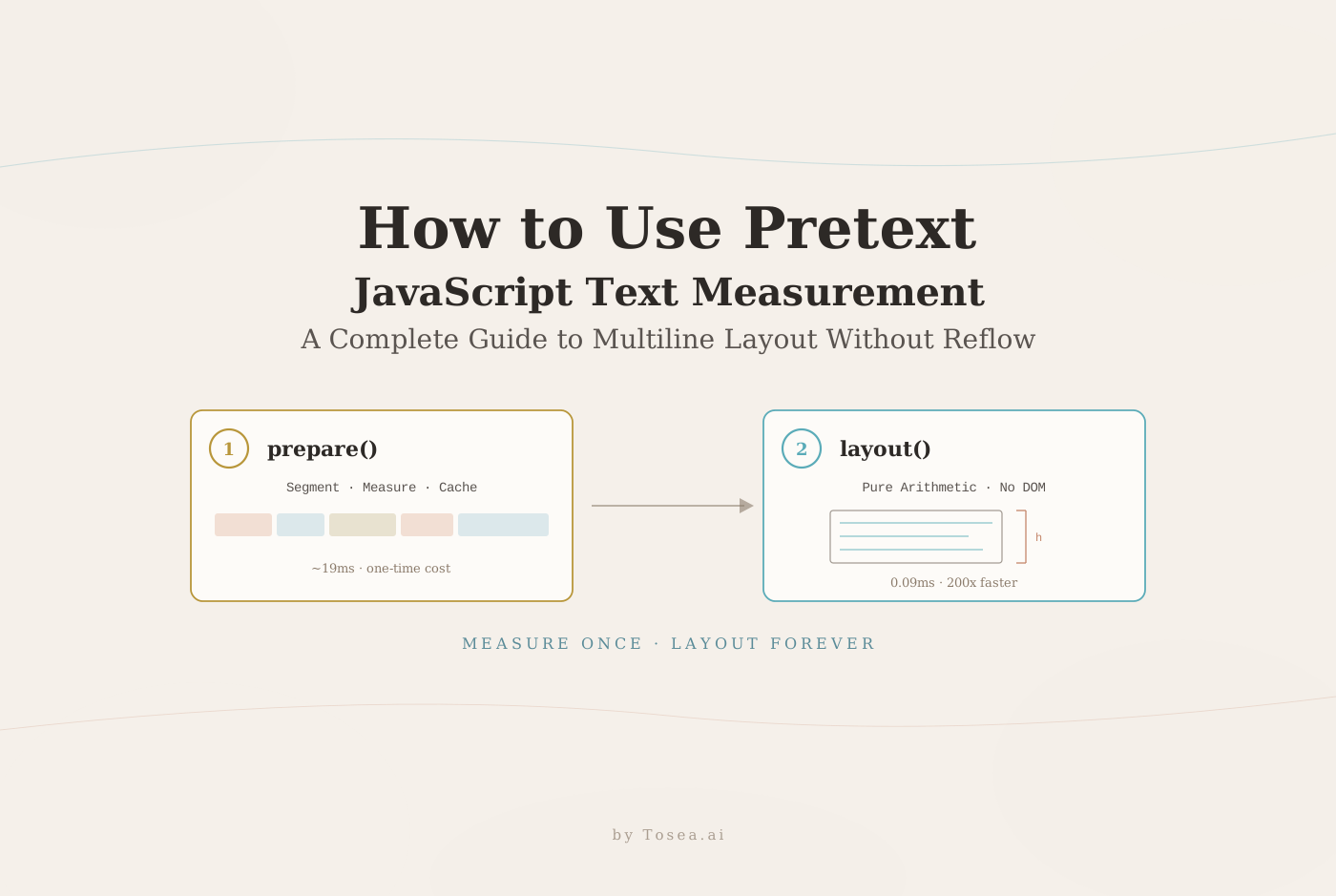
The expensive work — parsing text, segmenting it using Intl.Segmenter, measuring individual token widths using the Canvas measureText API, and caching those measurements — is done once in a preparation step. The cheap work — using those cached measurements to compute line breaks and total height for any given container width — is done as many times as needed, purely as arithmetic, with no DOM involvement at all.
This maps to two API calls.
prepare(): The One-Time Investment
import { prepare } from '@chenglou/pretext'

const prepared = prepare('Hello world 🌍', '16px Inter')
The prepare function performs several operations in sequence. It normalizes whitespace in the input text. It uses the Intl.Segmenter API to segment the text into grapheme clusters — the units that correspond to individual visible characters, which is meaningfully different from code points for languages with combining characters or emoji. It measures the width of each segment using the Canvas measureText method. And it caches all of that measurement data for use in subsequent layout calls.
According to the project's own benchmarks, processing 500 text segments in prepare takes approximately 19 milliseconds. That is a real cost, but it is a one-time cost.
The Canvas measureText approach is architecturally significant. Rather than rendering text to the DOM and asking the browser to report back its dimensions — which forces reflow — Pretext uses the browser's font engine directly through the Canvas API. The browser's own shaping and measurement logic is used as the source of truth, but none of that measurement is connected to the DOM layout system. DebugBear's guide to forced reflows explains precisely why this distinction matters: Canvas measurements do not invalidate the layout tree, which means they do not trigger synchronous reflow.
layout(): The Free Computation
import { layout } from '@chenglou/pretext'

const { height, lineCount } = layout(prepared, 300, 20)
// prepared: output from prepare()
// 300: container width in pixels
// 20: line height in pixels
The layout function takes the cached measurement data, a container width, and a line height, and returns the total height and line count through pure arithmetic. No DOM access. No style calculation. No reflow.
The benchmark figure for this step is 0.09 milliseconds for 500 segments. That is roughly 200 times faster than the preparation step, and orders of magnitude faster than equivalent DOM measurement approaches.
The practical implication is significant. You can call layout on every window resize event, on every sidebar drag, on every container width change — without any performance concern. The expensive work is already cached. You are only doing math.
The Advanced API: Line-by-Line Control
For use cases that require fine-grained control over individual lines — text wrapping around images, multi-column magazine layouts, or any situation where the available width changes from line to line — Pretext provides a lower-level API.
import { prepareWithSegments, layoutNextLine } from '@chenglou/pretext'

const prepared = prepareWithSegments(text, '18px Helvetica Neue')
let cursor = { segmentIndex: 0, graphemeIndex: 0 }
let y = 0

while (true) {
  // Width can change per line based on any condition
  const availableWidth = y < imageHeight
    ? containerWidth - imageWidth
    : containerWidth

  const line = layoutNextLine(prepared, cursor, availableWidth)
  if (!line) break

  // Render to Canvas, SVG, or any output target
  ctx.fillText(line.text, 0, y)
  cursor = line.end
  y += lineHeight
}
This pattern enables layouts that are genuinely difficult or impossible to achieve reliably with CSS alone. Each call to layoutNextLine advances a cursor through the text, returning the content and metrics for one line at a time, with the available width computed fresh for each line.
Additional utilities in the library include layoutWithLines, which returns all lines in a single call, and walkLineRanges, which iterates over line boundaries without constructing intermediate string objects. The latter is particularly useful for binary search operations, such as finding the optimal container width for a given text and height constraint.

Four Use Cases Where Pretext Delivers Measurable Value
Virtual scrolling lists. Virtual scrolling renders only the items currently visible in a scrollable container, relying on accurate height estimates to calculate scroll position and determine which items fall within the viewport. Pre-computing heights with prepare and layout before any DOM rendering happens means the scroll container can be sized correctly from the start, without the layout thrashing that DOM-based measurement in a loop would cause.
Adaptive chat and message interfaces. In a chat UI where messages should expand to fit their content without wasted whitespace, Pretext can compute the optimal bubble dimensions before any DOM element is created or positioned. The layout computation is available as soon as the message content is known.
Canvas and SVG typography. CSS-based layout is not available in Canvas or SVG rendering contexts. Building a multi-column article layout, wrapping text around arbitrary shapes, or implementing custom typographic rules for a data visualization all require manual control over line breaking. Pretext provides the line-breaking logic as a pure computation, with output that maps directly to Canvas fillText calls or SVG tspan elements.
AI-generated user interfaces. This is a use case the project author explicitly notes. When an AI system is generating or adjusting UI layouts, it benefits from predictable, deterministic interfaces rather than the emergent behavior of CSS layout algorithms. A function that takes text content and container dimensions and returns an exact height is a reliable primitive. The CSS box model, with its cascade and context-dependent behavior, is not. We explored a related version of this determinism argument in our write-up on why professional workflows demand more than code that runs.
Multilingual Support and Typographic Accuracy
Pretext's segmentation is handled through Intl.Segmenter, which provides locale-aware grapheme cluster boundaries and word breaking rules. This means the library handles combined characters in Korean and Japanese, right-to-left text in Arabic and Hebrew, and complex emoji sequences — the kind of composed characters that appear as a single visual glyph but consist of multiple Unicode code points — without special-casing.
The library targets parity with the browser's own rendering behavior for common CSS configurations: white-space: normal, word-break: normal, overflow-wrap: break-word, and line-break: auto. A pre-wrap mode is also supported for preserving whitespace, tabs, and newlines. The project includes an extensive corpus of test cases validating that layout output matches actual browser rendering across these modes and across multiple languages.
One practical caveat worth noting: using system-ui as the font family on macOS introduces inaccuracy in layout output. The project recommends specifying a named font — Inter, Helvetica Neue, or any other explicit font family — to ensure measurement consistency.
Installation and Getting Started
Pretext is available through npm:
npm install @chenglou/pretext
The basic usage for a single measurement looks like this:
import { prepare, layout } from '@chenglou/pretext'

// Prepare once per unique text + font combination
const prepared = prepare('Your text content here', '16px Inter')

// Layout as many times as needed for different widths
const { height, lineCount } = layout(prepared, containerWidth, lineHeight)
For production use cases with large lists, the recommended pattern is to prepare all text items up front during data loading, store the prepared objects alongside the data, and call layout on demand during scroll events or container resize handlers.
The project's interactive demo provides a live environment for testing measurement accuracy against actual browser rendering across different fonts, widths, and text content. For developers interested in the broader category of focused open-source developer tools released in 2026, our Microsoft VibeVoice complete guide and Claude Code complete guide cover similar territory from different angles.
The Engineering Philosophy Behind Pretext
What makes Pretext technically interesting is not any single API choice, but the design philosophy it embodies: identify which part of a computation is inherently expensive, isolate it, pay that cost once, and make every subsequent operation as cheap as possible.
This same philosophy — separate the hard work from the frequent work, cache aggressively, expose deterministic interfaces — appears in virtually every high-performance UI system. It is why virtual DOM diffing works. It is why CSS containment exists. It is why Canvas rendering pipelines consistently outperform DOM-based approaches for complex, data-driven graphics.
Pretext applies that philosophy to a specific, underserved problem: multiline text measurement. The result is a library that handles what was previously a performance liability and turns it into a predictable, high-throughput primitive.
From Text Measurement to Professional Presentation
Text measurement and document presentation are both, at their core, problems of translating content into structured visual output. Pretext solves the measurement half of that equation at the application layer with precision and performance. Tosea.ai addresses a similar determinism problem one layer up — taking research documents, business plans, and technical specifications and generating consulting-grade slide decks with the same commitment to logical structure and visual precision.
The underlying challenge is the same in both cases: respecting the structure of the source content and translating it faithfully into the target format. For a concrete example of that philosophy in practice, see our multi-agent professional slide generation piece, which walks through how structured pipelines outperform free-form generation for document-to-deck workflows.