How to Use OpenMontage: Guide to the Open-Source Agentic Video System
OpenMontage is the first open-source agentic video production system — 12 pipelines, 52 tools, 500+ skills. Learn how to install it and turn your AI coding assistant into a video studio.
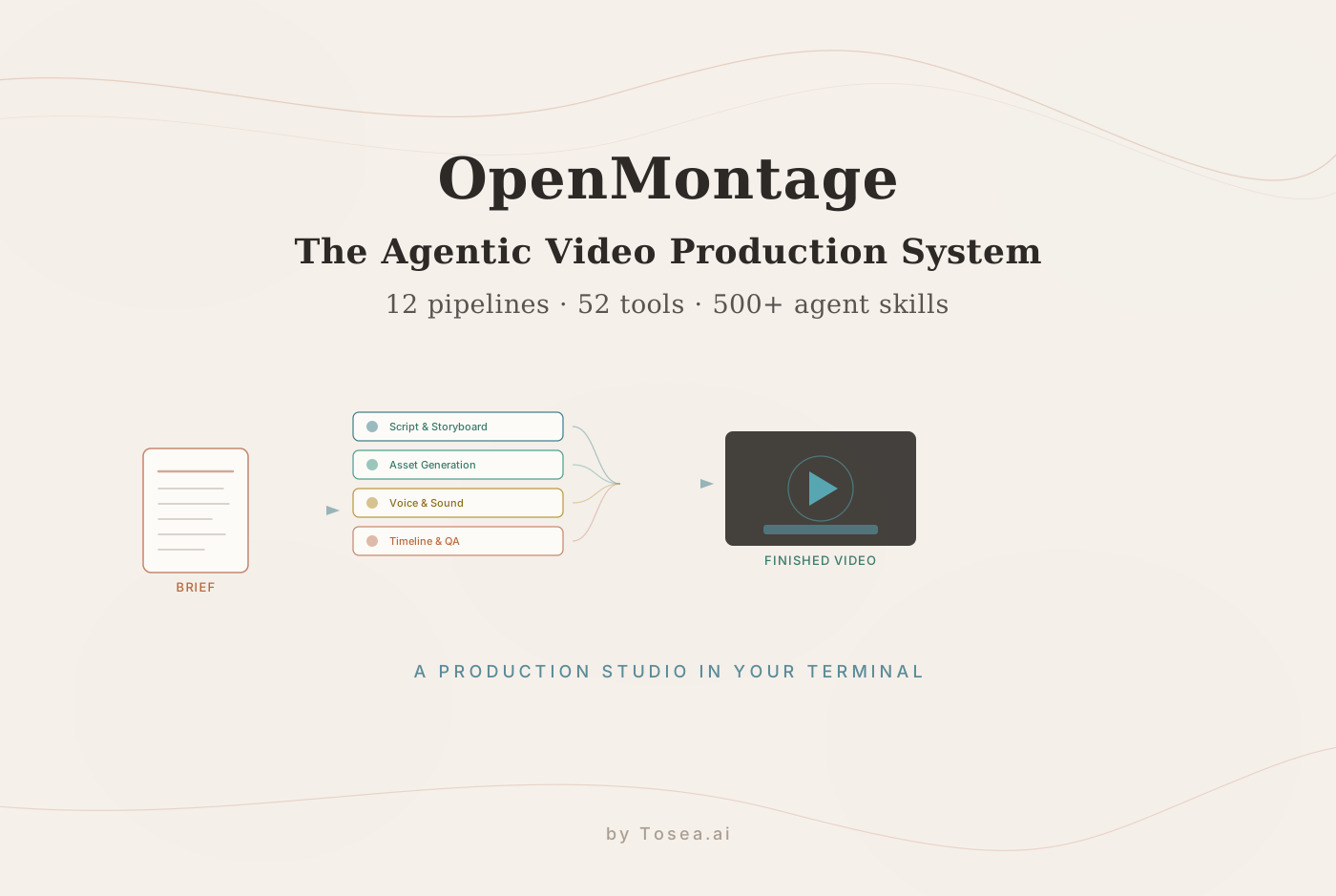
Most AI video creation today still means bouncing between detached tools — one app for the script, another for voiceover, a third for image generation, a fourth for stitching. Every handoff is a place where context gets lost and time gets spent. OpenMontage proposes a different structure: a single open-source framework that turns your AI coding assistant into a full video production studio, where one plain-language brief flows through the same staged process a real production team uses.
Released on GitHub in June 2026 and briefly the #1 trending repository of the day, OpenMontage bills itself as the first open-source, agentic video production system, with 12 pipelines, 52 tools, and 500+ agent skills. Rather than calling a single text-to-video endpoint and hoping for the best, it lets an agent research, script, generate assets, edit a timeline, and render a finished cut — with a budget guard and an auditable decision log along the way. This guide explains the architecture, walks through installation, and shows how to drive it from Claude Code or Cursor.
Understanding the Architecture of OpenMontage
Unlike a tool that outputs one isolated clip, OpenMontage is organized like a production house: specialized stages, a broad tool shelf, and a library of reusable skills the agent draws on. The diagram below shows the end-to-end flow.
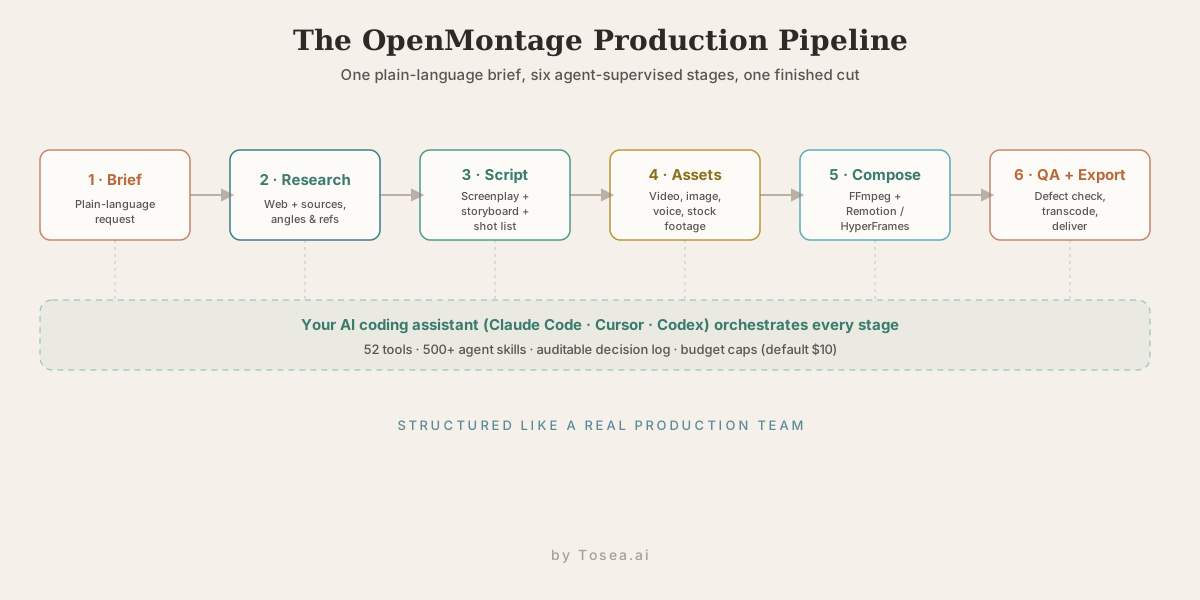
The 12 production pipelines
A "pipeline" in OpenMontage is a production preset for a type of video — each one carries the structure, pacing, and default tooling appropriate to that format. The 12 shipped pipelines are:
- Animated Explainer — concept-driven motion graphics.
- Animation — fully synthetic animated sequences.
- Avatar Spokesperson — a synthetic presenter delivering scripted lines.
- Cinematic — film-style narrative shots.
- Clip Factory — high-volume short clips for social.
- Documentary Montage — archival and stock footage cut to narration.
- Hybrid — a mix of generated and real footage.
- Localization & Dub — re-voicing and subtitling into other languages.
- Podcast Repurpose — turning long audio into short video segments.
- Screen Demo — product and software walkthroughs.
- Talking Head — a single presenter format.
- Plus a general production track for briefs that do not fit a preset.
Choosing a pipeline is how you tell the agent what kind of video you want before it starts assembling shots — and it sets sensible defaults for everything downstream.
The 52-tool ecosystem
To execute those pipelines, OpenMontage exposes 52 discrete tools to the agent, grouped by job:
- Video generation (14 providers): Kling, Runway Gen-4, Google Veo 3, Grok, Higgsfield, MiniMax, HeyGen, WAN 2.1, Hunyuan, CogVideo, LTX-Video, plus stock sources like Pexels, Pixabay, and Wikimedia Commons.
- Image generation: roughly ten image tools for stills, frames, and reference art.
- Text-to-speech (4): ElevenLabs, Google TTS, OpenAI TTS, and the offline Piper.
- Post-production: FFmpeg, video stitching, color grading, upscaling, and face enhancement.
- Analysis: transcription, scene detection, frame sampling, and video understanding.
- Avatar and lip-sync: talking-head and lip-sync tools.
The agent does not guess how to assemble a video; it calls precise tools to crop frames, retime audio, extract waveforms, and layer assets — the deterministic media operations that LLMs are otherwise bad at improvising.
500+ agent skills
An agent skill here is a reusable operational capability — detecting the beat of a music track, fitting an irregular image into a 16:9 frame without stretching, or running a quality checklist on a finished sequence. OpenMontage ships more than 500 of them, spanning production techniques, pipeline directors, creative recipes, quality protocols, and technology knowledge packs. This is the layer that lets a coding assistant handle problems that normally require years of editing experience, because the know-how is encoded as callable skills rather than left to the model's improvisation. It is a concrete example of the agent-skills pattern showing up in a real production system.
Research as a first-class stage
One stage that distinguishes OpenMontage from a pure generation wrapper is that web research is built into the pipeline, not bolted on. Before scripting, the agent can search YouTube, Reddit, Hacker News, news sites, and academic sources to gather data points, audience questions, trending angles, and visual references. That means a brief like "explain our new feature" produces a script grounded in what people actually ask about the topic, rather than a generic summary. It is the same instinct behind serious research-agent workflows — do the homework before producing the artifact.
Step-by-Step Installation and Setup
OpenMontage runs on macOS, Linux, and Windows, but expect to manage media dependencies carefully — it leans on local audio analysis, image pre-processing, and heavy FFmpeg transcoding.
Requirements
- Python 3.10+ in a clean virtual environment.
- Node.js 18+ (or 22+ if you use the HyperFrames composition engine).
- FFmpeg installed system-wide.
- Apple Silicon or an NVIDIA-class GPU is recommended for the heavier local steps.
Clone and install
The fastest path uses the bundled setup target:
git clone https://github.com/calesthio/OpenMontage.git
cd OpenMontage
make setup
If make is unavailable, run the manual install:
pip install -r requirements.txt && cd remotion-composer && npm install && cd .. && pip install piper-tts && cp .env.example .env
Then open the new .env file and add the API keys for whichever providers you plan to use. You do not need all of them — see the free tier below.
Connect your AI coding assistant
OpenMontage is driven from inside an agentic coding environment. You open the cloned project in your assistant and describe what you want in plain language — for example, "Make a 60-second animated explainer about how neural networks learn." The repo ships dedicated instruction files so each client knows how to operate the system:
- Claude Code:
CLAUDE.md - Cursor:
.cursor/rules/ - GitHub Copilot:
.github/copilot-instructions.md - Windsurf:
.windsurfrules
Because these config files travel with the repo, connecting an assistant is mostly a matter of opening the folder — the agent reads the project's own instructions and gains access to all 52 tools and 12 pipelines.
Two composition engines
A detail that sets OpenMontage apart from a thin API wrapper: it ships two real rendering backends. Remotion renders programmatic, React-based video — good for stat reveals, spring animations, and TikTok-style word-by-word captions. HyperFrames uses HTML/CSS and GSAP for kinetic typography, product promos, and custom motion graphics. The agent picks the engine that fits the pipeline, then drives FFmpeg for the final encode.
What It Actually Costs
The economics are the part that surprises people. Because OpenMontage routes work to the cheapest capable tool and can lean on free sources, real projects come in far below what a per-seat SaaS would charge. The figures below are from the project's own published examples.
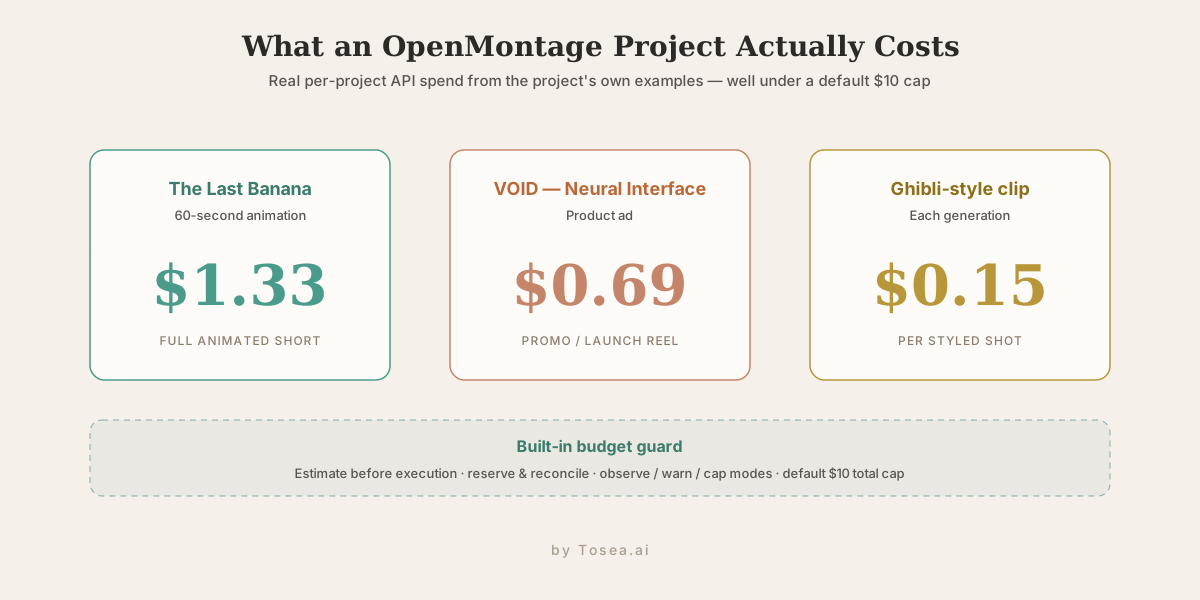
A full 60-second animated short ("The Last Banana") came to $1.33. A product ad ("VOID — Neural Interface") cost $0.69. Ghibli-style clips run about $0.15 each. Crucially, the framework has a built-in budget guard: it estimates cost before execution, reserves and reconciles spend, supports observe/warn/cap modes, and ships with a default $10 total cap so an agent loop cannot quietly run up a bill.
There is also a genuinely free path. With zero paid API keys you can still produce video using Piper for offline text-to-speech, Archive.org and NASA for open footage, free developer tiers from Pexels, Unsplash, and Pixabay, and the Remotion, HyperFrames, and FFmpeg stack for composition. You only pay when you opt into premium generation models.
Ready-to-Use Prompts to Drive OpenMontage
Once the project is open in your assistant, these prompts initialize real production routines.
Prompt 1: Plan a short-form project (review before executing)
Use the script and storyboard stages. Read the local markdown document
tracking our product overview. Draft a 60-second voiceover script, map out
8 distinct visual shots, choose the appropriate tools for asset synthesis,
and prepare the timeline structure. Stop and show me the asset map before
running any generation — I want to review it first.
Prompt 2: Post-production grading and audio leveling
Scan the workspace for all generated clips. Run the color-grading stage across
the raw MP4 assets so they map cleanly to a Rec.709 cinematic look. Then use
the sound-design tools to parse Audio Track 2 and duck the background gain by
12 dB whenever vocals are active on Audio Track 1.
The "review before executing" instruction in Prompt 1 matters: the decision log records alternatives considered and confidence scores, so you can inspect the agent's plan before any paid generation runs.
OpenMontage vs Other Automation Approaches
| Dimension | OpenMontage | Cloud video APIs (Shotstack) | Traditional editing automation |
|---|---|---|---|
| Control model | Autonomous multi-agent reasoning | Hardcoded JSON request schemas | Fixed desktop macros |
| Pipeline scale | 12 production pipelines | Single request block | Sequential linear scripts |
| Tool diversity | 52 integrated tools | Cloud rendering only | Limited internal APIs |
| Extensibility | 500+ agent skills | Fixed endpoints | Manual plugin work |
| Environment | Open-source, local (AGPLv3) | Closed-source cloud | High local app overhead |
| Error handling | Logs decisions, self-corrects | Fails on missing assets | Manual operator loops |
Who Is OpenMontage For — and Its Current Limits
OpenMontage is aimed squarely at developer-creators — people who are comfortable in a terminal and already run an AI coding assistant. If you can clone a repo, manage a Python virtual environment, and install FFmpeg, the framework hands you a production studio for the cost of a few dollars per video. Indie marketers and content teams producing volume — a steady feed of explainers, social clips, or localized versions of the same video — are the natural fit, because the per-project economics scale where per-seat SaaS pricing does not. Researchers and educators turning long talks or papers into short explainers benefit from the research and documentary pipelines specifically.
A concrete end-to-end run looks like this. You give the agent a brief — "a 60-second documentary-style montage on the history of the transistor." It runs the research stage (pulling references and a factual spine), drafts a narration script, storyboards eight shots, retrieves open archival footage from Archive.org for the historical beats, generates two synthetic shots for the parts no footage exists for, synthesizes a voiceover with Piper, assembles the timeline in Remotion, adds word-by-word captions, runs a QA pass for defects, and exports an MP4 — logging every decision and staying under the budget cap. You review the asset map before any paid generation runs.
The honest caveats matter here too. This is a brand-new, dependency-heavy project: FFmpeg, Node, Python, and multiple provider SDKs all have to line up, and the manual install path is not for the faint of heart. It is licensed under AGPLv3, which has implications if you want to build a hosted commercial service on top of it. The "12 pipelines, 52 tools, 500+ skills" headline is genuinely broad, but breadth is not the same as polish — early adopters should expect rough edges, occasional failed generations the QA stage has to catch, and the need to babysit complex multi-track jobs. And while the free tier is real, the most impressive results still come from the premium video models, which cost money. For the right user, those trade-offs are well worth it; for someone who just wants a one-click web tool, this is not that.
What OpenMontage Means for AI Slide Generation
OpenMontage is, at heart, an orchestration pattern: take an unstructured brief, decompose it into the stages a professional team would run, route each stage to a specialized tool, and keep an auditable record of every decision. That pattern is exactly what separates a serious document-to-deck system from a one-shot "make me slides" prompt.
A presentation, like a video, is structured media assembled from a source — and the same staged thinking applies. Where OpenMontage runs research → script → assets → compose → QA, an AI presentation pipeline runs parse → outline → slide content → layout → fact-check. The agent-skills idea translates directly too: a "quality checklist" skill that scans a finished video for defects is the analogue of a verification pass that checks a deck's claims against the source document. The same agent-orchestration research driving multi-step video production is what makes reliable, large-scale slide generation possible.
The key difference is the anchor. A video brief is open-ended; a deck is usually tied to a specific document — a report, a paper, a dataset — and the deliverable has to stay faithful to it. Tosea.ai occupies that layer as a document-to-PPT orchestration system: it parses the source, builds a structured outline, and renders the slide deck while keeping every point traceable to the original. If you want to see that parse-to-slides path concretely, our PDF-to-PowerPoint guide walks through it step by step. OpenMontage is a vivid demonstration that the future of media generation is staged, tool-routed, and agent-orchestrated — and that lesson holds whether the output is a finished cut or an investor-ready deck.
Frequently Asked Questions
Can I run OpenMontage without paid API keys?
Yes, for a meaningful subset. The coordination logic, timeline structuring, and FFmpeg composition are open source and run locally. For generation, you can route to free options — Piper TTS, Archive.org and NASA footage, free Pexels/Unsplash/Pixabay tiers, and local open-weight models via Ollama or Hugging Face — or pay for premium providers only where you need them.
How do agent skills differ from ordinary software functions?
A standard function requires you to declare every variable and branch explicitly. An OpenMontage skill combines deterministic code with LLM judgment: ask it to remove a vocal hiss and the agent analyzes the frequency response, decides on thresholds, and adjusts parameters on the fly — without you scripting the exact filter values.
What if the agent produces a broken FFmpeg command?
Complex multi-track filter graphs are where LLMs slip. OpenMontage's quality-assurance stage is built for this: it reads the terminal error, traces the faulty filter back to the offending step, and rewrites the command chain. The decision log makes it possible to see what it changed and why.
Can I export to professional NLE software?
The timeline engine does not lock you into a flattened output. It can export project states to standard formats, so you can use OpenMontage to generate a fast structural cut and then import the sequence into a tool like Final Cut Pro or Premiere Pro for final manual polish.
The Bigger Picture
OpenMontage matters less as "another AI video tool" and more as a clear, open blueprint for agentic media production: stage the work like a real team, give the agent a deep tool shelf and a skill library, guard the budget, and log every decision. By turning a developer's coding assistant into the control surface, it lets one person direct a production that used to need several.
That same blueprint is reshaping how structured documents become presentations — staged, verifiable, and agent-driven rather than templated. If you want to see the document-to-deck version of this pattern in production, explore Tosea.ai.
Sources
- calesthio/OpenMontage on GitHub — official README, pipelines, tools, and cost examples, June 2026
- OpenMontage: First Open-Source Agentic AI Video System — AIToolly, June 22, 2026
- Remotion — programmatic video documentation — Remotion
- FFmpeg — official documentation — FFmpeg project
- Piper — local neural text-to-speech — Rhasspy