How to Use GPT Image 2.5: Complete Guide to OpenAI's Sunburst and Flare Models
OpenAI shipped GPT Image 2.5 on September 8, 2026. We benchmarked gpt-image-2.5-flare and sunburst against gpt-image-2: latency, tokens, cost, and the quality ladder that quietly moved.
On September 8, 2026, OpenAI announced ChatGPT Images 2.5 and, alongside it, two new models on the Images API: gpt-image-2.5-flare and gpt-image-2.5-sunburst. The community had spent three weeks arguing about whether the next image model would be called GPT Image 2.5 or GPT Image 3 — we ran an evidence tracker on exactly that question. The answer turned out to be neither, exactly: the product is ChatGPT Images 2.5, and the API ships two suffixed model IDs rather than one flagship. If you call gpt-image-2.5 with no suffix, the API returns The model 'gpt-image-2.5' does not exist. So does gpt-image-3.
We had a benchmark harness sitting from the GPT Image 2 launch in April, so within a few hours of the announcement we pointed it at both new model IDs and ran 41 image generations through the official API. This guide is what came back: what OpenAI shipped, what the two models actually cost and how long they actually take, and one migration detail that will quietly change your bill and your output quality if you swap the model string and change nothing else.
What OpenAI Actually Shipped on September 8
The consumer release is the larger half of the announcement. Images 2.5 rolled out the same day to all ChatGPT, ChatGPT Work, and Codex tiers across desktop, mobile, and web, with four product features attached:
- Sketch — you draw directly in ChatGPT and the drawing becomes the compositional reference for the final image. Invoked by typing
@Sketch. - Templates — preset starting points for common formats such as posters and merch, so you fill in details instead of facing an empty prompt box.
- Comments on images — you place a comment on a specific region of a generated image to scope an edit to that spot.
- Prompt sharing — when you share an image you can attach the prompt that produced it, so someone else can re-run the idea with their own inputs.
On model quality, OpenAI's own framing is measured rather than dramatic: Images 2.5 "produces more natural lighting and richer textures, is better at preserving the subjects in your reference photos, and follows editing instructions more reliably across multiple turns." The one hard number in the announcement is latency — "reduced image generation latency by up to 50% compared with Images 2.0." OpenAI also disclosed that people now create more than 3 billion images a week across ChatGPT Images and the GPT-Image API models, and named Adobe, Runway, Manus, and Higgsfield AI as early API customers.
Safety handling is unchanged in kind: prompt and image checks, plus C2PA metadata and invisible watermarking on outputs. If your pipeline strips or rewrites image metadata, that behaviour carries over from gpt-image-2 and is worth re-verifying rather than assuming.
The Two API Models: Sunburst vs Flare
OpenAI's positioning is explicit about which one you should reach for first.
gpt-image-2.5-flare is described as "the default choice for most applications, delivering higher-quality images than GPT-Image-2 at 50% lower latency." It is aimed at creator and social content, product experiences, visual search, rapid prototyping, and high-volume generation.
gpt-image-2.5-sunburst "offers an extra level of precision for detailed creative work with longer generation times," and is pitched at production-ready campaign creative and polished product imagery.
Two things about that pairing matter for anyone planning an integration. First, this is not a big-model/small-model split in the way gpt-image-1 and gpt-image-1-mini were — both models are billed at identical rates, and in our runs both returned identical output-token counts at every quality setting. The difference you pay for is time, not money. Second, the naming gives no hint of the ordering: "flare" is the fast one and "sunburst" is the slow one, which is the opposite of what the words suggest to most people. Write it down somewhere your future self will find it.
Both models are restricted to two endpoints — POST /v1/images/generations and POST /v1/images/edits — and both list inpainting as supported. Neither is available through the Responses API image tool at the time of writing.
How We Tested GPT Image 2.5
Benchmarks that use one clever prompt tell you very little about production behaviour, so we used the shape of work our own pipeline does all day: turn a structured outline into a finished 16:9 slide, with brand-template reference images attached.
- Workload. A five-page deck for a fictional EV charging operator — a cover, an agenda page, and three content pages dense with figures (98.4%, 96.1%, 4.2 → 5.6, £1.9M, 18:00) that a model has to render without inventing or garbling. The deck is invented for this article; no customer content was used.
- Call shape.
POST /v1/images/editswith the outline as prompt and one to three brand template images attached as references — the same call our production image mode makes. - Resolution.
2048x1152(2K, 16:9) for the main matrix,3840x2160for the 4K comparison. - Provider. The official OpenAI API on a first-party key. No aggregator gateways, because token accounting is exactly what we wanted to measure.
- Retries. None. Every number below is a single-shot result, and we report wall-clock time from request to bytes in hand.
- Volume. 41 successful calls, zero failures, across
gpt-image-2,gpt-image-2.5-sunburst, andgpt-image-2.5-flare.
Cost is computed from the usage block each response returns, priced at OpenAI's published rates, rather than from a per-image estimate. That distinction turns out to matter a great deal.
Finding 1: The Quality Ladder Moved Two Rungs
This is the single most important thing in this article, and it is not in the announcement.
gpt-image-2 accepts three explicit quality settings — low, medium, high — plus auto. GPT Image 2.5 accepts five: low, medium, high, xhigh, max, plus auto. Passing xhigh or max to gpt-image-2 returns a clean rejection: The model 'gpt-image-2' does not support quality 'xhigh'.
The obvious reading is that OpenAI added two rungs above the old ceiling. That is not what happened. We measured the output image tokens each setting returns for the same 2048 × 1152 slide, and the two new rungs were inserted below the old ones — which pushed every familiar name down the ladder.
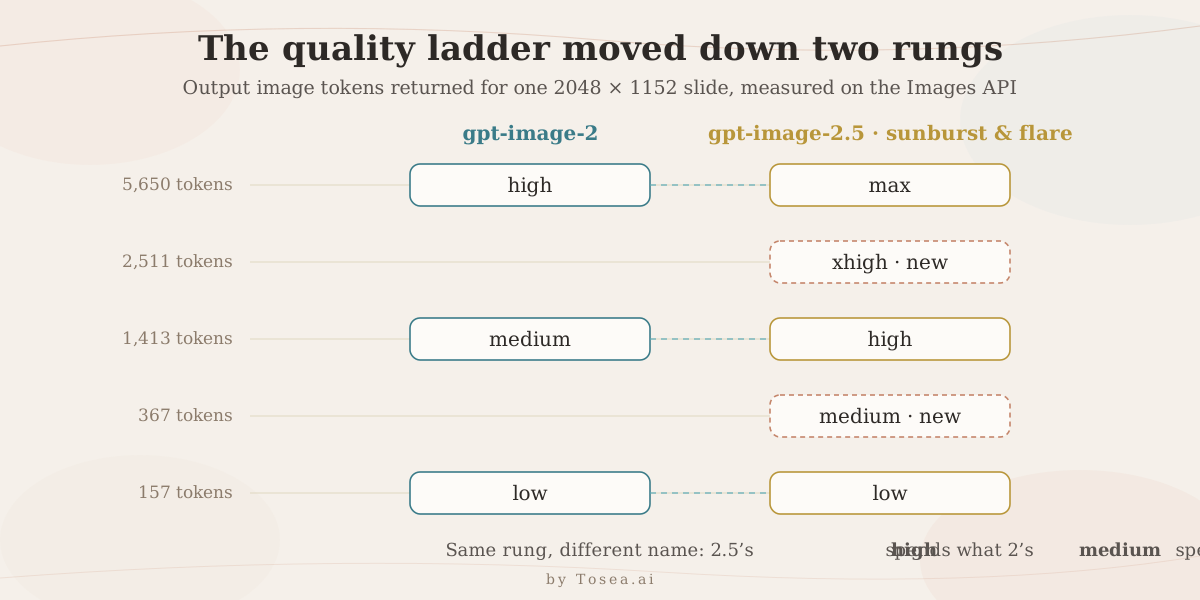
quality | gpt-image-2 | gpt-image-2.5 (both models) |
|---|---|---|
low | 157 tokens | 157 tokens |
medium | 1,413 tokens | 367 tokens |
high | 5,650 tokens | 1,413 tokens |
xhigh | rejected | 2,511 tokens |
max | rejected | 5,650 tokens |
Read the bold rows twice. GPT Image 2.5's high spends what gpt-image-2's medium spent. Its max spends what gpt-image-2's high spent. The low rung is the only one that kept its meaning.
The practical consequence: if you change the model string from gpt-image-2 to gpt-image-2.5-flare and leave quality: "medium" alone, you have silently dropped from a 1,413-token render to a 367-token render — a 3.8× cut in output budget. Your bill falls by roughly half, which looks like a win in the dashboard, and your compositions get simpler, which does not show up anywhere except in the images. The equivalent-fidelity swap is medium → high.
The same shift holds at 4K. At 3840x2160, gpt-image-2 at high returned 13,342 output tokens; GPT Image 2.5 at high returned 3,336, and only at max did it return the same 13,342. auto is not a safe escape either: on our runs sunburst and flare landed on the 1,413-token rung four times out of five, but one flare call came back at 628 output tokens — a value we never saw from any explicit setting. If cost predictability matters, set quality explicitly.
Finding 2: Same Tokens, Same Price, Less Waiting
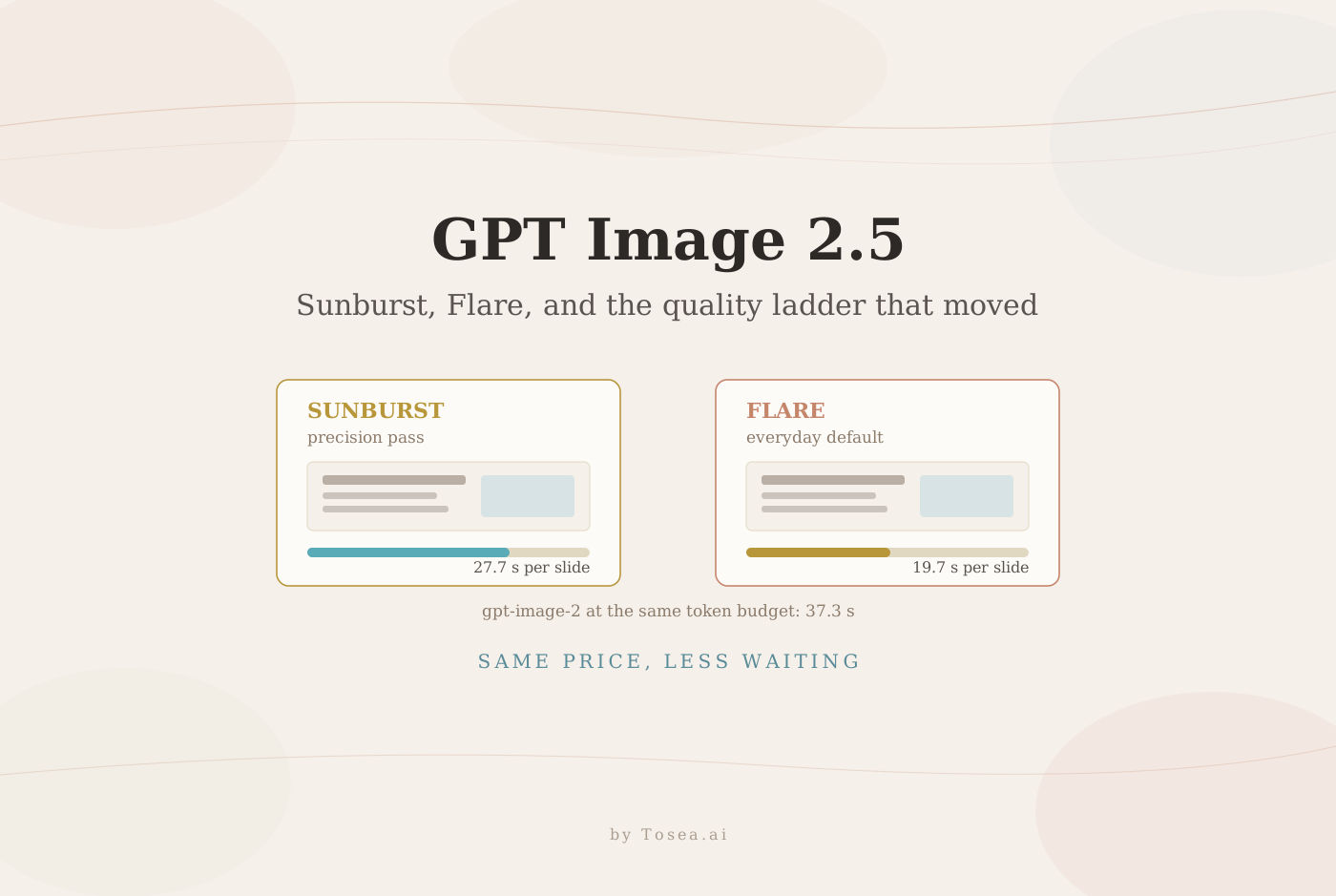
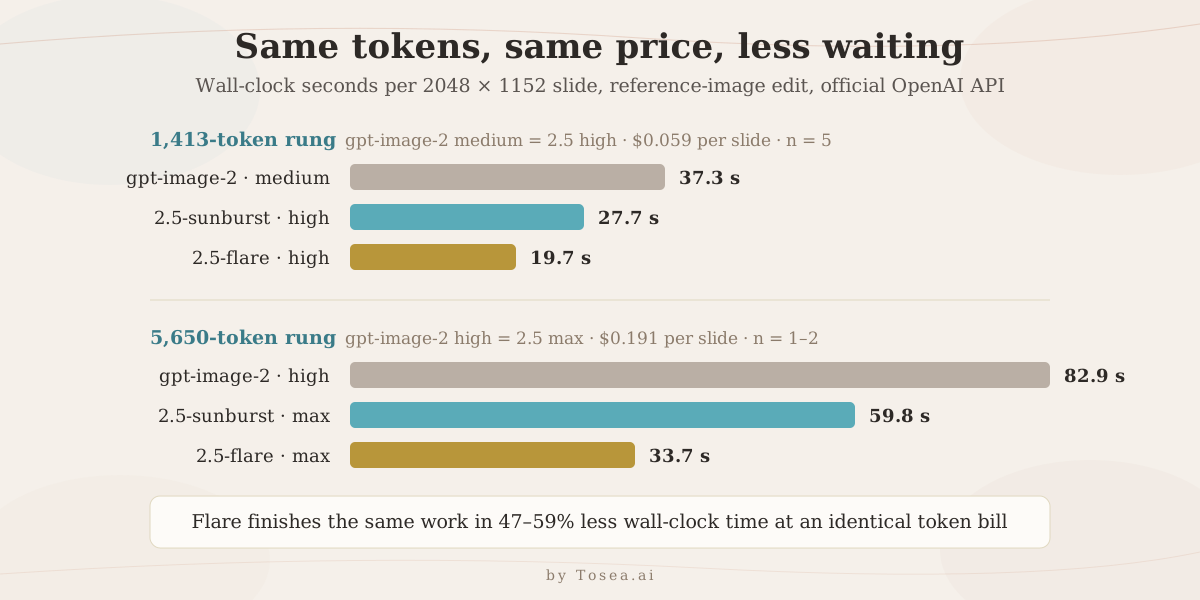
Once the ladder is corrected for, the comparison becomes clean. Below, all three models are producing a 1,413-output-token render of the same 2048 × 1152 slide, from the same prompt and the same reference images, at the same billed cost of about $0.059 per slide. The only variable is time. Each figure is the mean of five pages.
| Model | quality | Output tokens | Mean latency | Cost per slide |
|---|---|---|---|---|
gpt-image-2 | medium | 1,413 | 37.3 s | $0.059 |
gpt-image-2.5-sunburst | high | 1,413 | 27.7 s | $0.059 |
gpt-image-2.5-flare | high | 1,413 | 19.7 s | $0.059 |
Flare is 47% faster than gpt-image-2 at an identical token bill; sunburst is 26% faster. That lands almost exactly on OpenAI's "50% lower latency" claim for flare, which is a rarer outcome than it should be for launch-day marketing numbers.
The gap widens at the top of the ladder. On a single 5,650-token render of the same page, gpt-image-2 at high took 82.9 seconds; sunburst at max took 59.8 seconds and flare at max took 33.7 seconds — 59% faster. And at 4K, gpt-image-2 at high took 92.4 seconds and cost $0.42 per image, while both 2.5 models at high finished in 27.8–33.8 seconds for $0.12, though on the corrected ladder that is a cheaper rung rather than a like-for-like comparison.
Latency variance was also tighter. Across five pages, flare ranged 17.7–22.3 s and sunburst 27.1–28.9 s, while gpt-image-2 ranged 35.2–39.2 s. For a pipeline that fans out a 20-slide deck concurrently, the tail matters more than the mean, and the tail got shorter.
Finding 3: What Each Rung Actually Buys You
Cheaper rungs are only useful if the output is usable. We rendered the same content page at four of the five settings on sunburst and put them side by side.
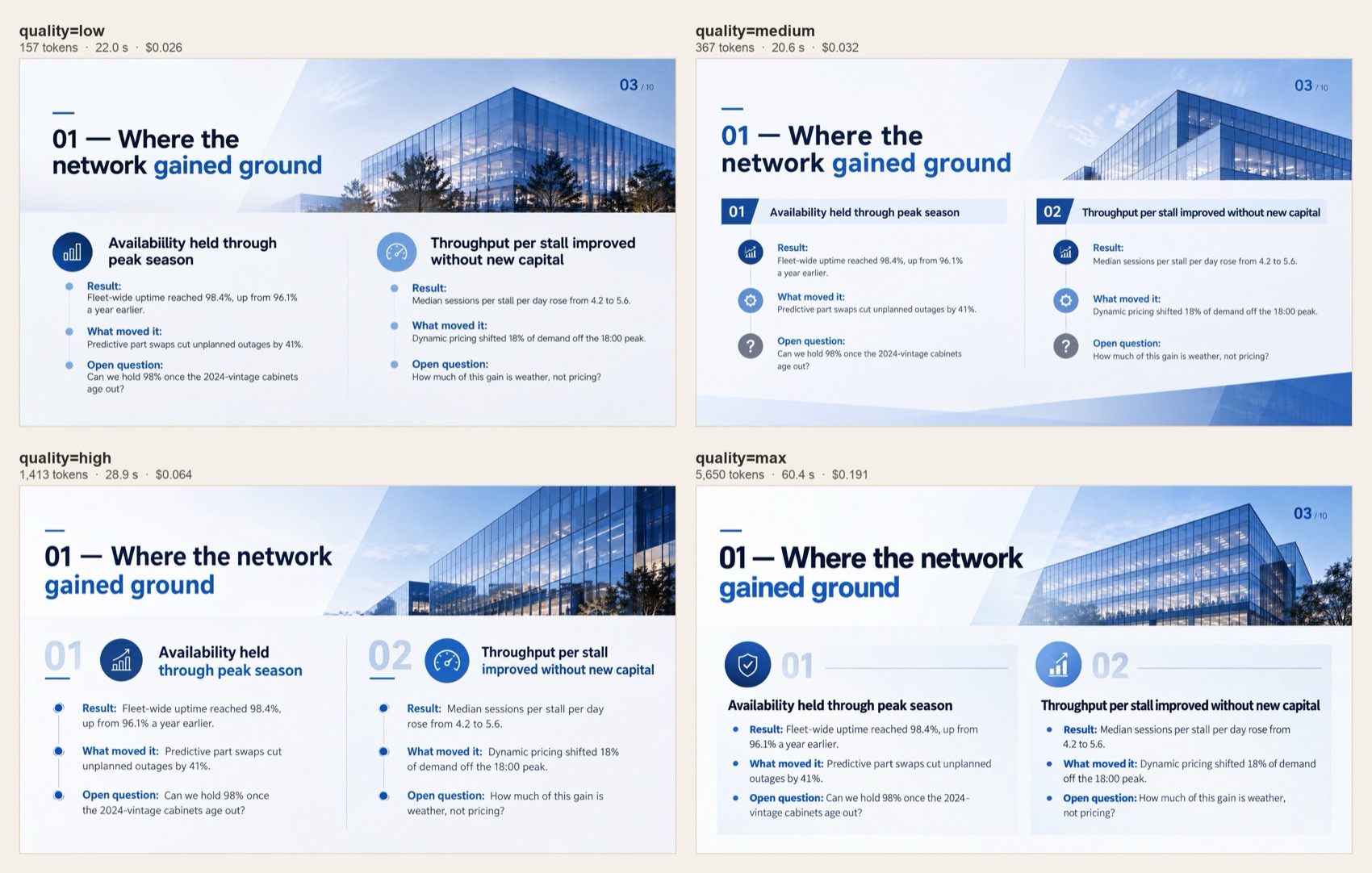
Every one of the four is legible, correctly typeset, and free of garbled text — including low at 157 tokens and $0.026. What the extra budget buys is not correctness but composition: at low and medium you get flatter photography, simpler dividers, and more conventional two-column blocks; at high and max you get layered cards, deeper depth-of-field in the background image, custom numbering treatments, and more considered typographic hierarchy.
For a deck that will be projected in a meeting room and thrown away next week, medium at $0.032 per slide is defensible. For anything a client sees, high is the rung that reads as designed rather than assembled. The new medium and xhigh rungs are genuinely useful additions — they fill gaps in a ladder that previously jumped 4× between steps.
Finding 4: Text and Numbers Held Up
The reason image-mode slide generation became viable at all was gpt-image-2's text rendering. Any regression there would be disqualifying, so we checked every generated slide against its source outline.
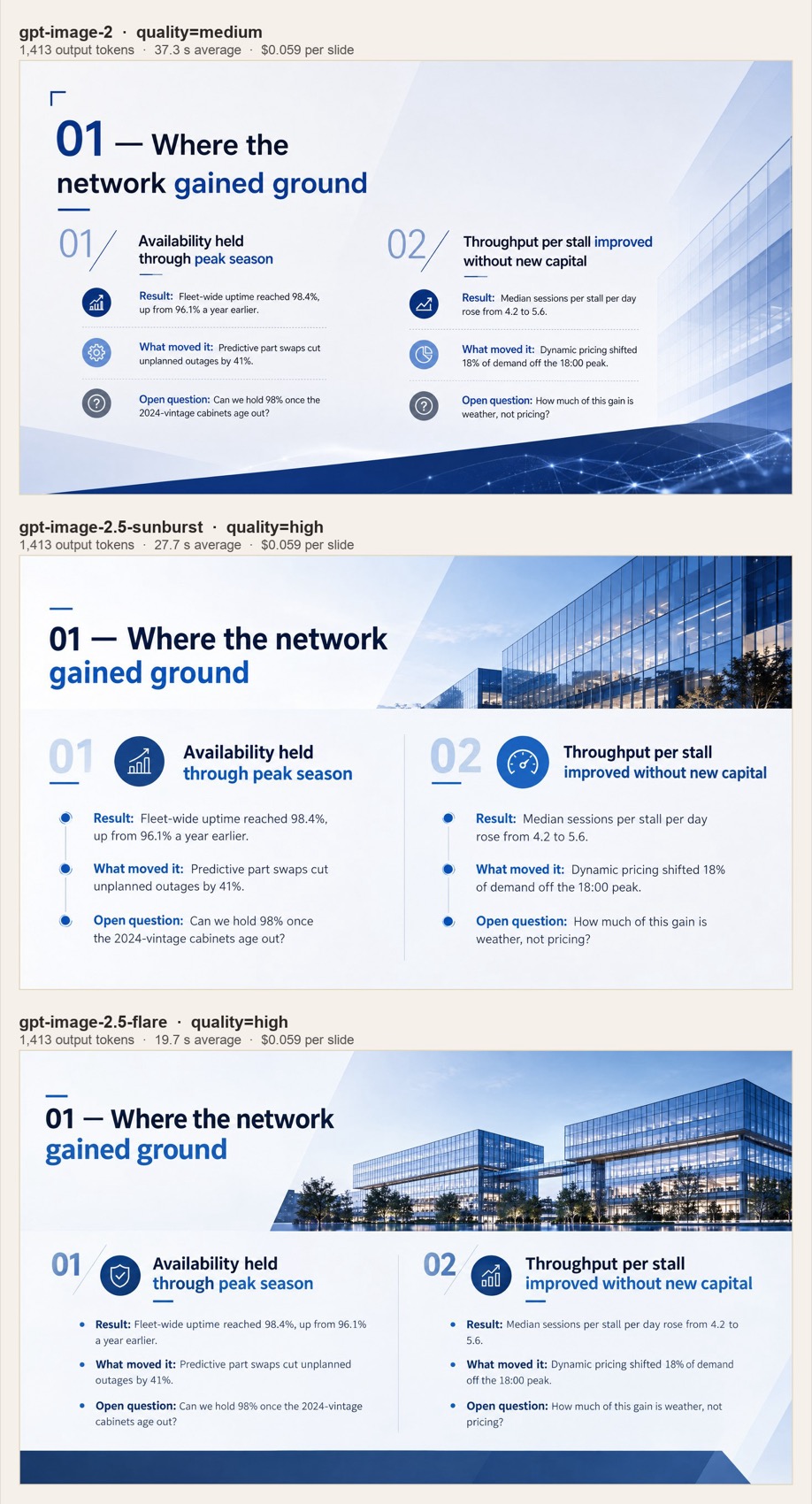
Across the fifteen slides in the head-to-head matrix, all three models rendered every heading, every bullet, and every figure correctly — 98.4%, 96.1%, "4.2 to 5.6", "18:00", "2024-vintage". No dropped decimals, no invented statistics, no hallucinated tagline in the empty logo area. We ran the same prompts in Chinese during an earlier pass and saw the same result, including the visually similar 盯/町 pair that trips weaker models.
The visible difference is layout intelligence. gpt-image-2 reads the outline and produces a competent grid. Both 2.5 models more often produce something a designer would recognise as a decision: an asymmetric photo band across the top third, icon medallions that match the semantic role of each bullet, a page number in the corner that the template implied but never stated. That is a subjective judgement and we are not going to dress it up as a benchmark — but it was consistent across all five pages, in both directions, in a blind look before we checked which file was which.
Finding 5: Multi-Turn Editing Drifts Less, But Still Drifts
OpenAI's precision-editing and multi-turn-consistency claims are the ones most relevant to anyone building an editor on top of the API, so we tested them directly. Starting from one finished slide, we issued three sequential single-change instructions, each time feeding the previous output back in: rewrite one heading, change one figure from 98.4% to 99.2%, replace one sentence on the opposite side of the slide.
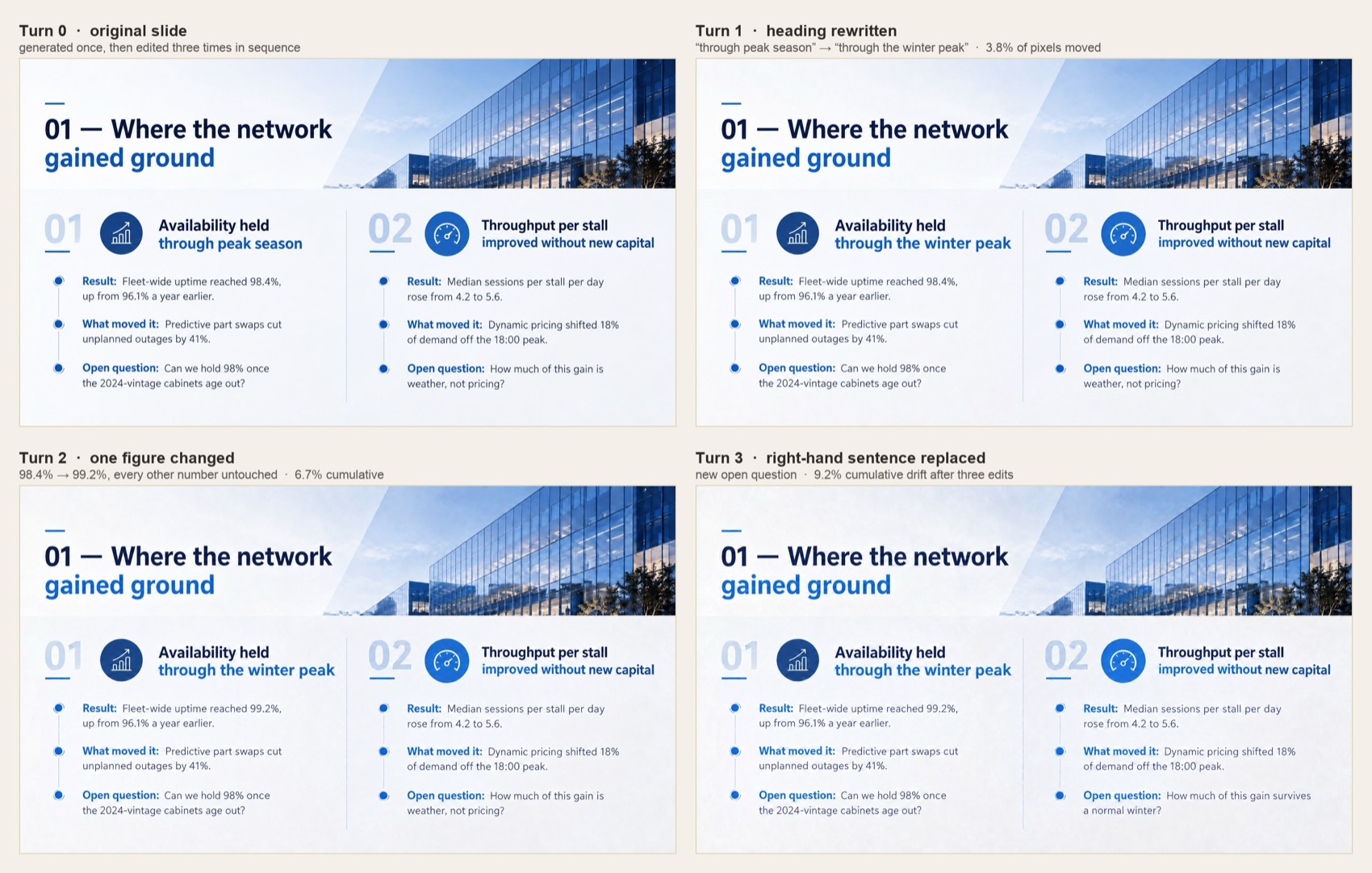
All three models landed all three edits, on all three chains — nine out of nine. That is a better result for gpt-image-2 than we expected, and it is worth saying plainly rather than burying: this is not a capability the older model lacks.
Where they differ is how much of the rest of the slide moves. Measuring the share of pixels that changed by more than a just-noticeable threshold, relative to the original:
| After | gpt-image-2 | 2.5-sunburst | 2.5-flare |
|---|---|---|---|
| Turn 1 | 5.6% | 4.1% | 3.8% |
| Turn 2 | 8.1% | 6.8% | 6.7% |
| Turn 3 | 11.4% | 9.9% | 9.2% |
GPT Image 2.5 accumulates roughly 15–20% less drift over three turns, and its per-turn drift shrinks as the chain goes on (4.1% → 3.1% → 2.8% for sunburst) where gpt-image-2 stays flat (5.6% → 4.9% → 4.9%). That is a real improvement in the direction OpenAI claims. It is also, on this evidence, an incremental one rather than a step change — and note that none of these are true local edits. Without a mask, the whole canvas is regenerated every turn; background photography subtly re-renders, and after enough rounds it will visibly wander. If you need a guaranteed-untouched region, you still need the mask parameter, not a politely worded prompt.
GPT Image 2.5 Pricing, in Practice
Both models publish identical rates, and those rates are identical to gpt-image-2:
| Token type | Price per 1M tokens |
|---|---|
| Text input | $5.00 |
| Cached text input | $1.25 |
| Image input | $8.00 |
| Cached image input | $2.00 |
| Image output | $30.00 |
Because the unit prices did not move, all savings come from the ladder, not the price list. Converted to a 20-slide deck at 2048 × 1152 with three reference images attached per page, using our measured token counts:
| Setup | Per slide | 20-slide deck |
|---|---|---|
gpt-image-2, medium | $0.064 | $1.27 |
| 2.5, high (matched fidelity) | $0.064 | $1.27 |
| 2.5, medium (one rung down) | $0.032 | $0.64 |
| 2.5, low | $0.026 | $0.51 |
gpt-image-2, high | $0.190 | $3.81 |
| 2.5, max (matched fidelity) | $0.191 | $3.81 |
One further note on inputs: reference images are billed at $8 per million and priced by pixel area, so three attached templates cost about 1,728 input tokens per call regardless of file size. Downscaling reference images before upload remains one of the cheapest optimisations available, and nothing about 2.5 changes that arithmetic.
What We Did Not Find
Balance matters more than enthusiasm here, so: several things we looked for did not show up.
No text-rendering leap. gpt-image-2 was already at the point where errors are rare on business-document content. We did not find a case where 2.5 succeeded and 2 failed. If in-image text accuracy is your only requirement, this release does not unblock anything.
No mask-free local editing. The precision-editing improvement is real but bounded, as the drift table shows. Anyone hoping "edit only the headline" now means "touch literally nothing else" will be disappointed.
No price cut. The headline economics improve only if you deliberately move down the renamed ladder, and moving down costs you composition quality. Framing this release as "half the cost" without that caveat is misleading.
Unmeasured territory. We tested one visual genre — dense business slides with brand references — at two resolutions. We did not test photorealistic portraiture, subject preservation from personal reference photos, transparent backgrounds, or the inpainting path with an explicit mask, all of which OpenAI highlights and all of which may behave differently. Our sample is five pages per configuration, single-shot; treat the latency means as indicative rather than as a service-level guarantee.
Migration Checklist for the gpt-image-2 API
If you have an existing integration, these are the changes that actually require a code diff:
- Re-map
quality, don't just swap the model ID.medium→highandhigh→maxpreserve your current output budget. Leaving the string alone silently downgrades you. - Pick flare unless you have a reason not to. It is OpenAI's stated default, it was faster than sunburst in every configuration we ran, and it costs the same. Reach for sunburst on hero assets where the extra 8 seconds buys tighter control.
- Stop relying on
auto. It resolved to different token budgets across otherwise identical calls. Setqualityexplicitly if you bill customers per generation. - Re-tune timeouts downward. If your client waits 180 seconds because
gpt-image-2at 4K needed it, flare will finish in a third of that. Shorter timeouts mean faster failure detection. - Keep
gpt-image-2reachable as a fallback. It is still served, and a single-provider image pipeline with no fallback is a bad bet regardless of which model is newest. - Re-verify your C2PA handling. Watermarking and provenance metadata carry over; if you post-process outputs, confirm nothing changed in the container.
What GPT Image 2.5 Means for AI Slide Generation
A faster image model does not, by itself, produce a better deck — and this is the distinction most launch coverage skips. An image model renders one canvas at a time. A presentation is a sequence of arguments with a shared visual grammar, built from a source document that the model never sees in full.
Where GPT Image 2.5 genuinely helps is the economics of the render step. In an image-mode pipeline, every slide is a separate API call, so per-slide latency multiplies straight into how long a user stares at a progress bar. Cutting 37 seconds to 20 on a 30-page deck removes roughly eight and a half minutes of wall-clock waiting at identical cost — which changes what feels acceptable to regenerate. When a render is cheap in time, users iterate; when it is slow, they accept the first draft. The new medium and xhigh rungs also make tiered output realistic: draft a whole deck at 367 tokens per slide to check the narrative, then re-render only the pages that survive at high.
What the model still cannot do is decide what belongs on slide 7. That work — parsing a 40-page PDF, deciding which findings earn a page, keeping numbers faithful to the source, and holding one template's visual language across a whole deck — sits above the image model, in the orchestration layer. It is the same division of labour we described in our HTML versus image slide generation comparison, and the reason a raw Images API key is not a document-to-PPT tool. It is also why the export question stays open: a generated slide is a picture until something turns it back into editable PPTX shapes.
Tosea.ai sits at that orchestration layer — reading the source document, building the slide structure, choosing the template, and dispatching each page to whichever image model is currently the right trade of speed against fidelity. Model launches like this one change which engine we route to and how we set the quality parameter; they do not change the harder half of the problem. If you are evaluating an AI presentation tool on the strength of its underlying image model alone, our PDF-to-PowerPoint workflow guide is a better place to see where the actual difficulty lives.
Frequently Asked Questions
Is there a model called gpt-image-2.5?
No. The API exposes gpt-image-2.5-sunburst and gpt-image-2.5-flare. A bare gpt-image-2.5 returns a model-not-found error, as does gpt-image-3.
Which model should I default to? Flare. OpenAI names it the default, and it was faster than sunburst at every quality setting we tested for the same price and the same output-token count. Use sunburst when an asset justifies the extra seconds.
Does GPT Image 2.5 cost less than GPT Image 2? Per token, no — the rates are identical. Per image, only if you move to a lower rung on the renamed ladder. At matched output budgets the cost is the same to within a tenth of a cent.
Will my existing gpt-image-2 code work if I just change the model string?
It will run, but quality: "medium" now buys 3.8× fewer output tokens than it did. Map medium → high and high → max to keep your current fidelity.
Is gpt-image-2 deprecated?
OpenAI has not announced a shutdown date, and the model is still served. It remains a sensible fallback in a multi-provider setup.
Does it support 4K?
Yes. Both models accepted 3840x2160 in our tests, at 3,336 output tokens on high and 13,342 on max.
How does it compare with Nano Banana 2? We have not re-run that head-to-head against 2.5 yet; our Nano Banana 2 comparison covers the previous generation and we will update it once we have matched-workload numbers.
Sources
- Introducing ChatGPT Images 2.5 — OpenAI, September 8, 2026
- gpt-image-2.5-sunburst model reference — OpenAI Developers, pricing and supported quality settings
- gpt-image-2.5-flare model reference — OpenAI Developers
- Introducing ChatGPT Images 2.5 — Simon Willison
- OpenAI Releases ChatGPT Images 2.5 With Sketch and Two New API Models — Unite.AI
- OpenAI launches ChatGPT Images 2.5 with faster generation — Investing.com
- All latency, token, cost, and drift figures in this article are our own measurements, taken on September 9, 2026 against the official OpenAI Images API.