How to Use Codex to Generate Marketing Slides for Market Research & Product Decks
How to use OpenAI Codex to generate marketing slides — market research, product launch, demo, competitive, and sales-enablement decks — with prompts, a 7-step workflow, and pros and cons.
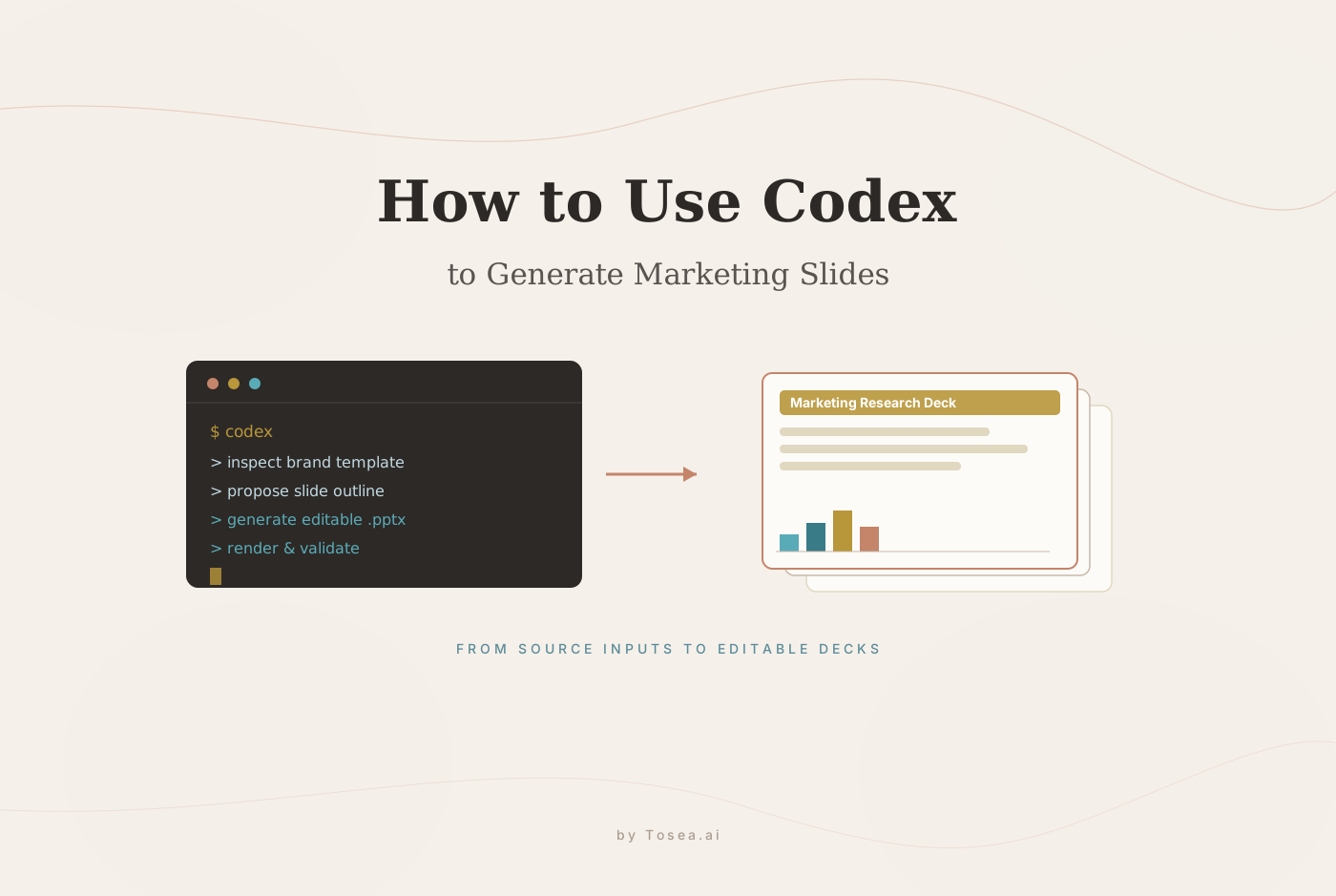
If you want to learn how to use Codex to generate marketing slides, the best use case is not a generic PowerPoint deck. Codex is most useful when you need to turn structured marketing inputs — market research notes, competitor analysis, product positioning, launch plans, customer insights, screenshots, PDFs, and reference decks — into repeatable slide presentations. OpenAI's official Codex slide-deck use case explains that Codex can manipulate .pptx files, generate visuals, apply repeatable layout rules, update existing decks, and build new presentations with the Slides and ImageGen skills. For marketing teams, that means Codex can help create market research decks, product launch decks, sales-enablement slides, product demo presentations, and executive briefing decks. (For the full picture of Codex beyond slides, see our OpenAI Codex complete guide.)
Quick Overview
Codex generates marketing slides by combining source materials, slide structure, visual generation, and code-driven PowerPoint editing.
It is especially useful for:
- Market research presentations
- Product launch decks
- Product demo slides
- Sales-enablement decks
- Competitive analysis decks
- Customer-insight presentations
- Campaign review slides
- Go-to-market strategy decks
- Executive marketing updates
- Investor or partner product briefings
According to OpenAI's guide, Codex can update existing presentations or build new decks by editing slides directly through code, generating visuals, and applying repeatable layout rules slide by slide. It recommends the Slides skill for .pptx editing and the ImageGen skill for illustrations, cover art, diagrams, and slide visuals. For a wider library of slide-generation skills across Codex, Claude Code, and Cursor, see our best HTML slide skills roundup.
Why Marketing Teams Use Codex for Slide Decks
Marketing teams create many decks that follow similar structures but require fresh inputs. A market research deck needs new category trends. A product launch deck needs updated positioning. A sales deck needs a new customer segment. A quarterly marketing review needs new campaign-performance numbers.
Codex is useful because it works with repeatable instructions. A marketing team can give Codex:
- A brand PowerPoint template
- Product screenshots
- Market research notes
- Competitive research
- Customer interview summaries
- Campaign performance data
- Existing slides
- A style guide
- A
guidelines.mdfile that defines the standard deck structure
Then Codex can generate or update a deck based on those materials. This is especially helpful for repeatable marketing workflows, where the format stays mostly consistent but the content changes — the same logic behind a recurring marketing monthly report.
Best Marketing Slide Decks to Generate with Codex
1. Market Research Slides
Codex can transform market research notes into a clear slide deck. A typical market research deck might include market overview, category growth drivers, customer segments, buyer pain points, competitor landscape, pricing patterns, adoption barriers, opportunity areas, and strategic recommendations.
A useful prompt:
Use the Slides and ImageGen skills to generate a 12-slide market research deck from the attached notes and competitor research. Start by proposing an outline. Include slides for market size, growth drivers, customer segments, competitor positioning, key risks, and recommendations. Preserve the existing brand style from the source deck and keep all text editable.
2. Product Launch Slides
Codex can also create product launch presentations. A product launch deck might include product overview, customer problem, target audience, positioning statement, key features, differentiation, launch narrative, messaging pillars, campaign plan, sales-enablement notes, timeline, and call to action.
A prompt example:
Create a 10-slide product launch deck for a new AI productivity feature. Use the attached product brief, customer pain-point notes, and screenshots. Follow the existing brand template. Include a launch narrative, positioning, key benefits, competitive differentiation, go-to-market timeline, and a final call-to-action slide.
3. Product Demo Slides
For product demos, Codex can structure screenshots and explanations into a logical walkthrough: demo objective, user problem, workflow overview, step-by-step product screenshots, feature highlights, before-and-after comparison, customer value, use cases, and next steps.
A prompt example:
Build an 8-slide product demo deck using the screenshots in this folder. Each slide should show one product moment, explain the user value, and include a concise presenter note. Keep screenshots large and readable. Use the existing brand deck as the visual reference.
4. Competitive Analysis Slides
Marketing and product teams often need competitor slides for leadership meetings, sales training, or positioning work. Codex can organize competitor research into a deck with a competitor overview, feature comparison, pricing comparison, messaging comparison, strengths and weaknesses, positioning map, differentiation strategy, and recommended talk tracks.
A prompt example:
Create a competitive analysis deck comparing our product with Competitor A, Competitor B, and Competitor C. Use the attached research notes. Include a comparison table, positioning map, strengths and weaknesses, and recommended sales messaging. Keep the tone objective and evidence-based.
5. Sales-Enablement Slides
Codex can generate sales-enablement decks from product messaging and customer insights: buyer persona, customer pain points, discovery questions, core value proposition, objection handling, competitor responses, proof points, customer examples, demo flow, and closing talk track.
A prompt example:
Generate a sales-enablement deck for account executives selling our new enterprise plan. Use the attached product messaging, customer objections, and sales notes. Include buyer personas, discovery questions, objection handling, competitor talk tracks, and demo guidance. Add speaker notes for each slide.
How to Use Codex to Generate Marketing Slides: Step by Step
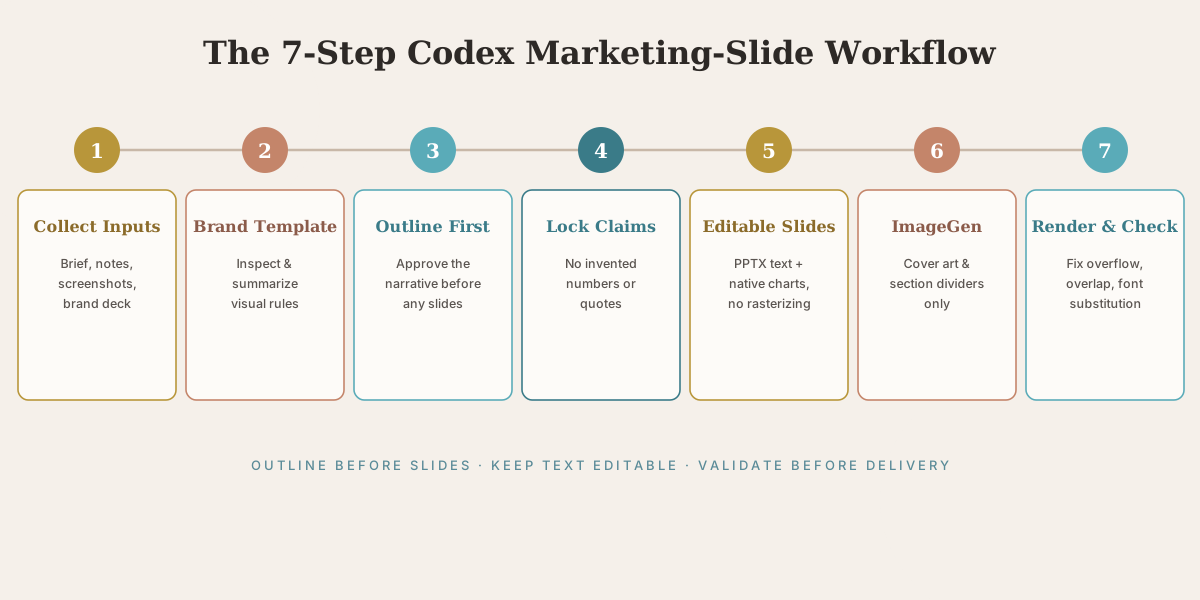
Step 1: Collect Your Marketing Inputs
Codex works best when it has structured source material. Prepare a product brief, market research notes, a brand deck or template, screenshots, competitor notes, customer interview summaries, campaign metrics, a messaging framework, approved claims, and logo and image assets. The more organized your inputs are, the better the deck will be.
Step 2: Start from a Brand Template
OpenAI's guide recommends starting from an existing deck when possible. For marketing slides this matters because brand consistency matters. Use a prompt like:
First inspect the existing brand deck. Identify the slide size, title style, body-text style, color palette, logo placement, image treatment, chart style, and spacing rules. Summarize these rules before generating new slides.
This helps Codex preserve the look and feel of your existing marketing materials.
Step 3: Ask for an Outline Before Generating Slides
Do not jump directly to slide generation. Ask Codex to propose the marketing narrative first:
Before creating the deck, propose a slide-by-slide outline. For each slide, include the title, core message, source evidence, recommended visual, and presenter note. Do not generate the PPTX until I approve the outline.
This step is crucial for marketing because narrative flow matters. A market research deck, a product launch deck, and a sales deck should not have the same structure.
Step 4: Tell Codex Which Slides Need Exact Claims
Marketing decks often contain approved messaging, legal claims, pricing language, and product statements. Codex should not rewrite those freely:
Preserve all approved product claims exactly as written. Do not invent customer quotes, pricing, performance numbers, or competitor claims. If evidence is missing, mark it as needs verification instead of filling it in.
This keeps the deck safer and more trustworthy. The same discipline applies to any AI deck — we cover it in depth in our hallucination-free document-to-PPT guide.
Step 5: Generate Slides with Editable Text and Native Charts
OpenAI's guide recommends keeping slides editable. For marketing slides this matters because teams revise wording, positioning, and visuals many times:
Create the deck as an editable PPTX. Keep text as editable PowerPoint text. Use native charts for simple bar, line, pie, and histogram visuals when practical. Do not rasterize full slides. Use image assets only for screenshots, illustrations, and complex visuals.
Step 6: Use ImageGen for Marketing Visuals
Codex can use image generation for cover images, product illustrations, abstract concepts, and lightweight diagrams. For marketing decks, use visuals intentionally:
Define a consistent visual direction for this marketing deck. Use clean SaaS-style illustrations, realistic product context, and a polished B2B visual tone. Save the image prompts or visual notes so future slides can match the same direction.
Use generated visuals for the cover slide, a product-concept slide, a market-trend illustration, a customer-journey diagram, an abstract technology concept, and section dividers. Avoid generated visuals for exact product UI screenshots, legal or compliance claims, real customer logos without permission, and data charts that should be native and editable. The current generation of in-image text rendering — covered in our GPT Image 2 guide — is strong enough for cover art and labels, but native charts remain the right call for editable data.
Step 7: Render and Validate the Deck
OpenAI's guide recommends rendering decks to slide images and checking for layout issues before delivery. For marketing teams this is essential because a deck can be content-correct but visually messy:
Render the deck to slide images. Review every slide for clipped text, overlap, inconsistent spacing, unreadable screenshots, font substitution, layout drift, and visual-style mismatch. Fix all issues before saving the final PPTX.
Example Full Prompt for a Market Research Deck
Use the Slides and ImageGen skills to generate a 12-slide market research deck for our product team.
Inputs:
- The attached brand PowerPoint template
- Market research notes
- Competitor analysis
- Customer interview summaries
- Product screenshots
First inspect the brand template and summarize the visual rules. Then propose a slide-by-slide outline before generating the deck. Include market overview, customer segments, pain points, competitor landscape, positioning gaps, product opportunity, and recommendations.
Preserve approved claims exactly. Do not invent numbers, customer quotes, or competitor claims. Mark missing evidence as needs verification.
After I approve the outline, create an editable PPTX. Keep text editable, use native charts for simple data visuals, and place screenshots clearly. Use ImageGen only for cover art, section dividers, and abstract concept visuals.
Render the final deck to slide images, check for overflow, overlap, font issues, and visual inconsistency, then fix problems before delivery. Output the final PPTX and a short note explaining which slides were generated, rewritten, or left unchanged.
Example Full Prompt for a Product Launch Deck
Use the Slides and ImageGen skills to generate a 10-slide product launch presentation.
Inputs:
- Product brief
- Launch plan
- Messaging framework
- Product screenshots
- Existing company deck template
Create a deck for a cross-functional launch meeting. The audience includes product, marketing, sales, customer success, and leadership.
First inspect the brand template. Then propose an outline covering the customer problem, target audience, product value, feature walkthrough, differentiation, messaging pillars, launch channels, timeline, sales enablement, and next steps.
Keep all product claims editable and source-grounded. Do not invent metrics or customer quotes. Use screenshots for product workflow slides. Use generated visuals only for abstract section dividers or conceptual slides.
Create an editable PPTX and render it for review. Fix clipped text, overlapping objects, inconsistent spacing, and font substitution before delivery.
Pros of Using Codex for Marketing Slides
- Great for repeatable marketing decks. If your team creates recurring market research decks, campaign reviews, sales-enablement decks, or product updates, Codex can automate the structure.
- Works from existing brand decks. Codex can inspect a source deck and extend it with similar layouts, fonts, colors, and logo placement — useful when brand consistency matters.
- Combines research, content, and visuals. Codex can work with notes, PDFs, screenshots, data files, and reference decks, and it can use ImageGen for visual assets.
- Keeps slides editable. With the right instructions, Codex preserves text as PowerPoint text and uses native charts where practical.
- Validates layout issues. The official workflow recommends rendering and checking decks before delivery, catching clipped text, overlap, and font issues.
Cons of Using Codex for Marketing Slides
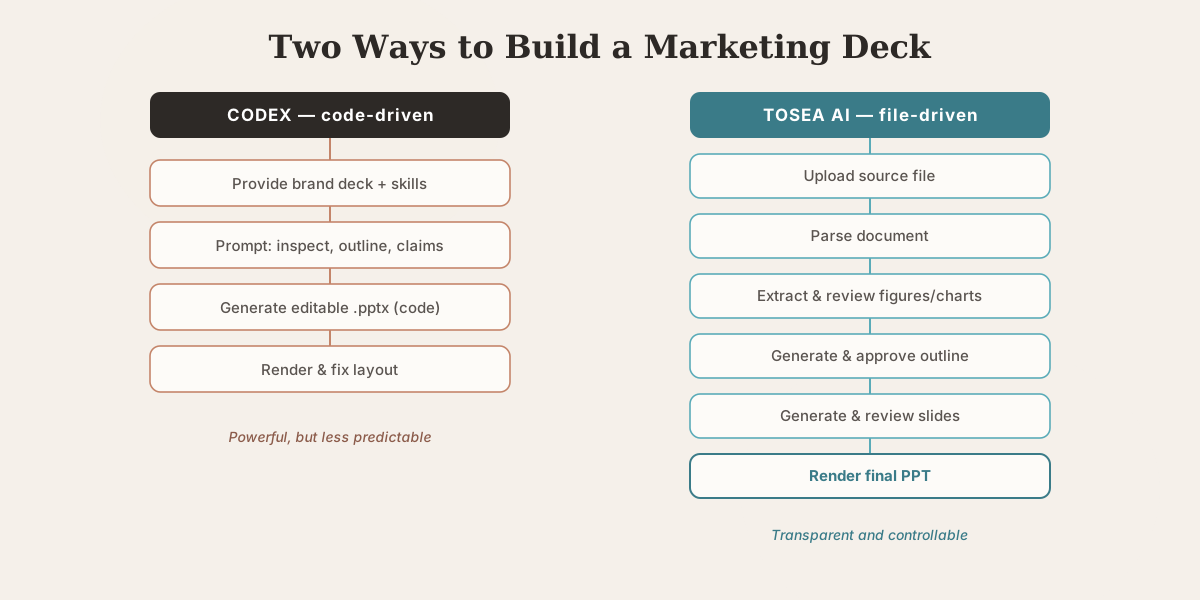
- The process is not very controllable. Codex is powerful, but the process can feel unpredictable. Marketing teams often need precise control over positioning, claims, screenshots, hierarchy, and slide order. Codex can do this, but only with careful prompting, inspection, and iteration.
- You must manage skills, templates, and references. Good results may require a brand deck, screenshots, layout rules, approved copy, marketing notes, and sometimes a
guidelines.mdfile — plus knowing when to use Slides versus ImageGen. - It is more technical than a dedicated marketing slide generator. Codex edits presentations through a code-driven workflow. That is powerful for technical operators, but less convenient for marketers who simply want to upload a document and review each step.
- Source extraction needs extra attention. Market research and product launch decks often rely on PDFs, reports, screenshots, and customer notes. Codex can work with those, but it is not primarily a file-parsing presentation workflow.
- Visual quality depends on iteration. Codex can produce strong marketing slides, but polished design usually requires rendering, review, and revision. The first draft may not be ready to present.
Why Tosea AI Is Better for Most Marketing PPT Workflows
Codex is a powerful way to generate marketing slides if you are comfortable with agentic workflows, code-driven slide editing, and detailed prompting. But most marketing teams want something simpler.
Tosea AI is built for a more controlled file-to-presentation workflow. Instead of asking users to find templates, choose skills, manage slide-generation prompts, or review code-driven edits, Tosea AI gives users a clear, reviewable process:
- Upload your source file
- Parse the document
- Extract images, figures, charts, and key content
- Review and modify the extracted materials
- Generate a slide outline
- Edit and approve the outline
- Generate slides
- Review and modify each slide
- Render the final PPT
For market research slides, this means you can upload reports, PDFs, competitor materials, or product documents and review the information before it becomes a slide. For product presentations, you can check screenshots, extracted visuals, outline structure, and slide content before rendering the final deck. That is the main difference: Tosea AI gives marketing teams step-by-step control without requiring them to manage technical tools. For the broader document-to-deck pattern, see our guide to mastering document transformation for executive presentations.
Codex vs Tosea AI for Marketing Slides
| Feature | Codex | Tosea AI |
|---|---|---|
| Best for | Technical users generating or editing decks through code | Marketers creating source-based presentation decks |
| Main workflow | Use Slides and ImageGen skills to edit .pptx files | Upload file, parse content, generate outline, create slides |
| Market research deck creation | Possible with structured prompts and references | Built for document-to-slide workflows |
| Product presentation deck creation | Possible with screenshots, source deck, and detailed prompting | Easier review of source content, visuals, outline, and slides |
| File parsing | Requires careful prompting and tools | Native part of the workflow |
| Image extraction | Possible with setup | Built into the workflow |
| Outline review | User must ask for it | Built into the workflow |
| Slide review | Possible through rendered images | Step-by-step reviewable workflow |
| Template management | User may need to provide or configure templates | Simpler, less technical |
| Control | Powerful but less predictable | More transparent and controllable |
| Best users | Developers, technical marketers, automation teams | Marketing teams, product teams, researchers, business users |
Frequently Asked Questions
How do you use Codex to generate marketing slides?
Provide a brand deck, marketing notes, product screenshots, research files, and a clear goal. Ask Codex to inspect the brand template, propose a slide outline, preserve approved claims, generate editable PPT slides with the Slides skill, use ImageGen only where visuals are needed, and render the deck for review.
Can Codex create market research slides?
Yes. Codex can create market research decks from notes, PDFs, competitor analysis, customer insights, and structured research inputs. For best results, ask it to create an outline first and avoid inventing unsupported numbers or claims.
Can Codex create product presentation slides?
Yes. Codex can generate product launch decks, product demo slides, product positioning decks, and sales-enablement presentations. It works best when you provide a product brief, screenshots, a brand template, and approved messaging.
What is the best prompt for Codex marketing slides?
A good prompt includes the audience, deck type, source files, brand template, slide count, required sections, approved claims, visual rules, and validation requirements. Always ask for an outline before generating the PPT.
Is Codex good for marketing teams?
Codex can be useful for technical marketing teams, product marketers, growth teams, and operations teams that need repeatable deck generation. It is less ideal for users who want a simple no-code presentation workflow.
What is the biggest weakness of Codex for marketing slides?
Controllability. Codex can generate strong decks, but the process can require careful prompting, template setup, rendered review, and multiple iterations.
Is Tosea AI better than Codex for marketing slide generation?
For most marketing teams, yes. Codex is better for custom automation; Tosea AI is better for a simple, controllable workflow from file parsing to image extraction, outline generation, slide review, and final PPT rendering.
Final Takeaway
Learning how to use Codex to generate marketing slides is worthwhile if your team wants a code-driven way to create market research decks, product launch decks, product demo slides, sales-enablement presentations, and competitive analysis decks. Codex can inspect existing brand decks, generate editable slides, use image generation, apply repeatable layout rules, and validate layout problems before delivery. It is powerful for technical users and repeatable marketing workflows.
But Codex is not the easiest way for most marketers to create slides. The generation process can be less controllable, and users may need to manage skills, templates, source files, screenshots, prompts, and validation steps. For a simpler, more controllable workflow, Tosea AI lets marketing and product teams upload files, parse source content, extract images, generate outlines, review every step, and render professional PPT decks without managing technical slide-generation tools — the source-first path from market research and product materials to a finished presentation. For data-heavy marketing decks specifically, our framework for presenting sales data to executives pairs well with either workflow.
Sources
- OpenAI Codex: Generate slide decks — OpenAI Developers, official use-case documentation
- OpenAI Codex — OpenAI, product overview
- OpenAI Codex Complete Guide — Tosea.ai, capabilities and surfaces overview