Best AiPPT.com Alternative: Accurate, Editable, Evidence-Driven Slides (2026)
Looking for the best AiPPT.com alternative? Compare AiPPT.com and Tosea AI for turning PDFs, research papers, and financial reports into accurate, editable, evidence-driven slides.
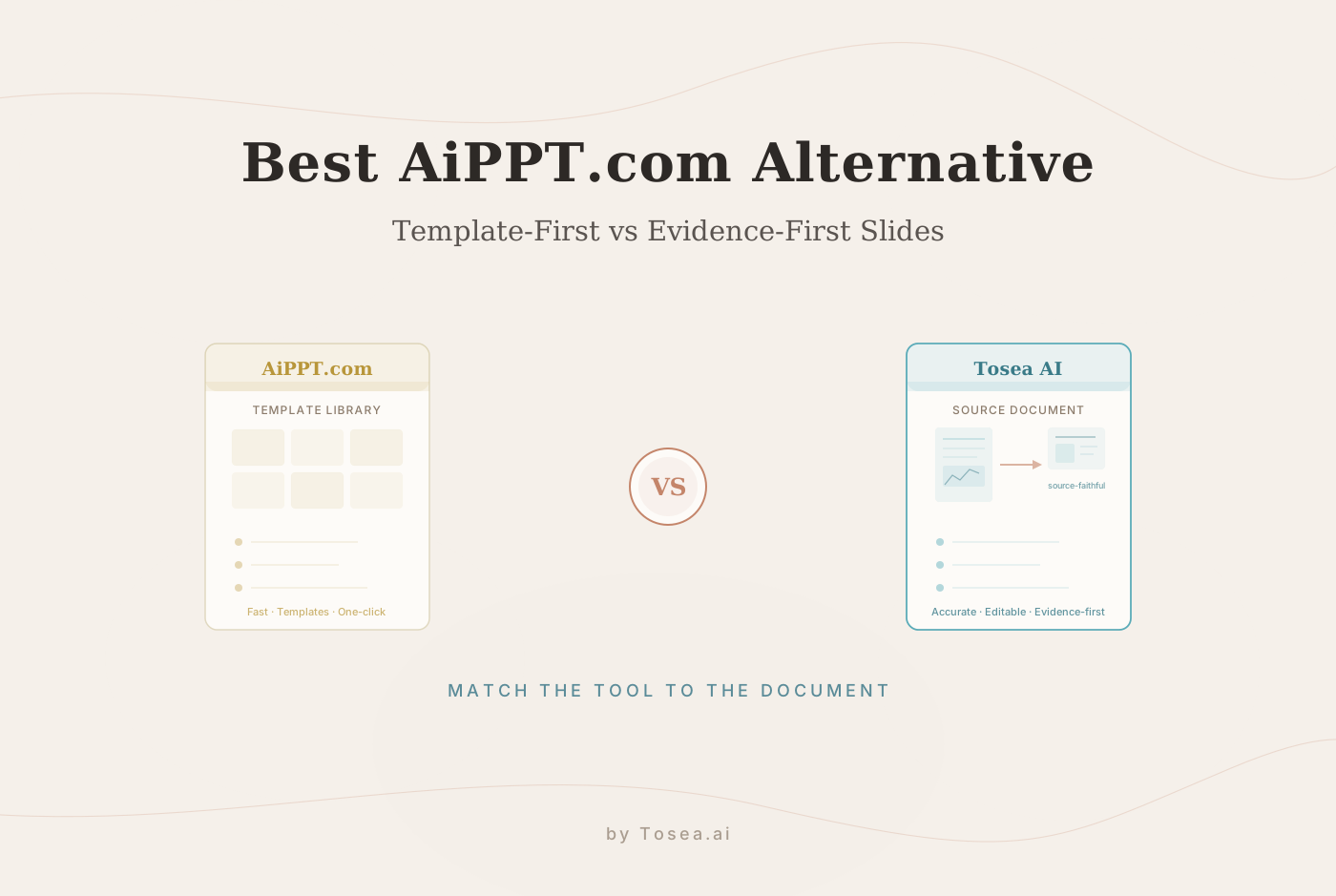
If you are searching for the best AiPPT.com alternative, the right answer depends on what kind of presentation you need to create. AiPPT.com is a fast AI presentation maker with templates, one-click slide creation, document upload, web URL conversion, Google Drive import, and AI-generated outlines. But if your priority is turning complex PDFs, research papers, financial reports, and professional documents into accurate, editable, evidence-driven slides, Tosea AI is the stronger AiPPT.com alternative.
This comparison is not about declaring one tool universally "better." It is about matching the tool to the job. If your input is a one-line idea and you want a template-driven deck in seconds, a speed-first generator wins. If your input is a 40-page report you have to defend in front of a committee, a source-first generator wins. We will map both tools to those situations so you can pick with confidence.
Quick Overview
AiPPT.com is good for quick presentation generation, templates, and general slide creation. It supports generating slides from ideas, local files, webpages, Google Drive imports, PDFs, TXT files, and Word documents. Its homepage also highlights a large template library and one-click slide creation.
Tosea AI is better for professional document-to-slide workflows. It is built around source-grounded presentations, file parsing, image and figure extraction, outline control, editable slides, speaker notes, and faithful reproduction of charts, formulas, and data.
Choose AiPPT.com if you want:
- Fast AI slide generation
- Many templates
- General PowerPoint creation
- Web URL to presentation conversion
- Simple teaching, business, or product decks
- A broad template-first workflow
Choose Tosea AI if you want:
- PDF to presentation AI
- Research paper to slides
- Financial report to presentation
- Evidence-driven slides
- Editable professional decks
- Source-faithful figures, charts, formulas, and data
- More control over outline and slide generation
- Professional document privacy
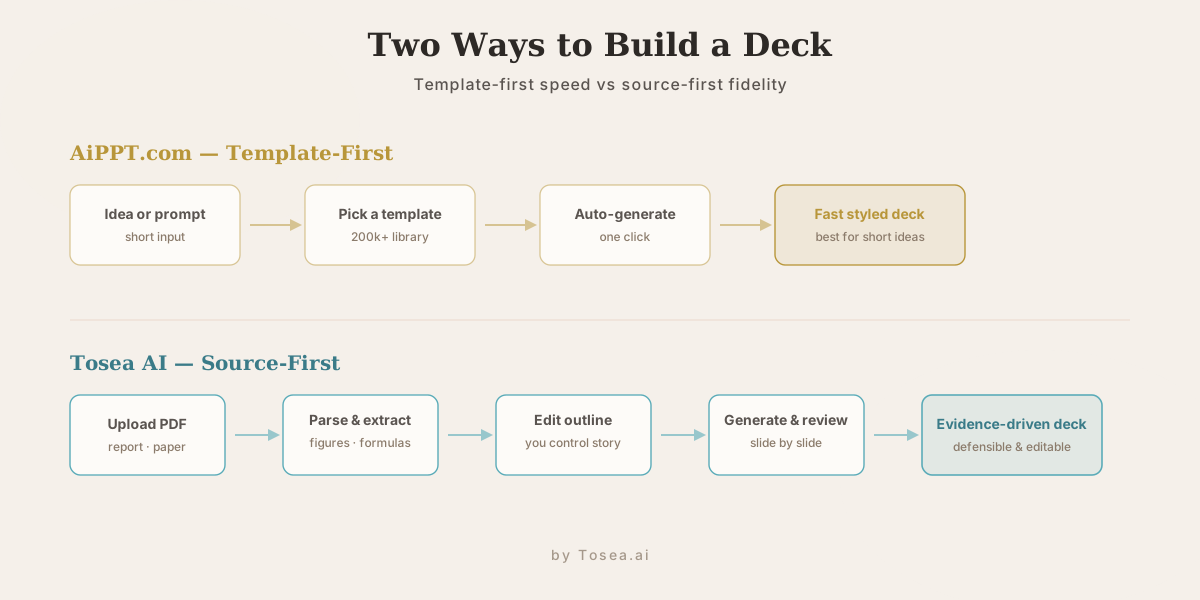
How We Compared AiPPT.com and Tosea AI
To keep this fair, the comparison is grounded in what each product publicly documents and demonstrates rather than subjective taste. We looked at four things:
- Input types supported — the kinds of source material each tool accepts (short ideas, webpages, PDFs, reports, papers).
- Workflow stages exposed to the user — how much of the generation process you can see and adjust before the final deck appears.
- Source fidelity — whether figures, tables, formulas, and numbers are reproduced from the original document or re-generated from a summary.
- Privacy posture — what each product states about how uploaded files are handled.
We deliberately did not score template aesthetics, because visual taste is subjective and both tools can produce attractive slides. The questions that actually separate these tools are about control and accuracy, not which gradient looks nicer. For a broader field of options beyond these two, our roundup of the best AI presentation makers for 2026 covers five more tools across the same criteria.
What Is AiPPT.com?
AiPPT.com is an AI presentation maker that helps users quickly create slides from ideas, text, files, webpages, and cloud documents. Its homepage describes the product as an AI presentation maker for quickly creating stunning slides. It also promotes a library of over 200,000 free templates across education, business, sales, marketing, medical, diagrams, charts, posters, and other categories.
AiPPT.com supports multiple creation paths:
- Generate slides with AI
- Upload documents
- Import from Google Drive
- Convert web URLs to presentations
- Use templates
- Auto-generate presentation outlines
- Edit, export, and share presentations
It is a useful tool for users who want a fast way to make a structured presentation without building every slide manually. The template library is genuinely large, and for someone assembling a classroom deck or a product overview from a short prompt, that breadth is a real advantage.
Why Look for an AiPPT.com Alternative?
AiPPT.com is useful, but not every user needs the same kind of slide generator.
People usually search for an AiPPT.com alternative when they need:
- Better source accuracy
- More control over document parsing
- More reliable PDF-to-slide workflows
- Editable slides based on real source documents
- Research paper presentation support
- Financial or technical document handling
- Better privacy for professional files
- A workflow that lets users review each stage before final output
This is where Tosea AI becomes a better fit. The core distinction is simple: AiPPT.com is more template-first and speed-first, while Tosea AI is more source-first and evidence-first. If you have run into decks that look polished but quietly drop a key figure or soften a number, you already understand why some users want the second approach. We unpack that failure mode in detail in our guide to zero-hallucination AI slides.
What Is Tosea AI?
Tosea AI is a professional AI slide generator designed to turn complex documents into accurate, editable presentations. Its homepage shows workflows for uploading PDFs, extracting content, building an outline, editing slides, adding speaker notes, and exporting polished slides.
Tosea AI is especially strong for:
- Research papers
- Credit research reports
- Financial documents
- Business reports
- Academic papers
- Technical documents
- Long PDFs
- Slide decks that need evidence and accuracy
Tosea AI's homepage states that its approach is evidence-first. It says the AI does not invent, and that charts, formulas, and data are reproduced from the source. That matters for professional users who need slides they can defend in meetings, classes, committees, or client presentations. If you regularly start from dense source files, our walkthrough on converting PDF to PowerPoint while preserving tables and formulas shows what that fidelity looks like in practice.
AiPPT.com vs Tosea AI: Key Differences
| Feature | AiPPT.com | Tosea AI |
|---|---|---|
| Best for | Fast general slide creation | Source-heavy professional presentations |
| Main workflow | Ideas, templates, documents, webpages, Google Drive | Upload file, parse source, extract images, build outline, generate slides |
| Strength | Speed and template variety | Accuracy, editability, and source fidelity |
| Document handling | Supports PDF, TXT, Word, Google Drive | Built for complex PDFs, reports, papers, figures, formulas, and data |
| Template focus | Very strong template library | Professional templates plus document-driven slide structure |
| Best users | Educators, general business users, quick deck creators | Researchers, analysts, consultants, finance teams, students, professional teams |
| Review control | Good for fast generation | Stronger step-by-step review workflow |
| Source traceability | More general presentation workflow | Evidence-first document-to-slide workflow |
| Privacy emphasis | Standard product/legal pages | Dedicated security page for professional documents |
Why Tosea AI Is the Best AiPPT.com Alternative for Professional Users
1. Tosea AI Is Built for Source-Heavy Documents
Many AI presentation tools work well when the input is a short idea. But professional presentations often start with source files.
Examples include:
- A 30-page research paper
- A 60-page financial report
- A consulting memo
- A technical white paper
- A market research PDF
- A board update document
- A credit research note
- A dense academic article
In these cases, the goal is not just to create pretty slides. The goal is to understand the source, extract the right evidence, preserve the key visuals, and create a deck that stays faithful to the original material. Tosea AI is designed for exactly this workflow, and our research paper to slides workflow shows the full path from a 30-page PDF to a finished talk.
2. Tosea AI Gives You More Control Over the Slide Process
One common problem with one-click AI presentation tools is that the result can feel too automatic. You upload a file or enter a topic, and the tool generates a deck. That is fast, but it may not give you enough control over what the AI includes, removes, rewrites, or emphasizes.
Tosea AI is more structured. Its workflow includes:
- File parsing
- Image and figure extraction
- Outline generation
- Outline editing
- Slide generation
- Slide-by-slide editing
- Speaker notes
- Export
This matters because professional users rarely want a one-shot deck. They want to review the material, adjust the story, and make sure the final presentation matches the source. The outline-editing stage is the pivot point: it is where you decide the narrative before a single slide is rendered.
3. Tosea AI Is Better for Research Paper Presentations
Research papers are hard to turn into slides. They contain abstracts, methods, experiments, figures, tables, equations, limitations, and references.
A general AI presentation maker may summarize the paper too aggressively. It may miss key figures, weaken the method section, or overstate the conclusion. Tosea AI is better for research workflows because it can extract figures and formulas from PDFs and shape the material into a presentation outline. That makes it useful for:
- Journal club presentations
- Thesis defense slides
- Academic conference talks
- Research paper summaries
- Class presentations
- Lab meeting updates
If your source is a scientific paper, Tosea AI is a more focused AiPPT.com alternative.
4. Tosea AI Is Better for Financial and Business Reports
Financial reports, market research documents, and business memos require precision. A wrong number, a missing assumption, or an invented statement can create real problems.
Tosea AI is built for evidence-driven professional slides. Its homepage demonstrates a credit research workflow where a PDF is turned into an investment committee deck. That is a very different use case from creating a generic business template. Use Tosea AI for:
- Investment committee decks
- Earnings call summaries
- Board presentations
- Financial report summaries
- Market research presentations
- Consulting deliverables
- Internal strategy decks
These are situations where source fidelity matters more than quick visual generation. If you build these decks regularly, our investment committee memo deck guide maps the structure that reviewers expect.
5. Tosea AI Is Stronger When Accuracy Matters
AiPPT.com is useful for speed and templates. Tosea AI is more compelling when accuracy matters.
The Tosea AI homepage emphasizes that charts, formulas, and data are reproduced from the source. That is important because AI slide tools can sometimes hallucinate facts, simplify too much, or produce polished slides that look correct but are not. For professional work, a slide has to be both clear and defensible. A good slide is not only beautiful; it should answer the question, "where did this claim come from?"
6. Tosea AI Has a Stronger Privacy Position for Professional Documents
Professional presentations often involve sensitive files. These may include internal reports, research drafts, financial models, business strategies, client deliverables, or academic work.
Tosea AI has a dedicated Security & Privacy page for professional documents. It states that uploaded documents are processed only to generate presentations and are not used to train AI models by default. It also describes encryption in transit and at rest, file deletion, account deletion, and DPA availability for enterprise customers. For teams that need a privacy review before uploading files, that documentation is a meaningful difference.
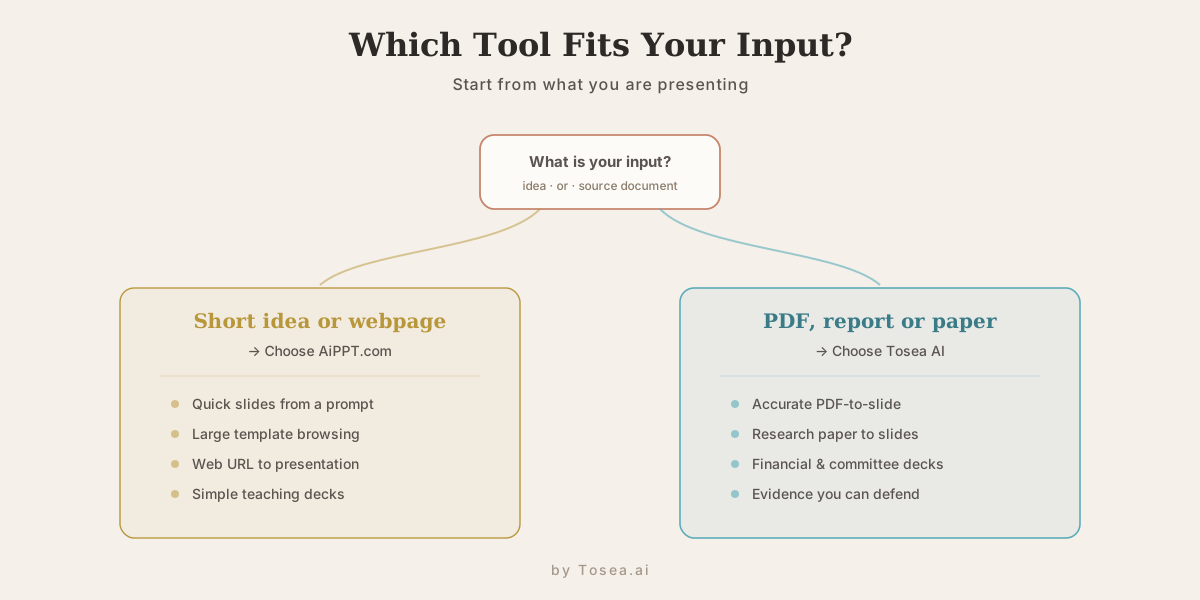
When AiPPT.com Is Still a Good Choice
A fair comparison should be honest. AiPPT.com is still useful.
AiPPT.com may be the better choice if you want:
- A large template library
- Fast general-purpose slide creation
- Web URL to presentation conversion
- Simple classroom slides
- Basic business plans
- Product introductions
- Quick work reports
- A lightweight AI slide maker
If your main goal is to quickly generate a visually structured deck from a short prompt, AiPPT.com can be a good option, and the template breadth is a genuine strength.
When Tosea AI Is the Better AiPPT.com Alternative
Tosea AI is the better choice if your presentation depends on source documents.
Choose Tosea AI if you need:
- Accurate PDF-to-slide conversion
- Research paper to slides
- Figures and formulas extracted from PDFs
- Editable slides based on source material
- Speaker notes from real documents
- Professional privacy and file handling
- More control over outline and slide structure
- Financial, academic, consulting, or technical presentations
In short, AiPPT.com is better for quick general slide creation. Tosea AI is better for serious document-to-presentation workflows. If you are also weighing other tools in this category, our Gamma alternatives roundup compares several source-aware options side by side.
Best AiPPT.com Alternative by Use Case
| Use Case | Better Fit |
|---|---|
| Quick slides from a short idea | AiPPT.com |
| Large template browsing | AiPPT.com |
| Webpage to presentation | AiPPT.com |
| Simple teaching deck | AiPPT.com |
| Research paper to slides | Tosea AI |
| PDF to editable presentation | Tosea AI |
| Financial report to presentation | Tosea AI |
| Investment committee deck | Tosea AI |
| Evidence-driven professional slides | Tosea AI |
| Sensitive business documents | Tosea AI |
Who Should Switch from AiPPT.com to Tosea AI
Not everyone needs to switch. If your work is mostly short-form decks built from prompts, AiPPT.com already fits. But a few audience segments tend to feel the limits of a template-first tool quickly:
- Graduate students and researchers turning papers into journal-club or defense slides, where dropping a figure or misstating a method is not acceptable.
- Financial analysts and consultants building decks from reports that will be scrutinized number by number in a committee.
- Technical teams presenting white papers, architecture documents, or specs that contain formulas, tables, and diagrams that must survive the conversion intact.
- Anyone handling confidential files who needs a documented privacy posture before uploading.
If you recognize your work in that list, the source-first workflow is worth trying. For a deeper look at moving complex files into board-ready output, see our guide on mastering document transformation for executive presentations.
How to Use Tosea AI as an AiPPT.com Alternative
Using Tosea AI is straightforward:
- Go to Tosea AI
- Upload your PDF, report, paper, or source document
- Let Tosea AI parse the file
- Review extracted images, figures, formulas, and content
- Generate a presentation outline
- Edit the outline before creating slides
- Generate slides
- Review each slide and speaker note
- Export or share the final presentation
The most important step is reviewing the outline. This is where you control the story before the deck is generated. That is the core advantage of Tosea AI: it gives you a more transparent and reviewable workflow.
Frequently Asked Questions
What is the best AiPPT.com alternative?
Tosea AI is the best AiPPT.com alternative for users who need accurate, source-heavy, editable presentations from PDFs, research papers, financial reports, and professional documents.
Is Tosea AI better than AiPPT.com?
Tosea AI is better for professional document-to-slide workflows. AiPPT.com is better for fast general presentation creation, template browsing, and lightweight slide generation. The right answer depends on whether your input is a short idea or a source document.
Can Tosea AI convert PDFs into presentations?
Yes. Tosea AI is built to turn PDFs and complex documents into accurate, editable presentations, including figures and formulas extracted from the original file.
Does AiPPT.com support document upload?
Yes. AiPPT.com says users can upload local documents, including PDFs, TXT files, and Word documents, to create structured presentation slides.
Which tool is better for research paper presentations?
Tosea AI is better for research paper presentations because it focuses on extracting figures, formulas, and source content and building presentation outlines from complex PDFs.
Which tool is better for templates?
AiPPT.com is stronger if your main priority is browsing a very large template library. Tosea AI is stronger if your main priority is source accuracy and document-driven slide generation.
Which tool is better for business reports?
Tosea AI is better for business reports that require accuracy, source fidelity, speaker notes, and professional review. AiPPT.com can work for simpler business decks and fast reports.
Is Tosea AI good for sensitive documents?
Tosea AI has a dedicated security page stating that uploaded documents are not used to train AI models by default and that files are encrypted in transit and at rest. That makes it a stronger option for professional document workflows.
Final Verdict: The Best AiPPT.com Alternative for Document-to-Slide Workflows
AiPPT.com is a capable AI presentation maker. It is fast, template-rich, and useful for general-purpose slide creation. If you need a quick teaching deck, business plan, webpage-to-presentation workflow, or template-based presentation, AiPPT.com may be enough.
But if you are looking for the best AiPPT.com alternative because your work starts with serious source material, Tosea AI is the stronger choice. It is built for accurate, editable, evidence-driven presentations from PDFs, research papers, financial reports, consulting documents, and professional materials, and it gives users more control over parsing, image extraction, outline generation, slide editing, speaker notes, and final export.
If your priority is speed and templates, AiPPT.com is useful. If your priority is turning complex source documents into professional presentations you can trust, Tosea AI is the AiPPT.com alternative to try.
Sources
- AiPPT.com — official AI presentation maker homepage (features, template library, supported inputs)
- Tosea AI — official homepage (document-to-slide workflow, evidence-first positioning)
- Tosea AI Security & Privacy — stated data handling, encryption, and deletion policy