Anthropic S-1 PowerPoint: How to Turn the IPO Filing into an 18-Slide Investor Deck
How we turned Anthropic's preliminary S-1 (filed Oct 26, 2026) into an 18-slide investor PowerPoint with AI: storyline, slide titles, period rules, verification checks and a reusable prompt.
The Anthropic S-1 PowerPoint in this article started as a preliminary SEC filing and ended as an 18-slide investor presentation. We used Tosea.ai to organize the filing around investor questions, turn dense financial disclosures into slide arguments, and produce a deck that could still be reviewed and edited. The result is not a page-by-page summary. It is a presentation about growth quality, operating leverage, compute commitments, risk and governance — and this article walks through how it was built, including the places where the first render still needed human correction.
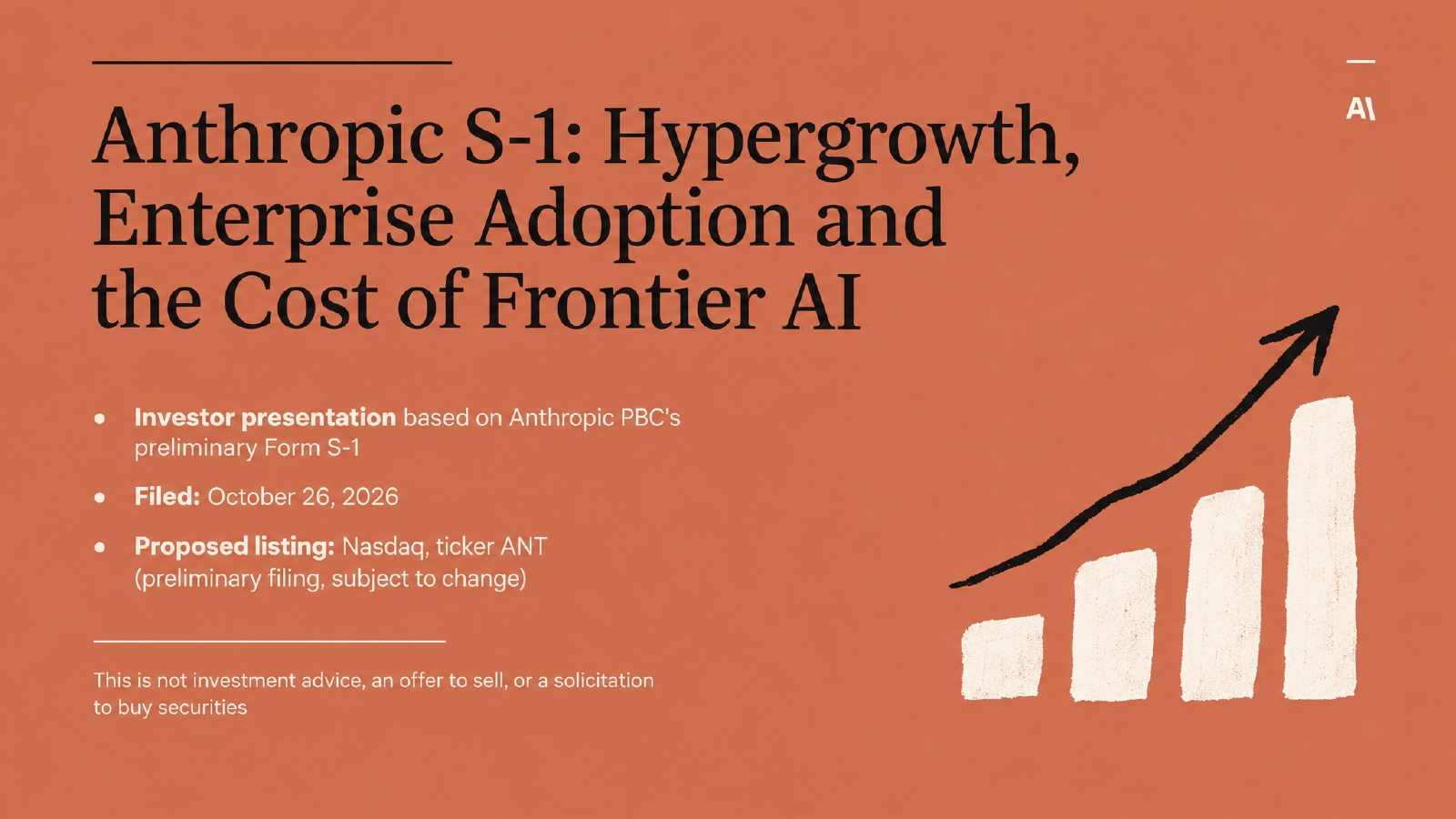
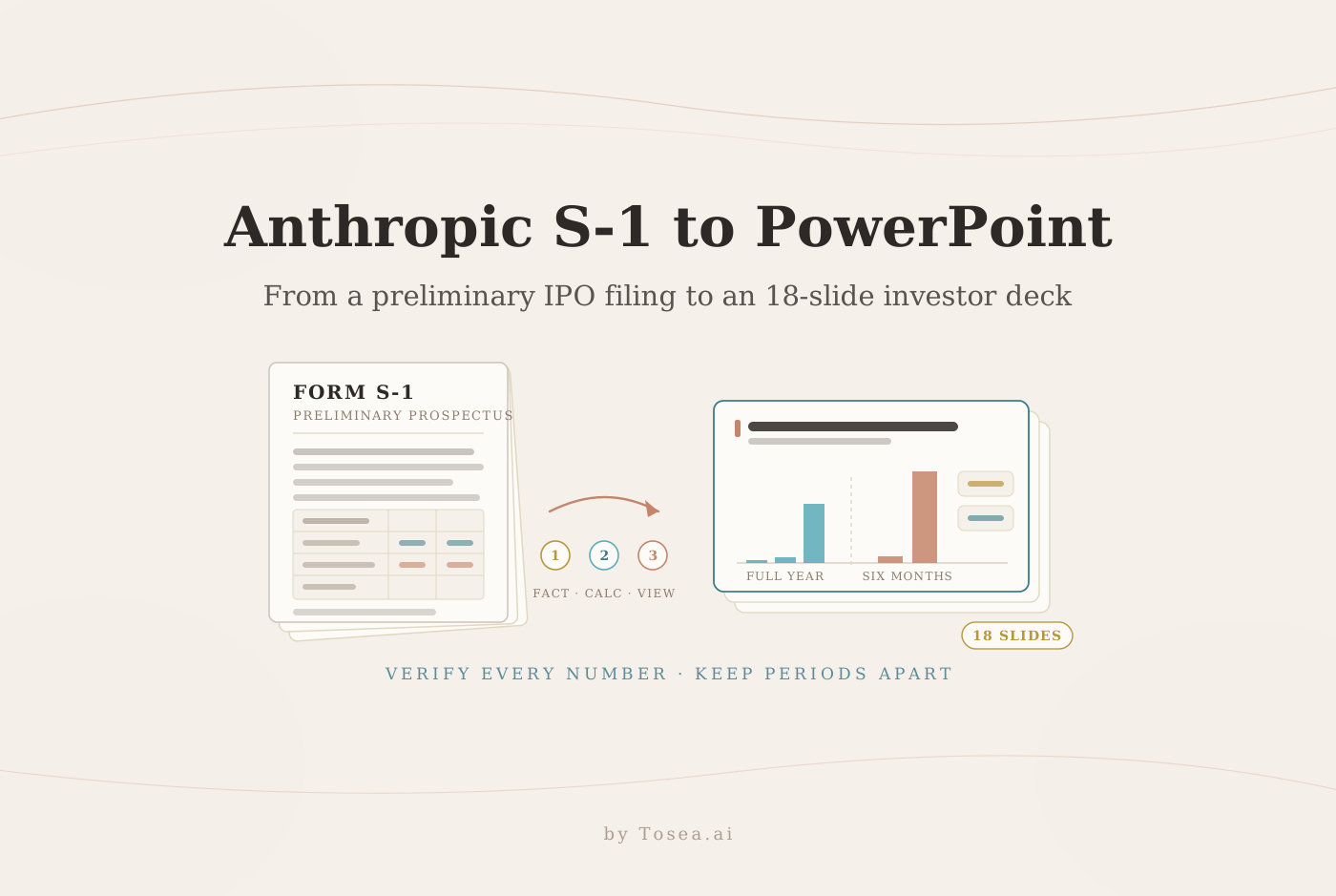
Cover slide of the 18-slide deck, generated from the preliminary S-1. The template placed an Anthropic-style mark in the top-right corner of three slides; the deck is an independent analysis, not an Anthropic document.
Disclosure: Tosea.ai is not affiliated with Anthropic. This is an educational walkthrough of a public SEC filing. It is not investment advice, an offer to sell, or a solicitation to buy securities.
Quick Answer: How to Turn an S-1 into a PowerPoint
To turn an S-1 into a professional PowerPoint, first define the investor question. Then separate reported facts from calculations and interpretation, organize the evidence into a storyline, match each argument with the right visual, and verify every number against the filing. Tosea supports this workflow with document upload, outline editing, slide generation, Data Studio charts and editable PPTX export — but the verification step stays with the analyst.
What We Built from the Anthropic S-1
Anthropic, PBC filed its preliminary Form S-1 on October 26, 2026. A registration statement is designed for legal disclosure, not for a live presentation. The SEC explains that a prospectus covers the business, financial condition, results, risks, management and audited financial statements. That scope makes the document useful but difficult to present without restructuring — the risk-factor section alone runs close to a hundred pages. See the SEC explanation of registration statements.
Our deck uses five chapters:
- Introduction — the investment thesis in brief
- Background — company positioning and product architecture
- Results — revenue growth, operating leverage, cost structure and the net loss bridge
- Discussion — risk factors, governance and offering mechanics
- Conclusion — the diligence questions investors must resolve
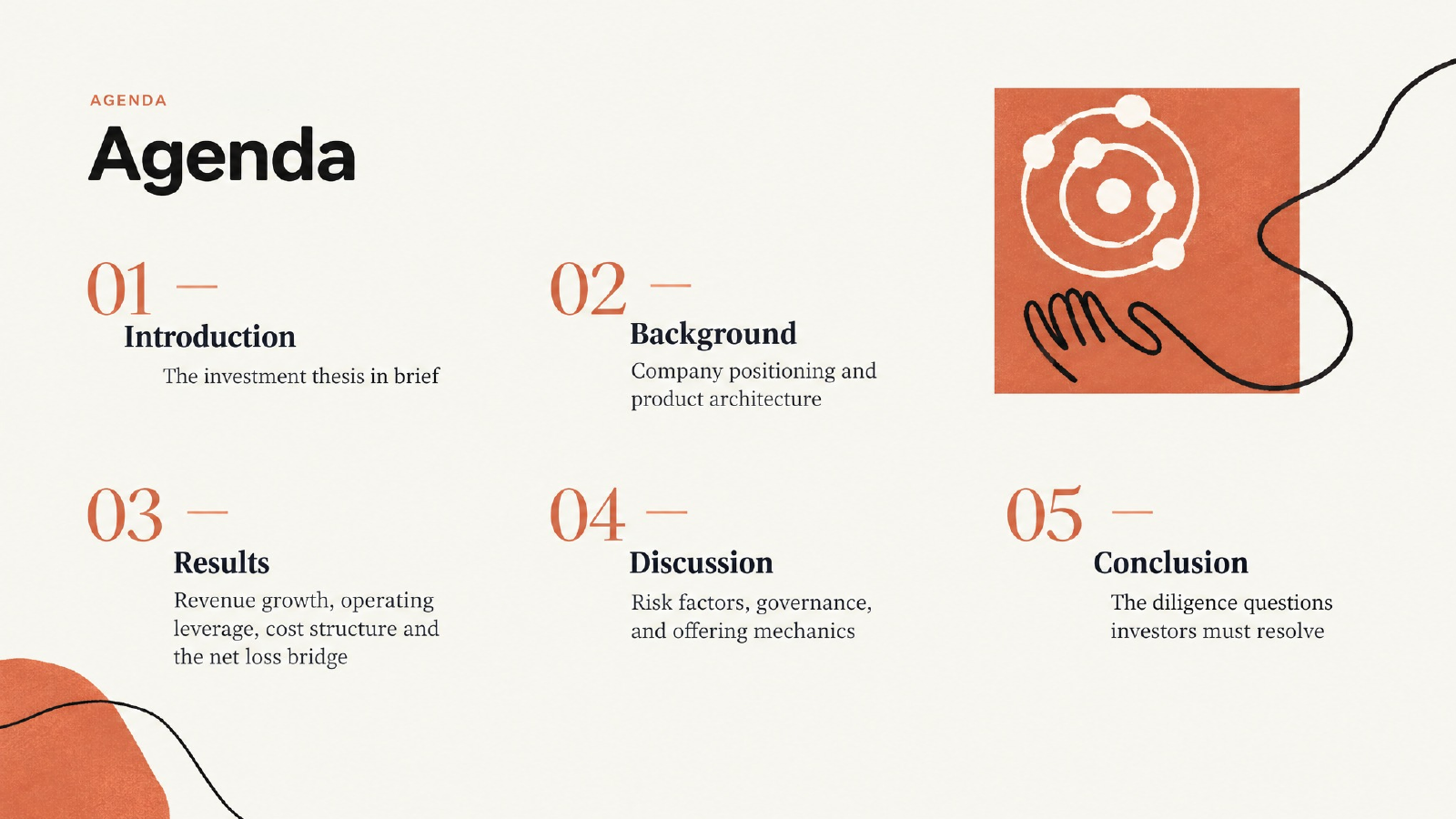
The deck follows an investor storyline instead of the filing's section order. The chapter names come from the template's report structure; the subtitles carry the investor logic.
The deck also keeps the preliminary status visible. The offering price, final share count, dilution and net proceeds were blank in the filing used for this project, and so was the headline total of compute commitments — even though the filing quantifies many of the individual agreements. We left those items unresolved instead of asking AI to estimate them.
That choice matters. A polished slide can make an unsupported number look authoritative. For source-heavy work, visible uncertainty is better than false precision.
The Hard Part Was Not Summarizing the Filing
Most general-purpose AI tools can shorten a long document. Shortening is not the same as building an investor presentation.
An S-1 follows disclosure rules. A deck follows an argument. The presentation has to answer a different set of questions:
- What does the company sell?
- Why are customers expanding usage?
- Is revenue growing faster than the cost base?
- Which expenses are operational, and which come from financing instruments?
- How much infrastructure must the company fund?
- Who controls the company after the offering?
- Which terms remain unknown?
The opening summary sets up both sides of the case. It shows exceptional growth and enterprise adoption, then puts compute obligations, financing volatility and voting control beside them.
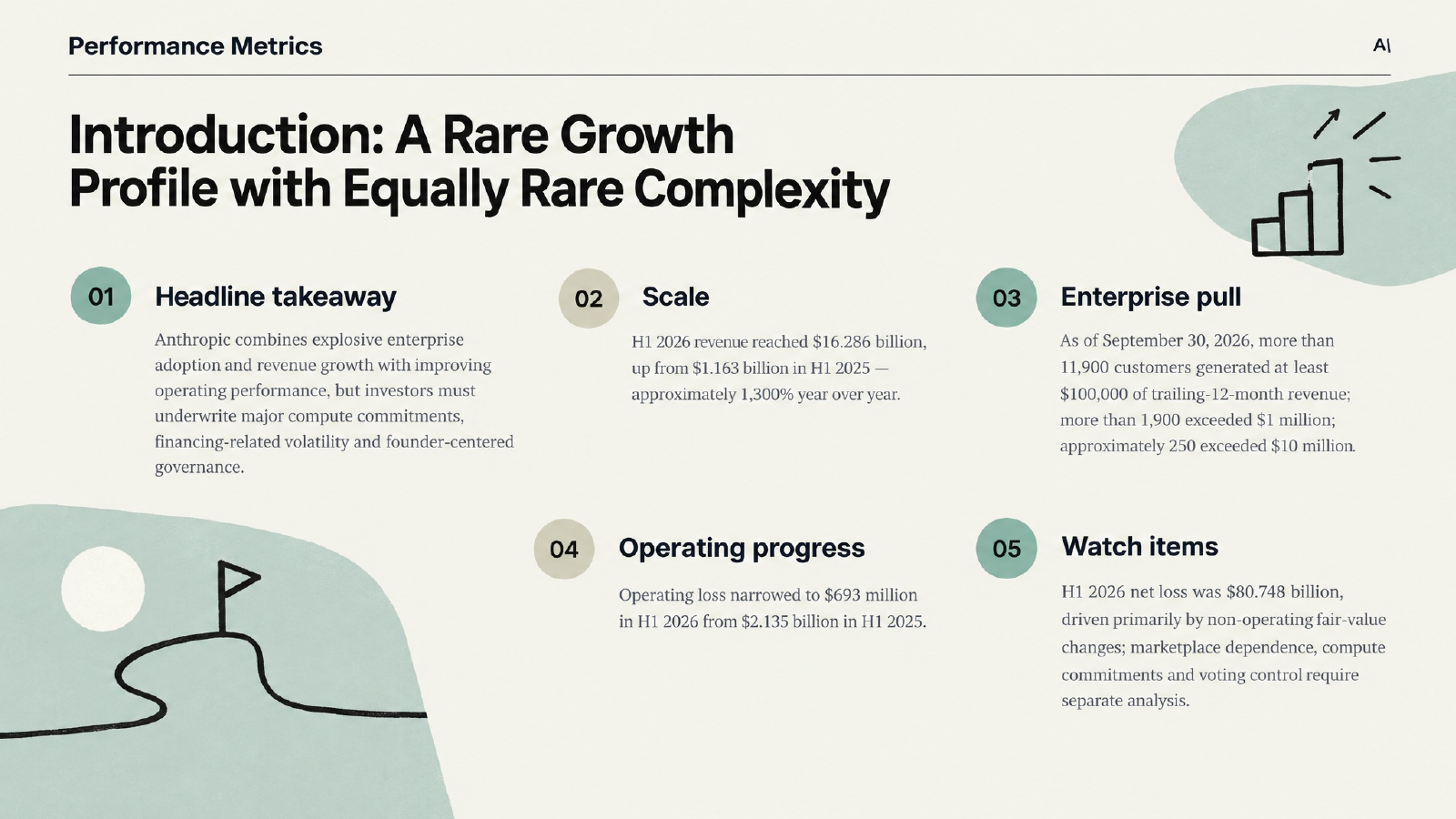
The opening summary presents the opportunity and the unresolved risks together. The small "Performance Metrics" header is a leftover template label from the first render.
Three analytical decisions shaped the rest of the deck.
Do not mix annual and half-year periods
FY2023, FY2024 and FY2025 are full calendar years. H1 2025 and H1 2026 are the six months ended June 30, and they are unaudited. Plotting all five values as one continuous line would suggest a time series that does not exist. In the deck, each value carries its own period label instead of sitting on a shared trend line. A stricter layout would go one step further and split them into two visibly separate groups — full years on one side, six-month periods on the other.
Separate operating loss from net loss
For H1 2026, the filing reports an operating loss of $693 million and a net loss of $80.748 billion. The entire $80.1 billion gap sits below operating income. A $72.388 billion loss from changes in the fair value of convertible notes, derivative liabilities and SAFEs accounts for about 90% of it. Another $8.757 billion of other expense is driven by a $9.405 billion charge for recognizing and remeasuring note purchase agreements at fair value. Interest income of $1.111 billion partly offsets those items, and a $21 million tax provision closes the bridge. Reading the $80.7 billion figure as an operating result would badly misread the business.
Separate channel concentration from customer concentration
Revenue sold through cloud service provider (CSP) marketplaces rose from about 11% of total revenue in FY2023 to 32% in FY2024, 47% in FY2025 and 48% in H1 2026. Those marketplaces also accounted for 58% of net accounts receivable at June 30, 2026. That is a distribution dependency. The share of revenue from the top five end customers — about 25% for the nine months ended September 30, 2026 — is a different measure. A useful slide keeps those two risks apart.
How We Turned the Filing into an Investor Storyline
Step 1: Start with the decision
The central question for the deck was simple:
Can Anthropic's operating leverage eventually outrun the capital required to compete at the frontier of AI?
That question determined the page order. Product and customer adoption came first. Revenue, operating costs and financing effects followed. Compute commitments, risk and governance came after the financial case because they determine how much of that growth may reach public shareholders.
This is the same principle used in strong strategy presentations: start with the governing thought, then make every slide earn its place. For a deeper treatment, see our guide to building a BCG-style storyline, and our executive summary slide guide for the opening page.
Step 2: Label facts, calculations and interpretation
We treated the content as three separate layers.
- Filed facts come directly from the S-1, including management's own ratios such as operating margin.
- Calculated metrics are derived by the presentation author from filed values, such as expense mix or the percentage by which the operating loss narrowed.
- Interpretation explains what those figures may mean for the business.
Calculated metrics need an explicit label. A reader should never have to guess whether a percentage came from management or from the presentation author.
Step 3: Write conclusion-led titles
A label such as "Revenue" gives the audience no conclusion. A title that states the finding tells them what to notice. The deck uses titles such as:
- Operating Leverage Is Emerging Before GAAP Net Income
- Why the $80.7 Billion Net Loss Does Not Equal the Operating Loss
- Compute Strategy: Multi-Chip Flexibility, Large Fixed Commitments
- Governance: Public-Benefit Structure with Concentrated Voting Control
The title does analytical work. The body provides evidence. One title shows how easily a conclusion-led headline can bend the period rule: "From $41 Million to a $16.3 Billion Half-Year" pairs a full-year starting point with a six-month endpoint. It says "Half-Year" explicitly, so it is not wrong, but a stricter version would compare H1 2025 with H1 2026.
Step 4: Choose a visual that matches the claim
The revenue page labels every figure with its period rather than drawing a single growth line through mixed periods.
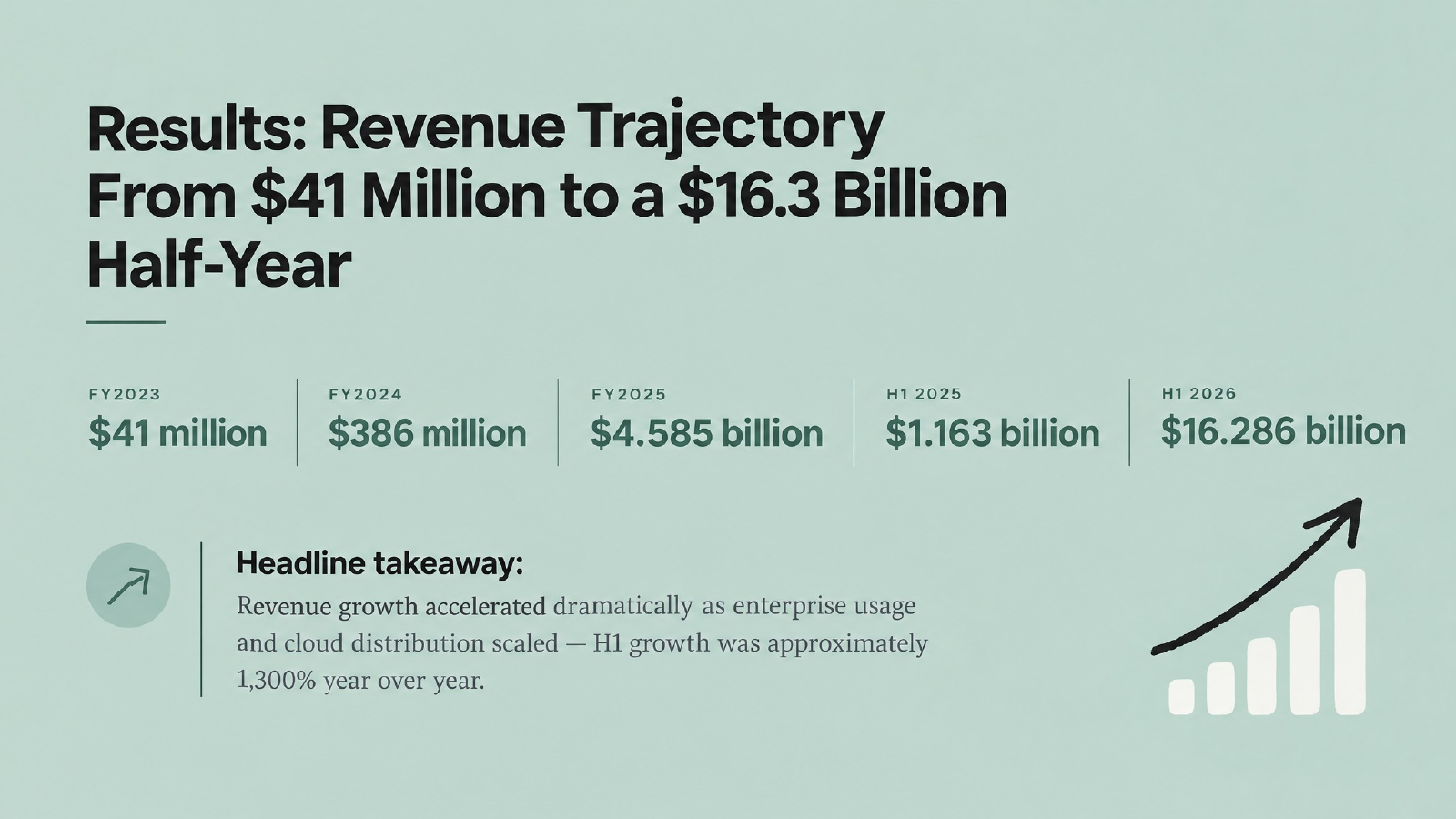
Each value carries its period label. The small rising-bar icon in the corner is template artwork, not a chart of these figures.
The operating leverage page compares revenue, operating expenses, operating loss and operating margin for the two half-years.
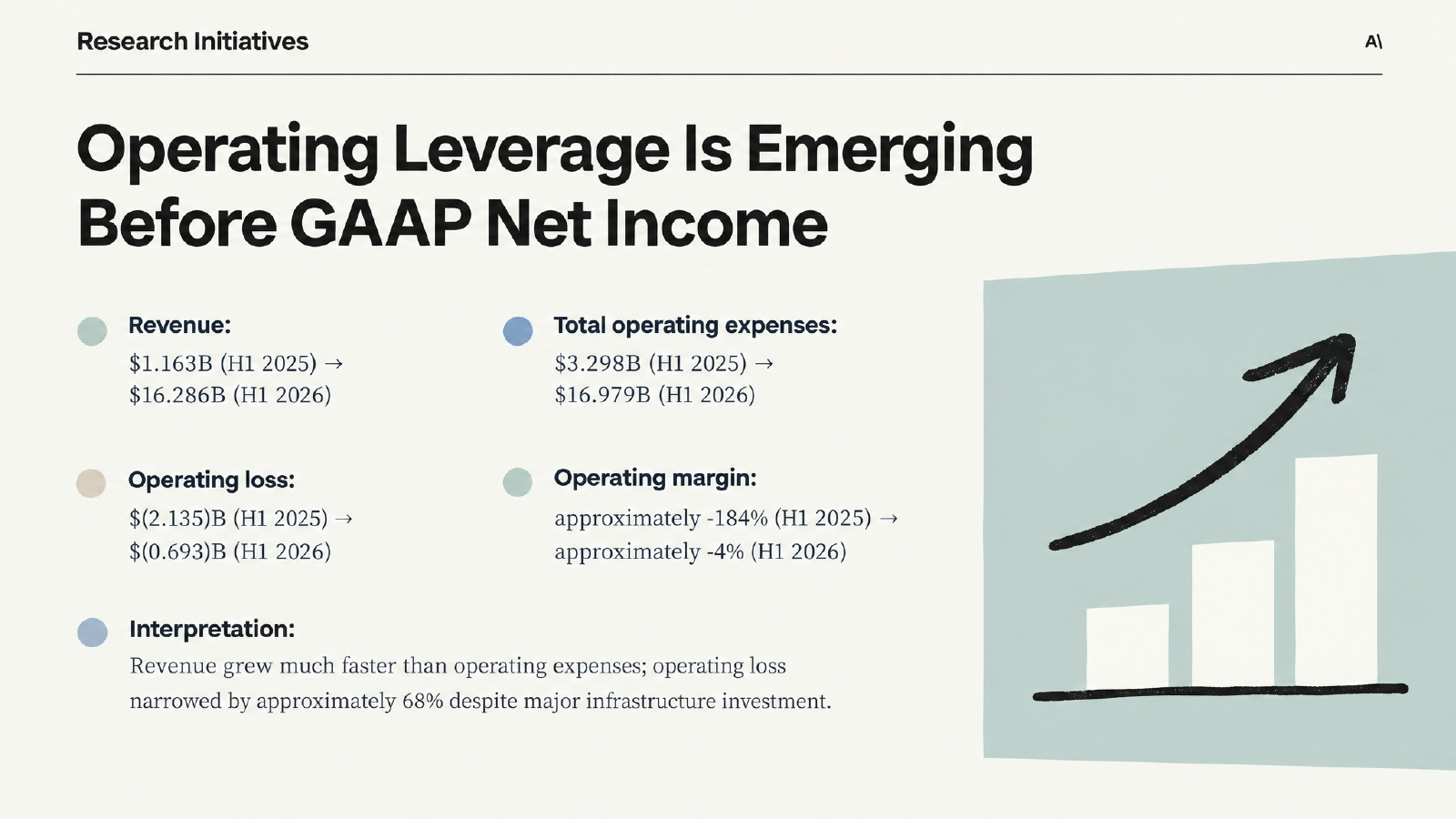
All four comparisons use figures reported in the filing, including the operating margins. The "Research Initiatives" header is another leftover template label.
The net loss page walks from the operating loss to the net loss line by line instead of treating one large GAAP number as a complete explanation.
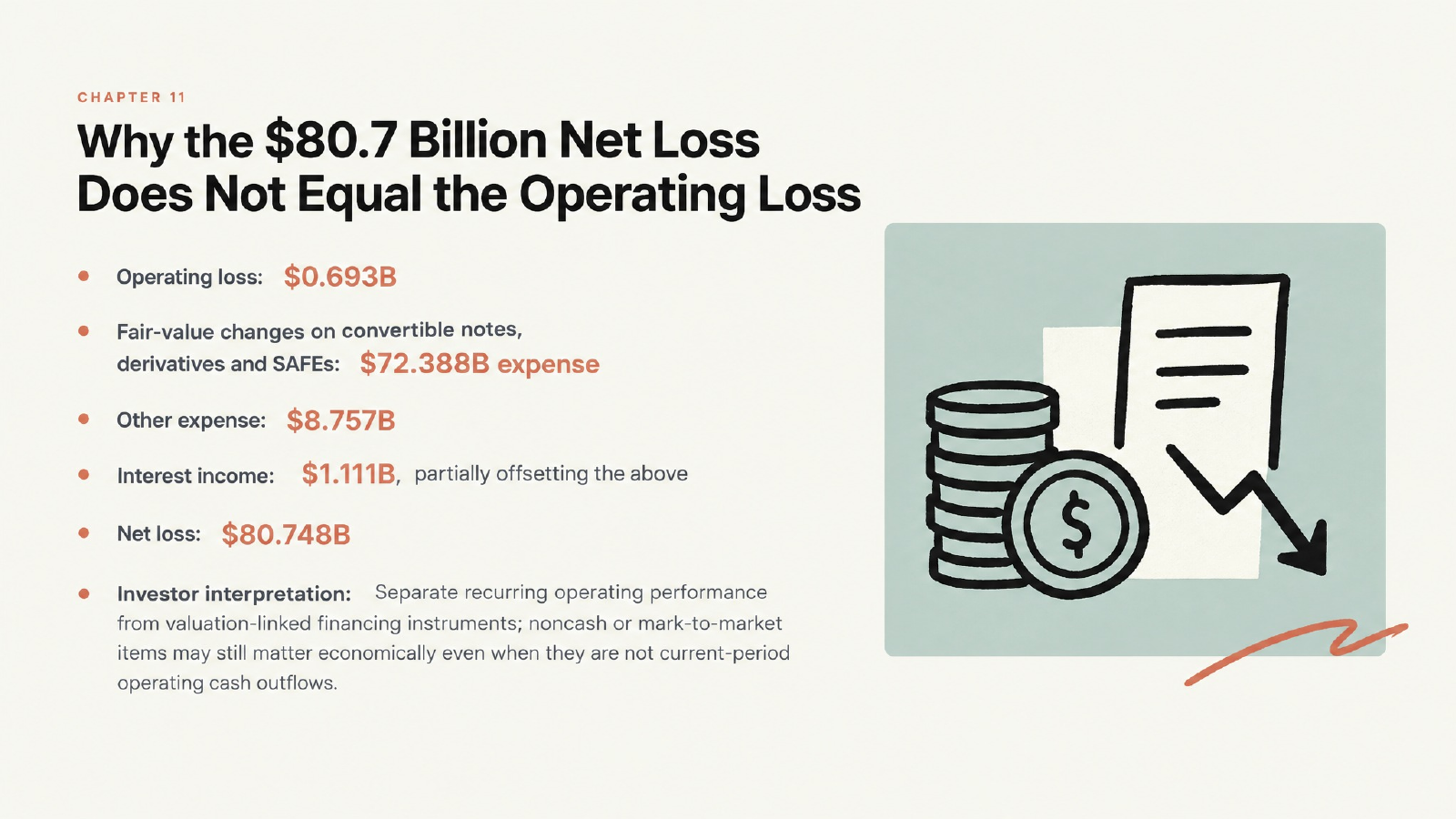
The slide separates operating performance from financing-related fair-value effects. Its line items reach the $80.727 billion pre-tax loss; the remaining $21 million is the income tax provision. "Chapter 11" in the eyebrow is the template's slide counter, not a reference to bankruptcy.
What the Deck Says About the Anthropic Investment Case
The filing reports revenue of $41 million in FY2023, $386 million in FY2024 and $4.585 billion in FY2025. H1 2026 revenue reached $16.286 billion, compared with $1.163 billion in H1 2025. That is approximately 1,300% year-over-year growth.
The customer data provides a second view of scale. As of September 30, 2026, more than 11,900 customers generated at least $100,000 of trailing-12-month revenue. More than 1,900 exceeded $1 million, and approximately 250 exceeded $10 million. The filing also reports net revenue retention of approximately 900%. That metric needs its definition: Anthropic divides the latest three months of revenue from qualified customers by their revenue in the same three months a year earlier, counting any customer with at least $1 of base-period revenue and excluding Claude Pro and Max subscribers. It should not be compared mechanically with an annual SaaS benchmark.
Operating performance improved even while the company spent heavily. Total operating expenses were $16.979 billion in H1 2026, including $8.945 billion of compute and infrastructure expense. Operating loss narrowed to $693 million from $2.135 billion in H1 2025, and the filing reports operating margin of (184)% and (4)% for the two periods. Management also cautions that margins will fluctuate, particularly when substantial incremental compute is delivered and the associated expenses arrive.
The infrastructure side is harder to reduce to one KPI. Anthropic describes a multi-chip strategy across AWS Trainium, Google Cloud TPUs, NVIDIA GPUs and AMD GPUs. The filing also describes large fixed commitments. Under the 2026 lease arrangement with Broadcom, rent over the five-year equipment lease totals approximately $125.2 billion, excluding interest; across all of the Broadcom master equipment leases the figure is about $161.2 billion. Up to $42 billion of convertible notes may be issued, subject to conditions, solely to finance rent under the 2026 arrangement. As of June 30, 2026, expected fixed or minimum guaranteed commitments under its purchase agreements — mainly cloud hosting and other third-party infrastructure services — were approximately $265.6 billion.
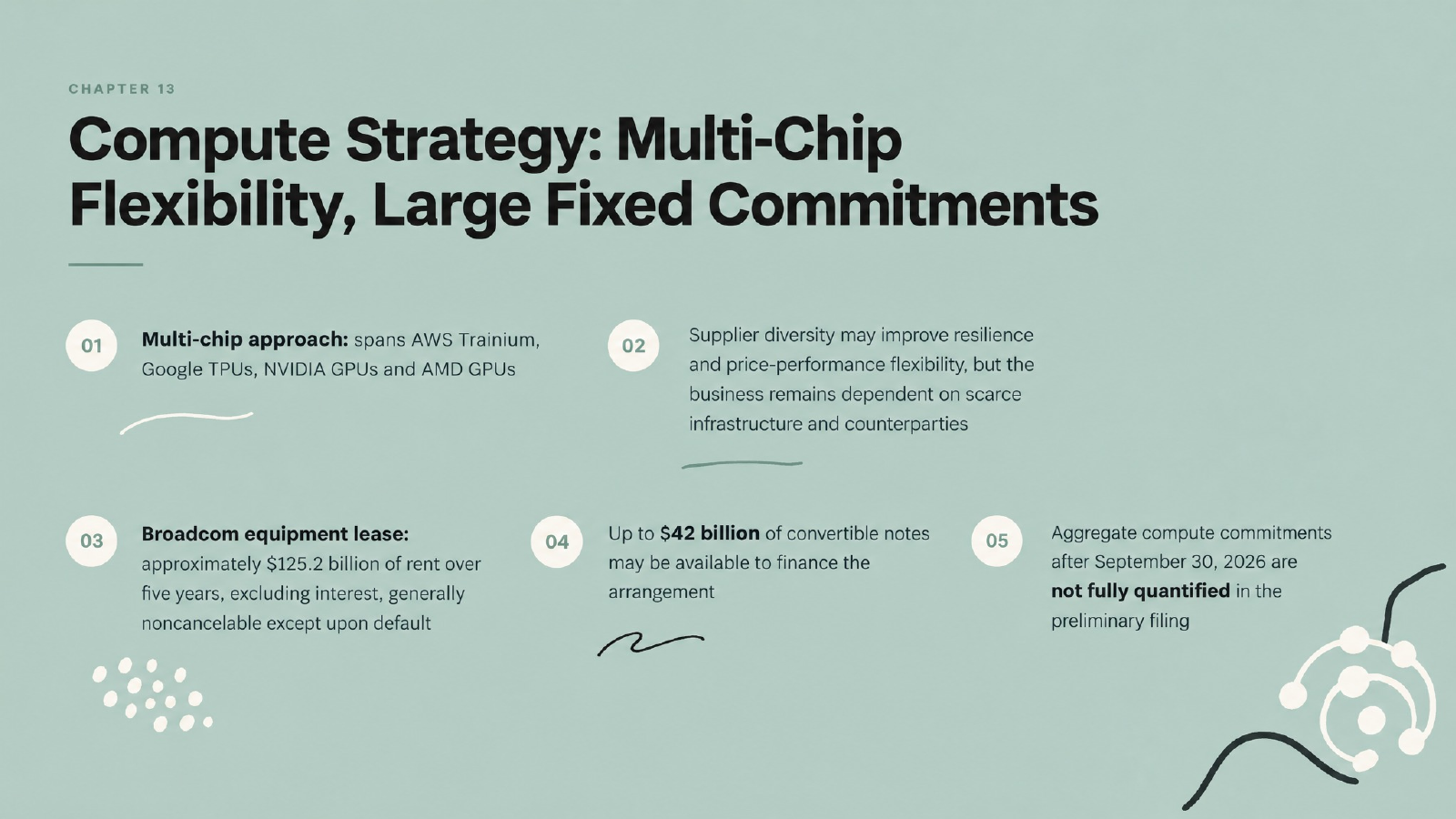
The compute page puts supplier flexibility beside the disclosed fixed commitments. "Chapter 13" is the template's slide counter.
Governance deserves its own slide. Anthropic is a Delaware public benefit corporation. The Long-Term Benefit Trust, the Founder LLC, multiple share classes and the Public Benefit Fund create different voting and economic rights. Immediately before the offering closes, the company will issue a single Class F share to the Founder LLC, whose members are the seven co-founders. That structure cannot be explained accurately with a generic ownership pie chart.
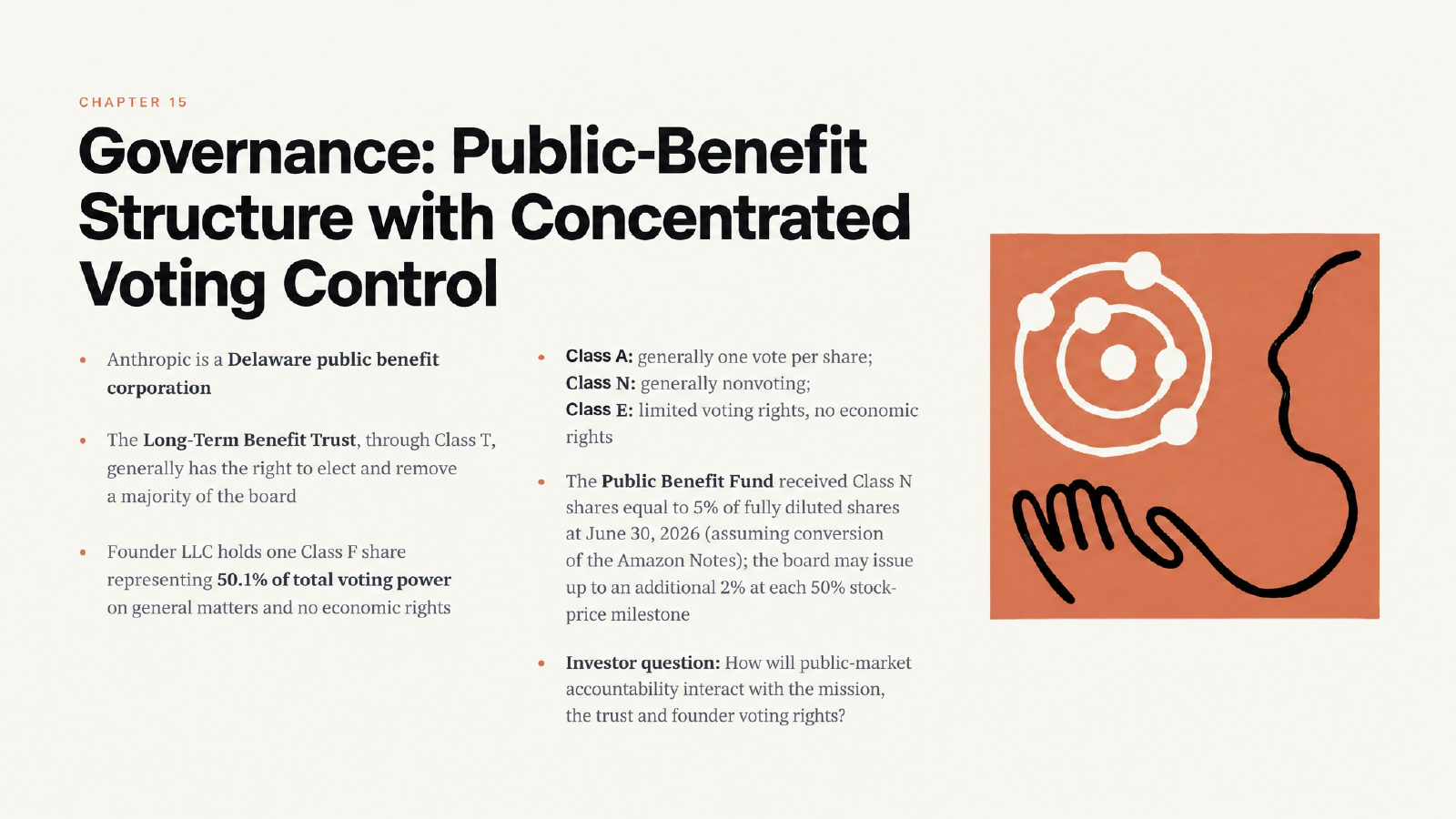
Voting rights and economic rights need separate treatment. "Chapter 15" is the template's slide counter.
Readers should use the original Anthropic S-1 as the source of truth. They should also check the SEC filing index for amendments before relying on offering terms.
Where Each Chapter's Evidence Lives in the S-1
A preliminary prospectus runs to hundreds of pages, and the numbers a deck needs are scattered. This is the map we used, organized by the deck's five chapters. It works for most S-1 and F-1 filings.
| Deck chapter | S-1 sections to pull from | What it supplies | Visual that fits |
|---|---|---|---|
| 01 Introduction | Prospectus Summary | Thesis, headline metrics, customer counts | Five-point summary or KPI cards |
| 02 Background | Business | Products, model and platform architecture, go-to-market | Architecture diagram or capability list |
| 03 Results | MD&A; Summary Financial Data | Revenue by period, expense mix, operating margin, channel mix | Period-labeled figures, comparison cards, bridge |
| 03 Results (net loss) | Financial statements and notes | Fair-value changes, other income and expense, tax | Line-by-line walk from operating loss to net loss |
| 04 Discussion | Risk Factors; Our Governance Structure; Description of Capital Stock | Concentration, compute obligations, share classes, trust rights | Risk table; governance structure diagram |
| 05 Conclusion | Use of Proceeds; Capitalization; Dilution; Underwriting | Offering terms — often blank in a preliminary filing | List of open diligence questions |
Two habits save time here. First, search the notes to the financial statements before you build any financing slide; the summary tables rarely explain what drives "other expense." Second, note the period and unit at the top of every extract. The S-1's tables are in millions, its customer counts are as of September 30, and its income statement runs through June 30 — three different dates in one deck.
Who This Workflow Is For
The same process applies whenever a long regulatory document has to become a decision-ready deck.
- Equity research and buy-side analysts preparing an IPO initiation or an investment committee memo can start from the filing and review the outline before any design work happens.
- Investor relations and corporate finance teams can use the same structure for roadshow preparation, board updates or an earnings call presentation.
- Venture, growth and private equity investors tracking a portfolio company's listing can turn the prospectus into a board-ready deck structure with the open terms clearly flagged.
- Students and finance club members building a stock pitch can practice the facts-calculations-interpretation discipline on a real, current filing.
The method also transfers to 10-Ks, annual reports and risk disclosures; our guide to presenting risk disclosures from annual reports covers that variant.
How Tosea Supports This Workflow
Tosea is useful here because the workflow begins with source material, not a generic topic prompt.
Upload the source file
Upload the filing, annual report, research paper or internal report. Add the target audience, presentation objective and desired page count. Tosea can parse text-based PDFs and can also recognize scanned documents, although scans require more checking. The Tosea getting started guide covers file upload, image selection, outline review, slide generation and export.
Review the outline before rendering
The outline is the cheapest place to fix the argument. You can rewrite slide titles, reorder sections, remove weak pages, add evidence and edit speaker notes before visual generation. You can also select layouts or diagrams for specific pages. For this project, the outline review prevented a chronological filing summary; we reorganized the material around the investor decision.
Build editable charts in Data Studio
Tosea Data Studio can recognize data in an existing chart or import Excel and CSV files. Users can edit the underlying values, chart type and styling. Available formats include column, stacked, line, pie and scatter charts. For an S-1 deck, that means the revenue chart, expense mix and concentration visuals can remain editable. When a filing amendment changes a value, the analyst can update the data instead of rebuilding a screenshot. Our think-cell alternative guide shows the workflow in more detail.
Refine pages after generation
A first render is a draft, and this deck shows why. The slides in this article are shown as generated: the numbers matched the filing, but several pages carried template residue — slide-counter eyebrows that read "Chapter 11," "Chapter 13" and "Chapter 15," and two leftover section headers. Tosea lets users switch between versions, regenerate individual pages, change a layout, edit a selected region and update slide content, which is how those details get cleaned up before delivery. Reference images can guide the colors, typography or card treatment of a specific page.
Export for final review
Tosea supports PDF, Image PPTX and Editable PPTX export. The export guide explains the available formats. Editable PPTX export is available on eligible plans and is intended for continued work in PowerPoint or Google Slides. Before presenting, check every number, period label, footnote and source in the exact application used for delivery.
Reusable Prompt for Turning an S-1 into PowerPoint
Create an investor presentation from the uploaded preliminary S-1.

Audience:
Institutional investors, equity research analysts and corporate strategy teams.

Objective:
Explain the company's business model, product architecture, customer adoption,
revenue growth, operating leverage, cost structure, capital requirements,
risk factors, governance and unresolved offering terms.

Structure the presentation around investor decisions rather than the order
of the filing. Use conclusion-led slide titles. Separate reported facts,
calculated metrics and interpretation.

For every financial slide:
- Preserve the reporting period and units
- Do not combine annual and half-year figures in one continuous trend
- Label calculated ratios clearly
- Add the filing section as a source
- Do not estimate redacted or blank figures

Use a restrained institutional design with editable charts and tables.
End with the questions investors should resolve before valuation.
For more prompt patterns built around finance documents, see our financial presentation prompts.
What AI Should Not Decide for You
AI can reduce the mechanical work of reading, structuring and designing. It cannot take responsibility for the analysis.
Before publishing an investor deck:
- Confirm each figure against the latest filing.
- Keep reporting periods, currencies and units visible.
- Mark calculated ratios as calculations.
- Preserve blank or redacted values.
- Check that every bridge foots, including small items such as the tax provision.
- Read every label on every slide, including small eyebrows and headers, for template residue.
- Check whether the filing has been amended.
- Ask a qualified reviewer to assess legal, accounting and investment conclusions.
The SEC's IPO investor bulletin reminds investors that a prospectus describes the company, the offering and other information used to evaluate an IPO. A presentation should help readers navigate that disclosure, not replace it.
Frequently Asked Questions
Can AI turn an S-1 into a professional PowerPoint?
Yes, if the process includes source verification and outline review. Upload the filing, define the audience and investment question, organize the argument, choose suitable visuals, and verify every figure. A one-line request to summarize the document usually produces a weaker deck because it does not define the decision the presentation must support.
Can Tosea AI create editable charts from filing data?
Tosea Data Studio can recognize chart data or import Excel and CSV files, then create editable tables and charts. Users can change values, chart types, labels, colors and other styling. Financial data should still be reconciled to the latest filing before the deck is shared.
How do I stop AI from inventing missing offering data?
Tell the model to preserve blank, redacted and not-yet-disclosed fields. Require a source for every material number and ask it to label calculations separately. In a preliminary S-1, offering price, share count or proceeds may remain unknown until a later amendment.
Can I change the layout after the slides are generated?
Yes. Tosea lets users revise individual pages after generation, switch versions and adjust the layout or diagram. This is useful when the argument is correct but the visual hierarchy is weak, or when a chart needs more room than the original layout allowed.
Can I use a reference slide to control the style?
Yes. A reference image can guide a new page's layout, colors, typography or card style. Use references for visual direction, not as evidence. The content and numbers should still come from the filing or another named source.
Does Tosea AI export editable PowerPoint files?
Tosea offers editable PPTX export on eligible plans. The exported presentation can be modified in PowerPoint or Google Slides. Complex fonts, charts and graphics can render differently across applications, so open the file in the final presentation environment and complete a visual and factual review.
Is this Anthropic presentation investment advice?
No. The deck and this article are an educational demonstration based on a preliminary filing. They are not an offer, solicitation or recommendation to buy or sell securities. Offering terms may change, and readers should review the latest SEC filing and seek qualified advice.
Turn the Next Filing into a Decision-Ready Deck
The Anthropic example shows where AI presentation software is useful and where it is not. It can move a team from a dense source document to a reviewable outline, editable data visuals and a coherent first draft in a fraction of the usual time. It does not remove the need to check every bridge, every period label and every stray template label. The analyst still owns the argument and the verification.
Use Tosea.ai to upload an S-1, 10-K, annual report, research paper or internal analysis. Review the outline, refine the slides, edit the charts and export the result for final work in PowerPoint. For related workflows, read How to Turn a Research Paper into a Presentation Without Losing Figures and Citations and How to Turn GPT Image 2 Slides into Editable PPTX.
Sources
- Anthropic, PBC — Preliminary Form S-1 registration statement — SEC EDGAR, filed October 26, 2026
- Anthropic, PBC Form S-1 filing index — SEC EDGAR
- What is a Registration Statement? — U.S. Securities and Exchange Commission
- Updated Investor Bulletin: Investing in an IPO — Investor.gov
- Getting Started — Tosea Docs
- Data Studio — Tosea Docs
- Export Slides — Tosea Docs