How to Turn a Research Paper into a Presentation Without Losing Figures and Citations
A source-grounded workflow to turn a research paper into a presentation: figure extraction, outline review, claim verification, and editable PPTX export, shown on a 22-page Cell review.
Turning a research paper into a presentation is an exercise in selection, not simple summarization. The aim is to preserve the research question, methods, evidence, limitations, figures, and citations while changing the format for a live audience. A good workflow keeps the paper as the source of truth and gives the author several points to review the output before export.
Direct answer
To turn a research paper into a presentation, upload a clean PDF, define the audience and talk length, inspect the extracted figures, edit the proposed outline, verify every claim against the paper, and export only after review. Tosea AI fits source-heavy workflows by combining document parsing, figure selection, outline control, speaker notes, and editable PPTX export on eligible plans. Complex tables, formulas, and citations still require author review.
Key takeaways
- Build the presentation around the research question and contribution, not the paper section count.
- Preserve original figures when they carry evidence that would be weakened by redrawing or paraphrasing.
- Keep a source map connecting every slide claim, number, figure, and citation to the original page.
- Review the outline before slide rendering because structural corrections are cheaper at that stage.
- Treat AI output as a draft. The author remains responsible for scientific accuracy and citation integrity.
What research paper to presentation conversion means
Research paper to presentation conversion is the process of restructuring a scholarly document into a time-bounded visual narrative while retaining its evidence and source context. It differs from ordinary PDF-to-PowerPoint conversion, which recreates existing pages rather than designing a new talk from the paper.
Best for and not best for
| Best for | Not best for |
|---|---|
| A conference talk built from a text-based PDF with clear headings and high-resolution figures | A final defense deck that requires bespoke animation, extensive visual storytelling, or strict institutional branding without manual design review |
| A journal club presentation where methods, findings, limitations, and citations must remain traceable | A confidential or unpublished manuscript that institutional policy prohibits uploading to a cloud service |
| A thesis or dissertation that needs a reviewable first outline and speaker notes | A scanned paper with unreadable tables, damaged pages, or low-resolution figures that require restoration first |
| A researcher who wants an editable draft rather than a finished deck with no human intervention | A complex mathematical talk where every equation must be rebuilt and typeset manually for a specific notation system |
| A team converting several related papers into a shared presentation | A one-off keynote where a specialist presentation designer can provide stronger narrative and visual direction |
Manual PowerPoint work is often the better choice when the deck contains only a few slides or when every visual must follow an established master template. A local script may be preferable when data cannot leave a controlled environment. A designer is the better fit when the presentation depends on original illustration, animation, or high-stakes brand expression.
Six decision criteria before choosing a tool
1. Source traceability
Check whether you can identify where each slide claim came from. A useful system should make it practical to compare the outline and slides with the original paper. If traceability is not visible, maintain your own slide-to-source worksheet. Our guide to zero-hallucination AI slides explains why this discipline matters for any generated deck.
2. Figure and table handling
Test the tool with the hardest page in your paper, not the abstract. Look for multi-panel figures, small legends, dense tables, unusual symbols, and footnotes. A figure that looks polished but changes labels or values is a failed conversion. For preparing publication-quality visuals before conversion, see our roundup of scientific figure skills for researchers.
3. Outline control
The outline should be editable before visual generation. Tosea official documentation states that users can review extracted images, generate an outline, edit titles and content, add or remove images, and edit speaker notes before generating slides. This workflow is documented in the Tosea Getting Started guide.
4. Editable export
Confirm what editable means. Some PPTX exports contain one full-slide image per page. Tosea provides Image PPTX and Editable PPTX options; its documentation states that Editable PPTX is available on Pro and Max plans and can be modified in PowerPoint or Google Slides. Current quotas are listed in the Tosea credits documentation.
5. Privacy and file limits
Read the privacy policy and your institution's data rules before uploading unpublished work. Tosea states that data is encrypted in transit and at rest. Its current documentation lists plan-specific limits for file size, page count, and multi-file uploads in the Tosea FAQ. Vendor statements are not a substitute for institutional approval.
6. Review time
The right tool should reduce mechanical work without creating a larger verification burden. Measure the minutes required to check the outline, figures, claims, citations, and export. Speed to first draft is less useful than speed to a presentation you are willing to defend.
A source-grounded input-to-output workflow
Step 1: Prepare and upload the paper
What you do: Use a text-based PDF when possible. Confirm that text is selectable, pages are upright, figures are legible, and the file is not password-protected. State the audience, talk length, research field, and purpose.
What the tool produces: A parsed representation of the paper, including text and candidate images.
What you check: Title, abstract, section order, mathematical symbols, table boundaries, figure captions, and reference text.
Step 2: Inspect extracted figures
What you do: Select only figures that support the talk. A 12-minute presentation rarely needs every result panel.
What the tool produces: A set of extracted images available for inclusion in the outline.
What you check: Resolution, cropping, panel labels, axes, units, legends, color meaning, and caption context. Return to the source if any element is missing.
Step 3: Generate and edit the outline
What you do: Ask for a slide sequence appropriate to the audience. Rewrite generic titles so each one states a message. Preserve methods that affect interpretation and keep limitations near the relevant result.
What the tool produces: Slide titles, body content, selected images, and speaker notes.
What you check: Whether the research question, design, sample, methods, primary findings, uncertainty, limitations, and contribution appear in the right proportions.
Step 4: Generate the slides
What you do: Choose a restrained academic template and generate the visual draft. Use layout-only revision when the content is correct but the page structure is weak.
What the tool produces: Rendered slides based on the approved outline and chosen model.
What you check: Reading order, text overflow, figure size, caption legibility, contrast, and whether the slide title matches the evidence below it.
Step 5: Verify every slide against the source
What you do: Compare the deck with the paper page by page. Keep a verification log for every quantitative or technical statement.
What the tool produces: Nothing new. This is the author's quality-control stage.
What you check: Numbers, units, statistical tests, sample sizes, confidence intervals, formula notation, figure labels, citations, references, limitations, and causal language.
Step 6: Revise and export
What you do: Correct the outline or individual slides, regenerate only where needed, and export the approved pages.
What the tool produces: HTML, PDF, Image PPTX, or Editable PPTX depending on the selected workflow and plan. Tosea documentation identifies Editable PPTX as a Pro and Max option.
What you check: Open the final file on the presentation device. Confirm fonts, equations, images, notes, animations, alignment, and links.
Concrete editorial demo
The following is a constructed editorial demonstration, not a reported customer result or product benchmark.
| Field | Demo specification |
|---|---|
| Source | The cGAS-STING pathway: Mechanism and medical implications, a 2026 Cell review by Alexander Hooftman, Alexander Keller, and Andrea Ablasser |
| Source length | 22 pages |
| Audience | Graduate immunology seminar and translational research lab meeting |
| Talk length | 15 minutes |
| Requested output | 12-slide graduate immunology presentation |
| Observed output | 10 rendered slides with speaker notes on every slide |
| Export target | Editable PPTX |
| Elements requested for preservation | Core pathway mechanism, endogenous DNA sources, cGAS and STING regulation, cellular effector functions, disease contexts, context-dependent tumor effects, therapeutic implications, open questions, figure labels, and references |
Sample input instruction
Create a 12-slide graduate immunology seminar presentation from this review.
Explain the canonical dsDNA-cGAS-cGAMP-STING signaling sequence, nuclear cGAS
regulation, endogenous DNA sources, STING trafficking, transcriptional and
non-transcriptional effector functions, disease implications, and therapeutic
strategies. Preserve the review's context-dependent interpretation of tumor and
inflammatory biology. Use original figures only when their labels remain readable.
Do not convert preclinical evidence into clinical efficacy claims.
Add speaker notes and include the source page for every slide claim.
Show me the outline before generating slides.
Test material presentation generation process and results
The 22-page PDF supplied for this editorial test was used as the source material. Public bibliographic metadata and the abstract are available through PubMed and the publisher page. The workflow produced four reviewable outputs: extracted image candidates, an editable outline, rendered slides, and an exported PPTX.
1. A set of extracted images available for inclusion in the outline
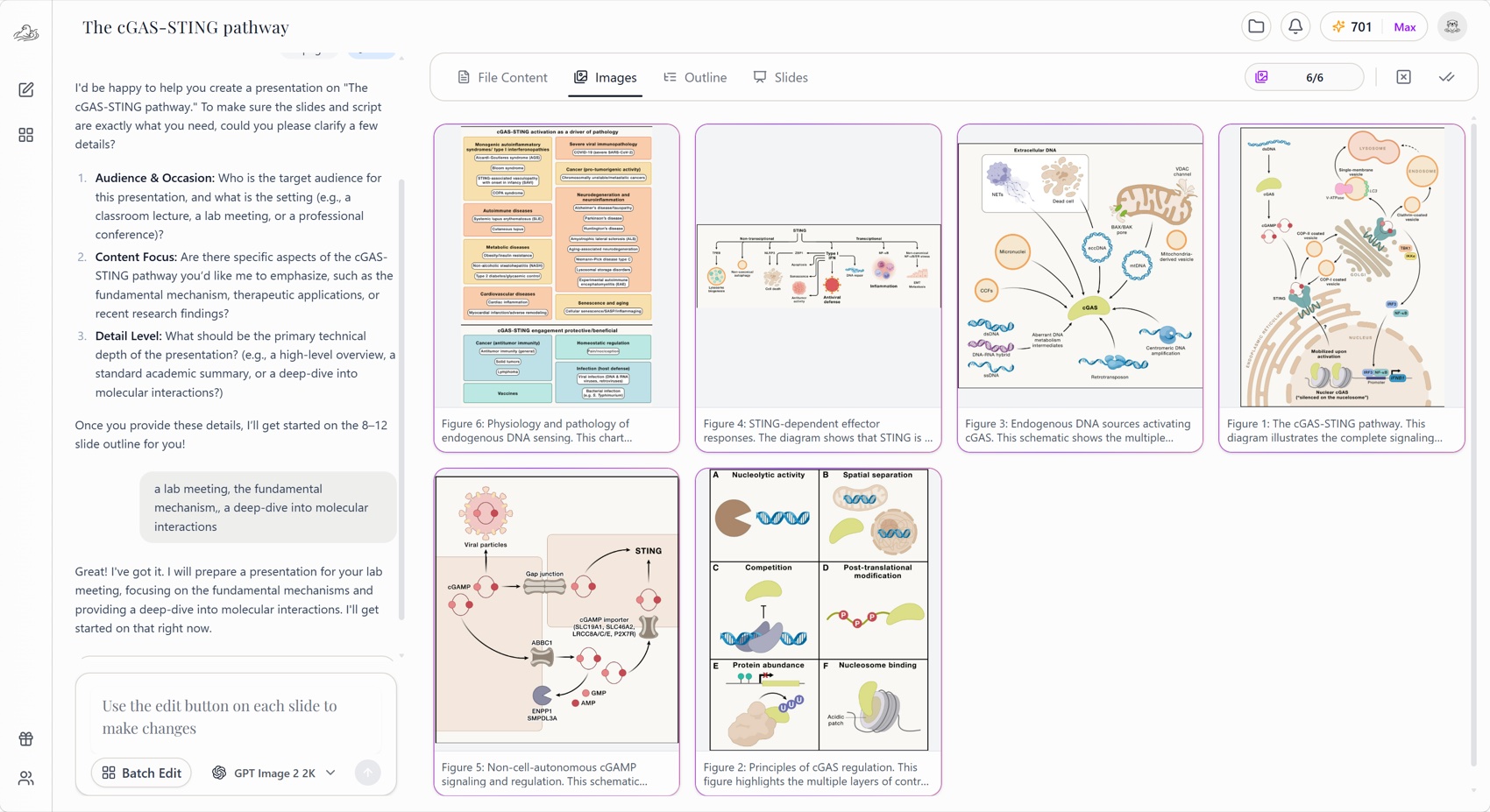
The source was parsed before slide generation so that paper figures could be reviewed as candidate visual assets. Figures 1 through 6 were carried into the final deck to explain the core pathway, cGAS regulation, endogenous DNA sources, STING effector functions, intercellular cGAMP signaling, and the health-versus-disease model.
At this stage, a reviewer should check each candidate image for the correct source page, complete panel labels, readable legends, accurate cropping, and sufficient resolution. Image extraction makes the figures available for selection; it does not remove the need to verify what each panel means.
2. The outline: slide titles, body content, selected images, and speaker notes
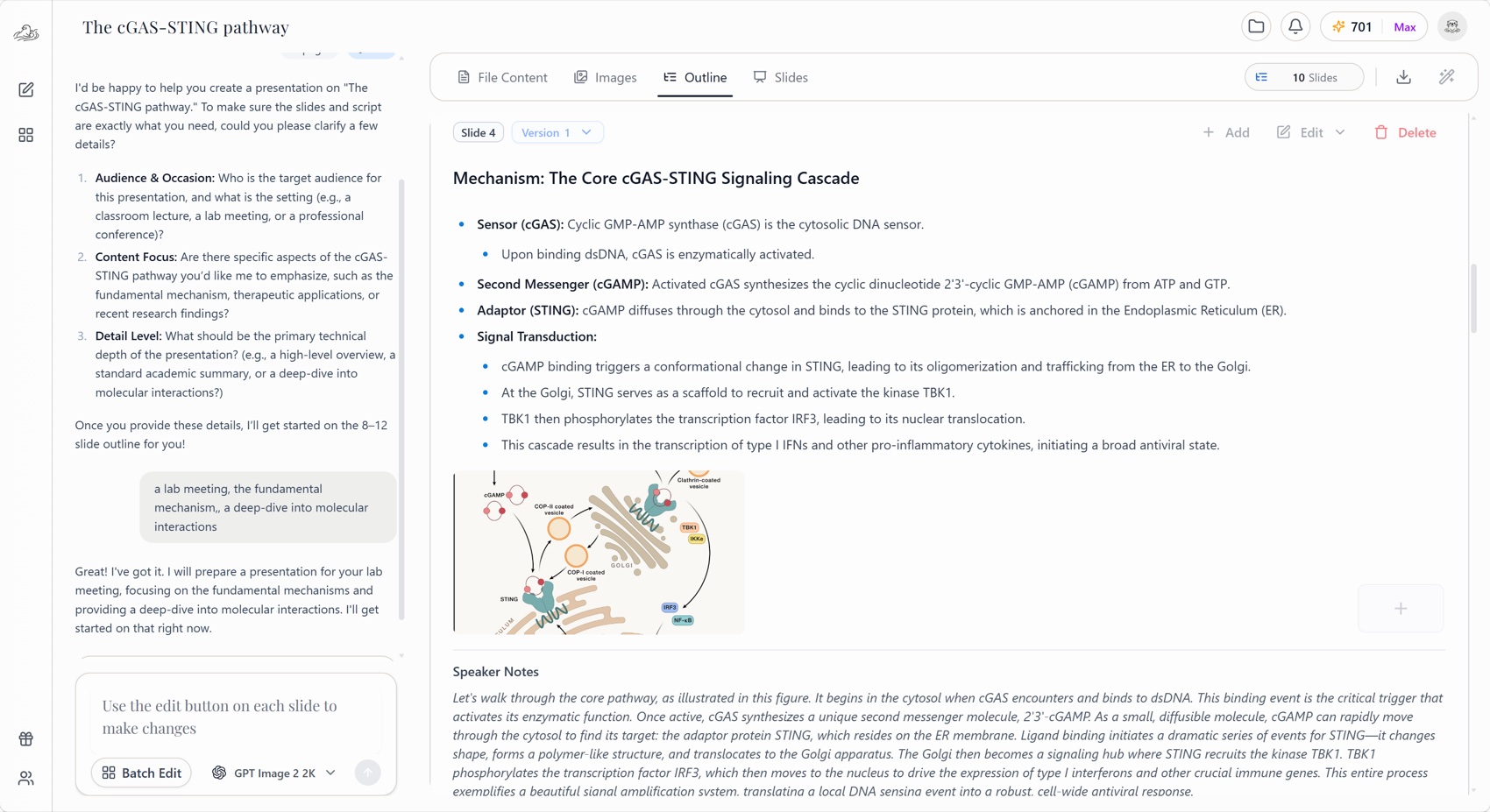
The generated outline was not just a list of headings. Each slide record contained a title, body content, a selected source image where relevant, and speaker notes. The resulting sequence covered the title, presentation roadmap, cytosolic DNA-sensing problem, canonical cascade, nuclear cGAS regulation, endogenous DNA sources, STING outputs, non-cell-autonomous cGAMP signaling, health and disease implications, and a final synthesis.
The prompt requested 12 slides, but the generated outline and deck contained 10. That difference is an important result: page-count compliance should be checked before rendering, particularly when a references slide or a dedicated limitations slide is mandatory. All 10 generated slides did include non-empty speaker notes.
3. The rendered slides
The rendered deck combined editable text with source-derived figures. The examples below show how the outline became presentation pages.
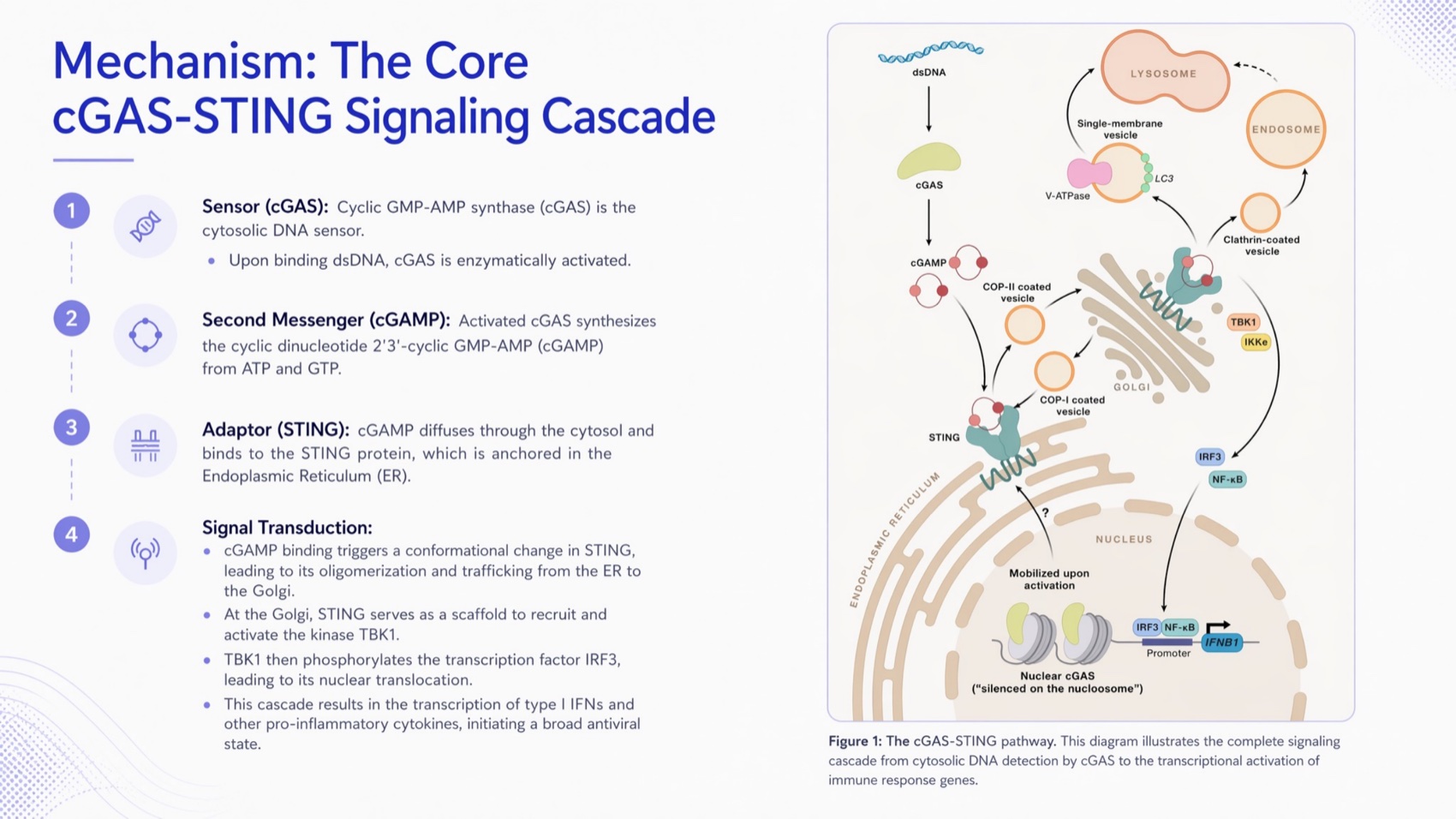
The core signaling slide uses Figure 1 to connect dsDNA recognition, cGAMP production, STING activation, TBK1, IRF3, and NF-kappaB outputs.
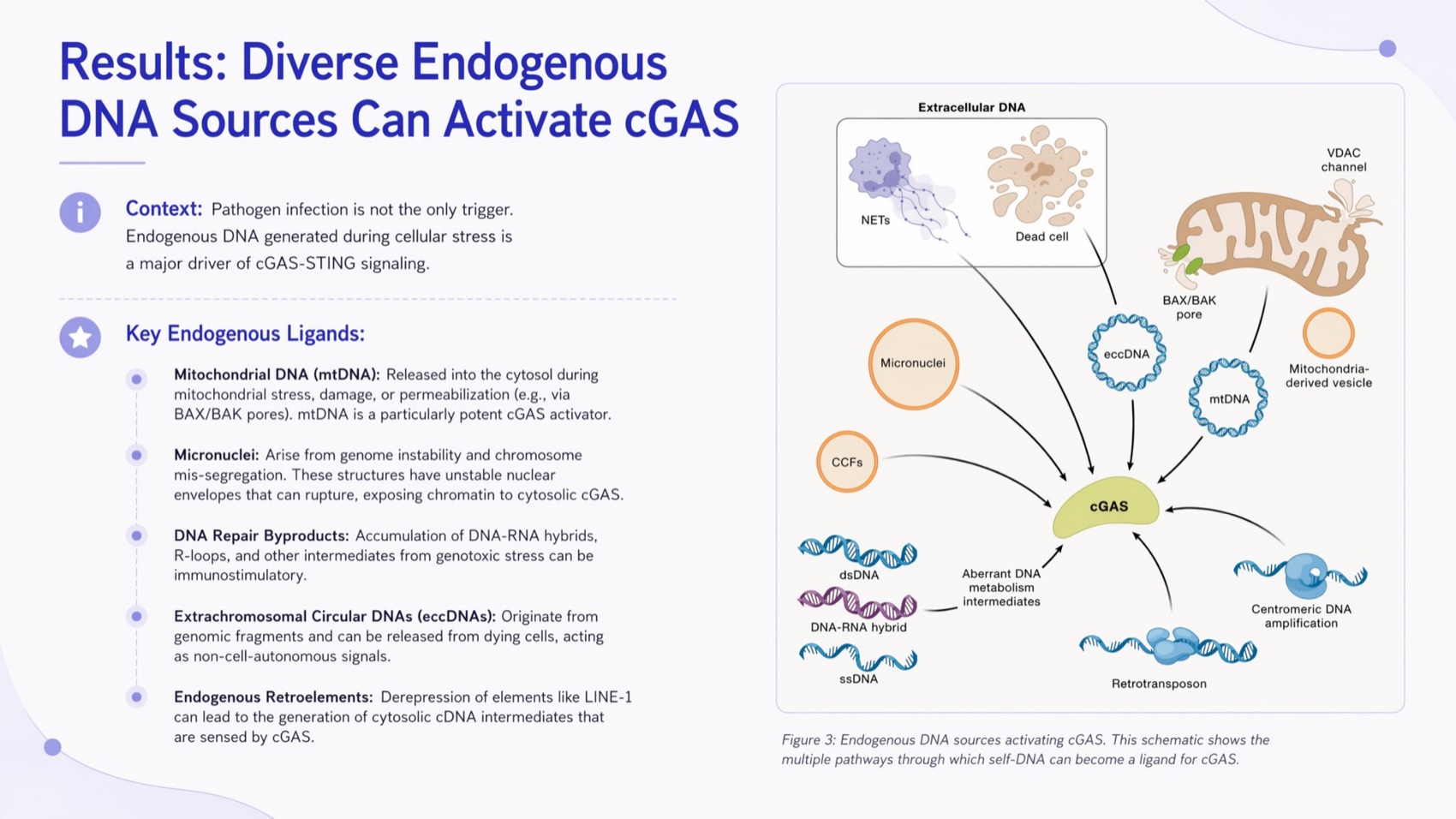
The endogenous DNA slide pairs the source figure with a structured explanation of mitochondrial, nuclear, retroelement-derived, and extracellular DNA.
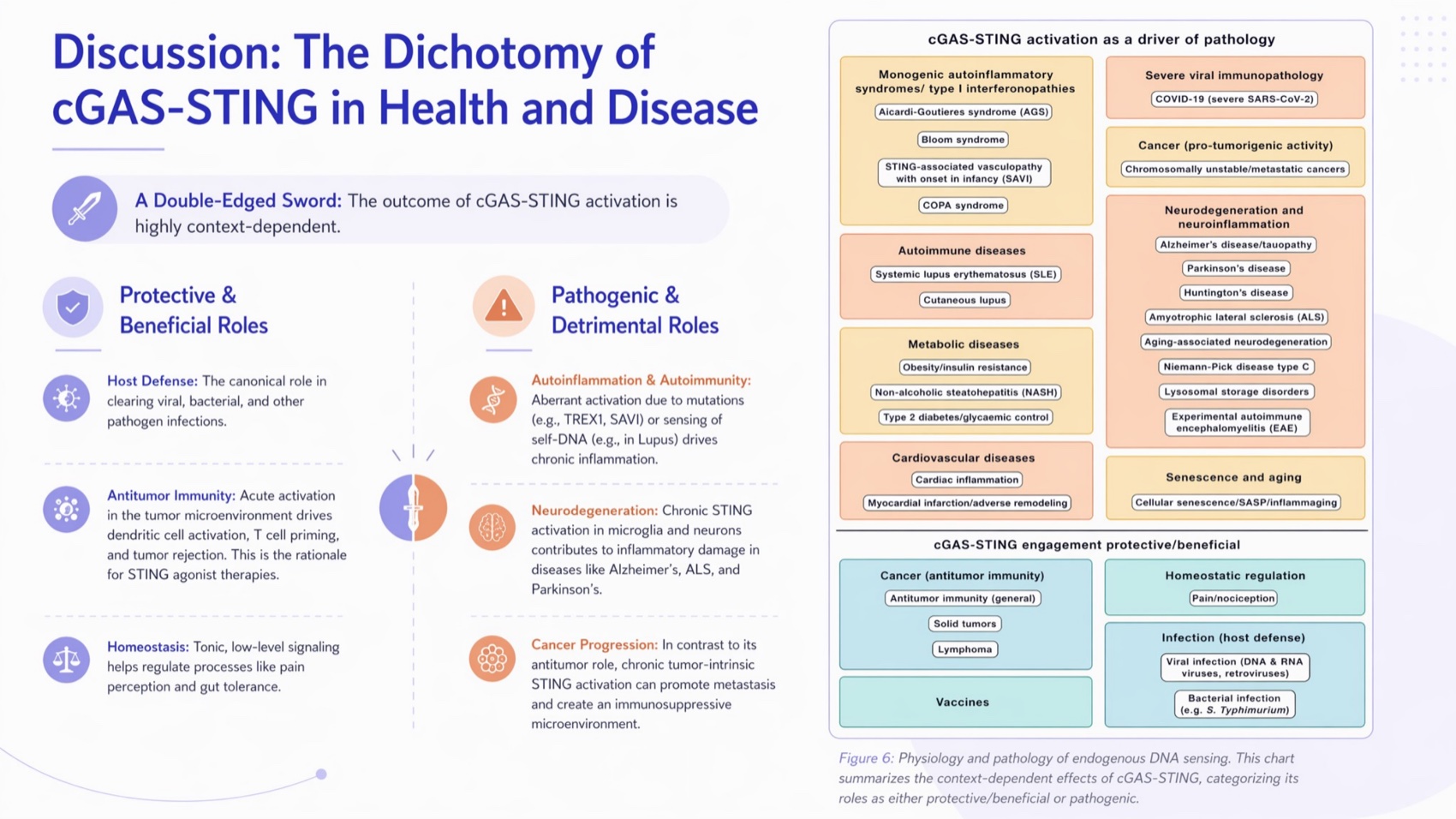
The disease-context slide preserves the review's central point that cGAS-STING activity can be protective or harmful depending on timing, tissue, and signal duration.
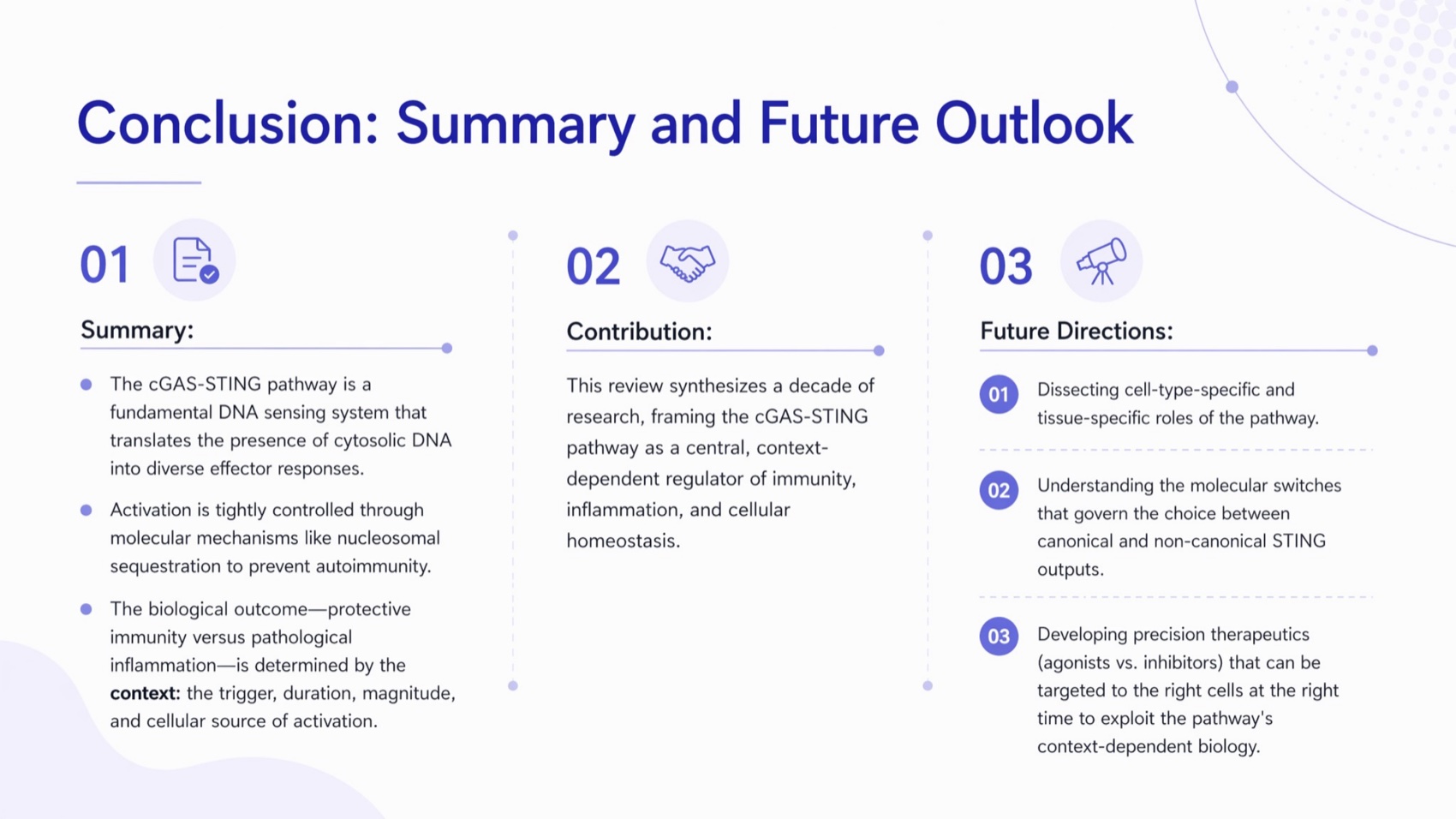
The final slide summarizes the pathway and identifies unresolved mechanistic and translational questions.
Visual inspection found useful figure selection and broad topic coverage, but it also identified issues for human review. Several pages are text-dense. Scientific typography such as NF-kappaB, type I interferon, and 2'3'-cGAMP should be checked after export. Figure labels, captions, line breaks, and font sizes also need to be reviewed at projected size. These observations describe one generated deck; they are not a formal accuracy score.
4. The exported PPTX
Download the generated editable PPTX
The exported file contains 10 slides. Text boxes and images are present as separate PowerPoint objects, and every slide includes speaker notes. This makes the deck practical for final editing, but editability does not guarantee scientific correctness. A subject-matter reviewer should still compare claims, figure context, terminology, and citations with the original paper before presenting the deck.
How we plan to test this workflow
No dated, same-input benchmark was supplied for this article, so reporting accuracy percentages would be misleading. The following protocol can produce publishable evidence.
Test question
Can a research-paper-to-presentation workflow reduce drafting work while preserving the paper's figures, claims, methods, limitations, and citations?
| Protocol item | Required record |
|---|---|
| Test date | Record the exact date and time |
| Product state | Tosea plan, model, template, and relevant version information |
| Source | Public paper URL, checksum, page count, and file type |
| Prompt | Publish the exact prompt and all follow-up instructions |
| Runs | Minimum three independent runs with the same input |
| Reviewers | At least two reviewers familiar with the subject area |
| Claim scoring | Correct, partly correct, unsupported, or omitted |
| Figure scoring | Correct figure, correct crop, readable labels, correct caption context |
| Citation scoring | Correct source attached to the correct claim |
| Method scoring | Study design, sample, measures, and analysis retained accurately |
| Limitation scoring | Major paper limitations retained without softening |
| Manual corrections | Count corrections by category and record review minutes |
Report counts and denominators. For example, state how many figure labels were preserved correctly out of the total checked. Publish failures alongside successes and disclose any reviewer disagreement or source-file confounders.
Reusable research presentation template
Use this sequence for a 10 to 15 minute research talk:
- Title and one-sentence contribution
- Problem and research gap
- Research question or hypothesis
- Study design and data
- Method or analytical framework
- Primary result
- Secondary or robustness result
- Interpretation and practical meaning
- Limitations
- Conclusion and next question
- References
- Backup methods and supporting results
Customize the balance by discipline. Methods-heavy fields may need additional design slides, while qualitative work may need more room for coding logic and representative evidence. Browse the Tosea template library for visual starting points, then adapt the structure to your institution and audience. For a complete worked example of compressing a long paper into a talk, see From 30-Page Research Paper to Professional Slides, and for timing discipline, our 15-minute conference talk guide.
Where Tosea AI fits
Tosea AI is most relevant when the paper itself must remain the center of the workflow. Its official documentation supports a sequence of PDF upload, parsing, image review, outline generation, outline and speaker-note editing, slide generation, individual revision, and export. These capabilities address three common problems:
- Too much source material: Parsing and outline generation provide a starting structure that the researcher can edit.
- Figures becoming detached from the argument: Extracted images can be reviewed and selected before slide generation.
- A draft that cannot be revised later: Editable PPTX export on Pro and Max plans supports continued work in PowerPoint or Google Slides.
The precise next step is simple: upload one research PDF to Tosea AI, generate the outline, and review every proposed slide before creating the deck.
Fair workflow alternatives
| Choose this workflow | When it is the better fit |
|---|---|
| Tosea AI | You have a long PDF, want figure selection and outline review, and need an editable presentation draft |
| Manual PowerPoint | The deck is short, the final visual system matters more than automation, or the content changes frequently |
| Local script | The paper cannot leave your environment or you need a reproducible pipeline with custom parsing and rendering |
| Presentation designer | The talk is high stakes and depends on custom storytelling, animation, brand control, or original illustration |
| General collaborative slide tool | Real-time browser collaboration and rapid visual ideation matter more than paper-level source traceability |
Choose Tosea when source-heavy drafting and reviewable structure are the bottlenecks. Choose manual or local production when privacy, exact notation, custom templates, or deterministic control matters more.
Limitations and pre-export checklist
Scanned PDFs, damaged files, dense multi-column layouts, unusual fonts, low-resolution images, and complex equations can require additional checking. Password-protected or corrupted PDFs may fail to parse. Cloud processing may also be unsuitable for confidential work under institutional policy.
Before export, verify:
- Every slide title matches the evidence on the page
- Numbers, units, denominators, and statistical notation match the paper
- Citations point to the correct claim and source
- Figure panel labels, axes, legends, and captions are readable
- Methods that affect interpretation have not been removed
- Limitations are stated clearly
- Confidential or unpublished information is approved for use
- Text does not overflow and fonts render correctly
- Speaker notes do not contain unsupported claims
- The exported file opens correctly on the presentation device
FAQ
What is the best AI presentation maker for research papers?
The best tool depends on whether you prioritize speed, collaboration, source fidelity, or PowerPoint editing. Tosea AI is a strong option for source-heavy PDFs because its documented workflow includes image review, editable outlines, speaker notes, and Editable PPTX export on Pro and Max plans. Test any tool with your own paper before committing.
Can AI turn a scientific paper into a presentation?
Yes. Upload the paper, define the audience and presentation goal, review the extracted content and outline, then generate the slides. Tosea AI can structure a presentation draft around the paper, but the author should still verify the methods, results, limitations, terminology, figures, and citations against the original source.
Does Tosea AI preserve charts, tables, formulas, and citations?
Tosea AI is designed for source-grounded document-to-slide work and supports reviewing extracted images before generation. Public product pages also describe handling for research figures, formulas, and citations. Results can vary with document structure and scan quality, so compare every chart, label, value, formula, citation, and reference with the paper.
Can I export the research presentation as an editable PowerPoint?
Yes, on eligible plans. Tosea documentation lists Editable PPTX export for Pro and Max, alongside an Image PPTX option. Open the exported file in PowerPoint or Google Slides and check unusual fonts, equations, complex graphics, text wrapping, and alignment before presenting.
Can I use Tosea AI for thesis defense slides?
Yes, as a first-draft workflow. Specify the defense length, committee audience, research contribution, required methods, and likely questions. Review every scientific claim and prepare appendix slides for detailed methods, robustness checks, supplementary figures, and anticipated committee questions. A defense deck still needs the candidate's judgment and rehearsal — our thesis defense presentation guide covers the full preparation process.
What kind of research paper produces the best result?
Text-based PDFs with selectable text, clear headings, high-resolution figures, readable tables, and standard page layouts produce the cleanest extraction. Scanned files and complex multi-column papers may still work, but they demand more manual checking. A focused instruction that names the audience, time limit, and required evidence also improves the outline.
Is it safe to upload an unpublished research paper?
Check your institution's rules first. Tosea states that uploaded data is encrypted in transit and at rest, but vendor security statements do not override grant, ethics, employer, journal, or data-use restrictions. Remove unnecessary sensitive information and use a local workflow when policy prohibits cloud processing.
Trust and freshness
- Author: Tosea Editorial Team
- Method: Product claims checked against Tosea official documentation; scientific example based on the supplied 22-page Cell review and verified against its DOI and PubMed record; no performance results invented.
- Test methodology: See How we plan to test this workflow.
- First published: August 23, 2026
Final recommendation
Start with one paper, one audience, and one talk length. Upload the PDF to Tosea AI, inspect the extracted figures, and edit the outline before generating slides. That low-risk test will tell you more than any generic product claim because it uses the document you actually need to present.