10 Best Business Presentation Prompts for ChatGPT and Claude in 2026
10 copy-ready business presentation prompts for ChatGPT and Claude: QBRs, market entry, finance, operations, risk and board decks, each with a sample slide and verification guardrails.
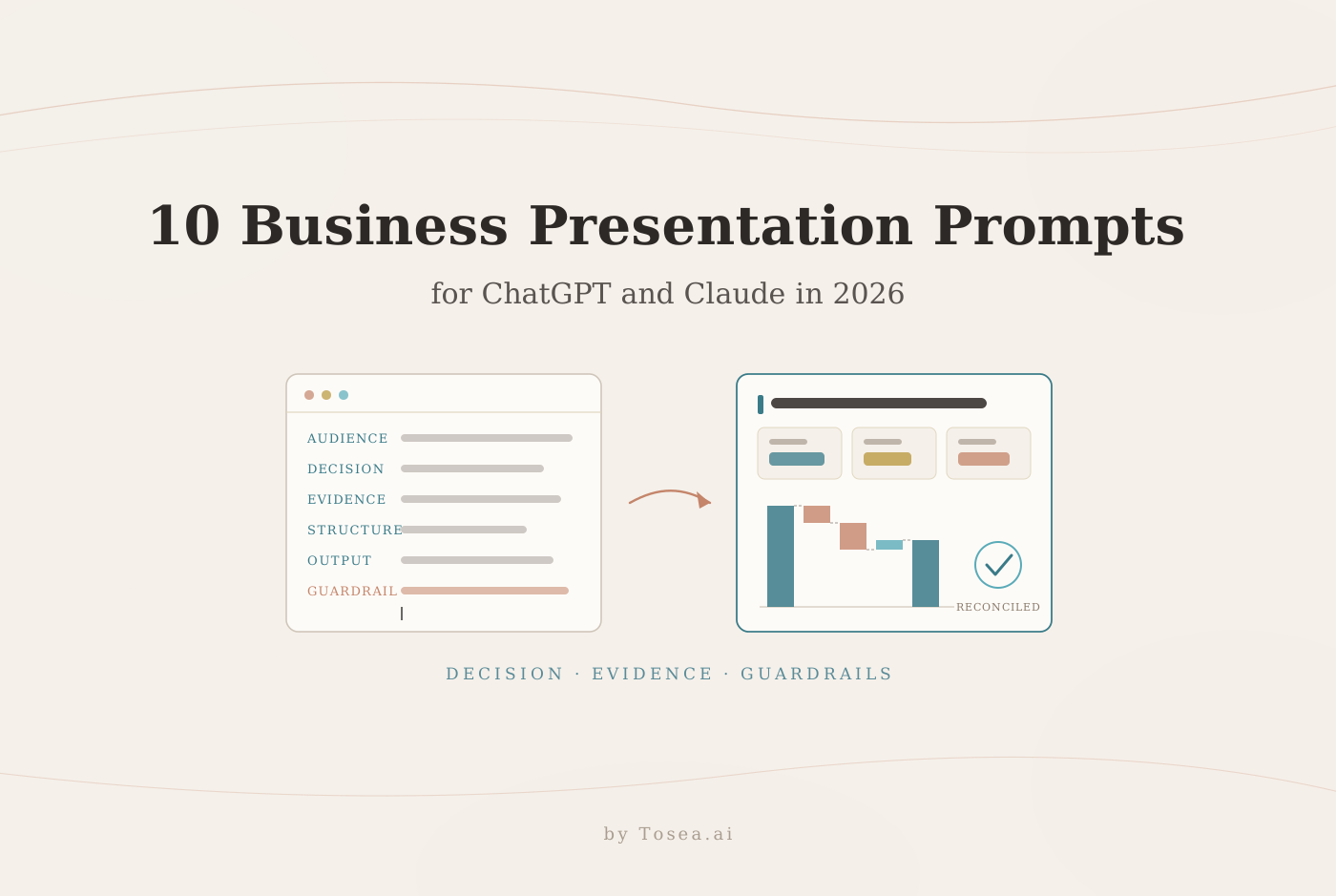
The best business presentation prompts for ChatGPT and Claude in 2026 define the audience, decision, evidence, structure, and verification rules. This guide provides 10 copy-ready prompts for ChatGPT and Claude, an original consulting-style sample slide for every use case, and a workflow for turning approved thinking into editable PPTX with Tosea.ai.
Quick answer: Tell the model what decision the deck must support, who will see it, which sources it may use, how the argument should be structured, and what it must not invent. Request an outline first, review the logic, then generate slide copy.
All sample slides use fictional data. They are editorial examples, not consulting-firm templates, and Tosea is not affiliated with any consulting firm.
A Reliable Prompt Structure for ChatGPT and Claude
OpenAI recommends clear, specific instructions, sufficient context, and an explicit output format. Anthropic offers similar advice and suggests clear sections or XML tags when a prompt contains several types of material. Read the official guidance from OpenAI and Anthropic.
Include six elements: audience, decision, approved evidence, analytical framework, output format, and guardrails. Ask for a slide outline with one conclusion, the supporting evidence, and a proposed visual for each page. This reveals gaps before they spread through the deck. If you want a broader library to adapt, our 60+ AI prompts for PowerPoint covers general deck tasks; the ten below are built for business decisions.
How We Built and Checked the Sample Slides
Each prompt below is paired with one sample slide that shows what a strong answer looks like on the page: an action title, evidence, a visual matched to the claim, and a clear next step. We drafted the slides with an AI image model from fictional data, then audited every figure by hand before publishing.
That audit is the best argument for the guardrails in these prompts. In the first drafts, seven of the ten slides had at least one number that did not reconcile. A margin bridge summed to 19.6% while its headline said 18.6%. A Pareto chart claimed Line 3 caused 62% of downtime when its own bars gave 55%. A weighted scoring table rewarded the most capital-hungry option with the best capital score, and a Gantt chart labeled a four-week slip that its bars did not show. Every one of those slides looked finished. We corrected the figures, then rechecked totals, bridges, rankings and plotted positions against the labels.
The lesson applies to text models as well as image models. Fluent output is not reconciled output. That is why every prompt here ends with an instruction about what the model must not invent and what it must flag.
1. Executive Quarterly Business Review
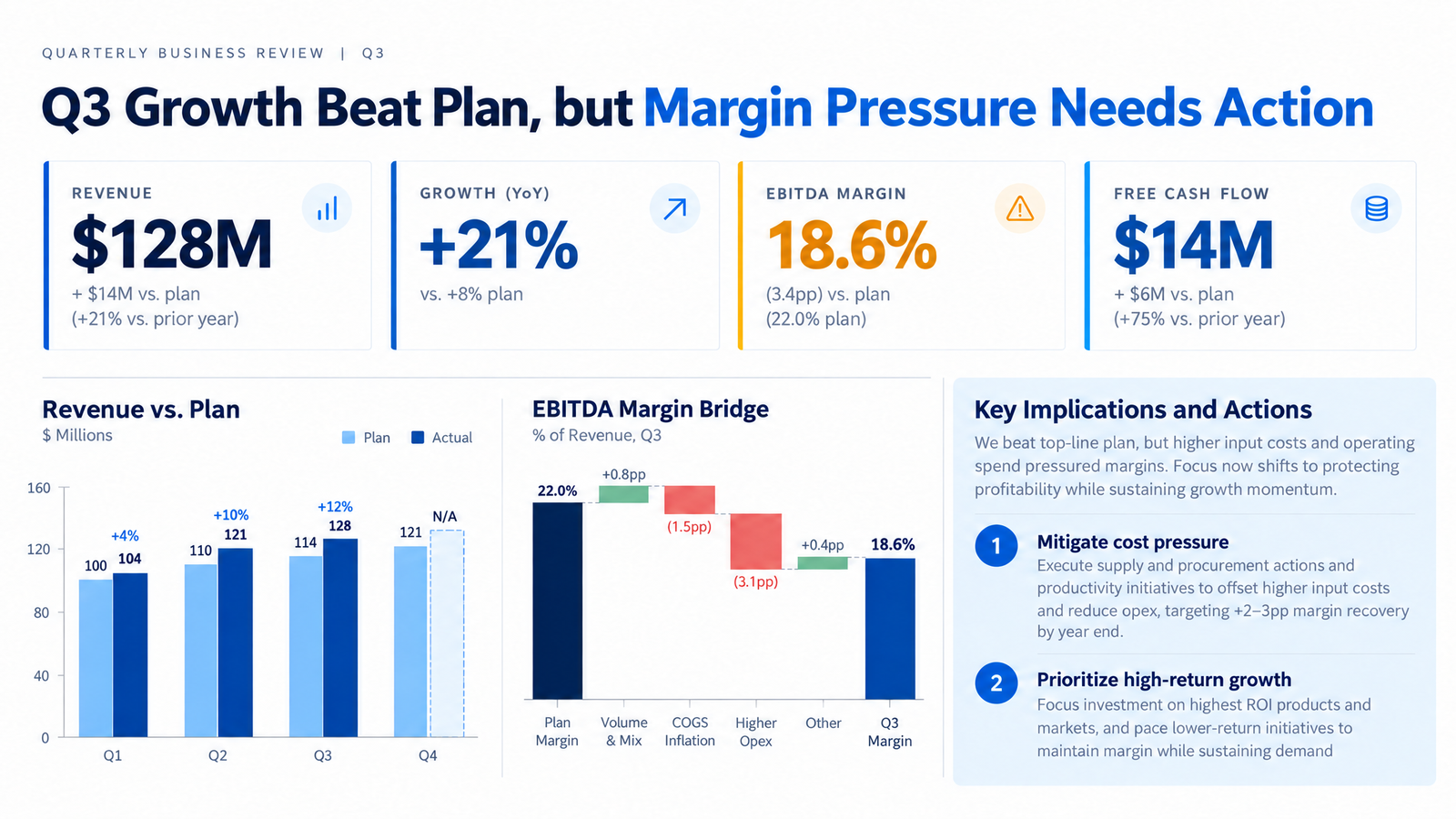
Original QBR example with fictional data.
Create a 10-slide quarterly business review for the executive committee.
Decision: agree on two actions to protect next-quarter margin.
Use only the attached Q3 results, budget, and operating notes.
Cover performance versus plan, revenue drivers, margin bridge, cash flow, customers, operating risks, and actions.
For each slide provide an action title, evidence, visual, and source.
Do not invent figures. Mark gaps as data required.
Why it works: Naming the decision ("two actions to protect margin") forces the model to build toward a recommendation instead of a tour of every metric. The margin bridge request makes the cause of the miss visible. For the full deck structure, see our QBR deck guide.
2. Market Entry Strategy
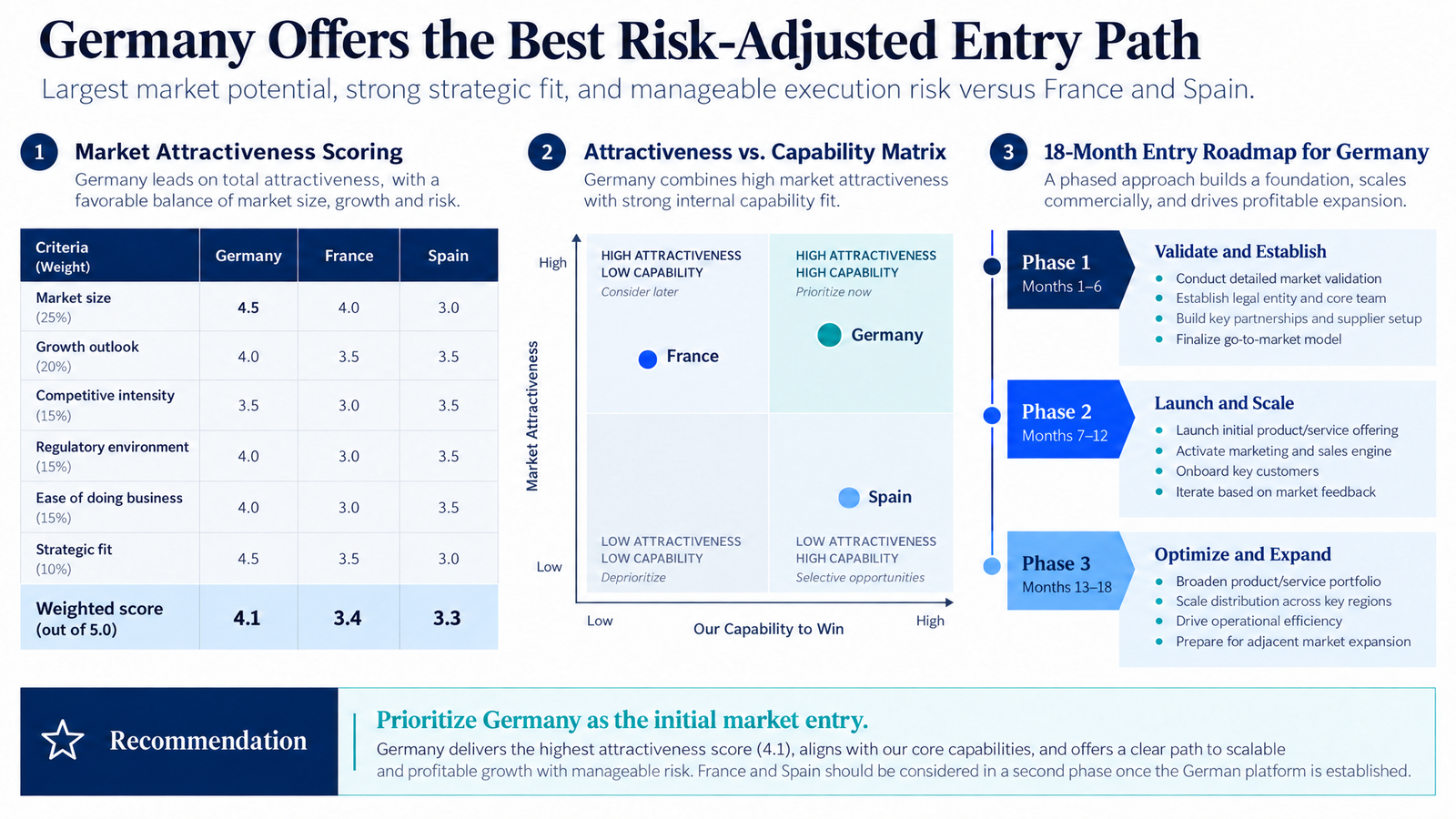
Original market entry example with fictional scoring.
Build a 12-slide market entry recommendation for [company] entering [region].
Audience: CEO and investment committee.
Decision: select the first market and approve an 18-month plan.
Compare [market A], [market B], and [market C] on size, growth, competition, regulation, route to market, and capability fit.
Use a weighted model, capability matrix, economics, risks, and roadmap.
Cite external claims. Separate facts, assumptions, and recommendations.
Why it works: A weighted model makes the trade-offs explicit, and the instruction to separate facts from assumptions stops market-size guesses from reading as research. Check the weighted totals yourself; a rounding slip can quietly reorder close options.
3. Competitive Analysis
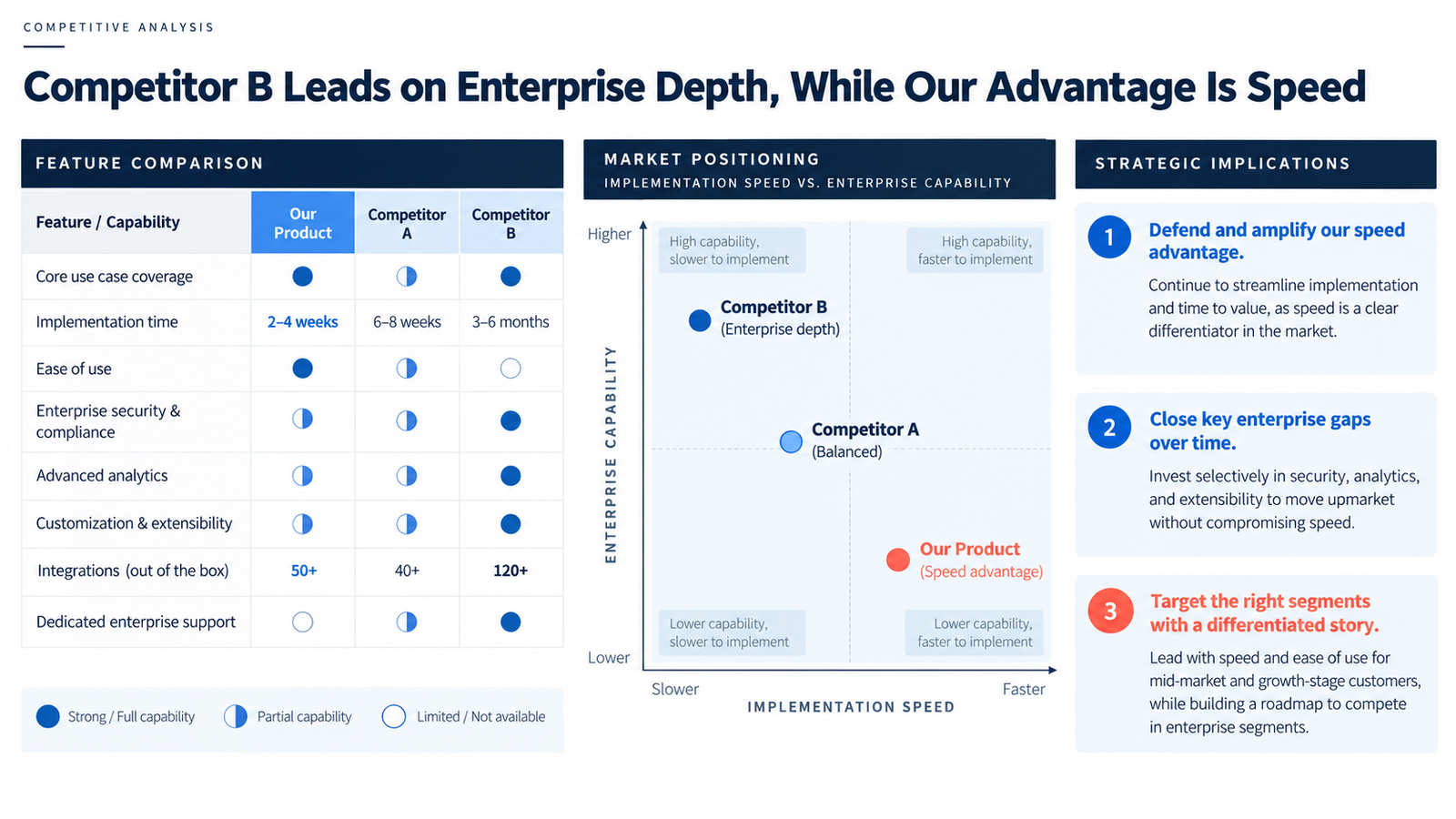
Original competitor comparison with fictional products.
Create an 8-slide competitive analysis for [product] versus [competitor A] and [competitor B].
Audience: product and commercial leadership.
Decision: choose two gaps to close and one advantage to defend.
Use the attached product documents, win-loss notes, and customer interviews.
Compare segments, use cases, implementation, integrations, security, pricing logic, and service.
End with a positioning map and three implications.
Label unsupported claims as unverified.
Why it works: "Two gaps to close and one advantage to defend" gives leadership a bounded choice. Restricting evidence to win-loss notes and interviews keeps the model from filling the table with marketing copy scraped from competitor websites.
4. Financial Performance Diagnosis
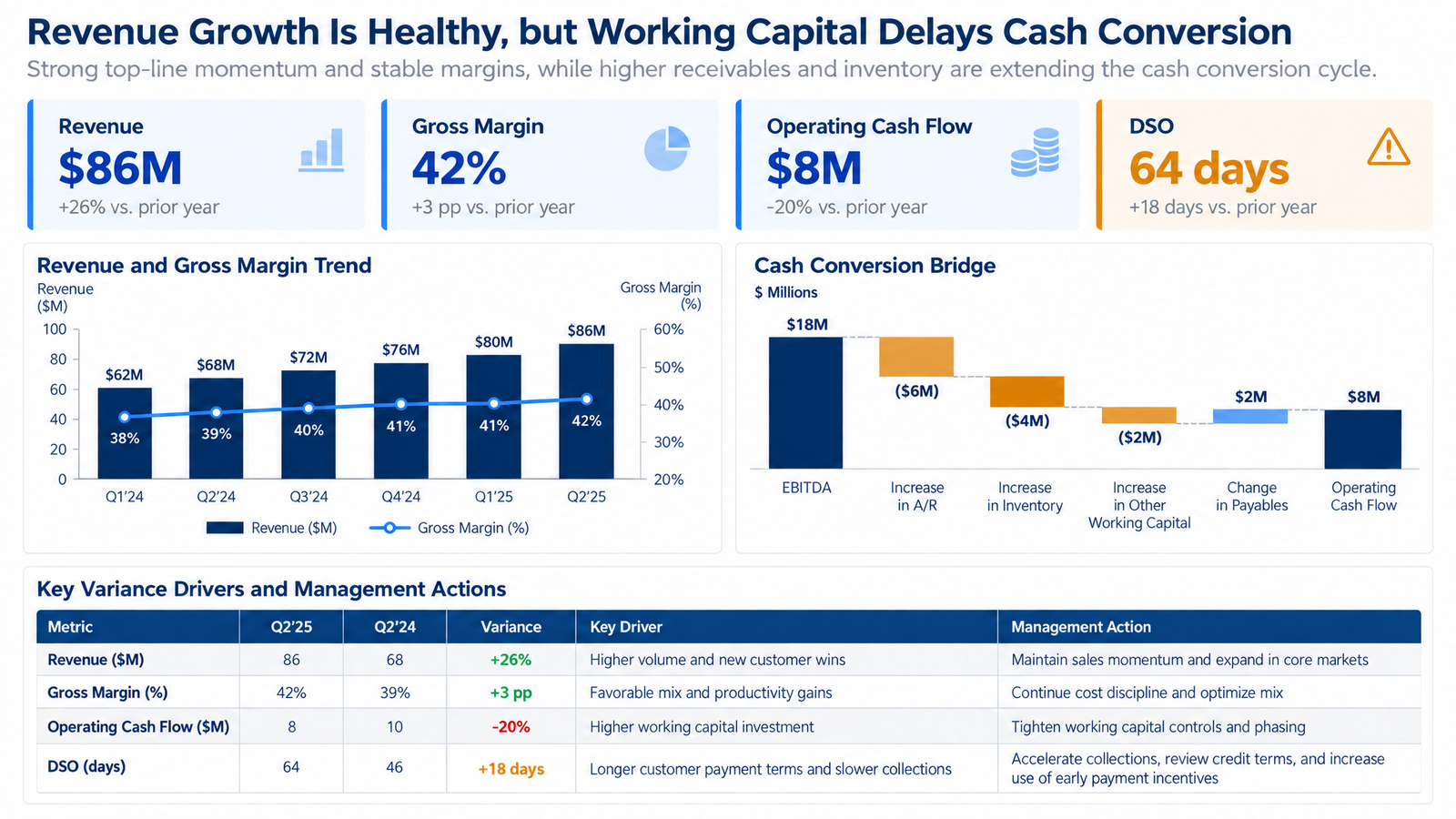
Original finance example with fictional data.
Turn the attached management accounts into a 9-slide financial diagnosis.
Audience: CFO and business unit leaders.
Decision: identify the cash conversion problem and approve corrective actions.
Cover revenue, margin, expenses, EBITDA, cash flow, receivables, inventory, payables, and forecast risk.
Use trends, budget-to-actual bridges, and an action table.
Preserve units, periods, currency, signs, and definitions. Reconcile totals and distinguish percent change from percentage-point change.
Why it works: The final line targets the most common finance-deck errors: mixed periods, flipped signs, and "+2%" written where "+2 pp" is meant. For more finance-specific variations, see our financial presentation prompts.
5. Operations Improvement
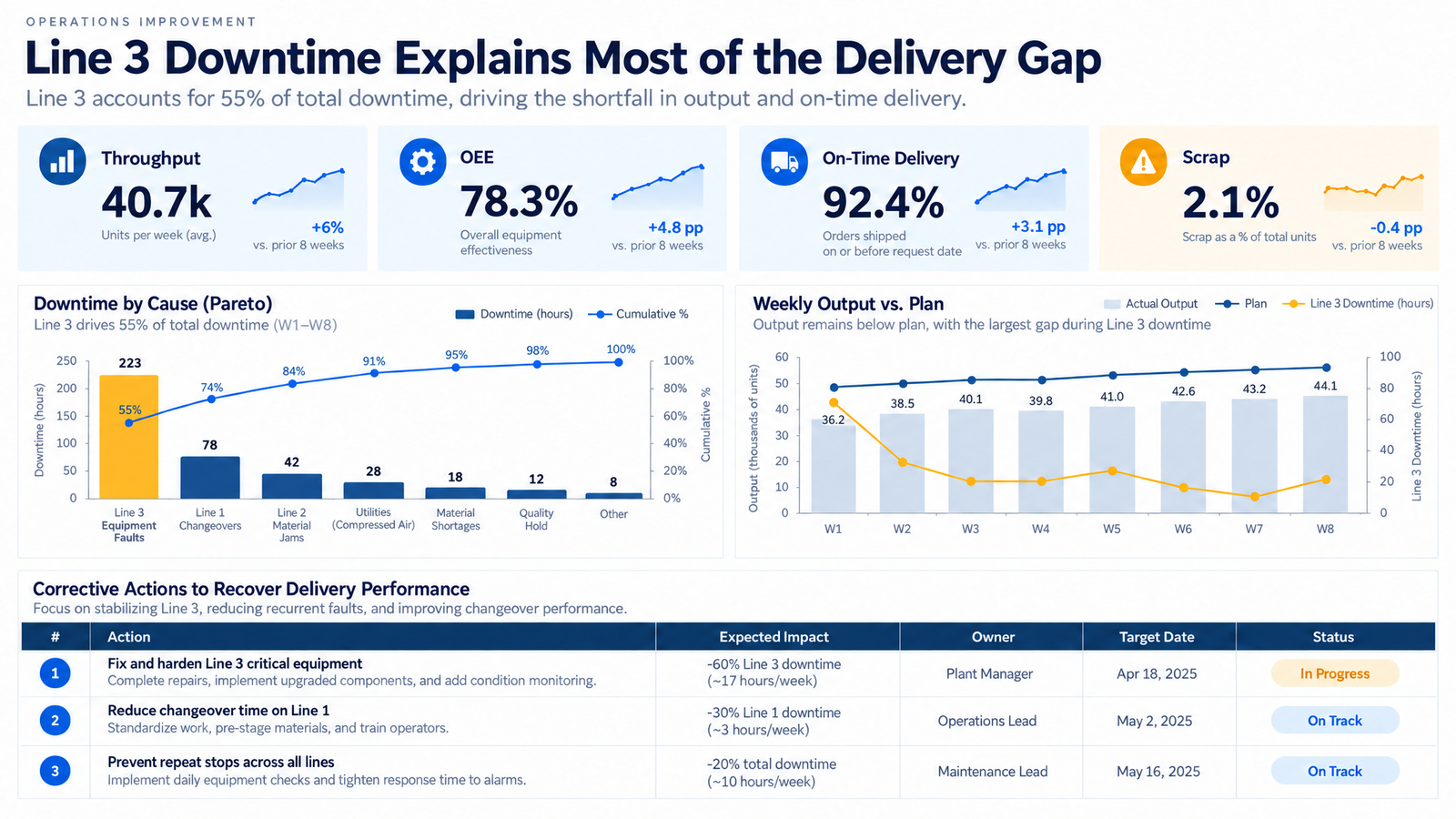
Original operations example with fictional plant data.
Create a 10-slide operations review from production, quality, downtime, and delivery files.
Audience: COO, plant manager, and supply chain leads.
Decision: select the first constraint to fix and assign a 90-day recovery plan.
Show throughput, OEE, delivery, scrap, downtime causes, capacity, and supplier issues.
Use a Pareto chart, trend, root-cause view, and action tracker.
Do not claim causality without evidence. Flag inconsistent definitions.
Why it works: Asking for "the first constraint" mirrors how operations teams actually sequence fixes. The causality guardrail matters because downtime and delivery data correlate easily; a Pareto shows where hours went, not why output fell.
6. Customer Segmentation
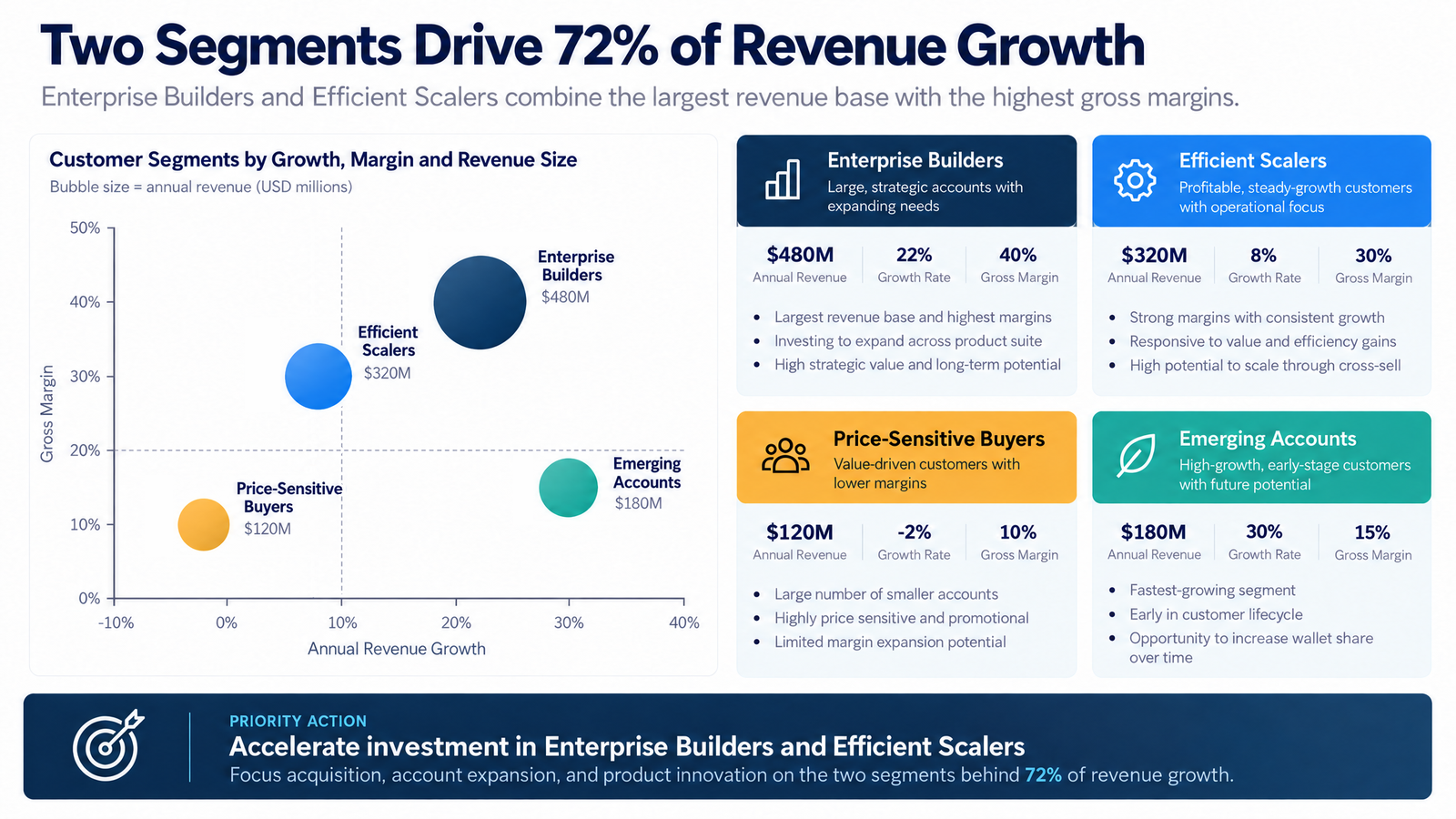
Original segmentation example with fictional data.
Develop a 9-slide customer segmentation using the attached CRM and profitability data.
Audience: revenue and marketing leadership.
Decision: select priority segments and treatments.
Segment customers by revenue, growth, margin, retention, adoption, and cost to serve.
Show segment size, economics, needs, risks, and commercial action.
Include a bubble chart and migration rules.
State the period and exclusions. Do not use attributes absent from the source.
Why it works: Migration rules turn a static segmentation into an operating tool: they say when an account moves between treatments. The bubble chart encodes three variables at once, so check that each bubble sits at the values printed on its card.
7. Product Roadmap
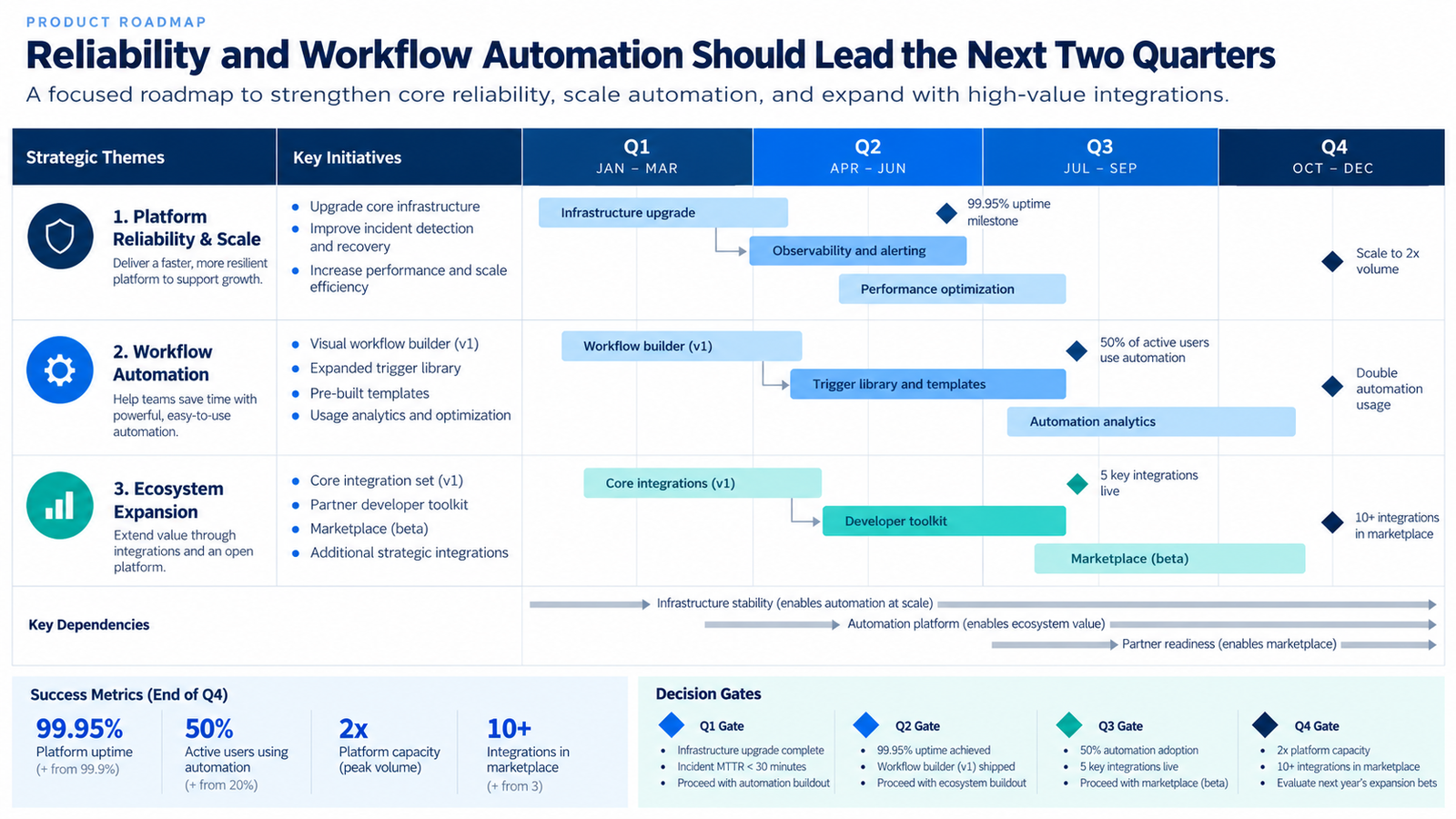
Original roadmap example with fictional initiatives.
Create an 11-slide four-quarter roadmap for [product].
Audience: executives, product, engineering, and go-to-market leaders.
Decision: approve sequencing and resources.
Organize work under three strategic themes. For each initiative show customer problem, value, dependency, capacity assumption, delivery window, metric, and decision gate.
Separate commitments from options. Identify conflicts.
Do not invent delivery dates or estimates. Use confirmation placeholders.
Why it works: Decision gates and the commitments-versus-options split make the roadmap reviewable instead of aspirational. "Confirmation placeholders" stops the model from producing dates that engineering never agreed to.
8. Enterprise Risk Assessment
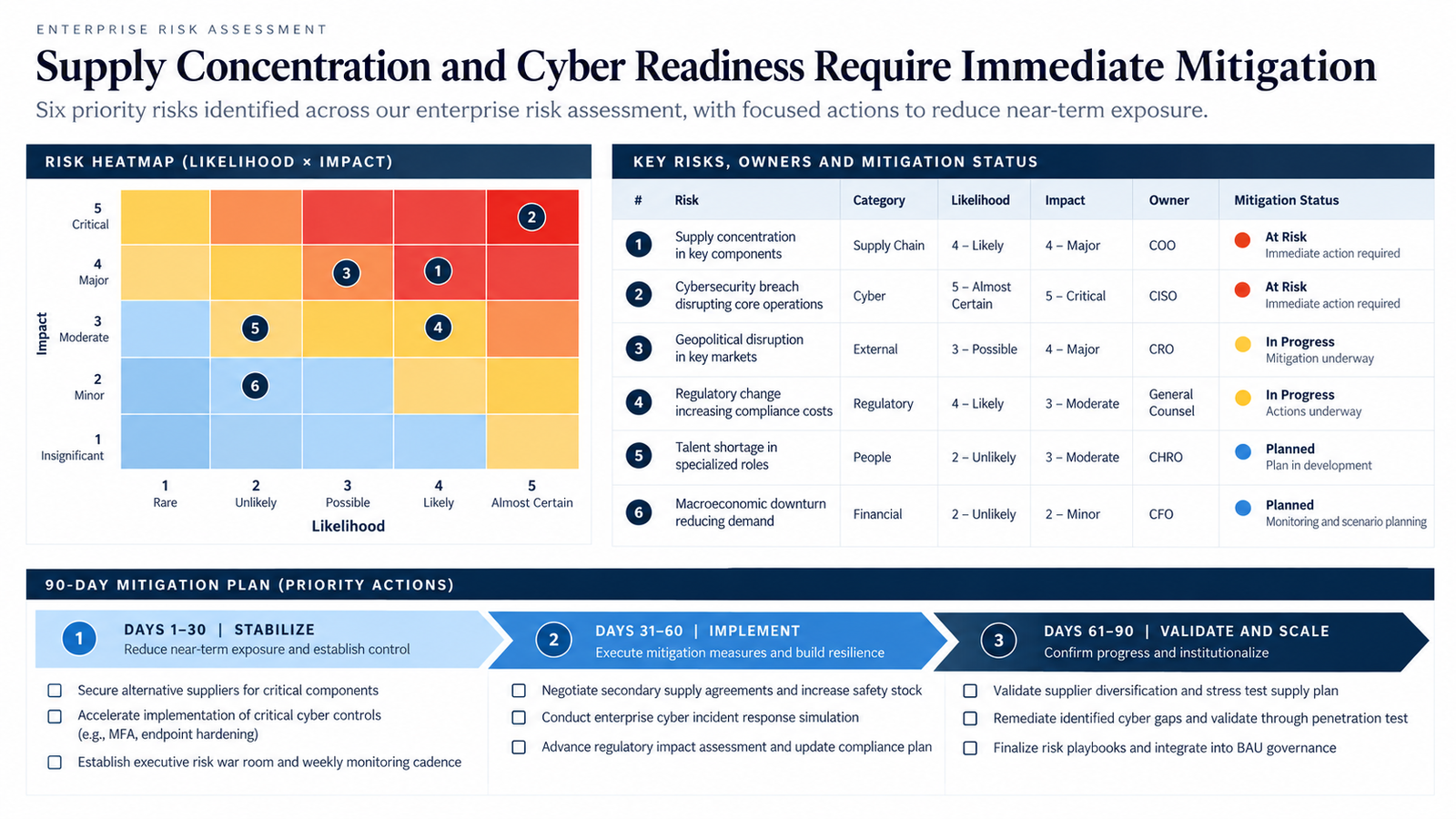
Original risk example with fictional risks.
Create an 8-slide enterprise risk assessment from the risk register, audit findings, and operating plan.
Audience: executive risk committee.
Decision: confirm top risks and fund mitigation.
Define likelihood and impact scales. Show inherent risk, controls, residual risk, owner, mitigation, date, and status.
Use a 5x5 heatmap, priority table, and 90-day plan.
Do not reduce a score for actions not yet implemented. Flag weak evidence and missing owners.
Why it works: The rule against lowering scores for unimplemented actions keeps residual risk honest. Defining the scales up front means a "4" means the same thing on every slide and to every committee member.
9. Project Postmortem
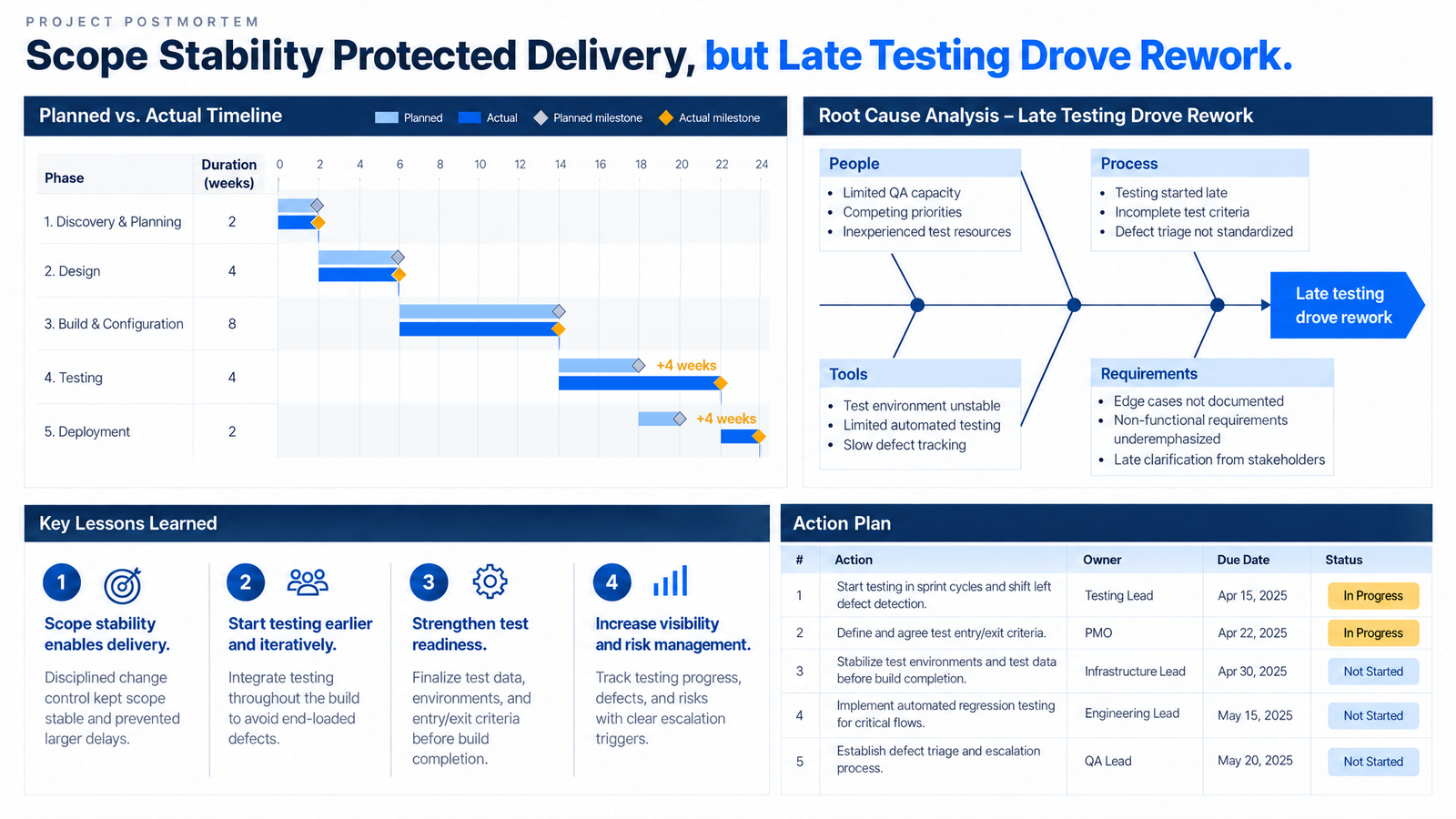
Original postmortem example with fictional milestones.
Create a 7-slide postmortem for [project] using the plan, status reports, issue log, and feedback.
Audience: steering committee and delivery team.
Decision: agree on changes before the next phase.
Compare planned and actual scope, schedule, cost, quality, and benefits.
Separate root causes from symptoms and controllable factors from external events.
Include a timeline, cause tree, lessons, and actions with owners and dates.
Use neutral language and do not assign blame.
Why it works: Separating root causes from symptoms is the step teams skip under time pressure. The neutral-language instruction keeps the deck usable in a room where the people involved are present.
10. Board Investment Decision
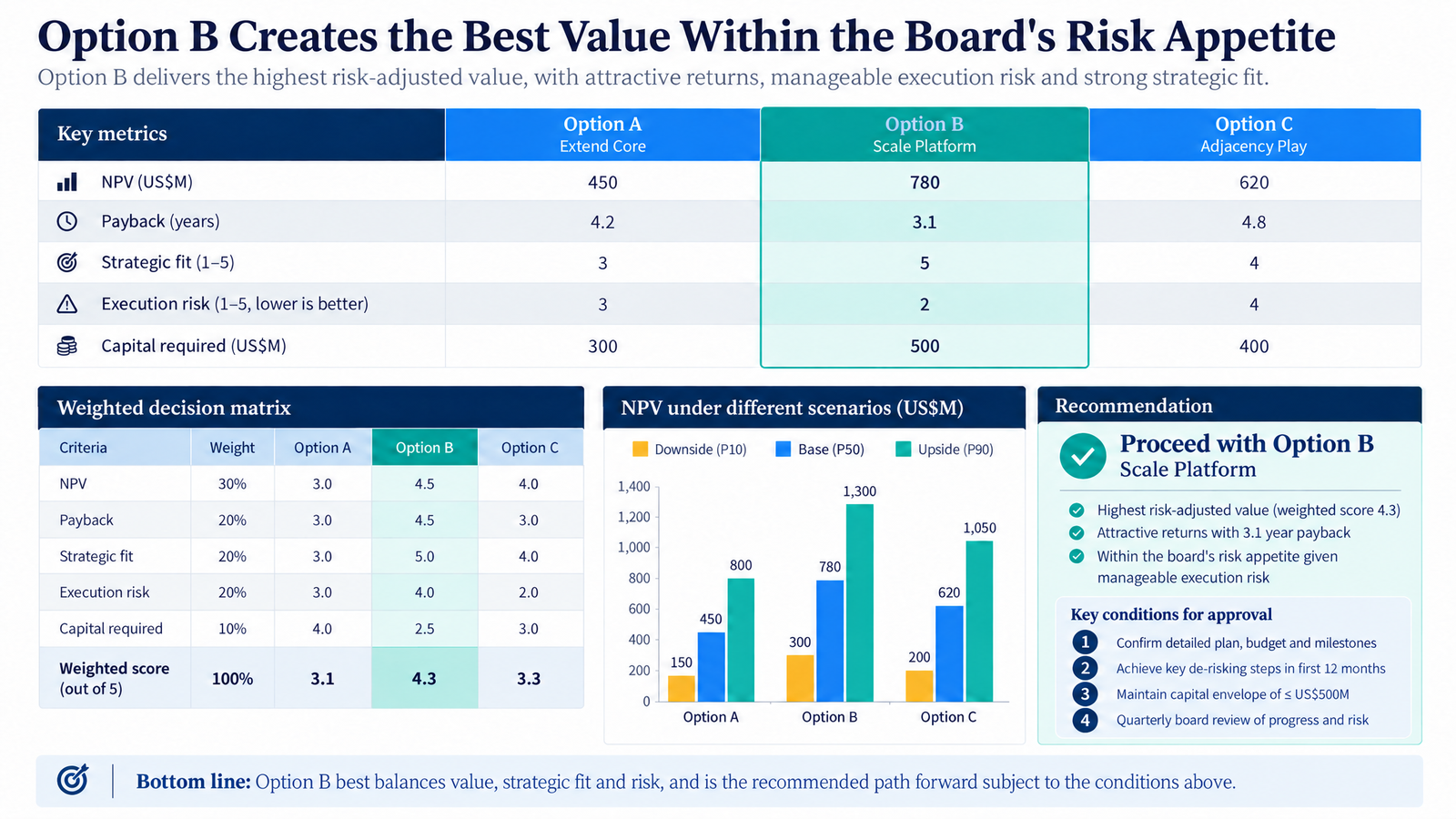
Original board example with fictional economics.
Create a 10-slide board deck comparing [option A], [option B], and [option C].
Decision: approve one option, reject all, or request evidence.
Compare strategic fit, customer value, NPV, payback, capital, execution risk, dependencies, and capacity.
Show base, upside, and downside cases from the attached model.
Provide a weighted matrix, recommendation, dissenting case, and approval conditions.
Do not change financial assumptions. Identify where judgment affects the result.
Why it works: Offering "reject all" and "request evidence" as legitimate outcomes respects the board's role, and the dissenting case shows the recommendation survived challenge. For the surrounding deck, see our board deck structure guide.
Control a Page with Tosea AI Reference Images
Text can describe a style. A reference image gives Tosea a concrete visual target for a specific page. The sequence below shows the original page, chosen reference, instruction, and completed result.
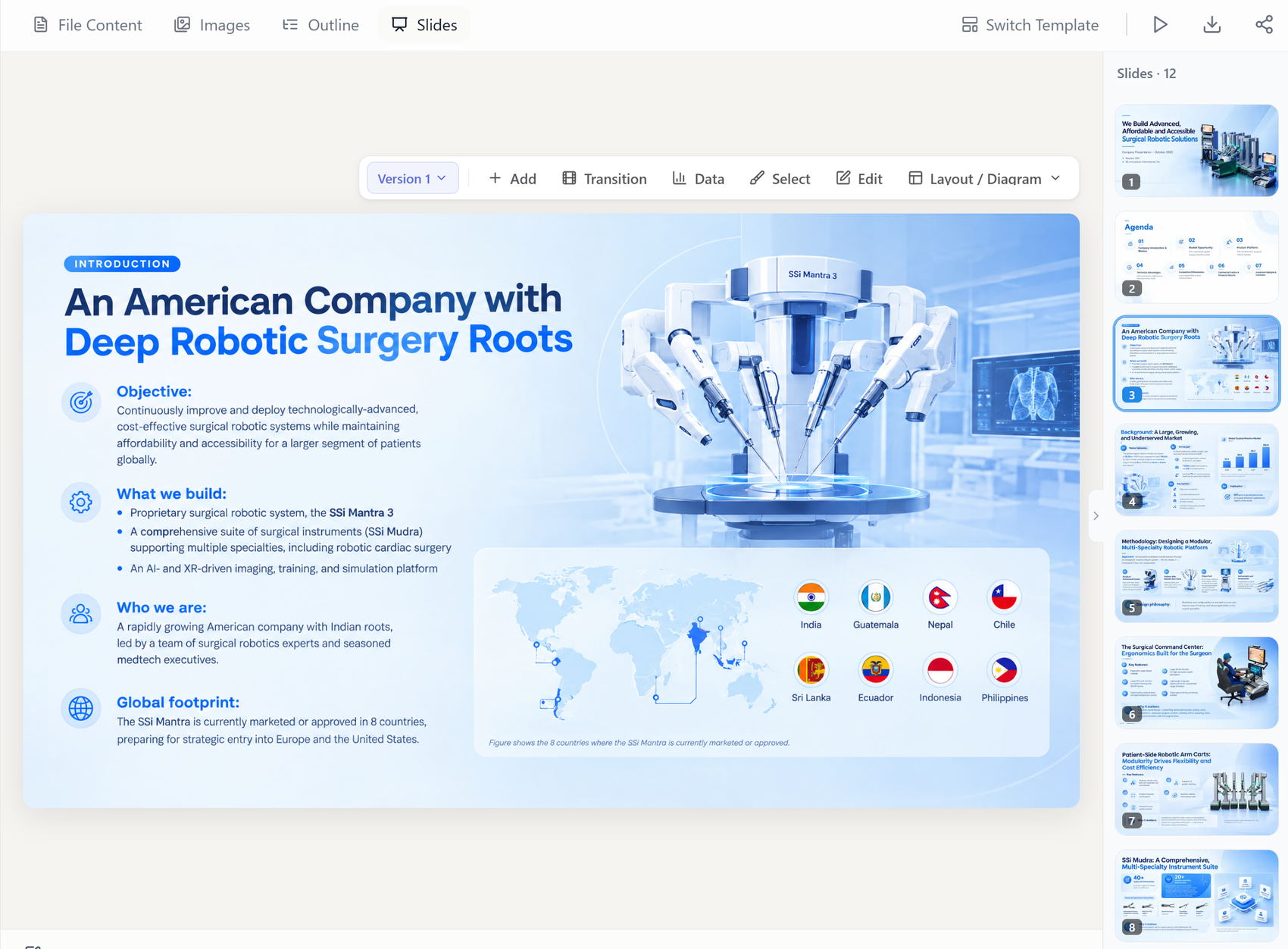
Original page before redesign.

Reference selected for its layout, palette, typography, and cards.
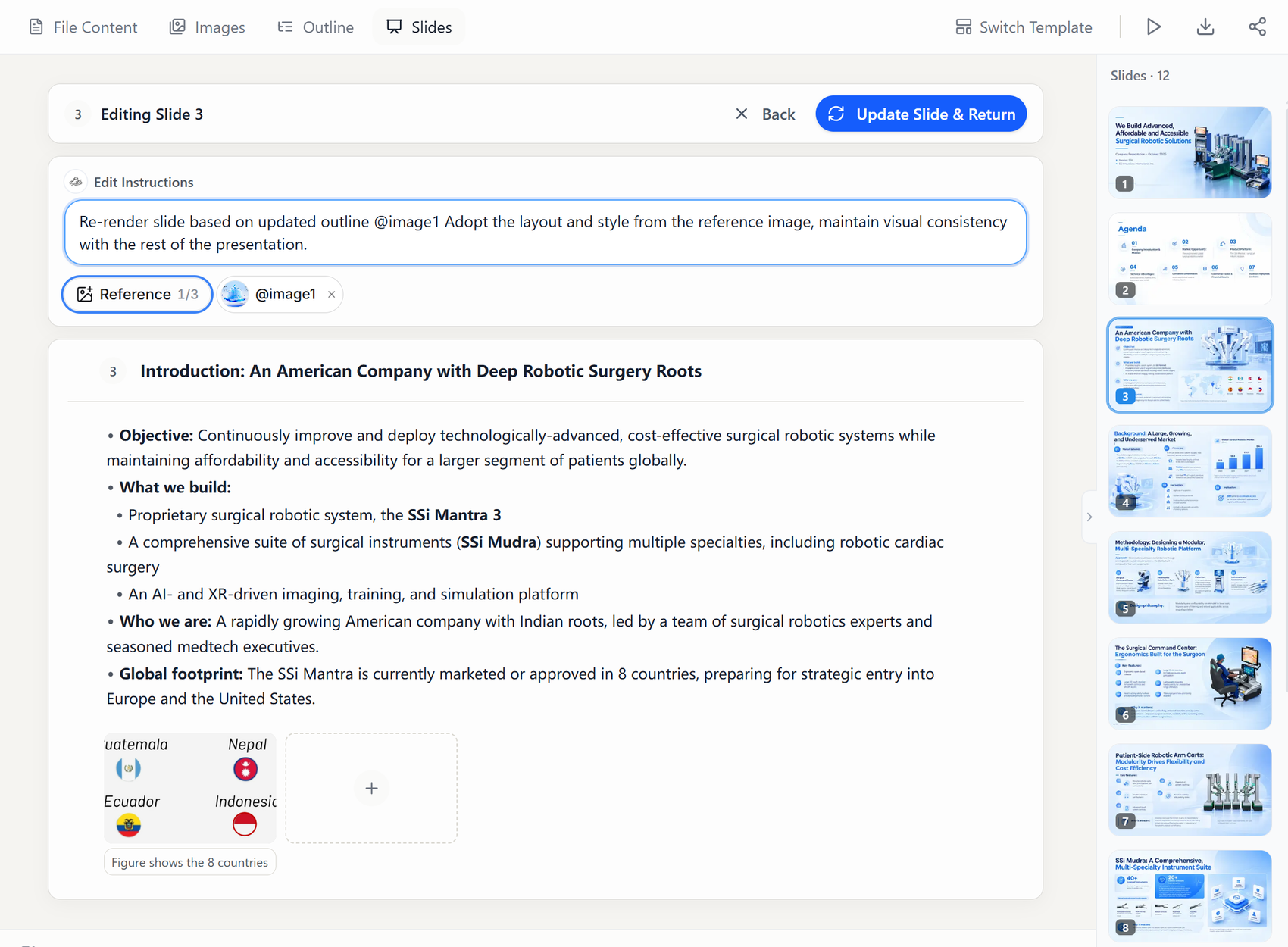
Page instruction refers to @image1 and requests deck consistency.
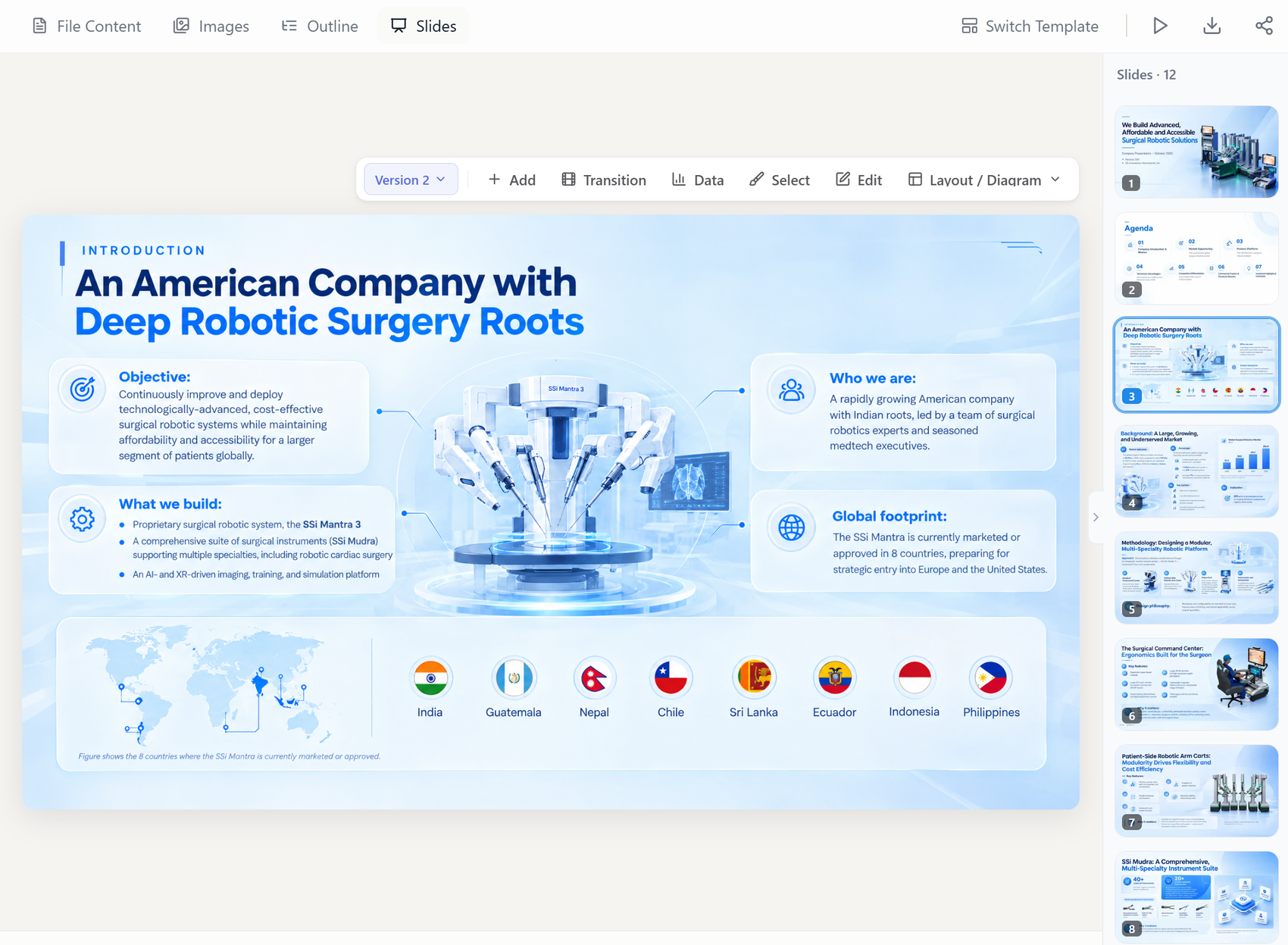
Completed page based on the reference.
For a new page, upload up to three images. Write use the layout from @image1 when you want the composition too. You can instead borrow only the palette, fonts, cards, or image treatment. If an image should appear unchanged as page content, state that explicitly. Review text fit and factual completeness after rendering.
Build Editable Charts in Tosea AI Data Studio
Tosea Data Studio accepts Excel and CSV files and recognizes values from charts or tables in images and PDFs. It places values in an editable grid before rebuilding the chart.
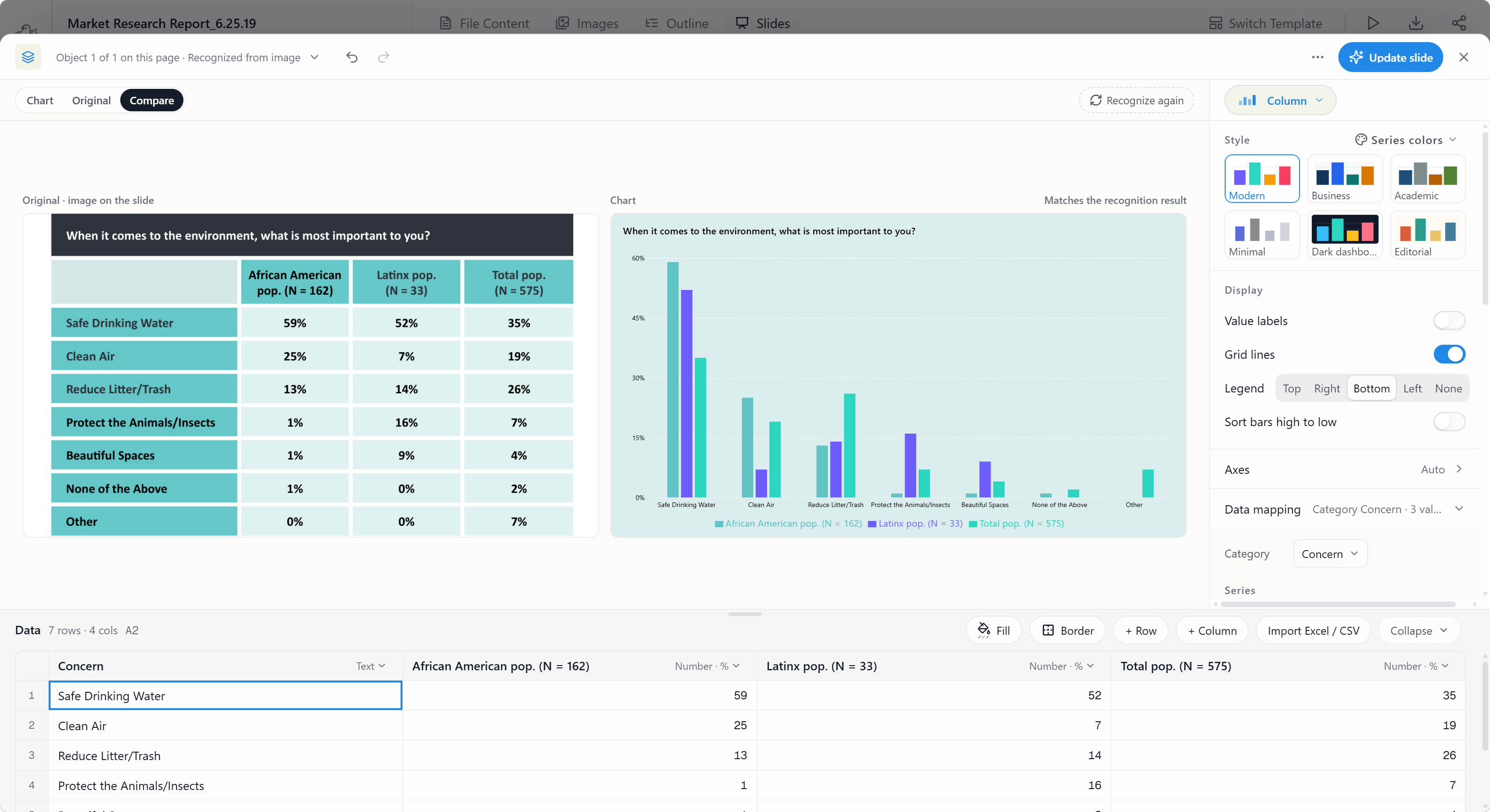
Data Studio places recognized values in an editable grid next to the rebuilt chart.
Correct values, map series, switch chart types, edit axes and labels, or use the deck palette. Recognition still needs review. Verify totals, units, signs, dates, denominators, and percentage bases against the source. See AI Think-Cell Alternative: Editable PowerPoint Charts.
Choose Layouts Before and After Rendering
At the outline stage, choose a layout or diagram for a matrix, timeline, process, comparison, or data page. After rendering, use Layout / Diagram to try another structure. Use Layout Only when approved wording must remain unchanged.
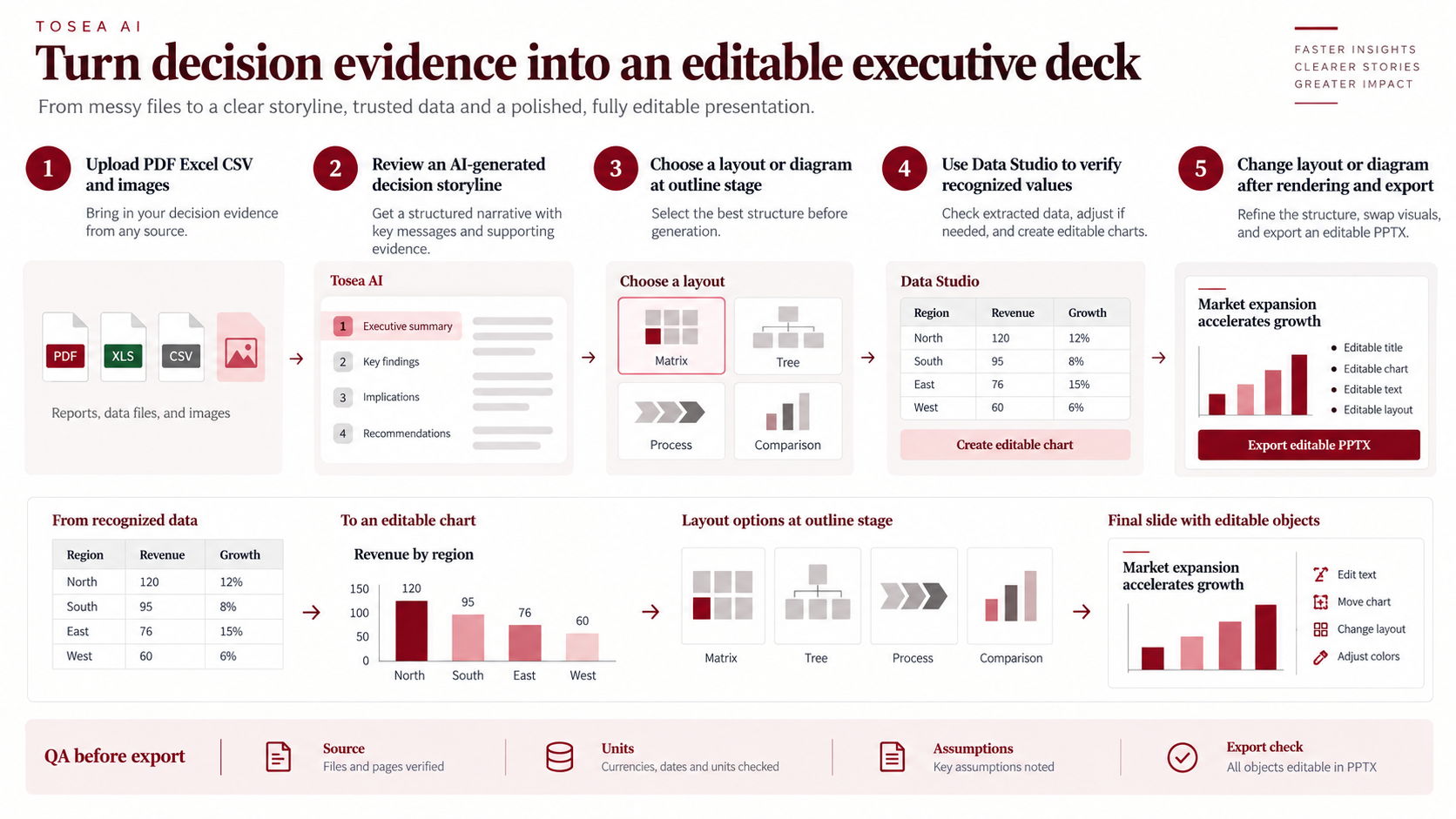
Choose a layout at the outline stage, then switch structure after rendering without rewriting approved copy.
Before export, confirm that titles state conclusions, numbers reconcile, sources remain visible, colors keep the same meaning, and actions have owners. Test the PPTX in the delivery environment. Microsoft explains editable charts in PowerPoint, while IBCS provides a reference for consistent business notation.
Frequently Asked Questions
Can the same prompt work in ChatGPT and Claude?
Yes. Both respond well to explicit context, source limits, output structure, and review criteria. Claude can use XML tags for long prompts; clear Markdown sections work in both.
Should I request the full deck in one prompt?
Start with the outline. Review the storyline and missing evidence, then expand approved pages. This limits the spread of weak assumptions.
Can Tosea AI redesign my existing PowerPoint without changing the content?
Yes. Export it as PDF, upload it, and request a redesign that preserves wording. Use Layout Only for visual changes, then verify labels and footnotes.
How do I upload a PowerPoint and request a slide-by-slide redesign?
Export as PDF, upload it, and ask Tosea AI to preserve content and sequence. Choose a template or visual direction, generate, inspect, and export.
Can I upload my own PowerPoint template to Tosea AI?
Eligible paid plans support custom templates. Verify layouts, fonts, colors, logo placement, and master-slide rules before sharing the output.
Can Tosea AI use brand colors, fonts, and a logo?
Yes. Specify them in the instructions and upload the logo or use a supported template. Check font availability, colors, clear space, and contrast after export.
Can Tosea AI match an old company presentation style?
It can use a representative deck or page as guidance. This is not permanent model training. Use an approved template for stronger consistency.
Does Tosea AI preserve PowerPoint formatting after export?
Editable PPTX export aims to match the preview. Fonts, complex graphics, and presentation software can affect results, so test the final environment.
Can I change only the layout and keep the exact wording?
Yes. Layout Only changes visual structure without intentionally rewriting copy. Compare the result with the source and verify citations, statistics, footnotes, and line breaks.
Turn Business Presentation Prompts into Editable Slides
The best business presentation prompts for ChatGPT and Claude in 2026 make the decision, evidence, logic, and uncertainty explicit. They produce a better draft, but professional review remains necessary — as our own sample slides showed, a page can look finished long before its numbers reconcile.
Use Tosea.ai to apply page-level reference images, rebuild editable charts, choose layouts at the outline stage, revise them after rendering, and export PPTX. Continue with Best Prompts for Document-to-PPT and Business Dashboard PowerPoint with AI.
Sources
- Prompt engineering best practices for ChatGPT — OpenAI Help Center
- Prompting best practices: structure prompts with XML tags — Anthropic
- Use charts and graphs in your presentation — Microsoft Support
- International Business Communication Standards — IBCS Association